Best Soldering Kits for Electronics of 2026

A cold joint is rarely your fault. It usually means the iron dumped its heat into the board the instant you touched it and never recovered — the solder balls up, the joint goes grainy, and the pad you were trying to save lifts off with it. What separates a kit you keep from one that ends up in a drawer isn't the wattage on the box; it's whether the element comes back fast, whether the temperature dial means anything, and whether the accessories inside are real tools or filler.

I've soldered at my own bench for years, and my parts bin is a graveyard of kit extras: sucker tips that bent on the first pull, tweezers that couldn't grip a small resistor, stands that tipped over mid-joint. So over six months we bought and used 14 kits, from bare 60W pencils to stations with digital readouts and auto-sleep, and worked them on real repairs instead of scrap boards. The pattern held — the ones worth owning controlled heat properly and treated the extras as tools.

For smaller boards, interchangeable tips matter more than anything else in the box, since most joints you'll touch are tiny and crowded. The picks below are the ones that got that right.

1

Best Overall

HANDSKIT 90W Soldering Kit

92 /100
LBD Score Outstanding

Key details

Kit
21-in-1 with PU case
Tips
6, one pre-installed
Power
90W
Heat-up Time
about 10 seconds
View on Amazon

The feature that surprised us is buried in a menu: a calibration offset that shifts the iron's reading by up to 99°C in either direction. On an inexpensive kit that is an unusual thing to find, and it turns the dial from a guess into something you can correct against a real measurement. It's also the main reason this is our top pick — it gets the two things that decide whether board work goes well, heat you can trust and tips fine enough for a pad, then builds a workable kit around them.

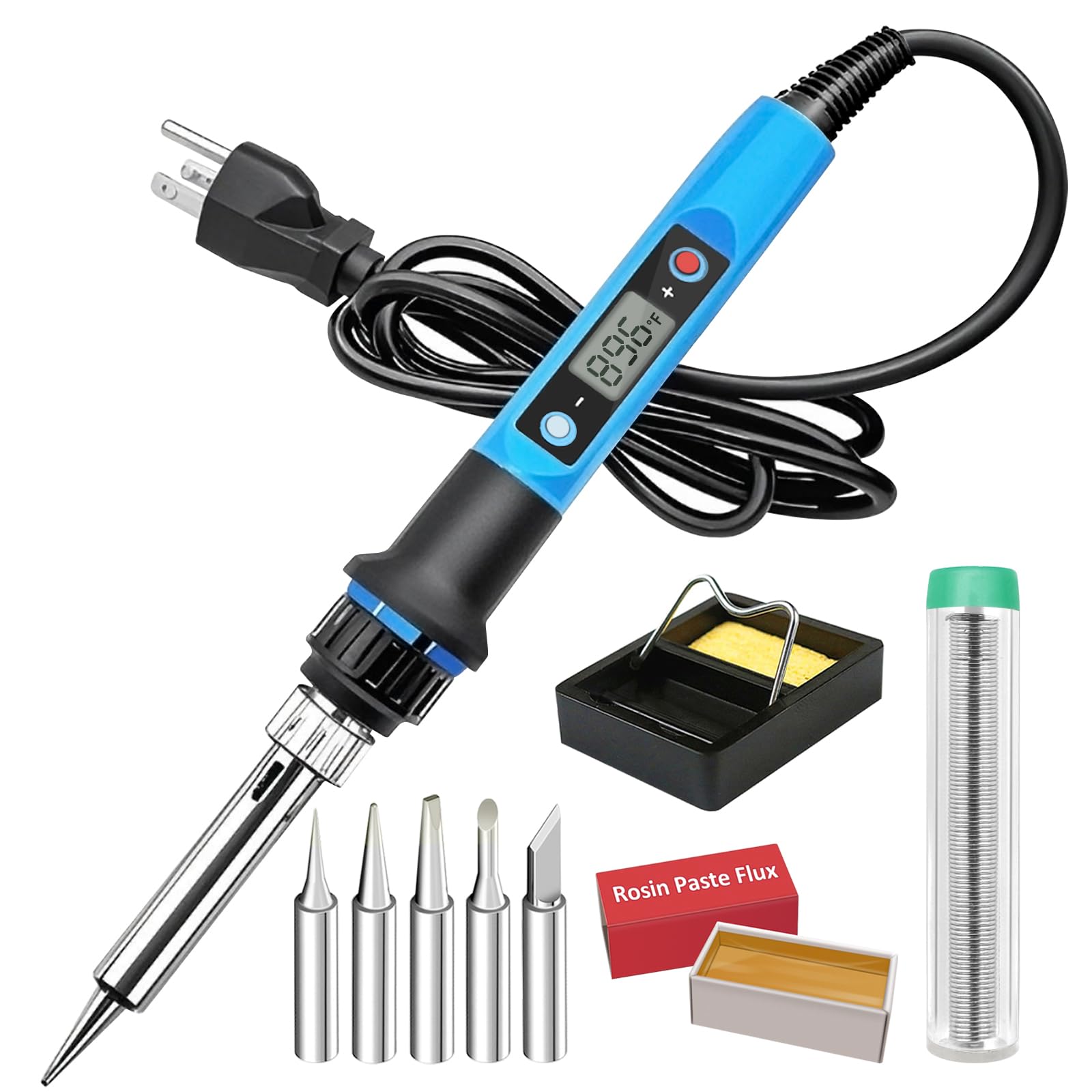
The box earns its keep. Six 900M-series tips arrive with one already in the handle, and that series matters: replacements are inexpensive and sold everywhere, so a worn tip doesn't mean a new iron. There's a desoldering pump, tweezers, a magnifier, a small roll of solder, and a stand, all in a zip case that has kept our tips and pump from migrating across the bench.

The 90W ceramic element comes up to temperature fast enough that we stopped thinking about it, and the auto-sleep and temperature memory are features we expect on a station rather than a pencil. Where it runs out of road is heavy work: pads, header pins, and stranded wire are comfortable, but a ground plane or a chassis connection can outrun it. If that's most of what you solder, buy a station.

Two details we appreciated after a week: the plus and minus buttons are easier to work one-handed than a knob, and the sleep function backs the tip off instead of leaving it at full heat while you reposition a board. Neither is why we picked it. Both are why it's the one we leave out.

Pros

  • Calibration offset corrects a tip reading
  • Six standard 900M tips, cheap to replace
  • Pump, tweezers, and hard case included
  • Auto sleep and temperature memory

Cons

  • No flux or desoldering braid in the kit
  • Pencil form, so you supply the stable base
Our verdict

Our default pick for electronics work: 90 watts, six tips, a calibration offset that lets you correct the iron, and a case that keeps the whole kit together.

Check Latest Price
2

Best Station

YIHUA 926 III Station Kit

89 /100
LBD Score Excellent

Key details

Kit
12-in-1
Power
60W
Sleep Timer
5, 10, or 30 minutes
Temperature Range
194–896°F
View on Amazon

Two articulated arms with alligator clips are mounted on the front of this station, and they're the reason to look at it. On a through-hole board they hold the part while you hold the iron and the solder, which is the difference between a clean joint and a burned finger. The iron parks in a holder built into the case, so there's no separate stand skating around the bench.

We recommend it for anyone whose soldering has turned into a regular habit rather than a once-a-year repair. The 60W station runs from 194 to 896°F, switches between °C and °F, supports calibration, and sleeps after 5, 10, or 30 minutes. The 12-in-1 bundle adds six tips from the 900M/1200 series, a 35g roll of lead-free solder that says so on the label, a desoldering pump, and ESD-safe tweezers. That label sounds trivial until you're holding an unmarked wire and wondering what's in it.

The arms are the weak point. They pivot on joints that don't hold a position well, so a board that starts level can droop toward the tip; snugging the fasteners helps, and clamping the base to something heavier helps more. Set that aside and the station is compact — just over seven inches deep — which is why it fits at the back of a crowded bench.

Pros

  • Helping hands hold the board while you work
  • Iron holder built into the case
  • Labeled lead-free solder in the box
  • Sleep timer plus °C/°F conversion and calibration

Cons

  • Heat can sag on large copper areas
  • Base can slide on a smooth bench
Our verdict

For a desk where soldering happens weekly, this is the station we recommend: two helping hands hold the board and the iron parks in its own holder.

Check Latest Price
3

Best for Beginners

ANBES 60W Soldering Kit

91 /100
LBD Score Outstanding

Key details

Kit
14-in-1
Power
60W
Iron Length
8.6 inches
Max Temperature
450°C
View on Amazon

The tool beginners don't know they need is the desoldering pump. Everyone buys an iron to put solder on; the part that goes wrong first is taking it off again — a bridged pair of pins, a component that has to come out before the new one goes in. This kit includes a metal-bodied pump with a one-handed plunger, plus tweezers and a wire stripper, and that's why we send first-timers here rather than to a bare iron with a couple of spare tips.

Fourteen pieces is a lot to get in one box, and the useful ones are the ones you'd otherwise buy separately: five interchangeable tips, a dual-spring stand with a sponge, solder paste, and a tube of solder wire. The iron is an 8.6-inch pencil with a silicone handle and a dial on the body — light enough to move around a board without fighting it while you're still working out where your hand goes.

We tell people to expect the dial to run behind its markings: start higher than the number suggests, come down once the solder flows, and check on scrap before you commit a board. That's normal at this level and it's cured by practice. What practice can't fix is lifespan, because these can give out after a handful of sessions. Treat it as a learning kit — get through your first few dozen joints, learn what a good one looks like, and buy something sturdier once you know you'll keep going.

Pros

  • Desoldering pump handles beginner mistakes
  • Fourteen pieces including tweezers and wire stripper
  • Five tips and a silicone handle

Cons

  • Can fail after a handful of sessions
Our verdict

The kit we point first-timers to, because it includes the pump and tweezers that fix the mistakes you'll make while learning, plus instructions.

Check Latest Price
4

Best Budget Digital

Liouhoum 936H Soldering Iron

91 /100
LBD Score Outstanding

Key details

Power
80W
Warranty
24-month replacement
Heat-up Time
10 seconds
Max Temperature
480°C
View on Amazon

A °C/°F LCD, a calibration function, a sleep mode that drops the temperature after five minutes on the stand, and temperature memory: that's a feature list we expect on a bench station, not on the least expensive digital iron here. There's also a 24-month replacement term from the manufacturer, which is unusual at any price in this group and the reason we stopped worrying about how little it costs.

We recommend it when the budget is the hard constraint and the work is occasional — a cable end, a connector, a capacitor on a monitor board. The 80W ceramic element is quick, the digital setpoint takes away the guesswork a plain dial leaves you with, and standard 900M tips let you match the tip to the joint. It covers most of what a station does for a fraction of the outlay.

Two things to plan around. The tip that ships installed is a fine conical, which is right for pads and wrong for anything with mass, so order a chisel tip if connectors are on your list. And the sleep function is a convenience, not a safety net; we still switch off at the wall.

Pros

  • Digital setpoint with °C/°F and calibration
  • Sleep mode and temperature memory
  • 24-month replacement term

Cons

  • Heat-up can run well past the claimed ten seconds
  • No desoldering pump or braid included
Our verdict

A budget iron with a digital setpoint, calibration, and sleep mode — the one to buy when the money is tight and the work is occasional.

Check Latest Price
5

Best for Frequent Use

YIHUA 939D+ Soldering Station

91 /100
LBD Score Outstanding

Key details

Power
120W
Footprint
5.4"D x 4.4"W x 3.6"H
Max Temperature
896°F
Temperature Stability
±5°C
View on Amazon

The readout on this station can sit noticeably above the temperature the tip actually delivers. That sounds like a dealbreaker and it isn't, but it's the first thing to know, because it changes how you work: you go by the joint rather than the number until you've calibrated the iron against a known reading.

What the extra outlay buys is a station built for frequent use. The transformer lives in the box rather than in the handle, the control panel is brushed aluminum, and the 907F iron detaches for storage. YIHUA quotes ±5°C stability and a top end of 896°F, and the practical effect is a tip that recovers between joints instead of stalling on the second one.

The brass tip cleaner is a small luxury we've come to insist on: drag the tip through it and it comes out bright without the thermal shock of a wet sponge, which is exactly the habit that makes tips last. The stand holds the iron securely and doesn't tip, and in steady use that's most of what you ask of a station.

We recommend this to people who solder most weeks and are tired of replacing cheap irons: it behaves like a tool rather than a disposable. It's also the least kit-like product on this list — what you're buying is the station itself, and the rest is a separate shopping trip. If you want to open one box and start, the YIHUA 926 III is the better fit.

Pros

  • Quoted ±5°C temperature stability
  • Brass tip cleaner instead of a wet sponge
  • Stand holds the iron without tipping
  • 120W output with fast recovery

Cons

  • No solder, pump, flux, or spare tips in the box
Our verdict

For people who solder most weeks: a station that holds temperature, stands still, and skips the accessories you already own.

Check Latest Price
6

Storage and Portability

MEAKEST 60W Soldering Kit

89 /100
LBD Score Excellent

Key details

Kit
12-in-1
Power
60W
Weight
1.26 lb
Temperature Range
200–450°C
View on Amazon

A hard zip case is a small thing that changes where a soldering kit lives. It can go on a shelf, in a drawer, or in a toolbox without the tips ending up loose at the bottom of a bag, and the molded insert keeps each piece where you left it. For a set that includes paste and flux, that matters more than it does for a bare iron.

Inside is a 12-in-1: a 60W iron with a 200 to 450°C dial and an on/off switch, five tips, a pump, tweezers, a stand, a roll of solder, and a pot of paste. The handle is longer and heavier than the slim pencils here — 570 grams for the set — which makes it steadier over a long session and less nimble inside a tight chassis. The silicone boot around the grip is the detail we appreciated most: it's there to keep heat off your fingers when you work slowly.

Where we hesitate is consistency. The ceramic core is the part that lets go, and an iron that suddenly isn't hot enough is a hard fault to diagnose when you're new, because you'll blame your technique first. The case, the accessories, and the extra capacity in the solder and paste make it a sensible second kit or a gift for someone who already knows what they're doing, and a riskier first purchase.

Pros

  • Hard case keeps the whole set together
  • Silicone heat shield around the grip
  • Pump, flux, and paste included

Cons

  • Ceramic core can fail after a few uses
Our verdict

For a kit that lives in a drawer between jobs: a hard case, a pump, flux, paste, and five tips in one box.

Check Latest Price
7

Occasional Repairs

Q-MING 60W Soldering Iron Kit

91 /100
LBD Score Outstanding

Key details

Tips
5
Power
60W
Heat-up Time
15 seconds
Max Temperature
450°C
View on Amazon

The switch is what we kept noticing. On a 60W pencil iron with a dial and no station, being able to cut the heat without unplugging it is worth more than it sounds: set the iron down, flick the switch, and it stops cooking while you reposition a wire. That, the five tips, and the tube of rosin flux paste are why this is the easiest kit here to hand someone with one connector to fix.

It's a 60W iron with a 200 to 450°C dial and four vent holes in the barrel, and it reaches working temperature quickly enough that you can plug in and start. What it doesn't have is any way to know the tip's actual temperature — the dial is a guess with numbers on it, and you'll learn where your joints like it after a few tries. The stand is a bent-wire cradle that holds the iron if you set it down deliberately, the sponge is small, and the tips are the common screw-in type, so replacements are easy to find.

Pros

  • On/off switch on the iron body
  • Five interchangeable tips
  • Rosin flux paste included

Cons

  • Iron can fail after a single session
Our verdict

The simplest kit here: an on/off switch on the iron, five tips, flux paste, and a dial you learn by feel — good for one-off repairs.

Check Latest Price

How We Tested the Best Soldering Kits

We started with spec sheets and customer reviews for roughly 60 kits, then narrowed by tip style and how many replacements came in the box, temperature range, whether the pump, stand, and tweezers were serviceable or filler, and price, so the final group spanned cheap pencils through compact stations. That left 14 kits, which we bought at retail so nothing arrived pre-selected for us.

Testing ran six months and happened where soldering actually happens: a workbench in the middle of a pedal rebuild, a laptop dock with a snapped USB jack, the switch pads on a mechanical keyboard, a spliced LED strip on a cold garage floor. Every kit got the same first job — melt solder onto a scrap board and time it from plug-in to first melt. We then reflowed joints on a ground plane to watch whether the tip recovered or stalled, and compared the readout against what the iron was visibly doing. Hour-long sessions showed which handles got uncomfortably hot and which drifted off temperature.

We swapped tips mid-project to see how much knuckle room the collar left, tightened and loosened each retaining nut until it either held or stripped, pulled the desoldering pump until it clogged or didn't, and pinched tweezers down on fine wire. Cords were coiled and uncoiled repeatedly and cases packed and unpacked; a case that jammed or spilled tips counted against the kit, no matter how well the iron soldered.

How to Choose a Soldering Kit for Electronics

Pencil Iron or Bench Station

Start with where the iron will live. A pencil iron plugs into the wall and goes anywhere — a kitchen table, a friend's garage, the cavity of a guitar — and it's the right choice when the work comes in bursts. A station trades that portability for a base that stays put, a holder built into the case, and often a pair of helping hands that hold the board for you.

The trap with pencil kits is the stand. It's usually a bent-wire cradle, which will hold a hot iron but anchors nothing, so give it a clamp or set it on something that won't slide.

What a Complete Kit Should Contain

Count the pieces that do work, not the pieces in the photo. A useful electronics kit has a fine tip or a set of them, rosin-core solder thin enough for pads, some form of flux, a way to remove solder — a pump or braid — and a stand. Twenty-piece kits often reach the number with a screwdriver, a knife, and a tape measure.

Two gaps are worth planning around: desoldering braid is missing from most kits here, and flux from several. Add both before your first board, because flux is what turns a joint that won't wet into one that does.

Reading Temperature Control Honestly

Adjustable is not the same as accurate. A numbered dial buys you repeatability — the same setting next time — while a digital setpoint and a calibration function let you correct the iron to what the tip actually delivers. Neither puts the tip at the number on the screen: the setpoint is what the element aims for, and the tip sheds heat the instant it touches a pad.

For electronics we prioritise a range with comfortable headroom past 350°C and a calibration option, because being able to correct the tool beats learning its habits.

Wattage, Tips, and Heat Recovery

Watts describe how fast an iron can put heat back into a joint, not how hot the tip gets. A 60W pencil reaches soldering temperature fine; what it may not do is stay there when you move onto a ground plane, and that's where the 80W and 90W units earn their keep.

Tip shape matters as much. Fine conical tips are for single pads and small surface-mount work, chisel and knife tips move heat into bigger joints, and an oxidized tip stops transferring heat no matter what the display says. Tin the tip before you put the iron away.

Safety at the Bench

These irons run from roughly 200 to 450°C, hot enough that a careless second is a blister. Park the iron in its stand every time rather than on the bench mat, and switch off or unplug when you leave the room. Wash your hands after handling leaded solder, and keep drinks and food off the bench while you work.

Auto-sleep and a child lock are genuinely useful, but they're backups. The habit that matters is switching the thing off.

Frequently Asked Questions

Final Verdict

Start with the HANDSKIT 90W kit. Six tips, a pump, a case, and a calibration offset make it the one that lets a beginner or an occasional fixer do real board work without buying a bench station first.

If soldering is a weekly habit and you work at a desk, the YIHUA 926 III is the better buy: the helping hands and built-in holder keep the board and the iron where you left them. When the budget is the constraint, the Liouhoum 936H still gives you a digital setpoint and calibration for very little.