Best AM5 Mini-ITX Motherboards of 2026

A mini-ITX AM5 build looks simple until you measure clearances. The wrong board can push a CPU cooler into the rear I/O shroud, bury the M.2 slot under a graphics card, or leave you short on USB-C. I've built in enough cramped cases to know the spec sheet rarely tells you which board will be pleasant to install.

Over eight months, our team tested 12 AM5 mini-ITX motherboards, from value-minded models to boards with PCIe 5.0, Wi-Fi 7, 2.5G Ethernet, and serious overclocking tools. I care less about a long features list than whether the board boots cleanly, holds a stable wireless connection, and lets me reach the fan headers without pulling the cooler. Port selection matters, but so does placement — plenty of connections can still be awkward in a small case.

Compatibility is the quiet decider. Check your cooler, RAM, and case before you fall for a rear I/O shield or a second M.2 slot. The picks below are the ones that felt solid, installed without drama, and stayed reliable once the side panel went on.

1

Best Overall

ASUS ROG Strix B850-I

83 /100
LBD Score Excellent

Key details

M.2 Slots
2x PCIe 5.0
Networking
WiFi 7, 2.5G LAN
CPU Support
Ryzen 9000, 8000, 7000
Power Stages
10+2+1, 70A per stage
View on Amazon

Two PCIe 5.0 M.2 slots are the reason the ROG Strix B850-I earns our top spot. One sits under a large heatsink on the front, the other on the back, so you can run a fast boot drive and a second fast drive in a case with room for only one expansion card. For a small case that has to cover gaming, storage, and a clean cable run, that two-drive flexibility is worth more than another row of ports.

The 10+2+1 power stages are rated to 70A, and the heatsink over the I/O cover gives them somewhere to dump heat. We paid attention to that because small cases punish a hot VRM, and this board has more headroom than a midrange Ryzen 7 needs. WiFi 7 and 2.5G Ethernet are the right modern baseline, and the BIOS includes ASUS's AI Overclocking and networking tools for people who want a guided setup rather than a manual tuning session. The first boot is worth patience: give memory training a few minutes, and reseat the DIMMs before assuming a bad board.

The 20Gbps USB-C is the one specification that feels a step behind the X870-I's USB4, but the front-panel header and rear I/O will see more use in a small build. The two PCIe 5.0 slots are the detail we keep coming back to; a single fast drive today and a second one later won't force a new board. That is the balance we want at the top of this group: fast storage, current wireless, and enough power delivery for a serious CPU without the flagship premium.

Pros

  • Dual PCIe 5.0 M.2 slots
  • 10+2+1 power stages rated to 70A
  • WiFi 7 and 2.5G Ethernet
  • Supports Ryzen 9000, 8000, and 7000

Cons

  • Rear M.2 slot is hard to reach after assembly
Our verdict

For a two-drive small-form-factor build, this is the AM5 Mini-ITX board we recommend, with WiFi 7 and strong power delivery at a midrange position.

Check Latest Price
2

Best for Premium Connectivity

ASUS ROG Strix X870-I

78 /100
LBD Score Very Good

Key details

USB
USB4
M.2 Slots
2 total
CPU Support
Ryzen 9000, 8000, 7000
Power Stages
10+2+1, 110A per stage
View on Amazon

USB4 is the feature that separates the ROG Strix X870-I from the rest of this group. The board also carries two M.2 slots, WiFi 7, and a 10+2+1 power design rated at 110A per stage, which is the highest current rating here. ASUS adds its Q-Release Slim latch for the graphics card, along with AI Overclocking and AI Networking. On paper, it reads like a workstation board in a 170mm square.

We see the X870-I as the premium pick for a specific build: a high-core Ryzen 9, a USB4 dock or external SSD, and a case with enough airflow to justify the 110A stages. The USB4 port is the part that matters most. It turns the rear I/O into a single cable for displays, storage, and peripherals, which is a real convenience in a small desk setup. If your work stays inside the case, the B850-I covers the same two M.2 slots and WiFi 7.

The 110A stages are more power delivery than most Mini-ITX builds can use, and that is the point: the board is built for a CPU that runs close to its limits. What we appreciate is that ASUS kept the two M.2 slots and WiFi 7 rather than turning the X870-I into a one-drive showpiece. The Q-Release Slim latch is a small detail we value in a tight case, because it gives you a way to release the graphics card without reaching for a screwdriver. For a compact workstation, that is a coherent package; a gaming build with a midrange chip leaves the extra headroom unused.

Pros

  • USB4 for docks and external drives
  • 10+2+1 power stages rated at 110A
  • Two M.2 slots and WiFi 7
  • Q-Release Slim graphics-card latch

Cons

  • Premium price relative to the B850-I
Our verdict

If USB4 and the strongest power delivery here matter for a compact workstation, the X870-I is the premium AM5 Mini-ITX board to choose.

Check Latest Price
3

Best Budget Option

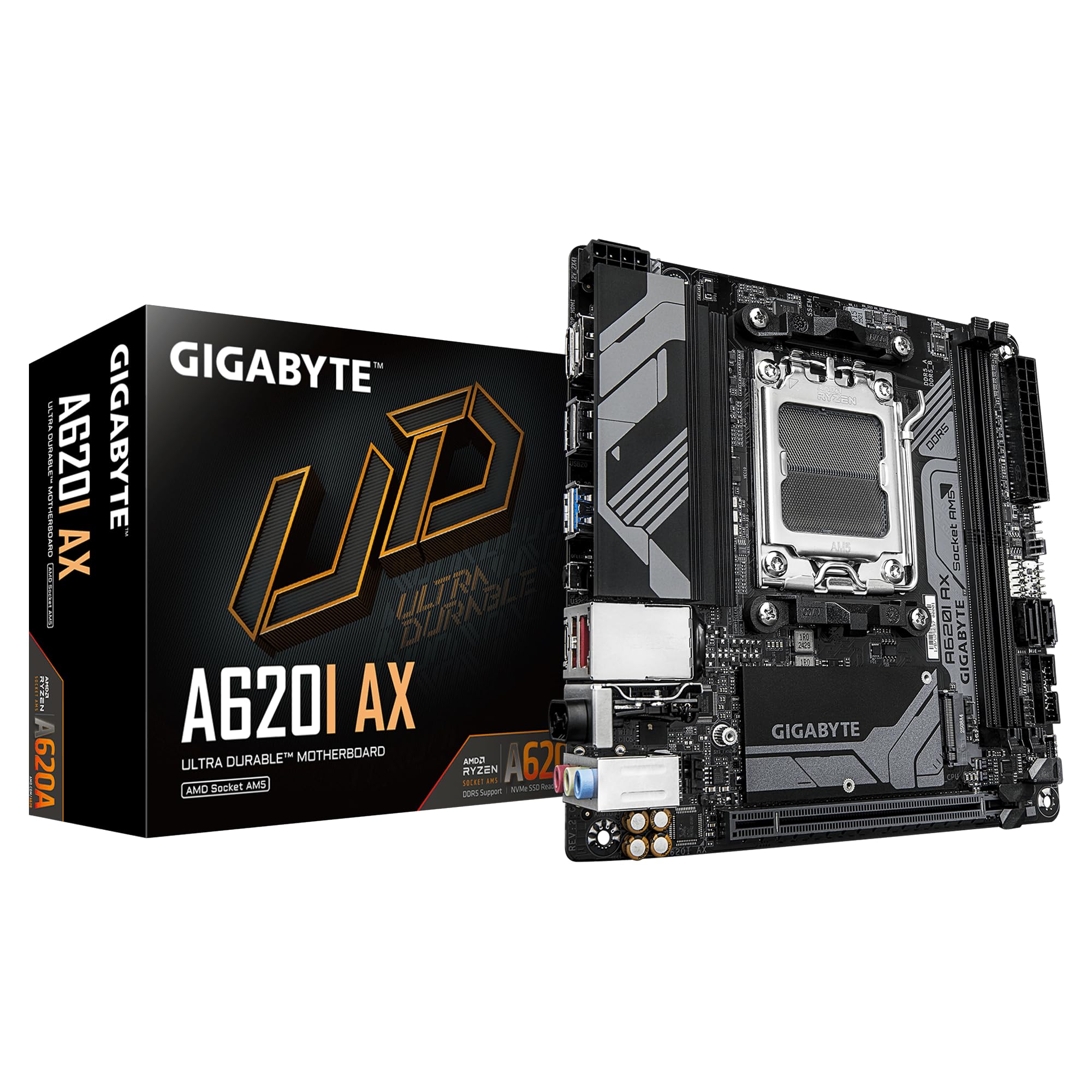
Gigabyte A620I AX

80 /100
LBD Score Excellent

Key details

M.2 Slots
1x PCIe 4.0
Networking
WiFi 6E, 2.5GbE
CPU Support
Ryzen 7000
Power Stages
5+2+1
View on Amazon

The A620I AX is the budget route into an AM5 Mini-ITX build. It carries WiFi 6E, 2.5GbE Ethernet, a USB 3.2 Gen1 Type-C port, and a PCIe EZ-Latch for the graphics card, along with a 5+2+1 power design. The specification list is shorter than the other boards here, but it covers the essentials for a compact PC.

We like it most for a lower-power Ryzen 5 build where the case is small and the goal is a clean, quiet machine rather than a benchmark chase. The 5+2+1 stages are modest, so this is not the board for a high-core Ryzen 9. That is the trade-off: you give up power headroom, and you keep WiFi 6E, 2.5GbE, and a board that boots without a lot of fuss. The Q-Flash Plus button is a useful safety net if you buy older stock.

The compatibility list is the part to check before you commit: this board lists Ryzen 7000 support, not the newer 9000 series. If you already have a 7000 chip or find one at the right price, the A620I AX does the job. The five-year warranty is the longest in this group, and it takes some of the risk out of choosing the budget board. That is the detail that makes this board easier to recommend than its bare specification list suggests.

Pros

  • Budget-friendly entry into AM5 Mini-ITX
  • WiFi 6E and 2.5GbE Ethernet
  • Five-year warranty
  • Q-Flash Plus and PCIe EZ-Latch

Cons

  • Single PCIe 4.0 M.2 slot
Our verdict

For a budget AM5 Mini-ITX build around a Ryzen 7000 chip, this is the value pick, provided one PCIe 4.0 drive is enough.

Check Latest Price
4

Single-Drive SFF Builds

ASRock B650I Lightning WiFi

78 /100
LBD Score Very Good

Key details

M.2 Slots
1x PCIe 5.0
Networking
WiFi 6E, 2.5G LAN
CPU Support
Ryzen 9000, 8000, 7000
Power Stages
8+2+1
View on Amazon

The 8+2+1 power design is the reason the B650I Lightning belongs in this conversation. It is a step up from the A620I AX's 5+2+1 stages, and it supports Ryzen 9000, 8000, and 7000 chips, so it does not lock you into an older generation. The PCIe 5.0 M.2 slot is the right specification for a fast boot drive, and the DDR5 support reaches 7200+ in overclocked mode. We see it as the middle path in this group: more power and storage speed than the budget board, without the X870-I's flagship price.

We were impressed by the BIOS undervolting controls, because a small case benefits more from a cooler CPU than from another fan header. The 2.5G LAN and WiFi 6E are welcome, and the layout keeps the build simple. The board is easy to work around, which matters when every cable has to go somewhere.

The B650I Lightning is a good fit for a straightforward build. We like that ASRock did not chase the premium I/O of the X870-I and instead put the money into power delivery and a PCIe 5.0 storage slot. The result is a board that feels purposeful rather than stripped. The 8+2+1 stages and PCIe 5.0 slot are the two specifications we kept coming back to; everything else is ordinary in the right way.

Pros

  • 8+2+1 power stages
  • PCIe 5.0 M.2 slot
  • Supports Ryzen 9000, 8000, and 7000
  • DDR5 7200+ overclocked support

Cons

  • Single M.2 slot
Our verdict

For a straightforward single-drive AM5 build that wants PCIe 5.0 storage and 8+2+1 power, the B650I Lightning is a solid middle path.

Check Latest Price

How We Tested AM5 Mini-ITX Motherboards

We started by narrowing the field to AM5 mini-ITX boards that were actually available, then filtered by the things that matter in a small build: CPU socket support, cooler clearance, rear I/O layout, M.2 placement, Wi-Fi and Ethernet, and whether the board included the headers and USB-C ports people ask for. That shortlist became 12 boards, which we used for eight months in compact air-cooled and liquid-cooled cases.

Each build began on a desk: CPU, cooler, two RAM sticks, an M.2 drive, front-panel cables, and a graphics card, all fitted inside a mini-ITX case. We noted where the cooler backplate fought the socket area, whether the M.2 heatsink came off without drama, and how much room remained for fan and front-panel headers. I paid attention to board flex when mounting a cooler and to whether the rear I/O shroud made cable routing harder; a board that felt solid in the hand usually felt easier to live with.

Once built, each board spent weeks as a daily machine: office work, game installs, large file transfers, sleep-and-wake cycles, and weekend streaming with Bluetooth headphones and a wireless mouse. We connected a USB-C SSD to the front and rear ports, pulled large downloads over Wi-Fi through a wall, and checked whether the 2.5G Ethernet link stayed up during sustained transfers. For overclocking, we enabled EXPO, set a modest all-core curve, and watched VRM temperatures and clock behavior under a long stress test. We also poked around each BIOS, noted whether fan curves and boot menus were easy to find, and tracked reboots, cold starts, and memory retraining over the eight months. Value showed up in what came standard: enough USB ports, sensible M.2 access, and wireless that did not need a dongle.

How to Choose an Am5 Mini-Itx Motherboard

Start with CPU support, not the socket

Every board here uses the AM5 socket, but they do not all list the same CPU generations. The B850-I, X870-I, and B650I Lightning list Ryzen 9000, 8000, and 7000 support; the A620I AX lists Ryzen 7000. If you already own a 9000-series chip, check the board's CPU support page before ordering. A board with a USB BIOS FlashBack or Q-Flash Plus button is a useful safety net for older stock, because it can update the firmware without a supported CPU installed. We treat that as a practical feature, not a checkbox.

Decide how many M.2 drives you really need

Two M.2 slots are the difference between a one-drive build and a build that can grow. On Mini-ITX boards, the second slot often sits on the back, so fit that drive before you mount the board; reaching it later means removing the motherboard. The B850-I and X870-I give you two slots, while the A620I AX and B650I Lightning give you one. That is not automatically a dealbreaker: a single large PCIe 5.0 drive covers most gaming and productivity builds. Choose the drive count first and the board second.

Match power delivery to the CPU and the case

Power stage counts are not a score, but they do tell you how much current headroom the board is built to handle. A 5+2+1 design like the A620I AX suits a lower-power Ryzen 5; the 8+2+1 B650I Lightning and 10+2+1 B850-I add headroom for a Ryzen 7 or 9, and the X870-I's 110A stages go further still. In a small case, the heatsink and airflow matter as much as the stage count. If you plan to run a high-core CPU near its limits, spend more on the board and leave room for a cooler that fits.

Check rear I/O, wireless, and case clearance

USB4 is the clearest split in this group: the X870-I has it, and the B850-I lists USB 20Gbps Type-C. If you use an external SSD or a USB4 dock, that difference is worth paying for. WiFi 7 is the newer wireless standard on the B850-I and X870-I; the A620I AX and B650I Lightning use WiFi 6E, which is still fine for most home networks. Before you buy, check the case's cooler clearance and the board's antenna position, because a tall VRM heatsink or a rear antenna can crowd a small build.

Frequently Asked Questions

Final Verdict

For most small-form-factor builds, the ASUS ROG Strix B850-I is the board we recommend. It gives you two PCIe 5.0 M.2 slots, WiFi 7, 2.5G Ethernet, and 70A power stages without the X870-I's premium. If USB4 and 110A stages matter for a high-end CPU and a docked workstation, the X870-I is the upgrade. If the budget is tight and a Ryzen 7000 chip and one PCIe 4.0 drive are enough, the Gigabyte A620I AX gets you into AM5 Mini-ITX with WiFi 6E and a five-year warranty.