Best AM5 Micro-ATX Motherboards of 2026

A micro ATX AM5 board is the quiet decision-maker in a build: it has to fit a smaller case, feed a power-hungry Ryzen chip, and boot cleanly on the first try. I've had boards that looked great but fought me over memory training, and plain ones that never flinched. The right one saves you a weekend of BIOS flashing. Over eight months, we built and rebuilt 12 AM5 micro ATX boards to find the ones that get out of your way.

What separates them isn't the logo or the RGB. It's whether the VRM heatsinks stay cool through a long gaming session, whether the BIOS finds your DDR5 kit without a fight, and whether the board has the M.2 slots and USB-C ports you need. We also checked memory slot layout, ARGB headers, and build quality you feel at the 24-pin connector. A long feature list is overrated: two boards can both list PCIe 5.0 and Wi-Fi 7 and still feel different when you're plugging in a GPU or recovering from a bad BIOS setting. The picks below held up.

1

Best Overall

GIGABYTE B850M AORUS Elite WIFI6E ICE

89 /100
LBD Score Excellent

Key details

Wi-Fi
Wi-Fi 6E
M.2 Slots
2
DDR5 Slots
4
Power Design
12+2+2
View on Amazon

Twelve plus two plus two is a serious phase count for a board that measures 9.6 inches square, and it is the first number we look at in this format. Micro-ATX should mean a smaller case, not a smaller CPU, and this VRM sits under fully covered MOSFET heatsinks with an M.2 thermal guard alongside. The budget picks in this roundup make do with six or eight stages and less metal around the socket; this one does not.

The rest of the package is just as settled. Four DDR5 slots, two M.2 mounts, PCIe 5.0 for the graphics card, Wi-Fi 6E and 2.5GbE on the rear panel — and Gigabyte's EZ-Latch tabs release the GPU and the primary SSD without a screwdriver, a small thing that stops being small the third time you open a cramped case. It is also the best-looking board in this group, white and silver with a clean I/O shroud, and the five-year warranty runs two years past what ASRock and ASUS offer.

Two M.2 slots is the thinnest count among our picks. The ASRock Steel Legend WiFi gives you a third and moves to Wi-Fi 7 for less money, so a three-drive build belongs there rather than here. Everyone else gets the better-established board. Plan on a little memory tuning too: EXPO is one click, but 6000 MT/s is the realistic target once all four slots are populated, and anything beyond that is a bonus rather than a promise.

Pros

  • 12+2+2 power under full heatsinks
  • Four DDR5 slots and PCIe 5.0
  • Wi-Fi 6E, 2.5GbE and USB-C onboard
  • Five-year manufacturer warranty

Cons

  • Only two M.2 slots
  • Costs more than the Wi-Fi 7 Steel Legend
Our verdict

We recommend it as the default AM5 mATX board: the strongest power delivery, four memory slots, Wi-Fi 6E and the longest warranty here make it the safest home for a Ryzen 7 or 9.
Check Latest Price
2

Best for Maximum Storage

ASUS ROG Strix B850-G Gaming WiFi

88 /100
LBD Score Excellent

Key details

Wi-Fi
Wi-Fi 7
M.2 Slots
4
DDR5 Slots
4
Power Design
14+2+1 (80A)
View on Amazon

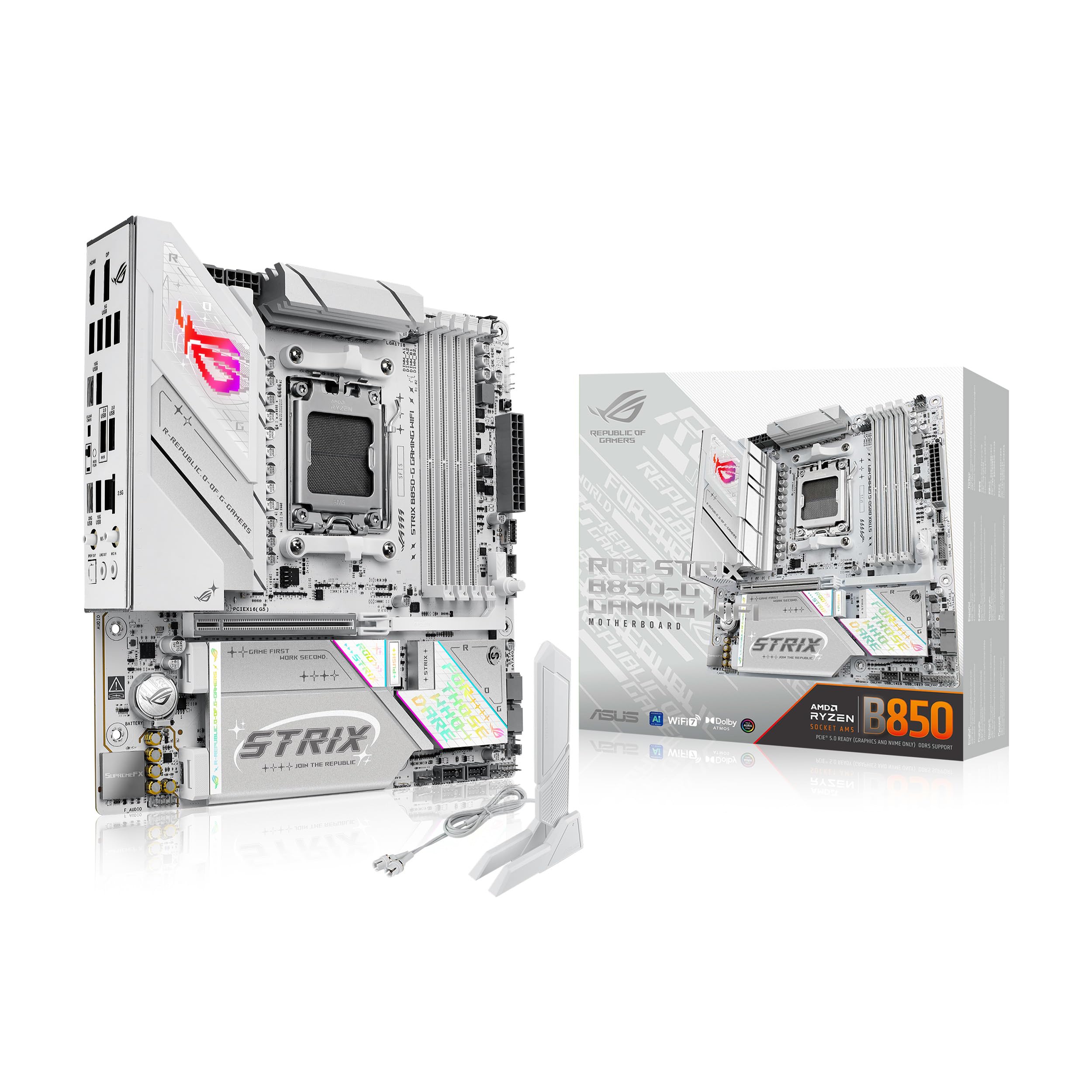
Four M.2 slots is the whole argument for this board. Most micro-ATX AM5 designs stop at two or three, which turns storage into an either/or question — the game library or the scratch disk, the capture archive or the spare drive. ASUS fits four NVMe mounts into the same 9.6-inch square, alongside a 14+2+1 design rated at 80 A per stage and an 8+8-pin ProCool connector. If the case is small and the drive count is not, this is the one that ends the argument.

It is also the most overbuilt board here in the ways you notice later: heatsinks bridged to the VRM with high-conductivity pads, an integrated I/O cover, a 20Gbps USB-C port on the rear, Wi-Fi 7 and 2.5G LAN. The little 8-bit LED logo can be driven from Aura Sync or Corsair's iCUE plugin, which is the sort of detail that makes a white build look finished rather than assembled.

Two things to accept going in. It comes in white and silver only, with no black version, and it is the most expensive board in this roundup by a wide margin. Neither matters if you are building a showcase compact PC around four drives and a Ryzen 9; both matter if you simply need a board for a 7600X, where the Gigabyte does the same job with fewer slots and two more years of warranty.

Pros

  • Four M.2 slots in micro-ATX
  • 14+2+1 stages rated at 80A
  • Wi-Fi 7 plus 20Gbps USB-C
  • Integrated I/O cover and padded VRM heatsinks

Cons

  • White and silver finish only
  • The most expensive board here
Our verdict

We pick it when storage drives the build: four M.2 slots, Wi-Fi 7 and 80 A power stages, in exchange for a white-only finish and the highest price here.

Check Latest Price
3

Best Wi-Fi 7 Value

ASRock B850M Steel Legend WiFi

84 /100
LBD Score Excellent

Key details

Wi-Fi
Wi-Fi 7
M.2 Slots
3 (1x Gen5)
DDR5 Slots
4
Power Design
12+2+1
View on Amazon

This is the value play of the group, and it does not read like one: Wi-Fi 7, three M.2 slots with one on PCIe 5.0, a PCIe 5.0 x16 graphics slot and a 12+2+1 Dr.MOS power design, on a board that costs less than both the Gigabyte and the ASUS.

What we like most is how little it asks you to give up. The VRM carries an extended heatsink and enough stages for a 16-core chip, all four DIMM slots are there for memory you add later, and BIOS Flashback means firmware can be updated with nothing in the socket — the single most useful feature on any board bought for a Ryzen 9000 build. The steel-and-silver look is quieter than the white boards here, which suits a black case with a window rather than fighting it.

The one thing that gives us pause is track record. This is the newest design among our top three, and a machine you plan to keep for eight years is easier to commit to once the model has been through a few firmware cycles in the wild. The hardware itself raises no doubts — the power delivery and slot count match boards that cost noticeably more — but that longer history is why the Gigabyte keeps the top spot.

Pros

  • Wi-Fi 7 and 2.5G LAN
  • Three M.2 slots, one Gen5
  • 12+2+1 Dr.MOS with extended heatsink
  • BIOS Flashback for CPU-less updates

Cons

  • Three-year warranty only
Our verdict

We like it as the value pick: Wi-Fi 7, three NVMe mounts and Gen5 graphics without the ASUS premium, at the cost of two years of warranty.

Check Latest Price
4

Best Budget

ASRock B650M-HDV M.2 White

81 /100
LBD Score Excellent

Key details

LAN
2.5GbE
M.2 Slots
2 (1x Gen5)
DDR5 Slots
2
Power Design
8+2+1
View on Amazon

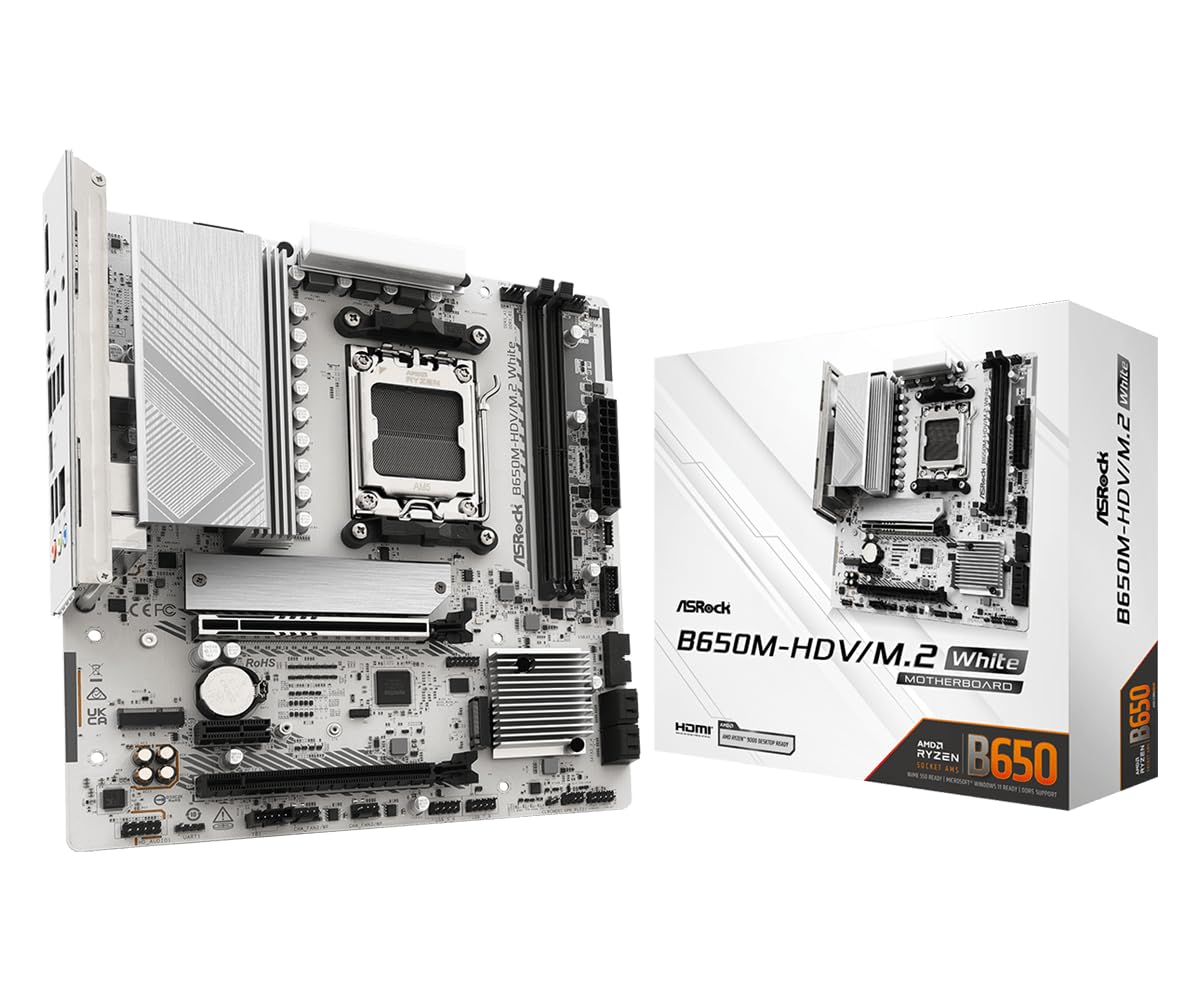
Two memory slots and no Wi-Fi radio — that is the trade, stated plainly, and it is why this is the cheapest way into AM5 in this group. What the money buys instead is the part that matters: a PCIe 5.0 x16 slot for the graphics card, a Gen5 M.2 mount plus a Gen4 one, front and rear USB 3.2 Gen2 Type-C, 2.5G Ethernet and an 8+2+1 Dr.MOS power design, all on a white PCB.

For a first build around a Ryzen 5 7600 or 9600X, that is a sensible set of priorities. Two DIMMs means one module per channel, the configuration AM5 memory controllers handle best, and a 2×16 GB DDR5-6000 EXPO kit covers everything a gaming PC needs. The white finish is the other reason people land here — a white PCB this far down the range is unusual, and it makes a budget build look deliberate behind glass.

The limit is expansion, and it arrives sooner than most people expect. Two slots cap you at 128 GB and mean replacing rather than adding when you upgrade, and while there is an M.2 Key E slot for a Wi-Fi card, that is another purchase and another pair of antenna leads to route behind the panel. If either of those bothers you, the Gigabyte or the Steel Legend is the better long-term buy. If neither does, this is a lot of board for the least money in the roundup.

Pros

  • 8+2+1 Dr.MOS power design
  • PCIe 5.0 x16 and a Gen5 M.2 slot
  • Front and rear USB-C plus 2.5G LAN
  • White PCB at the entry tier

Cons

  • No onboard Wi-Fi or Bluetooth
  • Two DIMM slots limit memory growth
Our verdict

We point first-time AM5 builders here: Gen5 graphics and storage, USB-C front and rear, and no Wi-Fi you did not want to pay for.

Check Latest Price
5

Work-First Desktops

MSI PRO B650M-A WiFi V1

88 /100
LBD Score Excellent

Key details

LAN
2.5GbE
M.2 Slots
2 (Gen4)
DDR5 Slots
4
Graphics Slot
PCIe 4.0 x16
View on Amazon

This is a board for the build that will never see a Gen5 drive: an unglamorous work machine with four sticks of memory, a graphics card, and possibly a capture card or a second network adapter in the lower slot. MSI gives it four DDR5 slots, two PCIe 4.0 x16 slots, twin Gen4 M.2 mounts, 2.5G LAN, Wi-Fi, and HDMI 2.1 plus DisplayPort for a chip with integrated graphics.

We like it for exactly that honesty. Nothing here pretends to be next-generation — there is no PCIe 5.0 anywhere, and that is the one specification that will date the board — but the layout suits a work build, the Shied Frozr plate on the primary M.2 keeps a Gen4 drive off its thermal limit, and the second x16-length slot is more useful than another RGB header when the card you are adding is not a GPU.

Two checks before ordering. The listing is fuzzy about Ryzen 9000: the title and bullets say it is ready, while the compatibility field stops at 7000 and 8000, so confirm the shipping BIOS with the seller if a 9000-series chip is going in. And if a Gen5 SSD or a next-generation graphics card is in your near future, the Steel Legend covers both for less — this board will hold you back on each.

Pros

  • Four DDR5 slots with Wi-Fi
  • Two PCIe 4.0 x16 slots
  • Twin Gen4 M.2 mounts
  • 2.5G LAN, HDMI 2.1 and DisplayPort

Cons

  • No PCIe 5.0 for GPU or storage
  • Ryzen 9000 support needs a BIOS check
Our verdict

We keep it for work-first builds that will never take a Gen5 drive — four memory slots and Wi-Fi, once you confirm Ryzen 9000 support.

Check Latest Price

How We Tested AM5 Micro ATX Motherboards

We started by pulling every current AM5 micro ATX board we could find from the major brands, then narrowed the list by socket support, DDR5, at least two M.2 slots, and a layout that wouldn't fight a compact case. That left 12 boards, which we tested over eight months.

Each board went into at least two builds: an open bench for easy part swaps, and a compact micro ATX case with a mid-size air cooler and a two-slot graphics card. I used one as my daily work machine, then switched to gaming and light video editing in the evening. We noted whether the first POST took one power cycle or several, whether EXPO memory profiles trained without a reboot loop, and whether the board kept its settings after we cut power at the wall.

We also treated the less glamorous stuff as real tests. We tugged on the PCIe latch, reattached the M.2 heatsinks to see if they cross-threaded, and mapped fan and ARGB headers to check whether cables could reach without splitters. We installed two- and four-stick DDR5 kits to see how the memory slots handled EXPO. For BIOS and boot behavior, we updated firmware from a USB drive, cleared CMOS after a bad memory setting, and watched for recovery. We compared what each board offered for the money, looked at how the PCB and heatsink finishes read through a case window, and ran a 24-hour stress loop to see if anything restarted or throttled.

How to Choose an Am5 Micro-Atx Motherboard

Match the Power Delivery to Your CPU

Phase counts are the easiest number to compare and the easiest to over-read. What matters is whether the VRM can feed your chip without throttling. A 6+1+1 board is fine behind a 65 W Ryzen 5 7600 or 9600X; a 12+2+2 design under covered MOSFET heatsinks, like the Gigabyte AORUS Elite or the ASRock Steel Legend, is what we want under a 120 W part or any Ryzen 9. A photo full of bare aluminum fins with no heatsink mass is the tell that a board was built for the cheap end of the range.

Two DIMM Slots or Four

Two-slot boards are cheaper and easier on the memory controller — one module per channel is the configuration AM5 runs fastest, which is a big part of why the ASRock HDV is such an easy budget recommendation. Four slots buy room to grow: 2×16 GB today, 96 or 128 GB later, with listed maximums running from 128 GB on the two-slot boards to 256 GB on the four-slot ones.

Decide your ceiling before you order. If 64 GB is plenty for the life of the machine, take the two-slot board and put the savings into a faster kit.

Count M.2 Slots, Not Generations

A PCIe 5.0 M.2 slot is table stakes on the B850 boards here, and for gaming you will not feel the difference between a Gen5 and a Gen4 drive. Slot count is the number that bites: two on the AORUS Elite, three on the Steel Legend, four on the ROG Strix, while the MSI makes do with two Gen4 mounts. If you keep a game library, a scratch disk and a video archive in separate places, pay for the count. Fill the later slots with Gen4 drives — cheaper, and you will notice nothing.

Networking Is a Model-Number Question

All five boards here have 2.5GbE Ethernet, so if you can run a cable, wireless is optional. When you do want it, check the exact model rather than the product family: the AORUS Elite is on Wi-Fi 6E, the ASUS and the Steel Legend are on Wi-Fi 7, and the ASRock HDV has no radio at all — just an M.2 Key E slot for a card you supply. Wi-Fi 7 is worth chasing only if your router already supports it; otherwise 6E behaves the same in a normal house.

Fit, First Boot and Warranty

Micro-ATX measures 9.6 inches square, so it drops into any ATX case and most compact ones — check clearance for a long graphics card and for the 8-pin CPU cable at the top edge, which is what decides whether your cable routing works. On first boot, AM5 trains memory before it POSTs; give it a couple of minutes before you start reseating anything. And if a Ryzen 9000 chip is going into a board that sat on a shelf, buy one with BIOS Flashback or Q-Flash Plus so the firmware can be updated without a working CPU.

Frequently Asked Questions

Final Verdict

The Gigabyte B850M AORUS Elite WIFI6E ICE is the board we point most builders to. Twelve power stages will carry a Ryzen 9, there are four DIMM slots for memory you add later, Wi-Fi 6E and 2.5GbE cover networking, and the five-year warranty is longer than anything else here — that combination is why it holds the top spot despite stopping at two M.2 slots.

If Wi-Fi 7 and a third NVMe mount matter more than the warranty, the ASRock B850M Steel Legend WiFi delivers both for less. And for a first gaming build with a strict budget, the ASRock B650M-HDV M.2 White keeps Gen5 graphics and Gen5 storage without charging for a radio you may never use.