Best Cable Modems for Optimum of 2026

Renting a modem from your cable company is one of those bills that's easy to ignore and hard to defend once you actually add it up — I paid that monthly fee for years before I finally bought my own. The purchase itself is the easy part. The homework is where people stall, because a modem has to be on your provider's approved list, match the speed tier you're paying for, and leave room for the router and devices behind it.

Over the past six months, my team and I have lived with 12 of them — older DOCSIS 3.0 units as well as current DOCSIS 3.1 models with multi-gig Ethernet ports — in homes where several people stream, game, and sit on video calls at the same time. The good ones didn't win on a spec sheet. They won on whether the provider activated them without a fight, whether the connection held through the evening crunch, and whether the speed I pay for actually reached my laptop.

One thing worth knowing before you shop: a modem can only pass along what your plan sends, and every phone and TV in the house still depends on your router for Wi-Fi. So the goal isn't the fastest box on the shelf — it's the one that matches your plan, activates cleanly, and stays steady. These are the ones that did.

1

Best Overall

Motorola MB7420

89 /100
LBD Score Excellent

Key details

DOCSIS Version
3.0 (16x4)
Ethernet Ports
1 x 1 Gb
Optimum Listed
Yes
Recommended Plan Speed
Up to 375 Mbps
View on Amazon

Optimum's name appears on exactly two of the modems in this guide, and this is the one we recommend of the pair. That single word carries more weight than any speed figure on the page, because a modem Optimum won't activate is a box with a power cord. Underneath it, the MB7420 is a plain 686 Mbps DOCSIS 3.0 modem with one Ethernet port — and for a lot of Optimum households that is genuinely all the modem they need.

What earned it the top spot is the boring part of ownership. It measures 4.9 by 2 by 6.1 inches and weighs nine ounces, so it vanishes on a shelf beside the router. Setup is coax, power, and a call or chat with Optimum using the MAC address from the bottom of the unit, and it's the most consistently painless install of the six here. The warranty runs two years, the longest in this group.

The ceiling is real and worth taking seriously. Motorola recommends this modem for service speeds up to 375 Mbps, so it's the right buy on a standard Optimum tier and the wrong one on anything faster — you'd be paying for speed the modem can't pass through to your router. On a gigabit plan, the Surfboard S34 is the upgrade, and the Netgear CM2500 is the middle ground.

Two details we appreciated after the fact: the fan-free design means no whine from a shelf in the living room, and Motorola's support line is US-based and staffed in English and Spanish, which is worth more than usual the first time provisioning goes sideways.

Pros

  • Optimum is named on the provider list
  • Setup is quick and consistently painless
  • Two-year manufacturer warranty
  • Nine-ounce body fits any shelf

Cons

  • Recommended only up to 375 Mbps service
  • 16x4 bonding is the thinnest design here
Our verdict

If your Optimum plan sits in the standard-speed range, this is the modem we hand to people who ask: it's on the provider list, installs in minutes, and carries a two-year warranty.

Check Latest Price
2

Best for Gigabit and Multi-Gig

Arris Surfboard S34

85 /100
LBD Score Excellent

Key details

Warranty
2 years
Max Download
2.5 Gbps
DOCSIS Version
3.1
Ethernet Ports
1 x 2.5 Gb + 1 x 1 Gb
View on Amazon

Upload is where cable modems usually embarrass themselves, and the S34 is the one here built to fix it. Arris supports next-generation upstream tiers on this model, and the port layout — a 2.5 GbE plus a separate 1 GbE — lets one cable carry the full multi-gig rate to your router without link aggregation.

That combination matters for a specific household: cloud backups running, two video calls at once, a kid uploading gameplay. Download headroom is easy to find in this group; upstream headroom isn't, and outside the Netgear's listed gigabit nothing else here comes close. It lies flat on a shelf at 10.55 by 6.75 by 2.46 inches, setup is browser-based, and the two-year warranty matches the best here.

Heat is the trade we noticed first. It's a fanless metal box that runs warm, and stacking a router on top of it in a closed cabinet is how you shorten its life — give it an inch of clearance and the worry goes away. Longevity is the other soft spot: the record includes units that quit within a few months alongside plenty that have run for years, which is exactly what a two-year warranty is for.

One check before you order: Optimum isn't on this modem's provider list, so confirm the model against Optimum's approved models for your tier. That's true of every DOCSIS 3.1 pick here — it takes five minutes and it's the difference between a clean install and a return.

Pros

  • Next-gen upstream support for faster upload tiers
  • 2.5 GbE plus 1 GbE, no aggregation needed
  • Flat body slides onto a shelf
  • Two-year manufacturer warranty

Cons

  • Runs warm; needs open-air placement
  • Optimum isn't on the provider list
Our verdict

We put it first for anyone paying for a gigabit tier: next-gen upstream, a 2.5 GbE port, and two years of warranty — once Optimum confirms it for your plan.

Check Latest Price
3

Best for High-Speed Plans

Motorola MB7621

91 /100
LBD Score Outstanding

Key details

Warranty
2 years
DOCSIS Version
3.0 (32x8)
Ethernet Ports
1 x 1 Gb
Recommended Plan Speed
Up to 900 Mbps
View on Amazon

The MB7621 is the modem this group keeps coming back to, and the reason is simple: it's a 32x8 DOCSIS 3.0 design rated for plans up to 900 Mbps, and it costs less than nearly everything else on the page.

Thirty-two downstream channels is the number that matters. Bonding isn't about headline speed — it's about how much congestion the modem can route around on a shared node, and 32x8 is the widest DOCSIS 3.0 design here. On a busy evening in a dense neighborhood, that's the gap between the speed you pay for and the speed you actually see. Setup is coax, power, and a short activation call.

Reliability is the soft spot. Dropped connections and modems that need a daily restart come up often enough to be worth knowing before you buy, and while the two-year warranty covers a failure, it doesn't cover the afternoon you spend on the phone sorting it out. If you want the least drama in this price range, the MB7420 is the safer pick from the same family.

Where it lands: if your Optimum tier sits in the several-hundred-megabit range and you want maximum headroom for the money, we like it here. Confirm Optimum approves the model first, and skip it entirely if your plan runs above a gigabit — the single gigabit port caps what your router can pull.

Pros

  • 32x8 bonding handles congested nodes
  • Rated for plans up to 900 Mbps
  • Two-year manufacturer warranty
  • Simple coax-and-activate setup

Cons

  • Reconnects and daily restarts in its history
  • Optimum isn't on the provider list
Our verdict

We recommend it for Optimum plans in the several-hundred-megabit range: the most established modem here, with the widest channel bonding, provided Optimum approves the model.

Check Latest Price
4

Best for Guided Setup

Netgear Nighthawk CM2500

88 /100
LBD Score Excellent

Key details

Max Download
2000 Mbps
Max Upstream
1000 Mbps
DOCSIS Version
3.1
Ethernet Ports
2 x 1 Gb
View on Amazon

Netgear's guided setup is the first thing you notice. The Nighthawk app walks you through activation, then keeps a speed test and a firmware panel in one place — more hand-holding than any other modem here offers, and genuinely useful if you've never provisioned one.

The hardware underneath is serious. DOCSIS 3.1 with 2 Gbps down and a listed 1 Gbps up — the highest upstream figure in this guide — plus two gigabit ports that combine for 2 Gbps when your router supports link aggregation. We rate it the best of this group for a household that uploads as heavily as it downloads, and the app makes it the easiest one to keep an eye on.

Two things hold it back. The warranty is one year, half what Motorola and Arris give on their models here, and the reliability picture splits close to even — plenty of units run for years without a reset, and others stop connecting and go back. At this money, that's a risk to take knowingly.

Worth being clear about the ports: on a modem, the second Ethernet port is for aggregation into a compatible router, not for plugging in a console and a laptop. Buy this for the app and the upload speed, not the port count. And confirm Optimum approves the CM2500 for your tier before the box arrives.

Pros

  • App-guided setup and status checks
  • 2 Gbps down and 1 Gbps up listed
  • Two ports aggregate to 2 Gbps

Cons

  • One-year warranty
  • Reliability picture splits close to even
Our verdict

We like it best for anyone who wants an app to walk them through setup and the highest listed upload speed here, as long as Optimum approves it and a one-year warranty is acceptable.

Check Latest Price
5

2.5G Router Owners

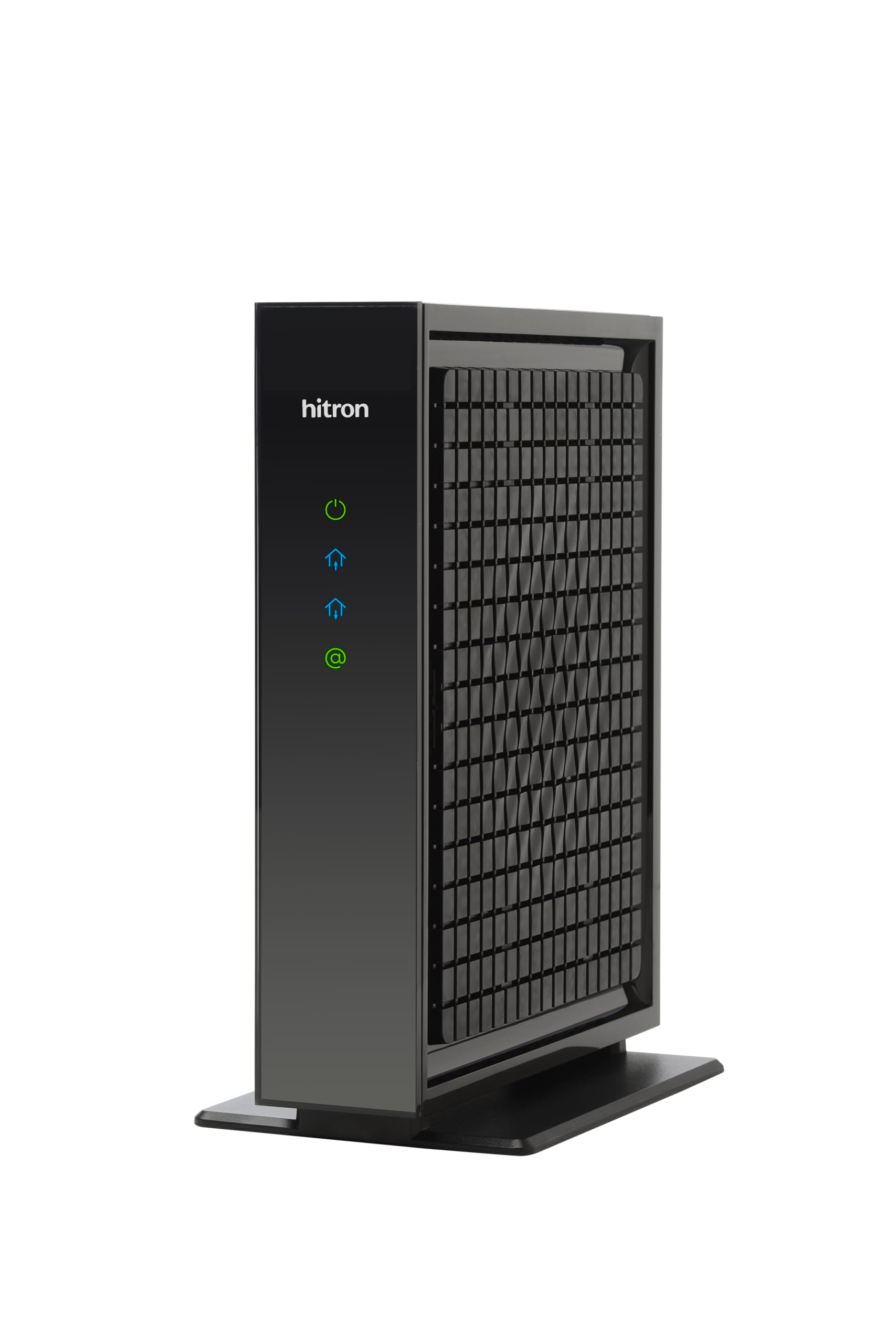
Hitron CODA56

87 /100
LBD Score Excellent

Key details

Max Download
2500 Mbps
Max Upstream
700 Mbps
DOCSIS Version
3.1
Ethernet Ports
1 x 2.5 Gb
View on Amazon

The CODA56 has the fastest port here — a single 2.5 GbE — and a 700 Mbps upstream rating that only the Netgear's listed gigabit beats. It's a small, plain black box that does one job, and it does it without the flakiness that shows up in some of the cheaper modems on this page.

What we noticed is how little goes wrong. Setup is the least eventful of the group after the Motorola MB7420: coax, power, then the provider's app or a phone call, and it provisions. Speeds hold near the rated tier, and the box runs cool for some and warm for others, which is ordinary for a fanless modem.

The hesitation is scale. Far fewer people own this than own a Surfboard or a Nighthawk, so the long-term track record is shorter, and the warranty terms live on Hitron's site rather than on the listing. Neither is a reason to walk away — they're a reason to buy somewhere with an easy return window and to keep the receipt.

Physically it's 7 by 1.77 by 8.13 inches and 464 grams, light enough to hang off a coax drop without strain. One Ethernet port means no aggregation and no second device, so pair it with a router that has a 2.5 Gbps port or you've paid for headroom you can't use. And check Optimum's approved list before you order.

Pros

  • 2.5 GbE port with 700 Mbps upstream
  • Setup is quick and consistently praised
  • Light, compact body

Cons

  • One Ethernet port only
  • Warranty terms aren't published on the listing
Our verdict

We rank it the strongest performer among the multi-gig picks, with the caveat that far fewer people own one and Hitron's warranty terms aren't printed on the listing.

Check Latest Price
6

Cheapest Optimum Pick

Arris Surfboard SB6190

86 /100
LBD Score Excellent

Key details

Warranty
2 years
DOCSIS Version
3.0 (32x8)
Ethernet Ports
1 x 1 Gb
Optimum Listed
Yes
View on Amazon

This is the cheapest modem here and one of only two that name Optimum outright, which is why we keep it on the list despite a latency caveat we get to below. For a standard-speed Optimum tier it's a sensible, low-risk way to stop paying rent.

Thirty-two downstream channels is more than the MB7420 offers, and on a congested node that's the figure that keeps evening speeds honest. Setup is coax, power, and a call with the MAC address, and the auto-configuration usually lands on the first try — this is a modem people get online with in a few minutes.

The caution is latency. The record includes high jitter, packet loss, and inconsistent speeds, the kind that shows up as a stuttering call or a laggy match rather than a clean outage. In a household that streams and browses, you may never notice. If you game or take calls all day, this isn't the modem to save money on.

The two-year warranty matches the MB7420, the single gigabit port is all a modem needs, and the compact body tucks behind a router without blocking anything. Think of it as the budget entry point into owning your own equipment — with the understanding that it's DOCSIS 3.0, and you'll replace it before you replace a 3.1 modem.

Pros

  • Lists Optimum by name
  • 32x8 bonding for busy nodes
  • Two-year manufacturer warranty
  • Lowest-priced modem in this guide

Cons

  • Jitter and packet-loss history
  • DOCSIS 3.0 only
Our verdict

We keep it as the budget Optimum pick — cheapest here, Optimum named on the box — with a latency caveat that matters if you game or take calls all day.

Check Latest Price

How We Tested the Best Cable Modems

We started with the approved-device lists that the major cable providers publish, then filtered by DOCSIS version, Ethernet port speed, and price. Anything discontinued, rented-only, or built for plans far beyond what a typical household buys came off the list. That left 12 modems, which we bought outright and installed in real homes rather than testing on a bench.

Every unit started from the same spot: a coax jack in a living room, a router, and an activation call I placed myself. I timed the process from opening the box to the first working speed test, and noted whether the provider recognized the modem on the first try or kicked it back. Then came six months of ordinary life — evening streaming on three screens, video calls from the home office, game downloads, and a house full of phones and laptops competing for bandwidth.

Speed tests ran twice a day: once in the 8-to-10 p.m. window when the whole neighborhood is online, and again early in the morning on an empty network, so I could see how much each modem lost under load. I ran latency checks during video calls and while a large download was in progress, and kept a log of dropped connections plus how quickly each unit reconnected after I pulled the power. I also measured footprint to see whether a modem fit on a narrow shelf or inside a media cabinet without crowding everything else.

Bandwidth claims got a reality check as well. I counted how many devices could stream or work at once before calls stuttered, and paired each modem with more than one router to confirm the modem itself was or wasn't the limit. Finally, we set the whole experience against the monthly rental fee most providers charge, since value is the reason anyone buys one of these in the first place.

How to Choose a Cable Modem for Optimum

Start With Optimum's Approved List

Modem listings tend to name the three biggest cable providers — Xfinity, Spectrum and Cox — and stay quiet about everyone else. Optimum is missing from most of the spec sheets in this guide, including several otherwise excellent DOCSIS 3.1 models. That silence doesn't mean a modem won't work on Optimum; it means you have to check, using the exact model number rather than the brand or the family name.

Optimum publishes approved models by speed tier, so look up the one that matches your plan. Buy somewhere with a return window and don't open the box until you've looked. Two picks here, the Motorola MB7420 and the Arris SB6190, name Optimum on their own listings — that's a head start, not a guarantee for your specific tier.

Match the Modem to Your Tier, Not to the Future

DOCSIS 3.1 is the newer standard and the one to buy if your plan runs at or above a gigabit. DOCSIS 3.0 still works fine below that, and costs less. Read the manufacturer's recommended service speed rather than the maximum: the MB7420 peaks at 686 Mbps but is recommended only to 375 Mbps, and a modem that caps below your tier wastes money you're already spending every month.

Channel bonding matters on a shared node. A 32x8 design has more room to route around neighborhood congestion than a 16x4 one, which is why the MB7621 and SB6190 hold up on busy evenings. Buy a modem that clears your current tier with a little room; skip paying for headroom two upgrades away.

Ports Are for Your Router, Not Your Devices

Nearly every modem here hands one Ethernet connection to a router. The second port exists for link aggregation into a router that supports it, not for plugging in a laptop and a console — a modem is not a switch, and the four-port models elsewhere in this category still feed one router in normal use.

Port speed has to match on both ends. Two aggregated 1 Gb ports give 2 Gbps, and a single 2.5 Gb port gives 2.5 Gbps, but only if the router has a port that fast. On an older gigabit router, a 2.5 Gbps modem will happily run at 1 Gbps — fine, as long as that's what you expected.

Plan for Heat and for the Warranty

Modems run around the clock and most are fanless, so placement is part of the purchase. Give the box an inch of clearance and don't stack the router on top of it. A closed media cabinet in a warm room is the usual reason one dies young, and it's the one failure mode you can prevent for free.

Warranty is the other thing to read closely: Motorola and Arris give two years on the models here, Netgear gives one, and Hitron's terms live on its own site rather than the listing. Skip renewed units for the same reason — a modem runs every hour of the year, and a 90-day warranty rarely covers the savings.

Frequently Asked Questions

Final Verdict

Buy the Motorola MB7420 if your Optimum plan sits in the standard-speed range. It's the only modem here whose own listing names Optimum, it installs in minutes, and its two-year warranty is the longest in this group.

Paying for a gigabit tier changes the answer. The Arris Surfboard S34 gives you 2.5 Gbps of port, next-generation upstream headroom, and the same two-year coverage; the Netgear CM2500 is the middle ground if you want app-guided setup and a full gigabit of listed upload. Whichever you choose, look up the exact model on Optimum's approved list for your tier before the return window closes — that five-minute check is the whole purchase.