Best IP Phones of 2026

Somewhere between the phone company and the IT person, somebody has to pick the desk phones. The worry isn't whether a phone makes calls — it's whether it will register with the VoIP service you already pay for, whether the power adapter is actually in the box, and whether a new hire can transfer a call without hunting for a manual. A good IP phone settles all three.

Over the past six months we've set up and lived with 11 of them — home office, shared reception desk, stockroom — and the differences showed up fast. Here's what nobody tells a first-time buyer: Power over Ethernet keeps a desk tidy, since the phone draws power down the network cable instead of from a wall wart, but only if your switch actually supplies it. Check that before you fall for a big screen.

What's left is fit: a reception phone needs a display you can read from standing height, while a single desk wants something compact that stays clear through a headset. The picks below run that range.

1

Best Overall

Grandstream GXP2135

89 /100
LBD Score Excellent

Key details

Display
2.8-inch color
Network
Dual Gigabit Ethernet, PoE
Programmable Keys
32 BLF/speed-dial keys
Lines And SIP Accounts
8 lines, 4 SIP accounts
View on Amazon

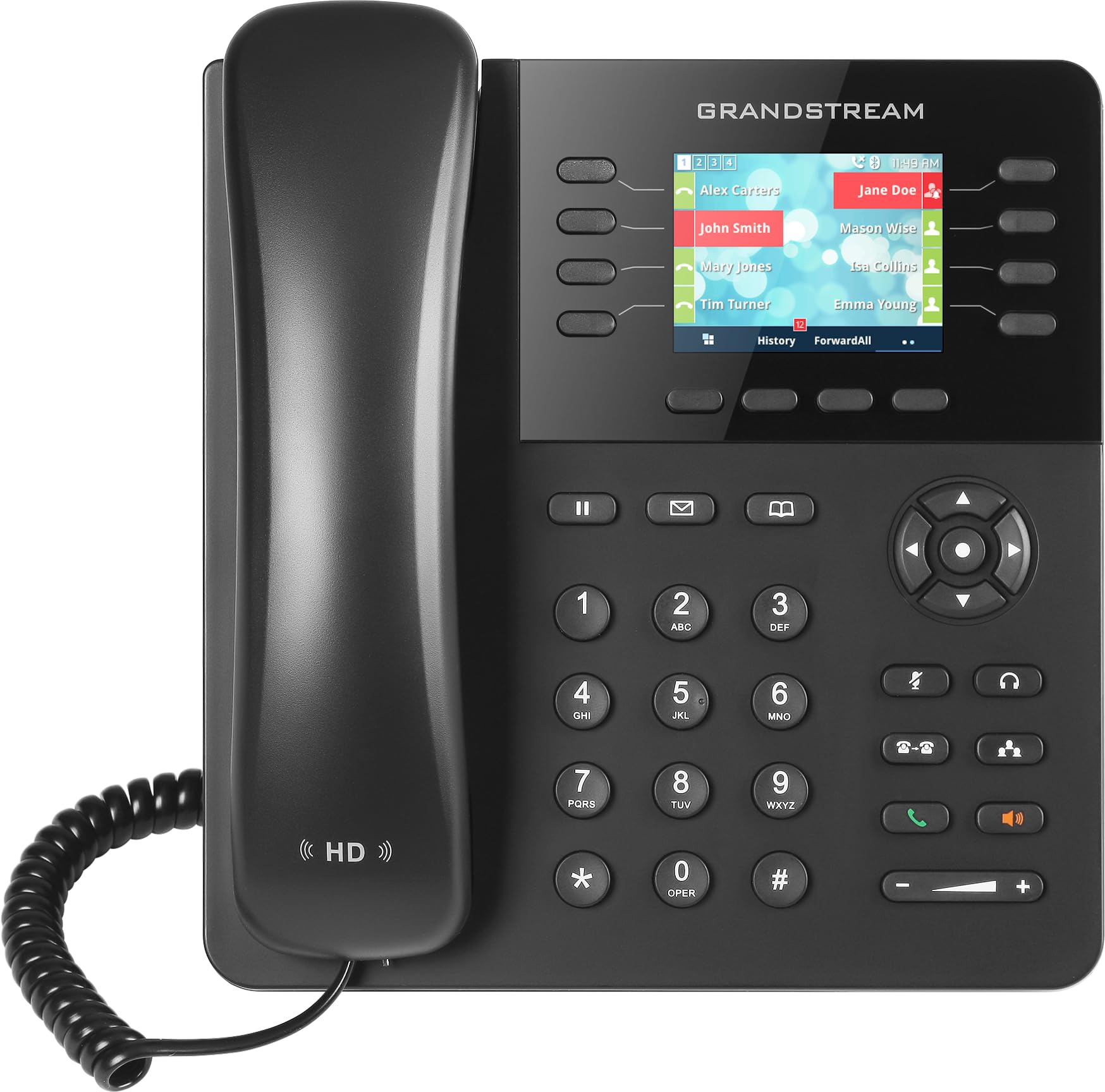
The 32 programmable keys are what make the GXP2135 our default office phone. With eight lines and four SIP accounts, it has enough room for a main number, a shared line, and the extensions a small team actually dials, and the keys put those appearances on the desk instead of behind a menu. We recommend it first because it covers the common office job without making you pay for an executive touchscreen.

The rest of the hardware supports that role. Dual Gigabit Ethernet ports with built-in PoE mean one cable can carry both data and power, and the included universal power supply covers a desk without PoE. Bluetooth is a useful extra for pairing a headset or a mobile device, and the HD handset and full-duplex speakerphone are the right baseline for conference calls. The color screen handles the basics, though the keys do the real work.

Setup is the one place where the GXP2135 asks for a little patience. The web interface is where most of the configuration lives, and it is not as polished as the phone itself; once a provider profile is loaded, day-to-day changes are straightforward. We think that is a fair trade for a phone that handles four SIP accounts, Gigabit, and Bluetooth at a midrange price. For a team standardizing on a practical handset, it is the one we reach for first.

Pros

  • Eight lines and four SIP accounts
  • 32 programmable BLF keys
  • Gigabit PoE and Bluetooth
  • Strong value for a small office

Cons

  • Small 2.8-inch display
Our verdict

We recommend the GXP2135 as the default office phone when you need four SIP accounts, plenty of programmable keys, and wired reliability without paying executive-phone money.

Check Latest Price
2

Best for High Call Volume

Grandstream GXP2170

84 /100
LBD Score Excellent

Key details

Display
4.3-inch color (480 x 272)
Expansion
Up to four GXP2200EXT modules
Programmable Keys
48 on-screen BLF keys
Lines And SIP Accounts
12 lines, 6 SIP accounts
View on Amazon

The GXP2170 is the phone we choose when the GXP2135's four SIP accounts start to feel tight. It doubles the line capacity to 12 lines and six SIP accounts, then adds a 4.3-inch color screen and 48 on-screen BLF keys. That is a different desk: a receptionist or office manager who parks calls, transfers, and watches extensions all day rather than someone who just needs a handset.

We like the GXP2170 most for that high-volume role. The 48 keys are not clutter; they are the point, because they let a receptionist see who is on a call and move a call without memorizing codes. The 4.3-inch display makes those pages easier to scan than the smaller GXP2135 screen, and the phone supports up to four GXP2200EXT expansion modules for up to 160 contacts. If your front desk is the office's switchboard, this is the one that earns its place.

The hardware is otherwise familiar Grandstream: dual Gigabit ports, integrated PoE, five-way conferencing, and solid handset and speakerphone sound. The caution is setup and stability. Configuration varies with the SIP platform, and a unit can freeze or drop its registration, so keep firmware current and buy with a return path. That does not erase the value for a busy desk, but it is why we treat the GXP2170 as a specialist pick rather than the default.

Pros

  • 12 lines and six SIP accounts
  • 48 on-screen BLF keys
  • 4.3-inch color display
  • Expansion to 160 contacts

Cons

  • Large, heavy desk footprint
Our verdict

We keep the GXP2170 on our short list for reception desks that live on hold, transfer, and BLF keys all day; its 12 lines and 48 keys earn the extra desk space.

Check Latest Price
3

Best Executive Phone

Yealink T57W

84 /100
LBD Score Excellent

Key details

Power
802.3af PoE; adapter not included
Display
7-inch adjustable color touchscreen
SIP Accounts
16
Network And Wireless
Wi-Fi, Bluetooth, dual Gigabit Ethernet, PoE
View on Amazon

The 7-inch adjustable touchscreen is the reason to choose the T57W. It turns the phone into a small control panel for a busy desk: 29 touch keys, 16 SIP accounts, and a display that tilts to meet your eyeline. We recommend it for executives and managers who handle a high call load and will actually use the screen, not for a hallway phone where a simple keypad is easier.

The connectivity is unusually flexible for a desk phone. It has dual-band Wi-Fi, Bluetooth, dual Gigabit Ethernet, and 802.3af PoE, so you can place it where a cable run is awkward or keep it wired for reliability. The USB 2.0 port handles call recording and a wireless USB headset, and Yealink's HD voice and Acoustic Shield are aimed at keeping speech clear. We like that the phone can be wireless without becoming a cordless handset; it still sits on the desk and works like a desk phone.

Sound and menu use are strengths; the phone is easy to navigate for a touchscreen model, and the adjustable screen is genuinely useful when you are switching between lines. The 16 SIP accounts are more than most desks need, but that headroom is the point for an assistant or a manager juggling multiple numbers. For a crowded desk that needs many accounts and a big visual interface, the T57W is the premium pick we point to.

Pros

  • 7-inch adjustable touchscreen
  • 16 SIP accounts and 29 touch keys
  • Wi-Fi, Bluetooth, and dual Gigabit PoE
  • USB headset and recording support

Cons

  • Power adapter not included
Our verdict

We point executives and heavy callers to the T57W when a large touchscreen and 16 SIP accounts matter more than a compact footprint or included power supply.

Check Latest Price
4

Best Budget

Yealink T31P

80 /100
LBD Score Excellent

Key details

Power
Adapter included
Display
2.3-inch graphical LCD
Network
Two-port 10/100 Ethernet, PoE
SIP Accounts
2
View on Amazon

The T31P starts with a small advantage that matters more than it sounds: the power adapter is in the box. Many business phones assume you have PoE, and if you do not, the extra adapter is an annoying add-on. This Yealink includes the 5V/0.6A supply and still supports PoE, so it works on a home desk or a small office switch without a scavenger hunt.

We recommend it for a simple desk that needs a straightforward handset, not a call-center console. The 2.3-inch graphical LCD shows the essentials, and five-way local conferencing covers a small team huddle. It is the budget pick because it keeps the feature set tight, not because it feels disposable; the basics are all here.

The T31P is not the phone for a reception desk; that is a different job, and the GXP2170 is the one we point to there. For a home office or a small front desk where the phone is a phone, the T31P keeps the setup simple. The included adapter is the detail that makes it easy to recommend: you can unbox it, plug it in, and get on with the day without ordering a part that should have been in the box.

Pros

  • Power adapter included
  • PoE support
  • Five-way local conferencing

Cons

  • Only two SIP accounts
  • 10/100 Ethernet only
Our verdict

We recommend the T31P for a home office or tiny front desk that needs two clean SIP lines and a power adapter in the box, not a wall of programmable keys.

Check Latest Price

How We Tested the Best IP Phones

We started with the phones small businesses actually deploy: unlocked units that register with any standard VoIP provider, dual-port gigabit Ethernet, and screens running from roughly 2.8 to 7 inches. We filtered by price as well, keeping the field to what a per-desk budget can absorb once you've added the adapter that some phones leave out of the box. That left 11 models, which we bought at retail rather than accepting loaners, and testing ran six months.

Each phone got a desk and a real job. One took the bulk of incoming calls at a shared reception desk, two handled a home office line used for client calls and the occasional early conference bridge, and one sat in a stockroom where the person answering is usually standing and often wearing a headset. A couple moved rooms mid-test so we could watch them re-register on a different network.

Setup was timed from opening the box to a completed test call, done solo using only the provider's instructions. We called a cell phone and a landline from each one, listening for hiss, clipped syllables, and how hard the handset pushed voices, then repeated the call on speakerphone and through a headset. We handed each phone to someone who had never touched that model and asked them to put a caller on hold and transfer it.

Displays were read at arm's length and from standing height, in a bright window and under office fluorescents, noting whether the font and contrast held up. At the end we unplugged the Ethernet cable from each phone to confirm whether it was running on PoE or needed its own adapter, and wrote down exactly what shipped in the box. The pattern held: the phones people reached for were the ones with a readable screen and a transfer key that behaved the same way twice.

How to Choose an Ip Phone

Count SIP Accounts and Lines First

A line is an appearance on the phone; a SIP account is a registration with your provider. For a single desk, two accounts can be enough, while a shared line or a reception position needs more. We put account capacity ahead of screen size because it decides whether the phone can do the job at all. The Grandstream GXP2135 gives you four SIP accounts and eight lines, the GXP2170 moves to six accounts and 12 lines, and the Yealink T31P keeps things simple with two accounts. Start there, then let the rest of the feature list follow.

Match Connectivity and Power to the Desk

PoE is the cleanest setup if your switch supplies it: one Ethernet cable carries data and power. If it does not, confirm that the phone includes a power adapter, because some business models ship without one. Wi-Fi is useful when a cable run is impossible, but it does not make the phone cordless; it still needs power. The Yealink T57W has dual-band Wi-Fi and PoE but no adapter in the box, while the T31P includes its adapter and still supports PoE.

Match Keys and Screen to the Call Handling

Physical BLF keys are a productivity feature on a phone that handles transfers and shared lines. A receptionist can see who is busy without memorizing codes, while a private office can get by with fewer keys and a simpler display. The GXP2170's 48 on-screen keys and the GXP2135's 32 programmable keys are aimed at that visible call handling. The T57W takes a different route with a 7-inch touchscreen and 29 touch keys. We treat the screen as secondary to the keys unless the phone is also a status board for a busy desk.

Listen for Sound and Plan for Setup

A spec sheet can promise HD voice and a full-duplex speakerphone, but the handset and speaker are what you live with. We put a supported provider profile ahead of an extra feature. Confirm that your VoIP provider supports the model or offers a configuration guide before you buy; provisioning is where a bargain phone can become expensive in time. A phone that registers cleanly and updates without fuss is worth more than a slightly larger screen.

Frequently Asked Questions

Final Verdict

For most offices, the Grandstream GXP2135 is the phone we recommend first. It has the SIP capacity, programmable keys, Gigabit PoE, and Bluetooth that a general desk needs, and it does not charge executive-phone money for them.

Choose the GXP2170 if your reception desk handles a dozen lines and needs a wall of BLF keys. Choose the T31P if the job is a simple two-line desk and you want the power adapter in the box. Choose the T57W if a large touchscreen and 16 SIP accounts are worth the premium. Start with the GXP2135 unless one of those requirements changes the desk.