Best Karaoke Machines with a Screen of 2026

The best part of karaoke night is the moment everyone forgets they're bad at singing. The worst part is squinting at a screen the size of a coaster while one microphone dies mid-chorus. A machine with a real lyrics display and self-charging mics is supposed to kill both problems at once — assuming the screen is readable from across a crowded room and the batteries outlast your uncle's power ballad.

I've hosted enough at-home karaoke nights to know that sound quality is what guests notice first and portability is what they notice last, right up until somebody has to carry the thing. Over the past seven months, my team and I ran six machines with built-in screens through birthday parties, a garage hangout, and one memorable camping trip, and the gaps between them were not subtle.

Here's what nobody tells a first-time buyer: screen size matters less than where the screen sits relative to your eyeline, and a machine that mirrors lyrics to your TV over HDMI will beat a bigger built-in panel in a packed room. What I was really hunting for was a unit that gets through an entire party without a cable, a charger, or a reboot. The ones below came closest.

1

Best Overall

Ikarao Shell S1

90 /100
LBD Score Outstanding

Key details

Screen
10.1-inch lyrics display
Weight
11.7 lb
Peak Power
280W
Microphones
2 auto-charging wireless
View on Amazon

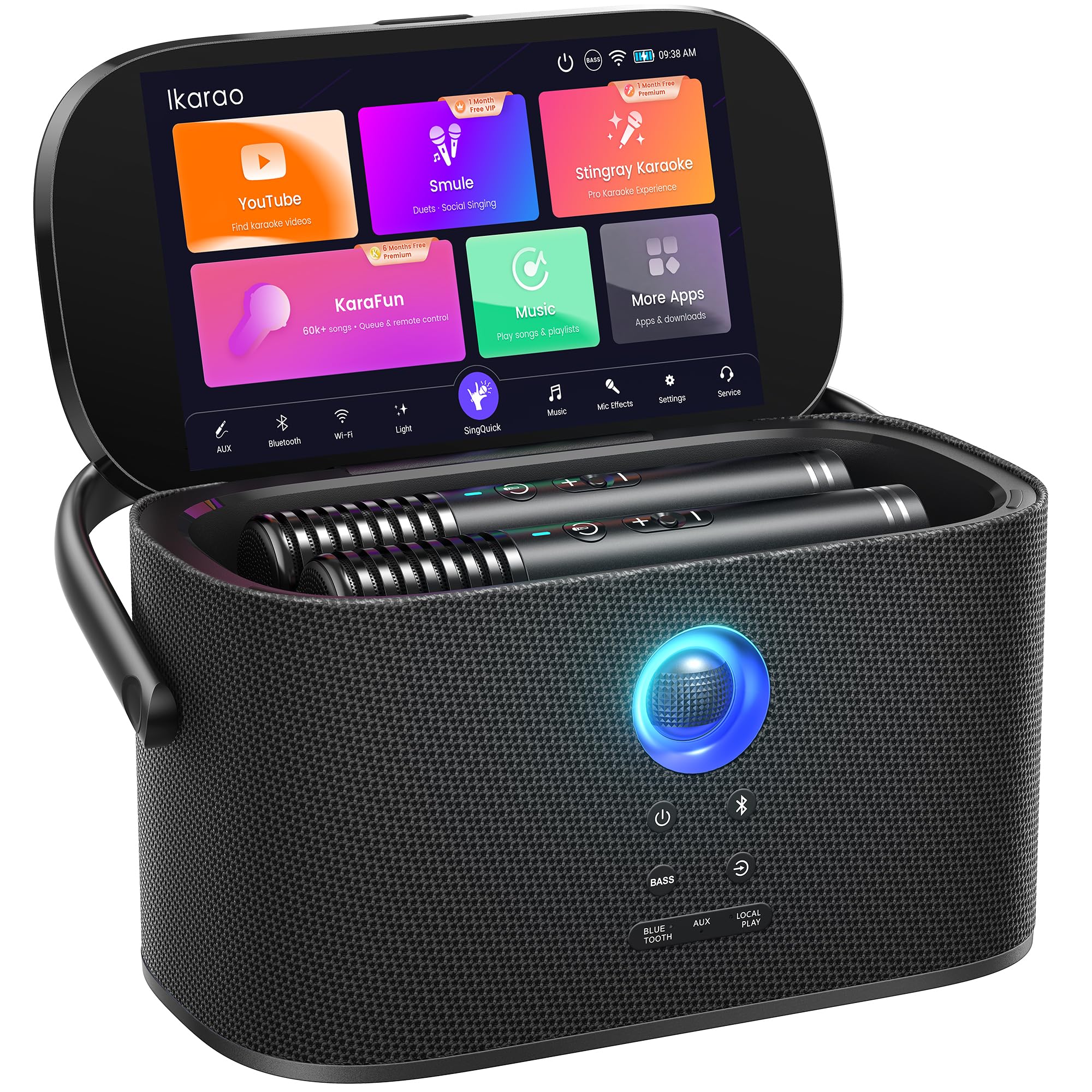
A 10.1-inch screen is the Goldilocks size for a home machine: big enough to follow lyrics from across a living room, small enough that the unit doesn't become a piece of furniture. The Shell S1's display is sharp and responsive, and because it is built into the machine, lyrics stay in view without asking someone to hold up a phone. HDMI is there when the group outgrows the built-in screen; one cable puts the lyrics on the TV.

The 280W peak rating needs context: peak power is a ceiling, not a guarantee of clean volume. In a living room, the four-speaker array had enough headroom for a loud chorus, and the two wireless mics picked up vocals without the thin, compressed sound we associate with bargain all-in-ones. The auto-charging docks are the detail we appreciated most after a party—drop the mics in and stop hunting for cables.

At 11.7 pounds, the S1 moves easily on the included shoulder strap, but it is not a toss-in-a-tote machine. That size is the point: it holds a screen you can actually read and speakers that fill a room, and it still fits on a sideboard. The Shell S2 is the one to pack; the S1 is the one to leave set up.

Pros

  • 10.1-inch screen is easy to read
  • 280W peak power fills a living room
  • Microphones recharge automatically in their docks
  • Shoulder strap makes 11.7 pounds manageable

Cons

  • A microphone can stop working
Our verdict

We recommend the Shell S1 as our all-round pick for most homes: the 10.1-inch screen is easy to read, 280W fills a living room, and 11.7 pounds still moves on the included strap.
Check Latest Price
2

Best Portable

Ikarao Shell S2

90 /100
LBD Score Outstanding

Key details

Screen
Built-in lyrics display
Weight
7.3 lb
Peak Power
140W
Microphones
2 self-charging wireless
View on Amazon

The Shell S2 is the machine we grab when the party isn't at home. At 7.3 pounds and 5.91 inches tall, it has a built-in handle and a footprint that fits on a kitchen counter without blocking the backsplash. The screen is part of the cabinet, so you're not balancing a tablet on a stand or finding a place for a separate display. It is the all-in-one idea in a package that actually travels.

The 140W peak rating is modest next to the S1's 280W, and peak figures are not a clean loudness comparison. For a patio or a small room, the dual 2.7-inch speakers are tuned for close-range clarity rather than big-room pressure. The six-month KaraFun subscription gives you a library out of the box, and the two self-charging mics mean the kit is complete without a separate mixer.

The trade-off is scale: this is not the machine for a large living room, where the S1's bigger speaker array and 10.1-inch display make more sense. What the S2 buys is convenience—8 sound effects and EQ adjustments, a built-in powerbank, and a body you can carry with one hand. It is the one we leave by the door.

Pros

  • 7.3-pound body with a built-in handle
  • 140W peak power suits small rooms
  • Six months of KaraFun included
  • Two self-charging wireless mics

Cons

  • Microphones can stop charging
Our verdict

We recommend the Shell S2 for singers who need a screen and a complete kit in a 7.3-pound package; it is the one to pack when the party moves.

Check Latest Price

How We Tested Karaoke Machines With Screens

We started by pulling every machine we could find that builds a lyrics display into the speaker itself rather than leaning on a phone propped against a glass, then filtered for what actually varies at this level: screen size and brightness, whether the microphones charge in their own cradles or need a separate cable, how the unit hands lyrics off to a TV, and what's in the box. That left six machines, which we lived with for seven months.

Testing happened where karaoke actually happens — a living room birthday with 14 people, a garage hangout with the door propped open, a backyard cookout, and one camping trip we don't recommend repeating. At each one we handed the machine over without instructions and watched how fast guests found a song, whether they had to shout to be heard, and how much of the night I spent troubleshooting instead of singing.

For sound, we played the same three tracks on every unit — a pop chorus, a country ballad, a rap verse — and listened for whether vocals sank under the backing track and whether anything hissed when we pushed the volume. We noted the delay between singing into a mic and hearing it through the speaker, since that lag is what makes a machine feel cheap. On charging, we ran each pair of mics from full to dead, counted the songs, then timed how long they took to come back.

Portability got measured the unglamorous way: up and down a flight of stairs, into a trunk, and set up alone with no second pair of hands. We kept running notes over the months on pairing dropouts, frozen screens, loose screen hinges, and mics that stopped holding a charge — the reliability problems a single afternoon never surfaces. We also counted what shipped in the box, because a machine that needs extra cables or a stand is worse value than the sticker implies.

How to Choose a Karaoke Machine with a Screen

Get the Screen Size Right for the Room

A 10.1-inch display is comfortable for a living room, where people sit several feet back; a smaller screen can be fine at arm's length but harder to read across a room. The Shell S1's 10.1-inch screen is the known quantity here. The Shell S2 keeps a built-in display in a much smaller body, so the trade-off is portability against lyric visibility. If the machine will sit on a shelf, put the screen at eye level and check whether HDMI to a TV is an option.

Read Peak Power Carefully

Peak wattage is a maximum rating, not the same as RMS or a measured loudness result, so 280W and 140W do not tell you exactly how much louder one machine is. The Shell S1's 280W and four-speaker array are aimed at a living room; the Shell S2's 140W and dual 2.7-inch speakers suit a patio or small room. Match the machine to the space, and don't pay for a bigger number if you mostly sing close to the speaker.

Check How the Microphones Charge

Auto-charging docks are a real convenience: drop the mics in after a song and they top up without a cable hunt. The catch is that charging contacts and batteries can fail, so test both mics as soon as the machine arrives, confirm they charge in the dock, and keep the contacts clean and dry. If a mic needs a cable, a charging dock is still easier to live with than a drawer full of loose batteries.

Match the Weight to Where It Lives

A 7.3-pound machine with a handle is easy to move from closet to patio; an 11.7-pound machine with a shoulder strap is still portable but wants a dedicated shelf. If the karaoke machine will live in the living room, the larger Shell S1's screen and sound are worth the extra bulk. If it will travel, the Shell S2's smaller body is the better fit. Measure the shelf or counter you have in mind before you buy, especially if the screen needs to sit at eye level.

Decide How Self-Contained You Want It

An all-in-one screen machine should let you see lyrics and control the mics without opening a laptop. Check whether the built-in song library needs Wi-Fi and whether the included subscription renews after the trial; the Shell S2 includes six months of KaraFun, while the Shell S1 pairs its 10.1-inch screen with HDMI for a TV. If you already have a smart TV and a good sound system, a simpler machine may be enough; if you want one box, pay for the screen and app experience.

Frequently Asked Questions

Final Verdict

For most homes, the Shell S1 is the machine we recommend. The 10.1-inch screen is readable from the couch, 280W fills a living room, and the 11.7-pound body still moves on the included strap. It is the all-in-one that makes the screen feel like part of the party rather than another device to manage.

The Shell S2 is the better buy when the party travels. It puts a built-in screen and two self-charging mics in a 7.3-pound package, with 140W sound that suits a patio or small room. Choose the S1 for the living room and the S2 for the car.