Best Network Audio Players of 2026

A network player is a small box that pulls music off your Wi-Fi and hands it to the amp and speakers you already own — no laptop tethered to a DAC, no hunting through files. What separates a good one from an irritating one rarely shows up on the spec sheet: whether the app holds its connection from the kitchen, whether AirPlay survives a whole album, whether setup takes five minutes or eats an evening. Get those right and the gear you already own sounds like it cost more.

I've spent six months living with nine of these streamers, running the same albums through the same amp and speakers, and the gaps were not subtle. Here's what nobody tells a first-time buyer: the DAC chip gets the marketing attention, but the app and the network radio decide whether you actually enjoy using the thing.

The nine ran from a coaster-sized puck to a touchscreen unit with balanced outs and HDMI ARC, and the ones that survived earned it on reliability rather than feature counts. The picks below are the ones I'd plug in again.

1

Best Overall

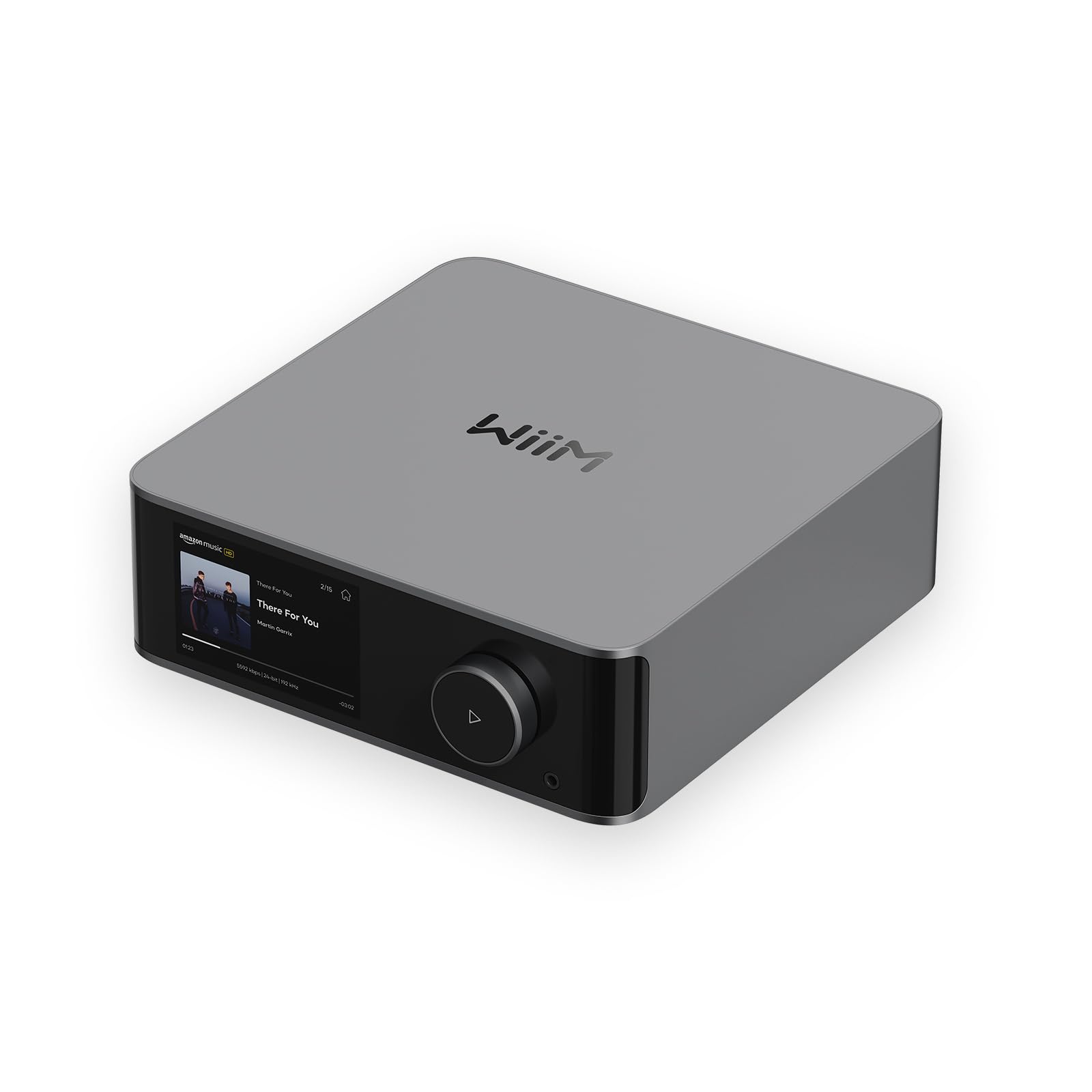
WiiM Ultra

92 /100
LBD Score Outstanding

Key details

Hi-res
Up to 24-bit/192 kHz
Inputs
Phono, HDMI ARC, optical, coaxial, USB
Network
Wi-Fi 6, Ethernet, Bluetooth
Outputs
RCA, subwoofer, headphone, coaxial, optical, USB
View on Amazon

The back panel is the reason the Ultra earns our top spot. Phono, HDMI ARC, optical, coaxial, USB, RCA, a headphone jack, and a subwoofer output all sit on one compact aluminum box, so it can take a turntable, a TV, and a streamer without adding a phono stage or an HDMI extractor. That makes it the most flexible hub in this group for a mixed stereo and living-room system.

The streaming side is just as complete: TIDAL, Qobuz, Spotify Connect, DLNA, and NAS access, with support for files up to 24-bit/192 kHz. RoomFit room correction and the subwoofer output are the details we appreciate most, because they let a pair of stand-mount speakers behave like a fuller system in a normal room. The touchscreen is small but useful, and the included remote means you don't have to reach for a phone just to change inputs or volume.

That flexibility comes with a category caveat: it won't drive passive speakers on its own, so you still need an amp or powered speakers. Given how much it replaces upstream, we're happy to make that trade. If you already have a good amp, the Ultra is the piece that makes the whole system feel current.

Pros

  • Flexible phono, HDMI ARC, and subwoofer connections
  • RoomFit tuning and subwoofer output
  • Touchscreen and remote control without a phone
  • Hi-res streaming up to 24-bit/192 kHz

Cons

  • No balanced XLR outputs
Our verdict

For most people building a stereo around an existing amp, we think the Ultra is the one to buy: it handles records, TV sound, and hi-res streaming without extra boxes.
Check Latest Price
2

Best Budget

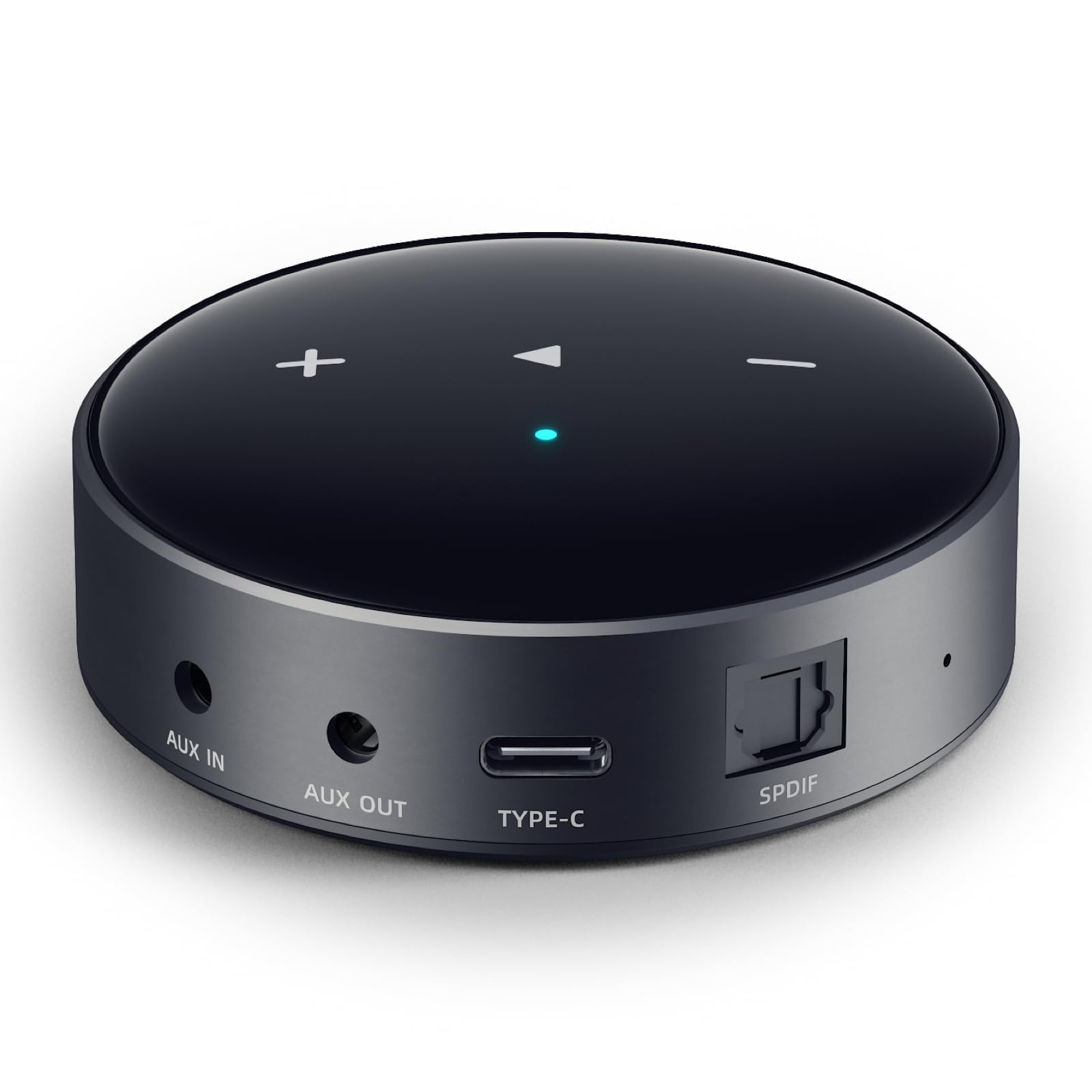
WiiM Mini

86 /100
LBD Score Excellent

Key details

Hi-res
Up to 24-bit/192 kHz
AirPlay
AirPlay 2
Network
Wi-Fi, Bluetooth
Outputs
Analog aux, optical
View on Amazon

The Mini is barely bigger than a deck of cards, and that's the point: it can sit behind a receiver or on a bookshelf without becoming another black box in the room. It brings AirPlay 2, Spotify Connect, TIDAL Connect, and 24-bit/192 kHz streaming to an older stereo through analog or optical output. We like it most as a second-room or desktop streamer where a full-size component is overkill.

The optical output is the feature that makes the Mini more than a budget adapter. You can start with its onboard DAC, then add a better outboard DAC later without replacing the streamer. In our view, that upgrade path matters more than the Mini's small, screen-free design, especially if your amplifier already has a decent DAC. The WiiM Home app keeps setup and source switching straightforward, and AirPlay 2 is built in for Apple households.

The catch is that the Mini is Wi-Fi only, and network stability is the thing to solve before you hide it in a cabinet. If your router is far away, plan for a mesh node or a wired access point rather than blaming the streamer when playback stutters. It is at its best when you give it a strong signal and treat it as a pure streamer. As a compact way to modernize a stereo, though, it earns its place.

Pros

  • AirPlay 2 and 24-bit/192 kHz streaming
  • Tiny footprint hides behind a receiver
  • Optical output allows an external DAC upgrade

Cons

  • No HDMI ARC or phono input
Our verdict

We recommend the Mini for a second stereo or desktop setup where AirPlay 2 and a tiny footprint matter more than inputs; it's the budget entry here.

Check Latest Price
3

Best with Balanced Outputs

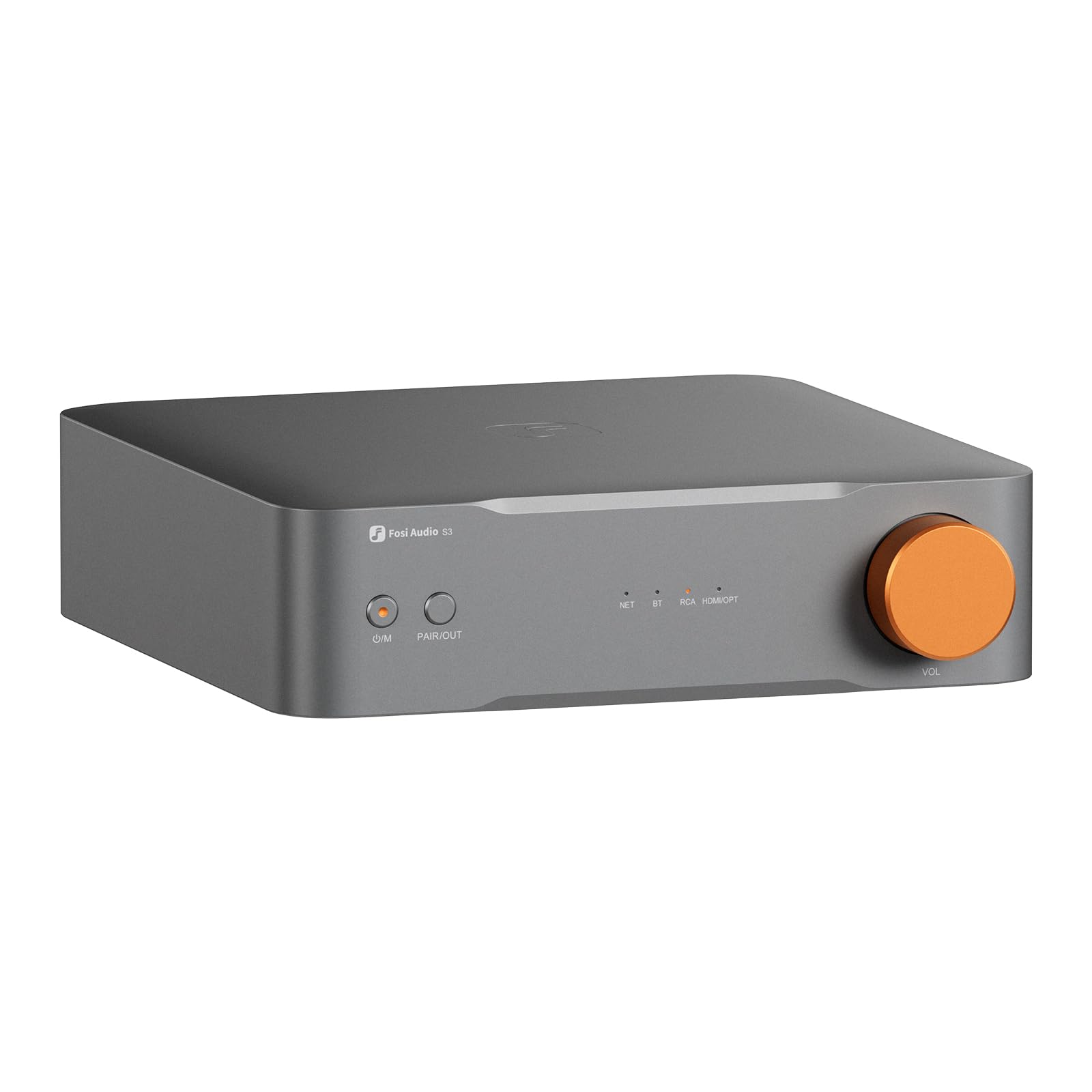
Fosi Audio S3

81 /100
LBD Score Excellent

Key details

DAC
AK4493SEQ
Inputs
HDMI eARC, optical, RCA
Network
Wi-Fi 6, Ethernet, Bluetooth 5.3
Outputs
XLR balanced, RCA, optical, sub out
View on Amazon

The S3's balanced XLR outputs are what set it apart in this group. If you run powered studio monitors or a power amp with balanced inputs, it feeds them without an adapter, and the HDMI eARC input means the same box can handle TV sound. We see it as a compact streaming preamp for a desk or a small living-room system, not a full-size hi-fi component.

Inside is an AK4493SEQ DAC with PCM support up to 32-bit/768 kHz over LAN, plus Wi-Fi 6 and Bluetooth 5.3. The 10-band EQ gives you more shaping than the simpler tone controls on some players here, and the subwoofer output gives a 2.1 setup somewhere to go. We liked the connectivity mix: optical, RCA, HDMI eARC, and XLR cover more systems than the footprint suggests.

The S3 makes the most sense when XLR is non-negotiable. It gives a desktop or powered-monitor system a balanced front end and a TV input without adding a full-size preamp, and the 10-band EQ lets you tune around a bright dome tweeter or a boomy desk. For a simpler RCA setup, the WiiM Ultra is the more flexible choice, but the Fosi earns its spot for the connections the others here don't offer.

Pros

  • Balanced XLR outputs feed powered monitors
  • HDMI eARC and sub out for TV and 2.1
  • AK4493SEQ DAC with a 10-band EQ

Cons

  • App and remote pairing can be fussy
Our verdict

We like the S3 for a powered-speaker or desktop rig that needs balanced XLR and HDMI eARC; it's the specialist pick here for those connections.

Check Latest Price
4

Best for Internet Radio

Grace Link

78 /100
LBD Score Very Good

Key details

Network
Wi-Fi, Ethernet, Bluetooth 5.0
Outputs
Analog and digital
Presets
100
Internet Radio
100,000 stations
View on Amazon

A hundred presets is the kind of feature that sounds excessive until you use it. The Grace Link makes internet radio behave like a car stereo: you can save stations, step through them with the remote, and see what's playing on the front panel without opening an app. We like that for a kitchen, den, or secondary system where quick access matters more than deep library browsing.

It isn't just a radio, either. The Link supports Spotify Connect, Pandora, Amazon Music, iHeartRadio, Chromecast, Bluetooth 5.0, and UPnP/DLNA, with analog and digital outputs and hi-res files up to 24-bit/192 kHz. We appreciate that it has both a remote and front-panel controls, because a radio-first device should work when your phone is across the room. Setup is straightforward, and the digital output is a clean way into an older DAC.

The service list is where the Link shows its radio-first design. It's built around internet radio, Spotify Connect, Pandora, Amazon Music, and Chromecast, so TIDAL and Qobuz listeners are better served by a WiiM. If your listening is news, public radio, and a handful of streaming playlists, the Link's focus is a feature rather than a shortcoming.

Pros

  • 100 presets make internet radio easy
  • Remote and front-panel controls
  • Analog and digital outputs feed older stereos
  • Chromecast, Spotify Connect, and Bluetooth built in

Cons

  • Bluetooth can be less stable than Wi-Fi
Our verdict

The Grace Link is our pick for radio-first listeners who want presets and a remote in a second stereo, not a general-purpose streaming hub.

Check Latest Price
5

Premium Display

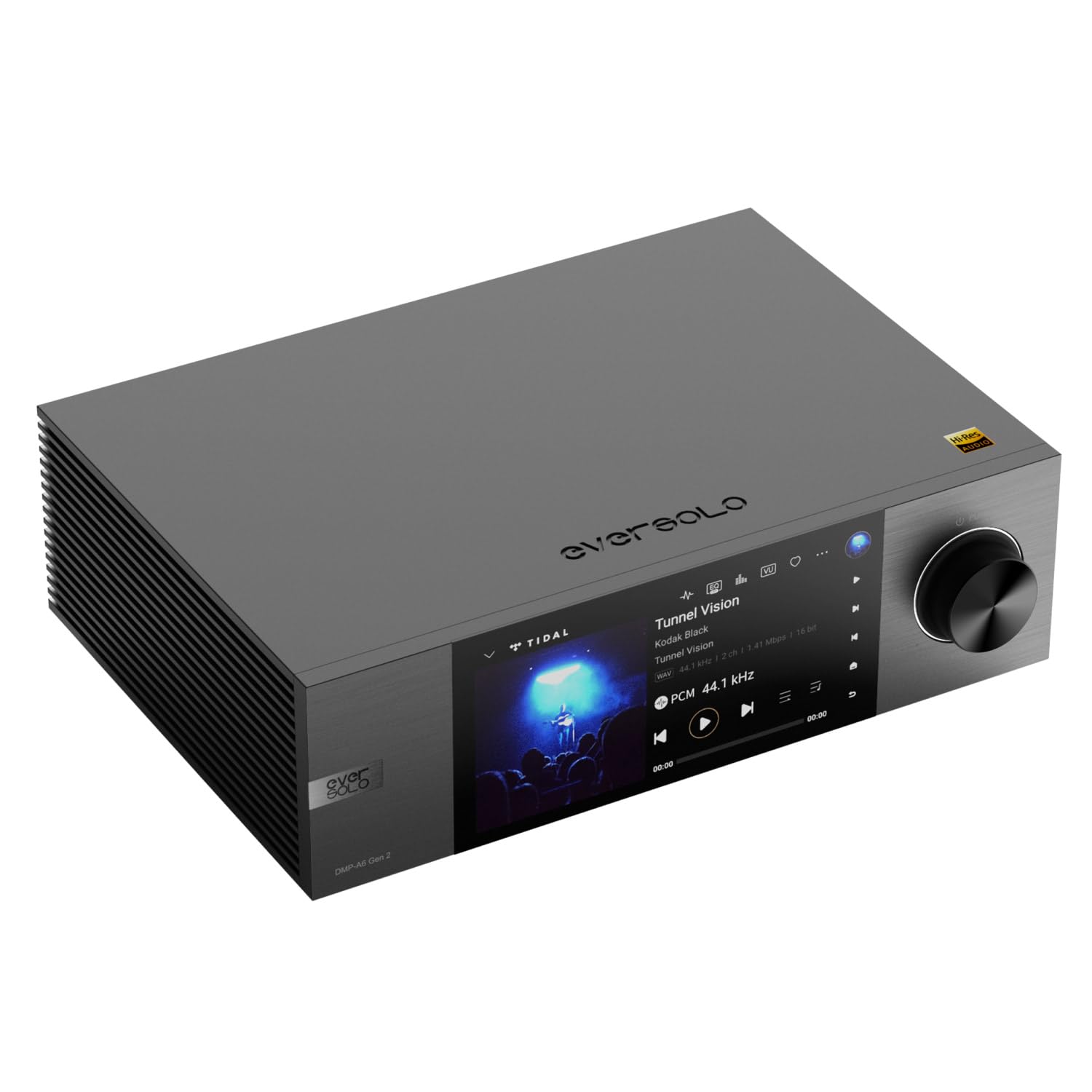
Eversolo DMP-A6 Gen 2

79 /100
LBD Score Very Good

Key details

Hi-res
DSD512
Display
6-inch touchscreen
Network
Wi-Fi, Ethernet, Bluetooth
Outputs
RCA, coaxial, optical, HDMI, USB, USB-C
View on Amazon

The DMP-A6 Gen 2 is the most visually oriented player here. Its six-inch touchscreen turns album art, track data, and VU meters into something you can see from across the room, and the Android-based interface is designed to be used without a phone. We appreciate that kind of front-panel confidence: it makes the streamer feel like a component, not a hidden adapter.

The hardware is serious, too. DSD512 support, a linear power supply, HDMI ARC, and a generous set of digital and analog outputs make it a natural fit for a high-end system with multiple sources. There are multiple USB ports, so external storage and a CD drive can coexist, and the screen can be mirrored to the Eversolo app on a phone or tablet. This is the one to choose if the display and format support are part of the appeal, not just the sound.

The catch is long-term reliability. Some units have refused to power up or stopped working after several months, and at a premium price that's a risk worth managing with a seller that has a straightforward return policy. If it stays healthy, the DMP-A6 Gen 2 is a compelling premium player. It is not the safe default in this group, but its display and format support make it a memorable premium player.

Pros

  • Six-inch touchscreen shows album art and meters
  • DSD512 and broad hi-res format support
  • Multiple USB ports and HDMI ARC

Cons

  • App can feel buggy and laggy
Our verdict

We see the DMP-A6 Gen 2 as a premium choice for a high-end system where a visible touchscreen and DSD playback matter, provided you buy with a return option.

Check Latest Price

How We Chose and Tested These Streamers

To build the shortlist, I went through the current crop of network players and cut anything that couldn't stream from more than one service or lacked a wired output to a real amplifier, then narrowed by price and by whether the control app existed for both iOS and Android. That left nine units. Each one lived with me for six months.

Setup came first: I timed how long each took from unboxing to first song, working alone and without opening the manual. Every unit then went into the same living room system — an integrated amp and a pair of bookshelf speakers — where I played the same three albums through Spotify Connect and TIDAL and listened for dropouts, flattened highs, and whether a wired connection sounded noticeably different from Wi-Fi.

After that, each moved around: a desk setup with powered speakers, a kitchen zone for multi-room, and a late-night headphone session. I left Bluetooth on and walked out of range to see how fast it recovered, switched between AirPlay and a native connection to compare lag, and changed volume three ways — app, remote, front panel — to see which felt natural. Room correction and EQ got their own pass; I ran the tuning routine, then toggled it off mid-song. Each unit also sat idle for a week, and I noted which ones reconnected without a reboot.

How to Choose a Network Audio Player

Start with the connections your stereo already has

We start with the jacks because a network player is only useful if it can feed what you own. RCA line outputs suit most integrated amps and receivers; optical or coaxial digital outputs let you use the DAC in an amp or outboard converter. If you run powered studio monitors, balanced XLR outputs are worth paying for because they reject noise over longer cable runs. HDMI ARC is the one to choose when the same system handles TV sound, and a subwoofer output gives a two-channel setup a path to 2.1.

We also check the inputs. A phono input lets a turntable plug straight into the player, while a player without one needs a separate phono stage. HDMI ARC is audio return from a TV, not a second HDMI switch, so a console-heavy rack still needs its own switching. Before buying, write down every source you want to hear and match each one to a jack.

Check services, AirPlay, and local-library access

Streaming support is not a generic checkbox. Spotify Connect, TIDAL Connect, Qobuz, Amazon Music, Chromecast, and AirPlay 2 each behave differently, and a player can be excellent on one and awkward on another. If most of your listening comes from a NAS or a computer, look for DLNA/UPnP or direct network-share access. Roon users should verify the exact model, because Roon readiness varies across a maker's range.

The trap is the hi-res badge. A player that decodes 24-bit/192 kHz files may still lack the native app for the service you use, and AirPlay or Chromecast can impose their own limits. We check the three sources we use most before anything else. The WiiM Mini is the clear AirPlay 2 choice here, while the Grace Link is built around Chromecast and internet radio.

Decide how much DAC and format support you need

For most systems, a well-implemented DAC that handles 24-bit/192 kHz is plenty. DSD512 is a genuine feature for listeners with a DSD library, but it should not drive the purchase if your files are CD-quality or streaming-service streams. Balanced outputs matter most when you have long cable runs, active monitors, or a persistent hum problem; otherwise good single-ended RCA outputs are fine.

The smart upgrade path is a player with a digital output and a DAC you can add later. That is why we like the WiiM Mini's optical output and the Fosi S3's balanced output stage for different buyers. One gives you a low-cost route into streaming and a later DAC upgrade; the other solves a powered-monitor setup that needs XLR from the start.

Plan for network stability and everyday control

A streamer is a network device before it is an audio component. Ethernet is the most reliable connection if your rack has a jack; if not, a strong mesh signal or a dedicated access point matters more than a higher bitrate. Dropouts are a network problem, not a DAC problem, and no amount of format support fixes them.

Control is the other daily friction. A good app makes source switching and library browsing quick, but a remote or front-panel display is valuable when the phone is elsewhere. We prefer a player with both when it sits in a shared room. If it lives in a cabinet, a display is wasted; spend the difference on outputs or a better DAC.

Leave room for the box and the way you listen

Network players are small, but they still need a shelf, a power outlet, and enough clearance for cables. A compact model can hide behind a receiver; a screen-led model like the Eversolo DMP-A6 Gen 2 wants to be seen. Measure the space before you fall for a display.

Think about the rest of the household, too. A player with a headphone jack, a subwoofer output, or multiroom support can replace several small boxes. The catch is that compact in a listing means a small chassis, not a portable player; these devices still need AC power and a network. Buy for the shelf you have, not the one in the photo.

Frequently Asked Questions

Final Verdict

We recommend the WiiM Ultra for most people because it solves the most common tangle in one box: a turntable, a TV, a streamer, and a subwoofer all feed through it without extra adapters.

If you want AirPlay 2 in a second room with the least clutter, the WiiM Mini is the better fit. For balanced XLR or HDMI eARC at a desk, choose the Fosi S3. The Grace Link is the radio-first exception, and the Eversolo DMP-A6 Gen 2 is the premium display piece for a system that can justify it.