Best Smart Locks for Interior Doors of 2026

Somewhere in my house is a key to a door I haven't locked in years. The spare-key system — one on the ring, one in a drawer, one with a neighbor — works until it doesn't, and it fails loudly: a kid shut into a bedroom, a contractor stranded in the driveway, a guest who can't get into the spare room. A keypad or fingerprint lock replaces that with a code you can change in ten seconds. I put one on my home office and haven't carried the key since.

Interior locks aren't really a security purchase — they're convenience and privacy. You aren't fortifying a vault; you're deciding who gets into the office, the garage, the pantry, the guest room. What separates a good one from an irritating one only shows up in daily use: whether the keypad is legible in a dim hallway, whether the auto-lock fires while you're hauling laundry, whether the fingerprint reader reads damp hands after the dishes. We spent six months installing and living with nine of these locks, and the picks below are the ones that stayed out of my way.

1

Best Overall

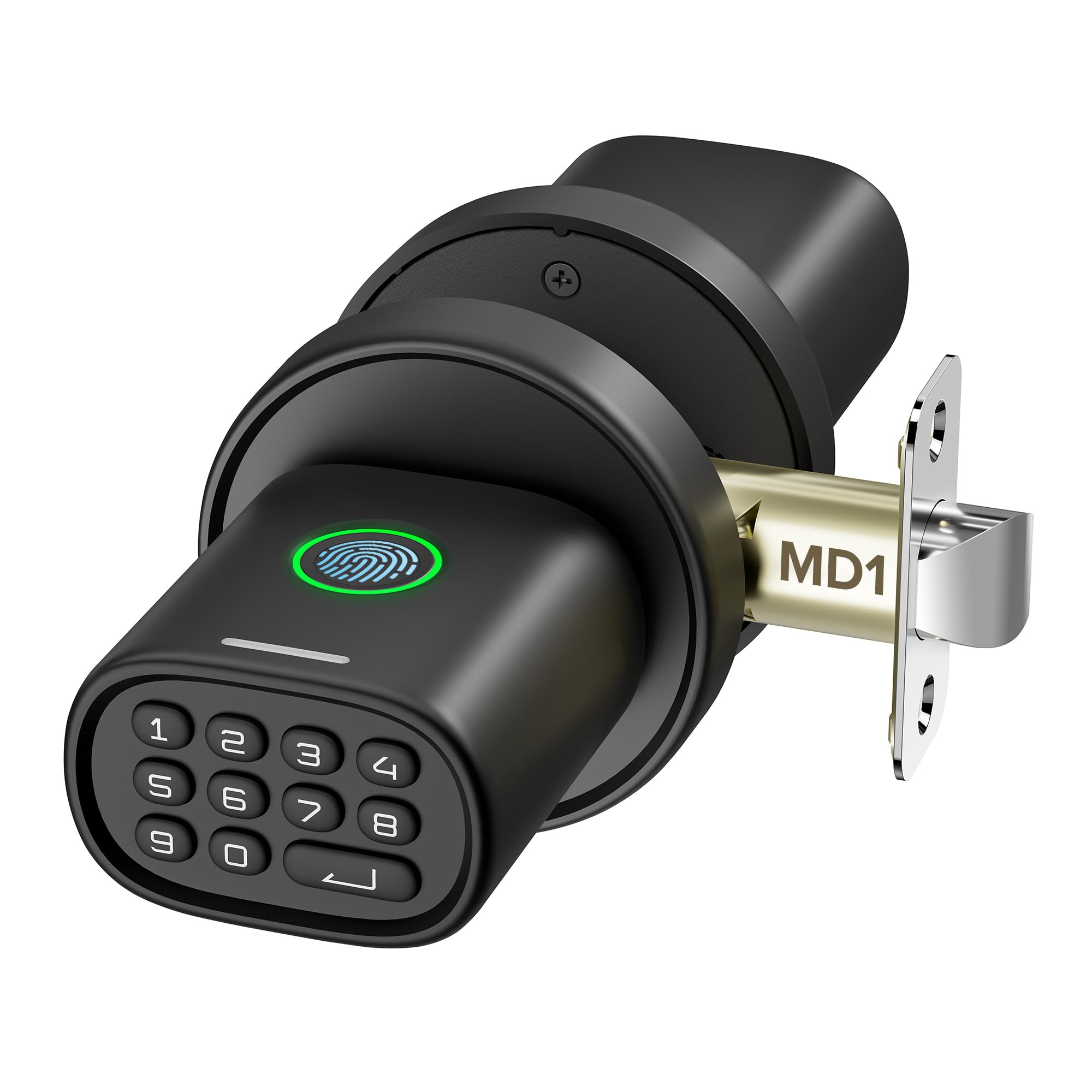
ThorBolt MD1 Fingerprint Door Knob

89 /100
LBD Score Excellent

Key details

Power
4 AA batteries
Capacity
100 fingerprints, 100 codes
Lock Type
Fingerprint door knob
Entry Methods
Fingerprint, keypad, key
View on Amazon

Most of the locks in this category are built to defend a front door. The MD1 is one of the few that assumes the door is inside the house — a bedroom, a home office, a dorm room, a pantry — and that changes what it has to do well. It is a knob replacement, so it drops into the holes your existing knob already uses, and it gets you in three ways: fingerprint, keypad code, or the backup key. No app, no hub, no account, which on an interior door is a feature rather than a compromise.

Programming is the part we appreciate most. Everything happens at the keypad with a single admin code, so adding a finger for a kid or a code for a housesitter takes a minute at the door and nothing else — no phone to find, no account to log into, no app update between you and bed. It holds 100 fingerprints and 100 codes, far more than a bedroom needs, which is also why it holds up on a shared office or a room you rent out.

What you are buying is privacy and convenience, not fortification. A knob of any kind is the lightest hardware on a door, so treat the MD1 as a way to keep a roommate, a toddler, or a contractor out of a room rather than as real security. Passage mode covers the afternoons you want the door to stay open, and silent mode covers the nights you don't want it announcing every entry to the hallway.

Pros

  • Fingerprint, keypad, and key with no app
  • Purpose-built for interior doors
  • Stores 100 fingerprints and 100 codes
  • Screwdriver install, no new holes

Cons

  • Knob-level security, not a deadbolt
  • Auto-locks just five seconds after use
Our verdict

We send anyone locking a bedroom, office, or dorm room here first: it's a knob swap rather than a project, and the fingerprint reader earns its keep instead of being a novelty.

Check Latest Price
2

Best Keypad-Only Lock

Yamiry YR04 Keypad Door Knob

88 /100
LBD Score Excellent

Key details

Auto-lock
5–99 seconds, can be disabled
Lock Type
Keypad door knob
User Codes
20
Entry Methods
Keypad code, key
View on Amazon

No app, no fingerprint sensor, no hub: the YR04 is a keypad, a knob, and two backup keys, and for a lot of interior doors that is the entire brief. If the room is a spare bedroom, a workshop, or an office shared by three people, what you want is a code that opens the door and a pad that lights up when you come home late — not an access system you have to administer from a phone.

Programming is where it earns its place. You set a four-to-eight-digit code, add up to 20 of them, and hand a one-time code to a cleaner or a guest that stops working once it has been used. There is no pairing step and no second app to install, so letting a housesitter in over the phone takes about as long as reading out eight digits.

The auto-lock is the setting to understand before you commit. It runs on a timer you choose, anywhere from five to 99 seconds, and it can be switched off completely — the difference between a lock that suits a door you close behind you and one that fights you when your hands are full. On a door that gets propped open, set it long or turn it off and lock up manually. The matte black aluminum body is the other reason it suits a hallway people actually see.

Pros

  • Twenty codes plus one-time guest codes
  • Backlit keypad for dim hallways
  • Screwdriver-only install

Cons

  • No fingerprint reader or app control
Our verdict

This is the one we suggest to people who want a code and a key and nothing else — no app, no account, no biometrics to enroll, just a backlit keypad that works in a dark hallway.

Check Latest Price
3

Best Budget Fingerprint Lock

KLLOQUE K10B Fingerprint Door Knob

86 /100
LBD Score Excellent

Key details

Modes
Privacy, normal, passage
Lock Type
Fingerprint door knob
Connectivity
Bluetooth
Entry Methods
Fingerprint, app, key
View on Amazon

The K10B does the thing the MD1 does not: it puts the lock in an app. Fingerprint, phone, and key all work, and the app is where you enroll a family member, check who has been in, and switch between privacy, normal, and passage modes. That is a different proposition from a code-only knob, and it is what earns this one a place in a shared house or a room you rent out.

We came away thinking of it as the tinkerer's pick. Setup is quick, the mode switch is genuinely useful — passage for a party, privacy when you are in for the night — and battery life is one of the better stories in this group. It is a Bluetooth app rather than a Wi-Fi one, though, so checking the log means standing near the door. Fine for a bedroom; close to useless for a rental you manage from another state.

The fingerprint reader is where it wobbles. It is fast when it reads, and then there are days it takes two or three presses, which tends to be exactly when you are carrying something. Enroll the same finger twice, keep the mechanical key in your bag, and treat the app as the third way in rather than the only one.

Pros

  • Fingerprint, app, and key entry
  • Privacy, normal, and passage modes
  • Battery life among the better ones here

Cons

  • No keypad, so entry is finger, phone, or key
Our verdict

We recommend the K10B when the lock needs to live in a phone as well as on the door: fingerprint, app, and key, with passage and privacy modes you will actually use.

Check Latest Price
4

Garage and Workshop

Signstek YL-99 Keypad Door Knob

84 /100
LBD Score Excellent

Key details

Modes
Mute and passage
Lock Type
Keypad door knob
Entry Methods
Keypad code, key
Latch Backset
2-3/8 in or 2-3/4 in
View on Amazon

This is the plainest and least expensive lock in the group, and the one we suggest for a garage-side door, a workshop, or a utility room before we suggest it for the front of the house. It is a keypad knob with a backlit pad, an adjustable latch that covers both common backsets, and a reversible design that does not care which way the door swings.

The detail we keep coming back to is mute mode. A beeping keypad outside a bedroom is one of those things nobody thinks about until it wakes someone at 11 p.m., and being able to punch in a code in silence is a small, specific win for an interior door. It is also built to take weather, which matters if the door in question is a garage entry rather than a hallway.

Consistency is the soft spot, more so than on anything else here. Battery life is uneven and the electronics are the part that gives out, so the sensible use is a door where a dead keypad is an annoyance rather than a security problem. Buy it for a utility room, keep the backup key outside the door, and expect a shorter service life than the rest of this list.

Pros

  • Mute mode for silent entry
  • Adjustable latch fits either backset
  • Least expensive lock here

Cons

  • Least consistent reliability in this group
  • No fingerprint reader or app
Our verdict

We keep this one for garage, workshop, and utility doors, where a budget keypad and a silent mode matter more than a fingerprint sensor or an app.

Check Latest Price
5

Pre-Bored Doors

Yamiry YR01 Smart Deadbolt Set

87 /100
LBD Score Excellent

Key details

Material
Stainless steel and zinc
Lock Type
Deadbolt with handle
Entry Methods
Fingerprint, code, fob, app, key
Access Sharing
Permanent or temporary codes via app
View on Amazon

Skip the YR01 unless the door already has a deadbolt bore. This is a handle-and-deadbolt set, the kind that replaces an entry-door handle rather than a bedroom knob, and on a standard interior door it means drilling a second hole in the edge. Where the door is already bored — a converted bedroom, an office over a garage, some apartment rooms — it earns its keep.

The reason to choose it is access management. Fingerprint, code, fob, app, and key all work, two fobs and two keys come in the box, and the app issues permanent or temporary codes so you can let a cleaner in without being there. That is a genuinely useful set of tools for a landlord with two or three rooms, and mostly unnecessary administration for a single bedroom.

Fingerprint reads are the variable: quick when they land, occasionally stubborn when they don't, which is why the fobs earn their place. The hardware itself is the most substantial here — matte black over stainless steel and zinc, on a set that feels like it belongs on an entry door rather than a closet.

Pros

  • Fingerprint, code, fob, app, and key entry
  • Temporary codes issued from the app
  • Passage mode for busy stretches

Cons

  • Bluetooth-only app control out of the box
Our verdict

We rate the YR01 only where the door already has a deadbolt bore, and there it is the most capable access manager in this group.

Check Latest Price

How We Chose and Tested Nine Interior Smart Locks

We began with about 40 interior smart locks and cut the list on paper first. Anything that only fit a deadbolt prep was out, since most interior doors are bored for a knob; so were locks with no key backup and models where the same complaint kept surfacing in reviews — a keypad that stopped registering presses, a latch that wouldn't retract cleanly. Nine made the cut, spanning keypad-only, fingerprint, and app-connected designs.

Each one went onto a real door — a hollow-core bedroom door, a solid home-office door, a garage entry, a pantry — and installed every lock ourselves with a screwdriver, timing the job and noting where the directions assumed a hole that wasn't there. Then we programmed them the way a household actually does: a permanent code for each family member, a temporary one for a houseguest, fingerprints for the people who'd rather not type. We counted the steps it took and whether the lock walked us through them.

Then we lived with them for six months. That meant unlocking in the dark with an armful of laundry, letting a guest in from the couch through the app, switching on passage mode so a hallway door stopped latching, and noticing whether auto-lock fired on its own schedule or ours. We logged every misfire: a fingerprint that needed a second press after washing dishes, a keypad that took two tries in cold weather, an app that lagged when the Wi-Fi hiccuped.

Once a month we checked each lock's reported battery level against how often we'd actually used it, and watched the finishes for scuffs from keys and cleaning wipes. Durability came down to small things: whether the knob still felt tight after weeks of turning, whether the latch lined up. That fed straight into value — whether the extra features earned their keep or were things we'd stopped touching by week three.

How to Choose a Smart Lock for an Interior Door

Start With the Hole in Your Door

A standard door has a 2-1/8-inch bore for the knob and a backset — the distance from the door's edge to the center of that hole — of either 2-3/8 or 2-3/4 inches. Knob and handle replacements reuse those holes, which is why the ThorBolt MD1 and the Yamiry YR04 go on with a screwdriver and nothing else. A set that includes a deadbolt, like the Yamiry YR01, needs a second bore in the edge of the door and a reinforced strike. That is an entry-door job.

The trap is the phrase smart lock with handle. It usually means a handle-and-deadbolt set built for a front door, and it will arrive at a door that has nowhere to put it. Measure the backset before you order, and check thickness while you are there: interior doors are typically 1-3/8 inches against 1-3/4 for exterior doors, and the latch has to reach through.

Choose the Entry Method You Will Actually Use

A fingerprint is the fastest way through a door and the fussiest thing to live with. It works beautifully for an adult with a dry thumb and less well for kids, wet hands, or worn skin, and it is the part of these locks that most often stops pulling its weight. If the room's regular users are children or older relatives, a code-first lock is the safer bet.

A code is the most dependable thing you can put on an interior door. A phone is the most convenient until it isn't: the app-controlled locks here are Bluetooth, so the phone has to be within range of the door, and anything that sounds remote usually means buying extra hardware. Whatever you choose, insist on a mechanical key, and keep it outside the room it opens.

Count Your People Before You Count the Codes

Twenty codes covers a family, a cleaner, and a dog walker with room to spare. The ThorBolt goes to 100, which only matters for a door shared by a rotating cast. More useful than raw capacity is a one-time code, because it solves the guest problem without you having to remember to delete anything afterward.

Passage mode is the other feature worth checking for. It holds the latch open so the door behaves like an unlatched door through a party, a move, or a workday, then goes back to locking. On a lock with no app you switch it at the keypad; on the KLLOQUE it is a tap in the app. If nobody ever props the door open, you can ignore it.

Decide Whether the Door Has to Lock From the Inside

An interior lock does two jobs that pull against each other: keeping people out and letting the person inside feel secure. Look at the interior side before you buy. Some locks in this category put nearly everything on the outside face, which is fine for a storage room and wrong for a bedroom in a shared apartment. What you want is a manual lock on your side that does not depend on a code.

Auto-lock belongs in the same decision. Many of these fire on a timer rather than sensing that the door has closed, so a short default can lock a door you are still walking through. A long setting, or none at all, suits a door that gets propped open; a short one suits a door you want shut behind you.

Plan for Batteries and the Day It Doesn't Open

Every lock here runs on AA batteries, warns you before they go, and carries a mechanical key. That combination is the whole failsafe, so test the key the afternoon you install the lock rather than the night the batteries die, and keep it somewhere other than inside the room it opens.

Durability is the longer question, and it is where the cheap end separates. A knob on a bedroom door might cycle a handful of times a day; the same lock on a shared office or a garage entry cycles dozens, and that is where budget models start to show their price. Match the lock to the traffic, not to the spec sheet.

Frequently Asked Questions

Final Verdict

For a bedroom, a home office, or a room you rent out, the ThorBolt MD1 is the one we recommend first. It reuses the holes your knob already made, it works without an app or a hub, and the fingerprint reader is the fastest way through a door with your arms full.

Take the Yamiry YR04 instead if biometrics aren't for you — it is a code and a key, with nothing to enroll. Move up to the Yamiry YR01 only when the door already has a deadbolt bore and you actually need to issue temporary access.