Best Steam Deck Cases of 2026

A Steam Deck is heavy, pricey, and just slippery enough that you will eventually fumble it. A case has to do two jobs that pull against each other: make the console nicer to hold for a two-hour session, and keep it intact when it slides off the arm of the couch. The thickest shells feel safest but turn a handheld into a brick; the slim ones still fit in a bag but cushion less. Fit is the part people underestimate — a case a millimeter off covers a vent or misses a shoulder button, and you feel it every time you play.

I've carried a Deck between trains, hotel rooms, and my own couch for two years, and I've retired three cases in that time. Over the past three months my team and I have lived with 14 of them, from thin textured grips to hard travel shells with room for a charger, and we weighed every kickstand against the ounces it added. Worth knowing before you buy: check the cutouts against your exact model, since OLED and LCD units aren't identical.

1

Best Overall

JSAUX PC0104 ModCase

94 /100
LBD Score Outstanding

Key details

Shell
PC-ABS and TPU
Stand
Detachable zinc alloy
Front Cover
Detachable hard cover
Compatibility
Steam Deck OLED/LCD
View on Amazon

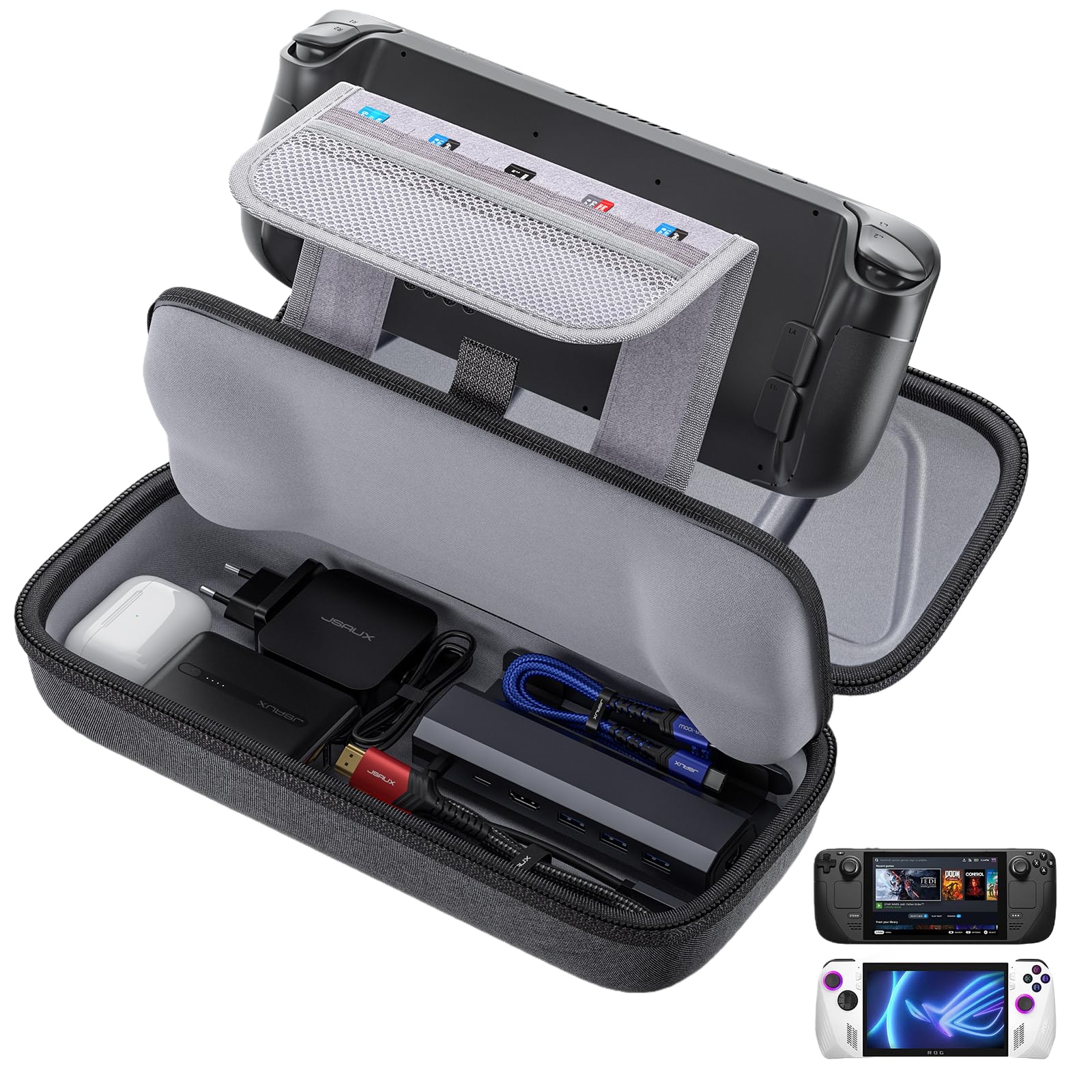
The first thing we noticed is that the front shell turns a grip case into something you can zip into a backpack without worrying about the sticks. It snaps over the screen and controls, then comes off for play, which is the sort of two-part design that actually earns its keep.

The shell itself is PC-ABS with TPU edges, and the texture gives your palms something to hold onto during a long session. The side ridges make the Deck less likely to slide in sweaty hands, and the cutouts leave the controls and ports alone. We also appreciate the modular strap: it will hold a power bank or a small hub against the back, which is more useful on a train or plane than another decorative ridge.

Compared with a plain TPU shell, the ModCase is bulkier, but the front cover replaces the need to carry the stock case for short trips. That makes it the one we reach for when the Deck is going into a bag with a charger and a couple of cables. If you want a shell that disappears into the original case, this is more case than you need.

Pros

  • Detachable front cover protects screen and sticks
  • Textured shell adds grip for handheld play
  • Strap holds a power bank or hub
  • Fits in a backpack without a hard case

Cons

  • Detachable stand can feel less secure on soft surfaces
Our verdict

We recommend the ModCase as the default because one shell gives you grip for play and a snap-on front cover for travel, without making you buy two cases.

Check Latest Price
2

Best Everyday Grip

Skull & Co. GripCase SD

93 /100
LBD Score Outstanding

Key details

Shell
Soft
Stand
75-degree stand
Weight
4.59 oz
Compatibility
Steam Deck
View on Amazon

The 75-degree stand is the detail that makes this more than another soft shell: the Deck can sit upright on a table without a separate kickstand, and the USB-C cutout is shaped to leave dock access alone. We also like that it slides into the stock Steam Deck case with the shell on, which is the practical test many grip cases fail.

The texture is the other reason it earns a place. The soft material has enough friction to stop the Deck sliding in your hands, but it does not feel tacky or pick up lint the way some silicone covers do. During longer sessions the shoulder-button area stayed comfortable, and the cutouts did not crowd the triggers. The shoulder-button shape also avoids the pinched-finger feel some shells create.

For everyday play, that is the right trade-off: less bulk than a travel case, more grip than the bare Deck. If you already have the original case and want the Deck to keep fitting inside it, this is the cleanest answer in this group. It is a grip shell first, so pair it with a sleeve when the Deck goes into a crowded bag.

Pros

  • 75-degree stand for tabletop play
  • Textured grip stays put in hands
  • Fits into the stock case with the shell on
  • USB-C cutout keeps dock access open

Cons

  • Soft shell leaves the screen exposed in a bag
Our verdict

We choose this when we want a grippy shell that stays out of the way and slips into the stock case, with a stand for tabletop breaks.

Check Latest Price
3

Best for Charger and Dock

JSAUX BG0106X Travel Case

93 /100
LBD Score Outstanding

Key details

Shell
Thickened EVA
Capacity
297 cubic inches
Dimensions
13.4"L x 6"W x 3.9"H
Compartments
3
View on Amazon

Open this case and the first thing you see is not a molded cradle but a deep lower bay. That is the point: the JSAUX hard shell is built to carry the Steam Deck plus the charger, a dock, cables, and a headset, with a 297-cubic-inch capacity and three compartments to keep them apart.

We found the layout more useful than a plain console sleeve because the Deck sits in its own strapped section and the accessories do not rattle against the screen. The thickened EVA shell feels stiff enough to protect against knocks, and the double zipper runs smoothly around the long side. The interior straps hold the console down when you open the lid, and the shoulder strap and reinforced handle make it easy to carry when your hands are full.

For a trip where the official dock and power supply come along, the extra volume earns its place. For a commute with just the Deck, a slimmer shell is the better call. The case is at its best as a single travel bag for a weekend of gaming away from home.

Pros

  • Holds charger, dock, cables, and headset
  • Rigid EVA shell with three compartments
  • Deck secured by internal straps
  • Reinforced handle and shoulder strap

Cons

  • Large footprint takes over a backpack
Our verdict

We reach for this when the charger and dock come too, because the extra depth swallows the kit that a slim case leaves behind.

Check Latest Price
4

Best Slim Kickstand Case

Spigen Thin Fit Pro

89 /100
LBD Score Excellent

Key details

Kickstand
Built-in
Materials
PC + TPU
Thickness
0.2cm
Compatibility
Steam Deck LCD/OLED
View on Amazon

At 0.2 cm, the Thin Fit Pro adds less bulk than almost anything else here, and that slimness is the whole reason to choose it. It still brings a built-in kickstand, a grippier TPU edge, and cutouts that leave the official dock and the original travel case usable.

The pre-applied tape keeps the shell flat against the back and avoids the loose edges you get from a soft slip-on cover. The kickstand locks at a useful angle for tabletop play, and the hard PC back gives the Deck more structure without hiding the screen or the shoulder buttons. We were surprised by how little it changes the Deck's silhouette.

Think of it as a low-profile protective skin rather than a travel case. It will take the scuffs of daily handling and make the Deck easier to hold, but it does not cover the face or provide a compartment for a charger. If your Deck already lives in a bag with a sleeve, that is a sensible trade.

Pros

  • Slim 0.2 cm profile
  • Built-in kickstand locks at a useful angle
  • Fits official dock and original case
  • TPU edges improve grip

Cons

  • Adhesive mounting makes removal less convenient
Our verdict

This is our pick for a barely-there shell that keeps the kickstand and official-dock clearance without turning the Deck into a brick.

Check Latest Price
5

Best Slim Travel Case

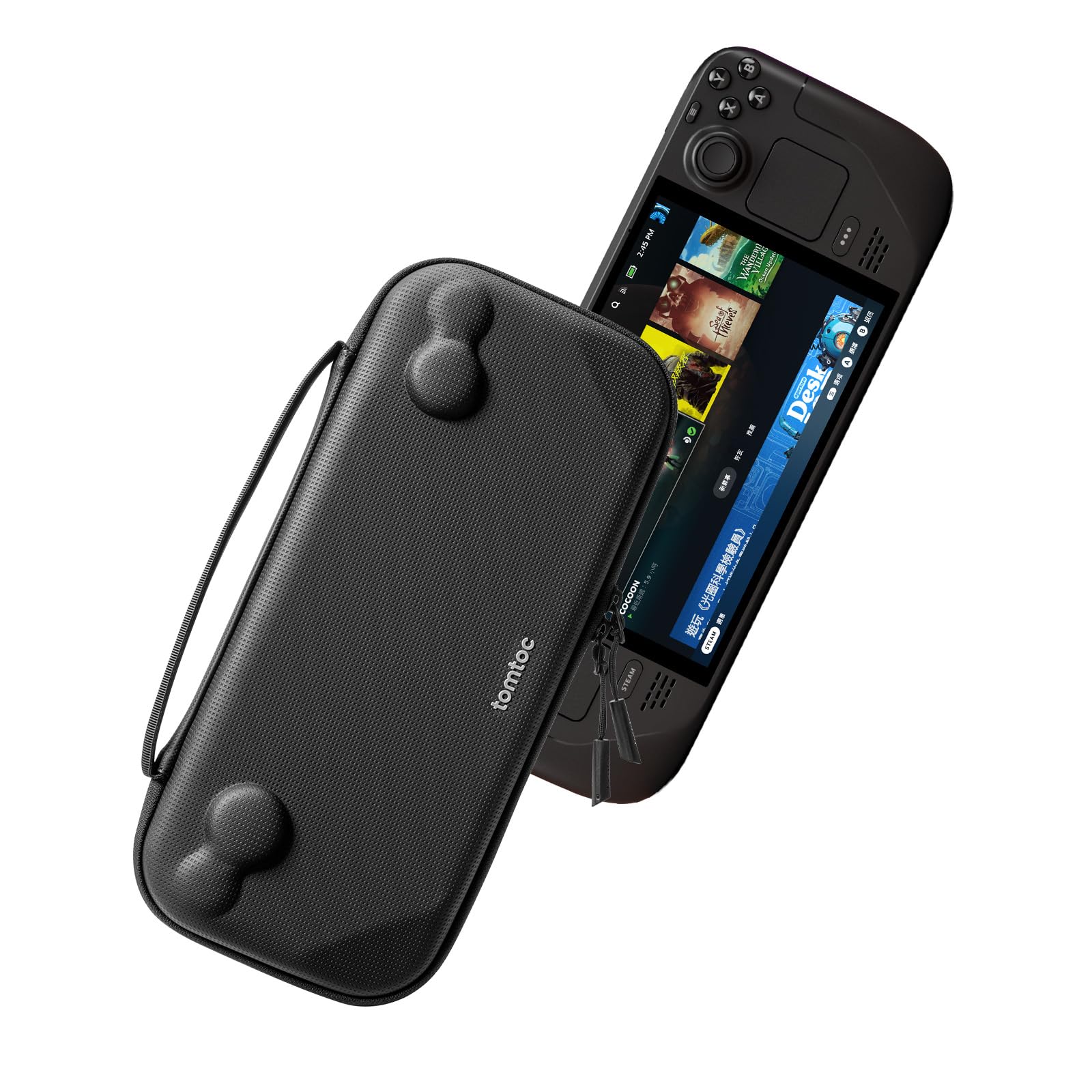
tomtoc Slim Carrying Case

93 /100
LBD Score Outstanding

Key details

Weight
11.6 oz
Closure
YKK zippers
Capacity
160.57 cubic inches
Dimensions
12.52"L x 5.51"W x 2.36"H
View on Amazon

The stock Steam Deck case is protective, but it is not small. The tomtoc Slim is the alternative we reach for when the Deck has to share a backpack with a laptop, headphones, and a water bottle, because it trims the package down to a hard-shell sleeve for the console and a cable.

The hard PU and felt shell has raised areas that follow the Deck's curves, so the sticks and buttons are not taking the pressure when the bag gets stuffed. We also like the inner flap: it sits between the screen and the shell, which is the detail that makes a slim case feel considered rather than just thin.

The YKK zipper is a small thing, but it runs cleanly and does not snag at the corners. The splash-proof outer material wipes down easily, and the built-in handle gives you a way to carry it without hugging the bag to your chest.

For a commute where the Deck rides with a laptop, the smaller footprint is the whole point. The inner flap gives the screen enough separation that we stopped worrying about it in a packed bag. For a lean daily bag, this is our pick.

Pros

  • Slim hard shell cuts bag footprint
  • Raised interior protects sticks and buttons
  • Inner flap shields the screen
  • Smooth YKK zipper

Cons

  • Little room for a charger or dock
Our verdict

We take this when the goal is to shrink the Deck's bag footprint, and we want a hard shell with a screen flap and a clean zip.

Check Latest Price
6

Best Budget

HEYSTOP TPU Case

83 /100
LBD Score Excellent

Key details

Dock Use
Dockable
Material
TPU
Dimensions
11.89 x 4.72 x 1.57 inches
Compatibility
Steam Deck
View on Amazon

Budget cases usually announce themselves with thin plastic and sharp seams. The HEYSTOP is not that kind of cheap: the TPU shell has a soft, slightly shiny finish, and the ergonomic handles give the Deck a more substantial feel in the hands.

We used it as a knock-around shell for around-the-house play, and the open cutouts let the Deck drop into a dock without peeling the case off every time. The material is flexible enough to install without a fight, and it covers the back and edges that pick up scuffs. It is also light enough that long sessions do not feel weighed down.

At this end of the range, the HEYSTOP makes sense as a first case or a spare for a second Deck. It will not replace a hard travel case or a stand-equipped shell, but for basic protection and a better grip, it does the job. We keep it in the budget slot because it gets the essentials right without making the Deck feel armored.

Pros

  • Low-cost way to add grip and protection
  • Flexible TPU installs easily
  • Dockable cutout
  • Light enough for long sessions

Cons

  • Button cutouts can sit slightly off-center
Our verdict

We keep this as the budget pick for a reason: it adds grip and a layer of TPU protection for casual play without asking for much.

Check Latest Price
7

Best Rugged Travel Case

Spigen Rugged Armor Pro

85 /100
LBD Score Excellent

Key details

Weight
1.48 lb
Dimensions
14.01"L x 6.76"W x 4.09"H
Compartments
3
Tracker Pocket
Hidden AirTag pouch
View on Amazon

The Rugged Armor Pro is a big case, and it makes no apology for it: just over 14 inches long, 6.76 inches wide, and 4.09 inches deep, with a stiff EVA shell and orange foam at the corners. We like it for exactly that reason. It gives the Deck a proper travel home and enough room for the charger, cables, and a low-profile stand.

The organization is better than the raw volume. The zippered mesh pocket holds a power bank or cables, the hidden compartment under the lid is a sensible place for a tracker, and the suede-lined strap keeps the screen away from the shell. The carabiner ring is a small extra that makes the case easier to clip to a larger bag.

The corner foam and anti-scratch nylon give it a more rugged feel than a soft sleeve, and the handle is wide enough to carry comfortably when the case is full. The central strap gives you a way to secure the Deck when the lid is open.

This is not the case for a minimalist pack. It is for the trip where the Deck, charger, and a couple of accessories need one protected home, and the roomy layout is worth the footprint. The extra width is the part we notice most, but it is also what makes the storage work.

Pros

  • Corner foam and stiff EVA shell
  • Mesh pocket and hidden compartment
  • Suede-lined strap protects screen
  • Hidden AirTag pouch

Cons

  • Deck can shift inside the wide shell
Our verdict

We choose this when the Deck travels with a charger and we want a hard case that can take a knock, not the smallest bag in the closet.

Check Latest Price
8

Colorful Grip

UYIYE Kickstand Case

82 /100
LBD Score Excellent

Key details

Shell
ABS and leather
Thickness
0.7mm
Dimensions
12 x 5 x 1.8 inches
Compatibility
Steam Deck LCD/OLED
View on Amazon

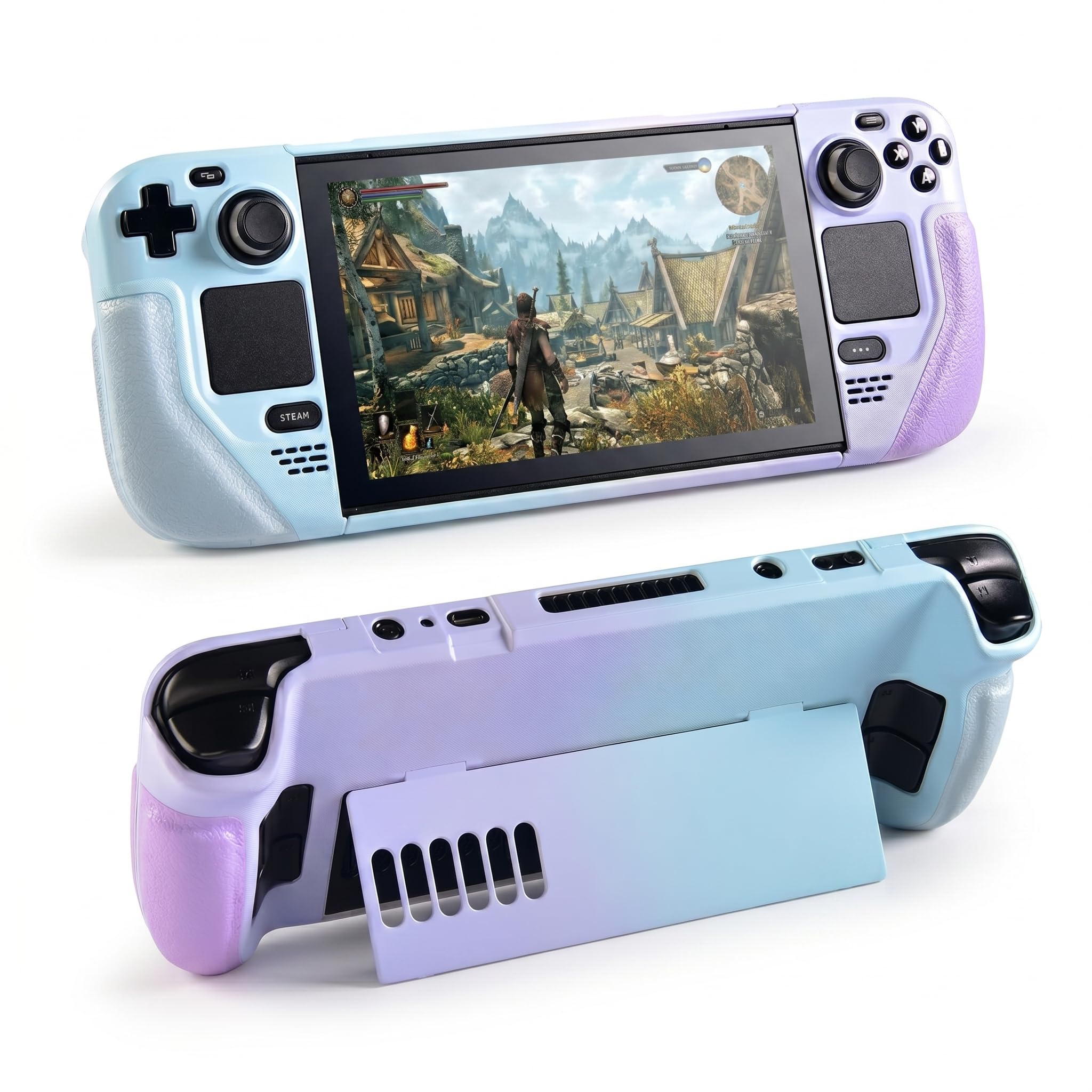
The blue-purple gradient is the first thing people notice, but the part that matters in the hand is the faux-leather texture. It gives the Deck a warmer, less plasticky feel than a TPU shell, and the hidden kickstand keeps the back looking clean when it is folded away.

The cutouts are precise enough that the face buttons and sticks sit where you expect, and the 0.7 mm layer over the buttons keeps the controls usable without a mushy press. We found it comfortable for longer sessions, with a shape that fills the palms without adding the heft of a hard travel case. It also fits inside the official case, which is more than some thicker shells manage.

Compared with a plain black TPU shell, the finish is the reason to choose it. It is still a protective shell rather than a travel case, and the hard material gives the edges more structure than a silicone cover. The color is not a subtle upgrade, so this is for someone who wants the Deck to look different.

We recommend it when the feel and finish matter more than a rugged build. The leather-look grip is comfortable, the button cutouts are clean, and it slips into the official case. It is a style-led shell first, and that is the role it fills here.

Pros

  • Faux-leather grip feels warmer than plastic
  • Hidden kickstand keeps the back clean
  • Fits inside the official case
  • Precise button and port cutouts

Cons

  • Kickstand feels flimsy on soft surfaces
  • Hard shell can be stubborn to remove
Our verdict

We recommend this when the feel and finish matter more than travel protection, and you want a colorful shell that still fits the official case.

Check Latest Price

How We Tested Steam Deck Cases

The shortlist started with a filter: if a case left the triggers, vents, or shoulder buttons half-exposed, it was out. From there I compared models across price and screen size — several are cut specifically for the OLED or the LCD — and brought in 14 that spanned soft textured grips, rigid shells with kickstands, and full travel cases with pockets for a charger and cable.

Testing began on the couch. I played in two-hour stretches with each case on, noting whether the grips still felt secure once my palms warmed up and whether the shell shifted under my hands. Then came fit and alignment: I ran a thumb over every button and trigger, matched the vent openings against the actual vents, and mounted each case on both an OLED and an LCD unit to see how precisely it seated. For protection, I dropped each one from waist height onto hardwood, screen down and corner first, then checked the shell and the console for marks.

Ease of use got a week of real life per case: into a backpack, onto a train, out again in a hotel room. I timed how long it took to put on and pull off, checked whether the charger actually fit in the case's storage, and whether the whole thing still slid into my bag's laptop sleeve. Over three months I noted which edges frayed, which textured grips went shiny with hand oil, and which lighter colors picked up dye from the inside of a bag. Anything that needed two hands and a fingernail to remove never came out of the drawer a second time.

How to Choose a Steam Deck Case

Choose Between a Grip Shell and a Travel Case

For everyday play, a grip shell stays on the Deck and adds texture, edge protection, and sometimes a stand. A hard travel case comes off when you play and carries the charger, cable, and maybe a dock. The ModCase blurs the line with a detachable front cover, while the tomtoc Slim is a pure travel sleeve. Decide which job you need first; a shell that tries to do both will add some bulk.

Check Fit Before Anything Else

Steam Deck OLED and LCD cases often look interchangeable, but the product page should name your model, especially if you use a skin or thumb caps. The more common trap is the dock: a shell can be called dockable and still sit too thick in a fixed cradle. Check the USB-C opening and the dock's clearance before you commit. The Spigen Thin Fit Pro is the slim option we trust most for official-dock use.

Treat the Kickstand as a Separate Purchase

A stand is useful for tabletop play, but it is often the first part to feel compromised. A built-in plastic leg can be flimsy, while a detachable metal bracket adds bulk and can be left behind. Look for a stand that locks at more than one angle if you play at a desk, and test it on a hard surface rather than a cushion. The Skull & Co. GripCase uses a 75-degree stand that we find more dependable than a hidden tab.

Match Storage to the Trip

Accessory space is the main reason a travel case grows. If the charger and dock come along, a deep bay and compartments keep them from pressing on the screen; the JSAUX BG0106X is built around that job. If the Deck travels with a laptop and the charger stays in another pocket, a slim sleeve is easier to live with. Measure your bag before choosing the bigger case, because a roomy case can take over a backpack.

Grip and Cutouts Beat a Pretty Shell

Texture matters more than a fancy pattern once the Deck gets warm in your hands. Look for raised grips or a soft-touch edge, and check that the shell does not cover the face buttons or block the microSD slot. A silicone cover can feel great but sit flush around the buttons; a hard shell with precise cutouts is easier to live with if you switch cards or use the dock often. The cutouts are the part we inspect first.

Frequently Asked Questions

Final Verdict

For most Steam Deck owners, the JSAUX PC0104 ModCase is the case we recommend first. It gives you a grippier shell for play and a detachable front cover for travel, so you do not have to choose between protection at home and protection in a bag. The metal stand is the part we treat as a bonus, not the reason to buy. If you mostly play around the house and want the Deck to slip back into its own case, choose the Skull & Co. GripCase SD instead.