Best Tablet Holders for Bed of 2026

There's a particular arm position — propped on one elbow, tablet hovering over your face, wrist starting to burn — that a bed tablet holder is meant to make obsolete. The problem is that the three formats crowding this category fail in completely different ways: weighted floor stands rock when the arm is stretched to full reach, gooseneck clamps droop under anything heavier than a paperback, and soft pillow stands creep toward the edge of the mattress the second you shift your hips.

We've spent the past three months with 14 holders clamped to headboards, arm overhead, and balanced on laps, and the pattern held. What separates a good one isn't the spec sheet. It's whether the grip holds your tablet at the angle you actually lie in, and whether the base stays where you put it when you roll over. The swivel heads and folding frames are nice, but only if the joints survive a few hundred adjustments.

A holder sized for a 6-inch e-reader is a different purchase than one that has to carry a 12.9-inch tablet, and a clamp that fits a chunky bed rail is useless on a rounded metal frame. The picks below are sorted by how you like to read — flat on your back, curled on your side, or somewhere that isn't a bed at all.

1

Best Overall

BluuSuuk Tablet Floor Stand

93 /100
LBD Score Outstanding

Key details

Screen Fit
4.7 inches and up
Base Weight
6.6 lb
Stand Weight
8.4 lb
Device Weight Limit
1.5 lb
View on Amazon

Doubling a base from 3.3 pounds to 6.6 tells you where the earlier version fell short. BluuSuuk put that weight into a metal plate that slides under the bed or beside a chair, then ran a folding arm out and over the mattress, so the screen hangs above your chest instead of sitting in your hands.

That base is the reason this one earns our top spot. In our testing the stand felt anchored while we read with the tablet floating at eye level, and the arm held its position through an evening of page turns. Assembly takes a couple of minutes and no tools: the support rods slot together, the folding arm drops in, and the pull chuck grips the tablet's edges.

The device limit is 1.5 pounds, worth checking against a large tablet in a thick case, and the fit runs from 4.7 inches up to an 11-inch iPad. What we appreciated most is that the arm swings clear when you get up and comes back to position when you lie down again, so the stand works around you rather than the other way around.

It weighs 8.4 pounds all in, so it is not something you move between rooms on a whim. Among the floor stands here it is the sturdier of the two, and that is what the extra money buys.

Pros

  • 6.6-pound base holds the arm steady
  • Hangs a tablet overhead with no headboard
  • Assembles in minutes without tools
  • Arm swings aside so you can get up

Cons

  • Needs floor space beside the bed
  • Tips if the arm swings far to one side
Our verdict

We recommend this one first for bed use: the 6.6-pound base lets a long arm hang a tablet over your chest with no headboard, and it stays put while you read.

Check Latest Price
2

Best Floor Stand Value

Elekpopu Tablet Floor Stand

91 /100
LBD Score Outstanding

Key details

Device Fit
4.7 to 11 inches, under 1.5 lb
Base Weight
5 lb
Height Range
27.5 to 55 inches
Stand Weight
5.8 lb
View on Amazon

The Elekpopu does most of what our top pick does for noticeably less money. A 5-pound metal plate anchors the bottom, the pole extends from 27.5 to 55 inches, and the bracket rotates a full 360 degrees, so switching from landscape to portrait does not mean unclamping anything.

Where it gives ground is ballast. Five pounds holds a Kindle or a 10-inch iPad steady above your lap; a heavy tablet left in a case is a different job, and Elekpopu's own instructions suggest adding weight to the base for exactly that. That is honest advice and worth following. The compatibility list stops at 11 inches, so a 12.9-inch iPad Pro is not covered.

We kept coming back to the adjustability for the money. The two support rods can be swapped so the arm starts higher or lower, which matters on a night you are propped on three pillows and a night you are flat on your back. Against the BluuSuuk you trade a lighter base and a lower device ceiling for a smaller bill, and you still get the overhead angle that makes reading in bed comfortable.

The joints are stiff, and moving the arm while you are lying down takes a deliberate push with both hands. We ended up setting the position before getting into bed rather than fiddling afterward, which is how most people use one anyway.

Pros

  • Overhead angle without a clamp or headboard
  • Pole adjusts from 27.5 to 55 inches
  • Support rods swap to change the starting height
  • Assembles without tools

Cons

  • Compatibility stops at 11-inch tablets
Our verdict

Our pick if you want overhead viewing for less: a 5-pound base, 55 inches of height, and no clamp that needs a home on your furniture.

Check Latest Price
3

Best Clamp Mount for Big Tablets

Lamicall Gooseneck Tablet Holder

86 /100
LBD Score Excellent

Key details

Arm
Tapered, 360° rotating holder
Device Fit
4.7 to 13 inches
Clamp Opening
0.2 to 3.15 inches
Max Device Weight
1.76 lb
View on Amazon

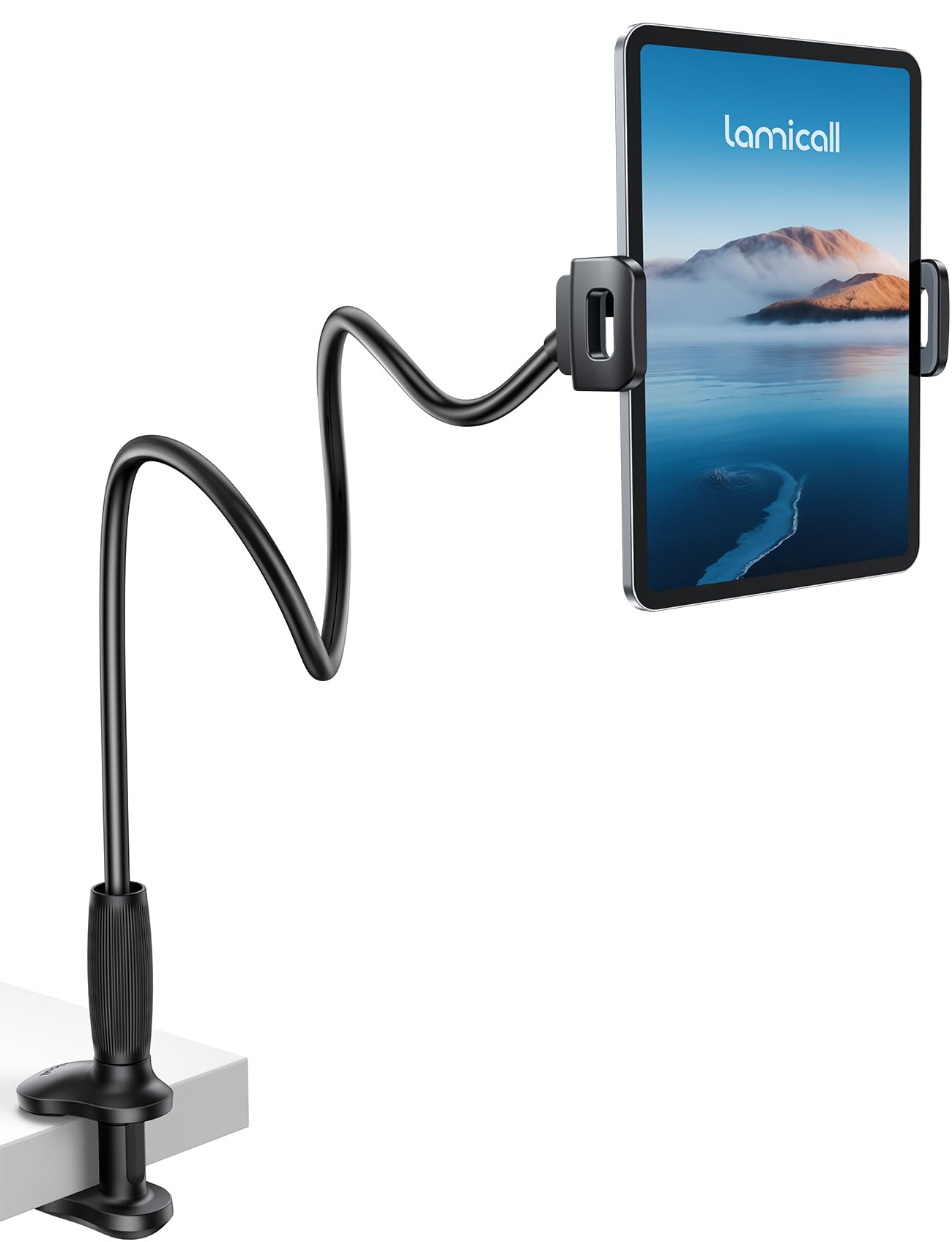
A tapered arm is a small change with a large effect. Where most goosenecks are one even tube, this Lamicall thickens toward the clamp and widens the grip at the base, which is exactly where a long arm starts to shake. We noticed the difference with a heavier tablet: the arm still moves when you tap, but it settles instead of swinging.

The numbers are the ones that matter for bed use. The clamp opens from 0.2 to 3.15 inches, which covers a bed rail, a desk edge, and most wooden headboards, and it holds devices from 4.7 to 13 inches at up to 800 grams. The holder rotates 360 degrees, so portrait, landscape, and a slight downward tilt all come without unclamping.

Touchscreens are the compromise. Bend the arm out straight and every swipe sends a bounce through the tablet; Lamicall's own advice is to keep a curve in the arm and the device close to the clamp, and we found that is the difference between a screen that nods and one that holds still. Reading and watching are fine. Typing or playing a game is not what this is for.

The clamp and holder are plastic, with non-slip pads where it grips and a one-year warranty behind it. That is a fair trade for the weight: a metal clamp body would be sturdier, but a headboard carries this one without complaint.

Pros

  • Tapered arm steadies a heavier tablet
  • Holds 4.7-to-13-inch devices up to 800 grams
  • 360-degree holder flips portrait to landscape
  • Padded clamp protects furniture

Cons

  • Clamp needs a flat surface up to 3.15 inches thick
Our verdict

The clamp mount we reach for with a big tablet: a tapered arm and an 800-gram rating let it hold a 13-inch iPad steady from a headboard.

Check Latest Price
4

Best Long-Reach Gooseneck

MAGIPEA Gooseneck Tablet Holder

86 /100
LBD Score Excellent

Key details

Arm Reach
About 30 inches
Device Fit
4.7 to 13 inches
Arm Material
Reinforced aluminum
Clamp Opening
0.2 to 3 inches
View on Amazon

Thirty inches of arm is what earns this MAGIPEA a place. Mounted on a headboard, it arcs out far enough that the screen lands where you want it while you lie on your side, and the aluminum core holds a curve better than the plastic-wrapped arms on cheaper mounts.

The rest of the spec sheet supports the reach. The clamp opens to about 3 inches for thick rails and bed frames, the holder rotates 360 degrees, and the 4.7-to-13-inch range takes everything from a phone to an 11-inch iPad. EVA pads sit under the clamp so a wooden headboard comes out of it unmarked.

Nothing here is refined. The holder grips the tablet's edges rather than cradling it, and the trim around the clamp feels ordinary. What you get instead is reach at a price near the bottom of this group, and an arm that folds down small enough to travel.

The open question is how the arm holds up over years of nightly bending. The joint where it meets the clamp is the part that decides it, so check that the arm still holds its curve every few months and re-bend gently rather than forcing it back into shape.

Pros

  • 30-inch arm reaches across a bed
  • Aluminum core holds its curve
  • Clamp opens to about 3 inches
  • Fits devices from 4.7 to 13 inches

Cons

  • Moves when you tap or swipe
Our verdict

Our budget clamp pick: a 30-inch aluminum arm with the reach to cross a bed, as long as your headboard gives the clamp something solid to bite.

Check Latest Price
5

Best Pillow Stand

KDD Tablet Pillow Holder

93 /100
LBD Score Outstanding

Key details

Extras
Storage pouch and pen slots
Weight
15.8 oz
Device Fit
4 to 13 inches
Viewing Angles
Three
View on Amazon

Pillow stands live or die on their grooves. KDD widened and deepened the slot so a tablet sits down inside the cushion instead of leaning against a lip, and the result holds a 10-inch iPad or a Kindle at an angle you can read from without propping it up again every few minutes.

Three angles is fewer than the six you get from Lamicall's pillow, but they are spread sensibly: one fairly upright for browsing, one mid-height for watching, one reclined for reading in bed. The cover is a soft polyester that gives the tablet something to grip, and the whole thing weighs under a pound, so moving it from bed to couch takes one hand.

What we appreciated most is the back. A large pouch swallows a phone, earbuds, and a charging cable, and there are slots for a pen or stylus, which turns the pillow into a small bedside station for anyone whose nightstand is already full. Folded flat, it slides into a carry-on for a hotel room or a long trip.

The limit is physics. A pillow cannot hold a screen up in the air, so you are still looking down at your lap, and the angle depends on how you are sitting. If your neck is the reason you are shopping, a floor stand or a clamp does more for you. If you want your hands free while the tablet rests on your knees, this is the most comfortable way to do it.

Pros

  • Deep grooves hold the tablet at three angles
  • Folds flat for travel and storage
  • Pouch and pen slots hold small gear
  • Under a pound, easy to move one-handed

Cons

  • Keeps the screen at lap height
Our verdict

The pillow stand we hand to someone who reads in bed every night: deep grooves hold a tablet at three angles, and it folds flat when you are done.

Check Latest Price
6

Best Soft Lap Stand

Lamicall Tablet Pillow Stand

89 /100
LBD Score Excellent

Key details

Cover
Detachable, washable
Device Fit
4.7 to 13 inches
Dimensions
11.6 x 9.3 x 6.5 inches
Viewing Angles
Six
View on Amazon

Six positions is the most you will get from any pillow here, and it is the reason we keep coming back to this Lamicall. The triangle leans back far enough for lying down and sits upright enough for reading with coffee, and switching between them means dropping the tablet into a different groove rather than adjusting anything.

The cover is a soft microsuede that comes off for washing, a small thing until the first time someone eats breakfast over it. The foam holds its shape instead of flattening under a big tablet, and the cushion is wide enough to take a 13-inch iPad, which is more than most pillows manage.

It can hold two tablets at once, one in front and one behind, which sounds like a gimmick until two people in the same bed want different screens.

The catch is the one every pillow shares: your tablet ends up in your lap and the angles are fixed by the grooves. Some tablets sit more securely than others depending on the case, and a thick folio can lift the device out of the groove that would otherwise hold it. With a slim case or none, this is the coziest way to read in bed we tested.

Pros

  • Six angles, the most of any pillow here
  • Removable, washable microsuede cover
  • Wide enough for a 13-inch tablet
  • Foam keeps its shape under a big tablet

Cons

  • Thick cases lift the tablet out of the groove
Our verdict

Six viewing angles and a cover you can unzip and wash make this the pillow we keep on the bed for long reading sessions.

Check Latest Price
7

Small Tablets

JSAUX Tablet Pillow Stand

85 /100
LBD Score Excellent

Key details

Extras
Mesh pocket and pencil holder
Weight
10.2 oz
Device Fit
4 to 11 inches
Angle Adjustment
Hook-and-loop strips
View on Amazon

JSAUX's pillow is the smallest-feeling stand here in the best sense. It weighs just over half a pound, so it sits on your lap without you noticing it, and the angle adjusts with hook-and-loop strips rather than a rigid hinge, which makes small changes easy.

The 4-to-11-inch range is the constraint, and it is a real one. An iPad Air, a Fire tablet, a Kindle, or a phone all sit well; a 12.9-inch iPad Pro does not, and the deeper grooves that keep a small device secure are the same ones that crowd a big one.

Where it earns its place is travel. It folds flat, has a mesh pocket for a cable and a loop for a stylus, and packs into a bag without adding noticeable weight. For a bedside Kindle stand you will barely think about, that is plenty.

Pros

  • Light enough to forget on your lap
  • Folds flat with a mesh cable pocket
  • Fits tablets from 4 to 11 inches
  • Inexpensive enough to travel with

Cons

  • Cushion flexes under a heavier tablet
Our verdict

The pillow to buy for a Kindle or an iPad mini: light, inexpensive, and shaped to hold a small device at a comfortable tilt.

Check Latest Price
8

Desk and Headboard

SAMHOUSING Foldable Arm Stand

84 /100
LBD Score Excellent

Key details

Joints
Four
Material
Aluminum
Rotation
360 degrees
Device Fit
4.5 to 12.9 inches
View on Amazon

Four locking joints instead of one bendy tube: that is the idea behind this SAMHOUSING stand, and it is a good one for anyone who has fought a gooseneck into position. Each segment sets at a fixed angle and stays there, so the arm holds a shape rather than drifting out of it.

It clamps to a desk, a bedside table edge, a headboard, or a bed board, and the aluminum segments fold down small when you unclamp it. The joints are stiff enough to hold a position once tightened, which is the whole point, and the 360-degree holder turns from portrait to landscape without tools.

Weight is the dividing line. With a phone, a Kindle, or a 10-inch tablet, the arm does its job and the clamp holds. Hang a 12.9-inch iPad Pro off the end and the assembly becomes a lever: the joints drift, the screen nods when you touch it, and the clamp starts to look like the weakest link. SAMHOUSING lists the fit up to 12.9 inches; the arm is at its best well below that.

Where it makes sense is a desk or a bed with a solid rail at the right height, where a short rigid arm beats a long floppy one.

Pros

  • Four locking joints hold a set position
  • Clamps to desks, rails, and bed boards
  • Aluminum segments fold down for storage
  • Steady with phones and small tablets

Cons

  • Two hands needed to reposition
Our verdict

For a desk or a solid headboard, this four-joint arm reaches where a gooseneck cannot, as long as the tablet you hang on it stays light.

Check Latest Price

How We Tested Bed Tablet Holders

We built a shortlist of roughly 40 holders from retailer listings and customer review sections, then cut anything whose clamp topped out below full-size tablet dimensions, whose arm had no stated weight capacity, or whose base looked light enough to tip. That left 14, which we used for three months.

Each one went through the same real-life rotation: reading in bed on our sides and stomachs, clamped to a headboard rail and a rounded metal bed frame, parked on a nightstand, and carried to the couch for morning shows. For clamp models, we tightened the jaws onto both surfaces and checked the next morning whether they had crept or left marks on the wood. Goosenecks were loaded with the heaviest tablet the listing claimed to support, set at reading angle, then checked eight hours later to see how far the arm had sagged on its own. Floor stands were extended to full reach while we watched the base for rocking, and we timed how long one person needed to assemble and reposition each one.

Pillow stands went onto a made bed with real sheets, where we noted whether they slid when we rolled over and how easily they folded for carrying into another room. We swapped devices between the smallest e-reader and the largest tablet in the batch to test fit, spun every rotating head, and adjusted each joint dozens of times to see which ones loosened first. Value came down to what a holder could actually do — a cheap clamp that securely grips every device in the house beats a pricier stand that handles one size.

How to Choose a Tablet Holder for Bed

Match the mount to your bed

Clamp mounts are the most compact option and the most dependent on furniture. The ones here open between roughly 0.2 and 3.15 inches, which covers a wooden headboard, a bed rail, and a nightstand edge, but not a padded or curved headboard where the jaws cannot get flat purchase. The trap is assuming any headboard will do; if yours is upholstered, skip to a floor stand.

A floor stand trades that requirement for floor space and a base plate that lives beside the bed. The two here weigh 5 and 6.6 pounds and do not move easily, which is the point. A pillow stand asks nothing of the room at all and puts the screen in your lap.

Weight and leverage decide stability

Every holder here is a lever, and the further the tablet sits from the anchor, the more the arm wants to move. That is why base weight matters more than a thicker tube: a 6.6-pound plate under the bed does more for a steady screen than a stiffer arm does. The same arithmetic applies to the tablet, since most mounts here are rated to 1.5 pounds or 800 grams.

If your tablet in its case is near that limit, shorten the reach. A device held close to the clamp is a shorter lever, and every clamp mount here becomes steadier for the compromise.

Check device fit before anything else

Screen ranges run from 4 to 11 inches at the tight end to 4.7 to 13 inches at the wide end, and that difference decides whether a 12.9-inch iPad Pro has a home. Pillows with deep grooves also crowd a large tablet in a way they never do a Kindle.

Weight caps are the second half of fit: 800 grams on the Lamicall clamp, 1.5 pounds on both floor stands. Weigh your tablet in the case you actually use, because that is the number the holder feels on the end of its arm.

Decide whether you will tap or just watch

A holder that is perfect for watching a film is not the same as one for typing. Pillow stands take tapping in stride because they already rest on you, but they keep the screen at lap height. Arms and stands lift the screen to eye level, better for your neck and worse for touch, because every swipe travels down the arm.

If your evenings are reading and streaming, buy for the stand and accept a little movement. If you type, answer messages, or play games in bed, a pillow is the more honest choice.

Frequently Asked Questions

Final Verdict

If you have a few inches of floor beside the bed, start with the BluuSuuk floor stand. Its 6.6-pound base is what lets a tablet hang over your chest night after night with no headboard to clamp to, and once the arm is set it is the steadiest thing in this group.

Clamp a Lamicall gooseneck to a solid headboard and you get the same eye-level screen with a fraction of the footprint, as long as your tablet stays under 800 grams. If your hands are the problem rather than your neck, the KDD pillow frees them without asking anything of your furniture.