Best Wired Gaming Keyboards of 2026

Ask five gamers what makes a keyboard good and you'll get five answers, but they mostly come down to the switch — the little mechanism under each keycap. Whether it clicks, thocks, or glides silently decides how the board feels on day one and whether the rest of the house hears you at midnight. I've spent the last six months gaming and typing on 12 wired keyboards, and the ones worth keeping weren't the flashiest.

Sound is the most personal thing in this category. A board that sounds crisp and satisfying to me can read as clacky and hollow to someone else, and 'whisper quiet' means very different things depending on what's inside. Build quality is easier to judge: an aluminum top plate doesn't flex under your palms, and a plastic deck that creaks on day one only gets worse after a year of hard use.

We also watched the details that only matter once the novelty wears off — even backlighting instead of bright zones with dark gaps, macro keys and media controls that genuinely save clicks, and whether a spilled drink ends the whole thing. The picks below run from full-size to 65% and from loud to nearly silent, so the right one is in there somewhere.

1

Best Overall

Redragon K580 VATA

93 /100
LBD Score Outstanding

Key details

Keycaps
Double-shot
Key Count
104
Macro Keys
5 onboard
Switch Type
Outemu Blue, clicky
View on Amazon

Five macro keys, recorded on the board itself, are what make the K580 our top pick. Hold the macro button, tap a key, type the string, and it's stored in the keyboard — no driver running, no profile to load before a match, no software to reinstall when you move to another PC. Anyone who plays the same character every night gets more out of that than out of any lighting preset on this page.

The rest of the hardware holds up. The stock switches are clicky blues with a real bump, and the sockets underneath accept almost any other switch, so moving to linears later costs a set of switches instead of a whole keyboard. The keycaps are double-shot, the rating is 50 million keystrokes, and the aluminum plate plus 1,200 grams of heft keep the board from walking across the desk mid-fight. All 104 keys are anti-ghosted, which matters the moment a game asks for movement, a crouch, and an ability at the same time.

That click is the loudest thing in this guide, and it carries into the next room; if that's a dealbreaker, the Apex 3 below is the answer. In exchange you get the only board here that pairs onboard macro keys, hot-swap sockets, and a metal plate for midrange money, plus a volume wheel and dedicated media keys that we missed the moment we went back to a keyboard without them.

Pros

  • Five macro keys record without software
  • Hot-swap sockets accept almost any switch
  • Aluminum plate and double-shot keycaps
  • Full anti-ghosting across all 104 keys

Cons

  • Advanced lighting and macro profiles need software
Our verdict

Our default pick: five macro keys record straight to the board, the sockets take new switches, and the aluminum plate keeps it planted — a mechanical keyboard that stays useful as your taste changes.

Check Latest Price
2

Best for Quiet Rooms

SteelSeries Apex 3

93 /100
LBD Score Outstanding

Key details

Key Count
104
Wrist Rest
Magnetic
Switch Type
Whisper Quiet membrane
Spill Rating
IP32
View on Amazon

Start with where the keyboard lives. If it shares a wall with someone who sleeps, the Apex 3 is the board we hand over first: the switches are rated for 20 million presses and stay close to silent, the media controls are dedicated keys rather than an Fn layer, and the magnetic wrist rest gives your palms somewhere to land.

It's also the most comfortable board here for a long session, and we mean that as a gaming note, not a desk-accessory one. The keys have soft, damped travel with a bump you can feel and no click you can hear, and the deck doesn't flex under hard input. The wrist rest lifts off for cleaning and snaps back into alignment every time, which sounds trivial until you've chased a sliding foam pad across a desk.

The IP32 rating is the practical part — spills drain instead of pooling, which is more than the mechanical boards here offer — and the volume and media keys sit where your hand already is. What we minded is the light: 10 zones wash the deck more than the legends, so the letters stay readable rather than glowing, and on a bright afternoon you'll want the brightness up.

Pros

  • Near-silent switches for shared rooms
  • Magnetic wrist rest lifts off for cleaning
  • IP32 spill resistance
  • Dedicated media and volume controls

Cons

  • 17.5-inch deck plus wrist rest eats depth
Our verdict

We recommend it to anyone whose keyboard shares a room with other people: near-silent switches, a magnetic wrist rest, and spill resistance at a midrange price.

Check Latest Price
3

Best Compact

Womier SK80

93 /100
LBD Score Outstanding

Key details

Mount
Gasket
Display
Color multimedia screen
Key Count
82
Switch Type
Pre-lubed linear, hot-swappable
View on Amazon

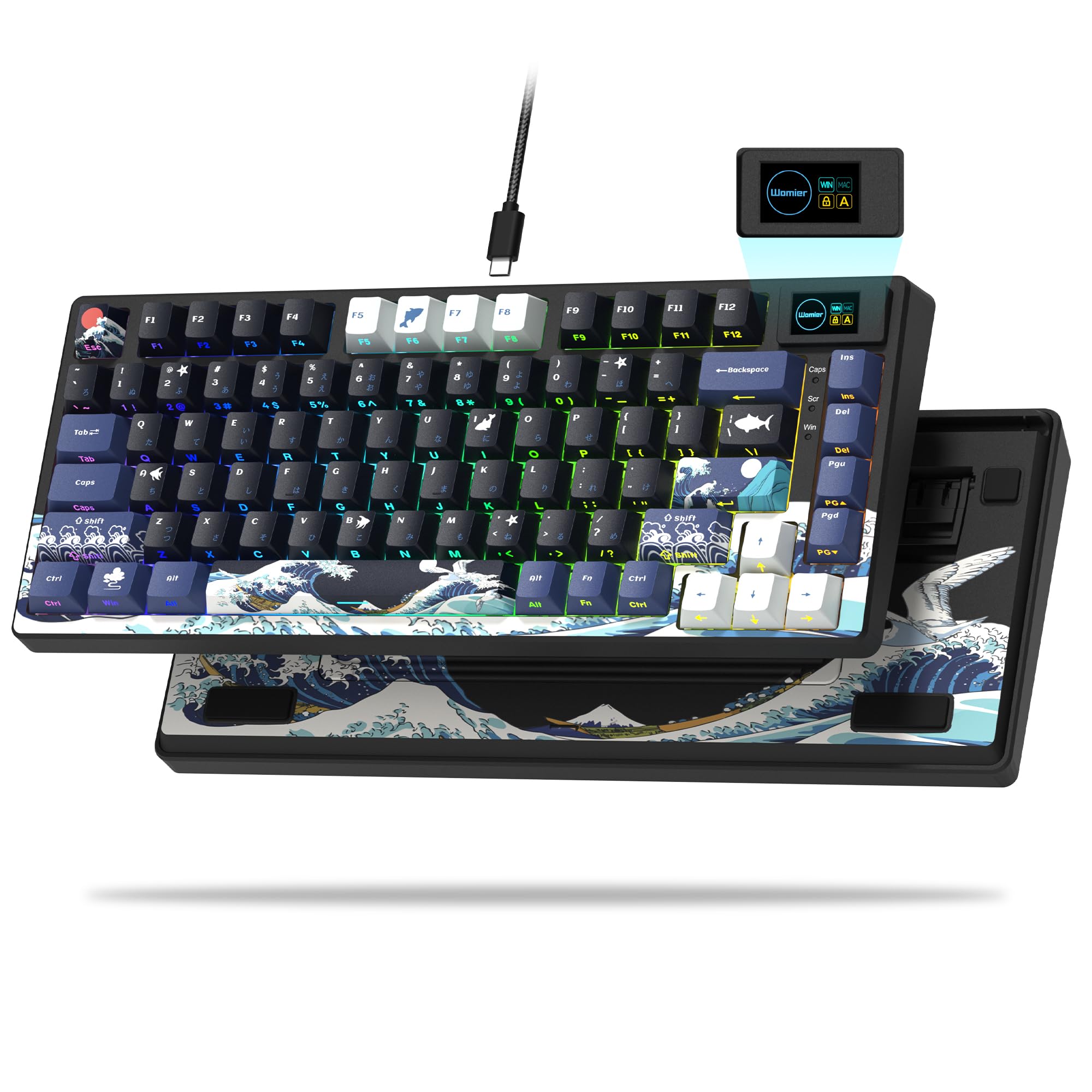
The sound is the first thing we noticed. There's no hollow tray ping under the keys — the SK80 lands with a low, damped thock that comes from the gasket mount, pre-lubed linear switches, and stabilizers that were lubricated before the board shipped. It's the best-feeling keyboard here to type on, and at a midrange price that's a strange thing to be able to say.

The 75% layout is the compromise that makes it work: 82 keys, arrows kept, number pad gone, so the mouse has somewhere to live. The color screen in the top corner shows a GIF, caps lock, and connection status, the driver handles custom GIFs, per-key lighting, and macros, and the hot-swap sockets mean the switches aren't a lifetime commitment.

The number pad is the trade you're making, and if your day runs on spreadsheets it's the wrong one — our top pick keeps all 104 keys for about the same money. Everything else is taste. A quiet, damped board that sounds expensive and costs midrange is the whole argument, and it's a good one.

Pros

  • Gasket mount damps the typing sound
  • Hot-swappable pre-lubed linear switches
  • Color screen shows GIFs and status

Cons

  • Not water resistant
Our verdict

Buy this if you want the best-feeling board in this guide: a gasket-mounted 75% with hot-swap sockets, a damped thock, and a screen in the corner.

Check Latest Price
4

Best for Durability

Logitech G413 SE

90 /100
LBD Score Outstanding

Key details

Keycaps
PBT
Rollover
6-key
Backlight
White LED
Switch Type
Tactile mechanical
View on Amazon

There's exactly one color of light on the G413 SE, and no way to change it. We expected to resent that after a week of rainbow boards and found the opposite: a clean white backlight that reads clearly in a dark room, steps down when you want it dimmer, and doesn't turn the desk into an aquarium.

What the money goes into is the case and the keycaps. The top is brushed black aluminum, the board sits at 780 grams without sliding, and the PBT caps are heat- and wear-resistant in a way painted ABS never is, so the legends stay legends instead of polishing into a shine. The tactile switches have a defined bump and a full, clacky sound — the spacebar is the loudest key on the board by some distance.

If you want a mechanical keyboard that feels like the same keyboard in year three, this is the one; if you want per-key color, a wrist rest, or a macro column, it isn't, and Logitech doesn't pretend otherwise. What you're buying is the opposite of a feature list — a plain, heavy, well-finished board that does the typing part properly.

Pros

  • PBT keycaps resist wear and shine
  • Brushed aluminum top case
  • Tactile mechanical switches

Cons

  • Six-key rollover is the lowest here
Our verdict

We point long-term buyers here: PBT keycaps and a brushed aluminum case that outlast the color lighting you'd trade them for.

Check Latest Price
5

Best for Macros

Razer BlackWidow V4 X

88 /100
LBD Score Excellent

Key details

Keycaps
Double-shot ABS
Actuation
1.2 mm, 45 g
Macro Keys
6 dedicated
Switch Type
Razer Yellow linear
View on Amazon

The most expensive board in this guide earns it with the switch. Razer's Yellow linears actuate at 1.2 mm with 45 grams of force and no gap between the actuation and reset points — a spec-sheet way of saying the key is ready to fire again the instant it has fired. In a game where the second tap matters more than the first, we felt the difference inside a round.

Six dedicated macro keys sit on the left edge, a roller handles volume with secondary media keys beside it, and Chroma lights every key individually. The caps are double-shot ABS, so the legends won't rub off, but ABS polishes where your fingers rest — the PBT on the G413 SE won't.

It's also a big board: 20.5 inches wide, 8 inches deep, and 2.5 pounds, so it wants a full-width desk and clear space for the macro column. Dampening and stabilizers make this a quieter BlackWidow than the clicky ones you may remember, though the Yellows still thock rather than whisper.

What that money buys is the trigger and the macro column. Nothing else here pairs six dedicated macro keys with a switch this short, and for a game that leans on both, the premium is the price of the feature. If you want an audible click and a tactile bump, Yellows are the wrong switch and the K580 is the right board.

Pros

  • Six dedicated macro keys
  • 1.2 mm actuation at 45 g
  • Per-key Chroma RGB with a media roller
  • Double-shot ABS keycaps hold their legends

Cons

  • Unresponsive keys appear after a few months
Our verdict

The pick we make when macros and fast re-presses matter more than money: six dedicated keys, a 1.2 mm linear trigger, and per-key lighting.

Check Latest Price
6

Best Built-In Display

SteelSeries Apex 5

93 /100
LBD Score Outstanding

Key details

Frame
Aluminum alloy
Display
OLED smart display
Key Count
104
Switch Type
Hybrid Blue, clicky
View on Amazon

There's a small OLED screen in the top right corner, and it turns out to be the most useful thing on the board: it shows the active profile and whatever Discord or a game pushes to it, so you're not alt-tabbing to check a setting. You can load a GIF onto it, which for a lot of people is the entire point.

Underneath is the same aluminum frame and magnetic wrist rest as the Apex 3, with one real difference: hybrid blue switches. They pair a blue-style click with a membrane underneath, rated for 20 million presses, and per-key RGB replaces the Apex 3's zone lighting. We liked the click — it's crisp, and noticeably louder than the Apex 3, though quieter than a true blue mechanical.

It's priced above the Apex 3 and below the BlackWidow, and what that buys is the screen and the per-key lighting rather than a better switch: the hybrid design feels crisper than a membrane and softer than a real mechanical. If you never look at the screen, the Apex 3 is the better buy, and if you want a genuine mechanical click, the K580 has it for less.

Pros

  • Customizable OLED smart display
  • Aluminum alloy frame with magnetic wrist rest
  • Per-key RGB lighting

Cons

  • Hybrid switch is part membrane
  • Some boards develop dead keys over time
Our verdict

The screen is why we recommend it: a customizable OLED that shows profiles and game info on a solid aluminum board with a clicky hybrid switch.

Check Latest Price
7

Budget Quiet Setup

TECKNET TK-KB002

89 /100
LBD Score Excellent

Key details

Key Count
104
Switch Type
Membrane, volcano
Spill Rating
IP32
Anti-ghosting
25 keys
View on Amazon

Toward the bottom of the price range, the TK-KB002 does what a budget board has to do: it types quietly and it doesn't flex. There's a metal plate under the keys, an IP32 spill rating with drainage holes built into the wrist rest, and a set of quiet membrane switches with a soft landing instead of a snap.

The rest of the sheet is generous for the money: 25 anti-ghosted keys, 12 multimedia keys, a 7-degree typing angle, and 15 zones of backlight across seven modes and four brightness levels. None of it is subtle, and none of it needs to be.

The lighting is the trade. Fifteen zones change color together, so you get bands rather than a custom map, which at this price is fair and the brightness is genuinely usable in a dark room. Two years of warranty is more than several boards here carry, and the quiet is the part we keep coming back to — this is a board you can type on at midnight in a shared apartment.

Pros

  • Metal plate keeps the deck stiff
  • IP32 with drainage holes in the wrist rest
  • 25 anti-ghost keys and 12 media keys
  • Quiet membrane switches

Cons

  • Keycap paint wears through over time
Our verdict

The budget board we point to for quiet households: a metal plate, spill drainage, and 25 anti-ghost keys, at the lowest price here.

Check Latest Price
8

Tight Desks

GEODMAER GM68

86 /100
LBD Score Excellent

Key details

Key Count
68
Connection
Detachable USB-C
Switch Type
Membrane
Anti-ghosting
26 keys
View on Amazon

The Type-C cable unplugs from the board, so the cord is replaceable and the keyboard travels without a tail wrapped around it. That's the right call on a 65% deck, which is the one that moves between a desk, a couch, and a backpack.

Sixty-eight keys is the whole idea: the arrows survive, the number pad and the rest go, and the footprint shrinks to something that fits beside a mouse on a narrow desk. The keycaps are two-tone with translucent legends, the backlighting is bright enough to read in the dark, and the rating is 10 million keystrokes.

What you give up is feel. It's a membrane board with linear travel, so it lands soft rather than crisp, and the plastic case is where the money went instead of the frame. The keys take more pressure than anything mechanical here, and you notice it at the end of a long session.

The warranty is the part we didn't expect. Three years is longer than any other board here carries, and it's a real answer to the durability question at this price: if a unit arrives that lights up but won't type, or dies in its first months, there's recourse after the return window closes.

Pros

  • Detachable Type-C cable
  • 68 keys fit a narrow desk
  • Three-year manufacturer warranty

Cons

  • No number pad
Our verdict

Our small-desk recommendation: 68 keys, a detachable cable, and a three-year warranty — the least expensive way into a compact gaming board here.

Check Latest Price

How We Tested Wired Gaming Keyboards

We started by pulling every wired gaming keyboard we could find from the big-name brands and the smaller upstarts, then cut the list by layout, switch type, and the gripes that show up again and again in customer reviews. Twelve made the cut, and each one spent six months on a desk — workday typing and spreadsheets, evening sessions in shooters and MMOs, and a few late nights typing while someone slept in the next room.

Sound came first because it's the thing a spec sheet can't tell you. We typed the same paragraph on every board and recorded it from the same seat, then played the clips back to back to hear which ones pinged, which sounded hollow or rattly, and which felt solid without being obnoxious. For noise, we typed a full page at 11 p.m. with a closed door between us and a sleeping housemate and noted whether anyone woke up.

Build and durability were handled physically: pressing hard on the corners and palm rests to feel for flex, shaking each deck to listen for rattles, and tracking which keys developed wobble, shine, or double-presses over the six months. We shot the backlighting in a dark room to check for bleed under the keycaps and uneven zones, and mapped macros and media controls to count how many clicks they actually saved. Price got weighed last against what each board delivered, since a screen or a macro column only earns its cost if you touch it.

Responsiveness was judged in play rather than on paper — holding movement keys while stacking abilities in shooters, plus rollover checks to see if anything dropped. On the boards promising water resistance, we splashed a few ounces across the deck, waited 30 seconds, wiped it up, and then tested every key.

How to Choose a Wired Gaming Keyboard

Start with the switch, not the word gaming

Every board here is sold as a gaming keyboard. What separates them is the switch underneath. Mechanical switches come in clicky, tactile, and linear flavors: the K580's blues announce every press, the G413 SE's tactiles bump without the click, and the BlackWidow's linears glide with almost no feedback at all. Membrane boards such as the Apex 3 are quieter and cheaper but land softer.

The trap is a title that promises mechanical feeling, which almost always means a membrane board with tall keycaps. If the listing won't name a switch you can look up or swap, it isn't mechanical.

Check the anti-ghosting number

Anti-ghosting is printed on every box; the number behind it runs from six keys to the whole board. It decides whether a crouch, a strafe, and an ability all register at once. Six-key rollover covers ordinary play. If your game stacks many simultaneous inputs, look for 20-plus keys or full n-key rollover.

Full-size boards usually publish the figure. Compact ones often don't, and that silence is worth pressing on before you order.

Keycaps decide year two

Legends wear off painted keycaps long before the switches die, which is why the cheapest boards here are the ones with faded letters after a year of use. PBT is heat- and wear-resistant and keeps its texture, ABS is smoother and polishes where your fingers rest, and double-shot molding runs the legend through the cap so it can't rub away.

Put keycap material above lighting features if you plan to keep the board for years. You can't upgrade legends later, and a glowing keyboard with blank keys is a novelty.

Layout and the desk you actually have

A full-size board runs roughly 17 to 20 inches wide, and a wrist rest adds a couple more inches of depth. A 75% keeps the arrow keys and drops the number pad; a 65% trims further and saves more desk.

Measure from your mouse pad to the edge of the desk before you choose, then decide honestly whether you type numbers in columns. The number pad is the first thing to go and the first thing people miss.

Onboard control beats a driver you don't have

Macros and lighting only help if you can reach them where you play. Some boards record straight to the keyboard, like the K580's five macro keys and its on-board lighting changes, while others need their driver running to do anything past the defaults.

That difference matters on a work laptop or a shared machine. If you configure once and never touch it again, either design is fine; if you move between machines, buy the board that carries its own settings.

Frequently Asked Questions

Final Verdict

Most people should buy the Redragon K580. It keeps giving: macro keys you program without opening anything, sockets that accept a different switch when your taste changes, and a metal plate that makes a midrange keyboard feel heavier than it is.

If quiet is the deciding factor — a shared bedroom, an open office, thin apartment walls — the SteelSeries Apex 3 is the better buy, and its magnetic wrist rest and spill rating make the swap easy to live with. Only skip both if a number pad is something you never touch; then the Womier SK80 is the one.