Best Vertical Mice of 2026

I switched to a vertical mouse after a month of my right wrist waking me up at night, and I haven't gone back to a flat one since. The pitch is simple: the shell tilts your hand toward a handshake, so your forearm stays straighter instead of twisting flat against the desk. Whether that feels better comes down to the details — the angle, where your thumb and pinky land, and how much of your palm the mouse actually supports.

My team and I spent six months with 12 vertical mice, through spreadsheet marathons and laptop days split between a desk and a coffee shop. What separated them wasn't the tilt — they all tilt — but the click, the grip, and whether they still registered after months of daily use. A fair warning: week one usually feels worse before it feels better, and multi-device pairing is only worth paying for if you truly juggle machines.

Below are the eight that earned a spot, including a wired option, a quiet pick for shared offices, and one for lefties who've been making do with their right hand.

1

Best Overall

Logitech MX Vertical

89 /100
LBD Score Excellent

Key details

Hand
Right
Battery
Up to 4 months, rechargeable
Vertical Angle
57°
Max Sensitivity
4,000 DPI
View on Amazon

Fifty-seven degrees is the number that matters here. Tilt your hand that far and your wrist stops lying flat on the desk — the position that has you rolling your forearm inward all day. Logitech built the MX Vertical around that angle, added a thumb rest on the left flank, and left the right side open so your palm drapes over the top instead of clenching around it. The first two days feel strange. After that, going back to a flat mouse feels stranger.

What makes it the one we recommend first is that the shape is backed by hardware that keeps up. The 4,000 DPI sensor and a cursor-speed button mean you can cross a wide monitor without lifting your arm, and the rechargeable cell runs about four months between USB-C top-ups. It also pairs with three computers and carries a copied paragraph between them, which is the feature we ended up leaning on most with a laptop docked beside a desktop.

The compromises are narrow but real. Four buttons is thin for a mouse at this price — the Lift gives you six — and there is no free-spinning scroll wheel for long documents. It is right-hand only, and the full-size body suits medium to large hands; if yours run small, the Lift or the ProtoArc will fit better.

The one thing to know before you commit is where these tend to fail: the left-click switch. When an MX Vertical goes, it usually goes there, after a year or two of daily use — longer than many people keep a mouse, shorter than you would hope at this price. Register it with Logitech the day it arrives and lean on the warranty if the click starts doubling.

Pros

  • 57° angle takes the twist out of the forearm
  • 4,000 DPI sensor with a cursor-speed switch
  • Rechargeable, roughly four months per charge
  • Switches between three computers

Cons

  • Right hand only
  • Four buttons is thin at this price
Our verdict

We recommend this one to most people with wrist strain: a steep, comfortable shape, a fast sensor, three-device switching, and a battery you charge a few times a year.

Check Latest Price
2

Best for Left-Handed Users

Logitech Lift Left-Handed

87 /100
LBD Score Excellent

Key details

Hand
Left
Battery
Up to 24 months, 1 AA
Vertical Angle
57°
Max Sensitivity
4,000 DPI
View on Amazon

Left-handed readers usually get a right-handed mouse with a different label on the box, so the fact that Logitech sculpted a separate left-hand shell — thumb rest on the right, two side buttons under the thumb where they belong — is the entire reason this one is here. We think it finally makes the handshake grip an option for the other tenth of the room, and the near-silent clicks are a genuine gift in a shared office.

Everything that makes the right-handed Lift worth owning carries over: 57 degrees of tilt, a softly textured grip, a snug thumb rest, and six buttons with four of them customizable through Logitech's software. The SmartWheel is the smooth, weighted kind that makes a long PDF less of a chore. It pairs over Bluetooth or the included Logi Bolt receiver, and it runs for the better part of two years on one AA, so there is no charging cable living on your desk.

Its size is the catch, and Logitech is upfront about it: this is built for small to medium hands. For a lot of people that is exactly right, and for anyone whose palm hangs off the back of a mouse it is not — go to the MX Vertical instead. What you are buying here is the shape, the silence, and a battery you forget about until some morning two years from now.

Pros

  • Genuinely mirrored for left hands
  • Whisper-quiet clicks
  • Up to 24 months on one AA battery
  • Six buttons, four customizable

Cons

  • One-year warranty
Our verdict

If you mouse with your left hand, we think this is the one to get: a genuinely mirrored 57-degree shell, quiet clicks, and a battery that lasts nearly two years.

Check Latest Price
3

Best Value

TECKNET TK-MS063

91 /100
LBD Score Outstanding

Key details

Battery
Up to 3 months, rechargeable
Warranty
3 years
Vertical Angle
57°
Max Sensitivity
4,800 DPI
View on Amazon

Set the TECKNET next to the two Logitechs above and the arithmetic gets uncomfortable for them: 4,800 DPI against their 4,000, six sensitivity steps instead of a toggle, three-device switching, silent buttons, and a three-year warranty, all for a fraction of the money.

The 57-degree body sits in the same territory as mice that cost several times as much, and the rechargeable cell is rated for about three months between two- to three-hour fills. Bluetooth 5.3 and the 2.4 GHz dongle between them cover anything with a radio or a USB-A port, and it remembers three devices at once. Nothing about the build feels like a corner was cut to hit the price.

The honest gap is time in service. This is a newer model than the Logitechs, so the long-run picture is short, and that three-year warranty is doing a lot of the reassuring. What we are confident about is the design: the angle, the silence, and the battery are the same combination the expensive picks charge a premium for, and the warranty covers the failure that actually happens — the click switch — for longer than any other pick here.

Pros

  • 4,800 DPI across six steps
  • Switches between three devices
  • Silent clicks for shared offices
  • Three-year warranty

Cons

  • Two- to three-hour recharge time
  • Right-hand shape only
Our verdict

This is the value pick we keep coming back to: 4,800 DPI, three-device switching, silent buttons, and a three-year warranty for a lot less than the Logitechs.

Check Latest Price
4

Best Wired

Anker Wired Vertical Mouse

89 /100
LBD Score Excellent

Key details

Buttons
5
Connection
USB-A, 4.9 ft cable
Max Sensitivity
1,600 DPI
View on Amazon

There is no battery in the Anker wired mouse, and after a few years of vertical mice that reads as a feature rather than a compromise. No charging, no pairing, no waking it up — the 4.9-foot cable goes into a USB-A port and the mouse works the moment the machine boots. We keep one on the spare desk for exactly that reason.

The shape is the classic take on the handshake grip: high on the thumb side, sloped away from the palm, light enough to skate rather than plow. Five buttons put back and forward under your thumb, a button on top cycles the sensitivity up to 1,600 DPI, and the design has been stable for years — its own kind of recommendation in a category full of revisions.

The main buttons need a deliberate press. Coming from a light-touch trackpad, the first day will feel like work, and long clicking sessions may leave your index finger aware of itself. The 1,600 DPI ceiling is also fine on a laptop panel and thin across a wall of monitors. For a spare desk, a workshop machine, or a computer you do not want to think about, the cord is the whole point.

Pros

  • No battery, no charging, no pairing
  • One of the least expensive picks here
  • Works the moment the machine boots

Cons

  • Firm buttons need a deliberate press
  • Capped at 1,600 DPI
Our verdict

We recommend the wired Anker for anyone who wants the handshake grip without batteries, pairing, or a premium price.

Check Latest Price
5

Best for Small to Medium Hands

ProtoArc EM11 NL

89 /100
LBD Score Excellent

Key details

Battery
500 mAh, USB-C
Devices
Up to 3
Vertical Angle
58°
Max Sensitivity
2,400 DPI
View on Amazon

Buried in the EM11's listing is the most useful sentence in this category: it is built for hand lengths under 7.5 inches, measured from the crease of your wrist to the tip of your middle finger. That is rare honesty from a mouse maker, and it is why we send smaller-handed desk workers here first — a vertical mouse you have to grip defeats the point of buying one.

For very little money you get a 58-degree tilt, seven buttons including forward and back, and a 500 mAh cell that charges over USB-C. It holds three devices, two over Bluetooth and one on the dongle, and hops between them with a button press — the feature that makes it genuinely useful on a desk shared by a work laptop and a personal machine. Setup is plug-and-play on Windows, and the black shell looks smarter than the price suggests.

Slipperiness is the honest catch: the glossy finish lets a dry palm drift during a long session, and the 58-degree angle needs the usual three or four days before it stops feeling like a mistake. Neither is enough to put us off if your hands run small and you are switching computers all day — the shape, the charging, and the device button are a lot of mouse for the money.

Pros

  • Sized explicitly for hands under 7.5 inches
  • Switches between three devices
  • USB-C rechargeable
  • Seven buttons at a low price

Cons

  • Glossy shell can slip in a long session
  • 2,400 DPI ceiling
Our verdict

If your hands run small to medium, we think the EM11 is the smartest cheap pick: three devices, USB-C charging, and a 58-degree tilt that actually fits.

Check Latest Price
6

Tightest Budgets

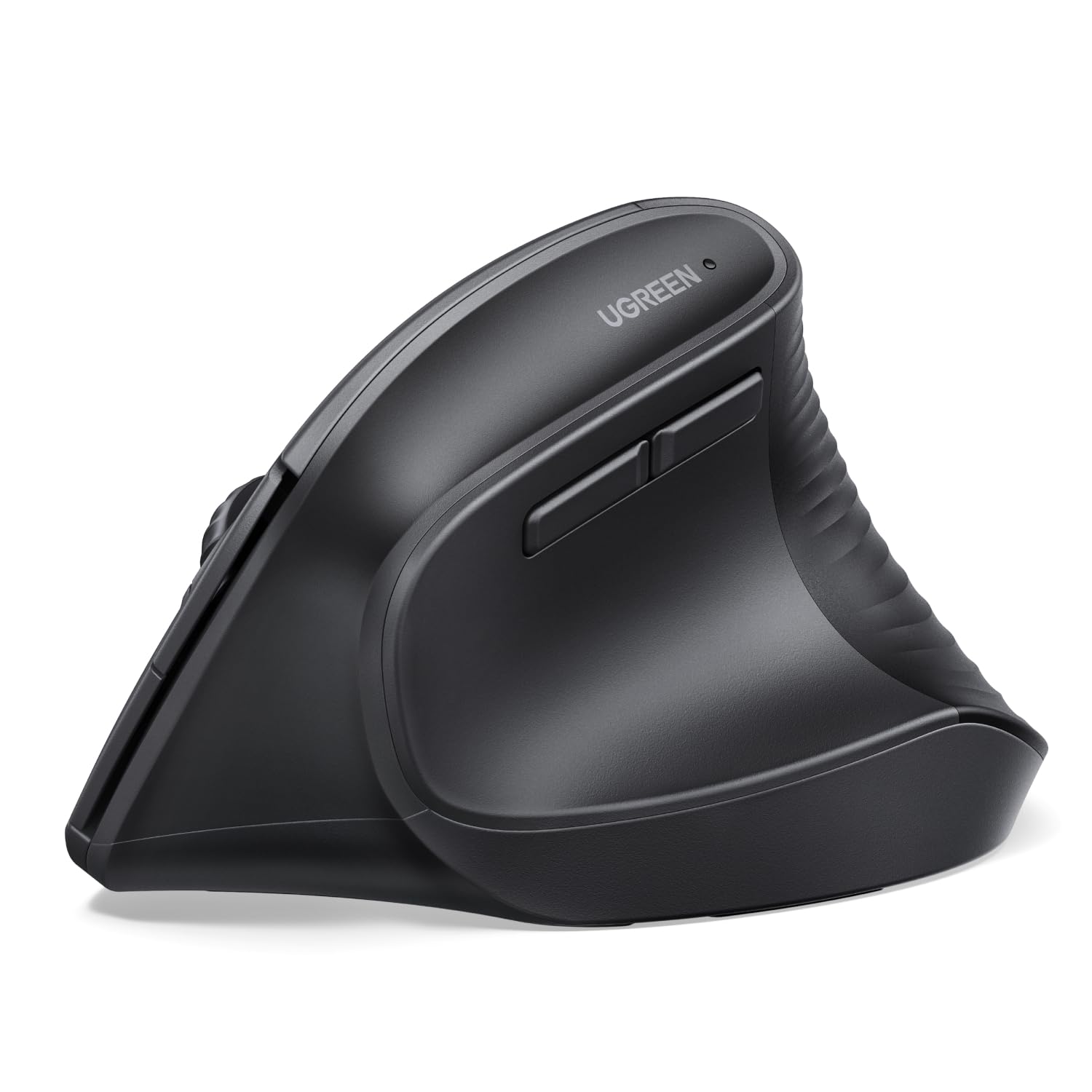
UGREEN Ergonomic Wireless Mouse

88 /100
LBD Score Excellent

Key details

Battery
1 AA
Buttons
5
Devices
Up to 3
Max Sensitivity
4,000 DPI
View on Amazon

There is a price below which a vertical mouse stops being an ergonomic investment and becomes an experiment, and the UGREEN sits under it. It is the least expensive thing in this guide that we are happy to put on a desk, and it does the one job that matters: it holds your hand at a handshake angle instead of flat.

The 4,000 DPI sensor matches the MX Vertical's ceiling, the clicks are quiet, and the PTFE glide feet make it move more smoothly than a mouse this cheap has any right to. It pairs over Bluetooth or the 2.4 GHz dongle with up to three devices, and it runs on a single AA, which means no charging cable — and a spare battery in a drawer.

Durability is where a price this low usually shows, since the click switch is the first thing to go on any mouse, and this one has not been around long enough to argue otherwise. That is the trade. In exchange you get the least expensive answer to a question worth asking before you spend real money: does the vertical grip suit your hand at all?

Pros

  • 4,000 DPI sensor at the lowest price here
  • Quiet clicks and smooth PTFE feet
  • Pairs with up to three devices

Cons

  • Runs on AA batteries instead of a built-in cell
Our verdict

We treat this as the budget answer: quiet clicks, a 4,000 DPI sensor, and three-device pairing, all for the lowest outlay in this guide.

Check Latest Price
7

Button-Heavy Workflows

AOC MS610

85 /100
LBD Score Excellent

Key details

Battery
800 mAh, up to 200 hours
Buttons
6 programmable
Vertical Angle
52°
Max Sensitivity
4,800 DPI
View on Amazon

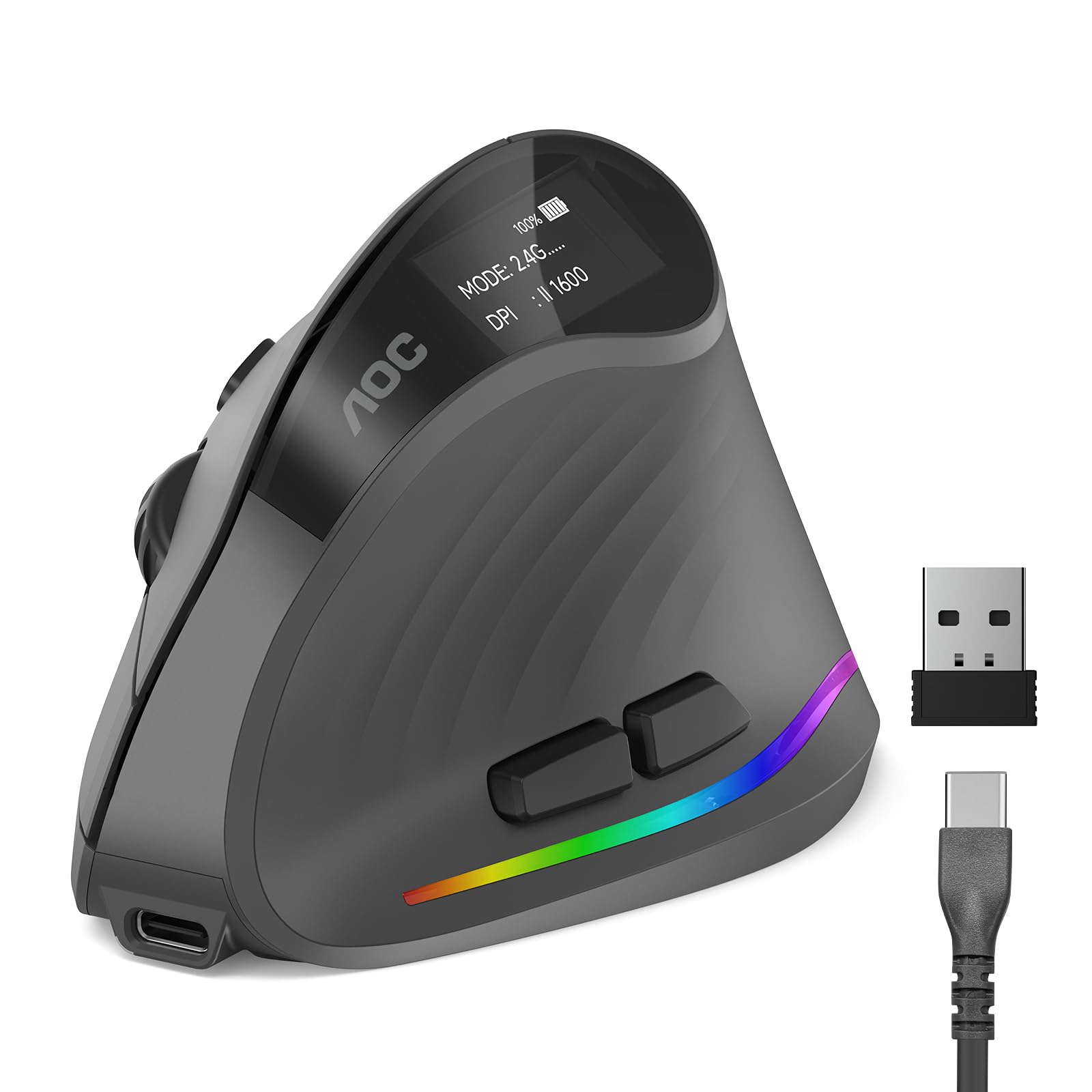
The detail we keep coming back to on the AOC is the little display: it shows battery percentage and the current DPI setting, which nothing else here does and which quietly solves the worst thing about a rechargeable mouse — dying mid-task with no warning.

Behind that screen is a genuinely flexible package: a 52-degree body, 4,800 DPI across five steps, six programmable buttons with downloadable software, and three ways to connect — Bluetooth 5.4, the 2.4 GHz receiver, or the USB-C cable for a wired session while it charges. The 800 mAh cell is rated for about 200 hours with the lighting off, or roughly 40 with it on.

Fifty-two degrees is the shallowest tilt in this guide, four or five degrees short of the Logitechs and the ProtoArc, and that is the reason it ranks below them rather than beside them. The steeper the body, the less your forearm still rolls inward — at this angle you get some of the benefit, not most of it.

The other reason is time in service: this is a new model, so the long-term picture is short, and early failure is the risk that matters most with any mouse. Set it up with the software on day one, though, and the programmable buttons, the display, and the triple-mode connection make it a lot of mouse for the middle of the market.

Pros

  • Onboard display shows battery and DPI
  • Six programmable buttons
  • Bluetooth, dongle, or wired over USB-C
  • 4,800 DPI sensor

Cons

  • Shallowest vertical angle in this guide
  • RGB drops battery life to about 40 hours
Our verdict

For tinkerers, we think this is the one: six programmable buttons, a display for battery and DPI, and three ways to connect, with a gentler angle than the steepest picks.

Check Latest Price
8

Creative Workstations

Razer Pro Click V2 Vertical

81 /100
LBD Score Excellent

Key details

Battery
Up to 6 months
Buttons
6
Devices
Up to 5
Max Sensitivity
30,000 DPI
View on Amazon

There is a button on the side of the Razer that fires an AI prompt, and whether that is the future of desktop work or something you will remap by Friday probably depends on how much of your day happens in a chat window. We are in the second camp, but the key is programmable, so it costs you nothing to ignore it.

What you are paying for is the rest of the package: a 30,000 DPI sensor that is an order of magnitude beyond anything else here, six buttons, 18 zones of Chroma lighting with underglow, and the ability to hold five devices across 2.4 GHz, three Bluetooth hosts, and a wired connection. Razer rates the battery at six months of normal use, and five minutes on the cable buys about three working days.

Think of it as a workstation mouse rather than a travel one. The base support gives your palm somewhere to land, profiles live on board so the settings follow the mouse between machines, and the lighting can be tied to notifications through Chroma plugins — which sounds silly until you have been ignoring a muted calendar all afternoon.

So it is a specialist's purchase. If you want the highest-resolution sensor here, five-device switching, and a mouse that looks like it belongs on a creative's desk, nothing else on this list comes close. If what you want is the most comfortable eight hours for the least money, three picks above do it better.

Pros

  • 30,000 DPI sensor
  • Holds five devices across three modes
  • 18-zone Chroma lighting
  • Six-month battery with quick top-ups

Cons

  • Weighs 0.41 kg, which some hands will feel
  • Wireless link can drop until it re-pairs
Our verdict

A specialist's mouse: we recommend it for creative and gaming desks where the 30,000 DPI sensor, five-device switching, and lighting justify the premium.

Check Latest Price

How We Tested 12 Vertical Mice

We started by pulling together every vertical mouse we could find across the budget and mid-range tiers, then filtered for shell size, hand orientation, connection type, and whether the buttons could be remapped. Customer reviews pointed to the failure points worth watching — scroll wheels that skip, soft-touch coatings that wear slick, side buttons that stop registering — and we cut anything with a pattern of those complaints. That left 12 mice, covering wired and rechargeable, quiet and clicky, right- and left-handed.

Each one got at least two weeks as somebody's primary pointer, on desks belonging to testers with small hands and genuinely large ones. They went through full workdays of spreadsheets, document editing, and design work, rode along in laptop bags on remote days, and got paired to a work laptop and a home desktop where the model allowed it. Because the first week of vertical use is awkward for almost everyone, we held our grip judgments until day ten.

Then the drills: drag-selecting cells in a long spreadsheet to see whether clicks landed where we meant them to, clicking the scroll wheel hard to catch double registers, remapping the side buttons to copy and paste and noting how far the thumb had to reach. We watched whether the heel of the palm rested on the shell or hovered, and whether the pinky had anywhere to go. We set each mouse up cold, without the manual, and counted the minutes lost to pairing. Quiet-click models got tested next to a colleague who hadn't been warned. We dropped each one from desk height onto carpet, wiped them weekly, and logged battery life. Value, in the end, came down to how many of these small things a mouse got right.

How to Choose a Vertical Mouse

Measure Your Hand Before You Look at the Angle

Run a ruler from the crease at the base of your palm to the tip of your middle finger. Under about seven and a half inches puts you in small-to-medium territory, which is where the Logitech Lift and the ProtoArc EM11 are aimed — the ProtoArc states the number outright, which almost nobody does. Longer hands want a fuller shell like the MX Vertical's, or your palm will hover and your fingers will curl to hold on.

Then look at the tilt. Most of the good ones sit at 57 or 58 degrees; the AOC runs at 52, which leaves more of the inward roll in your forearm. A steeper angle is not automatically better if the body does not fill your hand, which is why size comes first and degrees come second.

Wired, Dongle, or Bluetooth

A cord buys certainty: no charging, no pairing, no waking the mouse up, and it works the instant the machine boots — provided you have a free USB-A port within about five feet. Bluetooth frees that port, which matters on a laptop with only two, and the 2.4 GHz receiver remains the most predictable option for a desktop that never moves.

Count the machines you actually work across. Three-device switching is common here and genuinely useful when a work laptop and a home desktop share one desk; the Razer holds five, which covers a whole studio.

Decide How You Want to Handle Power

There are two philosophies. A single AA lasts up to 24 months in the Lift, with no cable anywhere near your desk and no warning light to ignore — you swap a battery one morning and forget about it. A built-in cell means USB-C top-ups roughly every four months on the MX Vertical and every three on the TECKNET, plus the small dread of a mouse that dies mid-meeting.

If you go rechargeable, favor one with an honest gauge. The AOC prints battery percentage and DPI right on the body, which is the simplest fix for the entire problem.

Give It a Week and Keep Your Old Mouse

Almost everyone dislikes a vertical mouse for the first two or three days. The grip change makes the cursor feel clumsy and your shoulder feel odd, and that is normal rather than a sign you bought wrong. Keep the flat mouse connected for deadline work during the adjustment week and judge the new one after seven days of ordinary use.

What you are aiming for is a wrist stacked over the forearm rather than rolled flat, elbow near 90 degrees, with the mouse close enough that you are not reaching for it. If that still has not happened after a week, the shell size is wrong, not the idea.

The Click Switch Is What Fails First

Switches and scroll wheels wear out long before the sensor or the radio does, and the symptom is specific: a click that registers twice, a drag that drops halfway across the screen. That is why warranty length is worth more here than on most electronics — three years on the TECKNET, two on the Razer and the ProtoArc, one on the Lift.

Whatever you buy, spend the first week doing the boring test: double-click a file name, drag a window across the screen, scroll a long document to the bottom. If any of it stutters, you are inside the return window, which is exactly where you want to find out.

Frequently Asked Questions

Final Verdict

Most people should buy the Logitech MX Vertical. The 57-degree shape does the work, the sensor and battery keep up with a full working day, and switching between a laptop and a desktop is the feature that ends up mattering most once the novelty wears off.

Two exceptions are worth naming. If you mouse with your left hand, the left-handed Lift is the proper option and the only mirrored shell here. And if you never want to think about charging again, the corded Anker asks for nothing but a USB port.