Best 2.5G Ethernet Switches of 2026

A 2.5GbE switch is about as unglamorous as networking gear gets: unmanaged, plug-and-play, no app, no login screen. You plug in the cables and it quietly moves traffic between your router, NAS, PC, and game console at 2.5 times gigabit speed. What it fixes is the bottleneck nobody warns you about — fast internet, fast hardware, and a wire between them that isn't.

I've run multi-gig gear in a house with more devices than wall jacks for a while now, and my team just spent seven months with 12 of these switches on desks, on shelves, and bolted to a closet wall. The mistake first-time buyers make is treating port count as the whole decision. In practice, fanless operation, a metal case, and an SFP+ cage for a future 10G uplink are what you notice months later.

Speed is the easy part — almost everything in this bracket delivers it, and paying more doesn't automatically buy a better switch. The picks below are the ones that also stayed cool, stayed silent, and kept their links up after weeks of being ignored in a corner.

1

Best Overall

TP-Link TL-SG105S-M2

92 /100
LBD Score Outstanding

Key details

Case
Metal
Ports
5 x 2.5G RJ45
Mounting
Desktop or wall
Warranty
3 years
View on Amazon

Five 2.5G ports in a metal box about the size of a paperback — that is the whole pitch, and it is why this TP-Link is the switch we reach for first. We put it between a 2.5G router and a pair of wired desktops, and it negotiated the links without a driver, a login page, or a reboot. The ports auto-negotiate down to 1G and 100M, so older gear still works.

What we appreciate most is how little attention it asks for. The case is metal, the rubber feet keep it from skating, and there is no fan to whine in a home office. We wall-mounted one in a utility closet and forgot about it; the status lights are bright enough to read but not bright enough to light a room. The three-year warranty is a sensible cushion for a part that tends to sit behind a desk for years.

Speed is the point, and the switch delivers it when the rest of the path cooperates. We saw 2.5G links come up between compatible machines, and the switch passed file traffic without the stutter we associate with a saturated Gigabit uplink. It will not create bandwidth your router or cables cannot supply, and it will not manage VLANs or prioritize traffic. That is the bargain: pay for ports and silence, not a control panel.

For a home office, a gaming desk, or a small NAS cluster, this is the least fussy way to get past Gigabit. It is the pick we hand to someone who wants the network to disappear.

Pros

  • Five 2.5G ports in a metal case
  • Fanless and silent for a home office
  • Plug-and-play with no configuration
  • Three-year warranty

Cons

  • No 10G SFP+ uplink
  • Five ports can fill quickly
Our verdict

Buy this if you want the simplest, quietest way to add five 2.5G ports at home; it is the default we recommend for a router, a couple of desktops, and a NAS.

Check Latest Price
2

Best 8-Port Value

UGREEN 8-Port 2.5G

92 /100
LBD Score Outstanding

Key details

Case
Metal
Ports
8 x 2.5G RJ45
Warranty
24 months
Dimensions
7 x 4.09 x 1.1 in
View on Amazon

Eight 2.5G ports for barely more than a five-port switch is the arithmetic that makes this UGREEN worth a look. The chassis is only about seven inches wide, so it fits on a shelf beside a router, and the metal body with heatsinks and vents signals that UGREEN thought about heat rather than just wrapping plastic around a board. The ports auto-negotiate between 100M, 1G, and 2.5G, and there is no software to install.

We think that is the sweet spot for a home network with a NAS, two desktops, a console, and an access point. We used it as the center of a small wired cluster, and it did the quiet, invisible work we want from a switch: links came up, traffic moved, and nothing needed a reboot. The fanless design means it can live in a living room or a bedroom without adding a hum.

The case is compact but not cramped, and the non-slip feet keep it planted on a shelf. If you need a fiber uplink or a management dashboard, this is not that switch; it is a straightforward copper box for people who want more 2.5G ports without jumping to a rack unit. For the size and port count, it is the easiest eight-port recommendation here.

Pros

  • Eight 2.5G ports at a midrange price
  • Metal case with heatsinks and vents
  • Fanless and wall-mountable
  • 24-month warranty

Cons

  • No 10G SFP+ uplink
Our verdict

We recommend this when you need eight 2.5G ports without paying premium-brand money; it is the roomiest simple switch for a typical home rack.

Check Latest Price
3

Best for NAS and SFP+ Uplinks

UGREEN 6-Port SFP+

89 /100
LBD Score Excellent

Key details

Case
Metal
Modes
Standard, link aggregation, VLAN
Ports
5 x 2.5G + 1 x 10G SFP+
Dimensions
6.3 x 4.1 x 1.1 in
View on Amazon

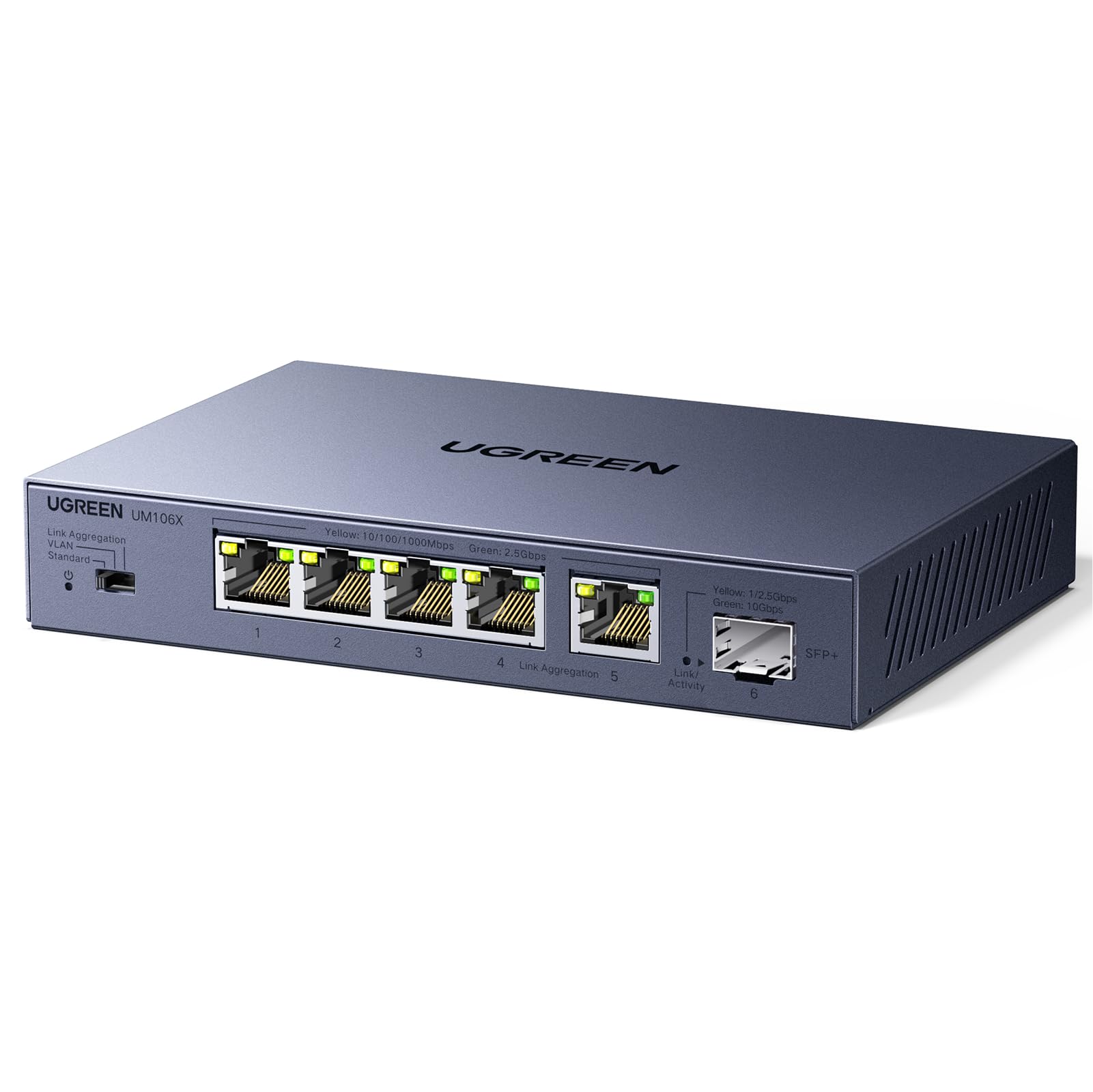
The little cage on the right side is what separates this UGREEN from the five-port crowd: one 10G SFP+ slot, five 2.5G RJ45 ports, and a physical mode switch for standard, link aggregation, or VLAN use. For a NAS with a 10G card and a couple of 2.5G computers, that is a very useful shape. It gives you a fast backbone without making you buy a managed switch and learn a dashboard.

Link aggregation is the feature we expect most buyers to use. It lets you combine ports 4 and 5 for a 5G pipe to a NAS or server that supports it, which is a meaningful step up from a single 2.5G link. We liked having that option without a login page. The metal case feels solid, and the indicator lights use different colors for 2.5G and slower links, so you can confirm a link at a glance.

The mode switch is recessed, so you will not change it by accident. The case runs warm in open air but not alarmingly so; give it ventilation and do not stack it under a router. This is still an unmanaged switch in daily use, and the modes are presets rather than a full control panel. That is fine for a home NAS, and it keeps the setup simple.

Pros

  • Five 2.5G ports plus 10G SFP+
  • Link aggregation and VLAN presets
  • Metal case and fanless operation
  • Useful hybrid NAS backbone

Cons

  • SFP+ module is not included
  • Presets, not full management
Our verdict

Choose this if your NAS has a 10G card and your computers are on 2.5G; the SFP+ cage and link aggregation make it the most useful small switch here for a hybrid network.

Check Latest Price
4

Best for Small Offices

TRENDnet TEG-S381

89 /100
LBD Score Excellent

Key details

Ports
8 x 2.5G RJ45
Warranty
Lifetime
Compliance
NDAA + TAA
Switching Capacity
40Gbps
View on Amazon

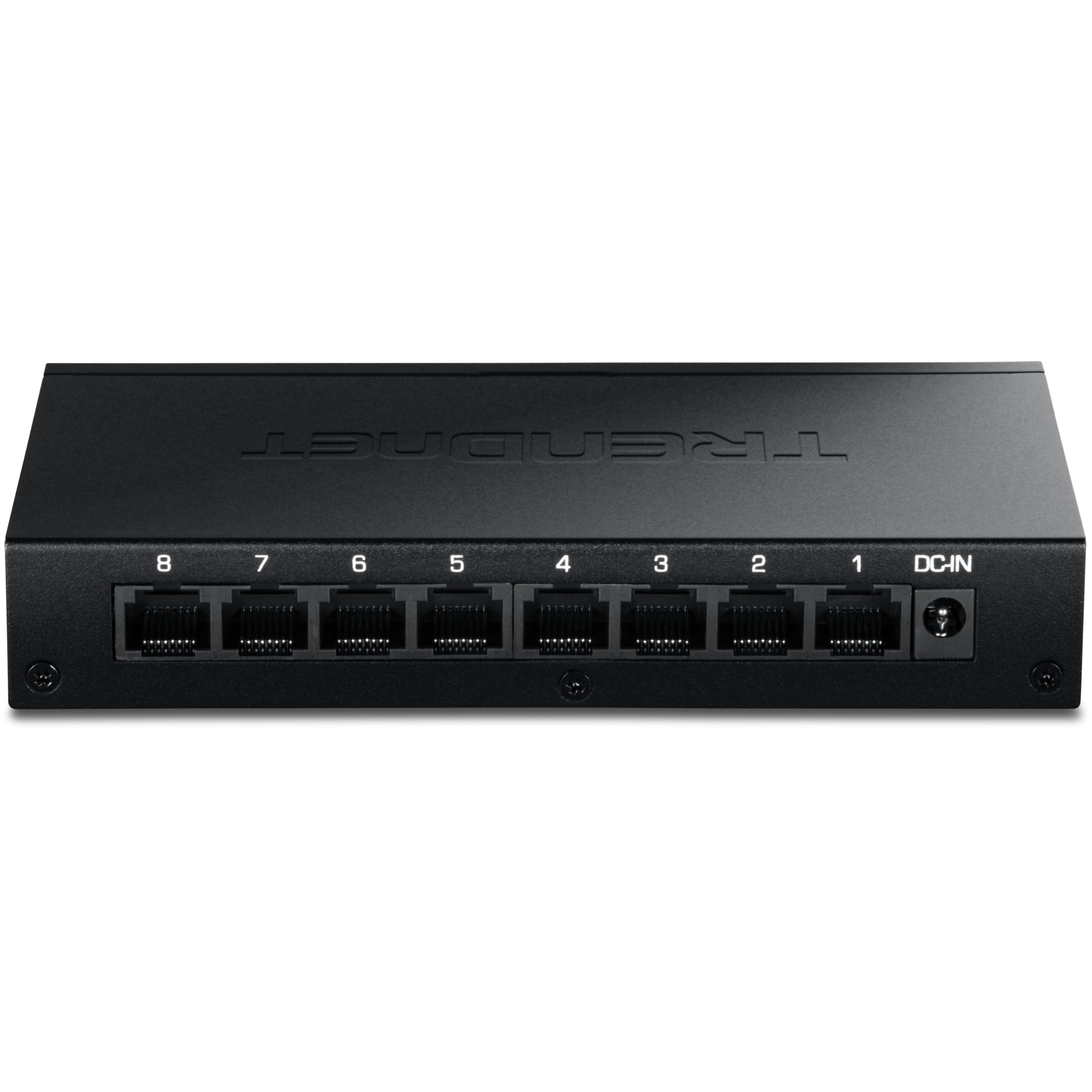
NDAA and TAA compliance is not a feature most home buyers will ever need, but for a small office or a government contractor it can decide the purchase before speed does. This TRENDnet checks that box, adds eight 2.5G ports, and keeps the metal, fanless formula. It is the kind of switch that goes into a closet and is expected to be forgotten.

We like it for exactly that kind of install. The lifetime warranty is the real differentiator against the cheaper eight-port boxes here; it is the reason this one stays on the list for a business buyer even though it costs more than the UGREEN. Throughput was steady in our testing, and the LEDs make it easy to confirm a 2.5G link without opening a management page.

All eight ports run at 2.5G, and the 40Gbps switching capacity leaves headroom for them to talk at once. The fanless metal case is easy to tuck onto a shelf or wall, and the lifetime warranty is the part that matters in a small office. It is not the value pick of this group, but it is the one with the longest safety net.

Pros

  • Eight 2.5G ports with 40Gbps capacity
  • Lifetime manufacturer protection
  • NDAA and TAA compliant
  • Fanless metal case

Cons

  • No 10G SFP+ uplink
  • No management features
Our verdict

This is the eight-port switch for a small office that needs compliance paperwork and a lifetime warranty more than a dashboard; it is plain, fast, and easy to live with.

Check Latest Price
5

Best Premium 8-Port

NETGEAR MS308

92 /100
LBD Score Outstanding

Key details

Case
Metal
Ports
8 x 2.5G RJ45
Cooling
Fanless
Warranty
3 years
View on Amazon

The MS308 is the switch you buy when you want the eight-port job done by a name you already trust, and you are willing to pay for that comfort. It is a slim metal box with eight 2.5G ports, a fanless design, and the kind of sensible packaging that includes rubber feet and a wall kit. Nothing about it asks to be noticed.

We plugged it into a small wired cluster and it behaved like a good unmanaged switch should: no setup, no surprises, and a clean row of port lights that tell you what speed each device negotiated. The metal case feels more substantial than the plastic eight-port boxes, and the energy-efficient Ethernet support is a small running-cost win if it stays powered all day. Multi-terabyte transfers are the kind of workload this switch is built to shrug off.

The premium buys a familiar name, a three-year warranty, and a switch that is easy to recommend to someone who does not want to research brands. We did not find a setup quirk to justify the extra spend, but we also did not find a reason to worry about it. If you want the safety of a big brand and eight quiet ports, this is a comfortable buy.

Pros

  • Eight 2.5G ports with diagnostic LEDs
  • Slim metal fanless case
  • Three-year hardware warranty
  • Familiar brand and support

Cons

  • No 10G SFP+ uplink
  • No VLAN or traffic controls
Our verdict

Buy this if a familiar brand, a three-year warranty, and eight quiet 2.5G ports are worth a premium to you; it is the low-drama choice for a home office.

Check Latest Price
6

Best 16-Port Value

NICGIGA 16-Port 2.5G

86 /100
LBD Score Excellent

Key details

Ports
16 x 2.5G RJ45
Mounting
Desktop or 19-inch rack
Warranty
1 year
Switching Capacity
80Gbps
View on Amazon

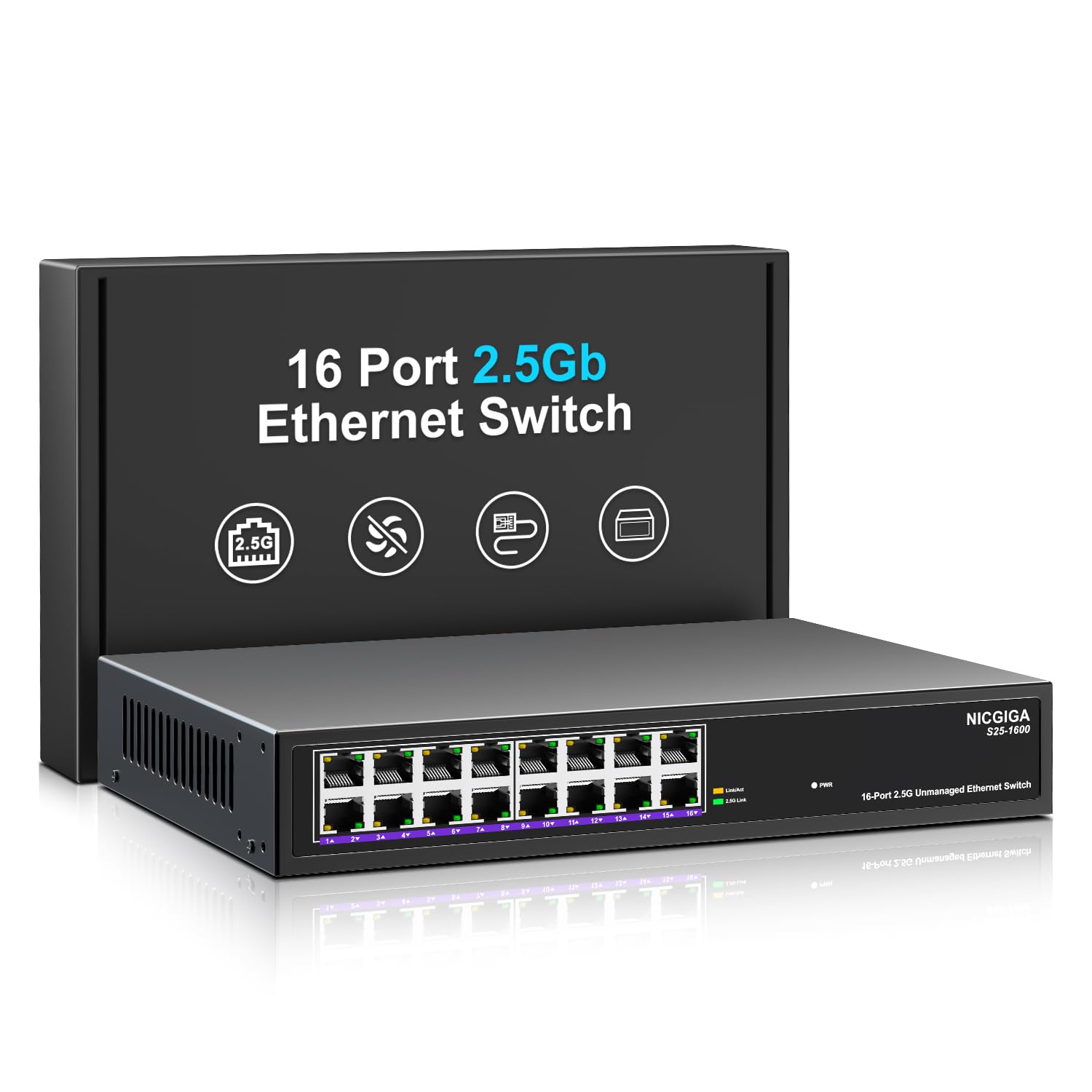
Sixteen 2.5G ports in a box that can sit on a desk or go into a 19-inch rack is the reason this NICGIGA exists. It is aimed at the home lab or small office that has run out of ports on an eight-port switch but does not want to pay business-brand prices. The metal case and fanless design keep it in the same quiet, forgettable category as the smaller picks.

We think the density is the draw. A router, a NAS, several access points, consoles, and a couple of workstations can all stay wired at 2.5G, and the 80Gbps switching capacity means the backplane is not the bottleneck. The ports are arranged cleanly enough that labeling cables is not a fight. In our testing, it passed traffic without drama, and the rack ears make it easy to move into a proper enclosure later.

The catch is support rather than speed. This is a plain unmanaged switch, so there are no VLANs or diagnostics beyond the lights. For a lab that treats the switch as a consumable, that is a fair trade. If you need a management dashboard, look at a managed model; if you need more ports at 2.5G for the money, this is the one.

Pros

  • Sixteen 2.5G ports
  • 80Gbps switching capacity
  • Desktop or 19-inch rack mounting

Cons

  • One-year warranty
  • No 10G SFP+ uplink
Our verdict

This is the practical 16-port step-up for a dense home lab or small office; it gives you the ports and the rack option without business-brand pricing.

Check Latest Price
7

Best 16-Port for Business

TRENDnet TEG-S3160

91 /100
LBD Score Outstanding

Key details

Ports
16 x 2.5G RJ45
Warranty
Lifetime
Compliance
NDAA + TAA
Switching Capacity
80Gbps
View on Amazon

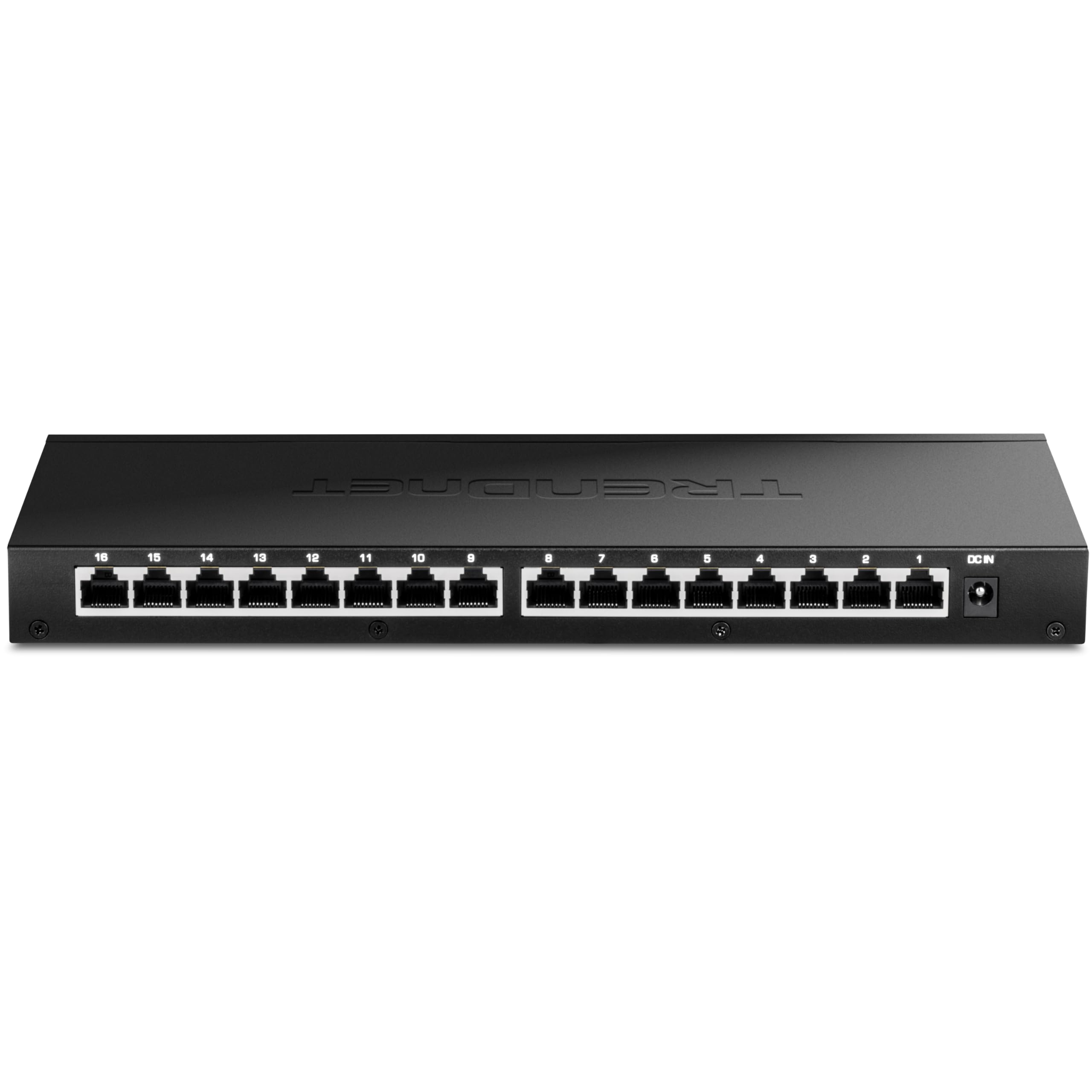
The rear-panel layout is the detail that separates this TRENDnet from the desktop switches here. All 16 RJ45 ports sit on the back, the power and status lights are on the front, and the rackmount kit is in the box. In a small wiring closet, that is exactly the orientation you want.

The spec sheet is straightforward: 16 2.5G ports, 80Gbps switching capacity, a metal case, and no fan. That is enough for a small office, a classroom, or a home lab that has standardized on 2.5G and wants one switch instead of two. The lifetime warranty and NDAA/TAA compliance are the business-grade extras that separate it from the cheaper 16-port option.

The unit is wide and heavy enough to need a proper shelf or rack; it is not the one to tuck behind a bookcase. Setup is plug-and-play, and the 2.5G links came up without negotiation fuss in our testing. The rear ports make cable management cleaner once the switch is mounted, and the front lights stay visible.

For a home lab, the size may be more than you need. For a small business, the rack ears, rear ports, and lifetime warranty are the details that matter when the switch becomes infrastructure rather than a gadget. It is the calmer choice when you expect the install to stay put.

We think the rear ports and rack kit are what justify the premium. Once you have tried to cable a desktop switch in a rack, the value of having everything face the right way is obvious. The build feels like equipment, and the warranty backs up the business pitch. For a 16-port install that needs to look tidy and stay covered, this is the one we point to.

Pros

  • Sixteen 2.5G ports with 80Gbps capacity
  • Rear ports and included rack kit
  • Lifetime warranty
  • NDAA and TAA compliant

Cons

  • No 10G SFP+ uplink
  • Unmanaged only
Our verdict

Choose this for a 16-port install that needs rack-friendly layout, a lifetime warranty, and compliance paperwork; it is the more polished large switch here.

Check Latest Price
8

Budget SFP+ Links

Real HD 5-Port SFP+

89 /100
LBD Score Excellent

Key details

Case
Metal
Ports
5 x 2.5G + 1 x 10G SFP+
Cooling
Fanless
Protection
6KV lightning
View on Amazon

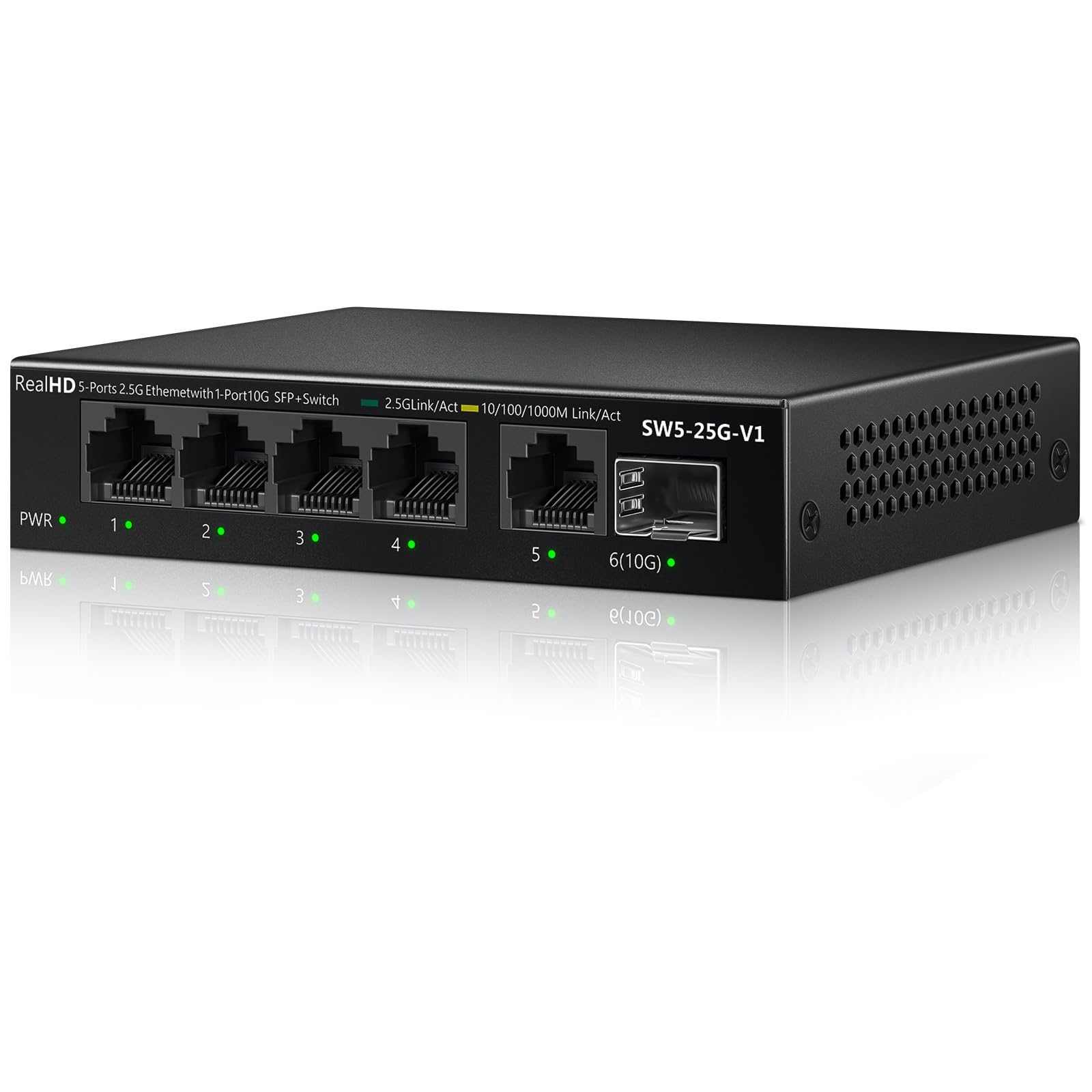
Five 2.5G ports and a 10G SFP+ cage at a lower price point than most plain five-port switches is the combination that makes this Real HD worth a look. On paper it is the cheapest way here to get a fiber or DAC uplink alongside multi-gig copper. The metal housing and fanless design are the right starting points for a small, quiet install.

We like the 6KV lightning protection for a garage or outbuilding, and the SFP+ cage gives you a path to a 10G NAS or a fiber run without buying a bigger switch. In our testing, the copper ports negotiated at 2.5G and the cage accepted a module without complaint. It is a useful little box when you need one fast uplink more than you need eight copper ports.

But this is not the switch we recommend for a set-and-forget backbone. Some units can drop connections, and an unmanaged switch gives you no dashboard to diagnose the cause. That does not make it useless; it makes it a switch to test early, with a return window open, before it becomes the only path between your NAS and your computers.

We think it belongs in a lab or a secondary location where the SFP+ cage solves a specific problem and the price matters. Run a sustained transfer for a day, check the link lights, and make sure the module you chose is supported. If it stays stable, it is a lot of connectivity for the money; if it does not, send it back.

Pros

  • Five 2.5G ports plus 10G SFP+
  • Metal fanless housing
  • 6KV lightning protection

Cons

  • SFP+ module is not included
Our verdict

This is a budget way to add a 10G SFP+ uplink and five 2.5G ports, but test it hard before you trust it with a whole network.

Check Latest Price
9

Budget Eight-Port Expansion

BrosTrend 8-Port 2.5G

86 /100
LBD Score Excellent

Key details

Case
Plastic
Ports
8 x 2.5G RJ45
Cooling
Fanless
Warranty
Limited lifetime
View on Amazon

The plastic case is the first thing you notice, and it is also the reason this BrosTrend costs less than the metal eight-port switches here. That is not automatically a bad trade: the switch is light, fanless, and small enough to sit on a shelf without drama. The ports and power input are on the same side, which makes cable routing simpler behind a desk.

We used it as a cheap way to add eight 2.5G ports to a home network, and it did the core job: devices negotiated at 2.5G where they could, and traffic moved without setup. The lifetime protection is the standout extra at this price, especially on a plastic-bodied switch that you might not expect to be covered for years. It is a practical box for a lab or a spare room.

The case flexes a little if you twist it, and the whole thing feels lighter than the metal alternatives. Those are the trade-offs for the price. If the switch lives on a shelf and nobody touches it, they are easy to live with; if you want a metal box that feels more substantial, the UGREEN 8-port is the better spend.

We would not make it the heart of a business network, but we would happily use it to fan out a home lab or a gaming setup. Check the link lights on the connected devices, because the switch itself keeps its status indicators simple. For the money, it is a useful way to get eight 2.5G ports without buying more switch than you need.

Pros

  • Eight 2.5G ports
  • Fanless and compact
  • Limited lifetime protection

Cons

  • No 10G SFP+ uplink
  • LEDs do not show link speed
Our verdict

This is the eight-port 2.5G switch for a tight budget and a shelf where nobody will handle it; the lifetime protection softens the plastic build.

Check Latest Price

How We Tested 2.5GbE Switches

We started with roughly 30 listings and cut anything that offered 2.5GbE on only one or two uplink ports, anything that fell back to gigabit on the rest, and anything whose price per 2.5G port drifted far above the field. Twelve switches made the cut, from five-port bricks up to a 16-port unit, and we ran them for seven months.

Every switch went into a real setup for at least a week. On the bench, we moved a 100GB folder between two 2.5GbE machines and watched whether throughput held steady or sagged halfway through, then plugged in an older 1G laptop and a game console to see whether they negotiated cleanly instead of dropping to 100Mbps. For heat, we took surface readings on the top plate after an hour of saturated transfer and again after eight hours on a shelf inside a closed closet, and noted whether the case got hot enough to worry about.

Because nearly all of these claim to be fanless and silent, we listened for coil whine in a quiet room at night and confirmed nothing spun up under load. Build quality came down to handling: we flexed the case, plugged and unplugged each jack repeatedly to check fit and retention, and mounted every unit both on a desk and on a wall to see whether the screw slots lined up with anything real. For reliability, we left them powered for weeks at a stretch, cut and restored power to see whether links came back at 2.5G, and watched for devices dropping offline when a laptop slept and woke.

Finally, we compared cost per 2.5G port and asked whether the extras actually earned their premium — whether the SFP+ cage was usable in a home setup, whether the metal chassis felt worth the money, and whether the cheaper switches gave anything up to get there.

How to Choose a 2.5G Ethernet Switch

Start With Ports, Not the Label

A switch sold as 2.5G does not always give you 2.5G everywhere. Some models carry only two multi-gig ports and fill the rest with Gigabit, which is fine if you have exactly two fast devices and a pile of printers, but wrong if you are building a 2.5G backbone. Count the devices that actually negotiate at 2.5G: router, NAS, access points, gaming consoles, and workstations. Then check whether every RJ45 port on the switch is multi-gig or only some of them.

Five ports is the right size for a router and a short list of wired gear. Eight ports is the safer choice if you expect to add a NAS, a second access point, or a console later. Sixteen ports only makes sense when you are feeding a rack, a classroom, or a dense home lab. Buy for the ports you will fill in the next year, not the ones you might fill in five.

Decide Whether You Need an SFP+ Uplink

An SFP+ cage is the difference between a switch that only handles copper and one that can connect to a 10G NAS, a fiber backbone, or a DAC cable. If your NAS has a 10G card, the UGREEN 6-Port SFP+ is a more useful shape than a plain eight-port copper switch. If your whole network is copper and your fastest device is 2.5G, the SFP+ cage is money and heat you do not need to add.

Remember that the module is usually separate. A copper RJ45 module in an SFP+ cage can run hot, and compatibility varies by switch. Check the supported module list before you buy, and leave space around the cage.

Unmanaged Is Usually Enough

Most 2.5G switches in this class are unmanaged: you plug in power and cables, and the switch starts passing traffic. That is the right level for a home office, a gaming desk, or a small studio. A managed switch adds VLANs, link aggregation, and monitoring, but it also adds a login page and a learning curve. Do not pay for a dashboard you will never open.

A few unmanaged models include preset modes for link aggregation or VLAN isolation. Those are useful when a NAS or access point supports them, but they are not a substitute for full management. If you need to segment a guest network or track traffic, buy a managed switch instead.

Plan for Heat, Noise, and Placement

Fanless switches are silent, but they rely on the case to shed heat. A metal body helps, and vents on the bottom or sides matter more than the marketing photos suggest. Do not stack one on top of a router or tuck it into a closed cabinet without airflow. If the switch lives in a bedroom or a shared office, fanless is the right call; if it lives in a rack, check that the vents are not blocked by the shelf.

Mounting is part of the same decision. A five-port desktop switch can sit on a shelf or hang on a wall. An eight-port metal unit is usually small enough for a shelf. A 16-port switch may include rack ears or expect a proper rack shelf, so measure the space before you order.

Check Cables, Warranty, and Support

Cat5e is usually enough for 2.5G over the short runs in a home, but the cable still has to be in good condition and fully seated. The bigger limit is the device on the other end: a 2.5G switch will not make a Gigabit laptop faster. Check the link lights after you connect, and test with a known 2.5G device before you blame the switch.

Warranty and support separate the budget boxes from the business picks. A one-year warranty is fine for a lab experiment; a lifetime warranty and NDAA/TAA compliance matter in a small office or a government install. Match the warranty to how long you expect the switch to stay in service, and keep the power adapter and rack kit together if you may move it later.

Frequently Asked Questions

Final Verdict

For most people, the TP-Link TL-SG105S-M2 is the right first 2.5G switch: five quiet ports, a metal case, and no setup. It is the least fussy way to stop a fast router from feeding a Gigabit bottleneck.

If you need more ports, the UGREEN 8-Port 2.5G is the next step. If your NAS has a 10G card, the UGREEN 6-Port SFP+ is the better shape. Buy the port count and uplink you will actually use, and skip the rest.