Best PoE Switches of 2026

A PoE switch does one quiet job: it sends power and data down a single Ethernet cable, so a camera on the side of a garage or an access point in a hallway doesn't need an outlet anywhere near it. The trouble is that the boxes all look alike — a metal rectangle with a row of ports — while the parts that actually matter hide in the fine print.

I've run PoE gear at home for years, mostly to keep outdoor cameras alive through bad weather, and my team and I have spent the past seven months living with 11 switches to see which ones earn their shelf space. We hung them in garages, stacked them in closets, and pushed them until the power budget ran dry.

The spec people overrate is port count; the one they underrate is the power budget, since four PoE ports sharing 60 watts won't run four power-hungry cameras. Every pick below passed the same basic tests.

1

Best Overall

TP-Link TL-SG1005P

95 /100
LBD Score Outstanding

Key details

Cooling
Fanless
PoE Ports
4 of 5
PoE Budget
65W
Port Speed
Gigabit
View on Amazon

Four inches square and an inch tall, in a metal case light enough to forget you are holding it: the TL-SG1005P is the switch we point most people to first, because it does the job and then gets out of the way. Four of its five gigabit ports carry PoE+ (802.3af/at, up to 30W each) on a 65W total budget, and the fifth is the uplink back to your router.

Nothing about it needs configuring. We plugged a camera and an access point into ours and both came up powered and passing video without a browser window ever opening. It also lists port-based QoS and IGMP snooping, which several of the cheaper PoE switches here skip, and that starts to matter once a few camera streams and a VoIP call share one uplink.

The 65W budget is the number to run your own arithmetic against. Four ordinary bullets drawing 5 to 10W each sit comfortably inside it; four PTZ domes near the 30W per-port ceiling do not, and no amount of port counting changes that. If your devices are on the heavy end, the 16-port TP-Link or one of the 190W boxes is the better fit.

What you give up is management: no VLANs, no per-port controls, no extend mode for long runs. For a house or a small shop hanging four cameras and an access point off one cable, none of it is missed. The wall-mount slots are the detail we appreciate most — two screws into a joist in the garage and the thing is off the shelf for good.

Pros

  • Powers four devices plus an uplink on one box
  • Fanless, so it adds no noise to a room
  • Metal case at a plastic-switch price
  • QoS and IGMP snooping the cheap ones skip

Cons

  • No VLAN, management, or extend mode
  • Only four of the five ports supply power
Our verdict

For four cameras or access points, this is the one to buy: silent, metal, gigabit, and the least expensive PoE switch here that manages all three.

Check Latest Price
2

Best for a Camera-Heavy Setup

UGREEN 10-Port PoE Switch

89 /100
LBD Score Excellent

Key details

Modes
Standard, VLAN isolation, Extend
PoE Ports
8 of 10
PoE Budget
60W
Port Speed
Gigabit
View on Amazon

Eight powered ports for roughly what the four-port picks cost is the whole argument for this UGREEN unit, and it holds up: eight PoE+ gigabit ports at 30W each, two plain gigabit uplinks, and a metal case that runs off a normal AC cord instead of a wall adapter.

The mode button is the part we ended up valuing more than the extra ports. One press moves the whole switch between Standard, Port Isolation, and Extend. Isolation stops the camera ports talking to each other, which gets you most of what a VLAN would without ever logging into a management screen, and Extend pushes power and data down runs well past the usual 328 feet. For a house with cameras scattered around a big yard, that is three useful behaviors with nothing to configure.

Sixty watts is where the arithmetic bites. Spread over eight ports that is a little more than seven watts each with every port filled, which covers ordinary bullets and domes but not a cluster of high-draw PTZs. When the draw does go over budget, the switch cuts ports from 8 down to 1, so put the camera you care most about on port 1 and the one you could lose on port 8. It is the single most useful thing to know before you start labelling cables.

It runs cool and quiet, with no fan to hum in a hallway, and the two-year warranty sits a step behind the lifetime cover on the TP-Link picks. Neither changes the value story. Ours is the switch we reach for when a camera count grows by two halfway through a project.

Pros

  • Eight PoE+ gigabit ports plus two uplinks
  • One-button isolation and extend modes
  • Standard AC cord, no wall adapter
  • Fanless metal case

Cons

  • 60W shared across eight ports
  • Two-year warranty, not lifetime
Our verdict

Best for someone whose camera count is already past four: eight PoE+ ports, a one-button VLAN stand-in, and no fan, for about the price of a five-port.

Check Latest Price
3

Best for a Growing Camera System

TP-Link TL-SG116P

89 /100
LBD Score Excellent

Key details

Cooling
Fanless
PoE Ports
16
PoE Budget
120W
Port Speed
Gigabit
View on Amazon

Sixteen powered ports is more than most homes need on day one, and that is the point: this is the switch you buy once, when the second wave of cameras arrives and the four-port box is already full. Every port carries PoE+ gigabit with 120W behind them, in a fanless metal chassis about eleven inches wide.

Fanless is the part that sold us. Sixteen PoE ports is exactly the size where a fan usually appears, and a whining box in a hall closet is the kind of thing you hear at 2 a.m. This one runs silent, sits on a shelf, and keeps the QoS and IGMP snooping of its smaller sibling.

A hundred and twenty watts across sixteen ports averages a little over seven watts a port with everything filled. Ordinary cameras live comfortably inside that; a rack of PTZ domes or a few long, power-hungry runs will not, and that is the honest ceiling on this model. Priority mode protects ports 1 to 4 for the streams you care about most, Isolation keeps camera traffic off the rest of the LAN, and PoE auto recovery power-cycles a frozen camera so nobody has to climb a ladder.

Extend mode reaches 250 m, at the cost of dropping that port to 10 Mbps — a fair trade for the camera at the back of the lot, and one we are happy to make. Coverage is TP-Link's limited lifetime warranty, which is the sort of thing that matters when the switch is screwed to a wall in a garage.

Pros

  • Sixteen PoE+ ports, every one powered
  • Silent at a size where fans usually appear
  • Auto recovery, priority, isolation, and extend modes
  • Limited lifetime warranty

Cons

  • 120W gets thin if all sixteen ports run high-draw gear
Our verdict

Best for a camera system that keeps growing: sixteen powered gigabit ports, 120W, and complete silence, with room for a dozen ordinary cameras.

Check Latest Price
4

Best for Rack and Office Installs

NETGEAR GS324P

0 /100
LBD Score Fair

Key details

Mounting
Desktop or rack mount
PoE Ports
16 of 24
PoE Budget
190W
Port Speed
Gigabit
View on Amazon

Rack ears, a metal chassis the width of a pizza box, and 24 ports across the front: this is where a PoE switch stops being something you tuck behind a desk. Sixteen ports carry PoE+ with 190W behind them, and the other eight are plain gigabit. That split turns out to be useful rather than stingy, since the printer, the NAS, and the desktop need neither power over Ethernet nor a slice of the PoE budget.

Setup is like everything else here — cord in, uplink connected, powered devices up. Rack kit and rubber feet both ship in the box, so it can go in a wiring closet or on a shelf, and the built-in supply means one power cord instead of a brick on the floor.

The headroom is what we think sells it. A hundred and ninety watts across sixteen ports leaves room for a dozen cameras plus a couple of access points without doing sums first, and dynamic PoE allocation sends unused power to whichever port is drawing hardest instead of reserving a fixed slice for every port. For a small office that adds cameras every year, that is worth more than any checkbox feature.

The one thing to check is noise. NETGEAR specifies a fanless design, which is unusual at this power level, so give it a listen in the first week wherever it ends up. A quiet switch in a closet is fine and an audible one beside a desk is not, and the three-year warranty gives you room to act. At 13 inches across it also wants a real shelf rather than the top of a filing cabinet.

Pros

  • 190W across sixteen PoE+ ports
  • Eight non-PoE ports that leave the budget alone
  • Rack kit, rubber feet, and a built-in power supply
  • Dynamic power allocation

Cons

  • Needs rack or shelf space; it dwarfs a desk setup
Our verdict

For a rack or a small office with sixteen powered devices, this is the straightforward buy: 190W, a rack kit in the box, and eight spare ports that leave the budget alone.

Check Latest Price
5

Simple Small Setups

NETGEAR GS305P

93 /100
LBD Score Outstanding

Key details

PoE Ports
4 of 5
PoE Budget
63W
Port Speed
Gigabit
PoE Allocation
Dynamic
View on Amazon

The GS305P does the same job as our top pick — four PoE+ gigabit ports, a fifth for the uplink, a metal case, no fan — for noticeably more money. The question worth answering is why anyone pays the difference.

Two reasons. Dynamic PoE allocation hands leftover budget to whichever port is drawing hardest rather than reserving a fixed slice for each one, and the spec sheet adds Energy Efficient Ethernet for lower idle draw. Around that you get the same plug-and-play experience as everything else here: cord in, uplink connected, devices up. The wall-mount kit in the box is a small thing we appreciate, because two screws gets the cable clutter off a shelf.

We keep recommending the TP-Link instead, which costs less and lists QoS and IGMP snooping that this one does not. What the GS305P has going for it is a five-minute install and nothing to configure — it powers access points and desk phones without drama, which is what you want from the box you never look at again. Sixty-three watts covers four cameras, or three cameras and an access point with room to spare; past that, the eight-port UGREEN is the better spend.

Pros

  • Dynamic PoE allocation shares unused power
  • Fanless, with a wall-mount kit included
  • Energy Efficient Ethernet trims idle draw

Cons

  • Costs more than the top pick for the same ports
Our verdict

A tidy, silent five-port for anyone who wants dynamic power sharing and a name they know — just know the top pick does more for less.

Check Latest Price
6

Two-Camera Add-Ons

Goalake 5-Port PoE Switch

87 /100
LBD Score Excellent

Key details

Modes
Extend up to 250 m
PoE Ports
4 of 5
PoE Budget
52W
Port Speed
2 PoE gigabit, 2 at 100 Mbps
View on Amazon

Read the port list twice. The Goalake has five ports and four of them carry PoE, but only two of those four are gigabit; the other two top out at 100 Mbps. The single uplink is gigabit.

That is a description of what it is for rather than a dealbreaker. Two 1080p cameras on the fast ports and two older devices or distant cameras on the slow ones is a sensible split we can live with, and it is the least expensive way into PoE here. Extend mode pushes power and data out to 250 m and drops the link to 10 Mbps on the way, which is exactly the trade you want for the camera at the end of a driveway.

The 52W budget runs four ordinary cameras without complaint, and the app gives you per-port PoE switching and VLAN settings — far more control than the price suggests. The printed guide is thin, though, and VLAN setup takes some digging if you have not done it before.

Our read is that this is a specific tool rather than a general one: the right buy for a garage, a gate, or a pair of cameras at the far end of a cable run, where the two slow ports cost you nothing. Coverage is a one-year replacement guarantee rather than the lifetime warranties on the TP-Link picks, so do not put it somewhere awkward to reach. At about four inches across it disappears into a junction box with the cabling, which is where a switch like this belongs.

Pros

  • Cheapest route to four PoE ports
  • Extend mode reaches 250 m
  • Per-port PoE control in the app

Cons

  • Only two of the four PoE ports are gigabit
Our verdict

Buy it for two cameras on a long run, or to add PoE to a garage or gate — and keep anything that needs real speed on the two gigabit ports.

Check Latest Price
7

Garage Camera Clusters

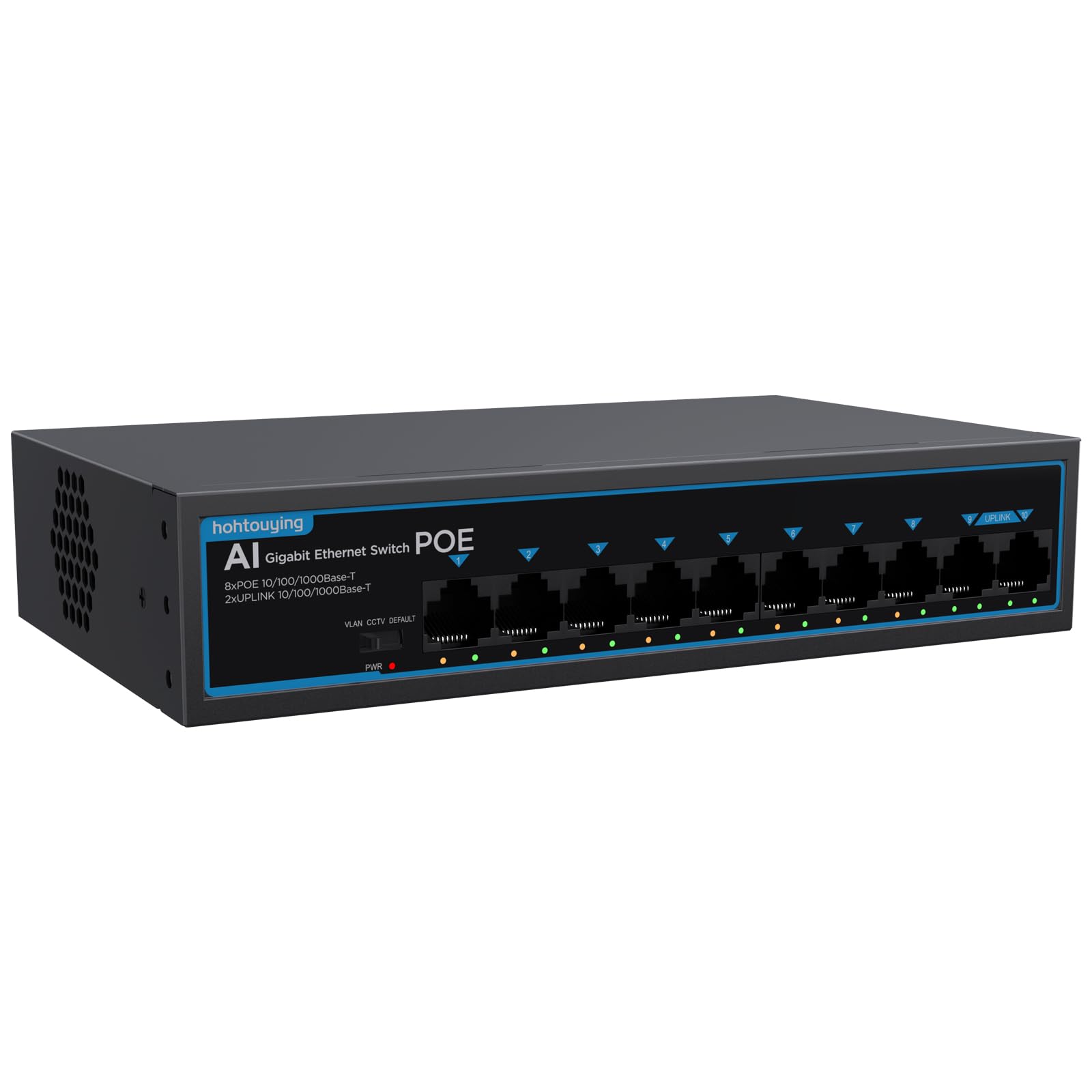
hohtouying 8-Port PoE Switch

84 /100
LBD Score Excellent

Key details

Modes
CCTV, VLAN, Standard
PoE Ports
8 of 10
PoE Budget
120W
Port Speed
Gigabit
View on Amazon

Eight PoE+ gigabit ports, two more for uplinks, 120W, and the power supply built into the case: this listing asks very little for a lot of PoE. The aluminum shell is sturdier than the price suggests, and there is no wall adapter competing for socket space.

We came away thinking it is the sensible budget answer for a cluster of cameras in one place — a garage, a workshop, a small barn — where a single dead switch is an inconvenience rather than an emergency. The three modes cover the usual ground: CCTV mode pushes a run out to 820 feet at reduced speed, VLAN mode separates the downlink ports, and the default is plain plug and play.

The four-kilovolt lightning protection on the ports is the detail that stood out for us, since that is exactly the sort of thing outdoor camera runs invite. The 120W budget is generous at this price too: eight cameras at 10W each fit with room left over. What you do not get is long coverage — one year is the shortest warranty here.

Buy it where the receipt is easy to keep and the install is easy to redo. It is the sort of switch that goes into a workshop ceiling and gets forgotten about, which is fine until it is not, and if it does die you are out very little and one ladder trip. That is the calculation this one is asking you to make.

Pros

  • Eight PoE+ gigabit ports plus two uplinks
  • 120W budget with a built-in power supply
  • Three modes including 820 ft CCTV runs
  • 4KV port lightning protection

Cons

  • One-year warranty
Our verdict

For a garage or workshop cluster of cameras, this is eight powered gigabit ports and 120W of budget for very little money.

Check Latest Price

How We Chose and Tested the Best PoE Switches

We started by pulling together every unmanaged and easy-smart switch we could find in the five-to-sixteen-port range, then cut anything that skipped 802.3af/at, shipped without a metal chassis, or had no path to wall-mounting. That left 11 switches, which we ran for seven months. We weighed cost per PoE port as we went, because the jump from five ports to eight is rarely a linear one.

Each one spent time on a shelf in a home office, screwed to a garage wall beside a run of cable, and in a closed closet — the three places these actually end up. We powered a mix of security cameras, an access point, and a VoIP phone off them, adding devices one at a time until the PoE budget was spent, and noted when a port dropped or a device browned out.

Plug and play got a stopwatch: unbox, connect, and time how long before devices appeared on the network with no app or manual. We cut power at the breaker mid-recording to see whether the switch rebooted itself and the cameras came back on their own, yanked cables to check the auto-recovery behavior some of these advertise, and tried the extend modes on a long run to a distant camera. The isolation and VLAN settings got a look too, mainly to confirm that separating camera traffic didn't break the rest of the network.

Durability came down to small things — whether the metal flexed when we torqued a cable, whether the mount screws lined up, whether ports stayed tight after repeated plugging. We also tracked draw at the wall against the rated budget, because a switch that promises more power than it delivers only reveals that when a camera drops offline.

How to Choose a Poe Switch

Do the Power Math First

PoE comes in two flavors: 802.3af, which caps a port at about 15W, and 802.3at, which doubles that to 30W. Those are ceilings, not reserves. The switch has one shared budget, so four cameras at 8W draw 32W from a 65W unit and leave plenty behind, while a single PTZ dome at 25W plus three cameras eats most of it.

Add up what your devices draw — the wattage is on every camera's spec sheet — leave a little headroom, and let that number pick the switch. It is the one calculation that cannot be fixed later with a different cable.

Count Only the Ports That Carry Power

A five-port PoE switch powers four devices, because one port is the uplink to your router. An eight-plus-two design powers eight and leaves two for uplinks or a NAS. That matters more than the headline number, and it is the single most common way people come up one port short.

Count cameras, add an access point or two, add one spare, then choose a switch with at least that many powered ports.

Gigabit Matters More on the Uplink Than on the Camera Port

A 1080p camera stream is a few megabits per second, so a 100 Mbps port is not the bottleneck people imagine. What does matter is the uplink, which carries every stream at once, and any port feeding an access point, a NAS, or a desktop.

If the switch is camera-only, Fast Ethernet ports are survivable. The moment real network traffic shares it, buy gigabit — we would not build a mixed network around 100 Mbps ports to save a few dollars.

Decide Where It Lives Before You Choose

Fanless designs are why a five-port or sixteen-port switch can sit in a hallway without anyone noticing. Above roughly 120W of PoE, fans start appearing, and the big rack units are built for a closet, not a bookshelf.

Measure the shelf or rack space, work out whether you need wall-mount slots or rack ears, and put anything with a fan where noise does not reach. The GS324P is 13 inches across, which is a real shelf commitment.

Warranties Separate the Brands

Coverage runs from one year on the budget imports to limited lifetime on the TP-Link models and three years on NETGEAR. For a switch screwed to a garage wall, that is the difference between a swap and a reinstall.

We lean toward the plainer switch with lifetime cover over the fancier one with twelve months, especially when it is powering cameras you cannot easily reach.

Frequently Asked Questions

Final Verdict

Most people should buy the TP-Link TL-SG1005P. It is the least expensive switch here that pairs four PoE+ ports with gigabit speed and a silent metal case, and for a handful of cameras and an access point there is nothing left to want.

The exceptions are worth knowing. Past four powered devices, the UGREEN's eight PoE ports cost about the same, and a full camera rollout belongs on the fanless 16-port TL-SG116P. If it is going into a rack with a dozen powered devices, the NETGEAR GS324P is the one with the headroom and the ears.