Best A620 Motherboards for Budget AM5 Builds of 2026

A620 is the cheapest door into AMD's AM5 socket, and the first question every shopper asks is where the catch is. Here it is: these boards won't overclock your CPU, and they aren't built for a stack of add-in cards. What they do is cover the basics well — run a Ryzen chip at its rated speed, take DDR5, and give you PCIe 4.0 for the graphics card — which leaves more of the budget for the parts you'll actually notice.

I've built AM5 systems for friends and family since the platform arrived, and cheap chipsets are where the surprises hide. Over the past seven months my team and I have built with nine A620 boards, from stripped-down microATX slabs to a mini-ITX board that had to swallow a real cooler. What separates them is whether the board can flash a new BIOS with no CPU installed, and whether Wi-Fi is built in or quietly costs you an expansion slot.

None of these are glamorous. It's the board you screw in, plug up once, and forget about, so the differences show in installation, port count, and how the memory behaves on first boot. The ones that stayed out of the way are below.

1

Best Overall

Gigabyte A620M S2H

81 /100
LBD Score Excellent

Key details

Warranty
5 years
M.2 Slots
1
Form Factor
Micro ATX
Memory Slots
2 DDR5
View on Amazon

Five years of warranty is unusual on a board this inexpensive, and it is the first reason we point budget builders to the Gigabyte A620M S2H. At this end of the market, a cheap board only stays cheap if it keeps working, and Gigabyte's coverage is longer than Asus's three years on the TUF board here. The microATX shape fits the usual budget case, and the layout is refreshingly plain: two DDR5 slots, one M.2 connector, four SATA ports, and a single 1GbE jack.

The 5+2+2 VRM is a sensible match for a Ryzen 5 or a lower-power Ryzen 7. We like it for a straightforward gaming or office build, but it is not the board to pair with a high-core CPU and expect lots of power headroom. The single M.2 slot is the compromise we noticed first. If you already have a second NVMe drive, you have to choose between it and the boot drive, or move the overflow to SATA. The PCIe EZ-Latch is a small convenience we appreciate when swapping a graphics card in a tight case.

Two DIMM slots mean you should buy the memory capacity you want as a matched pair; adding another kit later is not an option. Gigabyte lists a 96GB maximum, which is far beyond what a budget build needs, so 32GB is the practical sweet spot. The lack of Wi-Fi keeps the price down, and the 1GbE port is fine if the PC sits near a router. If you need wireless, plan for an add-in card or a USB adapter, and check that the card fits below the graphics card.

What settles it is the combination of a low price, a five-year warranty, and enough connectivity for a basic build. It won't impress anyone with a feature list, and it is the wrong choice for a mini-ITX case or a build that needs Wi-Fi out of the box. The flip side is that there is less to configure and less to pay for.

Pros

  • Five-year warranty is the longest here
  • Low price leaves more for CPU and memory
  • Simple microATX layout with PCIe EZ-Latch

Cons

  • Only one M.2 slot limits storage upgrades
Our verdict

The Gigabyte A620M S2H is our default A620 board for a budget AM5 build, pairing a low price with a five-year warranty and all the basics a Ryzen 5 system needs.

Check Latest Price
2

Best MicroATX Features

Asus TUF Gaming A620M-Plus WiFi

78 /100
LBD Score Very Good

Key details

M.2 Slots
2
Networking
Wi-Fi 6 and 2.5GbE
Form Factor
Micro ATX
Memory Slots
4 DDR5
View on Amazon

The Asus TUF Gaming A620M-Plus WiFi is the A620 board we point to when a microATX build needs to do more than the bare minimum. It keeps the compact footprint but adds four DDR5 slots, two M.2 slots, Wi-Fi 6, and 2.5GbE LAN. Those are the features that usually push a build toward a more expensive chipset, and having them here makes the board feel less like a compromise.

The power delivery is the other reason it earns a runner-up spot. Asus uses a six-layer PCB, alloy chokes, and a larger VRM heatsink, and the board carries a three-year warranty. It is still an A620 board, so CPU overclocking is off the table. For a Ryzen 5 or a modest Ryzen 7 in a case with ordinary airflow, though, the extra cooling headroom is welcome.

We like the practical I/O: front USB 3.2 Gen 1 Type-C, BIOS Flashback, HDMI and DisplayPort outputs, and the M.2 Q-Latch. The Q-Latch matters when you are installing a drive with the board already in the case, and the dual M.2 slots give you room for a fast boot drive and a second SSD without swapping the first. For a microATX A620 build, that is a meaningful upgrade path.

Reliability is the caveat. A board can boot cleanly and still fail months later, and bent pins have shown up out of the box. That is not enough to keep it off the list, but it is why the cheaper Gigabyte board remains our default. The board's real draw is the adapter-free build: Wi-Fi, 2.5GbE, front USB-C, and a second M.2 are all there. If you want to avoid adding cards later, this is the microATX pick that does it.

Pros

  • Four DDR5 slots leave room for memory upgrades
  • Dual M.2 slots plus Wi-Fi 6 and 2.5GbE
  • BIOS Flashback and front USB-C add convenience
  • Enhanced VRM cooling for Ryzen 5/7 builds

Cons

  • Premium price among these A620 boards
  • Three-year warranty trails Gigabyte's five years
Our verdict

Choose the Asus TUF Gaming A620M-Plus WiFi if you want four DIMM slots, dual M.2, and built-in Wi-Fi without stepping up to a pricier chipset; it earns our runner-up spot for features.

Check Latest Price
3

Best Mini-ITX

Gigabyte A620I AX

80 /100
LBD Score Excellent

Key details

Ethernet
2.5GbE
Wireless
Wi-Fi 6E
Form Factor
Mini-ITX
Memory Slots
2 DDR5
View on Amazon

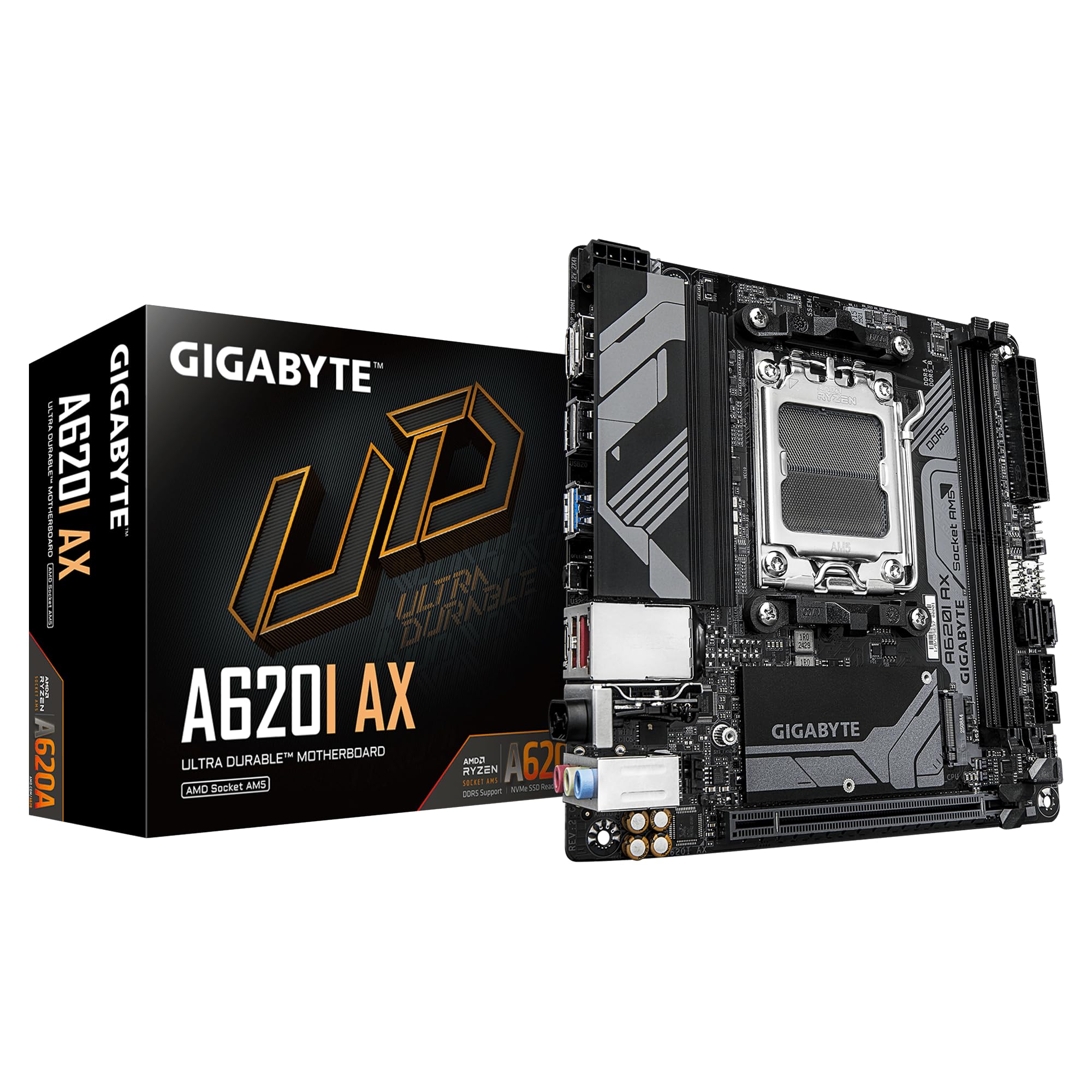
The Gigabyte A620I AX is the board we reach for when the case is the constraint. Mini-ITX AM5 boards are still a small club, and this one packs Wi-Fi 6E and 2.5GbE into the small footprint, so you do not need a separate wireless card or a USB dongle in a build where every slot and cable counts. The single M.2 slot is the trade-off, and it is the first thing we check before recommending it.

The 5+2+1 VRM is modest, which is expected at this end of the chipset range. We like it for a Ryzen 5 7600 or a lower-power Ryzen 7 in a compact case; the limits show up sooner if you plan to run a high-core CPU in a small enclosure with little airflow. Two DIMM slots are standard for mini-ITX, and the five-year warranty is a genuine plus when replacing the board means rebuilding the whole machine.

Installation is straightforward, with the EZ-Latch on the PCIe x16 slot and a layout that leaves room for a standard cooler. The Wi-Fi 6E is the feature we appreciate most: in a small build, it is one less cable and one less adapter, and the 2.5GbE jack is there when you want a wired connection. USB 3.2 Gen1 Type-C is included, which is handy for modern peripherals.

Reliability is mixed: the board can run perfectly for months, and it can also crash or fail. That is a risk you accept with a compact board that has fewer components and tighter heat margins. The single M.2 slot is the bigger everyday limit. There is no second M.2 hiding on the back of the board, so plan your storage before you close the case. If you need two NVMe drives, the Asus TUF is the better fit; if you want a tiny PC with wireless and a long warranty, this Gigabyte earns its place.

Pros

  • Wi-Fi 6E and 2.5GbE built in
  • Five-year warranty
  • Compact mini-ITX layout with PCIe EZ-Latch

Cons

  • Only one M.2 slot limits storage upgrades
Our verdict

We like the Gigabyte A620I AX for small AM5 builds that need Wi-Fi 6E and 2.5GbE, as long as one M.2 drive is enough.

Check Latest Price
4

Basic Office PCs

MSI Pro A620M-E

81 /100
LBD Score Excellent

Key details

M.2 Slots
1 Gen4
Form Factor
Micro ATX
Memory Slots
2 DDR5
Video Outputs
HDMI 2.1 and VGA
View on Amazon

The MSI Pro A620M-E is the plainest board here, and that is not a criticism. It has two DDR5 slots, one PCIe 4.0 x16 slot, one Gen4 M.2 connector, four SATA ports, and a 1GbE LAN port. The rear I/O includes HDMI 2.1 and VGA, which is the detail that makes it useful for a budget office PC or a living-room build with an older monitor. No Wi-Fi is built in, so plan for Ethernet or an add-in card.

We like the memory support: MSI lists the two DIMM slots as ready for DDR5-6400+ in a one-DIMM-per-channel setup, and 64GB is the practical ceiling. That is plenty for a Ryzen 5 gaming build or a general-purpose desktop, and the single M.2 slot is enough for a boot drive plus SATA storage. Frozr AI cooling adjusts fan settings automatically, which takes some of the guesswork out of fan curves.

What gives us pause is the lack of a second M.2 slot and the 1GbE LAN. Neither is a dealbreaker at this end of the market, but both are places where the Asus TUF goes further. The MSI's advantage is simplicity and video outputs: VGA is a small but genuinely useful extra if you are reusing a monitor that predates HDMI, and HDMI 2.1 covers a modern display.

Where it fits best is a straightforward desktop: a Ryzen 5, 32GB of DDR5, one NVMe drive, and a couple of SATA disks. The board is not for a small case, a wireless-only setup, or a build that plans to add a second fast drive later. For a full-size budget tower, it is an easy board to live with, and the VGA port may save you from buying an adapter for an older screen.

Pros

  • HDMI 2.1 and VGA cover old and new displays
  • Four SATA ports plus a Gen4 M.2 slot
  • Simple microATX layout with automatic fan control

Cons

  • Only one M.2 slot limits storage upgrades
  • 1GbE LAN only
Our verdict

We see the MSI Pro A620M-E as the right fit for a basic AM5 office or gaming build where HDMI and VGA outputs matter more than Wi-Fi or a second M.2 slot.

Check Latest Price

How We Tested the A620 Motherboards

We started by rounding up every A620 board we could find in stock, then cut the list to the form factors people actually buy — microATX and mini-ITX — and to boards that either supported a current Ryzen chip out of the box or could be updated without borrowing a CPU to do it. Nine boards made the cut, and we bought each one ourselves.

Every board got the same bench build: same Ryzen 5 chip, same DDR5 kit, stopwatch running. I counted trips back to the manual, checked whether the front-panel pins were labeled on the board itself, whether the M.2 slot needed a screwdriver, and how much the PCB flexed when I seated the 24-pin. Build quality showed up in the hand — stiff boards versus ones that bowed — and in whether the rear I/O had a proper shield or just a cutout.

For performance, each board ran the same Cinebench loop while I logged whether boost clocks held, then took a 6000MHz memory kit with its profile enabled to see whether it trained on the first boot or fell back to a slower speed. Wireless got tested where it's actually used: two walls from the router, running a file transfer and a video call. I counted rear USB ports, fan headers, and front USB-C by eye rather than off the spec sheet, because some headers disappear the moment a graphics card goes in.

Overclocking on A620 is a memory conversation, not a CPU one, so I pushed the DDR5 profile until each board refused and noted which ones recovered on their own instead of needing a CMOS reset. Each also served as my daily driver through sleep cycles, cold boots, and one accidental power-strip kick, since reliability never shows up in an afternoon. The last pass was value: what the step-up price actually bought — onboard Wi-Fi 6E, 2.5GbE, a second M.2, one more fan header — and whether any of it changed the build.

How to Choose an A620 Motherboard

Know What A620 Leaves Out

Every A620 board here is an AM5 board with DDR5, PCIe 4.0, and no CPU overclocking. That last point matters: if you want to tune a Ryzen 7 or chase high all-core clocks, a B650 board is the better starting place. A620 also tends to have fewer PCIe lanes, which is why you see one M.2 slot on several picks. We are happy to give up CPU overclocking on a budget build because a Ryzen 5 at stock speeds is already quick. Put the savings into a better cooler or a larger SSD.

Choose the Form Factor Before the Features

MicroATX is the budget default: more choice, more slots, and lower prices. Mini-ITX is for small cases, and you pay for the shrink. A mini-ITX board usually gives you two DIMM slots, one M.2 slot, and a single PCIe x16 slot, so plan storage and memory before you buy. Check the case's motherboard support and CPU cooler clearance, especially in a small tower. If you are reusing an ATX case, a microATX board will mount fine; you will just have empty standoff holes below it.

Count M.2 and Memory Slots

A second M.2 slot is the upgrade you miss first. If you keep a game library on a separate NVMe drive, pay for the Asus TUF's two slots; the Gigabyte A620I AX and MSI Pro A620M-E each have one. For memory, two slots are fine if you buy a 32GB kit now, because a future upgrade means replacing the kit rather than adding to it. Four slots, like the Asus TUF, let you start with two sticks and add two more later. Two-slot boards are often easier to run at high EXPO speeds, so do not assume four is always better.

Check Networking, BIOS, and Warranty

Built-in Wi-Fi is worth paying for on a mini-ITX build because there is no room for an add-in card. On microATX, 1GbE is enough for most homes, while 2.5GbE is a nice extra if you move large files across a network. If you are pairing a newer Ryzen with a board that has been on a shelf, look for BIOS Flashback or Q-Flash Plus so you can update without a supported CPU. Warranty is the quiet tiebreaker: Gigabyte covers these boards for five years, Asus for three, and that difference matters on a budget part.

Frequently Asked Questions

Final Verdict

The Gigabyte A620M S2H is the one we recommend first for most budget AM5 builds. It undercuts the other boards here, carries a five-year warranty, and has the slots and headers a Ryzen 5 system needs. Put the savings toward a better CPU cooler or a larger SSD, where you will feel the difference every day.

If you need Wi-Fi, four DIMM slots, or a second M.2 drive, the Asus TUF Gaming A620M-Plus WiFi is the better buy. If the case is mini-ITX, choose the Gigabyte A620I AX and plan around its single M.2 slot. Those are the two requirements that change the answer.