Best Arcade Fight Sticks of 2026

A gamepad will happily carry you through a story mode. Then ranked resets, your thumb slides off the d-pad halfway through a quarter-circle, and the round is gone — which is roughly the night most people start pricing out fight sticks. What you're actually buying is a lever, a row of buttons, and a layout that stops your hands from fighting your inputs.

I've kept one plugged in beside my desk for years, and over the last six months my team and I have put 11 through the same rotation of ranked nights and weekend locals. The surprise was how little the platform logos mattered next to the parts inside and whether the top panel comes off. A stick with good bones can be re-levered and re-buttoned for years; a sealed plastic shell is a dead end the day a switch goes mushy. Wireless and multi-console support are worth paying for if your setup travels between a couch and a tournament table, and not much otherwise. The ones below are the sticks that stayed plugged in.

1

Best Overall

Mayflash F500

92 /100
LBD Score Outstanding

Key details

Parts
Sanwa-compatible lever and buttons
Weight
6.55 lb
Connection
Wired USB
Compatibility
Switch, Xbox, PS4/PS3, PC, Android, Steam Deck
View on Amazon

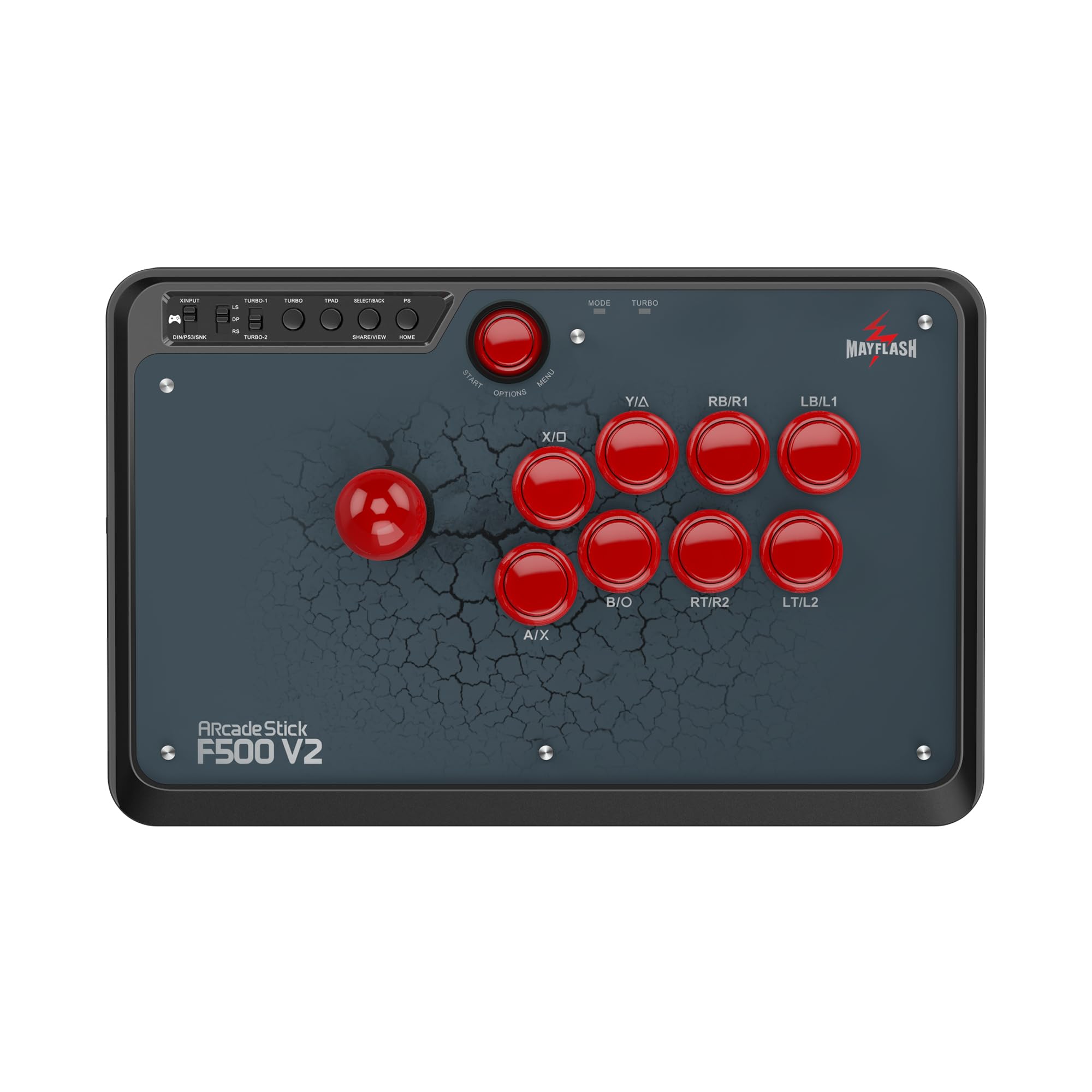
The F500 earns our top spot because it refuses to make you choose a console. It covers Switch, Xbox, PlayStation 4 and 3, PC, Android, Steam Deck, and a long list of mini consoles, and it does it with a single wired connection and a straightforward button layout. For a first serious stick, that flexibility matters more than a fancy finish: you can move it between a living-room console and a desktop PC without buying a second controller.

The 2.97 kg body is the other reason we keep coming back to it. It sits still on a desk or across your lap when you yank a quarter-circle, and the wide base leaves room for both hands. The case takes Sanwa-compatible parts, so you can swap in different parts later without replacing the stick. The turbo and headset support are useful extras on supported consoles, and we appreciate that Mayflash made the upgrade path obvious instead of sealing the case.

What it does better than any other pick is cover a mixed house of consoles without a second controller. If you want one sturdy, mod-friendly stick to learn on and keep, this is the one we point to first. If wireless is a priority, the 8Bitdo and F700 are the better fit.

Pros

  • Works with nearly every major console
  • Heavy base resists sliding
  • Sanwa-compatible upgrade path
  • Beginner-friendly controls and turbo

Cons

  • PS5 requires a separate adapter
  • Stock buttons are the first upgrade
Our verdict

We think most players should start with the F500: it covers more consoles than anything else here, stays put on a desk, and accepts Sanwa parts.

Check Latest Price
2

Best Wireless for Switch and PC

8Bitdo Arcade Stick

93 /100
LBD Score Outstanding

Key details

Weight
4.6 lb
Modding
Sanwa mounting plate
Connection
Bluetooth, 2.4 GHz, USB-C
Compatibility
Switch, Windows
View on Amazon

Three ways to connect is the first thing you notice about the 8Bitdo, and it remains the reason to buy one. Bluetooth, 2.4 GHz, and wired USB-C cover a couch session, a desk setup, and a tournament table, and the 2.4 GHz receiver has a hidden compartment inside the case so it does not wander off. That is a small thing until you have lost a dongle at a local.

We think it is the best choice here for a Switch or Windows player who wants a compact, cable-free stick. At 4.6 pounds it has enough mass to stay put without feeling like a brick, and the universal mounting plate supports Sanwa parts, so the stock lever is not the end of the road. The Ultimate software handles remapping and macros, and the 16-button layout gives you room for shortcuts.

The 8Bitdo is the stick we reach for when the cable is the annoyance, not the controller. It is small enough to live on a shelf and heavy enough to stay put for a set, and the three modes mean you can adapt to the room. For a Switch or PC player, that combination is hard to beat.

Pros

  • Tri-mode wireless and wired connection
  • Hidden receiver compartment
  • Sanwa mounting plate
  • Compact 4.6-pound body

Cons

  • Switch and Windows only
  • Button spacing is not for every hand
Our verdict

We choose the 8Bitdo for Switch and Windows players who want wireless freedom and a Sanwa-ready case that stays stable on a desk.

Check Latest Price
3

Best for PS5 Tournaments

Hori Fighting Stick Alpha

90 /100
LBD Score Outstanding

Key details

Weight
3.31 lb
Controls
Hayabusa lever and buttons
Connection
Wired USB
Compatibility
PS5, PS4, PC
View on Amazon

The Alpha opens up like a small suitcase, and that hinge is the detail that makes it a better long-term purchase than a sealed plastic stick. You can get at the lever, buttons, and artwork without dismantling the whole case, which is the difference between a controller you keep and one you trade in when the stock parts wear out.

The Hayabusa lever and buttons are light and quick, and the 17-button layout includes a touchpad that makes it feel like a modern PlayStation controller rather than a retro replica. The replaceable top-panel artwork is a nice touch if you like your stick to look like yours. The internal layout is tidy and easy to work in, which is the point of paying for a case that opens this cleanly.

That hinge and the Hayabusa parts make the Alpha the PS5 stick we recommend for tournament players who want a native connection and easy access. It is not as vault-like as the Victrix or as light as the Drone 2, but it hits the middle ground: a serious PS5 stick that is ready to play and ready to open.

Pros

  • Hinged case for easy mods
  • Hayabusa lever and buttons
  • Native PS5, PS4, and PC support
  • Touchpad and 17-button layout

Cons

  • Hayabusa buttons can feel over-sensitive
Our verdict

PS5 tournament players should put the Alpha on their shortlist: Hayabusa parts, native support, and a hinged case make it the practical competition pick we trust.

Check Latest Price
4

Best Wireless All-Rounder

Mayflash F700

89 /100
LBD Score Excellent

Key details

Parts
Sanwa-compatible lever and buttons
Weight
7.28 lb
Connection
Bluetooth, 2.4 GHz, USB
Compatibility
PS5 fighting games, PS4/PS3, Switch, PC
View on Amazon

The F700 is built for players who split their fighting-game time between a PS5, a Switch, and a PC. Bluetooth, 2.4 GHz, and wired USB cover the three places those machines live, and the receiver tucks into a hidden compartment when you are not using it. That is the same convenient setup as the 8Bitdo, but with a bigger, heavier case and a different console list.

At 3.3 kg, it is a desk or lap stick rather than a travel stick. The case is Sanwa-compatible, so you can swap in premium parts, and the 10-button layout is less crowded than the 16-button panels on some budget sticks. We like the wired headset support for PS5, PS4, and PC chat, and the turbo settings are there if you use them.

For a player who wants one wireless stick for PS5 fighting games and Switch or PC, this is the best fit in this set. It is a specialist, and the specialization is clear: the F700 gives you a substantial case, Sanwa-compatible parts, and three connection modes without asking you to tether it to the couch.

Pros

  • Bluetooth, 2.4 GHz, and wired USB
  • Sanwa-compatible case
  • Heavy 3.3 kg body
  • Wired headset audio

Cons

  • No Xbox support
  • PS5 mode limited to fighting games
Our verdict

The F700 is our wireless all-rounder for PS5 fighting games, Switch, and PC, with Sanwa-compatible parts and a base that feels substantial.

Check Latest Price
5

Best Lightweight PS5 Stick

Qanba Drone 2

87 /100
LBD Score Excellent

Key details

Weight
4 lb
Controls
Qanba B30 buttons, OV7 lever
Connection
Wired USB
Compatibility
PS5, PS4, PC
View on Amazon

At 4 pounds, the Drone 2 is the lightest full-size PS5 stick here. It is easy to move between a desk and a couch, and the 14-inch-wide body still leaves room for both hands. That light weight is the first thing we noticed, and it shapes the rest of the experience.

We recommend it as a first PS5-native stick for a player who wants Qanba parts without a heavy slab. The B30 buttons and OV7 lever have a crisp, mechanical feel, and the full control panel includes a touchpad and a 3.5 mm mic input with mute—details that matter if you play online with a headset. The control panel is laid out cleanly, and the touchpad is a welcome sight on a stick at this level.

The Drone 2 is not as planted as the F500 or as refined as the Alpha, but it is the one we hand to a PS5 player who wants a lighter native stick. The touchpad and mic input make it feel current, and the Qanba parts are a clear step up from generic budget controls.

Pros

  • Native PS5, PS4, and PC support
  • Qanba B30 buttons and OV7 lever
  • Touchpad and mic input
  • Light 4-pound body

Cons

  • Wired-only connection
Our verdict

We like the Drone 2 as a light, PS5-native first stick with Qanba parts and a useful touchpad.

Check Latest Price
6

Small-Space Travel

Hori Fighting Stick Mini

83 /100
LBD Score Excellent

Key details

Layout
8-button mini layout
Weight
1.03 lb
Connection
Wired USB, 8 ft cable
Compatibility
PS5, PS4, PC
View on Amazon

The Mini is the stick that fits in a drawer, a backpack, or the gap beside a monitor. At 467 grams and roughly 8 by 6 inches, it takes up less space than most keyboards, and the 8-foot cable gives you room to sit back. That small footprint is the whole reason to consider it.

The 8-button layout and Hori's V-cut joystick housing give it the arcade essentials, and the controls are responsive enough for casual play. We like it as a travel stick or a first controller for a smaller player, and the light weight makes it easy to pass around. The case feels like plastic, but it is not trying to be a tournament tank.

For an adult with large hands, the Mini is cramped: there is no palm rest, and long sessions put strain on your wrist. As a compact backup or a kids' first stick, we think it earns its place; as a primary tournament stick, it does not.

Pros

  • Compact 467 g body
  • Full 8-button arcade layout
  • 8-foot cable
  • Good first stick for smaller hands

Cons

  • No touchpad button
Our verdict

We see the Mini as a travel and small-space stick: its compact body and 8-button layout make more sense than a full-size stick there.

Check Latest Price
7

Premium PS5 Desk

Nacon Daija

82 /100
LBD Score Excellent

Key details

Weight
7.7 lb
Controls
Sanwa lever and buttons
Connection
Wired USB, 3 m cable
Compatibility
PS5, PS4, PC, Mac
View on Amazon

The Daija arrives with Sanwa parts, a textured palm rest, and a lock switch, which tells you exactly who Nacon built it for. This is a stick for a player who already knows they like a lever and wants premium components without swapping them in later.

The textured palm rest and rubber bottom keep it comfortable and stable on a desk. The front plate is customizable, and the Nacon software lets you map buttons and save profiles on PC and Mac. The 3-meter cable gives you some room to move, and the lock function prevents accidental presses during a match.

We appreciate the side buttons for star and menu, which are easier to reach than a crowded top panel. The Daija also gives you a quick-access route for swapping the joystick topper, which is the kind of small convenience that keeps a premium stick feeling premium.

The Daija is the premium PS5 stick we recommend for a desk player who wants Sanwa feel and a customizable faceplate. It is a coherent package: premium parts, a stable base, and software that lets you tailor the layout. If you want the Sanwa experience without the Victrix price, this is the middle ground.

Pros

  • Sanwa lever and buttons
  • Textured palm rest
  • Customizable faceplate and mapping
  • Lock switch prevents accidental presses

Cons

  • Heavy 7.7-pound body
Our verdict

For PS5 players who want Sanwa parts and a customizable faceplate without the Victrix's price, the Daija is the desk stick we point to.

Check Latest Price
8

Tournament Travel

Victrix Pro FS

86 /100
LBD Score Excellent

Key details

Build
Aluminum chassis, Sanwa parts
Weight
7.8 lb
Connection
Wired USB
Compatibility
PS5, PS4, PC
View on Amazon

The Pro FS looks like a piece of tournament equipment, because it is: a single-piece aluminum body, carrying handles, and a detachable lever. It is the only stick here that feels like it was designed to be carried through an airport and set down on a stream desk without a case.

The Sanwa Denshi buttons and JLF-based lever are the real deal, and the lockable control bar keeps your palms from firing buttons mid-match. The integrated wrist slope is a small ergonomic detail that makes long sets more comfortable, and the cable organizers keep the setup tidy. We like the detachable lever for travel, even if it adds one more thing to keep track of.

The aluminum body is the star: it feels cool and rigid, and the 7.8-pound weight keeps it from walking across a desk. The quick-access back panel makes parts swaps easier than a sealed case, though this is not a budget stick you open up on a whim.

The Pro FS is the premium pick for a tournament player who wants a metal chassis, Sanwa parts, and travel-friendly details in one package. It does not make you a better player; what it buys is build and portability. If you want the Sanwa feel for less, the Nacon Daija and Hori Alpha are the practical alternatives.

Pros

  • Aluminum body with carrying handles
  • Sanwa Denshi buttons and JLF lever
  • Lockable control bar
  • Detachable lever for travel

Cons

  • Premium price
Our verdict

Our pick for a premium tournament stick is the Pro FS: aluminum chassis, Sanwa parts, and travel-friendly details in one package.

Check Latest Price

How We Chose and Tested 11 Fight Sticks

A fight stick is a niche purchase, so the shortlist came from research before it came from testing. We pulled every stick sold through major U.S. retailers, then narrowed the field with three questions: does it work on the platforms you actually play on, does the top panel open, and are the lever and buttons standard-size parts a person can replace at the kitchen table? That left 11 sticks, which we tested over six months.

Testing happened where these things actually live. Each stick spent weeknights on a lap in front of a TV for ranked sets in two different fighting games, made the trip to a weekly local at a game shop where it got passed between hands, and sat on a desk for PC play and a docked handheld. We plugged every stick into each console it claimed to support, noting which ones needed an adapter, which needed a firmware update before they registered at all, and whether the button labels matched the console's own layout.

Button responsiveness we judged in training mode with input display on, running the same combo drills and counting dropped inputs and accidental double-taps. For button quality, we pressed each one off-center to feel for wobble and listened for rattle on release. Layout and ergonomics came down to hands: reach to the lever, whether the far button row landed under the fingers or past them, and how the whole thing felt after three hours on a lap versus a desk, including whether it slid across a coffee table mid-set. We lifted each stick by one corner to listen for creak, tugged the cable at its strain relief, and opened every panel that opened, checking whether the buttons were socketed and how much work a lever swap would take.

Value came last, measured as what a given stick costs against how much of it you can replace two years from now. We'll keep playing on these and update if anything loosens up.

How to Choose an Arcade Fight Stick

Start With the Console, Not the Stick

The first decision is not the lever or the artwork; it is which box the stick has to talk to. A native PS5 stick is the least fuss for PS5 fighters, but some PS4 sticks work through a game's legacy support, and others need an adapter. Xbox and Switch players face their own split. We check the exact console and game before buying, because a stick that works on PC may not work on a PS5 without help. The Hori Alpha and Qanba Drone 2 are native PS5; the 8Bitdo is Switch and Windows.

Lever, Buttons, and the Upgrade Path

Stock parts decide how the stick feels on day one; the mounting standard decides how it feels in a year. Sanwa-compatible 30 mm buttons and a JLF-style lever are the common upgrade path, while Hayabusa and Qanba parts have their own feel. We prefer a case that opens easily and takes standard parts, even if the stock buttons are not our favorite. If you never plan to mod, buy the best stock feel you can; if you do, prioritize the chassis and board. The F500 and 8Bitdo accept Sanwa parts; the Nacon and Victrix ship with them.

Weight, Grip, and Where You Play

A fight stick is a lever you push against, so mass matters. A heavy stick stays put on a desk or lap; a light one is easier to carry but can shift during hard inputs. We look at the base and rubber footing as much as the number on the scale. If you play on a glass desk or a glossy table, a mat or a heavier body makes more difference than a fancy top panel. The F500 and Victrix use their weight to stay planted; the Drone 2 and Mini are the travel-friendly end.

Wired, Wireless, and Tournament Day

Wireless is convenient at home; wired is the safe default at a tournament. Bluetooth and 2.4 GHz can be fine for casual play, but venues are crowded with interference and organizers often require a cable. We treat wireless as a bonus, not a replacement: carry the USB cable even if you play wirelessly. Check whether the cable is detachable or fixed, and whether the stick has a tournament mode or lock switch. The 8Bitdo and F700 are the tri-mode options here; the rest are wired.

Budget for the Parts You'll Actually Want

Entry-level sticks often put the money into the case and board, not the buttons. That is not a dealbreaker: if the case is sturdy and the mounting is standard, you can upgrade later. We think a comfortable chassis and reliable connection matter more than a premium stock lever for a first stick. Set aside room in your budget for a better lever or buttons if you play often; it changes the feel more than a cosmetic faceplate. The F500 is the clearest example of that approach.

Frequently Asked Questions

Final Verdict

For most players, the Mayflash F500 is the stick we recommend first: it covers more consoles than anything else here, has a heavy base that stays put, and accepts Sanwa parts when you are ready to upgrade. If your fighting games live on PS5 and you want a tournament-ready native stick, choose the Hori Fighting Stick Alpha. Switch and PC players who want wireless freedom should start with the 8Bitdo. The F500 remains the default because it makes the fewest assumptions about what you play on.