Best Color Laser Printers of 2026

Printers fail at the worst possible moment. The night before a color proposal was due, my inkjet answered with a clogged printhead and a magenta streak across page three, and I finished the job at a copy shop. A color laser doesn't do that: it fuses toner to paper with heat, so nothing dries out between jobs, and the first page lands before you've found your stapler.

The gap between models is wider than the spec sheets let on. Two printers with identical page-per-minute numbers can feel completely different at your desk, and the best color isn't always the cheapest to feed. The purchase price is the small number — toner is the one that follows you — so check the cost per page, and budget twenty minutes for wireless setup.

The bigger question is whether you want a scanner, copier, and document feeder in the same box or just clean pages. Over the past six months we ran eight color lasers, all-in-ones and print-only units alike, through deadlines, school forms, and shipping labels; below are the ones that earned their counter space.

1

Best Overall

Canon Color imageCLASS MF753Cdw II

80 /100
LBD Score Excellent

Key details

ADF
Yes
Duplex
Automatic
Functions
Print, scan, copy, fax
Print Speed
35 ppm color and black
View on Amazon

The Canon Color imageCLASS MF753Cdw II earns the top spot because it turns a home office into a small workgroup: 35 pages per minute in color or black, a 7-second first print, and an automatic document feeder that handles multipage copy and scan jobs in the background. That combination is what separates a real office machine from a printer that happens to sit in a spare room.

The 1200 x 1200 dpi output is sharp enough for contracts, charts, and client-facing documents, and automatic duplex saves paper on longer reports. We also appreciate the full four-function set—print, scan, copy, fax—because it keeps the whole desk on one machine. The 250-sheet cassette is adequate for a home office; a shared workgroup will refill it often.

Wireless setup is the caveat: the Wi-Fi path can be fussy, so use Ethernet if the router is within reach. Starter toner is modest at 1,100 pages color and 2,100 black, so plan for high-yield 069 cartridges. For most buyers, that is a fair trade for the speed and scanning flexibility.

Against the Brother MFC-L8930CDW, it gives up the 80-page feeder and high-capacity starter toner but is easier to place and less expensive. If your office prints in bursts rather than all day, the Canon is the better balance.

Pros

  • 35 ppm in color and black
  • ADF plus print, scan, copy, fax
  • 1200 x 1200 dpi output
  • Automatic duplex printing

Cons

  • 50-pound body needs a sturdy surface
Our verdict

Our top pick for a busy home office is the Canon Color imageCLASS MF753Cdw II, with 35 ppm output, ADF scanning, and four functions in one machine.
Check Latest Price
2

Best for High-Volume Offices

Brother MFC-L8930CDW

85 /100
LBD Score Excellent

Key details

ADF
80 sheets
Functions
Print, scan, copy
Print Speed
Up to 33 ppm
Included Toner
3,000 black / 1,800 color pages
View on Amazon

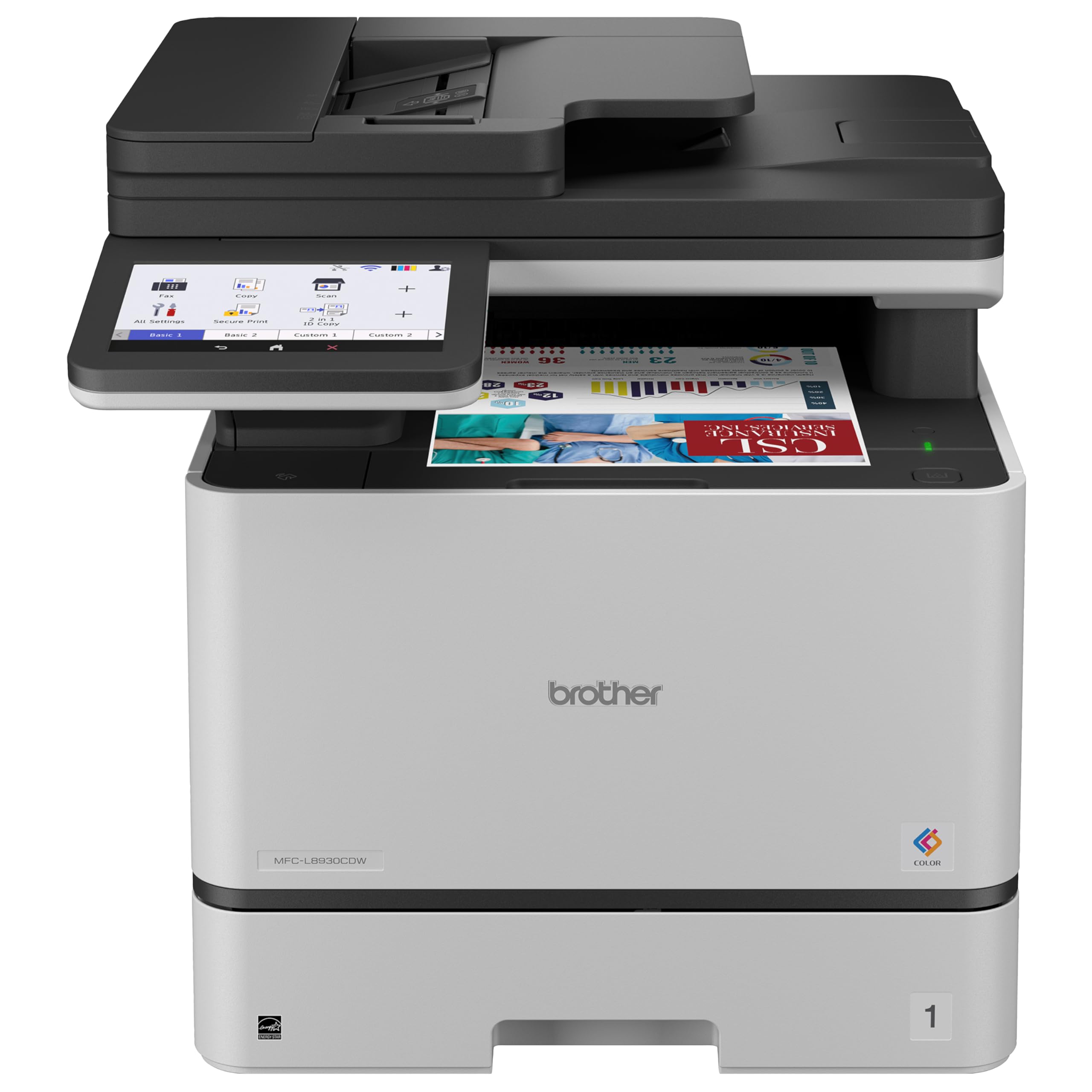
An 80-page automatic document feeder and two-sided scanning at up to 104 images per minute are the numbers that separate the Brother MFC-L8930CDW from the rest of this group. That is a scanner built for a front desk, not a flatbed you feed one page at a time.

What sells us is the workload fit: the engine runs at up to 33 ppm, the 7-inch touchscreen makes copy and scan settings easier to reach, and the included 3,000-page black and 1,800-page color cartridges mean you are not immediately buying replacements. Dual-band Wi-Fi and Gigabit Ethernet are both here, which is the right connectivity set for a shared machine.

The trade-off is size. At 71.2 pounds, this is a two-person lift and a permanent piece of furniture; measure the shelf or table before it arrives. Gigabit Ethernet is the more dependable connection, and if you can run a cable, the Wi-Fi question disappears. An office that parks it once and wires it up gets the full benefit of the feeder and toner.

The 80-page feeder is the detail that keeps a shared office moving when a long contract lands at the end of the day. That is the kind of interruption this machine is built to absorb.

Pros

  • 80-page ADF with 104 ipm duplex scanning
  • Up to 33 ppm print and copy speed
  • High-capacity starter toner included
  • Dual-band Wi-Fi and Gigabit Ethernet

Cons

  • Color better for business graphics than photos
Our verdict

We like the Brother MFC-L8930CDW for offices that print and scan all day: its 80-page ADF, fast duplex scanning, and high-capacity starter toner carry the workload.

Check Latest Price
3

Best Print-Only

Canon Color imageCLASS LBP646Cdw

80 /100
LBD Score Excellent

Key details

Duplex
Automatic
Functions
Print only
Print Speed
26 ppm color and black
Connectivity
USB, Wi-Fi, Ethernet
View on Amazon

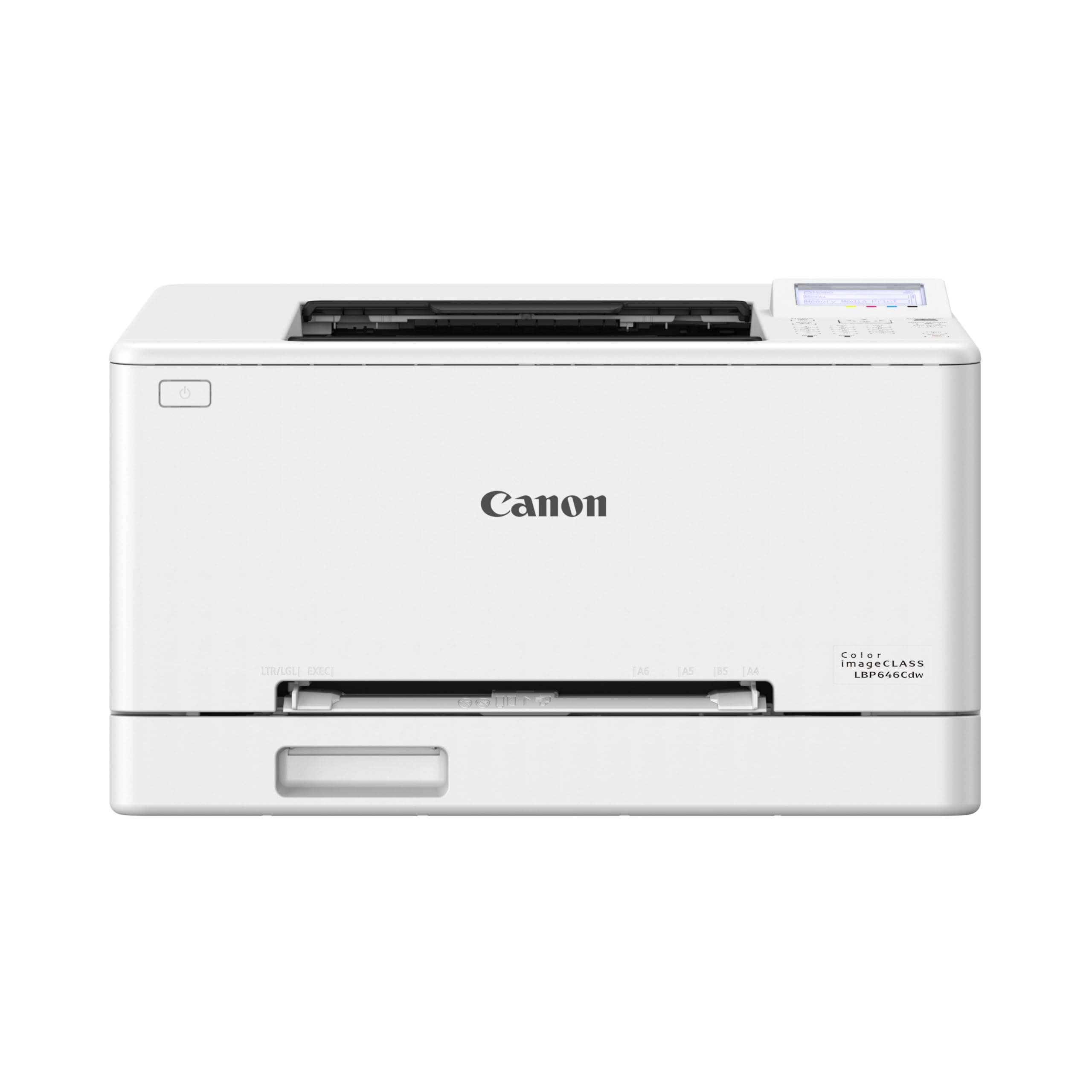
Strip away the scanner, copier, and fax, and the Canon Color imageCLASS LBP646Cdw becomes the print-only pick—and that focus is exactly why it earns a place. We like that it is 27.6 pounds, the easiest printer here to move, while still running at 26 ppm in color or black with automatic duplex. The 250-sheet cassette, 10.3-second first print, and 1200 x 1200 dpi output cover the office essentials, and print quality holds up for text, color labels, and simple graphics. This is not a photo printer, and it does not pretend to be.

Wireless setup is where it can test your patience. The Wi-Fi connection is the weak link, and the Ethernet port is the reliable path if you can run a cable. Once it is connected, the printer is happy to sit there and print; the setup is the hurdle, not the daily use.

Against the MF753Cdw II, you give up scanning, the ADF, and 9 ppm; in return you get a smaller footprint and a lower entry point. The MF753Cdw II is the more complete machine, but it is also 22 pounds heavier and adds functions a print-only desk may never use. That is the trade: fewer parts, less space, and a machine that earns its keep by printing well.

Pros

  • 26 ppm in color and black
  • Compact 27.6-pound body
  • Automatic duplex printing
  • Ethernet and Wi-Fi connectivity

Cons

  • Five-line LCD feels basic
Our verdict

The Canon Color imageCLASS LBP646Cdw is our print-only pick for a desk that wants fast duplex color output without paying for a scanner it won't use.

Check Latest Price
4

Best Compact All-In-One

Brother HL-L3300CDW

79 /100
LBD Score Very Good

Key details

Duplex
Automatic
Weight
40.8 lb
Functions
Print, scan, copy
Print Speed
19 ppm color and black
View on Amazon

A 40.8-pound color laser all-in-one that fits on a small office desk is a narrower ask than it sounds. The Brother HL-L3300CDW is that machine: print, scan, and copy in a body that is the lightest all-in-one here and only about 14 inches tall.

The flatbed scanner is easy to use for single pages, which covers receipts, IDs, and the occasional form; it also handles bound documents and odd shapes that an ADF cannot take. For a 20-page packet, the MF753Cdw II or MFC-L8930CDW will save you real time. We think the HL-L3300CDW is the right compact choice for a small office that needs color documents and light scanning. Setup is one of its stronger points, and dual-band Wi-Fi plus Wi-Fi Direct make it easy to put on a network without running cable.

The 19 ppm engine is the slowest here, so it suits a desk that prints in short bursts rather than a shared workgroup. Color is good for everyday charts and school reports; keep color-critical work on the Canon MF753Cdw II. The 250-sheet cassette is enough for a small office, and automatic duplex means two-sided handouts without manual flipping. The compact body is what makes the whole package work: a scanner and a duplex color printer that does not need its own table.

Pros

  • Lightest all-in-one here at 40.8 pounds
  • Print, scan, and copy in a compact body
  • Automatic duplex printing
  • Dual-band Wi-Fi and Wi-Fi Direct

Cons

  • No automatic document feeder
Our verdict

We value the Brother HL-L3300CDW's compact all-in-one build for small offices that scan single pages and print color in short bursts.

Check Latest Price

What Six Months of Deadlines and Shipping Labels Taught Us

We built the shortlist from spec sheets and owner reports, keeping current color laser models with duplex printing standard, a documented cost per page, and mobile printing over Wi-Fi, then narrowed to eight machines spanning print-only units and full all-in-ones with scanners, copiers, and document feeders. Price filtered the list rather than ranked it.

Every printer was set up cold, by one person, with a stopwatch: unbox it, strip the packing tape, install the toner, connect it, print a test page — no IT help, no support call. We joined each one to a busy home network from a laptop, a phone, and a tablet, unplugged the router to see whether it reconnected on its own, and tried the manufacturer app, AirPrint, and a direct Wi-Fi connection for the times a network misbehaves. Setup ranged from about ten minutes to well over an hour.

For print quality we ran the same 40-page document through every machine — dense body text, hairlines, a color gradient chart, a few photographs — and looked for banding, muddy shadows, and jagged letterforms up close. We timed first page out and pages per minute on identical jobs, fed cardstock, envelopes, and shipping labels through the bypass tray, and flipped duplex jobs to check registration on the second side. Then we simply used them: weekly invoices, school forms, 500-page runs, noting jams, curled corners, and how loud each one got when it woke up.

Every few weeks we logged toner levels against pages printed to get a real cost per page rather than a claimed one, and left two machines idle for a month to see whether they picked up where they'd left off.

How to Choose a Color Laser Printer

Decide between print-only and all-in-one

A print-only model such as the Canon LBP646Cdw is smaller, lighter, and less complicated, which makes sense if you already own a scanner or rarely copy. We treat the automatic document feeder as the dividing line for a shared office: it is the feature that matters for multipage contracts, invoices, and client packets. The Canon MF753Cdw II and Brother MFC-L8930CDW both have ADFs; the Brother HL-L3300CDW has a flatbed only, so it is a one-page-at-a-time scanner. Choose the workflow first, then the speed.

Balance speed against paper handling

Print speed is quoted in pages per minute, but the first page matters just as much when you print in short bursts. The MF753Cdw II starts in about seven seconds and runs at 35 ppm; the LBP646Cdw starts in about 10.3 seconds at 26 ppm; the HL-L3300CDW is the slowest here at 19 ppm. A 250-sheet cassette is the common baseline in this group, which is fine for a home office but thin for a shared workgroup. If three people print all day, look for the faster machine with the bigger feeder.

Treat toner as the real running cost

Color laser printers are cheap to buy compared with what they cost to feed. Look at both the starter cartridges and the high-yield replacements: the Brother MFC-L8930CDW includes 3,000-page black and 1,800-page color cartridges, while the Canon MF753Cdw II ships with 1,100-page color and 2,100-page black starter toner. The difference is not just the first month; it is how often you reorder. If you print color every day, a model with high-yield cartridges and a clear cost-per-page path is worth more than a lower purchase price.

Plan for placement and connectivity

Measure the footprint and the weight before you buy, because these machines are furniture. The Brother MFC-L8930CDW is 71.2 pounds; the Canon MF753Cdw II is 50 pounds; even the compact Brother HL-L3300CDW is 40.8 pounds. Put the printer on a sturdy surface with clearance for the paper tray and output. We put Ethernet ahead of Wi-Fi for a shared printer: it is the least dramatic route if the router is nearby. Dual-band Wi-Fi and Wi-Fi Direct help, but a weak signal can make any printer feel broken.

Set realistic color expectations

These are document printers, not photo labs. A 1200 x 1200 dpi color laser produces crisp text, strong charts, and clean color logos, but it will not match an inkjet on glossy photo paper. The Brother MFC-L8930CDW is built for brochures and business graphics; the Canon MF753Cdw II is the better balance for general office color. If your color work is client-facing, proof a few pages on the paper you actually use before a big run, and keep photo printing on a separate machine.

Frequently Asked Questions

Final Verdict

We recommend the Canon Color imageCLASS MF753Cdw II for most home offices. It has the speed, 1200 dpi output, automatic duplex, and ADF-equipped scanning to handle real document work without the 71.2-pound chassis of a high-volume office machine. If your office runs long copy and scan jobs all day, choose the Brother MFC-L8930CDW instead; its 80-page feeder and high-capacity starter toner are worth the extra weight. If you already own a scanner, the Canon LBP646Cdw gives you fast color printing in a much smaller package.