Best DDR5 RAM of 2026

DDR5's headline number is the easy part to sell and the hardest part to actually get. A kit rated at 6000MT/s only runs there if your motherboard trains it cleanly on the first boot — otherwise you're up at midnight clearing CMOS and wondering whether the RAM is faulty or just shy.

I've had a dozen kits moving through my own builds and my team's over the past six months, and the pattern is hard to miss: the ones that behave are validated for both AMD's EXPO and Intel's XMP, so a one-click profile actually exists for your platform. The timings sitting beside the frequency matter more than most shoppers expect, too — a tight CL30 kit at 6000 tends to feel quicker in everyday use than a looser kit wearing a bigger number.

Then there's the physical side: whether the heatspreader clears a beefy air cooler, whether the RGB syncs with your fans or demands yet another app, and whether the thing is in stock at a price that makes sense. Below are the kits that booted first try, ran cool, and stayed stable.

1

Best Overall

Corsair Vengeance RGB DDR5-6000 CL30

94 /100
LBD Score Outstanding

Key details

Capacity
32 GB (2 x 16 GB)
Lighting
Ten-zone RGB per module
Profile Support
Intel XMP and AMD EXPO
Speed And Timings
6000 MHz CL30-36-36-76
View on Amazon

One build, one memory decision — that's the buyer this kit suits, and it's why the Vengeance RGB sits at the top of this group. It runs 6000 MHz at CL30-36-36-76, the speed-and-latency pairing current AMD and Intel boards handle most gracefully, and among these kits it's the one where speed, stability and looks don't compete with each other.

The lighting is what you notice first: ten individually addressable LEDs per module behind a panoramic bar, bright enough to wash the inside of a case and adjustable zone by zone in iCUE. The part we appreciate more sits under the heat spreader — Corsair regulates voltage on the modules themselves, which it claims gives iCUE a finer hand than motherboard-level control, and that's the sort of detail you care about when you're chasing the last bit of stability at 6000.

Getting the rated speed is a single switch: EXPO on an AMD board, XMP on Intel, then a restart. No fan curve to change, no manual voltage entry, and once the profile is on we haven't had to revisit it.

The software is the one place to expect friction. Pulling the lighting into Aura Sync or Chroma takes a few extra steps in iCUE rather than working on first launch. If your case has no window, the plain kits below cost less and give up very little; this one earns its keep when the machine is on display.

Pros

  • CL30 at 6000 MHz on one profile switch
  • Ten-zone RGB with per-LED control
  • Holds rated speed without voltage tuning

Cons

  • 1.40 V rating leaves less tuning headroom than 1.35 V kits
Our verdict

One build, one memory decision: this is the kit we point to for a mainstream DDR5 machine, with 6000 MHz CL30, one profile switch, ten zones of light, and speed and stability that agree with each other.

Check Latest Price
2

Best Without RGB

Patriot Viper Venom DDR5-6000 CL30

88 /100
LBD Score Excellent

Key details

Voltage
1.35 V
Capacity
32 GB (2 x 16 GB)
Profile Support
Intel XMP 3.0 and AMD EXPO
Speed And Timings
6000 MHz, 30-40-40-76
View on Amazon

No light bar, no diffuser, no sync software: the Viper Venom is a black heat spreader, a sticker, and 32 GB of 6000 MHz memory, and for a lot of builds that's the entire point.

What makes it our pick for a windowless case isn't only the lower price — it's that you get the same 6000 MHz CL30 headline as the Corsair at 1.35 V instead of 1.40 V. The tested timings are 30-40-40-76, a touch looser in the secondaries than the top pick's 30-36-36-76, and that's the honest trade: slightly less tuning margin for a lower asking price and a gentler rated voltage.

Installation is as plain as the module looks. XMP 3.0 and AMD EXPO both live on the kit, so it's one switch on either platform, and there's no lighting cable to route and no third-party app to install — one less thing to troubleshoot when a fresh build refuses to post. The limited lifetime warranty covers it either way.

Nothing here is exotic, and that's the recommendation: no software, no lighting zones, no second thought once the profile is enabled. The money you don't put into diffusers and sync software is money for a better cooler or a bigger SSD, which will do more for the machine.

Pros

  • Same 6000 MHz CL30 speed as the top pick
  • 1.35 V rated voltage
  • XMP 3.0 and EXPO on one kit
  • Nothing to install or sync

Cons

  • Looser secondary timings than the other CL30 kit
Our verdict

Skip the light show and this is the CL30 kit to buy: the same 6000 MHz rating as our top pick, a lower 1.35 V rating, and money left over for the rest of the build.

Check Latest Price
3

Best for a First Build

G.SKILL Flare X5 DDR5-6000 CL36

91 /100
LBD Score Outstanding

Key details

Voltage
1.35 V
Capacity
32 GB (2 x 16 GB)
Profile Support
AMD EXPO and Intel XMP 3.0
Speed And Timings
6000 MT/s CL36-36-36-96
View on Amazon

If the Corsair's lighting and price both feel like more than the build needs, the Flare X5 is the step down that costs you the least: 6000 MT/s at CL36-36-36-96, 1.35 V, and a matte black heat spreader that looks like it came out of the motherboard box.

It's also the kit here we trust most for a first boot. The profile is AMD EXPO or Intel XMP 3.0 depending on the board, and in most builds it takes one switch and a restart to land at 6000. On some boards the memory settles at 5200 or 5400 instead — a negotiation between board and kit rather than a fault, and the cost is a few percent of bandwidth you won't feel outside a benchmark.

G.SKILL's own documentation is worth repeating here: these are matched pairs, and mixing two kits is one of the surest ways to turn a stable system into a crash-prone one. Buy the capacity you want in one box. The limited lifetime warranty is the backstop if a stick does go bad, and keeping the pair together keeps that claim simple.

The compromise is latency. CL36 sits a step behind the CL30 kits here, which is a benchmark gap more than a felt one — and it's the reason this kit undercuts the top pick while doing the same everyday job.

Pros

  • EXPO and XMP 3.0 on one kit
  • 6000 MT/s at 1.35 V
  • Most consistent first-boot experience here

Cons

  • CL36 trails the CL30 kits in this group
  • Some boards settle at 5200-5400 MT/s instead
Our verdict

For a build that has to work on the first try, this is the kit we hand over: one profile switch for 6000 MT/s on either platform, 1.35 V, and no lighting to configure.

Check Latest Price
4

Best for 64 GB Builds

G.SKILL Trident Z5 Royal Neo 64 GB

89 /100
LBD Score Excellent

Key details

Voltage
1.40 V
Capacity
64 GB (2 x 32 GB)
Profile Support
AMD EXPO
Speed And Timings
6000 MT/s CL30-36-36-96
View on Amazon

The silver heat spreaders are the dressiest thing in this group: polished metal, no diffuser bar, the one kit here that earns a glass panel on looks alone. It's also the only one that solves a problem the 32 GB kits can't.

Underneath the finish sit two 32 GB dual-rank modules at 6000 MT/s, CL30-36-36-96, 1.40 V — the tight timings that usually belong to 16 GB sticks. We think that matters most for a workstation: 64 GB across two slots rather than four keeps the load on the memory controller lower, and it leaves the other slots empty instead of filled with a second kit that shouldn't be mixed in anyway.

The catch is the profile list, and it's the kind that changes a purchase. This is an AMD EXPO kit with no Intel XMP profile, so on an Intel board you're either entering speed and timings by hand or running at JEDEC defaults. On AM5 it's a straightforward buy, and the price reflects both the capacity and the finish.

Where it stops making sense is a gaming machine. 64 GB is capacity you buy for video timelines, virtual machines, or a dataset that has to sit in memory; games won't touch most of it, and the money goes further elsewhere in the build. That's a decision about your work rather than about the kit.

Pros

  • 64 GB in two dual-rank modules
  • CL30 timings at 6000 MT/s
  • Silver finish that stands out behind glass

Cons

  • AMD EXPO only, with no Intel XMP profile
  • The most expensive kit in this group
Our verdict

For an AM5 workstation that needs 64 GB without filling four slots, this is the kit: dual-rank modules at CL30, 6000 MT/s, and the best finish in this group.

Check Latest Price
5

Budget RGB Builds

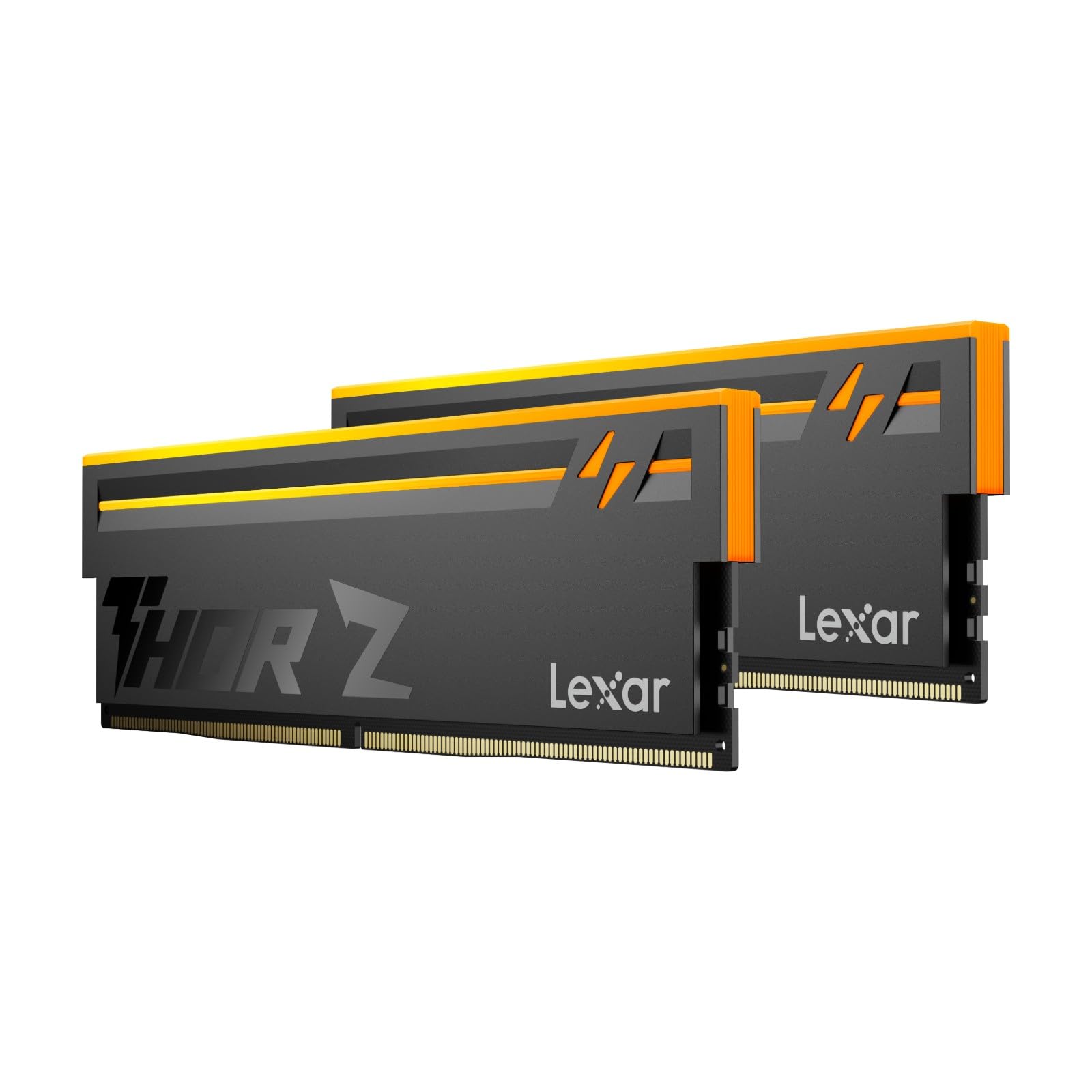
Lexar Thor Z RGB DDR5-6000 CL38

86 /100
LBD Score Excellent

Key details

Voltage
1.35 V
Capacity
32 GB (2 x 16 GB)
Profile Support
Intel XMP 3.0 and AMD EXPO
Speed And Timings
6000 MHz CL38
View on Amazon

CL38 is the number to notice. Every other 32 GB kit here runs CL30 or CL36 at 6000 MHz, and that gap is why the Thor Z ranks behind them.

We still think it deserves a place, because latency is the least felt number on a memory spec sheet. At 6000 MHz the difference between CL38 and CL30 turns up in memory benchmarks and very little else — in games and everyday work it isn't something you'll notice.

The rest of the kit is ordinary in a good way: 1.35 V, Intel XMP 3.0 and AMD EXPO both supported, a sandblasted aluminum heat spreader, and customizable RGB. Lexar makes a point of the on-die ECC and PMIC, though both are part of the DDR5 specification rather than extras you're paying for here — table stakes, not a reason to pick this one over another.

So the case for it is narrow and clear: a lit 32 GB kit at the bottom of this group's price range, from a name that hasn't been in memory as long as the others. If the budget is fixed and the panel is glass, that's a fair compromise — just don't buy it expecting the timings to be the reason.

Pros

  • 6000 MHz with XMP 3.0 and EXPO
  • Cheapest lit 32 GB kit here
  • 1.35 V rated voltage

Cons

  • CL38 is the loosest latency in this group
Our verdict

Worth it when the budget is fixed and the case has a window: 32 GB at 6000 MHz with lighting, both memory profiles, and nothing exotic to configure.

Check Latest Price

How We Chose and Tested These DDR5 Kits

We started by gathering every DDR5 kit we could find that listed both AMD EXPO and Intel XMP profiles, then narrowed by latency, capacity, and price until the shortlist covered a real spread: 32GB and 64GB pairs, tight CL30 kits alongside looser CL36 and CL38 ones, RGB heatspreaders next to plain low-profile sticks.

The 12 kits we settled on each went into one of three systems — an AM5 gaming build, an Intel DDR5 workstation, and a compact case where cooler clearance is genuinely tight. We installed them in the evening after work, the way you would, seating one pair and adding a second pair later on four-slot boards, and counted the power cycles it took to train at the rated profile.

Then we lived with them. Each kit ran overnight memory stress loops, a week of sleep-and-wake cycles, and long game-loading sessions, and we recorded whether the machine posted at its advertised speed or quietly fell back to a slower default, whether the OS saw the full capacity, and how warm the heatspreaders got under sustained load. We checked clearance against a large dual-tower cooler and a 240mm radiator, and loaded each vendor's lighting utility to see whether it cooperated with the motherboard software or fought it.

Reliability got the longest look: repeat cold boots across weeks, no stray blue screens, no re-training after a BIOS update. Value came last — we compared what each kit cost per gigabyte against what it actually delivered once it was in the slot.

How to Choose Ddr5 Memory

Capacity Before Speed

Settle 32 GB or 64 GB first, because nothing else about a kit matters if the capacity is wrong. Two 16 GB modules cover gaming, streaming and everyday work with headroom to spare; two 32 GB modules are for video timelines, virtual machines, large local datasets, or a machine you plan to keep through several upgrades.

Speed comes second. 6000 MT/s is where current AMD and Intel platforms most reliably run a one-click profile, which is why it is the sensible target for a build you want working tonight. Above that you are into manual tuning territory, and most builds do not repay the effort.

Match the Profile to Your Platform

Intel boards use XMP 3.0, AMD boards use EXPO, and most kits here carry both — but not all of them, so read the profile list before you buy. A kit with EXPO only leaves an Intel build without a one-click setting, which means typing speed, timings and voltage in by hand.

The other half of this: the rated speed is what you get after you enable the profile. Before that, the kit boots at the slower JEDEC default. Budget one trip into the BIOS and know where the memory menu lives.

Two Modules, One Matched Kit

Four sticks look better in photos and behave worse in practice. More modules mean more load on the memory controller and a lower chance of holding the rated profile, which is why every pick here is a two-module kit.

Buy the capacity you want in one box rather than planning to add a second pair later. G.SKILL's own documentation warns that mixing kits causes instability or system failure, and the rest of the industry takes the same view. If you need 64 GB, buy 64 GB now.

Read Voltage and Timings Together

CL30 at 1.35 V, CL30 at 1.40 V, CL36 at 1.35 V — those numbers only mean something next to each other. Tighter timings at the same speed do more work per clock, and a higher rated voltage is often what pays for them.

If you will never open the BIOS again, take the tightest timings at the lowest voltage your budget allows and stop there. If you plan to tune, a 1.35 V kit leaves you more room before you are running past what the modules were rated for.

Lighting, Software and Clearance

RGB is the easiest place to overspend. It looks best behind glass and costs a cable and a control app — iCUE for Corsair, plus extra steps if you want that lighting inside Aura Sync or Chroma.

The practical check is physical, not visual: a tall light bar sits above the DIMM slot, and a large air cooler overhangs exactly that space. Measure from the slot to the cooler's edge before you buy the showiest kit on the page.

Frequently Asked Questions

Final Verdict

The Corsair Vengeance RGB is the kit we point most builders to: 6000 MHz at CL30, one profile switch, ten zones of light, and a 1.40 V rating that only becomes a limitation if you intend to tune past the rated profile.

If the case has no window, the Patriot Viper Venom delivers the same speed at 1.35 V for less, and the Flare X5 is the calmer choice for a first build. For 64 GB on an AM5 workstation, the Royal Neo does what none of the 32 GB kits here can.