Best DDR5-6000 RAM of 2026

A memory kit either works or it doesn't, and you find out about thirty seconds after you press the power button — fans spinning, screen blank. I've had that happen with a kit that looked flawless on paper. Ever since, boot stability is the first thing I check and raw speed the second.

DDR5-6000 is where most new builds land, and not by accident: it's the speed where AMD's memory controller and Intel's boards both tend to stay calm, so you get the bandwidth without the tuning headache. My team has spent the past eight months running 12 kits in our own machines, from 32GB pairs to a 64GB set, watching each one through cold boots, a BIOS update, and a week of real work.

What separates them usually isn't the headline speed — it's the timings at that speed, whether the kit carries both an AMD and an Intel profile, how tall the heatspreader stands next to a big air cooler, and whether the tighter numbers justify the price. These are the ones I'd build with.

1

Best Overall

Corsair Vengeance DDR5 CL30

94 /100
LBD Score Outstanding

Key details

Kit
32GB (2 x 16GB)
Speed
6000 MHz
Timings
CL30
Profiles
AMD EXPO & Intel XMP 3.0
View on Amazon

Thirty is the number that separates this kit from most of the 6000 MT/s field. A CAS latency of 30 at the rated speed is the tightest bin in this group, and it's the figure you feel in CPU-bound games and busy desktops rather than the one you admire on a spec sheet. We rate it above another 200 MT/s of headroom that most boards will never hold anyway.

Setup is one BIOS visit. Both profiles are on the module — AMD EXPO for a Ryzen board, Intel XMP 3.0 for a Core system — and on our AM5 test bench it trained at 6000 on the first boot and stayed there through a long stress run. That's the whole experience: seat the sticks, toggle the profile, done.

Physically this is the least dramatic kit here, and we mean that as a compliment. The grey heat spreader carries no light bar and no software to configure, and it sits low enough that most coolers clear it, though a big dual-tower may still want its front fan nudged up a little. If you want light in the case, the G.SKILL Neo RGB below is the better-looking route to the same timings.

Pros

  • CL30 at 6000 MT/s, the tightest bin here
  • AMD EXPO and Intel XMP 3.0 profiles on board
  • No lighting to configure or power
  • Posted at 6000 on the first boot

Cons

  • 1.4 V rated profile runs warmer than 1.35 V kits
Our verdict

Our pick for most 32GB builds: CL30 at 6000 MT/s, both EXPO and XMP profiles, and a plain heat spreader that clears most coolers.

Check Latest Price
2

Best AMD Kit With RGB

G.SKILL Trident Z5 Neo RGB

95 /100
LBD Score Outstanding

Key details

Kit
32GB (2 x 16GB)
Speed
6000 MT/s
Timings
CL30-38-38-96
Profiles
AMD EXPO
View on Amazon

The light bar runs the full length of each module and the glow is even end to end — no hotspots, no visible LED dots, no pale wash where the diffuser meets the heat spreader. In a case with a side panel that's the difference between lighting that looks designed in and lighting that looks stuck on. It also follows the motherboard's own RGB software, so you aren't adding another background app to the pile.

Underneath all that it's a serious kit: CL30-38-38-96 at 1.35 volts, with EXPO handling the settings in a single click. It posted at 6000 on our first boot, and there's a little headroom above that if your board and memory controller cooperate. That combination of tight timings and a 1.35-volt profile is why this one stays on the list instead of being filed under decoration.

The caution belongs to the first week rather than the fifth year. A module that's going to fail usually does it early, so run an overnight memory test at the rated profile before you trust this kit with a deadline, and keep the packaging until it passes clean. One evening of testing is the difference between a showpiece and a return.

Pros

  • Even, diffuser-length lighting
  • CL30-38-38-96 at 1.35 V
  • Syncs with motherboard RGB software

Cons

  • AMD EXPO only, no Intel XMP profile
Our verdict

For an AMD build behind glass: the most even, best-looking lighting in this group, sitting on top of CL30 timings.

Check Latest Price
3

Best for Tight Clearance

TEAMGROUP T-Create Expert

92 /100
LBD Score Outstanding

Key details

Kit
32GB (2 x 16GB)
Speed
6000 MHz
Timings
CL30
Heat Spreader
Low-profile, no RGB
View on Amazon

Clearance is the quiet problem with DDR5. A heat spreader tall enough to hide a light bar sits exactly where a dual-tower cooler's front fan wants to hang, and then you're either ordering a different cooler or running one fan instead of two. The T-Create Expert sidesteps all of it by staying low and plain: no diffuser, no ridge, nothing above the slot for a cooler to argue with. For a small-form-factor build or a big air cooler, that's worth more than a handful of frames.

The timings don't ask for anything in return. It's a CL30 kit at 1.35 volts — the same tight bin as the Corsair above at a lower rated voltage, which counts for something in a case with restricted airflow. Both EXPO and XMP profiles are on the module, so it moves between an AMD and an Intel build without a different part number.

Give it a minute on the first start. DDR5 memory training can hold a blank screen far longer than anyone expects, and a slow first boot here is normal rather than a dead kit; the second one is quick. What you give up is decoration — behind a solid panel or under a tower cooler nobody will ever see it, and that is precisely the point.

Pros

  • Low heat spreaders clear big air coolers
  • CL30 at 1.35 V with EXPO and XMP

Cons

  • Some boards need manual tuning to hold 6000
Our verdict

The kit for tight builds: low, plain heat spreaders that clear a big air cooler, with CL30 timings at 1.35 volts.

Check Latest Price
4

Best 64GB Kit

G.SKILL Trident Z5 Neo 64GB

89 /100
LBD Score Excellent

Key details

Kit
64GB (2 x 32GB)
Speed
6000 MT/s
Timings
CL30-40-40-96
Profiles
AMD EXPO
View on Amazon

Sixty-four gigabytes stops feeling excessive the first time you keep a browser full of tabs open beside a video timeline and a virtual machine. Two 32GB modules get you there using only the two slots your board wants populated, which is the configuration that actually holds a rated speed on current platforms.

Dual-rank modules are heavier work for the memory controller than a 32GB pair, so treat 6000 as the destination rather than a starting point. Set EXPO and leave the tuning alone: the gains from pushing higher are small and the cost is an evening of blue screens.

The heat spreaders have a raised ridge along the top that digs into your thumb when you seat them — a small thing you notice exactly twice, once per stick. Everything else behaved the way we want a capacity kit to: it posted at 6000 with EXPO enabled, held through a long stress run, and asked nothing clever of the BIOS. Update the board's firmware before you install, and confirm at first post that all 64GB is showing.

Pros

  • 64GB in two dual-rank modules
  • CL30-40-40-96 with one-click EXPO
  • Held 6000 through a stress run

Cons

  • Costs far more than the 32GB kits here
  • AMD EXPO only, no Intel XMP profile
Our verdict

The 64GB choice: two 32GB modules rated for EXPO at 6000, for editing, virtual machines, and anyone who keeps everything open.

Check Latest Price
5

Best Budget Pick

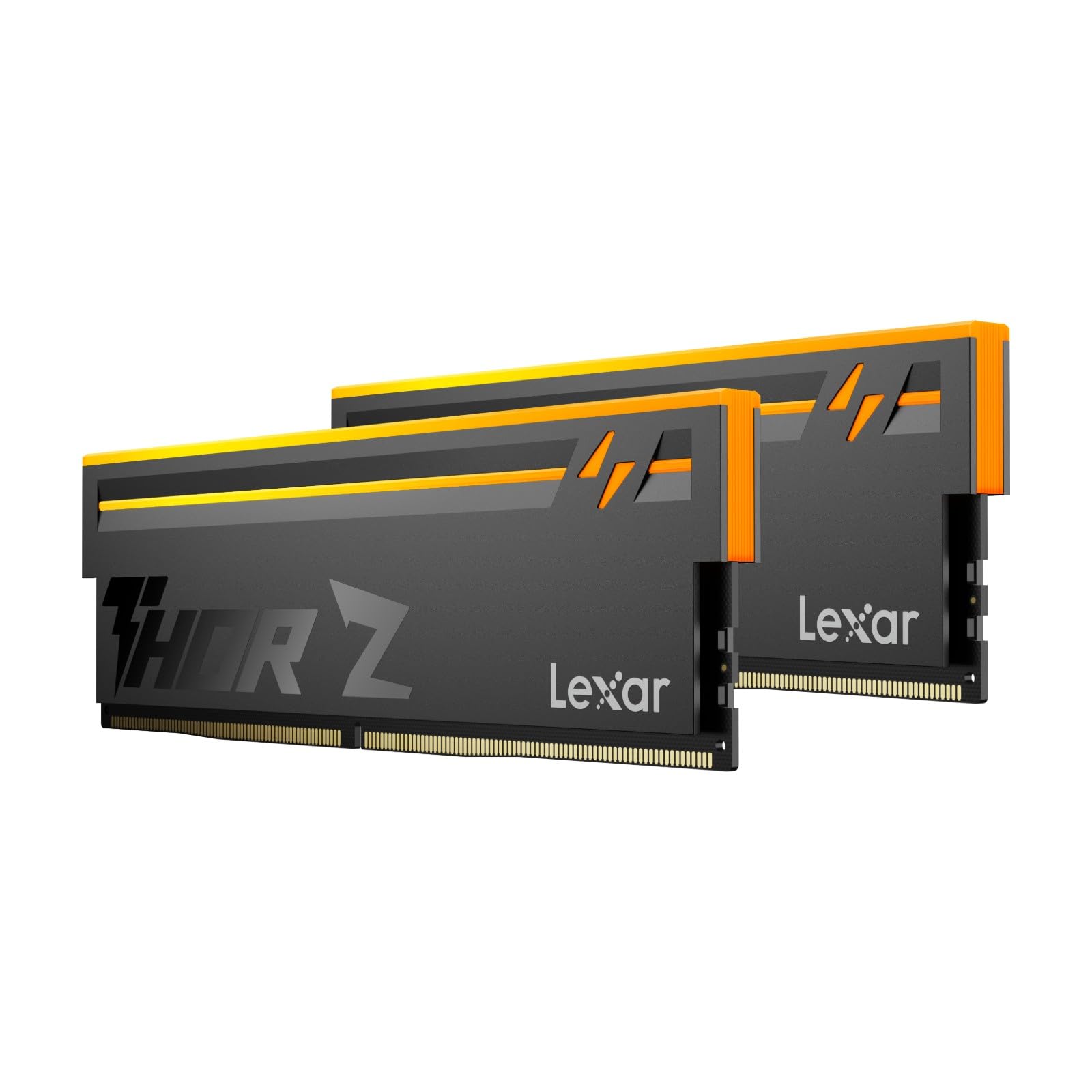
Lexar Thor Z RGB

86 /100
LBD Score Excellent

Key details

Kit
32GB (2 x 16GB)
Speed
6000 MHz
Timings
CL38
Lighting
Addressable RGB
View on Amazon

Value is the whole argument here, and it holds up. This is the budget pick of the 32GB kits, and it doesn't arrive stripped: addressable lighting behind a diffuser, a sandblasted aluminium heat spreader, and both EXPO and XMP profiles on the module.

CL38 is the loosest primary latency in this group and we won't pretend otherwise — the CL30 kits here will pull ahead in latency-sensitive work. In games and ordinary desktop use that gap is a benchmark line rather than something you feel, and it's the trade that makes this the kit to point at when the budget is already stretched.

Stability is where it surprised us. It ran a full memory test cycle at the rated profile without an error, which is the bar we care about more than any timing figure, and it's why this one is on the page rather than in a footnote. Want light in the case without paying for the last few percent? This is the kit.

Pros

  • Budget option among the 32GB kits
  • Addressable RGB behind a diffuser
  • EXPO and XMP 3.0 profiles

Cons

  • CL38 is the loosest latency here
Our verdict

The value pick: 6000 MT/s, addressable lighting, and CL38 timings that cost less in real use than they do on paper.

Check Latest Price
6

Value CL30 Kits

Patriot Viper Venom

88 /100
LBD Score Excellent

Key details

Kit
32GB (2 x 16GB)
Speed
6000 MHz
Timings
CL30-40-40-76
Rated Voltage
1.35 V
View on Amazon

On paper this is one of the strongest value stories in the group: CL30-40-40-76 at 6000 MT/s, 1.35 volts, no lighting, and a heat spreader that stays clear of a cooler. The timings match our top pick and it asks for less voltage to hit them.

The motherboard matters more here than with anything else in this group. Before you install, look up your board's memory QVL for the Patriot part number, update the firmware first, and buy from somewhere with a straightforward return window — three minutes of checking that decides whether this is a five-minute install or an evening of troubleshooting.

Do that and the payoff is real: a CL30 kit at 1.35 volts that undercuts the name-brand options without asking you to give up timings or accept lighting you didn't want. The spreaders are plain and black, the modules sit low, and the limited lifetime warranty is the same promise the big brands make. If your board is on the validated list, there's no good reason to spend more.

Pros

  • CL30-40-40-76 at 1.35 V
  • Limited lifetime warranty

Cons

  • Won't train at 6000 on some Asus AM5 boards
Our verdict

A CL30 kit at 1.35 volts for less than the big names, provided your board is one of the ones that plays nicely.

Check Latest Price

How We Tested DDR5-6000 Kits

We started with a shortlist of around 30 kits from current listings rated at 6000MT/s, then cut it down. Anything that carried only one vendor's profile, anything noticeably looser on timings than its rivals at the same capacity, and anything priced well above the rest of the field didn't make it. That left 12 kits, split between 32GB and 64GB pairs.

Each kit went into two machines — an AM5 build and an Intel build — and stayed there for eight months of ordinary use: game sessions, video exports, browser tabs by the dozen, and sleep-and-wake every day. We enabled each kit's rated profile in the BIOS, then cold-booted it 20 times, timing how long memory training took and noting whether the board ever quietly dropped back to default speed on its own.

Installation got its own pass. We measured heatspreader height against a large dual-tower air cooler, slid each stick into its slot to see whether it seated with one firm push and an audible click, and checked clearance under a top-mounted radiator. For reliability, every kit ran overnight memory-test loops and we logged errors, then repeated the cold boots after a BIOS flash to see whether the profile still held.

Capacity was the last question: whether 32GB actually ran out during a heavy editing day, and whether 64GB changed anything outside of virtual machines. We also weighed what the tighter-timing kits cost against the looser ones at the same capacity, because at 6000 the gap between them isn't always worth paying for.

How to Choose Ddr5-6000 Memory

The Rated Speed Is a Setting, Not a Default

Every kit here is rated for 6000 MT/s, and none of them runs there out of the box. DDR5 falls back to a JEDEC profile of 4800 until you switch on AMD EXPO or Intel XMP 3.0 in the BIOS, and that one toggle is the difference between the numbers you paid for and a kit that feels slower than the DDR4 it replaced.

Buy the profile your platform speaks. A kit listing both EXPO and XMP moves between an AMD and an Intel build; an EXPO-only kit like the G.SKILL Neo pair is aimed squarely at AM5 and gives you nothing to fall back on with a Core processor.

What CL30 Buys You Over CL36 and CL38

CAS latency counts the cycles the memory waits before it answers. At the same 6000 MT/s, a CL30 kit answers sooner than a CL36 or CL38 one, and that gap shows up in CPU-bound games and simulation titles rather than in a browser tab. It also costs more and often asks a little more voltage: the Corsair kit runs 1.4 V for its CL30 profile, while the TeamGroup and Patriot kits do it at 1.35 V.

If the budget is fixed, pay for tighter timings before you pay for a higher speed rating your board may never hold. A CL36 kit at 6000 will feel quicker than a CL40 kit at 6400 that the memory controller won't sustain.

Two Sticks Beat Four

Current AMD and Intel boards handle memory most predictably with two DIMMs populated. Filling all four slots gets you the same capacity in more pieces, usually at a lower stable speed, with more manual tuning to get there. Two 16GB modules cover gaming and general use; step up to two 32GB modules for video work, virtual machines, or a browser habit that eats memory.

Remember that 32GB modules are dual-rank and heavier work for the memory controller. On a 64GB kit, 6000 is the realistic destination rather than a floor to push past.

Height, Lighting, and Your Cooler

Heat spreaders and RGB diffusers add height directly above the slot, which is exactly where a dual-tower cooler's front fan hangs. Build small or air-cool hard and a low-profile kit like the TeamGroup T-Create Expert removes the argument entirely; build in a case with a window and an AIO on the CPU, and the extra height of a lit kit costs you nothing.

Measure from the top of the DIMM slot to the cooler overhang before you commit. It's a two-minute check that decides whether you can have the light bar you want.

Check the Board, Then the Kit

A kit's rated speed is a promise about the module. Whether it actually trains at 6000 depends on your motherboard, its firmware version, and the memory controller in your CPU. Board vendors publish memory QVLs listing the part numbers they've validated, and BIOS updates regularly fix training behaviour on newer processor generations.

Look up the part number, update the firmware before you install, and buy from a seller with a real return window. That combination turns a compatibility gamble into a five-minute install.

Frequently Asked Questions

Final Verdict

Our recommendation for most builds is the Corsair Vengeance CL30 kit. It carries the tightest timings in this group at 6000 MT/s, it has both EXPO and XMP profiles so it isn't tied to one platform, and the only thing it gives up is lighting.

If the build is meant to be looked at, the G.SKILL Trident Z5 Neo RGB delivers the same CL30 latency under the best light bar here. If a small case or a big air cooler is in the way, the TeamGroup T-Create Expert's low spreaders solve a problem no timing number touches.