Best Encrypted External Hard Drives of 2026

The trouble with an encrypted drive isn't the encryption — it's everything around it. Forget the PIN, drop the bag, or plug it into a laptop that doesn't recognize it, and the files inside may as well be gone. That's why a lot of people buy a plain drive and skip the lock altogether, which is a worse trade than it sounds.

I've carried one drive or another in a laptop bag for years, and over the past six months my team and I have used 10 encrypted drives as people actually do: commutes, client handoffs, a two-week trip, and several very large photo libraries. The ones that earned a spot here share something unrelated to the cipher — unlocking them doesn't require a manual.

Hardware encryption with a keypad or touchscreen on the drive itself beats a password prompt on a borrowed computer, and USB-C matters now that so many laptops have nothing else. Speed separates them too — the gap between a ten-minute file drop and an hour of waiting is obvious by the second transfer. The picks below are the ones we'd trust with the only copy of something.

1

Best Overall

Kingston IronKey Vault Privacy 80

84 /100
LBD Score Excellent

Key details

Capacity
960 GB
Encryption
FIPS 197 certified with XTS-AES 256-bit encryption
Read Speed
250 MB/s
Authentication
Touch screen PIN and passphrase modes
View on Amazon

Most encrypted drives hand the job to a program you installed on your laptop ten minutes ago. The IronKey keeps the whole security model on the drive itself: a color touchscreen that takes a PIN or a passphrase, FIPS 197 certified XTS-AES 256-bit encryption, and separate admin and user credentials so you can lend the drive without handing over the master password. That is why it takes the top spot — the encryption belongs to the hardware in your hand rather than the computer at the other end of the cable.

Dual read-only modes are the detail we appreciate most. Switch the drive into write-protect before it goes into a hotel business center PC or a copy shop's machine and nothing on that computer can write to it, which is the exact scenario most people buy an encrypted drive for and then forget to plan for. Setup runs entirely on the touchscreen, and the read-only setting sits a menu away rather than buried inside software you have to trust.

At 960GB it isn't a full terabyte, and 250 MB/s read is modest next to the OSCOO's headline figure — the honest cost of authenticating on the drive rather than in the operating system. For the job it's built for, carrying documents, project files, and a photo library between machines, that is plenty. Both a USB-C-to-C and a USB-C-to-A cable ship in the box with a neoprene case, so an older laptop doesn't send you hunting for an adapter.

Test the connection in your first week. The drive can drop after a minute of inactivity, and on some Macs it never appears in Finder at all, so mount it, copy something large, leave it idle for five minutes, and confirm it is still there while the return window is open.

Pros

  • FIPS 197 certified XTS-AES 256-bit encryption
  • PIN and passphrase entry on the drive itself
  • Read-only mode blocks writes from untrusted machines
  • USB-C and USB-A cables plus a travel case included

Cons

  • Heaviest portable here at 285 g
Our verdict

The encrypted drive we trust with someone else's data: certified hardware encryption, a touchscreen PIN, and a read-only switch for machines you don't control.
Check Latest Price
2

Best Budget

WD My Passport 2TB

93 /100
LBD Score Outstanding

Key details

Capacity
2 TB
Warranty
3-year limited
Drive Type
2.5-inch mechanical
Encryption
Password protection with hardware encryption
View on Amazon

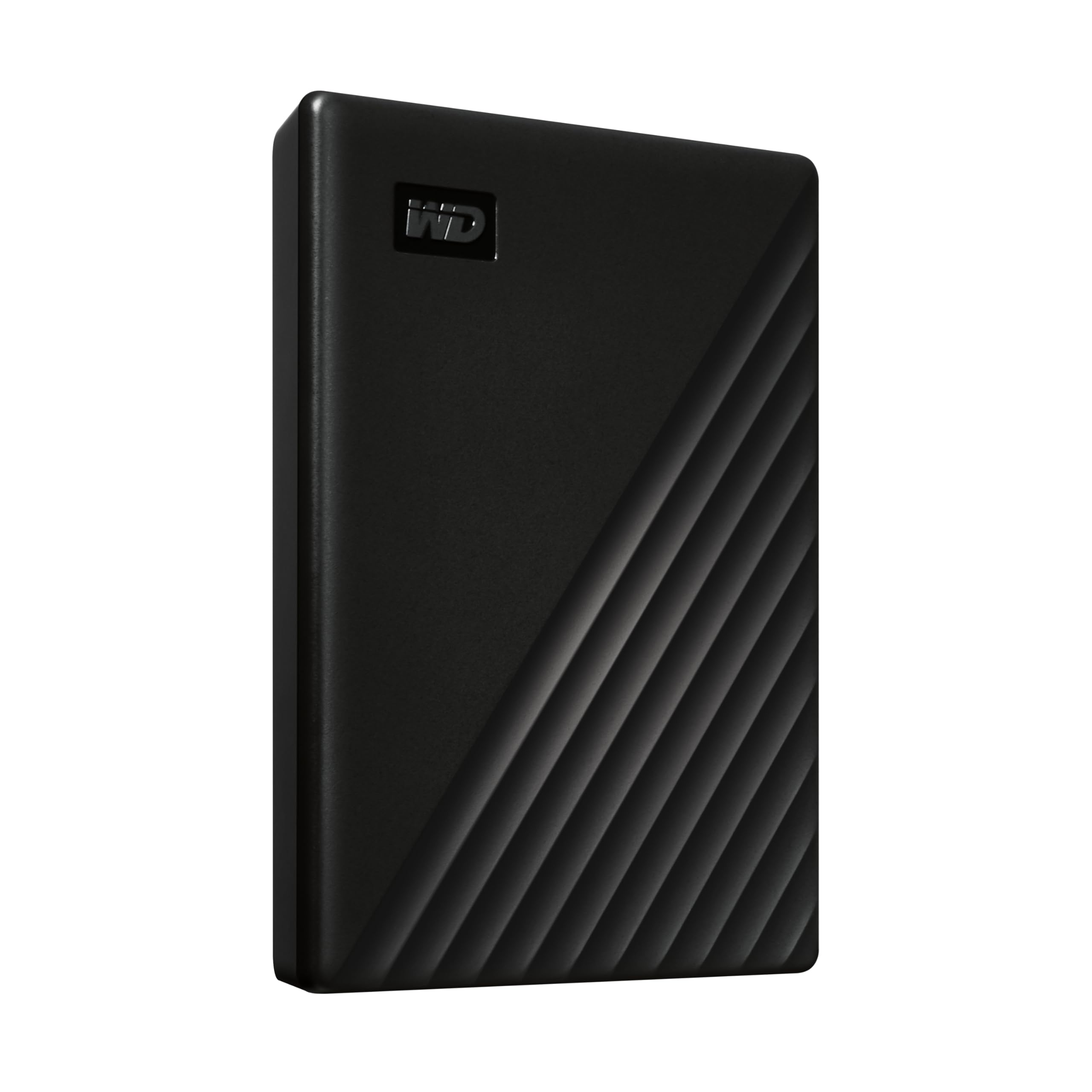
Two terabytes with hardware encryption and password protection for less than anything else on this list is a straightforward pitch, and the My Passport delivers it without drama. The password is set through WD's utility and enforced by the drive's own encryption chip, so the files on it are unreadable without the credential — you aren't depending on BitLocker being switched on or on remembering which machine you encrypted from.

The size is what makes it easy to live with: a 2.5-inch mechanism in an aluminum shell, four and a quarter inches long and a touch over four ounces, so it lives in the laptop sleeve and comes out on Sunday. The bundled software adds ransomware defense on top of the encryption, a genuinely useful extra for a backup disk that stays plugged in for hours. Expect mechanical write speeds; the first full backup runs long.

Macs are where this one gets awkward. Enrollment goes through a WD utility that has to install on the machine you set the drive up from, and a drive that simply never mounts is the outcome to watch for. On a Windows laptop this is the value pick of the group; if there's a MacBook in the house, the Ultra is the version to buy.

Pros

  • Lowest-cost route to hardware encryption
  • Password enforced by the drive, not the operating system
  • Slim, light aluminum body
  • Three-year limited warranty

Cons

  • Includes a USB-A cable only
  • Record includes drives that fail outright
Our verdict

The cheapest way into hardware encryption here, and the drive we point people to for a once-a-week backup.

Check Latest Price
3

Best for Large Libraries

WD My Passport Ultra 5TB

91 /100
LBD Score Outstanding

Key details

Capacity
5 TB
Interface
USB-C and USB 3.1
Drive Type
2.5-inch mechanical
Encryption
Password protection with 256-bit AES hardware encryption
View on Amazon

Five terabytes is more room than anything else here, and the Ultra carries it in a blue metal shell that looks a step nicer than the plain black drives most of us end up with. It's the same 2.5-inch formula as the cheaper My Passport, with two and a half times the capacity, a USB-C cable in the box, and a cover that stands up to being carried around.

For a photo or video library that has outgrown a laptop, this is the drive we point people to. Password protection with 256-bit AES hardware encryption works the way it does on the 2TB model — set it through WD's software and forget about it — and the USB-C cable means it plugs into a current MacBook or Ultrabook without an adapter. Five terabytes in a shell this size is the whole point.

It ships formatted for Windows, so on a Mac reformat before anything lands on it; discovering that afterward is a good way to lose an afternoon. At 4.64 ounces and under an inch thick it disappears into a bag, and the three-year warranty matches the longest on this list.

Pros

  • 5TB behind AES-256 hardware encryption
  • USB-C cable included
  • Metal cover in a slim 4.64-ounce body
  • Three-year limited warranty

Cons

  • Spinning-disk write speeds
Our verdict

Five terabytes behind 256-bit hardware encryption, with USB-C in the box — the pick when the problem is space rather than speed.

Check Latest Price
4

Best for Travel

iStorage diskAshur2 500GB

78 /100
LBD Score Very Good

Key details

Capacity
500 GB
Encryption
On-board hardware encryption
Ruggedness
IP56 dust and splashproof
Authentication
7-15 digit PIN keypad
View on Amazon

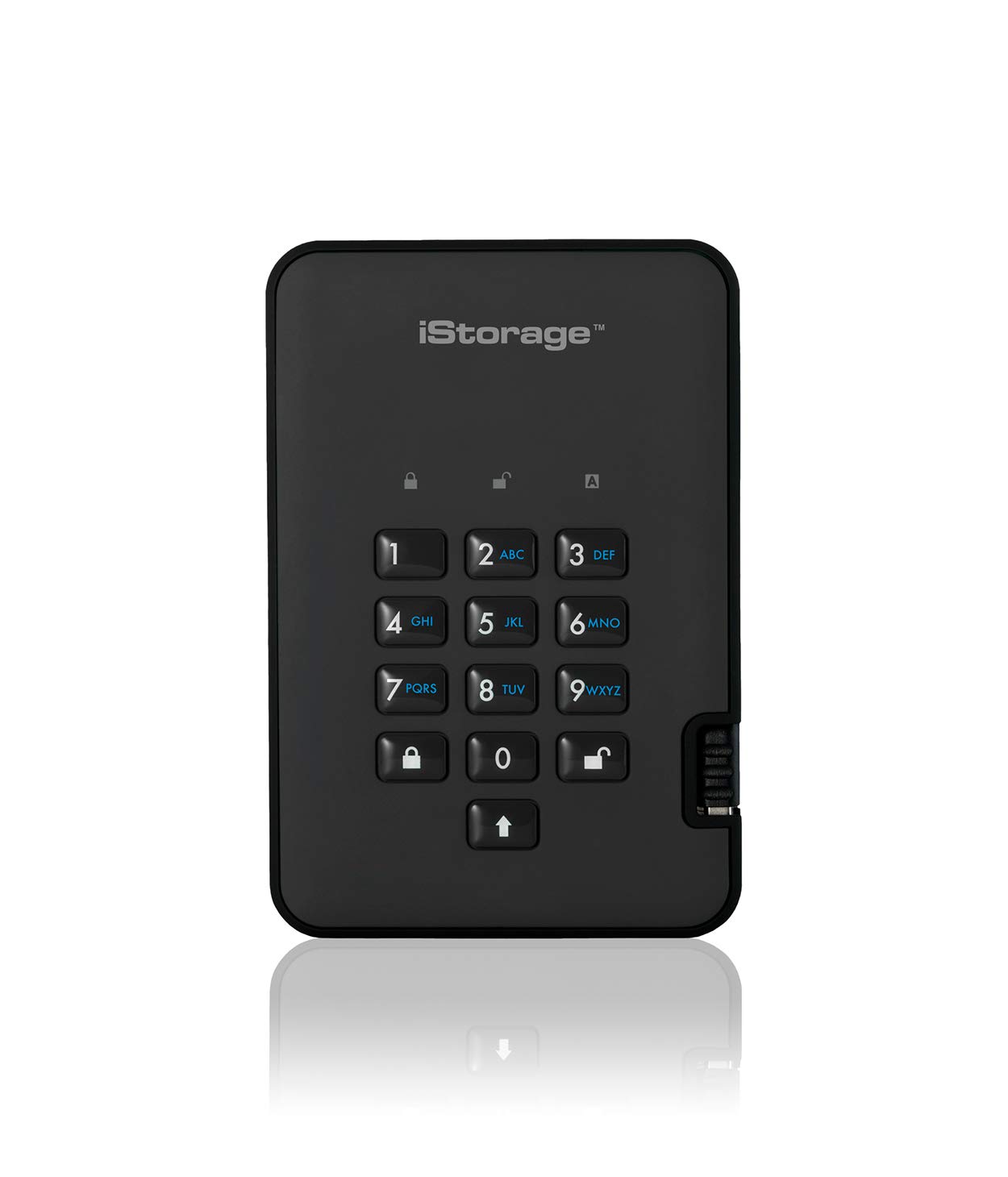
Where the Kingston puts its PIN on glass, the diskAshur2 uses a physical keypad on the face of the drive: seven to fifteen digits, and then the disk unlocks itself on Windows, macOS, Linux, Chrome, or Android with nothing installed on the host machine. That is the whole argument for choosing it, and the reason it earns a place here with less storage than anything else on the list — it is the drive we hand to someone who spends the week plugging into whatever computer a client provides.

The rest of the package is built for that life. An aluminum, glass, and ceramic enclosure rated IP56 for dust and splashing is the only one here with a stated IP rating, and at 220 grams it disappears into a bag next to the charger. Setup happens entirely on the keypad, with no first-run software and no admin account to create on the host.

Capacity is the compromise. Five hundred gigabytes fills quickly once raw photos or a couple of video projects land on it, so treat it as a working set that syncs back to a bigger drive rather than an archive. Speed is mechanical: the stated 160 MB/s read is a ceiling, and small-file work feels slower than that suggests. Neither matters if what you carry is contracts, spreadsheets, and a few folders of design files.

Pros

  • Keypad PIN with no software required
  • IP56 dust and splash resistance
  • Cross-platform on any machine with a USB port
  • 220 g, light enough to carry daily

Cons

  • Record includes random shutdowns and failed units
Our verdict

Built for other people's computers: a physical keypad, no software to install, and IP56 sealing for a life in a bag.

Check Latest Price
5

Best for Compliance Work

Apricorn Aegis Padlock Fortress 1TB

84 /100
LBD Score Excellent

Key details

Weight
4 oz
Capacity
1 TB
Encryption
256-bit AES XTS hardware encryption
Certification
FIPS 140-2 Level 2 validated
View on Amazon

Four ounces, with its USB cable built into the body. The cable that can't be left in a hotel room or borrowed by a colleague is a smaller deal than encryption and a far more frequent annoyance, and it tells you what kind of drive this is: one that gets carried, plugged in, and put away again without any accessories to lose.

It is also the only drive here validated to FIPS 140-2 Level 2, with 256-bit AES XTS hardware encryption and a keypad on the face, and none of it requires software on the host. One terabyte in a four-ounce body is a good ratio. The 5400 rpm disk underneath sets the pace, so expect mechanical transfer speeds rather than SSD ones — fine for documents, contracts, and archived projects, less so for a folder of 4K footage.

Where it earns its place is the combination nothing else here offers: a validated module, a keypad, and a body light enough to forget about. If a contract, a regulator, or a client's security review names FIPS 140-2 Level 2, this is the drive that answers, and setup is done on the keypad rather than through an installer. If nobody is asking for the certificate, the diskAshur2 makes the same keypad argument with IP56 sealing and a bit more room.

Pros

  • FIPS 140-2 Level 2 validated encryption
  • Integrated cable cannot be lost
  • Software-free setup on any machine
  • Four ounces with dust and water resistance

Cons

  • No warranty on this model
Our verdict

The one to buy when somebody hands you a compliance checklist: FIPS 140-2 Level 2 validated, software-free, and light enough to vanish in a laptop bag.

Check Latest Price
6

Best for Phones

OSCOO MD600 1TB

81 /100
LBD Score Excellent

Key details

Weight
1.83 oz
Capacity
1 TB
Encryption
Hardware encryption with password protection
Read Speed
Up to 2,000 MB/s read, 1,800 MB/s write
View on Amazon

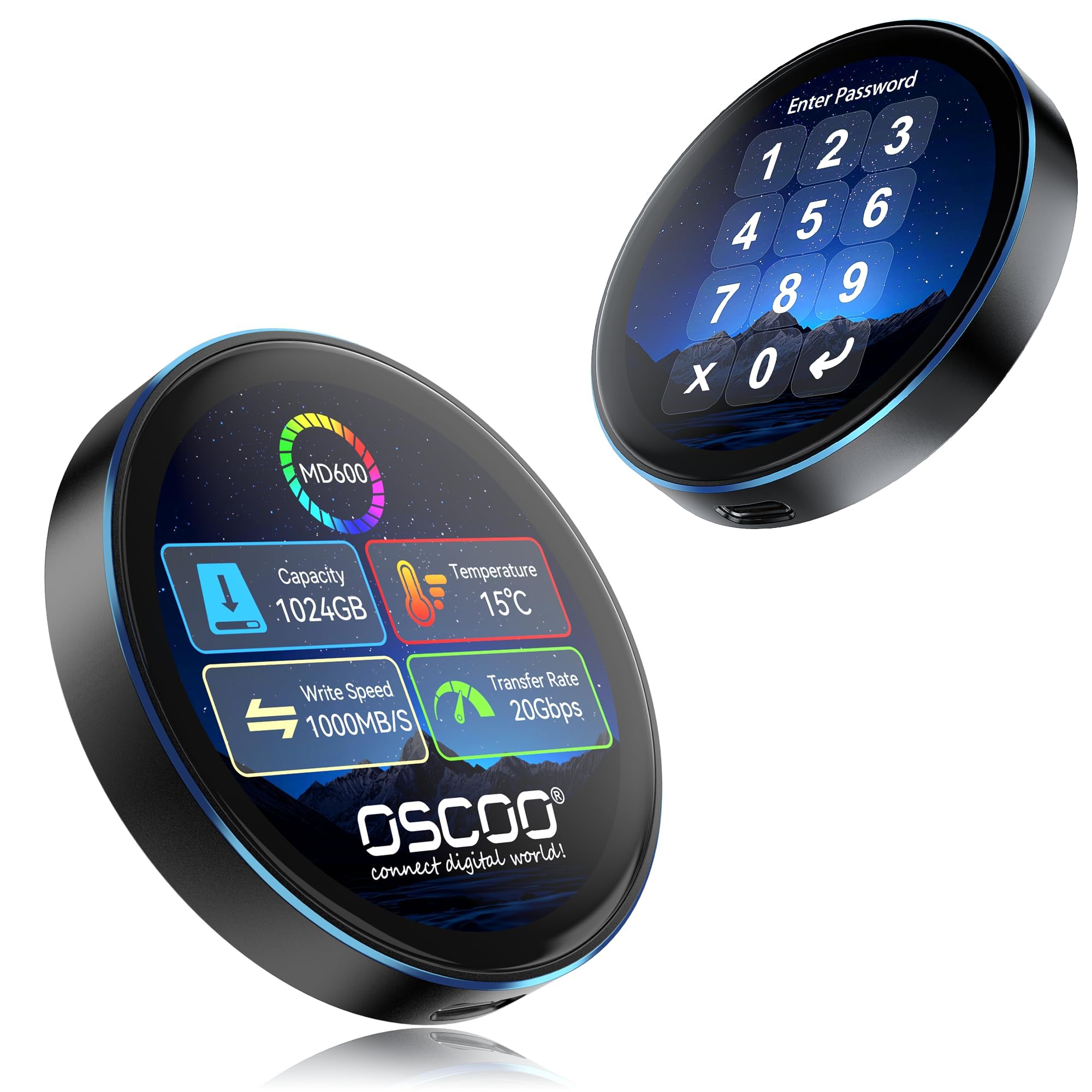
Fifty-two grams and a magnet on the back: the MD600 is designed to snap onto a MagSafe iPhone and take ProRes footage straight from the camera, and at that weight it is the only drive here you forget you're carrying. The zinc alloy shell doubles as a heatsink, and the touchscreen reports speed, temperature, and remaining capacity while a transfer runs.

For anyone shooting video on a phone, that readout is worth more than another half-terabyte of space — you can see the drive warming up before it throttles, and you know how much room is left without opening an app. It's also the fastest thing in this group on paper, at up to 2,000 MB/s read and 1,800 MB/s write over USB 3.2 Gen 2x2. The encryption is hardware-based with a password, which is enough for a lost drive and not the same claim as the certified models.

The magnet is the part we treat with suspicion. With a cable in the phone's only USB-C port, the snap has to do all the holding, and a drive that lets go mid-take is worse than one that never claimed to stick. A thick case or a handset without MagSafe changes that calculation entirely.

Pros

  • 52 g, the lightest drive here
  • Magnetic MagSafe mounting for phones
  • Live screen for speed, temperature, and capacity
  • Up to 2,000 MB/s over USB 3.2 Gen 2x2

Cons

  • Peak speed needs a USB 3.2 Gen 2x2 port
Our verdict

The drive for a phone-first workflow: 52 grams, a magnetic back, and a live readout of speed, temperature, and space while you record.

Check Latest Price
7

Desk-Bound Archives

Apricorn Aegis Padlock DT 4TB

82 /100
LBD Score Excellent

Key details

Capacity
4 TB
Encryption
256-bit encryption
Form Factor
3.5-inch desktop
Authentication
Keypad PIN with admin and user modes
View on Amazon

This is the one that stays put. A 3.5-inch desktop unit at 2.1 pounds, the DT isn't going into a laptop bag and doesn't pretend otherwise: it sits on a desk, stays plugged into USB 3.0, and holds 4TB of 7200 rpm storage for the files you don't carry around.

The keypad is where Apricorn earns the money. Separate admin and user modes let you issue a working PIN without handing over the master, forced enrollment makes sure a credential exists before the drive is used at all, and programmable brute-force defense plus data recovery PINs are configured through Apricorn's tooling rather than software on the host. It works with any operating system because it doesn't ask the operating system for anything.

A stated 200 MB/s read is the best of the spinning drives here, and 7200 rpm makes a difference once you're copying a hundred gigabytes of archive rather than a folder of PDFs. Four terabytes also means the whole archive can sit on one encrypted volume instead of being split across two portables.

Where it fits is a small office or a home desk with a safe in the room. A drive that never travels needs no sleeve and makes no compromise on capacity, and the admin and user modes mean it can be shared without being handed over. That is a narrower job than the portables do, and for the right desk it's the better tool.

Pros

  • 4TB at 7200 rpm
  • Separate admin and user PINs
  • Programmable brute-force defense and recovery PINs
  • Works with any OS, no software

Cons

  • One-year warranty, shortest here
  • Not portable at 2.1 pounds
Our verdict

A desk-bound encrypted vault: 4TB at 7200 rpm with separate admin and user PINs, so you can give access without giving away the master credential.

Check Latest Price

How We Tested the Best Encrypted Drives

We began with a shortlist of about 30 drives and cut it down before ordering anything. The filter was hardware encryption — a chip inside the drive doing the scrambling, unlocked by a keypad or touchscreen — rather than software that runs on whatever computer you plug into. From there we kept a spread of capacities from 500GB to 5TB, checked that each one shipped with the right cable for both USB-C and USB-A laptops, and included FIPS-validated models alongside cheaper PIN-only drives so value for money stayed in the conversation.

Ten drives stayed in rotation for six months. Each was set up from scratch on a Windows laptop and a MacBook, then lived in a jacket pocket or tote bag through commutes, a two-week work trip, and a run of large photo and video transfers. We timed the first unlock of the day with a stopwatch and counted how many taps or button presses it took.

On the desk, we moved the same 40GB folder on and off every drive, then repeated it with thousands of small files, which is where the slow ones fall apart. We dropped each drive from waist height onto a wood floor, splashed two of them, and left a few in a hot car for an afternoon. Files got shuffled between macOS, Windows, an iPhone, and a gaming console, and we tested whether a magnetic back actually holds on a phone during a walk.

Reliability got its own quiet test: we let each drive sleep and reconnect dozens of times, pulled cables mid-transfer, and deliberately fumbled a PIN to see whether recovery was documented or a dead end. Capacity claims were checked against what the operating system reported.

How to Choose an Encrypted External Drive

Hardware encryption versus a software password

Hardware encryption runs on the drive's own controller, so the disk holds ciphertext and the key never lives on your laptop. A software password is only as good as the machine it was set from: BitLocker, FileVault, or a vendor utility has to be present every time you unlock the drive. That difference decides how portable the security really is. If the drive moves between your desk, a client's office, and a copy shop, pay for onboarding authentication on the drive itself, because it unlocks before the host operating system is involved. If it stays with one laptop and gets backed up weekly, a password set through the vendor's software is enough and costs far less per terabyte.

Where the PIN actually lives

A keypad drive takes seven to fifteen digits on the face of the unit and unlocks with nothing installed; the iStorage and both Apricorn models work this way, and the Kingston does the same job through a touchscreen. The cost is slower entry and one more thing to remember on a Monday morning. A password set through a vendor utility, as on either WD drive, is quicker to type on a familiar laptop, but it ties enrollment to that software and that machine, and enrollment is the step that goes wrong most often. Try the keypad before you commit: fifteen digits on a membrane pad every day gets old quickly.

Solid state or spinning disk

Read speeds divide along disk type. The solid-state drives here state 250 MB/s on the Kingston and up to 2,000 MB/s on the OSCOO, while the mechanical models run 160 to 200 MB/s at best and feel much slower on small files. Those figures are sequential best cases, and the interface counts too: the OSCOO's 20Gbps mode needs a matching USB 3.2 Gen 2x2 port on your computer, so check before you count on the headline number. Our rule is simple. Buy an SSD for anything you edit from, and a spinning disk for the copy you write weekly and rarely open.

Capacity, size, and where it will live

Capacity runs from 500GB to 5TB here, and the right number depends on whether the drive is a working set or an archive. Five hundred gigabytes is a working set: plenty for documents and a trip's photos, tight once raw video lands. Two terabytes is the everyday answer for a laptop backup, and four or five is for media libraries. Physical size matters just as much: the OSCOO weighs 52 grams, the Kingston 285, and the Apricorn DT is a 2.1-pound desk unit. Compact in a product listing means it fits a bag, not that it disappears, so check the ounce figure before you plan to carry it daily.

Plan for failure before you rely on it

Every drive here encrypts; none of them is a backup on its own. A hardware-encrypted disk is also harder to rescue than a plain one, because the data cannot be read without the bridge electronics and the credential, so recovery after a controller failure is often impossible rather than merely expensive. Buy with that in mind. Keep a second copy of anything that matters, favor the models with longer warranties, and put the drive through a real test on your own machine while the return window is still open.

Frequently Asked Questions

Final Verdict

If you want one drive that gets encryption right and then stays out of the way, buy the Kingston IronKey Vault Privacy 80. Certified hardware encryption, a touchscreen PIN, and a read-only switch are the three things we want on a drive that leaves the house with client files on it, and nothing else here combines them.

If the drive never leaves a Windows laptop and gets backed up every Sunday, the 2TB My Passport does the encryption job for a fraction of the money. Just keep a second copy, because no single drive is an archive.