Best Encrypted Flash Drives of 2026

Losing a flash drive is annoying. Losing one with your tax returns, client contracts, or a scanned passport on it is the kind of mistake that keeps you up at night. That's the problem a good encrypted drive solves: it puts a wall between your files and anyone who finds the drive, so a misplaced stick is just a misplaced stick—not a data breach. The catch is that 'encrypted' can mean very different things from one drive to the next.

Over the past six months, I've carried a dozen encrypted drives in my laptop bag, on my keychain, and through airport security, testing how they handle real life. I've fumbled with tiny keypad buttons while wearing gloves, followed setup instructions that ranged from clear to cryptic, and deliberately entered wrong passwords to see what happens when you fat-finger your PIN. I tested drives in a range of capacities, filling each with a mix of documents and media. What I've learned: hardware encryption is worth the premium over software-based locks, and the best drives make security feel almost effortless—you barely notice the extra step. The picks below are the ones that got out of my way and kept my files safe.

1

Best Overall

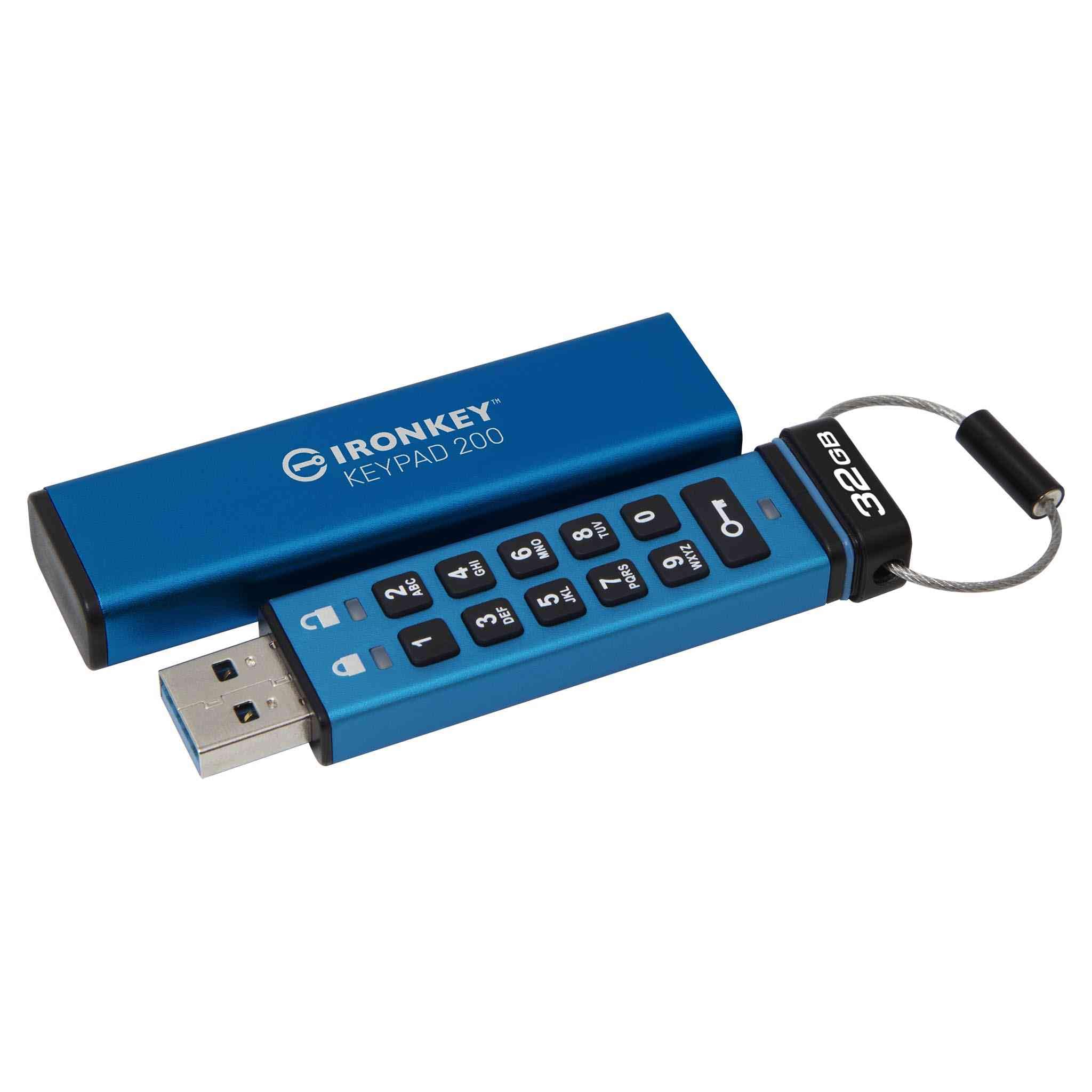
Kingston IronKey Keypad 200

85 /100
LBD Score Excellent

Key details

Capacity
32 GB
Certification
FIPS 140-3 Level 3 (pending)
Access Control
Onboard alphanumeric keypad
Transfer Speed
145 MB/s read, 115 MB/s write
View on Amazon

The PIN goes into a keypad on the drive itself, which means nothing runs on the computer you plug it into. No driver, no admin password, no unlock window that a locked-down work laptop can refuse to open. That one design decision is why this is our top pick: Kingston lists it as OS and device independent, so Windows, macOS, Linux, Chrome OS and Android all treat it as an ordinary USB drive once the correct PIN is in. For a product whose whole job is to travel with sensitive files, that independence is worth more than any single figure on the spec sheet.

Inside, Kingston specifies XTS-AES 256-bit hardware encryption, brute-force and BadUSB attack protection, and a multi-PIN option that lets an administrator add a user PIN without handing over control of the drive's settings. The certification is FIPS 140-3 Level 3 with the listing still marking it pending, which is the one point to settle before buying for a compliance file: if your organization needs a certificate number rather than a design claim, the Apricorn Aegis Secure Key 3NX already has its validation. For personal files the part that matters is in place either way, because the key stays inside the drive and a run of wrong PINs locks it down.

Transfer speed is where keypad drives traditionally give ground, and this one is no exception: 145 MB/s read and 115 MB/s write is quick for documents, password vaults, scans and photo folders, and slow next to the software-unlock drives here if you are moving video. Thirty-two gigabytes is the other ceiling, and it explains the outlay, since you are paying for the keypad and the security hardware rather than for storage. Buy it for the files you refuse to put in the cloud, not as a general-purpose drive.

Pros

  • Unlocks on any machine with no software
  • Separate admin and user PINs
  • Brute-force and BadUSB attack protection

Cons

  • Small keys need a firm, deliberate press
  • USB-A plug needs an adapter for USB-C-only laptops
Our verdict

If you have to open sensitive files on computers you don't control, this is the drive we hand people: PIN on the drive, no software, nothing to install.

Check Latest Price
2

Best Validated Certification

Apricorn Aegis Secure Key 3NX

90 /100
LBD Score Outstanding

Key details

Capacity
64 GB
Certification
FIPS 140-2 Level 3 validated
Access Control
Keypad with admin and user modes
Transfer Speed
64 MB/s read, 51.2 MB/s write
View on Amazon

Certification is the reason to look here. Apricorn's FIPS 140-2 Level 3 validation is completed rather than pending, and the drive is built for organizations that hand hardware to people: separate admin and user modes, two read-only modes, and data recovery PINs so a forgotten passcode does not automatically mean a destroyed drive. If the question you have to answer is whether the cryptographic module is validated, this is the drive in this group that says yes.

We reach for it when a drive has to be passed around. The read-only modes let you open files on an unfamiliar machine without any risk of that machine altering them, and 64 GB is generous for the work this does — contracts, records, source code, key files. The keypad keeps the PIN off the host entirely, the same advantage the IronKey Keypad 200 has, and at 22.68 g the drive disappears in a jacket pocket.

The trade is speed, and it is the sharpest trade in this article. Apricorn rates the 3NX at 64 MB/s read and 51.2 MB/s write, the slowest here by a wide margin, so copying a full photo library or a batch of video feels like an older generation of hardware. For documents it barely registers. Anyone moving large media between machines should accept that cost knowingly, because everything else about this drive is aimed at the buyer who never will.

Pros

  • Completed FIPS 140-2 Level 3 validation
  • Admin and user modes plus recovery PINs
  • Two read-only modes protect files

Cons

  • Small keypad buttons suit short PINs only
Our verdict

Buy this when someone asks for a certificate rather than a promise: the FIPS 140-2 Level 3 validation is complete and the admin modes are built for shared drives.

Check Latest Price
3

Best for Large Capacities

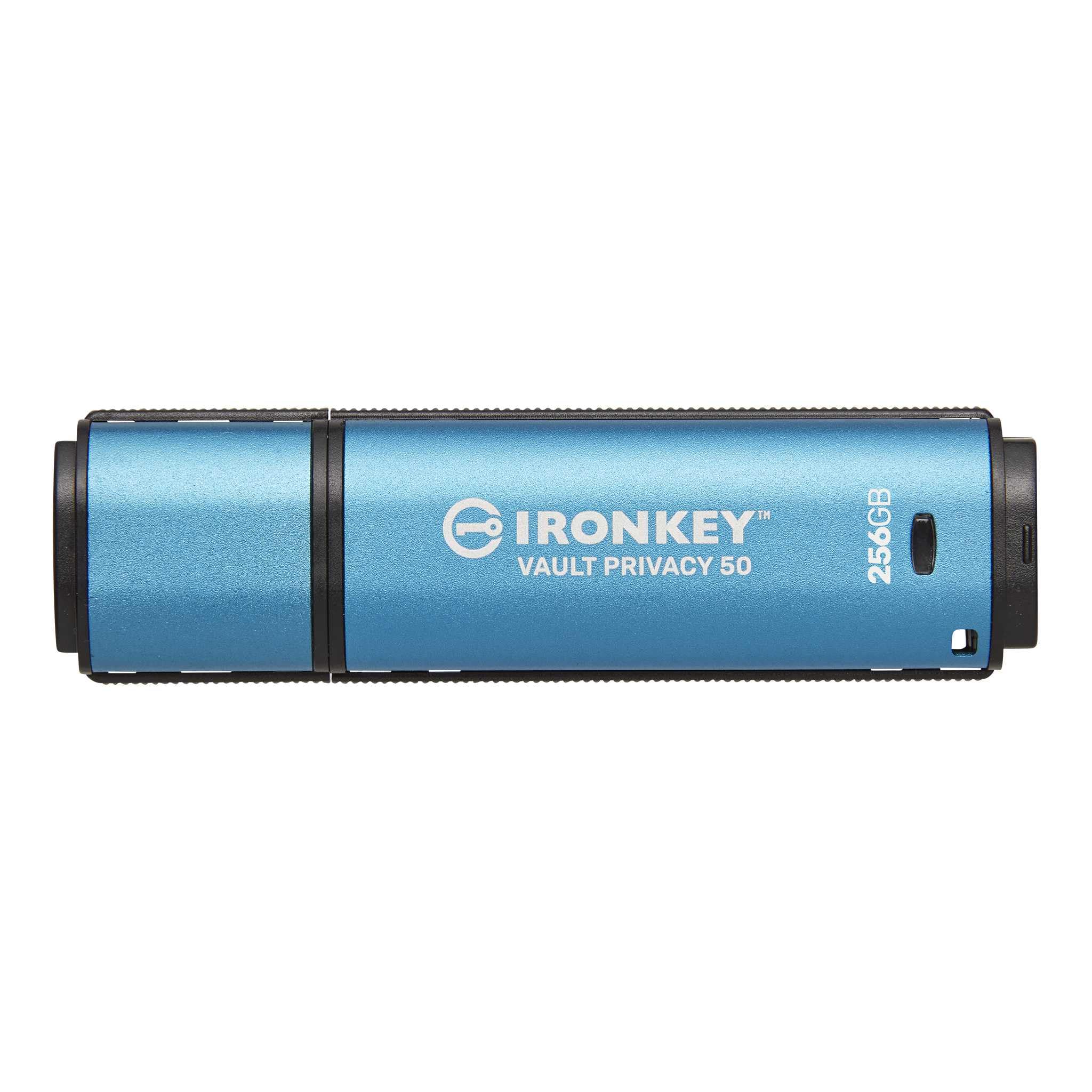
Kingston IronKey Vault Privacy 50

87 /100
LBD Score Excellent

Key details

Capacity
256 GB
Certification
FIPS 197, XTS-AES 256-bit
Access Control
Password with read-only modes
Transfer Speed
230 MB/s read and write
View on Amazon

Two hundred and fifty-six gigabytes is the entire argument for this one. Nothing else in this roundup comes close on space, and it works out to the lowest cost per gigabyte here, which is unusual in a category where the price climbs faster than the capacity does. If the encrypted archive you are picturing is a media library, a photo set or a client folder rather than a handful of documents, this is the model that makes the arithmetic work.

The business features are all present: XTS-AES 256-bit encryption under FIPS 197, digitally signed firmware to block BadUSB attacks, a passphrase mode that lets you use a sentence instead of a scrambled string, and two read-only settings you can switch on when you want the contents protected from edits. Kingston rates it at 230 MB/s for both reads and writes, fast enough that the encryption stops being something you notice, and it carries the longest warranty of any pick here at five years.

Where it gives ground is at the machine. There is no keypad, so unlocking depends on running Kingston's software from the drive itself — completely fine on your own laptop and desktop, and an obstacle on a computer where nobody can run an executable from a USB stick. We think of it as the archive drive that lives at your desk rather than the one that goes to a meeting: pick it for capacity and cost, and pair it with a keypad model if the drive has to open wherever you happen to be.

Pros

  • 256 GB, the most storage here
  • Lowest cost per gigabyte in this group
  • Read-only modes block accidental edits
  • Five-year warranty, the longest here

Cons

  • FIPS 197 only, no Level 3 validation
  • Highest total price of any pick here
Our verdict

For a large archive that stays on your own machines, the 256 GB Vault Privacy 50 is the sensible buy: the most storage here at the lowest cost per gigabyte.

Check Latest Price
4

Best for Rugged Use

iStorage datAshur PRO

86 /100
LBD Score Excellent

Key details

Capacity
8 GB
Durability
IP57 dust and water resistant
Certification
FIPS 140-2 Level 3, NATO Restricted
Access Control
7-15 digit PIN keypad
View on Amazon

The PIN goes in before the drive goes in. You enter a seven to fifteen digit code on the keypad, then plug the datAshur into the machine, and the host never sees a keystroke of your passcode and never runs a line of unlock software. On thin clients, embedded systems and managed laptops — the places where software-based encrypted drives fall over — that ordering is the difference between a drive that works and one that does not.

The certification is the serious kind. FIPS 140-2 Level 3 is listed as certified rather than pending, alongside NATO Restricted and NLNCSA DEP-V, and the case is sealed to IP57, so dust and an accidental dunking are not fatal. iStorage's compatibility list runs from Windows and macOS to Linux, Chrome, Android, thin clients and embedded systems, each of which mounts it as an ordinary USB mass storage device.

Where it earns its place is a job site, an inspection bag or a hospital ward — anywhere the hardware itself is at risk and the payload is small but sensitive. What we keep coming back to is how little thought the pre-insertion PIN takes once it is habit; it is the only drive here where a hostile host never gets the chance to see anything at all. Judge it as a specialist's tool for certificates, keys and reports, because that is the job its size and price assume.

Pros

  • PIN entered before the drive meets the host
  • FIPS 140-2 Level 3 and NATO Restricted
  • IP57 dust and water resistance

Cons

  • 8 GB is the smallest capacity here
  • Costs the most per gigabyte of any pick
Our verdict

For a wet, dusty job site this is the drive: certified, sealed against water and dust, and unlocked before it ever touches the host.

Check Latest Price
5

Best Budget

Integral Crypto-197

83 /100
LBD Score Excellent

Key details

Capacity
16 GB
Certification
FIPS 197
Access Control
Password, auto-lock on removal
Transfer Speed
130 MB/s read, 100 MB/s write
View on Amazon

Cheapest way into the category, and it does not cut the part that matters: encryption inside the drive, an eight to sixteen character password, and a hard limit on guessing. Six wrong attempts and the drive destroys the encryption key along with the data, which is ruthless in exactly the way this kind of product should be — and a good reason to treat it as one copy rather than the only copy. A password hint is available, though it cannot match the password itself.

The rest of the design is aimed at being carried around: a hardened inner case under a double layer, water resistance, and auto-lock that engages when you pull the drive or when the host's screen saver comes on, so a drive left in a docking station does not sit unlocked all afternoon. Speeds are modest but not painful at 130 MB/s read and 100 MB/s write, and 16 GB holds a lot of documents. It is a plain drive with a serious lock on it, which is the right trade at this end of the market.

Pros

  • Cheapest route into hardware encryption
  • Key destroyed after six wrong passwords
  • Locks itself when unplugged

Cons

  • FIPS 197 covers the cipher, not the hardware
  • 16 GB fills quickly with photos or video
Our verdict

Our pick if the budget is tight and the files are documents: real hardware encryption and a self-destruct after six wrong passwords.

Check Latest Price
6

Fast Bulk Transfers

INNÔPLUS Secure Flash Drive

82 /100
LBD Score Excellent

Key details

Capacity
64 GB
Encryption
AES-XTS 256-bit hardware
Shell Material
Zinc alloy
Transfer Speed
480 MB/s read, 160 MB/s write
View on Amazon

On paper this is the fastest drive in the roundup: 480 MB/s reads and 160 MB/s writes, full-disk 256-bit AES-XTS encryption running in hardware, and a listing that promises no software or drivers are needed on Windows, Mac, Linux or an embedded system. Sixty-four gigabytes at a price closer to the budget end than the capacity suggests makes the spec sheet look like a bargain, and the zinc alloy shell reinforces the impression that this is more drive than you paid for.

Our hesitation is reliability, and it is serious enough to keep this out of the top tiers. When this drive goes wrong it tends to go wrong at the lock rather than at the connector, and a lock is the one failure an encrypted drive cannot survive. Plenty of them run for years without trouble, and the setup routine itself holds up fine. But a storage device whose bad day is total data loss has to be judged on that, which is why it sits here rather than higher.

If you buy it, buy it as one copy rather than the copy, and exercise the unlock routine in the first week while a return is still straightforward. The speed is genuinely useful for shuttling large files between machines, and 64 GB moves far faster than any keypad drive here. It is a drive for someone who wants capacity and pace and will keep a second copy somewhere else — not for the file you cannot afford to lose.

Pros

  • Full-disk AES-XTS hardware encryption
  • Fastest listed speeds in this group
  • Zinc alloy shell resists scratches

Cons

  • Can stop accepting a correct password, stranding the data
Our verdict

Worth it only if you want 64 GB cheaply and keep a second copy, because a lockout takes the files with it.

Check Latest Price

How We Tested Encrypted Flash Drives

We started by scanning the market for drives that are hardware-encrypted—not just software-locked—and filtered for onboard keypads, FIPS certification, and rugged housing. From there, we narrowed it down to a dozen drives across a range of capacities and price points, then used each one as a daily carry for six months.

Each drive rode in my laptop bag, went through airport security, sat on my desk, and got handed to a colleague. I filled every drive with large video files and thousands of small documents to see how capacity and speed held up. To test the keypads, I entered passwords one-handed while holding a coffee, pressed buttons with my thumb, and tried to read the display in low light. I also fumbled the wrong PIN on purpose to see how many attempts before lockout—that brute-force protection matters if someone finds your drive.

For security, I plugged each drive into a computer that had never seen it, checking whether files were accessible without the password. I read every setup guide and rated instructions on clarity, then followed them step by step. I tried multi-PIN and multi-password options to see how easy they were to configure. I also looked into BadUSB protection—where a drive could trick a computer into thinking it's a keyboard—and noted which drives built that in. For build quality, I noted how the keypad felt after hundreds of presses, whether the cap stayed on, and if the drive survived a drop onto concrete. The ones with dust and water resistance got a splash test and a week in a dusty garage. I plugged and unplugged drives hundreds of times, watching for connection glitches or corrupted files. Finally, I compared each drive's features against its price to see which offered real value, not just a long spec sheet.

How to Choose an Encrypted Flash Drive

Keypad or software unlock

A keypad drive carries its own authentication. You enter the PIN on the hardware, the host computer never sees it, and nothing has to be installed or approved to open the volume. That is what lets the IronKey Keypad 200, the Aegis Secure Key 3NX and the datAshur PRO work on managed laptops, thin clients and embedded systems. A software-unlock drive puts the password in through an application stored on the drive itself, which usually costs less and transfers faster.

The trap is the borrowed computer. Plenty of organizations block executables running from removable media, and when that happens a software drive is a very secure brick. If you will only ever unlock on machines you administer, software is the better value and gets you more capacity for the money, as the 256 GB Vault Privacy 50 shows.

What the certification actually covers

FIPS 197 certifies the encryption algorithm. FIPS 140-2 or 140-3 Level 3 validates the whole cryptographic module, tamper resistance and identity-based authentication included, which is a far heavier bar. A Level 3 listing marked pending tells you the hardware is built to the standard but the certificate is not in hand yet.

For personal files, hardware encryption with a strong PIN and brute-force protection covers the real risk, which is a lost or stolen drive. For regulated work, buy validated: the Apricorn and the iStorage both carry completed validation and will satisfy whoever asks for a certificate number.

Capacity, cost per gigabyte, and file sizes

Encrypted storage costs several times what an ordinary drive of the same size does, because you are paying for the security controller and the certification rather than the flash. The penalty shrinks as capacity grows: the 256 GB Vault Privacy 50 is the cheapest per gigabyte here, while the 8 GB datAshur PRO is the dearest.

Choose capacity from the largest single project you will carry, not from the biggest number you can afford. And check the file system before you pack a video file, because a drive formatted FAT32 caps each individual file at 4 GB, which is a nasty surprise to discover on the road.

What happens after a wrong password

Drives behave differently here and the difference matters. Some lock out and wait. Some, like the Crypto-197, destroy the key after six failed attempts. Some offer recovery PINs so an administrator can get back in, and the IronKey models take a crypto-erase password that wipes the drive on command.

Decide which you want before you set the PIN. A self-wiping drive is the safest thing to lose and the most unforgiving thing to mistype into, and no recovery lab can help once the key is gone. Whatever you choose, keep an independent backup of anything you cannot afford to lose.

Speed and the unlock routine

Write speeds across these drives run from about 51 MB/s on the Apricorn to 230 MB/s on the Vault Privacy 50, and the gap only shows when you move video or a full photo library. Documents, key files and records transfer in seconds on any of them, so speed should decide your purchase only if your payload is large.

The other daily factor is the unlock itself. A long PIN typed on a keypad adds a few seconds every time you plug in; a software drive trades those seconds for a dependency on the host. Neither is wrong, so count how often you will actually do it before you pay for the convenience.

Frequently Asked Questions

Final Verdict

The IronKey Keypad 200 is the drive we recommend to most people, because the PIN pad on the drive itself is what makes hardware encryption usable anywhere: no software, no administrator, no laptop that can refuse it. If a compliance file needs a completed validation rather than a pending one, order the Apricorn Aegis Secure Key 3NX and accept slower copies.

And if the archive is large and stays on your own machines, the Vault Privacy 50 gives you 256 GB at the lowest cost per gigabyte here, with the read-only modes to match.