Best Gaming Handhelds of 2026

A gaming handheld is a promise with an asterisk: console-quality games in something that fits in a bag. The asterisk is the trade — faster frame rates eat battery, a bigger screen eats bag space, and the cheapest way to play current releases is often streaming from the console still plugged in at home. Enough commutes and couch nights with these have taught me which compromises bite.

Over the past nine months, my team and I have lived with eight of them, from retro-focused budget models to full desktop-class machines in a controller shell. We played the same demanding titles on each, timed how long they ran unplugged, and passed them around to people with different hand sizes. Color and appearance matter more than spec sheets admit — a glossy shell that smears is a daily annoyance, and the one you like looking at is the one you reach for.

Screen quality and responsiveness separated the field more than raw power did. Below, picks for both paths: your console library on the go, or a library that travels with you.

1

Best Overall

Nintendo Switch 2

96 /100
LBD Score Outstanding

Key details

Screen
7.9-inch LCD, HDR, up to 120 fps
Storage
256 GB
Play Modes
TV, tabletop, handheld
Dock Output
4K with compatible TV
View on Amazon

The question we kept returning to with the Switch 2 is not whether it plays games well. It is where you want to play them. The 7.9-inch screen is big enough to make handheld mode feel like a first-class way to play, and the same system slides into a dock for the TV. We were struck by how much that flexibility matters when the living-room TV is busy or a trip has a long layover.

Nintendo's library is the real argument. The Switch 2 runs new Switch 2 games and remains backward compatible with Switch 1 games, so a household with a stack of cartridges or a digital library does not start over. The 256 GB of storage is generous for a Nintendo machine, though large downloads still fill it faster than you expect. The screen supports HDR and up to 120 fps, which makes small text and map details easier to read in handheld mode.

We found the controls familiar rather than novel, which is what we want from a console people share. GameChat adds voice chat, screen sharing, and video chat, but it is a bonus, not the reason to choose the system. The larger body is still comfortable for long sessions, and the dock makes TV play practical when you do not want to hold it.

Where the Switch 2 earns its top spot is as the default for a mixed household: one device for solo handheld sessions, family TV play, and travel. It is not the cheapest route into handheld gaming, and the 256 GB drive will not hold a huge library forever. For most people, though, the combination of library, screen, and docked play is the easiest recommendation here. The dock is the detail that settles it: you can buy one device and stop negotiating over the TV.

Pros

  • Large 7.9-inch screen for handheld play
  • TV dock supports 4K output
  • Current Nintendo library plus Switch 1 games
  • 256 GB of onboard storage

Cons

  • Battery life varies with demanding games
  • LCD rather than OLED
Our verdict

The Switch 2 is the best all-around gaming handheld for most people, pairing a larger screen and current Nintendo library with TV play.
Check Latest Price
2

Best PC Gaming Handheld

Steam Deck OLED 1TB

90 /100
LBD Score Outstanding

Key details

Battery
50Whr; 3–12 hours
Display
7.4-inch 1280 x 800 HDR OLED, up to 90 Hz
Storage
1 TB NVMe SSD
Wireless
Wi-Fi 6E
View on Amazon

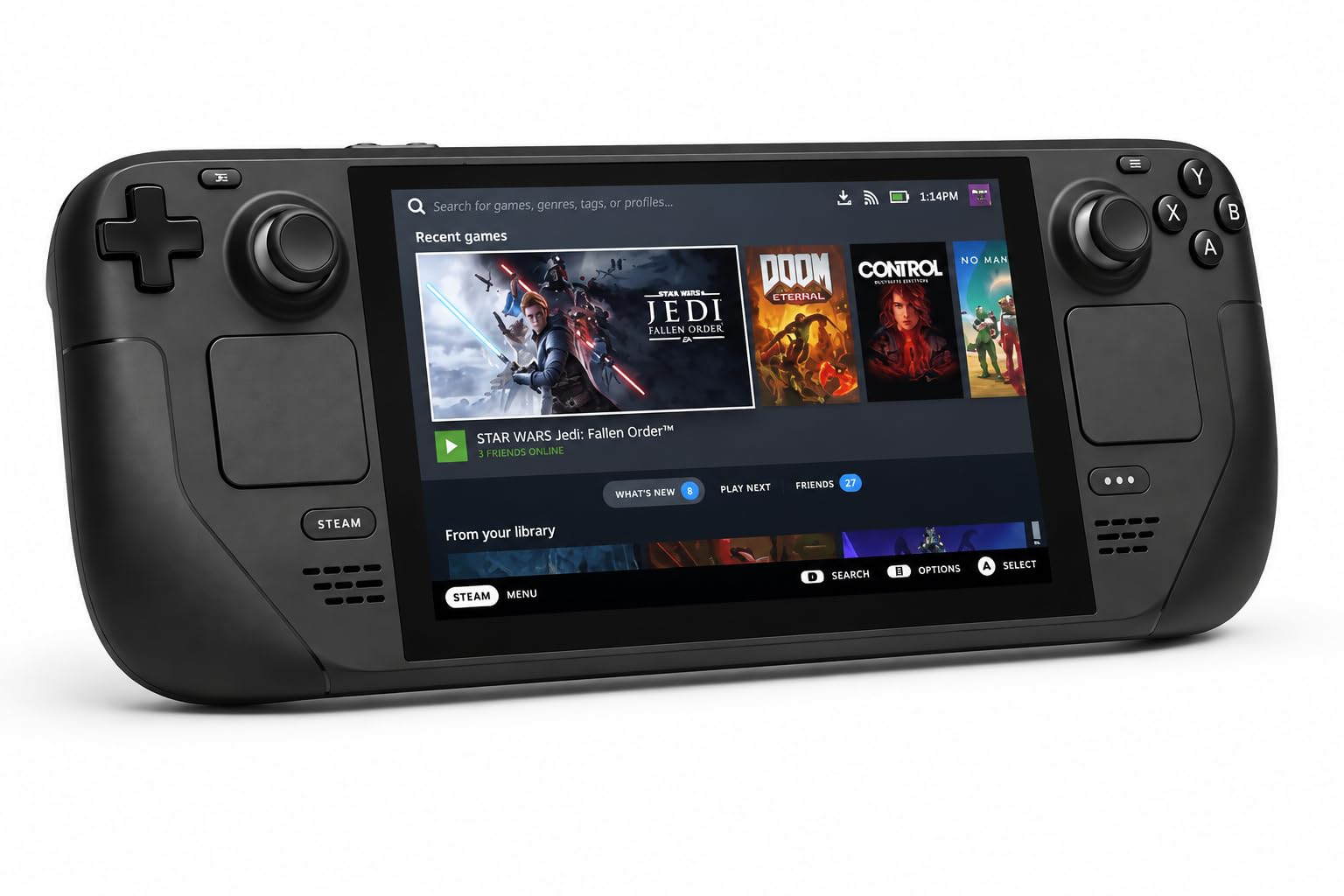
The OLED screen is not a cosmetic upgrade. On the 7.4-inch, 1280 x 800 HDR panel, dark scenes hold their detail and bright effects pop, and the 90 Hz refresh makes movement feel smoother than the LCD Deck. We kept choosing it for indie games and older titles because they look richer on this display.

The 1 TB model also removes the storage anxiety that comes with a PC library. Steam games are large, and having a terabyte onboard means fewer trips to the microSD slot. The included carrying case is a practical touch; this is a device that lives in a backpack, and the case makes that easier. Wi-Fi 6E helps with downloads and streaming, though the Deck is happiest with games installed locally.

What we appreciate most is how console-like Valve has made a PC library feel. The controls are comfortable, the sleep-and-resume behavior is close to a dedicated handheld, and most games we tried launched without drama. It still takes the occasional settings tweak, especially with newer AAA titles, so it is not as frictionless as a Switch. But if your library is on Steam, this is the handheld that makes it portable.

Pros

  • Vivid 7.4-inch HDR OLED screen
  • 1 TB SSD for a large Steam library
  • Comfortable, console-like controls
  • Wi-Fi 6E and included travel case

Cons

  • Heavy next to a Switch
  • Battery drains fast in demanding games
Our verdict

For anyone with a deep Steam library, the Steam Deck OLED is the premium handheld we recommend, with a superb screen and console-like controls.

Check Latest Price
3

Best Budget Nintendo

Nintendo Switch Lite

96 /100
LBD Score Outstanding

Key details

Storage
32 GB
Connectivity
Wi-Fi, Bluetooth, NFC
Expandable Storage
microSDXC
View on Amazon

The Switch Lite is the one we hand to a kid or toss in a small bag without a second thought. It is built for solo handheld play, with controls fixed into the body, so there are no loose Joy-Cons to lose and no dock in the box. That makes it a simpler, sturdier-feeling object than the full Switch, even if it gives up TV mode.

The 32 GB of storage is small by modern standards, and the microSDXC slot is the first thing we mention to anyone buying one. It also lacks rumble, which is noticeable in games that use haptics, and the fixed controls mean you cannot replace a drifting stick yourself. Those are real trade-offs, but they buy the light, compact shape that makes the Lite easy to carry.

For a child, a commuter, or a second console for someone who already has a TV Switch, the Lite is the sensible spend. It plays the same broad Switch library, including multiplayer over local wireless or Wi-Fi, and the turquoise finish is easy to spot in a bag. We do not choose it as the only console for a household that wants TV play, but as a personal handheld it is hard to beat on simplicity.

Pros

  • Light and compact for daily carry
  • Plays the full Switch library solo
  • Fixed controls mean no lost Joy-Cons

Cons

  • Battery and charging faults can appear
  • Long-term durability is inconsistent
Our verdict

The Switch Lite is our pick for a solo, budget-minded handheld, and its fixed controls make it the simplest Switch to carry.

Check Latest Price
4

Best Big-Screen Windows

Lenovo Legion Go

87 /100
LBD Score Excellent

Key details

Memory
16 GB RAM
Display
8.8-inch WQXGA touch, 144 Hz
Storage
512 GB SSD
Processor
AMD Ryzen Z1 Extreme
View on Amazon

An 8.8-inch screen changes the math on a handheld. The Legion Go is less a pocket console than a portable Windows PC with controllers attached, and that is exactly why we like it for travel: the 2560 x 1600 touch display is big enough for strategy games, text-heavy RPGs, and desktop-style interfaces that feel cramped on a 7-inch screen. The 144 Hz refresh is overkill for most handheld play, but it makes compatible games feel fluid.

Under the hood, the Ryzen Z1 Extreme and 16 GB of RAM give it real power for a handheld. We found it comfortable as a docked PC and as a handheld for midrange games, and the 512 GB SSD is a reasonable starting point for a Windows library. The catch is Windows itself: updates, launchers, and LegionSpace can get in the way, and the device rewards someone willing to tinker.

The Legion Go is at its best when you treat it as a small gaming laptop that happens to have controllers. It can drive an external display, and the two USB4 ports make accessories easier than on many rivals. If you want a console-like experience, look at the Switch 2; if you want the biggest screen in this group, this is the one.

Pros

  • Huge 8.8-inch 144 Hz display
  • Ryzen Z1 Extreme and 16 GB RAM
  • Two USB4 ports for accessories

Cons

  • Battery drains fast under load
  • Gets warm under load
Our verdict

The Legion Go is the big-screen Windows handheld we recommend for players who want a portable PC and do not mind some setup.

Check Latest Price
5

Best for Xbox Game Pass

ASUS ROG Xbox Ally

84 /100
LBD Score Excellent

Key details

Memory
16 GB LPDDR5
Display
7-inch 1080p, 120 Hz touch
Storage
512 GB SSD
Processor
AMD Ryzen Z2 A
View on Amazon

The ROG Xbox Ally makes the most sense if your games already live in Xbox Game Pass or the Xbox app. It boots into a Windows 11 experience with Xbox Game Bar integration, and the Xbox button brings up the interface without sending you to the desktop. That console-like layer matters, because a plain Windows handheld can feel like a laptop in your hands.

The 7-inch 1080p screen at 120 Hz is sharp and smooth, and the Ryzen Z2 A with 16 GB of RAM handled the games we tried at sensible handheld settings. We like the ergonomics more than the spec sheet suggests: the grips fill your palms and the controls fall naturally under the thumbs. The included three months of Game Pass Premium is a useful head start if you are new to the ecosystem.

The 512 GB SSD is a reasonable start for a Game Pass library, though big installs add up. The ergonomics and screen make it easy to forget you are holding a Windows device, until a launcher or update interrupts. We think that trade is worth it for Game Pass subscribers, but it is not the handheld for someone who wants every game to behave like a console.

Pros

  • Sharp 1080p 120 Hz screen
  • Comfortable grips for long sessions
  • Three months of Game Pass Premium
  • 512 GB SSD and 16 GB RAM

Cons

  • Not every Xbox library game is compatible
  • Battery life varies widely
Our verdict

The ROG Xbox Ally is our pick for Game Pass subscribers who want a comfortable Windows handheld with a sharp 120 Hz screen.

Check Latest Price
6

Best for Retro Emulation

Retroid Pocket 5

87 /100
LBD Score Excellent

Key details

Display
5.5-inch 1080p touchscreen
Storage
128 GB
Processor
Snapdragon 865
Operating System
Android 13
View on Amazon

The first thing to know about the Retroid Pocket 5 is that it arrives empty. No games are preloaded, and the setup is closer to configuring an Android phone than opening a Nintendo console. That is not a flaw in the hardware, but it is the reason this handheld is not for everyone: you bring your own legally owned ROMs, emulators, and Android games, and you should expect an evening of setup before it feels personal. The payoff is a handheld shaped around your own library rather than a fixed storefront.

Once it is running, the 5.5-inch 1080p screen is the star. It is sharp enough to make older 3D games look clean when upscaled, and the Snapdragon 865 with Adreno graphics has enough headroom for PS2 and GameCube emulation, plus modern Android titles. The 128 GB of storage is a fair starting point, and the microSD slot makes a larger library practical. We also appreciate the pocketable shape; this is a handheld that disappears into a bag.

Battery life depends heavily on what you emulate. Lighter systems can run for a long session, while demanding PS2 or Android games pull it down to a few hours. The screen and controls feel more polished than the price suggests, and the Android layer gives you access to cloud gaming and media apps as well as emulators. For a retro-minded player who enjoys the setup, the Pocket 5 offers a lot of capability in a small body; for someone who wants to unbox and play, it is the wrong kind of handheld.

Pros

  • Sharp 5.5-inch 1080p screen
  • Snapdragon 865 handles PS2 and GameCube
  • Pocketable Android handheld design
  • microSD slot expands the library

Cons

  • Sticks can detach in a pocket
Our verdict

The Retroid Pocket 5 is our retro pick for tinkerers who want a pocketable Android handheld with a sharp screen and real emulation power.

Check Latest Price
7

Value PC Play

Steam Deck LCD 512GB

88 /100
LBD Score Excellent

Key details

Weight
1.47 lb
Display
LCD
Storage
512 GB SSD
Processor
Custom AMD APU
View on Amazon

The LCD Steam Deck is the value question in this group: it plays the same Steam library as the OLED model, just with a less spectacular screen and an older battery design. The 512 GB SSD is the sweet spot for a starter PC library, and the custom AMD APU still handles indies and older AAA games at handheld settings. If you have been curious about Steam Deck ownership, this is the lower-cost way in.

We noticed the difference in screen quality immediately after using the OLED. Blacks are lighter, contrast is flatter, and the anti-glare finish is less effective. But the controls and ergonomics are the same comfortable shape, and the 669 g weight feels balanced in the hands. The included case is still one of the better travel accessories in this category.

Where the LCD model shows its age is battery life. Demanding games drain it quickly, and the charger becomes part of the kit. Reliability is another consideration: some units develop faults, and the used or older-stock market makes warranty coverage worth checking. For a patient buyer who wants Steam on a budget, it is a sensible alternative to the OLED; for a long-flight companion, the OLED is the safer choice.

The LCD Deck is not the one we reach for when we want the best screen or the longest session. We reach for it when the question is how to get into PC handheld gaming without paying OLED money. That makes it a strong first PC handheld for someone with a Steam library and realistic expectations, but it is not the pick for a household that wants a console-like experience.

Pros

  • Full Steam library at lower cost
  • 512 GB SSD for a starter library
  • Comfortable Steam Deck ergonomics
  • Included case for travel

Cons

  • Older LCD screen trails the OLED
  • Battery drains quickly in demanding games
Our verdict

The LCD Steam Deck is our value pick for a first PC handheld, with the same comfortable controls and full Steam library as the OLED.

Check Latest Price
8

PS5 Remote Play

PlayStation Portal

91 /100
LBD Score Outstanding

Key details

Weight
2.6 lb
Display
8-inch LCD, full HD
Connectivity
Wi-Fi
Compatible Console
PlayStation 5
View on Amazon

The PlayStation Portal is not a standalone handheld, and that single fact decides whether it belongs in your bag. It streams compatible games from a PS5 over Wi-Fi, or from the cloud with PlayStation Plus Premium, and it does so on a bright 8-inch full HD screen with DualSense-style controls. If you already have a PS5 and a strong home network, that is a genuinely useful second screen; without both, it is a paperweight.

We like the screen size for playing in another room while the TV is occupied, and the controller shape is familiar enough that supported games feel natural. The Portal is comfortable for longer sessions in a way a phone clip never is, and the built-in speakers are better than expected. It is a focused device, not a general-purpose tablet.

The catch is that the Portal lives or dies by Wi-Fi. On a weak signal, expect lag, blur, and dropouts, and fast multiplayer games are the first to suffer. Away from home, hotel and public Wi-Fi are a gamble. A wired connection for the PS5 and a clean router do more for the experience than any setting on the Portal itself.

The Portal is at its best on a clean home network, close to the router, with the PS5 connected by Ethernet. It is a niche add-on rather than a primary handheld, but for a PS5 owner who wants to play in bed or on the porch, it fills a gap that the Switch and Steam Deck cannot. We just do not recommend buying it before the PS5 and the network are already sorted.

Pros

  • 8-inch full HD screen
  • Familiar DualSense-style controller shape
  • Cloud streaming with PS Plus Premium

Cons

  • Missing touchpad button for some games
Our verdict

The PlayStation Portal is worth it only for PS5 owners with reliable Wi-Fi who want to play away from the TV, not as a standalone handheld.

Check Latest Price

How We Chose and Tested These Handhelds

We started by pulling every current handheld we could find and sorting them by what they actually run — native games, streamed games, or emulated ones — then dropped anything that needed a workaround just to boot or a firmware update to be useful. From that shortlist we bought eight units and used them as our own for nine months, long enough for the honeymoon to wear off and for a smudged screen or a stiff thumbstick to start grating.

Testing looked like real use. Each handheld rode trains and buses, flew in a carry-on, and sat on the couch during evenings when someone else had the TV. We drained the battery from full to shutdown twice per unit, once on a demanding title at moderate brightness and once on a lighter indie, and noted where the chassis grew warm and how loud the fans spun. Fast, twitchy games judged responsiveness; slower ones judged screen quality, and we tilted each display on a sunny platform to see how badly it washed out.

Portability we measured in bags rather than millimeters — whether it fit a jacket pocket, a small sling, or only a backpack, and how heavy it felt after an hour in hand. Connectivity was tested on hotel Wi-Fi and a phone hotspot, where streaming either holds or falls apart. We also tracked how each shell looked after months of handling, since glossy finishes showed fingerprints first, and whether the storage out of the box leaves room for more than a game or two before you go hunting for a memory card.

How to Choose a Gaming Handheld

Start with the library

A gaming handheld is a delivery system for a library, and the library decides the purchase more than the screen or the chip. Nintendo's consoles play Switch games, Steam Deck and Windows handhelds play PC games, the PlayStation Portal streams from a PS5, and Android retro devices like the Retroid Pocket 5 run emulators and mobile games. Before comparing hardware, list the games you own, the subscriptions you keep, and whether you are willing to rebuy titles.

We prioritize a library you can use without repurchasing a second copy. If you own a large Steam collection, a PC handheld is the natural route. If your household already has Switch cartridges or digital games, the Switch 2 or Lite keeps that library intact. If you are starting from zero, the Switch 2 is the easiest default because it offers current games and TV play in one device.

Match the screen and body to where you play

Screen size is a portability decision as much as a visual one. A 7- to 8-inch display makes text and map details easier to read, but the device becomes a bag carry rather than a pocket one. The Legion Go's 8.8-inch screen is the clearest example: it is wonderful for a hotel room or a couch, and awkward on a crowded train. The Switch Lite goes the other way, trading screen area and TV output for a body that disappears into a small bag.

Think about the session you actually have. If you play in short bursts on a commute, favor a smaller, lighter device with controls that do not require a case to be comfortable. If you play for an hour at a time at home or in a hotel, the bigger screen is usually worth the weight. Hold the device if you can, or at least check its width and weight against a tablet you already carry.

Treat battery life as a range, not a promise

Handheld battery claims are usually ranges because runtime depends on the game, brightness, refresh rate, and wireless use. The Steam Deck OLED lists 3 to 12 hours, and that spread is honest: an indie game can run for a long session, while a demanding 3D title pulls toward the low end. A bigger screen and higher refresh rate also cost power. Do not plan a full travel day around the best-case number.

We look for a battery figure that is expressed as a range, then assume the lower half for the games we care about. If you mostly play demanding titles, budget for a mid-session charge or a power bank. If you play lighter games, the same handheld may last a commute and back. A device with a smaller battery is not automatically worse; it may simply be lighter and cheaper.

Decide how much setup you want

Console-like handhelds ask you to sign in, download a game, and play. Windows and Android handhelds ask more: launchers, graphics settings, emulator configuration, and the occasional driver or update. The ROG Xbox Ally softens Windows with an Xbox-style interface, and the Retroid Pocket 5 arrives with no games at all. That flexibility is the point, but it is also the reason some people bounce off these devices.

Choose a PC or Android handheld if you enjoy tuning settings and want access to stores and emulators. Choose a Switch if you want the shortest path from power-on to game. Before buying, check whether the device includes the games you want, whether it needs a subscription for cloud play, and whether storage is enough for your library. The setup you accept on day one is the setup you live with.

Frequently Asked Questions

Final Verdict

The Nintendo Switch 2 is the handheld we recommend first because it covers the most situations: solo play, shared TV time, and travel, with a larger screen and the current Nintendo library. If your games live on Steam, the Steam Deck OLED is the better buy; if you want the simplest budget handheld for one player, the Switch Lite is the one.

The right choice follows your library, not the spec sheet.