Best Hardware Security Keys of 2026

The worst thing a security key can do isn't fail to stop a hacker — it's lock you out of your own accounts on a morning you have a flight to catch. That fear kept me on app-based codes for years. The hardware itself is simple: a small certified token you plug in or tap to prove it's you. What separates one from another is everything around it — whether the sites you actually use accept it, whether its connector fits your laptop and your phone, and whether you'll finish setting up the backup.

We've spent three months with 14 of these keys on our keyrings, tapping them against phones and plugging them into desktops and laptops, and handing a few to less technical family members to set up cold. The lesson that surprised me most: buy two. Register a spare the day you register the first, and a lost key becomes an annoyance instead of a catastrophe. The picks below survived daily use without punishing anyone for being new to this.

1

Best Overall

YubiKey 5C NFC

91 /100
LBD Score Outstanding

Key details

Weight
0.35 oz
Connector
USB-C and NFC
Protocols
FIDO2, U2F, OTP, OATH, PIV, OpenPGP
Passkey Slots
100
View on Amazon

One plug and one radio make the whole case: USB-C on the end for a laptop, NFC inside for a phone. That pairing is why the YubiKey 5C NFC is the key we recommend first to most people. It covers the two devices you actually log in from without an adapter, and at 10 grams and just over an inch and a half long it disappears onto a keyring. We kept ours on a ring with the car keys and stopped thinking about it within a day, which is exactly the right relationship to have with a security token.

Using it is as physical as security gets. A site asks for your key, you plug in, tap the gold contact, and you are through; on a phone you hold it against the back of the device until the tap registers. NFC is the fussy part of any key. It is short range, it wants a specific spot near the top of the phone, and a thick case, a magnetic mount plate, or a metal-backed phone will stop the handshake dead. Pull the case off before you conclude the key is broken.

What separates the 5C from the cheaper FIDO2 sticks is the protocol list: FIDO2/WebAuthn and U2F for ordinary logins, plus Yubico OTP, OATH-TOTP/HOTP, PIV smart card, and OpenPGP. The FIDO2 half is what you will use with Google, Microsoft, Apple, GitHub, and most password managers. The OATH half is the sleeper — the key can generate six-digit codes for the handful of services that still will not take a passkey, so you don't need to keep a separate authenticator app for them.

PIV and OpenPGP are the parts we barely touched, and unless your employer issues smart-card certificates, you won't either. The 100-slot passkey limit is another number to ignore; it is far more than the number of accounts most people will register. So this is a key that costs more than a simple Google-and-GitHub life requires, and earns the difference the moment your accounts stop being simple.

Pros

  • One key covers USB-C laptops and NFC phones
  • Full protocol stack including OATH, PIV, and OpenPGP
  • 10 g body sits flat on a keyring

Cons

  • Per-account enrollment takes patience, and instructions are sparse
  • Plenty of banks and apps still won't take a key
Our verdict

Buy the 5C NFC if you want one key for a USB-C laptop and a phone, with the protocol support to handle nearly any account that takes a hardware key.

Check Latest Price
2

Best Value

Security Key C NFC

87 /100
LBD Score Excellent

Key details

Weight
0.16 oz
Connector
USB-C and NFC
Protocols
FIDO2, U2F
Dimensions
0.1 x 1.8 x 0.7 inches
View on Amazon

It costs about half what our top pick does, and for a lot of people it does the same job. The Security Key C NFC has the same USB-C plug, the same NFC radio, the same waterproof and crush-resistant shell, and the same account capacity on the box. What it leaves off is the protocol list: FIDO2/WebAuthn and U2F, and nothing else.

That is a trade we take for a first key. Google, Microsoft, Apple, GitHub, and the big password managers all speak FIDO2, and on those accounts this key registers without drama. Where it runs out is an account that wants the key to generate a six-digit code itself, or an IT department that has standardized on smart-card certificates — those need the 5-series, and patience will not add the feature. Our rule of thumb: if the words passkey or security key show up in your account settings, this one works; if you also need codes generated by the key, it doesn't.

The disappointment that follows this model is nearly always a service that doesn't accept FIDO2, not a key that fails. A bank portal or a government login that offers only SMS and an app will not be moved by any hardware key, and it is worth checking that list before you spend an evening on setup. Ours went straight onto a keyring, which is where a key this small belongs.

Pros

  • About half the price of our top pick
  • USB-C and NFC, same coverage as the flagship
  • Registers cleanly wherever FIDO2 is supported

Cons

  • FIDO2 and U2F only, with no TOTP or PIV
  • Plug end is the long-term wear point
Our verdict

We point most people here: it handles passkeys and standard two-factor over USB-C or NFC for roughly half the money, as long as your accounts don't need codes from the key.

Check Latest Price
3

Best Dual-Connector

Thetis Pro FIDO2

84 /100
LBD Score Excellent

Key details

Weight
1 oz
Connector
USB-A, USB-C, and NFC
Protocols
FIDO2, HOTP
NFC Support
Mobile devices only
View on Amazon

A USB-C laptop, a USB-A desktop, and a phone is an ordinary setup, and it is the one this key was engineered for. Thetis puts a USB-A plug on one end and USB-C on the other under a 360-degree metal cover you flip to whichever side you need. Of everything here, it is the only key that handles every port you own without an adapter, and that is worth real money the first time you are standing at a tower with no USB-C in sight.

The cover is the smart part and the question mark. It shields the plug you are not using and swings around with a firm detent, but it is also a moving part on something that rides in a bag. At an ounce and nearly three inches long, this is a chunky key next to the 10-gram YubiKey — it will not vanish on a keyring, and you will feel it in a pocket. We treat it as a bag key, not a pocket key.

Two limits to check before you order. Thetis is explicit that NFC here is for mobile only, so you can't tap it on a Mac or a Windows PC the way you tap it on a phone. And Windows Hello sign-in needs an Enterprise edition of Windows, which rules out using it to unlock a home PC. Beyond those, the compatibility list is broad — Windows, macOS, Linux, Chrome OS, iPhone, and Android — and the rotating cover means you are never the person asking around for a dongle.

Pros

  • USB-A and USB-C plugs on one key
  • Flip cover protects the unused plug
  • Passkeys plus HOTP codes in one device

Cons

  • NFC is mobile only, not computers
  • Chunkier and heavier than a YubiKey on a ring
Our verdict

We hand this to anyone juggling a USB-A desktop and a USB-C laptop: one key, both ports, plus phone NFC, as long as computer tap-to-login isn't the goal.

Check Latest Price
4

Best for Leaving Plugged In

Thetis Nano-A

85 /100
LBD Score Excellent

Key details

Connector
USB-A
Protocols
FIDO2, TOTP, HOTP
Dimensions
0.25 x 0.74 x 0.25 inches
Passkey Slots
200
View on Amazon

There is no USB-C plug and no NFC radio here. The Nano-A is a USB-A stub a quarter inch thick and three-quarters of an inch wide, built to go into a port and stay there. On a desk with a tower or a dock and a free USB-A slot, that is the appeal: nothing to find, nothing to forget, nothing to unplug when you sit down.

The internals are more generous than the size suggests. It handles FIDO2/WebAuthn passkeys and passwordless login, and it also generates TOTP and HOTP codes — 200 passkey slots and 50 TOTP slots, more headroom than the YubiKey offers. At 14 grams it is denser than it looks, and the stubby body sits close to the chassis instead of levering against the port every time you bump the desk.

We like it as the fixed half of a pair. One Nano-A in the back of the desktop and a portable key for everything else covers a home office better than a single do-everything key does, because the one you never unplug is the one you never lose. Just plan around what it can't do: it can't touch a phone, it can't plug into a USB-C-only laptop, and if the tower goes to a repair shop, your key goes with it.

Pros

  • 200 passkey slots and 50 TOTP slots
  • Sits close to the chassis in a desktop port
  • Passkeys and code generation in one stub

Cons

  • USB-A only, with no phone or USB-C use
Our verdict

We buy it as the key that never leaves the desktop — inexpensive enough to dedicate to one machine, with more slot capacity than you will fill.

Check Latest Price
5

Spare USB-A Key

HYPERFIDO Pro MINI

81 /100
LBD Score Excellent

Key details

Weight
0.16 oz
Connector
USB-A
Protocols
FIDO2, U2F, HOTP
Dimensions
0.59 x 0.39 x 0.2 inches
View on Amazon

Six-tenths of an inch long and under four-tenths wide, this is the smallest key in the group, and the size is the whole argument. It slips into a crowded USB hub without covering the ports on either side of it. If you have ever unplugged something to make room for a security key, that detail matters more than any line on the spec sheet.

It is also the lowest-priced way into hardware security here, and it gives up less than you might expect to get there. FIDO2 and U2F cover passkey logins and standard two-factor; OATH HOTP is there for the event-based codes some workplace setups use. What is missing is NFC, USB-C, and TOTP. We see it as the spare that lives in a laptop bag, or the inexpensive way to find out whether hardware keys fit how you work before buying two of something better.

The single button is the only thing on it that moves, and it is what you press every time you log in, so it is the part to keep an eye on. The bigger practical limit is the connector: a USB-A plug is fine on a desktop or an older laptop, and it means an adapter on anything newer. Pair it with a USB-C key and you have covered both without paying flagship prices for the privilege.

Pros

  • Narrow enough to leave hub ports free
  • Lowest-priced key in this guide
  • FIDO2, U2F, and HOTP support

Cons

  • USB-A only, with no NFC tap
Our verdict

We treat it as a laptop-bag spare: the least expensive way to add a hardware key to a USB-A machine, and small enough to forget you are carrying it.

Check Latest Price
6

USB-C Laptops

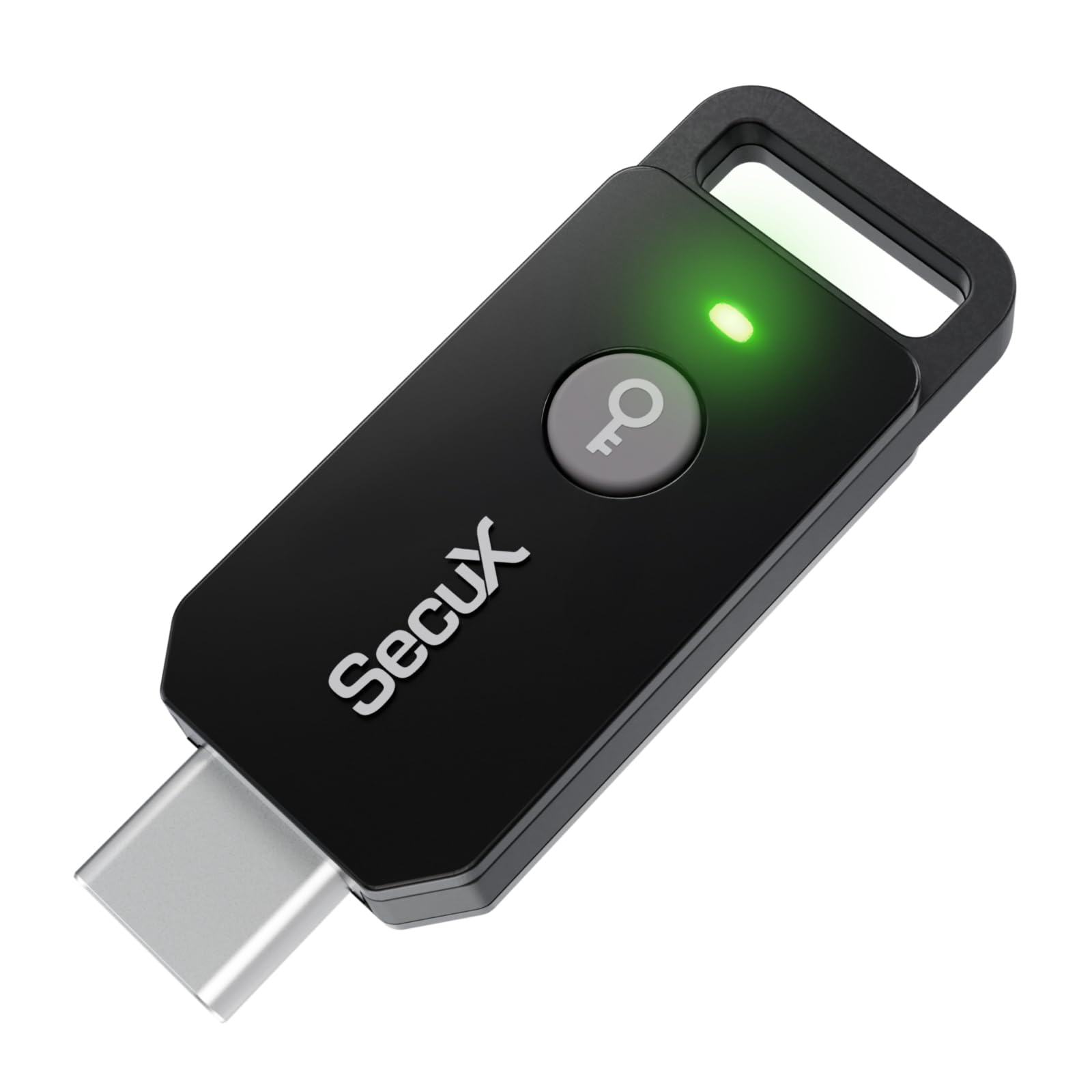
SecuX PUFido

79 /100
LBD Score Very Good

Key details

Connector
USB-C
Protocols
FIDO2, U2F
Security Anchor
PUF hardware root
View on Amazon

The pitch is a PUF — a physically unclonable function — which means the key's secret is derived from microscopic physical variation in the chip instead of sitting in readable memory. In plain terms, there is no stored private key for anyone to extract. We can't verify unclonability from the outside, and for ordinary logins it changes little: what defeats a phishing page is the FIDO2 handshake, not the silicon underneath.

What we can judge is the shape of the thing. It is a compact USB-C plug with a hole for a keyring, it covers FIDO2 and U2F, and the compatibility list is the usual one — Windows, macOS, Linux, iOS, and Android — for any service that takes a hardware key. There is no NFC and no code generator, so it is a passkey key rather than a universal one.

Where it earns a place is the USB-C-only laptop and the buyer who wants an alternative to the biggest name in the category. We stop short of calling it a primary key for someone with a desktop tower and a phone to cover, because one USB-C connector leaves both of those out. As a dedicated key for a laptop that travels, it is simple, small, and does the one job without extra software.

Pros

  • Secret is hardware-rooted, not stored
  • Compact USB-C body with a keyring hole
  • FIDO2 and U2F across major platforms

Cons

  • USB-C only
Our verdict

We recommend it for a USB-C-only laptop, where its hardware-rooted design and simple FIDO2 support handle passkeys and standard two-factor without extra software.

Check Latest Price

How We Tested Security Keys at Desks, in Bags, and on the Subway

We started with spec sheets and support pages rather than packaging. A key made the shortlist if it was FIDO2 certified, worked across the platforms our team actually uses — Windows, macOS, Linux, iOS, and Android — and shipped with the connector types people need, whether that was USB-C, USB-A, or NFC for phones. Anything that demanded a proprietary app just to enroll it got cut.

The 14 shortlisted keys then lived on our keyrings for three months. Every tester enrolled the same set of accounts — email, a code repository, a password manager, a couple of social logins — and we timed the setup, noted where a service refused a key outright, and wrote down every step that needed a support article to get through. Then came the boring part that actually matters: logging in twice a day on a USB-C laptop, an older USB-A desktop tower, and a phone held to the key's NFC pad.

We carried them loose in bags next to keys and coins, dropped a few on pavement, and checked afterward whether each connector still seated firmly and still registered on the first try.

A few keys throw in stored one-time codes alongside the FIDO logins; we set those up and asked whether anyone would actually use them, and mostly the answer was no. Cheap keys got the same scrutiny as expensive ones — we asked what the extra money bought and whether a basic key covered the same logins. In the end, we ranked each one on how quickly a non-technical person could get in, not on how many acronyms its listing carried.

How to Choose a Hardware Security Key

Match the connector to the devices you actually log in from

USB-C is the default on new laptops, but plenty of desktops, docks, and older machines still have only USB-A, and a key with the wrong plug ends up used with an adapter or not at all. Count the ports on the machines you log in from most, then choose. The Thetis Pro is the one key here with both plugs on the same body, which is the simplest answer for a mixed desk.

NFC is the other half of the decision, and it is the part buyers misread. A key with NFC taps on a phone, not on a laptop or desktop — even models that advertise NFC heavily still need the key in a port on a computer. If your phone is genuinely your second device, NFC saves you an adapter. If it is not, don't pay for it.

Know what FIDO2 covers and what the extra protocols buy

FIDO2/WebAuthn is the baseline, and it is what Google, Microsoft, Apple, GitHub, and the major password managers use for security-key logins. A FIDO2-only key like the Security Key C NFC handles all of that. What the pricier keys add is OATH-TOTP/HOTP for six-digit codes generated by the key itself, PIV for workplace smart-card certificates, and OpenPGP.

Pay for those extras only if a specific account or an IT policy requires them. Otherwise the money is better spent on a second key, which protects you against a problem you will actually have.

Buy two, and enroll the spare the same day

Every key here is a single point of failure until a second one is registered on the same accounts. The failure case is rarely a broken key — it is the key sitting in a coat pocket in another city when you need to get into your email. Buy two of the same model, or one good key plus a cheap spare, and enroll both in the same sitting.

A backup that was never registered is a paperweight. Do the second enrollment before you close the security settings page, every time.

Decide whether it lives on a keyring or in a port

There are two shapes worth considering. The keyring key — the YubiKey 5C NFC, the Thetis Pro, the HYPERFIDO — plugs in, authenticates, and goes back in your pocket. The plug-and-stay key, like the Thetis Nano-A, lives in a desktop port and never moves.

Choose by where you will be when you log in, not by which one looks tidier. A flush key left in a laptop you carry is a key you will snap off at the port, and a pocket key left in a tower is a key you will lose. Both shapes are small enough to misplace, so use the keyring hole.

Set aside an evening, and check your services first

Setup is not plug-and-play, and the box will not walk you through it. Each account has its own security menu, the steps differ between Google, Microsoft, GitHub, and a password manager, and you will do them one at a time. Before you start, confirm the accounts you care about actually accept a hardware key — a lot of banks, insurers, and government portals still do not.

Start with email and your password manager, leave your existing two-factor method running until both keys are enrolled, and remove the old method only after you have logged in successfully with each key.

Frequently Asked Questions

Final Verdict

The YubiKey 5C NFC is the key we recommend to almost everyone. USB-C plus NFC covers a modern laptop and a phone in one 10-gram device, and the full protocol list means you will not hit an account it cannot handle. If your accounts only speak FIDO2 and you don't want to pay for protocols you will never touch, the Security Key C NFC does the same everyday job for about half as much.

The one requirement that changes our answer is a desk with USB-A ports and a laptop with USB-C. Thetis solves that with both plugs on one key, so no adapter is needed anywhere. That is the whole decision: one connector or two, and whether you need codes generated by the key itself.