Best Large Resin 3D Printers of 2026

A resin printer builds a model upside down, lifting each thin layer off a film stretched across the bottom of the tank before the plate dips back for more. Scale that tank up to fit a full-size bust or a squad of miniatures and the same physics gets harder — more surface area sticking to the film, more resin to keep warm and mixed, more hours lost when a print lets go at 3 a.m.

Since spring, my team has run eight large-format printers through ordinary shop use, and the ones that earned a permanent spot set up in under an hour, leveled themselves without a wrench, held their first layer, and stayed quiet enough to run overnight in the next room. Print experience counted for as much as raw specs.

Resolution is the number everyone compares and the one that tells you the least — an even light source and a vat heater that actually holds temperature beat a higher layer count once a machine lives in a cold garage. Value works the same way: the fussiest printer on my bench ate the difference in wasted resin. The picks below are the ones we'd buy again.

1

Best Overall

Anycubic Photon Mono M7 Max

84 /100
LBD Score Excellent

Key details

Build Volume
11.73 x 6.46 x 11.81 in
Resin Heating
Temperature-controlled vat
XY Pixel Size
46 x 46 µm
LCD And Resolution
13.6 in, 7K mono
View on Amazon

A full-size helmet, a display sword blade, or a dozen figures on one plate: the 11.73 x 6.46 x 11.81-inch build volume is the whole reason the Photon Mono M7 Max exists, and it's the second-largest plate in this guide. Only the 15-inch Phrozen beats it, and that machine asks more of your budget and a lot more of your bench.

That size is what earns it our top spot. Moving up to a plate this big is really about printing something in one piece instead of slicing it, gluing it, and filling the seam afterwards, and 300mm of Z height covers most of what people want at this scale. The 13.6-inch 7K panel works out to 46 x 46-micron pixels, the coarsest figure here, so a bust reads smooth while a 32mm figure won't hold the same micro-detail. For this machine's job, that's the right trade.

The temperature-controlled vat is the feature we appreciate most day to day. Resin thickens and prints get fussy when a room runs cold, and holding the vat at temperature takes one variable out of the equation. Anycubic rates the machine at up to 60mm/h with its release film and light-off compensation, and the plate hangs at an angle after a print so resin drains back into the vat rather than onto your bench.

What that size costs you is space and patience. At 60.9 pounds and roughly 31 x 19 x 20 inches, it wants a sturdy table of its own and a doorway wide enough to get it there, so measure both before delivery day. A vat this big also takes a serious fill, which is the other reason the heated vat earns its place: a failed print costs more here than it does on a 10-inch machine.

Pros

  • Build volume takes full-size models in one piece
  • Temperature-controlled vat steadies cold-room printing
  • Angled drip setting recovers resin after a print
  • Rated up to 60 mm/h with its release film

Cons

  • Coarsest stated pixel pitch in this guide at 46 µm
  • 60.9 pounds and a 31-inch footprint need dedicated space
Our verdict

For anyone whose models keep outgrowing a 10-inch plate, this is the one we point to: the second-biggest build here, a heated vat, and far less outlay than the 15-inch alternative.
Check Latest Price
2

Best 10-Inch All-Rounder

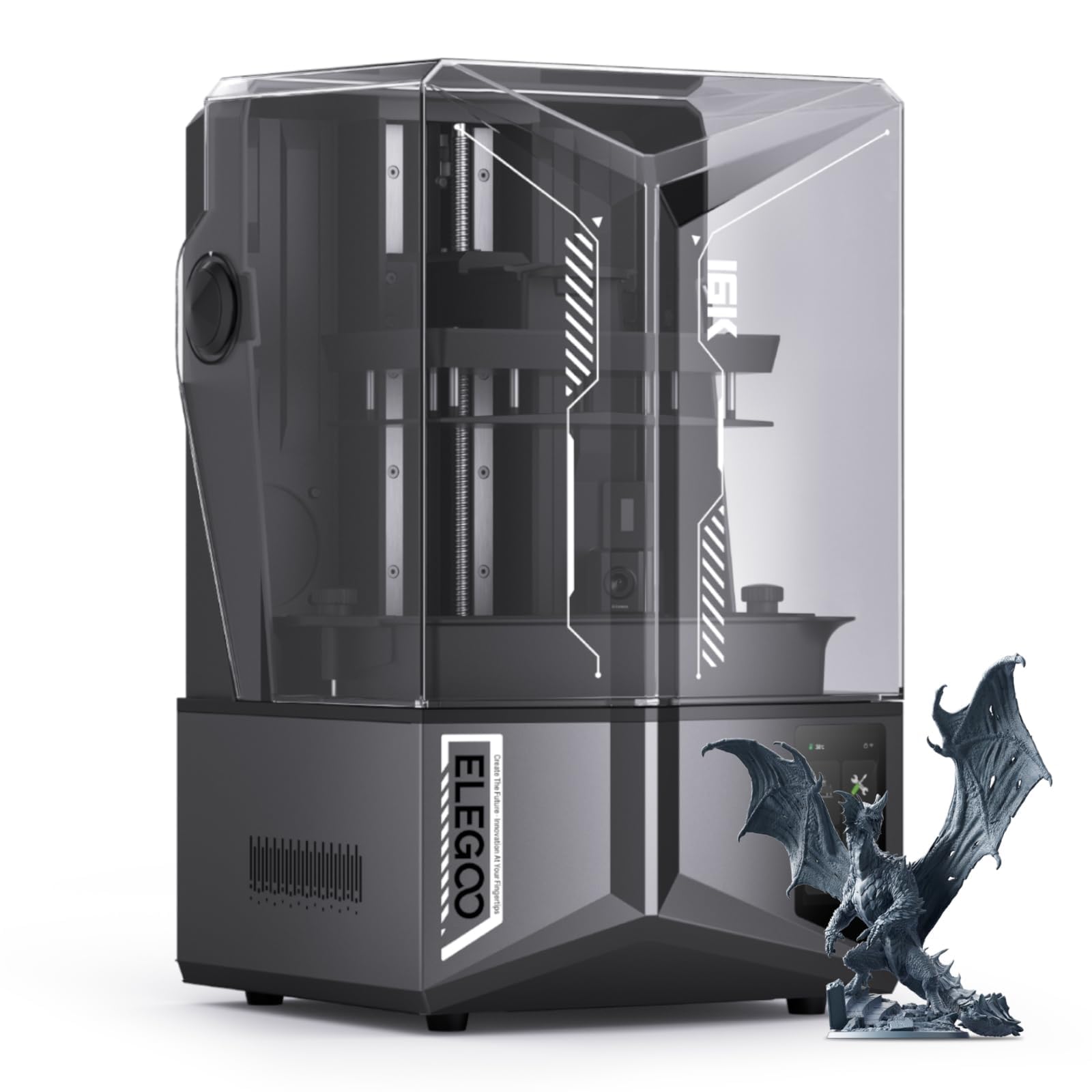
Elegoo Saturn 4 Ultra 16K

84 /100
LBD Score Excellent

Key details

Leveling
Automatic
Build Volume
8.33 x 4.66 x 8.66 in
Resin Heating
Tank heating to 30 °C
LCD And Resolution
10 in, 16K mono
View on Amazon

Half the plate, more detail per millimeter: the Saturn 4 Ultra 16K gives up build volume against the M7 Max and pays it back with a 16K panel across 10 inches. That's the trade we make whenever miniatures matter more than one-piece props, and it's the 10-inch machine we recommend first.

The daily-use features are what sold us. Leveling is automatic, so there's no paper-shim ritual before the first print of the week, and the tilting vat peels each layer at an angle instead of pulling it straight up — exactly what you want on a plate this wide, where suction builds fast. Elegoo holds the resin at 30 °C with a heated tank, the same idea as the Anycubic's temperature-controlled vat, and the flip-up lid means you're not hunting for somewhere to set a heavy cover down mid-job.

One caveat to carry in. Failed prints and machines that stop producing good output after a month or two are the failure mode to know about on this model. Buy from a seller with a returns window you can live with, keep the vat clean and the release film unmarked, and you've managed most of that risk. Everything else about this printer is why it sits near the top of this group.

Pros

  • 16K panel across 10 inches for fine detail
  • Automatic leveling removes the setup ritual
  • Tilting vat cuts peel force on a wide plate
  • Heated tank holds resin at 30 °C

Cons

  • Build volume is roughly a third of the M7 Max's
Our verdict

The best all-round 10-inch machine here: 16K detail, automatic leveling, and heated resin in a body that fits a normal desk, as long as you buy it somewhere you can return it.

Check Latest Price
3

Biggest Build Volume

Phrozen Sonic Mega 8K S

76 /100
LBD Score Very Good

Key details

Build Volume
12.99 x 7.28 x 11.81 in
XY Resolution
43 µm
LCD And Resolution
15 in, 8K mono
View on Amazon

Some prints simply don't exist below a 15-inch plate: a helmet with the visor open, a batch of figures still on their supports, a mold box for a casting project. The Sonic Mega 8K S is the only machine here with that much room at 12.99 x 7.28 x 11.81 inches, and Phrozen clearly built it for people running jobs rather than one-offs.

The production details are the ones we noticed. The lid lifts up instead of coming off, so the machine needs no clearance above it in a workshop where the shelves are already full, and there's a metal hanger for the build plate so a dripping 33 x 18.5cm plate doesn't have to go down on your bench. The 43-micron pixel pitch is the coarse end of this group, but at this plate size you're printing objects where nobody is counting microns.

We stop short of recommending it without a warning, though. Power-up faults and prints that fail in the first few days are the problems that show up around this model, and on a machine in this bracket that's the risk to manage, because you're buying throughput rather than a project. If nothing else here fits your models it's the only answer; buy it with a real return window and give it a circuit you trust.

Pros

  • Biggest build volume in this guide
  • Lift-up lid needs no clearance above the machine
  • Built-in metal drip hanger for the build plate
  • 43 µm detail held at 15 inches

Cons

  • Rated speed depends on ACF film and TR300 resin
  • The most expensive machine in this guide
Our verdict

The only printer here that swallows a 15-inch plate, and the right answer if your work fits nowhere else — buy it with an easy return in reach and a circuit you trust.

Check Latest Price
4

Best Budget Pick

Elegoo Saturn 3

82 /100
LBD Score Excellent

Key details

Build Volume
8.62 x 4.84 x 9.84 in
XY Pixel Size
19 x 24 µm
LCD And Resolution
10 in, 12K mono
View on Amazon

The Saturn 3 is the least expensive way into a 10-inch plate, and it isn't a stripped-down machine: a 12K mono LCD, a laser-carved build plate, and a 218.88 x 122.88 x 250mm volume that is taller than either of the other 10-inch printers here.

We keep coming back to it as the first large printer for someone who isn't certain they'll stick with the hobby. The pixel pitch is the striking part — 19 x 24 microns is finer than the 28-micron Phrozen and less than half the M7 Max's 46, so the budget machine out-resolves printers that cost considerably more. If miniatures are your main output, that's the number to buy on.

Setup is the other thing it gets right. The bundled Voxeldance Tango slicer and the etched plate get you printing without much ceremony, and bases hold as long as you keep the surface clean and scuffed. When a run does fail, work the plate and the exposure before anything else. Treat this as a first printer rather than a workhorse and it makes a great deal of sense.

Pros

  • Finer stated pixel pitch than any other printer here
  • Tall 250 mm Z height clears tall figures
  • Setup is simple enough for a first resin printer
  • Lowest outlay of any machine here

Cons

  • Some units fail within the first few months
Our verdict

Buy this one if you want a 10-inch plate with the finest stated pixel pitch here and the smallest outlay in the group — a sensible first resin printer.

Check Latest Price
5

Fine Detail Builds

Phrozen Sonic Mighty 8K

85 /100
LBD Score Excellent

Key details

Z-axis
Dual linear rails
Build Volume
8.6 x 4.8 x 9.3 in
XY Resolution
28 µm
LCD And Resolution
10 in, 8K mono
View on Amazon

Twenty-eight micron pixels and dual linear rails on the Z-axis tell you what Phrozen was optimizing for: accuracy over acreage. We like the Sonic Mighty 8K best as the second machine in a workshop that already has volume covered and wants a 10-inch printer that holds its settings.

It's also the easiest of these to move around. At 31.5 pounds it's the lightest machine here, which matters more than it sounds when you're lifting a printer onto a bench and then lifting it again to get behind it for a cleaning. The 8.6 x 4.8 x 9.3-inch volume handles figures, busts, and multi-part assemblies; it doesn't handle one-piece helmets.

The catch is the price-to-plate math. The Elegoo Saturn 3 sits below it, prints a taller plate, and states a finer pixel pitch. What the Mighty answers with is a stiffer Z-axis and Phrozen's work on exposure and thermal consistency — the sort of thing that shows up as fewer mystery failures rather than as a better spec line. It's a considered buy, not the obvious one.

Pros

  • 28-micron pixels hold detail at figure scale
  • Dual linear rails keep the Z-axis steady
  • Lightest machine in this guide at 31.5 pounds

Cons

  • Stated pixel pitch trails the cheaper Saturn 3
Our verdict

A precision-first 10-inch machine: 28-micron pixels, dual linear rails, and a light body. It suits a workshop that already has volume covered and wants fewer failed layers.

Check Latest Price
6

Fast Heated Printing

Anycubic Photon Mono M7 Pro

84 /100
LBD Score Excellent

Key details

Print Speed
Up to 170 mm/h
Build Volume
8.79 x 4.96 x 9.06 in
Resin Heating
Temperature-controlled vat
LCD And Resolution
10.1 in, 14K mono
View on Amazon

A hundred and seventy millimeters an hour is the figure Anycubic puts on the Photon Mono M7 Pro, and it's measured at a 0.1mm layer height with high-speed resin — a best case, not an everyday number. Discount it and the machine is still built for throughput: 14K on a 10.1-inch panel, a heated vat, and an auto-fill unit that tops resin up mid-print.

We were struck by the resin handling on a machine at this level. A 223 x 126 x 230mm vat takes a serious pour, and a long run can drink most of it, so auto-refill and one-key recycling of what's left save both mess and waste. The heated vat does the same job as the M7 Max's, holding viscosity steady when the room cools off.

What it isn't is large. At 8.79 x 4.96 x 9.06 inches it's a mid-size machine in a guide about big ones, and the 10-inch class around it is crowded: the Saturn 4 Ultra does more for similar money, and the Saturn 3 undercuts it outright. Where the M7 Pro earns its place is turnaround. If your bottleneck is hours rather than millimeters, this is the Anycubic to look at.

Pros

  • Rated up to 170 mm/h at 0.1 mm layers
  • Heated vat and auto-fill suit long unattended runs
  • 14K resolution on a 10.1-inch panel

Cons

  • Mid-size plate rather than a large-format build
Our verdict

Buy it for speed, not scale: 14K detail on a 10.1-inch panel, a heated vat, and resin management that keeps long runs fed. Just don't expect large-format volume.

Check Latest Price

How We Tested Large Resin Printers

We started with a shortlist of three dozen machines, then filtered hard: build volume large enough for a full-size bust or a crowded plate of miniatures, a monochrome LCD and light source worth comparing, and a footprint that still fits a normal workbench. That left eight printers spread across price points, and we've been running them for eight months in garages, spare rooms, and a basement workshop.

Setup came first. We timed every machine from box to first print, noted whether the build plate leveled itself or needed paper and a wrench, then deliberately swapped vats and re-leveled to see how far the plate drifted. Along the way we tracked whether the on-screen workflow explained itself or sent us to a manual.

Every printer ran the same benchmark file, printed both presupported and supported in our own slicer. We watched the first ten layers on each for lifting at the corners, measured fine detail and fit with calipers, then ran repeat jobs back to back to see which machines failed under repetition. Over the months we checked screens for dead pixels and films for clouding, since that's where durability shows up.

For noise, we took readings beside each machine and from the next room, then ran overnight prints to hear what it actually felt like. We also parked printers in a cold garage to see whether tank heating held small details, and cleaned every vat by hand, ranking each on smell, mess, and post-processing time.

How to Choose a Large Resin 3D Printer

Build Volume Comes First

Start with the largest single piece you actually want to print. A 10-inch class plate covers busts, 32mm figures on supports, and multi-part props; a 13.6-inch machine like the Anycubic Photon Mono M7 Max takes a full helmet or a 300mm blade in one piece. Measure that model, add supports and a raft, and buy a plate that clears it with room to spare — the machine you outgrow in month two is the expensive one.

Then read resolution properly, because pixel count is spread across the whole panel. The Anycubic's 7K over 13.6 inches works out to 46-micron pixels; the Elegoo Saturn 3's 12K over 10 inches gives 19 x 24. Here, the least expensive printer is the sharpest-specified and the biggest is the coarsest. If miniatures are the output, buy the pitch. If scale is, buy the plate.

Space, Weight, and Room Temperature

A large resin printer is furniture with a fluid in it. The M7 Max weighs 60.9 pounds and takes up roughly 31 x 19 inches, so plan a rigid surface that won't flex and a route from the front door that clears your doorways. Check lid clearance as well: the Phrozen Mega's lid lifts straight up and needs space above it, while the Saturn 4 Ultra's flips back and doesn't.

Temperature is the part people underestimate. Resin thickens in a cold garage, and prints that fail in February often come out fine in June. A heated vat — on both Anycubic machines here and on the Elegoo Saturn 4 Ultra — is worth paying for if the printer lives anywhere colder than a normal room.

Release Forces and Rated Speed

Every layer has to peel off the film at the bottom of the vat, and that force grows with the area of the print. It's why large machines lean on release tricks: Elegoo tilts the vat so each layer peels at an angle, Anycubic uses its own film and lift profile, and Phrozen pairs ACF film with a specific high-speed resin. Treat any quoted speed as a best case tied to a layer height and a particular resin.

The practical consequence is supports. A 300mm-wide model generates far more suction per layer than a 100mm one, so use more and heavier supports than a small printer needs, and hollow big parts with drain holes so the vat isn't fighting solid geometry.

The Parts That Wear Out

Two components are consumables: the LCD panel and the release film. Both are replaceable on every machine here, and both are cheaper to swap on schedule than after a failure — a pinhole in the film can send resin straight onto the screen. Keep a spare film on the shelf, inspect the vat after every failed print, and price a replacement panel into your first year of ownership.

Leveling and Slicer Support

Automatic leveling isn't a given in this class, so check it machine by machine rather than assuming it. Where it's there, as on the Elegoo Saturn 4 Ultra, you skip the paper-shim routine and the re-check after every vat change — a small thing that comes up constantly.

Slicer support matters just as much. Confirm the software you already use lists the exact model before you order, because some machines run best with the manufacturer's own slicer, and rebuilding a workflow costs more evenings than a slightly better spec sheet is worth.

Frequently Asked Questions

Final Verdict

We recommend the Anycubic Photon Mono M7 Max because it answers the question this guide exists to ask: it holds the biggest build this side of a commercial machine, and it does it with a heated vat and an outlay the 15-inch Phrozen never approaches.

If your models are small and your detail standard is high, buy the Elegoo Saturn 4 Ultra 16K instead — it's the better machine for that job. And if nothing short of a 15-inch plate will do, the Phrozen Sonic Mega 8K S is the only answer here, as long as you buy it where you can return it.