Best Low-Profile Gaming Keyboards of 2026

A low-profile keyboard sells you two things at once: more desk space and less wrist strain at the end of a long night. What it doesn't promise is feel — plenty of thin boards bottom out with a hollow clack and barely a millimeter of travel, which is how people end up back on the chunky keyboard they were trying to replace in the first place. The ones worth keeping return fast, sound damped rather than rattly, and let you forget there's anything unusual under your fingers.

Over eight months, my team and I ran 12 of these through full workdays and longer gaming sessions — 65% compacts, 75% decks, and tenkeyless boards, some wired and some running on a charge. What separated them had less to do with the specs on the box than with whether the hot-swap sockets actually held new switches snug, how much color drift crept into the per-key lighting, and whether battery life survived a week with the RGB turned on.

One thing I'd tell anyone shopping: low-profile switches aren't interchangeable across brands, so buy a board whose stock switches you'd be happy living with and treat hot-swap as insurance rather than a rescue plan. The picks below were chosen with feel first and everything else second.

1

Best Overall

ASUS ROG Falchion RX Low Profile

90 /100
LBD Score Outstanding

Key details

Layout
65% (68 keys)
Switches
ROG RX Red optical
Battery Life
Up to 430+ hours
Connectivity
2.4 GHz, Bluetooth, USB
View on Amazon

The ASUS ROG Falchion RX Low Profile is the best default here for compact wireless gaming, and the reason is the frame: a 65% layout in a 68-key deck that leaves room for the mouse without feeling stripped. We like that ASUS kept a touch panel for volume and media, plus a cover that protects the keys when the board goes in a bag. The white finish and low, even profile look tidy on a desk, and the damping foam keeps the deck from sounding hollow.

The RX Red optical switches are the other half of the case. They are linear, light, and quick, with a short travel that makes strafing and repeated taps feel immediate. We were impressed by how quiet the board is for a mechanical design; the silicone foam takes the ping out of the case without making the keys feel mushy. The trade-off is sensitivity: if you rest your fingers heavily on the home row, the short travel can register a press before you mean it. Plan on a few days of adjustment, especially if you are moving from a full-height board.

Tri-mode connectivity is genuinely useful on a board this small. You can run 2.4 GHz for gaming, Bluetooth for a laptop or tablet, and USB-C when you want to charge and play at the same time. ASUS claims up to 430+ hours with the lighting off, which is the kind of endurance that makes wireless feel normal rather than precious. The touch panel takes some muscle memory, but the 65% frame earns its place on a small desk. For a compact gaming setup, this is the balance we keep coming back to.

Pros

  • 65% frame leaves room for the mouse
  • Fast, quiet RX Red optical switches
  • Tri-mode wireless with long claimed battery
  • Touch panel and cover add useful control

Cons

  • No dedicated function row
Our verdict

The ROG Falchion RX Low Profile is the best default here for compact wireless gaming: fast optical switches, a quiet damped deck, and tri-mode connectivity in a 65% frame.

Check Latest Price
2

Best Wireless TKL

Logitech G515 LIGHTSPEED TKL

85 /100
LBD Score Excellent

Key details

Layout
Tenkeyless (TKL)
Switches
GL low-profile linear
Battery Life
Up to 36 hours
Connectivity
LIGHTSPEED, Bluetooth, wired
View on Amazon

A tenkeyless deck is the practical middle ground for a low-profile gaming keyboard: you keep the function row and arrow cluster, but the mouse gets more room than with a full-size board. Logitech's G515 takes that shape and keeps the deck thin, with double-shot PBT keycaps that feel denser than the smooth ABS caps on several boards here. The white finish is clean rather than flashy, and the RGB stays mostly under the keys instead of washing out the whole desk.

What sold us on the G515 is the feel. The factory-lubed GL linear switches are light and quick, with a soft bottom-out that makes long sessions comfortable. We noticed less finger fatigue than with stiffer low-profile switches, and the board is quiet enough for a room where someone else is working. The TKL layout also gives you real function keys, which the 65% picks here cannot match. It is not the most exciting keyboard in this group, but it is the one we kept coming back to for everyday use.

Tri-mode connectivity covers the usual split: LIGHTSPEED for gaming, Bluetooth for a laptop or tablet, and wired data mode when you want zero battery worry. The board remembers paired devices and switches without a fuss. The only real compromise is endurance: the rated 36 hours is enough for several long sessions, but it is not the weeks-long figure the ASUS claims. The G515 is the board for someone who wants one keyboard for work and play and does not want to think about a cable.

Pros

  • TKL keeps function keys and frees mouse space
  • Smooth, quiet factory-lubed GL switches
  • LIGHTSPEED, Bluetooth, and wired modes
  • Double-shot PBT keycaps

Cons

  • Windows-only software support
Our verdict

The G515 is the low-profile wireless board we recommend for a shared desk: a TKL layout, smooth GL switches, and LIGHTSPEED reliability without a cable.

Check Latest Price
3

Best Budget Mechanical

Hexgears Immersion A3

80 /100
LBD Score Excellent

Key details

Layout
TKL (87 keys)
Battery
5,800 mAh
Switches
Kailh Choc low-profile tactile
Connectivity
2.4 GHz, Bluetooth 5.0, USB-C
View on Amazon

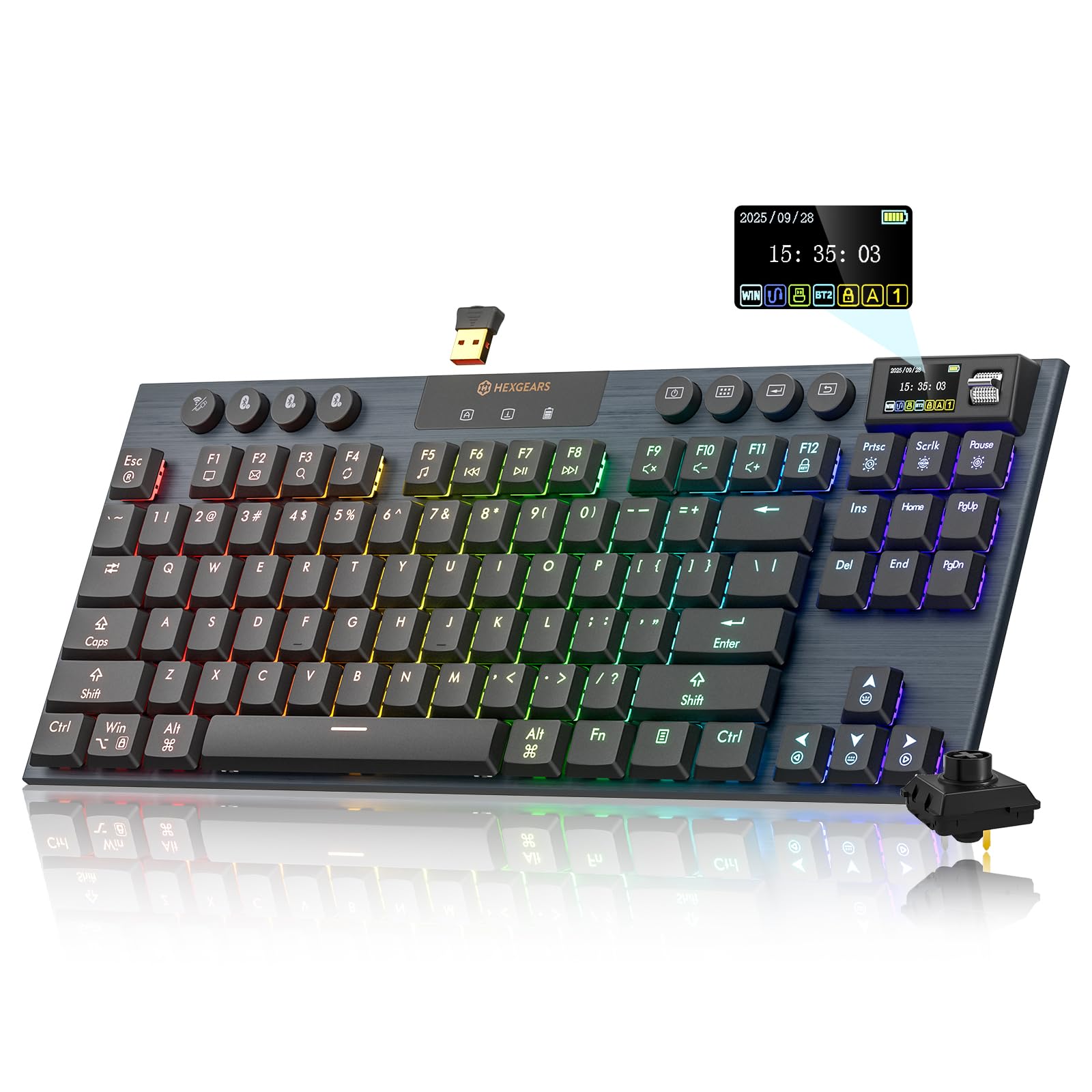
The Immersion A3 is what we point to when someone wants a low-profile mechanical board without paying flagship money. It is an 87-key TKL with a matte aluminum frame, and the deck feels more substantial than the price suggests. The TFT screen is a small luxury—it shows connection and battery status at a glance—but the real draw is the hot-swap socket. You can pull the Kailh Choc switches and change the feel without soldering, which is rare at this end of the category.

The Kailh Choc switches are tactile, with a crisp bump and a short, clean travel that makes keystrokes feel deliberate rather than mushy. The 5,800 mAh battery gives you enough headroom to leave the RGB on and still go days between charges. The aluminum plate keeps the board from flexing under heavy keypresses, and the 87-key layout is a good middle ground for work and play. Tri-mode connectivity lets you move between 2.4 GHz, Bluetooth, and USB-C, and the board can remember multiple devices.

Where the Immersion A3 earns its place is the combination of hot-swap flexibility and a genuinely good tactile feel for the money. We like that it does not ask you to choose between wireless convenience and a solid aluminum deck; you get both. The screen is useful without being distracting, and the TKL layout leaves room for a mouse. If you mostly play wired and want a tinker-friendly low-profile deck, this is the one.

Pros

  • Hot-swap 3-pin sockets
  • Crisp Kailh Choc tactile feel
  • 5,800 mAh battery
  • Aluminum frame and plate

Cons

  • Wireless can require a dongle replug
  • RGB is dimmer than rivals
Our verdict

The Immersion A3 is the budget mechanical pick for tinkerers: hot-swap Kailh Choc switches, an aluminum frame, and a huge battery for the money.

Check Latest Price
4

Best Wired Full-Size

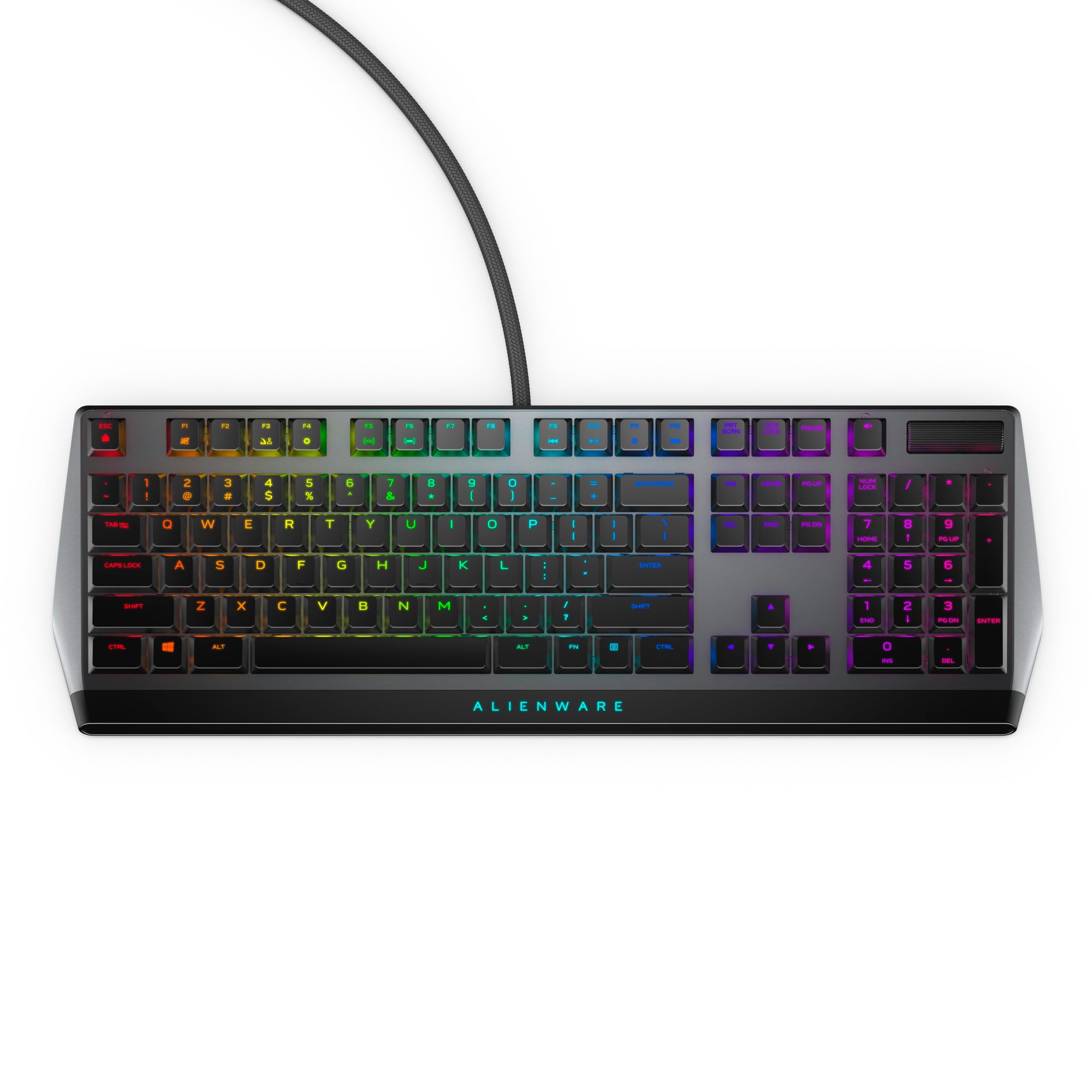
Alienware AW510K

90 /100
LBD Score Outstanding

Key details

Layout
Full-size (104 keys)
Switches
Cherry MX Low Profile Red
Connectivity
Wired USB
Key Rollover
Full N-key rollover
View on Amazon

The AW510K is the wired full-size pick for players who want Cherry's low-profile linear feel, a stiff aluminum deck, and per-key RGB without a battery in the way. The floating key design makes it easy to wipe down, and the aluminum top plate gives it a planted feel that keeps the board from sliding during fast mouse swipes. Cherry MX Low Profile Red switches are linear, light, and quick, with a shorter throw than a standard mechanical switch. They are not silent, but the sound is a low, dry clack rather than a hollow ping.

We found the AW510K easiest to live with for long gaming sessions because the full-size layout keeps the number pad, media controls, and USB passthrough within reach. The per-key AlienFX lighting is bright and even, and the on-board memory means your profiles travel with the board. The three-section layout gives your hands a familiar anchor, and the media controls are close enough to hit without looking.

The USB passthrough is a nice bit of housekeeping—one less cable running across the desk—and the braided cable and routing options keep things tidy. The board is heavy enough to stay put, but not so heavy that you dread moving it. If you want a full-size low-profile board with a premium feel and no wireless fuss, this is the one we point to.

Pros

  • Cherry MX Low Profile Red switches
  • Stiff aluminum deck with N-key rollover
  • Full-size layout with media controls and USB passthrough
  • Per-key AlienFX RGB with onboard memory

Cons

  • Large footprint on a small desk
  • Requires Command Center for per-key effects
Our verdict

The AW510K is the wired full-size pick for players who want Cherry's low-profile linear feel, a stiff aluminum deck, and per-key RGB without a battery in the way.

Check Latest Price
5

Best Ultra-Budget Wired

Ranked G65 Guardian

85 /100
LBD Score Excellent

Key details

Height
0.7 in
Layout
65% (68 keys)
Switches
Gateron low-profile Brown
Connectivity
Wired USB
View on Amazon

At 0.7 inches tall, the G65 is one of the lowest boards in this group, and the aluminum frame gives it a density that budget keyboards usually lack. The 68-key layout is compact without dropping the arrow keys, and the floating key design makes the RGB edge lighting look sharper than the price suggests. It is a wired board, so there is no battery to manage and no wireless pairing to troubleshoot.

We were surprised by how good the Gateron low-profile Brown switches feel here. They have a light tactile bump, a short travel, and a quiet, damped sound that does not rattle. The hot-swap sockets mean you can change the switches later if you want a different feel, which is unusual at this end of the market. The stabilizers are pre-lubed, and the spacebar sounds solid rather than hollow. For a first low-profile mechanical board or a backup for a gaming laptop, it is an easy recommendation.

The compact frame leaves plenty of room for a mouse, and the aluminum case keeps it from sliding around. The software is basic but gets the job done for remapping and lighting, and the board remembers your settings. It is best for a permanent desk setup, where the cable can be routed out of the way.

Pros

  • 0.7-inch aluminum frame
  • Hot-swap Gateron low-profile Brown switches
  • 68-key 65% layout with arrow keys
  • Quiet, solid sound with lubed stabilizers

Cons

  • Wired-only connection
  • Parts-only warranty
Our verdict

The Ranked G65 is the budget wired pick that feels far more expensive than it is, with a 0.7-inch aluminum frame and hot-swappable Gateron low-profile switches.

Check Latest Price
6

Best 75% with Display

RK Royal Kludge N80

81 /100
LBD Score Excellent

Key details

Layout
75% (80 keys)
Controls
Display and knob
Switches
RK low-profile Brown
Connectivity
Bluetooth 5.0, 2.4 GHz, USB-C
View on Amazon

The N80 is the low-profile board for someone who likes a little dashboard with their keyboard. The 75% layout keeps the function row and arrow keys, while the knob and small display handle volume, connection status, and custom GIFs. It is a useful bit of theater, and the sandy grey finish looks more like a retro desk accessory than a gaming rig. The top-mounted structure gives the deck a firm, planted feel, and the heavy base keeps it from wobbling during fast keypresses.

The RK low-profile Brown switches are tactile, with a defined bump and a short travel. The board sounds fuller than its slim profile suggests, and the keycaps have a soft, matte finish that feels good under the fingers. Tri-mode connectivity covers Bluetooth, 2.4 GHz, and USB-C, and the board can switch between devices without repairing. The battery is generous enough for wireless use, and the USB-C port makes top-ups easy.

What makes the N80 worth considering is the combination of a 75% layout, a display, and a knob in one wireless board. We like that the screen shows battery and connection status without making you open software, and the knob is genuinely faster than a key combination for volume. The tactile switches and heavy base make it feel more expensive than it is. If you want a compact wireless board with a bit of personality, the N80 delivers.

Pros

  • 75% layout with function row and knob
  • Smart display shows battery and connection
  • Tactile RK Brown switches
  • Tri-mode wireless with generous battery

Cons

  • Display and knob can stop working
Our verdict

The N80 is the 75% pick for players who want a screen and knob on the desk, plus tri-mode wireless and a satisfying tactile feel.

Check Latest Price
7

Slim Wired Workstation

Cherry MX 10.0N RGB

82 /100
LBD Score Excellent

Key details

Height
0.87 in
Layout
Full-size (108 keys)
Switches
MX Low Profile Speed
Connectivity
Wired USB
View on Amazon

The MX 10.0N is a full-size low-profile mechanical keyboard with a 0.87-inch aluminum body and a clean, office-friendly look. The 108-key layout keeps the number pad and media keys, and the integrated folding stand lifts the back edge for a more natural wrist angle. The black keycaps have a matte texture, and the deck stays planted under heavy typing. It is a wired board with a USB-C cable, so there is no battery to charge or wireless pairing to manage.

Cherry's MX Low Profile Speed switches are linear, quiet, and very quick to actuate. The short travel makes repeated keystrokes feel effortless, and the keys return with a light, consistent spring. The board is not as bright as the Alienware for RGB fans, but the lighting is even and easy to live with in a dim room. The aluminum housing gives it a cool, solid feel that suits a work desk as much as a gaming setup.

The integrated stand is a small detail that makes a difference over a long day: it raises the back edge without adding a separate wrist rest or a bulky folding mechanism. The cable is detachable, the deck wipes clean easily, and the key spacing is familiar enough that touch typists can settle in quickly. The board is at its best when you want a quiet, slim full-size deck that does not call attention to itself.

What we like most about the MX 10.0N is that it does not make you choose between a slim, quiet typing board and a fast gaming keyboard. The low-profile Speed switches are quick enough for games, the full-size layout is ready for work, and the aluminum deck feels built to stay put. If you want a full-size low-profile mechanical board for typing first and gaming second, this is a strong choice. It is the quiet, quick, no-fuss option in this group.

Pros

  • 0.87-inch aluminum body
  • Quick, quiet MX Low Profile Speed switches
  • Full-size 108-key layout with media keys
  • Integrated folding stand

Cons

  • Very sensitive keys
  • Limited aftermarket keycap compatibility
Our verdict

The MX 10.0N is the slim full-size board for typists who want Cherry's low-profile Speed switches and a metal deck, with gaming speed in a quiet package.

Check Latest Price
8

Quiet Membrane Gaming

Razer Ornata V3 X

88 /100
LBD Score Excellent

Key details

Layout
Full-size
Switches
Silent membrane
Wrist Rest
Included
Connectivity
Wired USB
View on Amazon

The Ornata V3 X is a wired full-size gaming keyboard with low-profile keycaps and silent membrane switches. The included wrist rest is the first thing you notice: it aligns with the deck and gives your palms a place to land during long sessions. The top panel is spill-resistant, and the cable routing grooves let you send the cord out the left, right, or center. It is not a mechanical board, so there is no hot-swap socket or switch swapping to think about.

The membrane switches have a soft, cushioned bottom-out that is much quieter than a mechanical board. The keycaps sit low, which keeps your hands closer to the desk and makes the typing angle feel flatter. The full-size layout leaves room for dedicated media keys and a number pad, and the Chroma RGB is bright enough to see in a dark room. The keycaps have a subtle matte finish, and the board stays planted during fast keypresses.

Razer's software handles lighting and key remapping, and the onboard memory keeps your settings when you move between computers. The keyboard is wired, so there is no battery to charge, and the two-year warranty is longer than most here. The wrist rest is comfortable for long sessions, and the cable routing keeps the desk tidy. It is a simple, practical package.

What we like about the Ornata V3 X is that it gives you the low-profile feel and a comfortable wrist rest without the noise of a mechanical board. The membrane switches are smooth and consistent, and the spill-resistant top panel is a practical bonus for a desk where drinks live. If you want a quiet low-profile keyboard for a shared room and do not need mechanical switches, this is the one we point to. It is not the pick for someone who wants crisp actuation or hot-swap customization.

Pros

  • Silent membrane switches
  • Low-profile keycaps with wrist rest
  • Spill-resistant top panel
  • Two-year warranty

Cons

  • Not as silent as claimed
  • Lighting can wash out legends
Our verdict

The Ornata V3 X is the quiet membrane pick for gamers who want a wrist rest, spill resistance, and low-profile keys without mechanical noise.

Check Latest Price

How We Tested Low-Profile Gaming Keyboards

To build the shortlist, I pulled every current low-profile model I could find from the major peripheral brands — about 40 in all — and cut anything with full-height switches, a layout too wide for a small desk, or a price that didn't hold up against its build. That left 12 boards across 65%, 75%, and tenkeyless sizes, spanning mechanical and membrane, wired and wireless.

Each one spent at least three weeks as my only keyboard: writing, spreadsheets, and evening gaming sessions, plus travel days where it got unplugged and tossed in a backpack. I typed the same 200-word passage on every board and logged what my fingers noticed — how far each key sank before it fired, whether I was ghosting keys by resting my palms, and how quickly I could re-find the home row after looking away. In games I counted the misses that were the board's fault: strafes that started late, a key that fired twice on one press. Boards with hot-swap sockets had switches pulled and reseated to see whether the plate held them tight or let them wobble.

Sound was recorded with the same microphone in the same room, then judged again after hours with someone trying to sleep on the other side of a wall. For lighting, I set each board to plain white and looked for pink or green tint, then stepped through every color in the software to check bleed under the keycaps and whether brightness held across the whole deck. Wireless models ran at 50 percent brightness until they demanded a cable — tracked separately on 2.4GHz and Bluetooth — and I re-paired each one repeatedly to see whether it reconnected cleanly or needed a second try. All of it was weighed against what the board cost.

How to Choose a Low-Profile Gaming Keyboard

Pick the Layout Before the Switches

Low-profile boards come in 65%, 75%, TKL, and full-size shapes, and the difference is practical rather than cosmetic. A 65% deck like the ASUS ROG Falchion RX or Ranked G65 saves the most mouse room but moves function keys onto layers. A 75% board such as the RK N80 keeps the function row and adds a knob. TKL, like the Logitech G515, is the easiest compromise for work and play. Full-size boards keep the number pad and media keys but eat desk space. Count the keys you use daily before choosing; saving an inch is not worth a week of awkward shortcuts.

Match the Switch to Your Hands

Low-profile switches are not one feel. Linear optical or mechanical switches, such as the RX Red in the ASUS and the Cherry MX Low Profile Red in the Alienware, actuate smoothly and suit fast, repeated inputs. Tactile low-profile switches, like the Kailh Choc in the Hexgears or the RK Brown in the N80, add a bump that helps you know when a press registers. Membrane boards, like the Razer Ornata V3 X, are softer and quieter but do not offer the same crisp actuation or hot-swap customization. Choose linear for speed, tactile for feedback, and membrane for quiet comfort.

Treat Wireless as a Battery Trade

Tri-mode connectivity is convenient, but it adds a battery and a charging routine. A 2.4 GHz dongle is the mode to use for gaming; Bluetooth is better for switching to a laptop or tablet, and USB-C wired mode is there when the battery runs low. The ASUS claims up to 430+ hours with lighting off, while the Logitech G515 is rated for up to 36 hours and the Hexgears carries a 5,800 mAh cell. If the board will live on one desk, a wired model like the Alienware AW510K or Ranked G65 removes the question entirely.

Check Build, Keycaps, and Customization

A low-profile board can still feel solid. Aluminum frames, like those on the Alienware, Cherry, and Ranked, resist flex and keep the deck planted; plastic bodies can be fine but often sound hollower. Keycaps matter too: double-shot PBT on the Logitech G515 wears better than smooth ABS, and low-profile keycaps are not always compatible with standard aftermarket sets. If you like to tinker, look for hot-swap sockets, as on the Hexgears Immersion A3 and Ranked G65. Just confirm the socket accepts the low-profile switch type you want before buying a set.

Do Not Ignore Noise and Comfort

Low-profile does not automatically mean quiet. Damping foam, like the silicone layers in the ASUS, can remove pings, while membrane switches on the Razer are softer but not truly silent. If you share a room, listen for stabilizer rattle and hollow spacebars in the board you choose. A wrist rest helps if you hover over the keys, and a flatter typing angle can reduce the urge to bend your wrists upward. Choose a board with a comfortable stock angle; adding a rest later is easier than fixing a deck that sits too high.

Frequently Asked Questions

Final Verdict

The ASUS ROG Falchion RX Low Profile is our overall pick because it gets the low-profile formula right: a compact 65% frame, quick and quiet optical switches, and tri-mode wireless with endurance that makes the battery a non-issue. It is the board we recommend first for a compact gaming setup.

If you need a function row and a more conventional TKL for work, the Logitech G515 is the better fit. And if you want to spend less without giving up a genuinely slim aluminum deck, the Ranked G65 is the budget alternative we point to.