Best Network Firewall Appliances of 2026

The box that runs your network is the one piece of gear nobody should have to think about. A dedicated firewall appliance takes routing, DHCP, VPN, and traffic rules off the ISP's cramped all-in-one and puts them on hardware built for the job, so video calls, game downloads, and a work laptop on a VPN all keep moving at once. Get it right and you forget it exists; get it wrong and you're rebooting the internet during dinner.

I've kept a box like this humming in my own closet for years, and over the past six months my team tested nine of them, from bare multi-port mini PCs you image yourself to appliances that arrive with the software already loaded. One thing first-time buyers miss: fanless is standard here, and that's a gift — nothing to whine at 2 a.m. — but those sealed cases do get warm, and a box that runs hot at idle is a box that will throttle when you finally push real traffic through it.

The other spec that decides how much you'll like living with one is hardware crypto acceleration, which shapes VPN speed far more than clock rate does. The picks below are the ones that held up on all of it, setup included.

1

Best Overall

Protectli Vault FW4B

88 /100
LBD Score Excellent

Key details

Memory
8GB DDR3L
Processor
Intel Celeron J3160, quad-core
Ethernet Ports
4 x 1 GbE Intel
Firewall Software
None preinstalled; pfSense, OPNsense and Untangle tested
View on Amazon

Four Intel gigabit ports, no fan, and no operating system on the drive: that's the Vault FW4B in a sentence, and we think it's the right starting point for most people building a real perimeter firewall. You bring the software — pfSense, OPNsense, Untangle, whatever you trust — and Protectli brings a small, silent box with a quad-core Celeron J3160, 8GB of DDR3L and a 120GB mSATA SSD, already tested against those platforms. Nothing arrives half-configured, which is exactly the point: you write the ruleset instead of unpicking somebody else's.

At 4.5 by 4.3 by 1.5 inches it takes less shelf than a hardback, and with convection cooling there's nothing to hear from the next room — a detail that stops mattering only if your rack lives in a basement. Four ports is also the right number for a serious home network: WAN, LAN, a guest or IoT segment, and one left over for a DMZ or a second internet connection.

The J3160 is a 2015-era chip, and that's the honest limit of this pick. A few hundred megabits of routing with an ordinary rule set is comfortable territory; turn on heavy intrusion detection, run a VPN and a multi-gig WAN at the same time and you'll feel the processor's age. The fanless case also runs warm under load, so give it air rather than stacking a switch on top of it.

What we kept coming back to is the serial console jack on the back. Most buyers ignore it until a bad rule locks them out of the web interface, and then it's the only way back in without a factory reset. Add dual HDMI, two USB 3.0 ports and an optional coreboot install you do yourself, and this is a small appliance that stays useful as the network around it gets more complicated.

Pros

  • Four Intel gigabit ports for real segmentation
  • Fanless and silent enough for a living room
  • 8GB RAM and 120GB SSD leave package headroom
  • Tested with pfSense, OPNsense and Untangle

Cons

  • 2015-era J3160 limits IDS and VPN headroom
  • Fanless case runs warm under load
Our verdict

The firewall appliance we point most home and small-office buyers to first: four Intel NICs, silent operation, and a platform pfSense and OPNsense already run on.
Check Latest Price
2

Best for Multi-Gig Networks

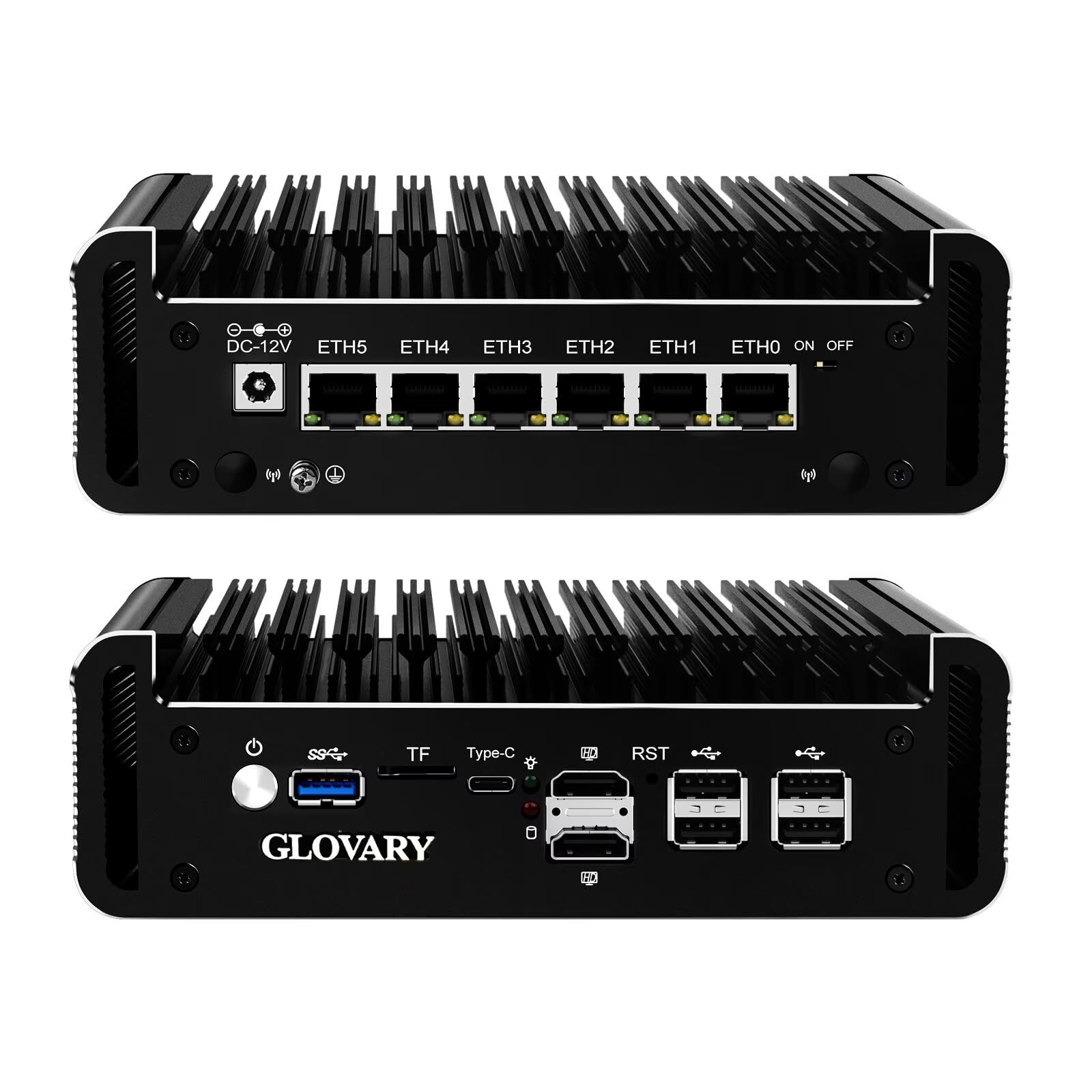
Glovary N150 6-Port

82 /100
LBD Score Excellent

Key details

Memory
8GB DDR5, 32GB max
Storage
2 x M.2 2280 NVMe, 1 x SATA
Processor
Intel N150, 4 cores up to 3.6 GHz
Ethernet Ports
6 x 2.5 GbE i226-V
View on Amazon

Six 2.5-gigabit Ethernet ports on a fanless aluminium box the size of a paperback is the whole argument for this one. The i226-V controllers run 2.5 times gigabit, which is the difference between a firewall that becomes the bottleneck the day you upgrade your internet and one that doesn't — every other pick here except this one tops out at 1 GbE.

The internals are the newest in this group: an Intel N150 quad-core running up to 3.6GHz at a 6W TDP, DDR5 memory with 8GB installed and a 32GB ceiling, two M.2 2280 NVMe slots and a SATA bay. We like the second NVMe slot more than we expected to. One drive for the firewall, one for a spare install or a second boot environment turns a failed update into a five-minute swap, which is not something we usually get to say about a firewall. OPNsense, pfSense, Proxmox and ESXi all run on it.

Heat is the thing to plan for. The case is one big heat sink and it does get warm in service, which is normal for passive cooling but means open air rather than a sealed cabinet. There's a four-pin fan header and a cable in the box if the box has to live somewhere tight, which tells you the manufacturer expects the question.

Price-wise it sits just above our top pick, and the extra buys you two more ports, more than twice the link speed and a processor roughly a decade newer. If you have a 2.5G switch or multi-gig internet on the roadmap, that's the easier money to spend.

Pros

  • Six 2.5GbE i226-V ports
  • Newest CPU, DDR5 and dual NVMe here
  • Fanless aluminium case with a fan header
  • Runs OPNsense, pfSense, Proxmox or ESXi

Cons

  • VLAN configuration can be temperamental
Our verdict

Buy this if your network has already gone past gigabit: six 2.5GbE ports and the newest hardware here for a little more than the top pick.

Check Latest Price
3

Best Preloaded pfSense

Netgate 1100

79 /100
LBD Score Very Good

Key details

Memory
1GB
Ethernet Ports
3 x 1 GbE switched
Firewall Software
pfSense+ preloaded, lifetime updates
Firewall Throughput
650+ Mbps
View on Amazon

This is the only appliance here that arrives with the firewall already on it: pfSense+ preloaded, software updates for the life of the product, a one-year hardware warranty and TAC Lite support in the box. If you want pfSense's rule engine and traffic shaping without spending an evening writing a USB installer and another one reading a setup guide, that head start is the product.

The hardware is genuinely tiny — 4.33 by 3.33 by 1.25 inches, about a pound — and it runs silent and cool off a 12-volt brick, so it disappears onto a shelf or a wall. Three switched 1 GbE ports cover WAN, LAN and one optional segment, and 1GB of RAM is fine for a straightforward rule set. It is not fine for a stack of packages, and you should buy it knowing that.

Throughput is where we slow down. The rated figures are in excess of 650 Mbps of firewall throughput and near-gigabit for plain routing, so a fast fibre line will outrun it once inspection is switched on, and a package like Suricata makes the little dual-core ARM chip show its limits quickly. On a several-hundred-megabit connection with a few VLANs it's plenty. On gigabit plus intrusion detection it isn't.

Setup is easier than its reputation and harder than the box suggests. pfSense is a logical interface once you know what a WAN subnet is, and opaque if you don't — preloaded software removes the install, not the learning curve. If you've configured a consumer router's port forwarding and understood it, you'll be fine by the end of an afternoon.

Pros

  • pfSense+ preloaded with lifetime software updates
  • Three gigabit ports in a tiny, silent case
  • One-year warranty and TAC Lite support included

Cons

  • Firewall throughput tops out around 650 Mbps
  • Reliability is uneven across units
Our verdict

The quickest route to a real pfSense firewall — preloaded, supported and silent — as long as your connection stays in the hundreds of megabits.

Check Latest Price
4

Best for Small Business

FortiGate 60F Bundle

80 /100
LBD Score Excellent

Key details

Memory
2GB
Ethernet Ports
13
Firewall Software
FortiOS
Included Services
1 year FortiGuard UTP and FortiCare Premium
View on Amazon

A year of FortiGuard Unified Threat Protection and FortiCare Premium is bundled with this 60F, and that bundle is really the product. FortiOS handles routing and policy enforcement while the subscription supplies the web filtering, anti-botnet and threat signatures that turn a firewall into a next-generation firewall. Let it lapse and you still have a capable router with the interesting services switched off.

For a small business that needs compliance reporting and somebody to call at 9 a.m. on a Monday, this is a different offer from everything else here, and that's what we appreciate most about it. No operating system to install, no packages to assemble, no forum thread at midnight. The hardware keeps up: 13 ports in an 8.5 by 6.3 by 1.5-inch desktop chassis, with FortiOS handling VLANs, site-to-site VPN tunnels and policy from one interface.

The catch is the calendar. Twelve months of protection and support are included; after that, both become a recurring line item and the largest running cost in this group. Budget for the renewal at the same time you budget for the appliance, because a FortiGate with expired services is a much less interesting device than the one you thought you bought.

It's also the most expensive box here by a distance. That's the right trade only if you're buying it for an organisation with staff, auditors or an insurance requirement — the depth that makes it valuable at work is precisely what a household pays for and never opens.

Pros

  • FortiOS with UTP and support bundled in
  • 13 ports in a compact desktop chassis
  • Compliance reporting and vendor support

Cons

  • Renewals become a recurring cost after year one
  • Highest entry price in this group
Our verdict

The pick for a small business that wants vendor-backed threat protection and a support line rather than a build-it-yourself pfSense box.

Check Latest Price
5

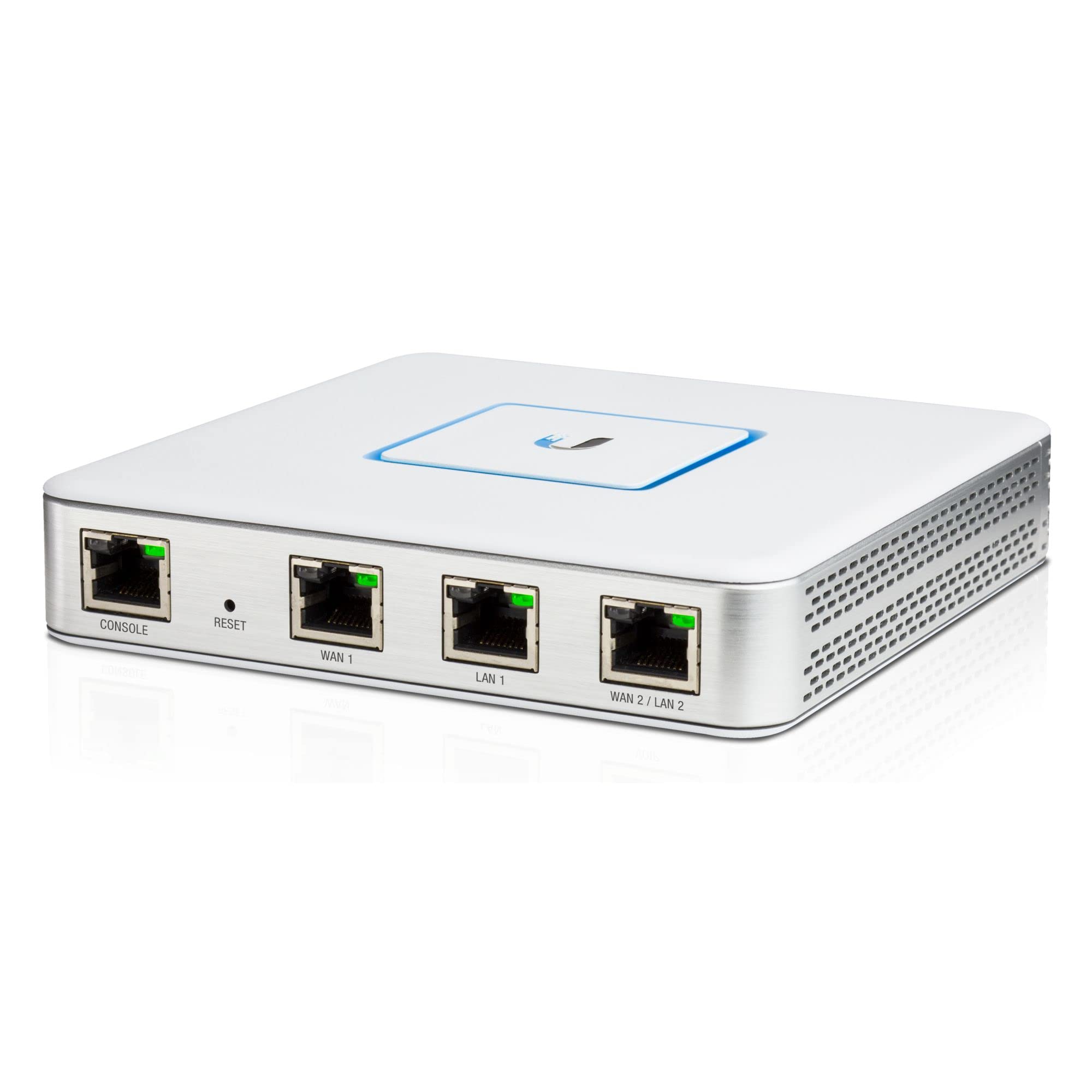
Best for UniFi Networks

Ubiquiti UniFi USG

91 /100
LBD Score Outstanding

Key details

Memory
512MB
Dimensions
5.31 x 5.31 x 1.11 in
Management
UniFi Controller
Ethernet Ports
3 x 1 GbE
View on Amazon

The cheapest thing on this list, and for a house already running UniFi access points and switches it does something none of the others can: it appears inside the same UniFi controller as the rest of your gear, so firewall rules, VLANs, VPN and Wi-Fi live in one place. That single dashboard is worth more day to day than a faster processor you'd have to manage somewhere else.

The hardware is honest about its job: three gigabit ports (one WAN, two LAN), 512MB of RAM, a fanless 5.31-inch square weighing 12.3 ounces that sits on a shelf or hangs on a wall. Two LAN ports is the real constraint — plan on VLANs over a trunk if you want more than one internal network plus a guest segment, because you've run out of physical sockets.

What we kept coming back to is how little there is to configure badly. The controller gives you a small, tidy set of screens for the things most homes actually need — VLANs, QoS for voice traffic, a VPN server for when you're away — and stays out of the way the rest of the time. The flip side is depth: pfSense and OPNsense expose far more, and if your plans run to inline intrusion prevention at the edge, the 512MB of RAM and three ports tell you to look elsewhere.

For a flat home network with a couple of segments and a travel VPN, it covers the job at the lowest outlay here. It's a firewall to settle into, not one to grow into.

Pros

  • Cheapest appliance in this group
  • Managed from the same UniFi controller as your Wi-Fi
  • Fanless, wall-mountable, 12.3 ounces
  • VLANs, QoS and a VPN server built in

Cons

  • Three gigabit ports, one used for WAN
  • 512MB of RAM leaves little room for extra services
Our verdict

The one to buy if your network already lives in UniFi: the lowest cost here, one dashboard, and enough firewall for a home or small shop.

Check Latest Price

How We Tested (and Lived With) Nine Firewall Appliances

We started with spec sheets and forum threads, then filtered for port count, cooling design, RAM and storage, whether the software ships preinstalled or you image the drive yourself, and price. Nine units made the cut, and testing ran six months. Each one spent at least two weeks as the primary router on a live network with a couple dozen devices attached, and went back in for follow-up rounds after that.

Setup was timed from the moment a unit came out of its packaging until a laptop could browse the web, without opening the support docs, and we counted how many steps forced us into a command line. Each box then took the place of the ISP router at the head of the network, carrying the real thing: video calls, an overnight NAS backup, game downloads, and a laptop tunneling home over VPN from a coffee shop.

For speed, we pushed traffic between LAN ports from a pair of laptops and let a 24-hour saturated run cook each unit, taking surface temps with an IR thermometer on the lid and beside the power jack. Quiet operation got its own measurement — a decibel meter a foot away in a silent room at 11 p.m. We also pulled the WAN cable to watch failover kick in, timed how long each box took to reconnect, and logged every unscheduled reboot.

Reliability and value produced the surprises. A few units never needed a restart in six months; a couple needed one after every rule change, and one ran hot enough at idle that I stopped trusting it inside a closed cabinet. For each, we asked the question a shopper actually asks: did the extra money buy something a basic multi-port mini PC couldn't do?

How to Choose a Network Firewall Appliance

Pick the software before the hardware

pfSense and OPNsense are free, heavily documented and run on almost any x86 box, which is why the Protectli Vault ships with no operating system at all. FortiOS and UniFi are managed ecosystems where the vendor supplies the features and the updates, and the appliance is the entry ticket.

Decide whether you're buying a platform or a product. A preloaded appliance like the Netgate 1100 saves an install evening; a bare box lets you change your mind, or your firewall, three years later without buying hardware again.

Size throughput with the services switched on

Published throughput figures usually describe plain routing with nothing inspecting the traffic. Turn on intrusion detection, VPN or antivirus scanning and the number falls, sometimes by a lot. The Netgate 1100 is rated above 650 Mbps of firewall throughput and near gigabit for plain routing — comfortable on a several-hundred-megabit line, tight on a gigabit connection with Suricata running.

Buy for the speed you'll actually run, not the number on the box. If you plan to inspect everything at a gigabit or beyond, the Glovary's newer N150 is the one here with headroom to spare.

Count ports, and know what kind you need

Two ports is the floor: one in, one out. Four lets you separate guests, work devices and a DMZ on physical interfaces, which is far easier to reason about at 11 p.m. than a trunk full of VLANs. The FortiGate 60F's 13 ports make it a distribution point as much as a firewall, while the UniFi USG's three are enough for a flat home network and little more.

Speed matters as much as count now. The Glovary's 2.5GbE ports are the only ones in this group that keep pace with a multi-gig switch or a 2.5G WAN.

Plan for heat, noise and where it lives

Fanless appliances are silent because the case is the heat sink, and that only works with air moving past it. A shelf in an open room is ideal; a sealed wiring cabinet or a stack of gear on top is not. Leave a couple of inches clear on every side, and if the box has to live in a closed enclosure, add a fan rather than hoping.

Budget for renewals, not just the box

Open-source firewalls cost nothing to license but ask for your time, and a hardware failure means rebuilding from a backup you remembered to take. Commercial appliances fold support and threat signatures into a subscription: the FortiGate 60F's price includes a year of FortiGuard UTP and FortiCare Premium, and the renewal is the real running cost.

Whichever route you take, export the configuration somewhere that isn't the appliance. It's the difference between a bad afternoon and a lost weekend.

Frequently Asked Questions

Final Verdict

The Protectli Vault FW4B is the appliance we recommend to most people: four independent Intel NICs, no fan, 8GB of memory, and a platform that pfSense, OPNsense and Untangle all run on. It isn't the fastest thing here — the J3160 shows its age once you pile on inspection — but it's the least fussy way to put a real firewall at the edge of a home or small office.

Step up to the Glovary N150 if your network already runs 2.5GbE, and to the FortiGate 60F if you need vendor signatures, compliance reporting and a support line behind the box.