Best PC VR Headsets of 2026

The trouble with PC VR is that the best-looking headset isn't always the one you'll actually wear. Some setups deliver gorgeous, high-resolution worlds and then tether you to a tower with a cable that yanks at your shoulder every time you turn. Others cut the cord and ask you to trade sharpness and battery life for the privilege. Sorting out which side of that line you can live with is most of the buying decision.

We've spent the past eight months with six headsets set up in living rooms, a spare-bedroom play space, and beside a gaming PC, and the pattern is hard to miss: comfort and patience beat raw numbers. A headset that stays clear and comfortable through an hour-long session gets used; one that looks marginally sharper for twenty minutes and then fogs up or pinches your temples does not. Battery life, tracking that doesn't wander mid-swing, and how fast you get back into a game after a break all matter more than the numbers on the box.

1

Best Overall

Meta Quest 3 512GB

91 /100
LBD Score Outstanding

Key details

Storage
512 GB
Battery Life
2.2 hours
Refresh Rate
120 Hz
Resolution Per Eye
2064 x 2208 pixels per eye
View on Amazon

The 2064 x 2208 pixels per eye is the number that makes this our pick. It's the sharpest per-eye image in this group, and the pancake lenses hold that sharpness out toward the edges of the view instead of smearing it the way older lens stacks do. We noticed it most in text — a virtual desktop window, a cockpit dashboard, a menu you actually have to read — which is where VR optics usually let you down first.

What makes it a PC headset rather than a console in a box is that PC Link is optional. The Quest 3 runs its own library, so it's useful the day it arrives and becomes a PC display when you connect it. Air Link drops the cable entirely, but you're then running on the headset's own battery, listed at 2.2 hours — a ceiling rather than an average. For a long session at the desk, a cabled link is the calmer choice.

The 400 g is light for a headset and the balance is reasonable, but the facial interface presses firmly enough that an hour in is where we start noticing it. A replacement interface is the usual fix, and it's the first accessory we look at. Storage is the quieter selling point: 512 GB means a standalone library can stay installed instead of being juggled.

The bundle adds GOLF+ and three months of Meta Horizon+, which we treat as a bonus rather than a reason to buy. Against the Quest 3S, you're paying for the lenses and the resolution and giving up a little listed battery. Against the Index, you're trading base-station precision for the freedom to unplug. For a headset that shares a desk with a gaming PC, that's a trade we make every time.

Pros

  • Sharpest per-eye image in this group
  • Pancake lenses keep the edges of the view clear
  • Standalone library and PC link in one device
  • 512 GB leaves room for a standalone library

Cons

  • 2.2-hour listed battery is the shortest here
  • Firm facial interface makes an hour feel long
Our verdict

Our pick for most people: the Quest 3 gives you the sharpest per-eye image in this group plus a standalone mode, so PC Link is an option rather than a requirement.

Check Latest Price
2

Best Value

Meta Quest 3S 128GB

93 /100
LBD Score Outstanding

Key details

Storage
128 GB
Resolution
1832 x 1920
Battery Life
2.5 hours
Field Of View
128 degrees
View on Amazon

The Quest 3S is where you find out how much the display matters to you. Resolution is listed at 1832 x 1920, a clear step down from the Quest 3, and the place it shows is text: virtual desktop windows, in-game menus, and the small print on a HUD come through softer than the sharper headset manages.

We still think it's the right buy for a lot of people, because almost everything else about the experience has the same shape. It runs the same standalone platform, links to a PC the same way, and ships with Batman: Arkham Shadow — a full game rather than a demo, and a decent demonstration of what the headset does well. If the PC is doing the rendering, the headset's own hardware matters less than the screen you're looking through, and the screen is a compromise you're taking knowingly.

Battery is the pleasant surprise. At 2.5 hours listed it outlasts the top pick on paper, which stretches a wireless PC session further than the price suggests. The bundle also throws in three months of Meta Horizon+, which mostly matters if you're new to the platform and want something to play on day one.

Where this lands depends on what you read in VR. If your PC time is mostly seated sims and desktop work, the softer text is the thing you'll notice every session. If it's mostly room-scale games where you're moving, you'll stop thinking about it within minutes.

Pros

  • Same standalone platform and PC link as our top pick
  • Cheapest of these picks
  • Batman: Arkham Shadow included, plus a Horizon+ trial
  • 2.5-hour listed battery beats the Quest 3

Cons

  • 128 GB fills quickly once you install standalone games
Our verdict

The cheapest route into PC-linked VR here, and the one we point to when the headset will mostly be a display for a desktop PC.

Check Latest Price
3

Best Dedicated PC VR

Valve Index Full Kit

80 /100
LBD Score Excellent

Key details

Displays
Dual 1440 x 1600 LCDs
IPD Range
58mm - 70mm
Refresh Rate
144 Hz
Field Of View
130 degrees
View on Amazon

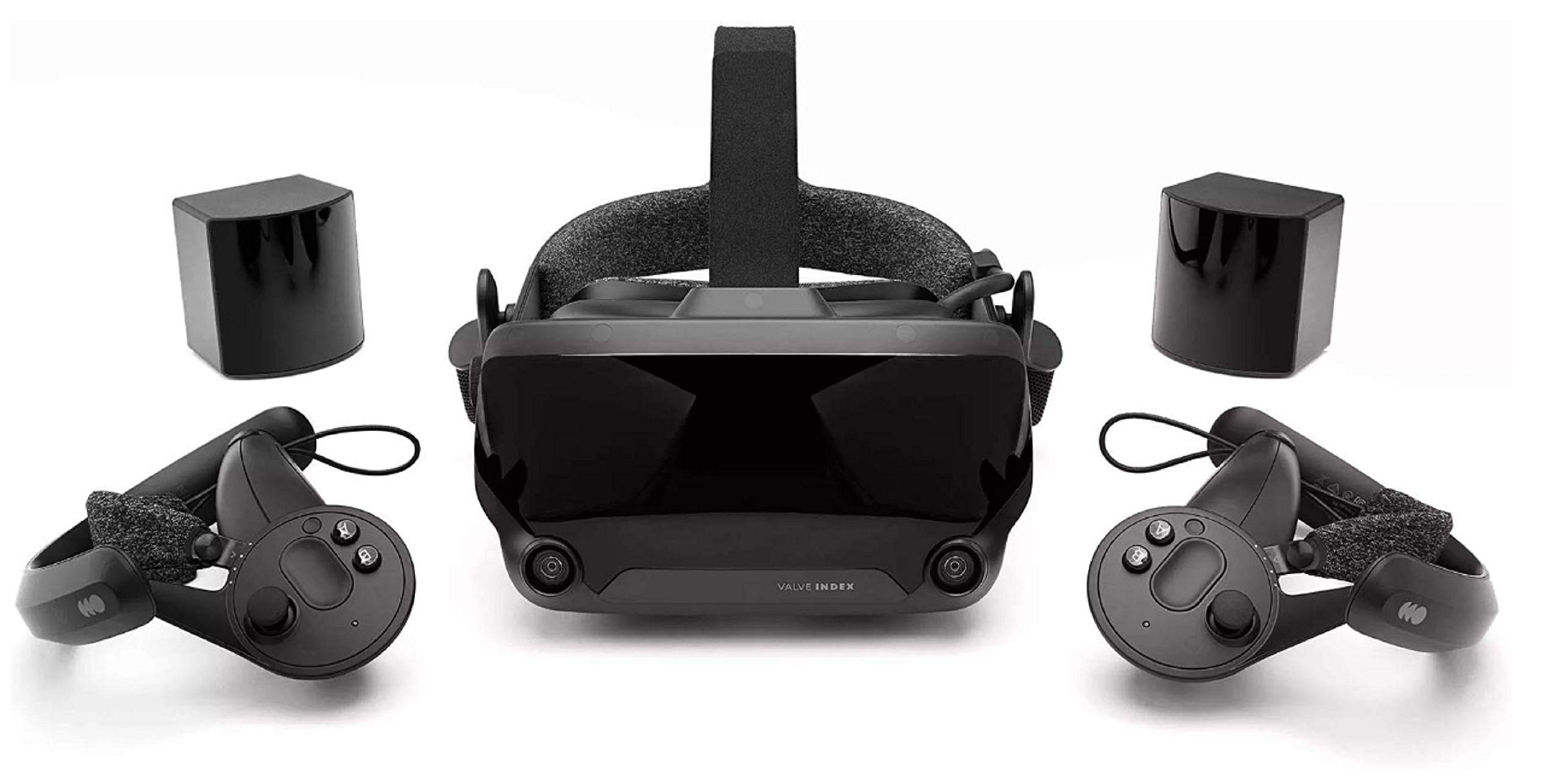
Two base stations and a headset is what the money buys, and it's a different method from everything else on this page. The Index tracks with external stations rather than cameras built into the visor, so controller tracking holds steady when your hands are outside your own view and room-scale coverage doesn't change with the light in the room.

The 144 Hz refresh rate is the highest in this group and the specification we care about most, because fast head turns stay settled instead of smearing. It's also unapologetically a PC product: no standalone mode, no battery to run down, so a long sitting ends when you decide it does. Eye relief, head size, and interpupillary distance all adjust mechanically, with the IPD range spanning 58mm to 70mm — worth more than it sounds if you share the headset or sit at either end of that range.

The sticking point is money. This is the most expensive kit here by a wide margin, and at that figure we want the PC to be doing the work. The kit also arrives in several pieces, so open every box and check each base-station lead and both headphone arms before you settle in — a missing power cord is the kind of thing that sidelines a new setup for a week.

If your PC is the only place you'll play and the room is yours to arrange, this is the kit. If the headset also has to be a living-room device that gets packed away, it isn't.

Pros

  • Steadiest tracking here, thanks to external base stations
  • 144 Hz refresh, the highest in this group
  • Mechanical IPD adjustment across 58mm to 70mm
  • No battery to die mid-session

Cons

  • Tethered only: needs a compatible PC, no standalone mode
  • Base stations need power points and clear placement
Our verdict

For a room-scale, PC-first setup, the Index's base stations give the steadiest tracking here and 144 Hz keeps fast turns clean — accept the tether and the price.

Check Latest Price

How We Tested PC VR Headsets

We started with a shortlist of headsets that could be driven by a gaming PC, either over a link cable or wirelessly, then filtered by tracking style, included accessories, and price so every tier was represented. Six of them arrived and stayed set up for eight months — long enough for the novelty to wear off and the small annoyances to surface. Each one got the same routine.

Every headset was used in three setups: a living room with the coffee table pushed aside for room-scale games, a basement desk wired to a mid-range PC for flight and racing sims, and the couch for seated sessions and video. We wore each for at least one two-hour sitting to see when the weight started to bite, tried them with and without glasses, and timed every battery from full charge to shutdown while noting what was on screen.

For image quality, we read small in-game text and cockpit gauges, moved our eyes off-center until the picture blurred, and checked which headsets showed visible grain in dark scenes. We streamed from the same PC wirelessly and over a cable, counting stutters and adjusting settings whenever frames dropped. Then we weighed what came in the box against the price — base stations, controllers, cables, included games — to see what each headset actually cost to get running.

How to Choose a Pc Vr Headset

Standalone With PC Link, or Tethered From the Start

Two designs answer the same question differently. A standalone headset runs its own operating system and its own games, then borrows your PC's graphics over a cable or a Wi-Fi link when you want something more demanding. A dedicated PC headset is closer to a monitor: no battery, no internal compute, just whatever your graphics card can push through a tether.

If the headset will also leave the desk — a living room, a friend's house, a trip — the standalone route earns its keep, which is why our top two picks take it. If it lives in one room and you want the fewest moving parts, a tethered kit is simpler. The Index is that second answer.

Check Your PC Before You Fall for a Headset

The heartbreak in PC VR is buying the headset first. A linked standalone needs a spare USB-C port that carries data, or a Wi-Fi network strong enough to reach your play space without stuttering. A tethered kit needs a free video output and a machine that meets the maker's requirement — Valve's kit is listed as requiring a Valve Index-compatible PC.

Look at the back of your computer before you order. If it's a thin laptop, assume you'll need an adapter or a different headset, and confirm the requirement the maker publishes rather than the one you hope for.

Read the Resolution Number Per Eye

Listings mix per-eye and combined figures, and the combined ones flatter the product. The Quest 3's 2064 x 2208 is per eye; that's the figure to stack against the Quest 3S's 1832 x 1920. Lens design matters nearly as much: pancake lenses hold the image sharp toward the edges of the view, which is why reading a virtual desktop on the cheaper headset feels softer than its numbers alone suggest.

If your PC time is mostly text, spreadsheets, and seated sims, spend here. If it's mostly room-scale games where you're moving, the gap closes.

Tracking: Cameras on the Headset or Stations in the Room

Inside-out tracking uses cameras on the visor to read the room. Nothing to mount, nothing to plug in, but it wants a lit space with visible detail to work against. Base-station tracking puts the sensors in the room instead, which costs you setup time and two power points and returns the steadiest controller tracking of the three.

Shared living rooms and headsets that get packed away favour inside-out. A dedicated space where the stations stay on their shelves is where the Index's approach pays you back.

Plan for Session Length and Fit

Listed battery life here runs from 2.2 to 2.5 hours, and that's a ceiling rather than a promise: demanding titles and wireless PC streaming both draw harder, so a real session ends sooner. Decide up front whether you'll charge between sessions or play cabled.

Fit matters as much. Facial interfaces press differently on different faces, and mechanical IPD adjustment — the Index's 58mm to 70mm range is the clearest example — is worth having if more than one person wears the headset.

Frequently Asked Questions

Final Verdict

The Meta Quest 3 is the headset we point most people to, because it refuses to force the decision: it plays on its own and it plays your PC library, and it has the sharpest per-eye image in this group. If the PC is the only place you'll use it, the Quest 3S does the same job for less and asks you to accept a softer picture.

The Valve Index remains the answer for a dedicated room and a graphics card that never moves — nothing here tracks like it. Just know that's what the money is buying, and that it buys nothing else.