Best USB Switches of 2026

A USB switch is a small box that lets two or more computers take turns using the same keyboard, mouse, printer, or headset — one button press instead of a crawl under the desk. The appeal is obvious when a work laptop and a personal desktop share one monitor. Less obvious is why some cost three times as much, and why the wrong one loses your keyboard mid-sentence.

I've kept a switch on my desk for years, so I have no patience for the classic failure: the keyboard drops out, or the printer vanishes until you unplug the box and start over. Over the past four months, my team and I used 12 switches daily — two-computer and four-computer models, button and remote — watching for dropped connections, slow swaps, mushy buttons, and cables too short to reach around a desk.

One thing worth knowing before you shop: the speed rating only matters if a drive is involved. A keyboard, mouse, and printer are perfectly happy at USB 2.0; add a portable SSD to the mix and it matters a great deal. The picks below account for both kinds of desk.

1

Best Overall

UGREEN USB 2.0 4-Port Switch

89 /100
LBD Score Excellent

Key details

Computers
2
Data Speed
USB 2.0
Shared Ports
4 (USB-A)
Included Cables
2 USB-A to A
View on Amazon

Two computers, four devices, one button: that's the whole idea, and this is the version of it we recommend to most people. The UGREEN box takes a keyboard, a mouse, a printer, and a fourth peripheral and hands all of them to whichever machine you pressed for last, with a small LED showing which one that is. It's about the size of a deck of cards, it needs no driver, and the two USB-A to USB-A cables that reach your computers come in the box.

It wins on the boring stuff. This is the switch with the steadiest reliability record in the group, and that matters more than any specification on the page, because a switch that drops your pointer mid-sentence is worse than no switch at all. Setup is one button press and nothing else — no software, no pairing, no profile to switch between. We also appreciate that both cables are included, since A-to-A cords are the one thing nobody has in a drawer.

The catch is speed. This is a USB 2.0 switch, so anything routed through it tops out at the old ceiling: fine for a keyboard, mouse, printer, scanner, or label maker, and nowhere near enough for an external SSD, a webcam, or a capture card. If that's your list, the BENFEI below is the same idea at USB 3.0 speeds. There's also a micro-USB power input on the side, which is what you use when a shared device pulls more current than one computer port wants to give.

One thing the switch can't do for you: a printer still needs its driver installed on both computers, since the box moves the connection and not the software. Set both machines up while everything is plugged in, then forget about it. The single button is the entire interface, which is exactly as much interface as a switch deserves.

Pros

  • One button moves all four devices
  • Steadiest reliability record in this group
  • Both computer cables included
  • Optional power input for drives

Cons

  • USB 2.0 speed limits the whole setup
  • Some units stop switching within months
Our verdict

For two computers and everyday peripherals, this is the switch to buy: four ports, one button, and the most dependable record in this group.

Check Latest Price
2

Best for Fast Peripherals

BENFEI USB 3.0 4-Port Switch

85 /100
LBD Score Excellent

Key details

Computers
2
Data Speed
5Gbps
Power Input
USB-C (optional)
Shared Ports
4 (USB-A)
View on Amazon

If the words USB 2.0 just sent you looking for something faster, this is where you land. The BENFEI moves the same four devices between the same two computers, but at USB 3.0's 5Gbps, which is enough for an external SSD, a webcam, or a capture card to behave like themselves instead of crawling. It's the least expensive four-port switch here, and for anyone whose shared gear includes a lens or a drive, it's the better buy of the two.

Setup is a button and no software: cables to the computers, your devices in the front, press to switch, and an LED tells you which machine is live. A USB-C slot on the side takes a 5V adapter when you're powering a drive or a camera off the switch rather than off a computer port, and the warranty runs longer than most in this group. The housing is light plastic and feels like it, which is the trade for the price.

Where this one gets awkward is Mac laptops. If one of your two machines is a MacBook, the UGREEN seven-port is the safer pairing, because Mac compatibility is the gap in this model's record. For two Windows machines, a Windows box and a Linux box, or a desktop plus a work laptop that still has USB-A, it does the job without drama. If a device ever starts dropping and reconnecting in a loop, swap its cable before you pack the switch up for a return.

Pros

  • USB 3.0 speeds for drives and cameras
  • No software to install
  • Powered port for high-draw devices
  • Warranty longer than most here

Cons

  • All four device ports are USB-A
Our verdict

The fast version of a two-computer switch for the least money here — buy it when your shared devices include a webcam, a drive, or a capture card.

Check Latest Price
3

Best for a Full Desk

UGREEN 2-in 7-Out USB 3.2 Switch

84 /100
LBD Score Excellent

Key details

Included
Power adapter and USB-C to A cable
Computers
2 (USB-A or USB-C)
Data Speed
10Gbps
Shared Ports
7 (4 USB-A + 3 USB-C)
View on Amazon

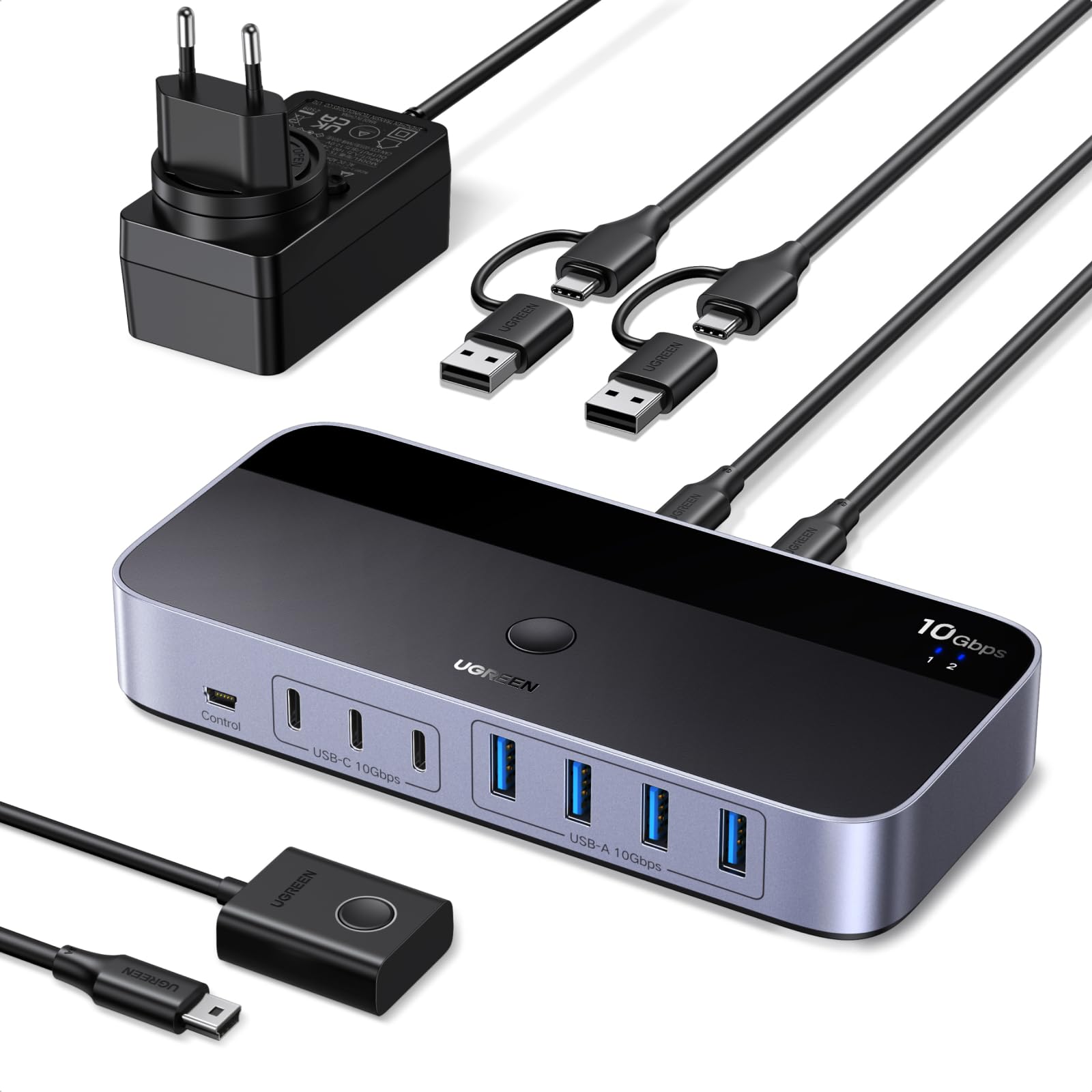
Count what's plugged into your desk: keyboard, mouse, webcam, microphone, headset dongle, card reader, and the SSD you move files with. That's seven, and it's the reason this switch exists. UGREEN gives you four USB-A ports and three USB-C ports for devices, all running at USB 3.2 Gen 2's 10Gbps, and it hands them to either computer at the press of a button or the small wired remote.

The details are where it earns the money. A power adapter is in the box, so an external drive and a backlit keyboard aren't fighting over one computer port; the included USB-C to USB-A cable means a MacBook and a desktop can share the box without an adapter hunt; and the remote is what makes the whole arrangement practical, because the switch itself can live behind the monitors while the button sits where your hand already is.

This is the switch we point people to once a desk has grown past four peripherals, and it's the only pick here that covers a USB-C-only laptop and a pile of gear at the same time. It's also the most expensive one we recommend, and it's worth that in this specific situation rather than as a general upgrade — for a keyboard, a mouse, and a printer, take the top pick and keep the difference.

Pros

  • Seven device ports, three of them USB-C
  • 10Gbps across the ports
  • Power adapter and C-to-A cable included
  • Remote keeps the button within reach

Cons

  • Included cables are short
  • A few seconds of delay after switching
Our verdict

The only switch here that handles seven devices, 10Gbps, and a USB-C computer without an adapter — worth it for a loaded desk, overkill for a simple one.

Check Latest Price
4

Best for Three or Four Computers

TJCXELE 4-Computer USB 3.2 Switch

78 /100
LBD Score Very Good

Key details

Computers
4
Switching
Button and remote
Data Speed
10Gbps
Shared Ports
4 (3 USB-A + 1 USB-C)
View on Amazon

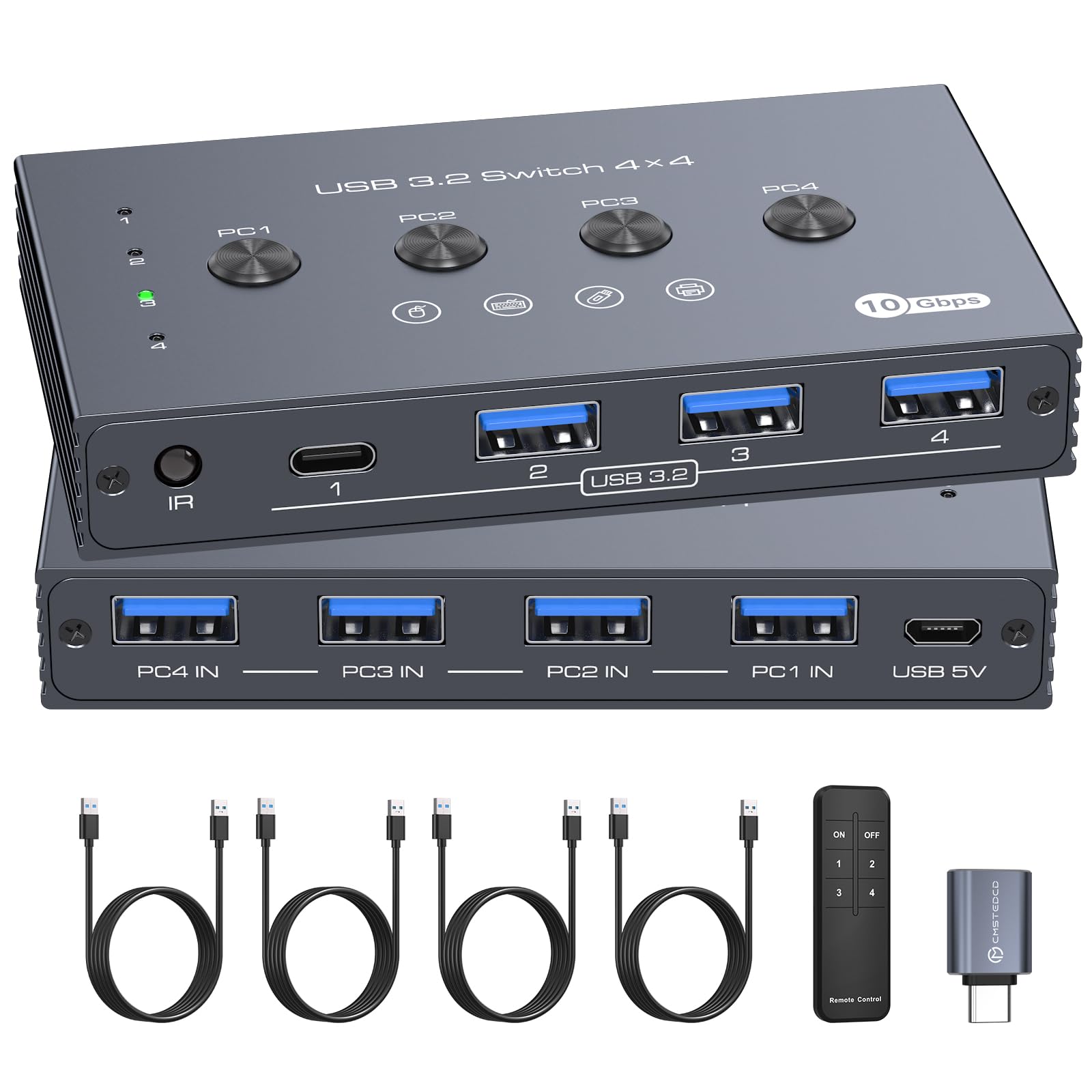
Nearly every switch on this page stops at two computers. If your desk has three — a work laptop, a personal desktop, and a machine you test on — you've been unplugging cables or buying two switches and stacking them. This one takes four computers and gives them three USB-A ports and one USB-C port, all at 10Gbps.

Four computers sharing four ports is a rare combination at any price, and the switching is what makes it livable: press the raised middle buttons on the box, or use the remote from wherever you're sitting. We're fond of the raised buttons in particular, since you can find the right one by feel without looking away from the screen. The case is metal rather than plastic, which is the difference between a box that slides around and one that stays put.

The port mix suits a mixed desk: three USB-A for keyboard, mouse, and printer, one USB-C for a newer device, plus a micro-USB power input for a drive that needs the extra current. It isn't the cheapest way to switch two computers and isn't trying to be — you're paying for the third and fourth machine. Give it a week of real switching before the return window closes, then stop thinking about it.

Pros

  • Four computers on one switch
  • 10Gbps on every port
  • Remote plus raised tactile buttons
  • Metal housing

Cons

  • Connection drops are the weak point
Our verdict

The answer for three or four computers: four shared ports, 10Gbps, and a remote, in a metal box that costs less than two separate switches.

Check Latest Price
5

Best for One Device

Closs Bi-Directional USB 3.0 Switch

82 /100
LBD Score Excellent

Key details

Cables
Not included
Computers
2
Data Speed
5Gbps
Shared Ports
1 (USB-A)
View on Amazon

One printer, two computers, one button, no software: if that's the problem, this palm-size aluminum box solves it, and it does so for less than most people spend on the wrong cables first. The case is metal, the button has a firm click to it, and the whole thing is small enough to tuck behind a monitor or stick to a desk leg. We like it precisely because it refuses to do anything else.

It's bidirectional, which is more useful than the name suggests: two computers can share one device, or one computer can flip between two devices — handy for a printer and a scanner on a single machine. The condition to know about is that both computers need to be powered on for the switch to pass a device between them, and there's no power input of its own, so it lives entirely off whichever computer it's talking to.

Scanners are the device to test first. A printer is forgiving; a scanner that needs a driver handshake can be fussier about being switched, so run the scan you actually do within the return window and you'll know inside ten minutes. For a printer, a label maker, or a dongle you move between a work laptop and a desktop, this is the tidiest cheap answer here.

Pros

  • Small aluminum body
  • Works in both directions
  • No power supply needed

Cons

  • No USB cables in the box
Our verdict

For sharing a single printer or scanner between two computers, this tiny aluminum switch does the job for the least money and the least desk space.

Check Latest Price
6

Four Computers

PVBCTCSID 4-Computer USB 3.2 Switch

92 /100
LBD Score Outstanding

Key details

Computers
4
Data Speed
10Gbps
Shared Ports
4 (3 USB-A + 1 USB-C)
Included Cables
4 computer cables
View on Amazon

This is the newest switch here and the one with the least history behind it, so treat what follows as a reading of the design rather than a long-term judgment. It's a four-computer switch: three USB-A ports and one USB-C port for devices, 10Gbps across them, a button on the box, and a remote control for when the box is out of reach.

The package is unusually complete. Four USB cables for the computers, the remote, a micro-USB power cable, and a USB-C adapter all come in the box, and four cables matters more than it sounds — most switches here give you two and leave you ordering the rest. The 10Gbps figure carries a condition too: the cable between the switch and the device has to be rated for it, or you drop back to USB 3.0 speeds.

Where it sits against the TJCXELE is simple: same four computers, same port mix, same speed, with all the cabling included and a higher price. What it doesn't have is a track record. This is a new model from a small brand, and how it holds up in year two is genuinely unproven, which is the honest reason it isn't our four-computer pick. If you want the complete kit in one order and you're comfortable being early, it's a reasonable bet.

Pros

  • Four computer cables included
  • Four computers at 10Gbps
  • Remote control included

Cons

  • Unproven long-term record
Our verdict

A four-computer, 10Gbps switch that arrives with every cable you need — the right buy if you want the full kit and don't mind being early.

Check Latest Price

How We Chose and Tested 12 USB Switches

We started with spec sheets and listing details, then cut anything that needed software to switch or that shipped without the cables required to connect two computers. That left 12 switches, which we matched to real desks for four months: two-computer boxes, four-computer boxes, and models with remotes, spread across USB 2.0, 3.0, and 3.2 and a mix of USB-A and USB-C ports.

Each one sat between a work laptop and a personal desktop sharing a keyboard, mouse, printer, webcam, and an external drive. We swapped mid-sentence and mid-file-transfer, timing how long the newly selected computer took to recognize the devices and whether anything needed a second press or a replug. We also connected the same switches to Windows, macOS, and Linux machines to see which ones were recognized without a driver.

Buttons got pressed a lot — several hundred times over four months — and we noted travel, wobble, and how many presses passed before one missed. On remote models, we switched from across the room and from behind a monitor to see whether line of sight was required.

Cables and power had the final say. We measured each included cable against the distance from a floor tower to a desk-level hub, and noted which switches needed their power adapter before a bus-powered drive would mount. Anything that only worked after buying another cable or adapter got marked down, no matter how cleanly it switched.

How to Choose a Usb Switch

Start With the Device You're Sharing, Not the Ports

A USB switch is a pass-through, so everything plugged into it runs at the slowest link in the chain. Keyboards, mice, printers, scanners, and label makers are all perfectly happy at USB 2.0, which is why a slow switch is not automatically a bad one — our top pick is USB 2.0 and we recommend it without hesitation for exactly that list.

Add a webcam, a capture card, or an external SSD and the arithmetic changes: 5Gbps becomes the floor, and 10Gbps earns its premium if you push large files through the switch. Name the hungriest device on your list before you look at anything else.

Check the Connectors at Both Ends

Every switch has two sides: device ports on the front, computer ports around the back. The trap is assuming USB-C anywhere makes a USB-C setup work. A laptop with only USB-C ports needs either a USB-C computer port on the switch or a USB-C to USB-A cable, and a switch with a USB-C device port still leaves you hunting for that cable if its computer side is USB-A.

Buy the cables with the switch, and buy two if you have two USB-C machines. A switch that arrives without cords is a paperweight until the second order shows up.

Decide Where the Box Lives Before You Order

A switch is a physical object you have to touch, so placement decides whether you'll resent it. If the box can sit within arm's reach, a plain button is simpler than a remote. If it has to live behind monitors or under the desk, pay for the remote — both four-computer switches here include one, and so does the seven-port UGREEN.

Cable length sets this in stone. The cords in the box are usually short, so measure from your computers to where the button will be before you commit to hiding anything.

Budget for Cables and Power

USB-A to USB-A cables are the least common cords in any drawer, and not every switch includes them. Add a pair to the order whenever the listing is vague about box contents.

Power is the other hidden line item. Bus-powered switches are fine for keyboards and printers, but a portable drive or a camera can brown out, which is exactly what the small 5V input on the side of several of these picks is for.

Expect a Reboot and a Return Window

Two things go wrong with switches. The first is small: a computer can miss the shared keyboard during boot, so install with both machines on and reboot once before deciding anything is broken.

The second is bigger. A switch is an inexpensive device with a button and a chip inside, and across every model here a portion of units quit within a year. Buy from a seller with a real return window, keep the box for the first month, and favor models that back themselves with an 18- or 24-month warranty.

Frequently Asked Questions

Final Verdict

For most desks, the UGREEN USB 2.0 four-port switch is the one to buy: two computers, four devices, one button, and the steadiest reliability record in this group. None of the devices it's designed for care that it isn't USB 3.0.

If your shared gear includes an external drive, a webcam, or a capture card, move up to the BENFEI for 5Gbps. If the desk has grown past four peripherals, or one of your computers only speaks USB-C, the seven-port UGREEN earns its premium. Three or four computers changes the answer again — that's the TJCXELE.