Best Vertical Laptop Stands of 2026

A laptop balanced on its edge in a thin cradle is a small act of faith — one brush of a tote bag and you're thinking about the drawer again. The fix is simple: a vertical stand turns the machine you aren't typing on into a docked slab at the back of the desk and hands you back its footprint. What separates a stand you stop noticing from one you resent is smaller than the product photos suggest: how wide the slot opens, whether you can widen it without an Allen key, and whether the base stays put.

We've spent five months with 14 of these on our desks, and the deciding details were rarely the ones printed on the box. Slot width matters most: a cradle that maxes out around an inch will hold an ultrabook happily and fight a thick gaming laptop, while a wide slot can let a thin MacBook lean if the padding is skimpy. Dual- and four-slot racks earn their price only if you park that many machines; for one laptop, a single dock is plenty.

1

Best Overall

UGREEN Adjustable Vertical Stand

95 /100
LBD Score Outstanding

Key details

Footprint
1.97 x 5.91 x 3.15 in
Slot Count
Single
Body Material
Aluminum
Thickness Range
0.47–1 in
View on Amazon

The case for a one-laptop vertical stand is simple: the laptop spends most of its day closed, so it might as well take up the footprint of a book. The UGREEN does that with a single screw-adjusted slot that opens from 0.47 to 1 inch, an aluminum body, and a footprint of 1.97 x 5.91 x 3.15 inches. We like that the adjustment is obvious the first time you use it—twist, set the gap, and the silicone pads do the rest.

What makes it our default is the balance of grip and give. The slot is narrow enough for a thin MacBook-style machine but opens for a thicker gaming laptop, and the rubber lining runs along both faces rather than just the bottom. We paid attention to the base because a tall laptop can make a small stand feel tippy; the UGREEN's low center of gravity and covered foot keep it from skating across a smooth desk.

The aluminum finish is the other quiet win: it looks at home next to a MacBook or a plain black work laptop, and it wipes clean without much fuss. For a desk with one laptop and a monitor, the small footprint is worth more than extra capacity. It is the stand we leave in place and forget about, which is the highest compliment for this kind of accessory.

Pros

  • Adjusts from 0.47 to 1 inch
  • Small aluminum body stays put
  • Silicone-lined slot protects finish

Cons

  • Single laptop only
  • Screw needs resetting for different thicknesses
Our verdict

We recommend the UGREEN as the default vertical stand for one laptop: the screw-adjusted slot grips a wide thickness range, and the aluminum body stays put without hogging desk space.

Check Latest Price
2

Best for Two Laptops

OMOTON Dual Vertical Stand

96 /100
LBD Score Outstanding

Key details

Footprint
5.91 x 4.72 x 1.85 in
Slot Count
Dual
Body Material
Anodized aluminum
Thickness Range
0.55–1.65 in
View on Amazon

Two laptops, one stand: the OMOTON's double dock is the obvious buy for a work laptop and a personal machine that share a desk. Each slot adjusts independently from 0.55 to 1.65 inches, and the anodized aluminum body is finished to match a MacBook rather than call attention to itself. At 5.91 x 4.72 x 1.85 inches, its broad base gives the stand a settled look.

We like the weight distribution more than the dimensions suggest. The wide base and metal mass make it feel planted when you slide a laptop in or out, and the silicone pads keep the edges from getting scuffed. The adjustment uses an Allen key, so it is a set-and-forget job rather than something you change at the start of every workday. Keep the key in a drawer; the alternative is hunting for it when a new laptop arrives.

The dual format is the reason to choose it. If you only ever dock one machine, the OMOTON is more stand than you need, and the single-slot UGREEN is easier to tuck behind a monitor. With two, the independent slots are worth the extra desk real estate—especially when one laptop is a thin ultraportable and the other is a chunky 15-inch work machine.

Pros

  • Independent dual-slot adjustment
  • Wide base feels planted
  • Anodized aluminum finish

Cons

  • Wider footprint than single-slot stands
Our verdict

We recommend the OMOTON when two laptops need to share one footprint; the weighted dual-slot body feels planted, and each side adjusts independently.

Check Latest Price
3

Best Tool-Free Adjustment

Psitek Aluminum Vertical Stand

96 /100
LBD Score Outstanding

Key details

Footprint
5.91 x 3.74 x 2.56 in
Slot Count
Single
Body Material
Aluminum
Thickness Range
0.5–1.65 in
View on Amazon

The Psitek's best trick is the pair of stainless quick-release screws that set the slot width without an Allen key. The gap runs from 0.5 to 1.65 inches, so it covers everything from a slim tablet to a thick gaming laptop, and the sandblasted aluminum body has the same low-key look as the rest of this group. We like a stand that can be reset by hand when a different machine lands on the desk.

At 5.91 x 3.74 x 2.56 inches, it has a slightly deeper footprint than the UGREEN, but the base still fits behind a monitor. The padded slot holds the laptop away from the metal, and the rubber feet keep the frame from walking. We found the tool-free screws the detail that matters most day to day: you can loosen, slide, and retighten without leaving the desk.

The five-year manufacturer warranty is longer than most here, and the frame is simple enough that there is little to go wrong. The aluminum finish wipes clean, and the low profile disappears behind a monitor. It is the stand we reach for when a laptop changes hands often.

Pros

  • Tool-free width adjustment
  • Fits 0.5 to 1.65 inches
  • Five-year manufacturer warranty

Cons

  • Light frame can shift when pulled
Our verdict

For a single stand you can reset by hand between devices, we choose the Psitek: the quick-release screws are easy to turn and the aluminum frame is tidy.

Check Latest Price
4

Best for Frequent Docking

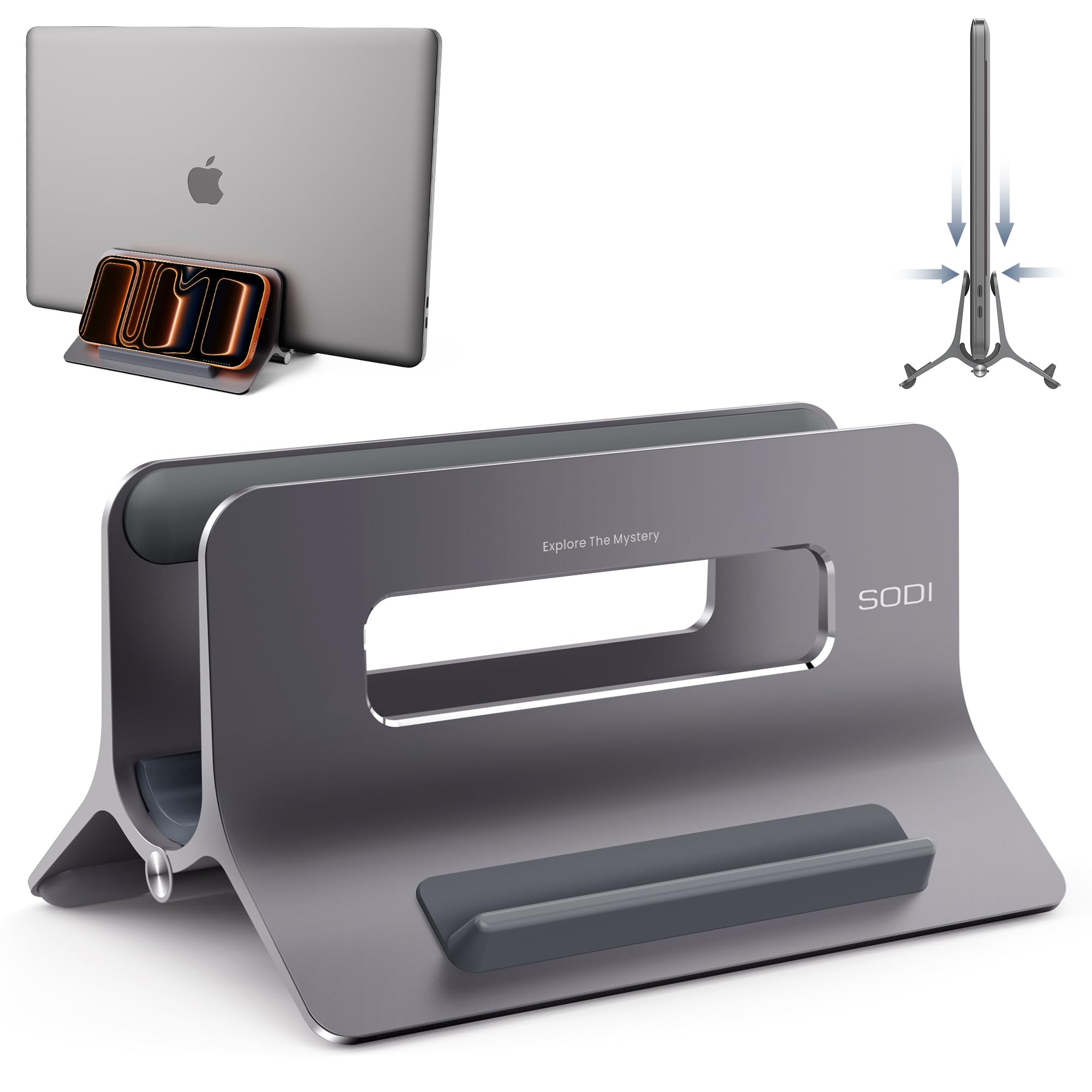
SODI Gravity Lock Stand

92 /100
LBD Score Outstanding

Key details

Footprint
6.38 x 4.33 x 3.46 in
Body Material
Aluminum
Device Capacity
Three devices
Thickness Range
Up to 1.05 in
View on Amazon

The SODI is built around a different habit: drop the laptop in, let gravity pull the jaws closed, and lift it out when you leave. The opening takes machines up to 1.05 inches thick, and the open aluminum frame is designed to let air move around the closed lid. At 6.38 x 4.33 x 3.46 inches, it is chunkier than a simple slot stand, but the extra width is what lets it hold a phone or tablet alongside the laptop.

We like the auto-lock for a desk where the laptop comes and goes several times a day. There is no screw to hunt for behind the monitor and no need to reset the gap when you switch from a MacBook to a work PC. The grip feels secure once the weight settles in, and the silicone pads keep the contact points from scuffing.

The three-in-one shape is more useful than it sounds. The side slots give a phone or tablet a home without another piece of plastic on the desk, and the open frame keeps the laptop's side ports reachable. We minded the larger footprint on a narrow desk; on a deep desk, the extra capacity earns its space.

Pros

  • Gravity jaws self-adjust
  • Holds laptop, phone, tablet
  • Open frame aids airflow

Cons

  • Thick gaming laptops exceed the 1.05-inch slot
Our verdict

We recommend the SODI for anyone docking and undocking all day, because gravity closes the jaws around the laptop instead of leaving you to spin a screw.

Check Latest Price
5

Best for Large Laptops

JARLINK Adjustable Vertical Stand

96 /100
LBD Score Outstanding

Key details

Footprint
6 x 6.07 x 1.75 in
Slot Count
Single
Body Material
Anodized aluminum
Thickness Range
0.55–2.55 in
View on Amazon

The JARLINK is the one we point to when the laptop is big and heavy. Its slot adjusts from 0.55 to 2.55 inches, the widest range in this group, and the anodized aluminum body has a broad 6 x 6.07 x 1.75-inch base to match. A 17-inch gaming laptop or a thick mobile workstation needs that kind of room; a slim ultraportable will rattle around until you wind the screw in.

The screw is adjusted with an included Allen key, and once the gap is right the laptop sits upright without leaning or wobbling. The silicone mat protects the finish, and the base is heavy enough that the stand stays put when you lift the machine out. Changing to a much thinner laptop means resetting the gap, which is a two-minute job rather than a daily annoyance.

What we appreciate most is the confidence the JARLINK gives with a large machine. It does not feel like a scaled-up phone stand; the mass and the wide contact patch make a 17-inch desktop replacement look settled rather than balanced on an edge. The silicone mat runs the length of the slot, so a large laptop is supported along its edge rather than pinched at one point.

Pros

  • Widest thickness range here
  • Heavy aluminum base
  • Full-length silicone padding

Cons

  • Wide base takes more desk depth
Our verdict

We point buyers with a thick 17-inch laptop to the JARLINK, whose wide adjustment and hefty aluminum base suit machines that make lighter stands feel top-heavy.

Check Latest Price
6

Best Budget Dual-Slot

Vaydeer Dual-Slot Plastic Stand

92 /100
LBD Score Outstanding

Key details

Footprint
5.98 x 5.51 x 2.17 in
Slot Count
Dual
Body Material
ABS plastic
Thickness Range
0.59–0.94 in
View on Amazon

The Vaydeer is the plastic answer to a two-laptop desk. It has two vertical slots that adjust from 0.59 to 0.94 inches, plus outer uprights that can hold a tablet or phone in the 4-in-1 layout. At 5.98 x 5.51 x 2.17 inches and 0.23 kg, it is light enough to move around and compact enough to sit behind a monitor.

The two outer pieces move independently, so one slot can take a thin MacBook while the other takes a chunkier work laptop. The silicone pads on the base keep it from sliding, and setup is simple enough to do without instructions.

We like the Vaydeer for the job it does rather than the object it is. It holds two laptops upright, frees the desk, and doesn't pretend to be a premium dock. The plastic is the thing you notice in the hand, but it is also why the stand stays light and easy to move; for a home office that needs organization more than heft, that is the right trade.

Pros

  • Two independently adjustable slots
  • Light and compact
  • 4-in-1 device storage

Cons

  • Thickness range stops at 0.94 inch
Our verdict

We rate the Vaydeer as the budget answer for two laptops and a tablet, as long as you accept a plastic body that will not feel like machined aluminum.

Check Latest Price
7

Best Multi-Device Organizer

KDD 4-Slot Gravity Stand

89 /100
LBD Score Excellent

Key details

Weight
1.3 lb
Device Slots
Six
Contact Padding
Silicone
Thickness Range
Up to 1.1 in
View on Amazon

Six slots is the headline, and the KDD makes the most of them: two outer bays for laptops and four middle slots for tablets, phones, a keyboard, or whatever else is cluttering the desk. The device slots take thicknesses from 0 to 1.1 inches, and the gravity clamps close around each device as it settles. At 0.59 kg, it has enough mass to stay put when you pull something out.

The gravity mechanism is the right choice for a family desk or a small office where devices are constantly coming and going. There are no screws to adjust and no trays to line up; you drop the laptop in and the weight does the clamping. The silicone padding protects the edges, and the upright layout keeps the laptop's side ports accessible.

The four middle slots are more useful than the laptop bays in daily life. They give an iPad and a phone a place to live without adding another dock, and the open design makes it obvious which device is where. On a narrow desk, the six-slot footprint is the thing to check before buying; on a deep desk, it replaces a drawer's worth of clutter.

What we like most is how little thought the KDD asks for. You drop a device in, it grips, and the desk stays clear. It is not the stand for a single sleek laptop—it is the stand for a pile of devices that needs a parking structure, and it earns its space by replacing several smaller organizers.

Pros

  • Six device slots
  • Gravity clamps need no adjustment
  • Weighted base stays put

Cons

  • Thick devices above 1.1 inches do not fit
Our verdict

We recommend the KDD when a desk is a parking lot for laptops, tablets, and a phone; its six slots and gravity clamps bring order without a premium stand's price.

Check Latest Price
8

Wood Desk Setups

Nuvograin Wood Vertical Stand

89 /100
LBD Score Excellent

Key details

Footprint
6 x 3 x 1.6 in
Slot Count
Single
Body Material
Natural wood
Contact Padding
EVA pad
View on Amazon

The Nuvograin is the one stand here that looks like a piece of furniture rather than a computer accessory. It is cut from natural wood, finished in black walnut, and sized at 6 x 3 x 1.6 inches, with an EVA pad to protect the laptop and the desk. For a visible shelf or a home office with warm materials, that changes the calculation.

The single-slot shape is simple and unobtrusive, and the wood softens a metal-and-glass desk in a way aluminum cannot. The slot is adjustable, but it is a screwdriver job rather than a hand-twist, so set it once and leave it alone. The compact footprint lets it sit beside a monitor without becoming the visual center of the setup.

The Nuvograin is not trying to be a dock. There is no second slot, no cable channel, and no gravity mechanism; it is a block of wood with a padded slot, and that is the appeal. On a desk where the laptop is closed and the stand is visible all day, the restraint is the point.

We like the Nuvograin most when the stand is part of the room, not hidden behind a monitor. The walnut grain and the small footprint make it feel intentional, and the EVA pad keeps the laptop from sliding on bare wood. It is the warmest-looking way to clear a desk, and that is the reason to choose it.

Pros

  • Natural walnut finish
  • Compact single-slot shape
  • EVA pad protects laptop

Cons

  • Fit is tight for thick laptops
Our verdict

We recommend the Nuvograin for the desk where a laptop stand has to look like furniture; its walnut body is handsome, but check your laptop's thickness because the fit is less forgiving.

Check Latest Price

How We Tested Vertical Laptop Stands

We started with more than 40 stands and cut the list down by reading spec sheets for the things that actually disqualify one: a slot that won't open past a certain thickness, a cradle with no padding, an adjustment that needs a screwdriver every time you swap machines. Slot count and material narrowed it further, and price had to make sense per laptop parked — a four-slot rack only earns its cost if you genuinely keep four machines on a desk. That left 14 stands, single- and multi-slot, in aluminum, plastic, and wood.

For five months they lived on three desks: my home office, a shared coworking desk where equipment gets moved constantly, and a colleague's setup where a work laptop and a personal one fight over the same corner. We measured every slot at its narrowest and widest, then loaded a 13-inch ultrabook, a 15-inch laptop, and a thick 17-inch gaming model in turn, noting whether each sat straight or leaned against a wall of the slot.

Sturdiness got physical. We bumped each stand with the spine of a notebook, slid a laptop in and out 20 times, and pressed on the base to see if it flexed — rubber feet decided more of these tests than the metal did. The gravity-locking cradles were the most fun: you drop a laptop in and the slot pinches closed, so we checked that the mechanism still released smoothly after a few weeks of use.

Space saving was measured with a tape rather than a feeling — footprint before and after, plus the clearance needed behind the stand for a charging cable, since models without a cable notch pushed the laptop forward on the desk. We finished by tracking finish wear, loosening screws, and how much the padding flattened, because a stand that scuffs a lid by month three is worse than no stand at all.

How to Choose a Vertical Laptop Stand

Measure the slot, not the screen size

A 17-inch laptop can be thinner than a 13-inch work machine, so screen size tells you almost nothing about fit. Measure the laptop at its thickest point, with any shell case left on, and compare that number with the slot range. The UGREEN covers 0.47 to 1 inch; the JARLINK opens to 2.55 inches for desktop replacements. If the laptop is close to the limit, leave room for the silicone pad and for a case you might add later.

Choose one slot or a device rack

One laptop, one slot is usually the tidiest arrangement; a dual-slot stand only earns its footprint when two machines genuinely live on the desk. The OMOTON gives each laptop its own independently adjustable bay, while the KDD turns the same idea into a six-slot rack for tablets and phones. Count the devices you need to park, then look at the desk depth you have. A multi-slot stand is an organizer, not just a laptop holder, and it should replace clutter rather than add it.

Decide how the slot should adjust

Tool-free screws and gravity clamps solve different problems. A screw stand is set once for a laptop that stays put; a hand-tightened screw, as on the Psitek, is easier when devices swap occasionally. Gravity clamps, as on the SODI, suit a laptop that comes and goes several times a day because the jaws close on their own. Check the release, too: a case or a thick edge can make a clamp feel stickier than it does with a bare laptop.

Stability, padding, and airflow

Aluminum and weighted bases resist tipping better than light plastic, but the desk surface matters too. Silicone or EVA pads protect the laptop and give the stand grip; felt feet on a glass desk are the wrong combination. A vertical stand can help a laptop that vents through the bottom by keeping the vents off the desk, but only if the slot and pads do not cover them. Check the vent layout before you assume the upright position is cooler.

Frequently Asked Questions

Final Verdict

For most desks, the UGREEN is the stand we recommend: it adjusts across the common laptop thickness range, holds a closed machine securely, and leaves a small footprint. If two laptops need a home, the OMOTON's independent slots are worth the extra desk space.

For a single laptop that moves between devices, the Psitek's hand-tightened screws are the easier daily ritual. The one you choose should match how often the laptop leaves the stand, not how many features the box lists.