Best Wireless Mice of 2026

There is a specific kind of frustration that comes from a cursor that freezes mid-sentence, thinks about it for two seconds, then reappears on the other side of the screen. I've retired more wireless mice than I'd like to admit over that exact stutter. A mouse should be the least noticeable thing on your desk: you reach, it moves, you stop thinking about it. When that breaks down, you feel it all day.

The problem is that the numbers on the box tell you almost nothing about how a mouse feels in your hand at hour six of a spreadsheet. We've spent the past six months living with 14 wireless mice, from six-button budget models with adjustable DPI to silent Bluetooth designs meant to ride in a laptop bag, and the same handful of things separated the good ones from the ones I quietly unplugged.

Here's what first-time buyers tend to overrate: maximum DPI. Most people never push past the middle setting, and a higher number doesn't buy you a smoother cursor. What does matter is whether the shape suits your hand size, whether the clicks stay quiet enough for a shared office, and whether the thing reconnects instantly after your laptop wakes up. The picks below earned their spots on those grounds, not on spec-sheet bragging rights.

1

Best Overall

Logitech M510

93 /100
LBD Score Outstanding

Key details

Size
4.4 x 2.5 in
Battery
2 AA, rated 2 years
Buttons
7, including back/forward
Connection
2.4 GHz USB-A receiver
View on Amazon

The M510 is one of two genuinely full-size shapes in this group, 4.4 inches long and 2.5 inches wide with soft rubber panels down each side, and the size is the whole point: your palm rests on the arch of the back instead of hovering beside a shell that ends under your knuckles. We noticed it most in the third hour of a work session, when a compact mouse turns into a claw grip and this one simply doesn't.

We appreciate just as much how little upkeep it asks for. Two AA batteries are rated at two years, and the on/off switch and sleep mode make that number believable — our low-battery indicator stayed dark through testing. The scroll wheel tilts sideways for horizontal movement through wide spreadsheets, the back and forward buttons sit where your thumb already rests, and it pairs through Logitech's Unifying receiver, so a compatible keyboard can share the same plug and leave your other port free.

Two limits shape who this suits. Sensitivity is fixed at 1000 DPI with no switch on the body, which is comfortable for documents, email, and browser work but gives you nothing to turn up on a very large, high-resolution display. And the thumb buttons are positioned for a right-handed grip; left-handed users should look at the M240 instead.

Long-term results are the one place this mouse splits: plenty run for years, while a smaller share develop a lagging cursor or a switch that stops registering. The one-year warranty is the backstop, and it's the single reservation we hold against an otherwise easy recommendation.

Pros

  • Full-size shape that supports the whole palm
  • Two-year battery rating on two AA cells
  • Back, forward, and tilt-scroll controls
  • Unifying receiver can carry a keyboard too

Cons

  • Fixed 1000 DPI with no sensitivity switch
  • Long-term switch and scroll-wheel results are mixed
Our verdict

We recommend the M510 to anyone who spends the day at a desk: it's the most comfortable full-size shape here, with a two-year battery and buttons that earn their place.

Check Latest Price
2

Best Bluetooth

Logitech M240 Silent

89 /100
LBD Score Excellent

Key details

Weight
2.6 oz
Battery
1 AAA, rated 18 months
Buttons
3, fixed functions
Connection
Bluetooth
View on Amazon

There's no receiver in the box, and that's the entire argument for the M240: it pairs over Bluetooth, so it costs you no USB port at all. On a laptop with two ports, one of them permanently occupied by a dongle, that isn't a small convenience. At 73.8 grams it also disappears into a bag pocket and turns up again when you need it.

The clicks are quiet the way the name promises — a soft tap rather than a sharp snap — and Logitech rates the reduction at over 90 percent. What stays audible is the scroll wheel, which notches along with a light click; that's the sound to listen for if you share a quiet room. The shape is compact and ambidextrous, so it works in either hand, and the three buttons are fixed: no back or forward, no sensitivity switch.

Where this one earns its place in our bag is the combination: silent, wireless without a dongle, and rated for 18 months on a single AAA that comes in the box. The trade-off is hand size — it's built for small and medium hands, and a wide palm will feel the lack of support by mid-afternoon. It's also Bluetooth-only, so a desktop without a Bluetooth radio needs a different mouse.

Pros

  • Uses no USB port at all
  • Near-silent clicks for shared rooms
  • 18-month rating on one included AAA
  • Compact ambidextrous body at 73.8 g

Cons

  • Bluetooth-only; needs a Bluetooth-equipped computer
  • Only three buttons, none customizable
Our verdict

Buy the M240 if you want to stop sacrificing a USB port: Bluetooth pairing, quiet clicks, and a shape small enough to live in your laptop bag.

Check Latest Price
3

Best Budget

SABLUTE M21

87 /100
LBD Score Excellent

Key details

Weight
3 oz
Buttons
6
Connection
2.4 GHz USB-A, USB-C adapter included
Sensitivity
800/1200/1600 DPI
View on Amazon

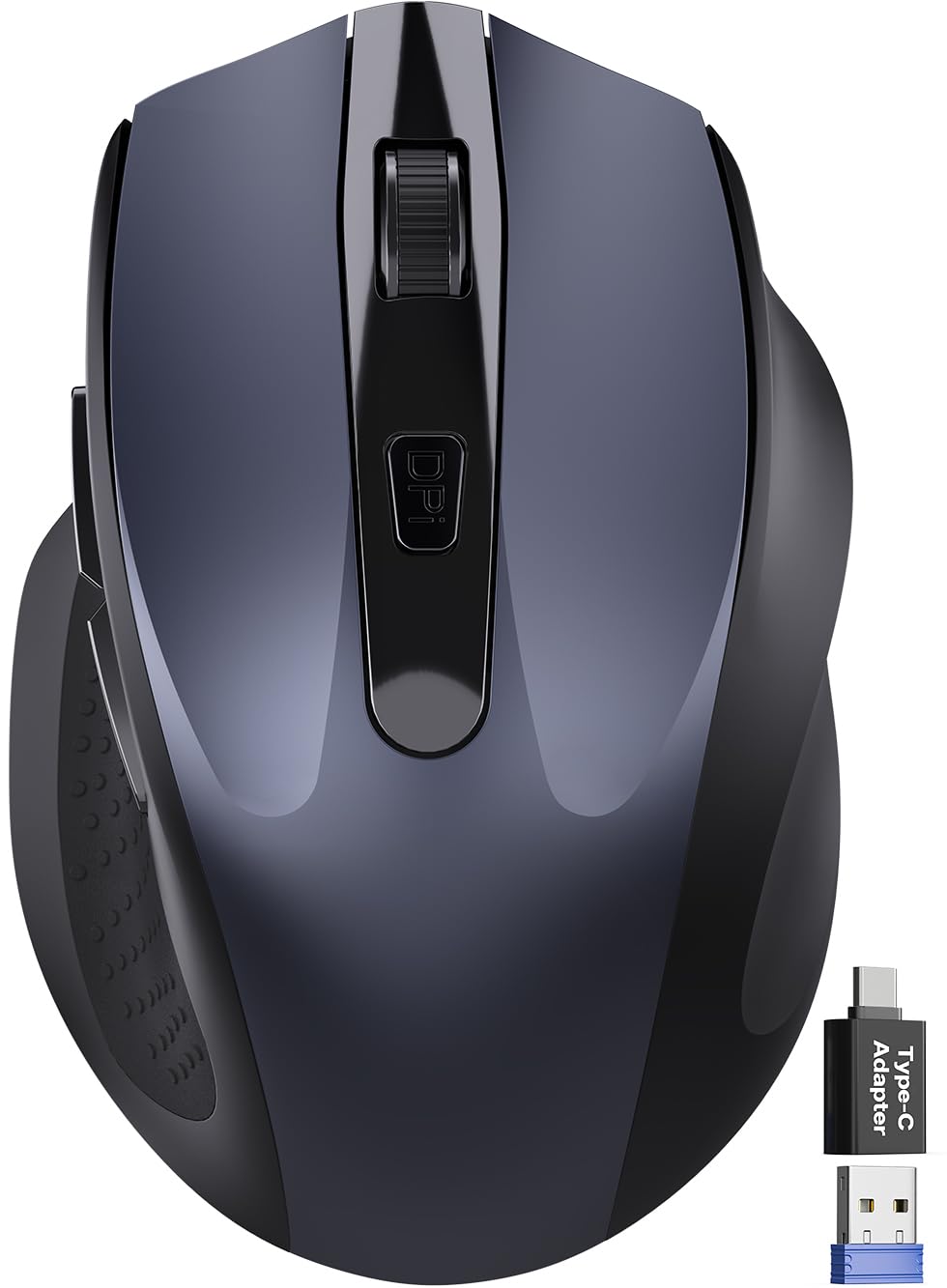
Two small pieces of plastic in the box solve a very modern annoyance: a 2.4 GHz USB-A receiver and a USB-C adapter it slots into. On a laptop with nothing but USB-C ports, that's the difference between this mouse working and a return label. The body is compact too, 4.09 by 2.68 inches and around 85 grams, with a thumb rest molded into the left side.

At the bottom of this group's price range, we expected the shape to be the compromise, and it isn't — this is the cheapest mouse here we're happy to recommend for a small or medium hand. The clicks are quiet (the listing claims up to 90 percent noise reduction), the six buttons include forward and back, and a button on top cycles 800, 1200, and 1600 DPI. The shell is made from 65 percent recycled plastic, a nice bonus rather than a reason to buy.

The reservations are real but bounded. It's a right-handed shape, so lefties should stop here, and the sizing runs small: large hands will overhang the back. Some units arrive dead or develop a cursor that lags behind the movement, and this model has a shorter track record than our top picks — which is the trade for the lowest price in this set.

Pros

  • USB-C adapter included alongside the receiver
  • Quiet clicks and six buttons at a budget price
  • Thumb rest for small and medium hands
  • Shell uses 65% recycled plastic

Cons

  • Right-handed shape only
  • Some units arrive dead or lag behind the cursor
Our verdict

Our budget pick earns it with quiet clicks and both USB adapters in the box, as long as your hands are small to medium.

Check Latest Price
4

Best for Big Hands

Acer OMR266

88 /100
LBD Score Excellent

Key details

Size
5.1 x 3.2 in
Batteries
2 AAA, not included
Connection
2.4 GHz USB-A receiver
Sensitivity
800/1200/1600 DPI
View on Amazon

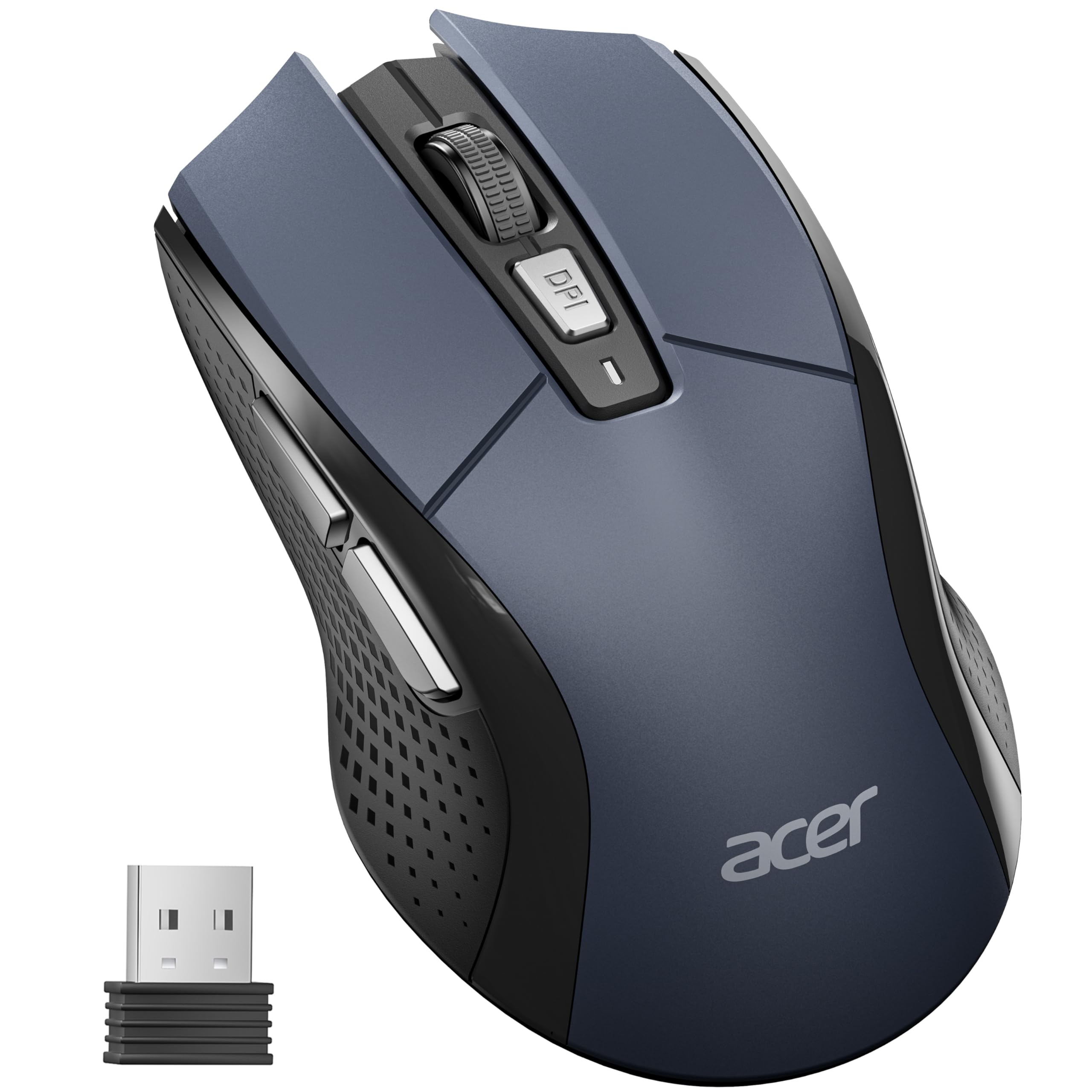
If your hand hangs off the end of most budget mice, start here. The OMR266 runs 5.1 inches long and 3.2 inches wide at about 85 grams, which makes it one of the widest bodies in this group, and it sits at the budget end of the price range. It's the shape we point medium and large hands toward when there isn't much to spend.

Six buttons is more than this price usually buys: left, right, scroll click, a DPI button, and forward and back on the left flank. Sensitivity cycles through 800, 1200, and 1600 DPI, and a red indicator light flashes once, twice, or three times so you know which level you landed on after a battery change. The mouse sleeps after ten minutes of inactivity and wakes with a click or two.

Two things to plan for. It takes two AAA batteries and they aren't included, so order them with the mouse or you'll be making a second trip. The plastic feels like the price it carries, and a portion of long-term results describe units that lag or go dormant until you click; ours ran cleanly, and it's still the reason this sits below the M510 rather than beside it.

Pros

  • Wide body for medium and large hands
  • Six buttons including forward and back
  • Three DPI levels with an indicator light
  • Sleep mode with click-to-wake

Cons

  • Two AAA batteries are not included
  • Basic plastic and some units lag or go dormant
Our verdict

For medium and large hands on a tight budget, we point you here: a wide body, six buttons, and simple plug-and-play setup.

Check Latest Price
5

High-Resolution Screens

Acer OMR339

85 /100
LBD Score Excellent

Key details

Size
4.9 x 2.7 in
Battery
1 AA, not included
Connection
2.4 GHz USB-A receiver
Sensitivity
800/1200/2400/3200/4000 DPI
View on Amazon

4,000 DPI is the highest sensitivity ceiling in this group, and it's the reason to look at this Acer at all. On a big 4K monitor a faster cursor crosses the screen with a shorter flick of the wrist, and five steps — 800, 1200, 2400, 3200, 4000 — let you find a speed that suits you. Drop it to 800 and it behaves exactly like the cheaper Acer.

The rest is familiar: a 4.9-by-2.7-inch right-handed body at 85 grams, six buttons with forward and back, the same red indicator flashes, and plug-and-play setup with no software to install. One practical note the listing makes a point of: it ships without its single AA battery, and it won't respond until the cell is in correctly and the switch is on.

We treat this as the specialist of the group rather than the default. Most people never move off the middle setting, and the cheaper Acer does the same job with the same button layout. Buy this one if you work on a large, high-resolution display and want the headroom without adding software — and accept that it's a narrower bet than our top pick.

Pros

  • Highest DPI ceiling here for big displays
  • Five sensitivity steps with indicator flashes
  • Six buttons and plug-and-play setup

Cons

  • Single AA battery not included
  • Right-handed shape only
Our verdict

We keep the OMR339 on this list for its 4,000 DPI ceiling, which earns its place only on a large, high-resolution display.

Check Latest Price

How We Tested Wireless Mice (and What We Stopped Counting)

We started with a shortlist of roughly 60 mice and narrowed it by connection type, sensor, button layout, stated battery life, hand-size range, and price band. Anything that hid its battery claim or shipped without an adapter for newer laptops got cut. That left 14 mice, which we rotated through six months of ordinary use.

Each one lived on a real desk for at least a full workweek of spreadsheets, document editing, and photo cropping, so we could watch how the cursor tracked during fine selections. Testers with both small and large hands used the same units, which is how we sorted out which shapes actually supported the palm and which forced a claw grip by mid-afternoon.

For connectivity, we paired each mouse, restarted the laptop, and timed how long it took to come back, then ran the receiver through a USB-C adapter to see if the signal held. Clicks were measured with a decibel app in a quiet room, though we also noted when a silent model felt mushy or lost its tactile snap. Battery life got tracked the boring way: we wrote down the install date and checked in monthly, and every mouse rode loose in a tote bag with keys and a metal water bottle for a week before being dropped from desk height onto hardwood.

How to Choose a Wireless Mouse

Start With the Shape and Your Hand

Two sizes cover this group. Full-size bodies such as the Logitech M510 at 4.4 inches and the Acer OMR266 at 5.1 inches let your palm rest, and they are the right call if a mouse is your main pointing device. Compact models such as the M240 and the SABLUTE M21 suit smaller hands and crowded bags.

The trap is the word compact itself. In a listing it describes how a mouse packs, not how it feels at hour six, and a travel mouse pressed into full-time service is where wrist complaints start. Measure from the crease of your wrist to the tip of your middle finger: roughly 7 inches or more and a full-size body will feel better, under that and a compact shell is comfortable.

Dongle or Bluetooth?

A 2.4 GHz receiver works with anything that has a USB-A port, including an older desktop, and usually connects the moment you plug it in. It also costs you that port permanently, which on a two-port laptop is a real trade. Bluetooth leaves every port free and pairs straight to laptops, tablets, and Macs, which is why the M240 is our travel recommendation.

The catch is that Bluetooth needs a radio on the computer. Plenty of desktop builds don't have one, and a Bluetooth-only mouse on a machine without it is a paperweight until you add an adapter.

What the Battery Rating Really Means

Replaceable AA and AAA cells are the norm here, and the rated life — two years for the M510, 18 months for the M240 — assumes sleep mode and, in practice, an occasional flick of the on/off switch. Those numbers hold up for a mouse that sits idle most of the day, which is exactly what an office mouse does.

What the listings don't always tell you is whether cells are in the box. Logitech includes them; both Acers ship without, so add a pack of the right size to the order or you'll be making a second trip.

Silent Clicks and What Stays Noisy

Quiet mice soften the click itself, and the difference is obvious in a shared office or a bedroom at midnight. What the marketing skips is the scroll wheel, which still notches audibly on most quiet models, and the muted click can feel mushy to anyone who likes a crisp button.

If silence is the priority, compare the M240 against the SABLUTE M21. If you want a definite, satisfying click and don't share your space, the M510 is the livelier of the three.

Sensitivity and Buttons Worth Paying For

1,000 DPI is plenty for documents, email, and browsing, which is why the M510 gets away with a fixed sensor and no switch on the body. Higher sensitivity earns its keep on a large, high-resolution display, where a faster cursor means less arm travel — that is the case for the 4,000 DPI Acer, and it's a narrow one.

Buttons matter more to most people. Forward and back under the thumb save a click every time you navigate a browser or a file tree, and a DPI switch is worth having mainly if several people share the machine.

Frequently Asked Questions

Final Verdict

Buy the Logitech M510 if a mouse is your main pointing device. It's the most comfortable full-size shape in this group, the two-year battery rating holds up, and the back, forward, and tilt controls are the kind of convenience you notice every hour rather than once a month. Fixed 1000 DPI is the only spec we question, and it won't trouble anyone working in documents, email, and browsers.

If your laptop has no port to spare, the M240 is the better buy: Bluetooth, quiet clicks, and a compact shape that lives in a bag. Small-handed budget shoppers should look at the SABLUTE M21, and anyone with a wide palm at the Acer OMR266.