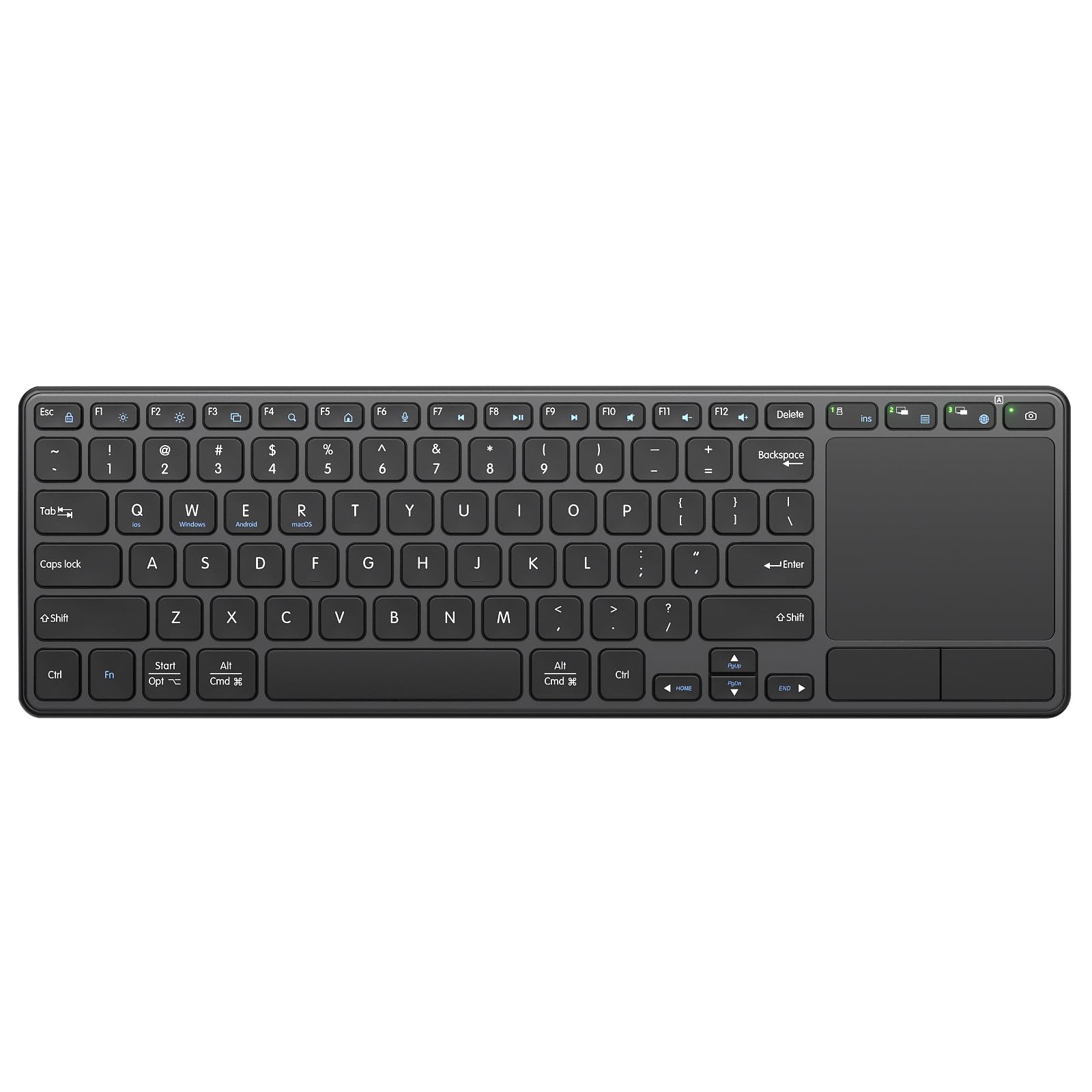
Best Wireless Keyboards with Touchpads of 2026

A wireless keyboard with a built-in touchpad is a compromise by design: small enough to balance on your knees or slide into a bag, big enough to type on without hunting for letters, with a trackpad wedged in below the space bar. Get it wrong and every search becomes a fight with a cursor that overshoots its target. Get it right and the PC hooked up to your TV, the tablet on the coffee table, and the laptop on the desk all get easier to live with.

I've spent six months with 12 keyboards like these, and the trackpad decides everything — more than key travel, more than how it looks sitting out. A twitchy pad ruins a board with lovely keys; a good one can carry a deck that's merely fine. The other thing sellers bury: whether it pairs over Bluetooth, ships with its own USB receiver, or does both.

Every pick below earned its place on compatibility, battery life, and how it felt after a week of real use. Some are built for the couch; some fold into a jacket pocket.

1

Best Overall

Logitech K400 Plus

89 /100
LBD Score Excellent

Key details

Size
13.95 x 5.5 x 0.93 in
Range
Up to 33 ft
Battery
2 AA, up to 18 months
Wireless
Unifying USB receiver
View on Amazon

The K400 Plus is the keyboard we point most people to, and the reason is layout. The keys get the full 14 inches and the touchpad sits to the right of them, vertical, where a laptop user's thumb already goes — not squeezed under the spacebar the way the handheld minis here do it. You can type a search and move the cursor without lifting the board off your knees.

It is a 2.4GHz board with a Unifying receiver and no Bluetooth, which is the first thing to check: the TV or box needs a free USB-A port. A media PC usually has one; a streaming stick does not. Logitech also includes a short USB extender, and it earns its place in the box — with the receiver buried behind a cabinet, tracking gets noticeably sloppier from across the room.

Everything else is set-and-forget. Two AA cells are rated for up to 18 months, there is a power switch on the edge for the weeks you are away, and the media keys along the top work without installing anything on Windows, Android, or Chrome OS. The keys are quiet, short-throw chicklets — right for a living room, a little hollow if you are drafting something long.

What settles it is the unglamorous stuff: a spill-resistant top that shrugs off a glass set down in the wrong place, a footprint that slides under the sofa when the room has to look like a living room again, and a price below the other full-size boards here. It is the board we leave connected to the living-room PC and stop thinking about, which is the highest compliment this category offers.

Pros

  • Full-size keys with the touchpad where a thumb expects it
  • Rated for up to 18 months on two AA batteries
  • USB range extender included for better couch range
  • Media keys work with no software install

Cons

  • No backlight for typing in the dark
  • Touchpad can lag at the far edge of a room
Our verdict

If you want one keyboard for the TV and no fuss, we point you to the K400 Plus: full-size keys, a right-side touchpad, and an 18-month battery.
Check Latest Price
2

Best Backlit

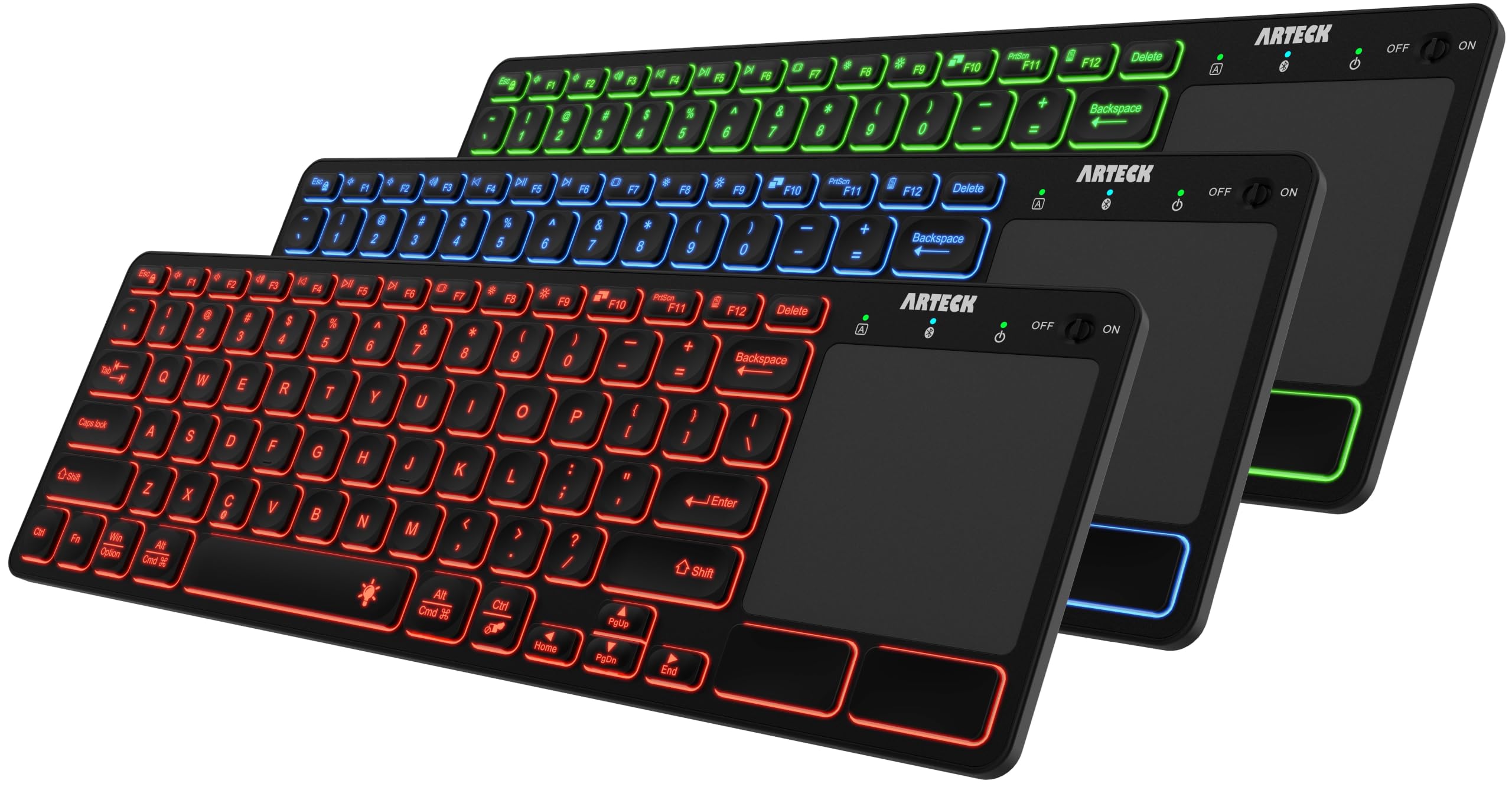
Arteck HB305-4B

83 /100
LBD Score Excellent

Key details

Keys
78 scissor-switch
Battery
Rechargeable, USB-C
Wireless
Bluetooth
Backlight
7 colors, 2 brightness levels
View on Amazon

In a dark living room the backlight is the whole argument. The HB305-4B lights its keys in seven colors at two brightness levels and wakes on a keypress, so you can find the password field mid-movie without turning on a lamp. The keys themselves are scissor switches with a soft, laptop-ish give, and they are the nicest thing to type on among the full-size boards here.

The touchpad is laid out the way a laptop does it: centered under the spacebar with its own left and right click buttons, so a click is a press rather than a tap you have to time. That combination — backlight, real buttons, soft keys — is why this is the pick for a dark room, and it is a more comfortable board than the K400 Plus for anything longer than a search.

Two things to know. It is Bluetooth only, with no receiver in the box, so the device on the other end has to speak Bluetooth; a budget box that only offers USB is out. And pairing is the fussy part — it connects quickly and then, in a room busy with wireless traffic, can drop the link and want re-pairing. Charge comes over USB-C, and how long it lasts is the figure we trust least here.

Pros

  • Seven backlight colors at two brightness levels
  • Soft scissor keys with laptop-like travel
  • Touchpad with its own physical click buttons
  • Recharges over USB-C

Cons

  • No USB receiver in the box
  • Touchpad can lag under quick movement
Our verdict

The HB305-4B is what we hand someone whose TV speaks Bluetooth and who types in the dark: seven backlight colors, soft scissor keys, and a touchpad with real buttons.

Check Latest Price
3

Best Mini Handheld

Burhoo K808

86 /100
LBD Score Excellent

Key details

Battery
600mAh, USB-C
Touchpad
Rotating, flip-open with click buttons
Wireless
2.4GHz and Bluetooth
Backlight
7 colors
View on Amazon

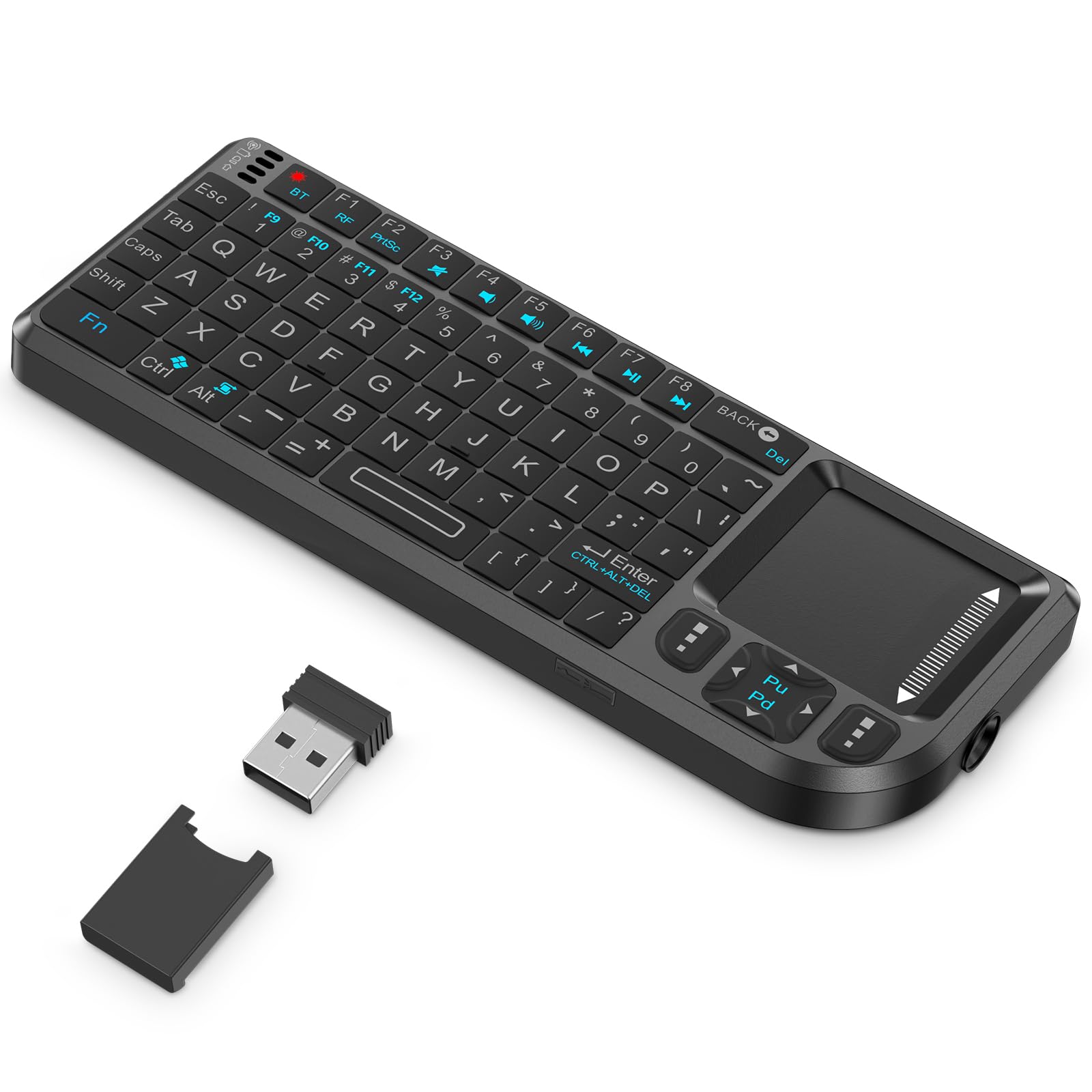
The K808's touchpad flips open and rotates 90 degrees with a two-key press, and that trick is why it earns a place. Under the flipped pad sit dedicated left and right mouse buttons — real ones you press — so clicking a link from the couch becomes one thumb movement instead of a timing exercise. Of the handhelds here, this is the one that behaves most like a laptop in the hand.

Everything else is sized for a hand rather than a desk. The 69 keys sit close together with the spacebar right of center, seven backlight colors cycle from the keyboard, and the 600mAh cell charges over USB-C. It also carries a laser pointer, which is a small thing until you are the one standing in front of a screen.

Two radios in one shell is the practical win: the dongle goes into a desktop or HTPC, Bluetooth goes to an Android box or a tablet, and it wakes a sleeping device rather than asking for a fresh pairing. That is a lot of capability from the cheap end of this group, and it is why this is the board we keep in the drawer by the sofa.

Pros

  • Touchpad flips open and rotates 90 degrees
  • Dedicated left and right click buttons
  • 2.4GHz and Bluetooth in one board
  • 600mAh battery charges over USB-C

Cons

  • Tiny keys double-register under fast typing
Our verdict

We reach for the K808 when the couch is the desk: a rotating touchpad with real click buttons, two radios, and a price that makes a second one for the bedroom easy.

Check Latest Price
4

Best for Travel

ProtoArc XK01 TP

86 /100
LBD Score Excellent

Key details

Keys
88 with full shortcut row
Battery
300mAh, up to 120-day standby
Wireless
Bluetooth 5.1, 3 devices
Open Size
15.19 x 4.68 x 0.48 in
View on Amazon

Unfolded, the XK01 TP is 15 inches of keyboard: 88 keys, a full shortcut row, and keycaps 0.65 inch across — close enough to a laptop's that touch typing survives the switch. That is the thing most folding boards get wrong, and it is why this one is worth carrying.

It folds into thirds, powers off as it closes so it does not drain in a bag, and ships with a PU pouch and a phone stand. Bluetooth 5.1 holds three devices at once and switches with a keypress, and standby is rated at up to 120 days.

The trackpad is the compromise. It is multi-touch with gestures and it is fine for scrolling a page or landing on a link, but tap-to-click is not reliable enough that we trust it for dragging a file or nudging a slider. Pack a mouse if the work is precise; take the keyboard if it is not.

Where it beats everything else here is the bag. The K400 Plus stays on the coffee table and the Burhoo lives in a drawer; this one goes to the hotel, and three-device Bluetooth means the laptop, the tablet, and the phone all get a real keyboard without re-pairing any of them. The pouch and the stand sound like filler until the first trip.

Pros

  • Full 88-key layout with a shortcut row
  • Folds into thirds with a carrying pouch
  • Pairs with three devices over Bluetooth 5.1

Cons

  • Trackpad can feel sluggish
  • Flexes when it is not on a flat surface
Our verdict

The XK01 TP is the one we pack: a nearly full-size 88-key layout that folds into thirds, with a gesture touchpad and three-device Bluetooth.

Check Latest Price
5

Everyday Desktop Typing

Bnnwa K905

88 /100
LBD Score Excellent

Key details

Battery
500mAh, USB-C
Devices
Up to 3 at once
Switches
Scissor-switch
Wireless
2.4GHz plus 2x Bluetooth 5.1
View on Amazon

The K905 has more heft than most of the boards here, and it is the right kind of heft: set it down and it stays put, with none of the skitter you get from a shell that weighs nothing.

Scissor keys keep the typing quiet and short-throw, and a function-key shortcut sets the layout for Windows, Android, iOS, or macOS — the kind of feature you appreciate once and then never think about again.

The connections are the reason to look: a 2.4GHz dongle plus two Bluetooth 5.1 slots, three devices at once, and a 500mAh battery over USB-C. The touchpad is the best of the full-size boards in this set — smooth, quick to settle, and big enough that you stop aiming at things.

What we cannot do yet is vouch for the years. The record behind this one is far shorter than the K400 Plus's or the ProtoArc's, and it is good enough that we want to see a couple of years of use before we move it up this list. Buy it if you want the nicest-feeling full-size board here and you are comfortable being early.

Pros

  • Three devices across 2.4GHz and two Bluetooth slots
  • Quiet scissor keys with a settled, solid feel
  • Trackpad tracks like a laptop's

Cons

  • Cover over the power port works loose
Our verdict

The K905 is the sleeper here: quiet scissor keys, three connections at once, and a trackpad that tracks like a laptop's — we just want more time with it.

Check Latest Price
6

Tiny Secondary Setups

Rii X1 PLUS

85 /100
LBD Score Excellent

Key details

Size
About the size of a phone
Battery
500mAh, 30+ days per charge
Wireless
2.4GHz and Bluetooth
Backlight
White LED
View on Amazon

Roughly the size of a phone and about as heavy as one, the X1 PLUS is the board we hand someone who needs cursor control on a secondary TV a few times a week. It is backlit in white, charges over USB-C from a 500mAh cell rated for more than a month per charge, and pairs over either the dongle or Bluetooth.

Small is the whole point and also the whole cost. Two hands crowd each other on a board this size, so it is a search-box and password keyboard rather than a place to write. If you will be typing more than a line a night, the Burhoo's roomier keys and separate click buttons are worth the extra few dollars; for a Raspberry Pi or a bedroom mini PC, the size stops being a compromise.

Pros

  • Phone-sized and light enough to keep in a drawer
  • White backlight for dark-room use
  • Dual 2.4GHz and Bluetooth pairing

Cons

  • Trackpad skips under firm pressure
  • Keys sit where your fingers do not expect them
Our verdict

For a secondary TV or a Raspberry Pi, we keep the X1 PLUS around: it is the size of a phone, backlit, and pairs over either radio.

Check Latest Price
7

Stylish Media PCs

Miritz K809

83 /100
LBD Score Excellent

Key details

Size
5.94 x 2.32 x 0.48 in
Frame
Aluminum
Battery
1000mAh, USB-C
Wireless
Bluetooth 5.2 and 2.4GHz
View on Amazon

The K809 is the only board here that looks like something you leave out on purpose. The aluminum frame and orange finish make it feel like a remote from a better-stocked living room, and at just under six inches wide and 89 grams it disappears onto a side table.

Inside that shell it is a 71-key board with Bluetooth 5.2 and a 2.4GHz dongle, a 1000mAh battery over USB-C, and RGB backlighting you cycle with one key. That is the largest battery of the handhelds here, which matters because the backlight is what sends you looking for a cable.

Precision is the compromise: app tiles and playback controls are easy on this pad, and work that needs a steady hand is not, which is the right trade for a wall-mounted media PC and the wrong one for a work machine. There is no right-hand Shift key either, which we noticed inside the first hour. As the board that sits out because it looks good there, it earns its spot.

Pros

  • Aluminum frame with a genuinely nice finish
  • 1000mAh battery, the largest of the handhelds
  • Bluetooth 5.2 plus a 2.4GHz receiver

Cons

  • No right-hand Shift key
Our verdict

We pick the K809 for the media PC you want on display: an aluminum body, a 1000mAh battery, and RGB, with a trackpad that prefers big targets.

Check Latest Price
8

Number-Heavy Travel

Nillkin Foldable Keyboard

77 /100
LBD Score Very Good

Key details

Keys
105 with number pad
Keycaps
16mm
Wireless
Bluetooth, 3 devices
Folded Size
7.2 x 4.2 x 0.63 in
View on Amazon

A folding keyboard with a number pad is unusual, and the Nillkin is the only one here that manages it: 105 keys including a real numeric cluster, folded into a square that measures about seven by four inches.

The trick is that the number pad and the touchpad share the same patch of board, and one keystroke switches between them — digits for a spreadsheet, a cursor for everything else. The keycaps are 16mm across on scissor switches, quiet enough for a meeting, and the aluminum hinge is rated to 10,000 folds.

The folding mechanism is the part to weigh, and not because of the hinge: a key that stops registering is the failure this kind of board runs into, and it is the one thing we want a couple of years of use to settle.

Where that leaves us: if your travel kit has to include a number pad — accounting, spreadsheets, anything with columns — this is the only board on the page that does it, and it does it well. If the number pad is not the point, the ProtoArc folds smaller for less and types nearly as nicely. The pouch and the USB-C cable are in the box, which matters more than usual for a keyboard that leaves the house.

Pros

  • Full 105-key layout with a number pad
  • 16mm keycaps on quiet scissor switches
  • Aluminum hinge rated to 10,000 folds

Cons

  • Priciest keyboard in this group
  • Touchpad shares space with the number pad
Our verdict

We recommend the Nillkin when a number pad has to travel: 105 keys, 16mm caps, and a hinge that folds it into a pouch.

Check Latest Price

How We Tested Wireless Keyboards With Touchpads

We started by pulling every keyboard we could find that had a real multi-touch pad rather than a pointer nub, then cut the list by checking supported operating systems, whether power came from a rechargeable cell or AA batteries, whether the keys lit up, and price, so the final group spanned budget and spendier options. That left 12 keyboards, which we used for six months.

Most of them lived where this product actually lives: on a couch cushion while I navigated a TV-connected PC, on a coffee table during movie nights, on my lap for long email sessions. The folding models went into a backpack for a stretch of hotel rooms and train tray tables.

Each keyboard got the same 300-word typing passage, and I logged typos and how often I had to look down. I dragged the cursor across the screen to hit a small close button, pinched and scrolled with two fingers, and noted whether the pointer jumped when my palm brushed the pad. In a dark room I checked whether the backlight made the legends readable or just glowed. I paired every unit with a laptop, a tablet, a phone, and a TV-connected PC, timed how long reconnecting took when switching between them, and ran each battery down to see how many weeks of daily use it actually delivered. I also pressed the corners of each deck to feel for flex, wiggled keys for wobble, and wiped fingerprints off the finish.

The ones that stayed on my coffee table after the first month all had one thing in common: a pad that tracked where I meant it to.

How to Choose a Wireless Keyboard with a Touchpad

Check the Port Before the Keyboard

The radio decides whether the thing works. A 2.4GHz board like the K400 Plus needs a free USB-A port on whatever you are controlling, and TV boxes tend to offer exactly one, already occupied by a drive or a streaming stick's power cable. Bluetooth boards like the Arteck HB305-4B need the TV or box to speak Bluetooth at all, which plenty of budget boxes do not.

Count the free ports and open the Bluetooth menu before you choose. A small USB hub solves the first problem; nothing solves the second.

The Touchpad Matters More Than the Keys

You will touch the pad far more often than you type, so buy for the pad. The best arrangement here is the laptop one — a pad to the side or under the spacebar with its own left and right click buttons, as on the K400 Plus and the Arteck — because a physical click beats tap-to-click when you are aiming at a small target from across the room.

The handhelds put the pad under your thumbs, where it needs a lighter finger. Expect tracking to get sloppier at the far end of a room; moving the receiver closer fixes more of that than any setting will.

Full-Size or Handheld?

How much you type settles this. If the keyboard is how you search, log in, and answer the occasional message, a board around 14 inches wide — the K400 Plus, the Arteck, the Bnnwa — puts real key spacing under your fingers and still sits comfortably on a lap or a coffee table.

If it is a remote that happens to type, a 69- or 71-key handheld is the right size, and you accept that a paragraph takes a while. Folding boards are the third case: full-size when open, bag-sized when closed, and worth it only if the keyboard travels.

Backlighting and Battery Upkeep

A backlight earns its keep in a room where the lights are usually off, but weigh it against upkeep. Disposable cells last longest — the K400 Plus is rated for up to 18 months on two AAs — and suit a board that sits on a shelf between uses. Rechargeable boards trade that for a USB-C cable near the couch and a backlight that eats into the charge.

Both are fine. The mistake is a backlit rechargeable board for a brightly lit room, where you pay for the light and never use it.

Range Is a Claim, Not a Promise

Every one of these says 10 meters or 33 feet, and every one of those numbers assumes a clear line from keyboard to receiver. A couch, your own body, a cabinet door, and a router two feet away all eat into it, which is why the same board feels instant in one room and laggy in another.

Put the receiver on the extension cable Logitech includes, get it out of the cabinet and facing the couch, and re-test before blaming the keyboard.

Frequently Asked Questions

Final Verdict

The Logitech K400 Plus is what we tell most people to buy. It puts a full-size keyboard and a right-side touchpad on your lap for less than the other full-size boards here, runs a year and a half on two AA cells, and asks for nothing except a free USB port.

Buy the Arteck HB305-4B instead if your TV speaks Bluetooth and you type in a dark room. Buy the Burhoo K808 if the keyboard has to live in a drawer and work one-handed.