Best XLR Microphones for Streaming of 2026

There's a moment every streamer knows: you rewatch a clip of yourself and realize you sound like you're ordering through a drive-thru speaker. A better microphone fixes that — and it doesn't have to be the most expensive one on the shelf. The right XLR mic is the one that suits your voice, your room, and the interface you already own.

I've spent the past six months with a dozen XLR mics hanging off a boom arm beside my desk, and the pattern was hard to miss. Dynamic mics shrug off mechanical keyboard clatter and the echo of an untreated room; condensers catch every detail of your voice, along with your neighbor's lawnmower. Several of the newer options also give you USB as a backup, plus onboard mute and headphone monitoring, which matter more than most spec sheets let on.

One thing worth saying plainly: no microphone outruns a weak interface or a bare room, so budget for clean gain and something soft behind you. The picks below still sounded good weeks after the novelty wore off.

1

Best Overall

Shure SM7B

96 /100
LBD Score Outstanding

Key details

Weight
2.7 lb
Capsule
Dynamic, cardioid
Connectivity
XLR
Recommended Gain
At least 60dB
View on Amazon

The SM7B is built like a broadcast workhorse, but it is not a plug-and-play default. The wide-range dynamic capsule, cardioid pattern, air-suspension shock isolation, and detachable windscreen are built to keep a voice close and solid while pushing room rumble and handling noise away. The all-metal body and locking yoke mount feel like broadcast equipment, and the detachable windscreen is easy to remove for cleaning or a different look.

We rate it as the best overall here because it makes an ordinary speaking voice sound anchored and broadcast-ready without needing a treated studio. The catch is gain: Shure recommends at least 60dB, and the mic rewards a clean interface or inline preamp. Feed it properly and it is forgiving of imperfect rooms; ask a budget interface to do all the work and the result can sound thin or noisy.

We also appreciate the electromagnetic shielding and the included yoke mount, which make it easier to place on a boom arm without extra hardware. It is a purposeful object, not a desk toy, and that suits a permanent streaming setup. The locking yoke mount holds its angle when you switch between sitting and standing, which is the small detail that keeps the mic where you left it.

Pros

  • Broadcast-weight voice and strong room rejection
  • All-metal body with locking yoke mount
  • Detachable windscreen simplifies cleaning

Cons

  • No XLR cable included
  • Heavy body needs a sturdy boom arm
Our verdict

We recommend the SM7B to streamers who already own a clean high-gain interface; it gives broadcast-weight voice and shrugs off room noise, provided you can feed it properly.

Check Latest Price
2

Best Value

RØDE PodMic

96 /100
LBD Score Outstanding

Key details

Weight
2.07 lb
Capsule
Dynamic, cardioid
Mounting
Integrated swing mount
Connectivity
XLR
View on Amazon

The PodMic makes the strongest case for a first serious XLR mic: it looks and feels like broadcast gear, but it does not ask for broadcast money. We think it is the value pick here because the internal pop filter and shock mounting remove two accessories that usually add cost and clutter, while the all-metal body and integrated swing mount make it feel purpose-built for a desk or boom arm.

The broadcast-style dynamic capsule is tuned for speech, and it keeps voices clear and forward in a normal room. We like the way the internal shock mount keeps desk thumps out of the recording, and the swing mount makes angle changes quick. The tuning is not neutral—it flatters speech rather than capturing every nuance—but that is the right trade for streaming.

The all-metal body has no plastic creak, and the black finish looks tidy on camera. It is a focused tool rather than a feature-packed one, and the integrated mount is the small convenience that makes it feel that way: you can tilt the mic without hunting for a separate clip.

Pros

  • Internal pop filter and shock mount
  • All-metal build and integrated swing mount
  • Speech-tuned dynamic capsule

Cons

  • Requires significant interface gain
  • Heavy enough to need a sturdy boom arm
Our verdict

If you want the broadcast dynamic sound without the premium outlay, the PodMic is our value pick, with a solid metal build and built-in pop control.

Check Latest Price
3

Best Lower-Gain Shure

Shure MV7X

94 /100
LBD Score Outstanding

Key details

Weight
1.12 lb
Capsule
Dynamic, cardioid
Mounting
Adjustable yoke mount
Connectivity
XLR
View on Amazon

If your streaming room is a normal bedroom rather than a treated studio, the MV7X is built around that reality. The dynamic cardioid capsule and integrated shock mount are designed to keep your voice in front and room noise, vibrations, and handling thumps behind it, and the all-metal body has a broadcast look that disappears nicely on camera.

We rate it as the easier Shure to live with for most streamers because it keeps the voice-forward character without the SM7B's extreme gain appetite. It still needs an interface, but the output is more manageable, and the adjustable yoke mount and 3/8-inch adapter make it simple to fit on a boom arm. The XLR-only design is the point: there is no USB safety net, so you need to be ready to commit to an interface.

The 508-gram body feels solid without dragging a lightweight arm down, and the included foam windscreen is a practical touch. The yoke mount's angle adjustment stays where you set it, which makes switching between sitting and standing less fiddly.

Pros

  • Voice-isolating dynamic capsule
  • All-metal body and integrated shock mount
  • Adjustable yoke mount with 3/8-inch adapter

Cons

  • XLR-only, with no USB backup
  • No XLR cable included
Our verdict

The MV7X is the Shure to choose when the SM7B's gain demands are more than your interface can handle; it keeps voices forward and rooms out of the way.

Check Latest Price
4

Best Budget Hybrid

FIFINE K688

93 /100
LBD Score Outstanding

Key details

Weight
1.12 lb
Capsule
Dynamic, cardioid
Controls
Tap-to-mute, headphone jack
Connectivity
XLR and USB-C
View on Amazon

The K688's most streaming-friendly features are on the front panel, not in the spec sheet: a tap-to-mute area and a headphone jack with its own volume control. We think that makes it the best budget hybrid here for live work, because you can mute coughs and monitor your own voice without opening software or adding a mixer.

The dynamic capsule is tuned for speech and handles high sound pressure without distorting, and the metal body with its shock mount feels more substantial than the price suggests. In USB mode it is genuinely plug-and-play; in XLR mode it behaves like a standard dynamic mic and needs an interface with gain. The dual connection is the real story: you can start on USB and move to an interface later without replacing the microphone.

The front-panel controls are easy to find by touch, which matters when you are live and cannot look away. That quiet mute is the detail we keep coming back to, because it solves a problem every streamer has without adding a keyboard shortcut or a software panel. The shock mount also does useful work on a desk that gets bumped.

Pros

  • Tap-to-mute and headphone monitoring
  • USB-C and XLR connectivity
  • Metal body with shock mount

Cons

  • No stand or XLR cable included
  • Room noise can reach the capsule in difficult spaces
Our verdict

For a first XLR setup that can also run over USB, the K688 gives you mute, monitoring, and a solid dynamic tone without demanding a premium interface.

Check Latest Price
5

Best Condenser for Quiet Rooms

Audio-Technica AT2020

95 /100
LBD Score Outstanding

Key details

Power
Phantom power
Weight
1.32 lb
Capsule
Condenser, cardioid
Connectivity
XLR
View on Amazon

The AT2020 is a reminder that better depends on the room: in a quiet, treated space, its condenser capsule pulls out more detail than the dynamics here. The side-address design and cardioid pattern are aimed at project studios and home recording, and the low-mass diaphragm gives voices an open, articulate top end.

That sensitivity is the trade-off. A condenser hears the room, the keyboard, and the fan in the corner more readily than a dynamic, so this is not the mic we point at a noisy gaming desk. If you already have a quiet space and an interface that can feed it, it is a lot of microphone for the money.

We rate it as the best condenser here for a tight budget because it gives a clean, detailed voice without the brittle edge that cheap condensers can have. It rewards a treated space and a disciplined setup: keep it a few inches away, use a pop filter, and keep the keyboard off the same desk if you can. In a noisy room, one of the dynamics will serve you better.

Pros

  • Open, detailed condenser sound
  • Solid metal body
  • Cardioid pattern rejects rear sound

Cons

  • Requires phantom power
  • No XLR cable included
Our verdict

The AT2020 is our pick for a quiet, treated room where you want condenser detail and can supply phantom power.

Check Latest Price
6

Low-Noise Studio

RØDE NT1 Signature

92 /100
LBD Score Outstanding

Key details

Capsule
Condenser, cardioid
Included
Shock mount, pop filter, XLR cable
Self-noise
4 dBA
Connectivity
XLR
View on Amazon

A self-noise figure of 4dBA is the kind of specification that sounds abstract until you hear how quiet the spaces between words can be. The NT1 Signature Series is a large-diaphragm cardioid condenser built around that low noise floor, with a smooth frequency response and high SPL handling that suit both speech and music.

The bundle is unusually complete for a studio condenser: shock mount, pop filter, and a premium XLR cable are in the box, and the mic is light enough at 313 grams to sit on a modest boom arm. The red finish is a nice change from the usual black, though you buy this one for the capsule and the quiet, not the color.

It is not the right first mic for a noisy bedroom, where a dynamic will do more to keep the room out of the stream. Give it a quiet space and an interface with phantom power, and it disappears into the background.

We rate it as the best low-noise condenser here for a treated room, and the included pop filter and shock mount are the detail we keep coming back to: they remove the usual first-week shopping list and let the mic work properly from day one. Choose it if you already have a quiet room and want a studio-clean voice, not if you are trying to tame a live kitchen.

Pros

  • Exceptionally low 4dBA self-noise
  • Shock mount, pop filter, and XLR cable included
  • Smooth, detailed condenser sound

Cons

  • Needs phantom power
  • Costs more than the budget condensers here
Our verdict

Choose the NT1 when low self-noise and a complete studio bundle matter more than room rejection; it rewards a treated space with clean, detailed voice.

Check Latest Price
7

All-In-One Kit

MAONO A04 Gen2

91 /100
LBD Score Outstanding

Key details

Capsule
Condenser, cardioid
Included
Boom arm, shock mount, pop filter
Sampling
192kHz/24-bit
Connectivity
XLR and USB-C
View on Amazon

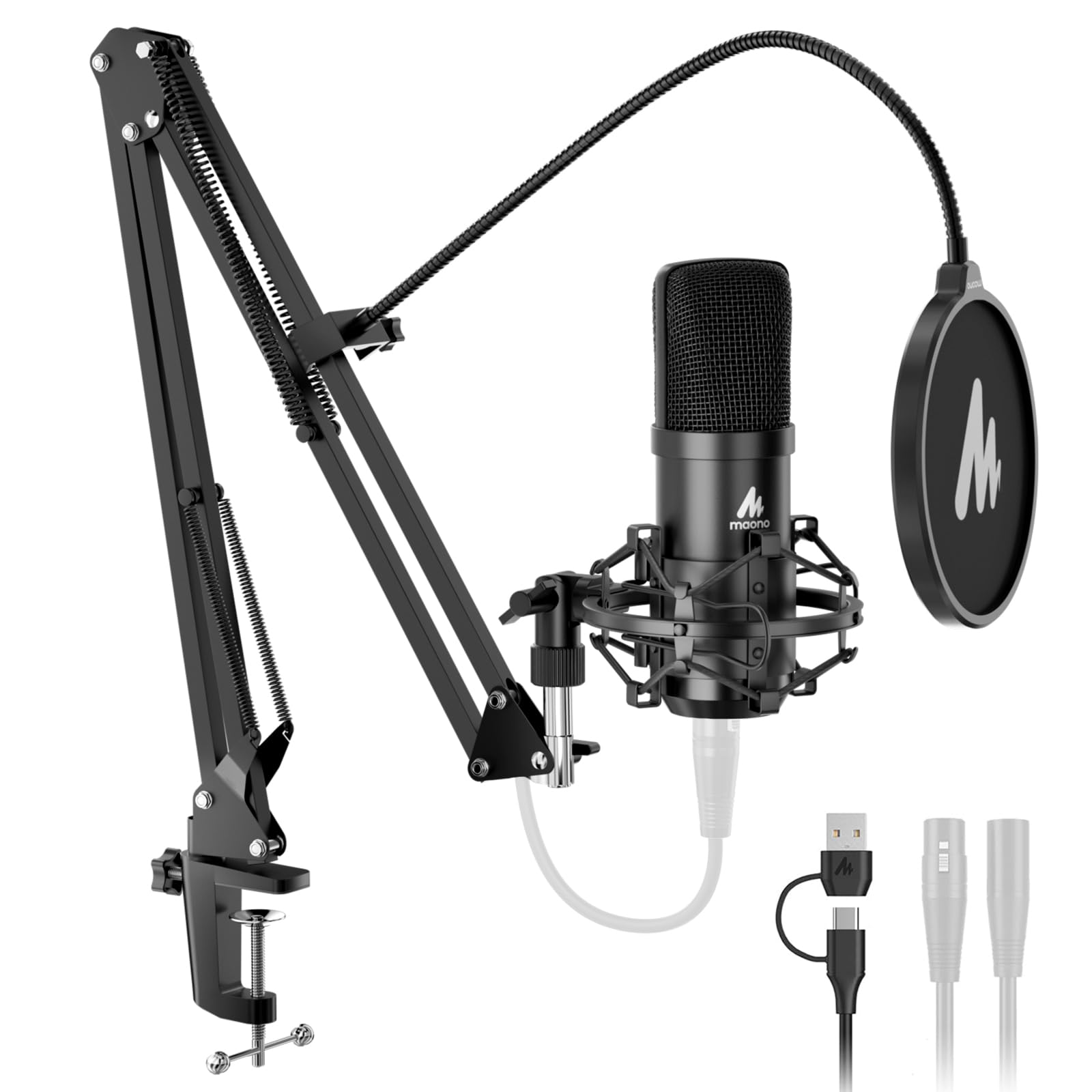
The A04 Gen2 arrives as a kit rather than a microphone, and for a first streaming setup that is the appeal: boom arm, shock mount, pop filter, and windscreen are all in the box. You can clamp it to a desk, plug in over USB, and start talking without buying a separate arm or filter.

The 16mm condenser capsule and 192kHz/24-bit capture give voices a bright, detailed sound, and the cardioid pattern keeps the focus in front. The MAONO Link software adds EQ and noise-control options if you want to tune the tone, though the mic is usable without it. XLR output is there for an interface when you are ready to upgrade.

The metal mic body feels more substantial than the price suggests, and the kit is best treated as a starter package rather than a buy-once setup. In USB mode it is easy to live with; in XLR mode you need an interface.

We rate it as the best all-in-one kit here for a beginner who wants to start on USB and move to XLR later, but not as the mic for a noisy room or a heavy-handed desk. If the arm and clamp feel secure on your desk, the rest of the kit is a sensible way to get talking without a drawer full of adapters.

Pros

  • Complete boom-arm kit
  • USB and XLR connectivity
  • 192kHz/24-bit capture

Cons

  • No XLR cable included
  • Condenser picks up room noise
  • Boom arm and clamp feel less sturdy
Our verdict

The A04 Gen2 is a smart first kit if you want a boom arm, shock mount, and pop filter in one box and understand it is a condenser that hears the room.

Check Latest Price

How We Tested a Dozen XLR Mics for Streaming

We built the shortlist by reading spec sheets for polar pattern, self-noise, and maximum SPL, then cross-checking what actually ships in the box — a stand adapter, a shock mount, a cable, or none of the above — because those omissions add real cost once you're set up. Anything locked to proprietary software or awkward to mount on a boom arm came off the list, which left 12 microphones spread across the price range.

Those 12 lived on our desks for six months. They went through live streams, Discord calls, late-night voiceover sessions in a shared apartment, and marathon gaming nights with a mechanical keyboard clacking a couple of inches away.

For each one, we typed while talking to hear how much clatter bled in, and recited plosive-heavy sentences to catch pops that the internal filters didn't stop. We set interface gain to a normal speaking level and listened for hiss and hum, then recorded 40-minute sessions and played them back on laptop speakers and cheap earbuds, the way most viewers actually hear you. We timed setup from box to first recording, checked whether the mute button was reachable mid-sentence without looking, and knocked each mic over on a desk mat to see what the grille and finish did.

Longer sessions settled the rest: which mounts sagged by hour three, which mute buttons clicked loudly enough to be picked up on stream, and which mics demanded so much gain that the interface's own noise became part of the performance. We kept using the standouts well past the six-month mark, and anything that started to loosen or rattle got noted.

How to Choose an Xlr Microphone for Streaming

Start with the room, then pick the capsule

A dynamic capsule is the safer default for most streamers because it is less sensitive to room reflections, keyboards, and fans. A condenser can sound more detailed and open, but it also makes a normal bedroom sound like a normal bedroom. If your space is quiet and treated, a condenser like the AT2020 or NT1 can be rewarding; if not, a dynamic like the SM7B, PodMic, or MV7X will usually make a cleaner stream with less fuss.

Check the gain before you fall for the mic

Dynamic mics convert sound into signal with less output, and some models ask a lot from your interface. The SM7B is the obvious example: Shure recommends at least 60dB of clean gain, and a budget interface may not deliver it without noise. The PodMic also wants a gain-rich input, while the MV7X is easier to drive and the K688's USB mode sidesteps the interface question entirely. Before buying, check your interface's gain range and whether it has a clean inline preamp option.

Decide whether you want XLR-only or a hybrid

An XLR-only mic is the simpler long-term choice if you already own an interface and want the cleanest signal path. A hybrid like the K688 or MAONO A04 Gen2 adds USB so you can start without an interface and move to XLR later. The trade-off is usually extra controls, software, or a built-in headphone amp, not a loss of XLR quality. Buy hybrid if you need a backup connection or travel between setups; buy XLR-only if you want fewer switches between you and the interface.

Budget for the mount, filter, and cable

The microphone is often the least of the setup cost. A boom arm, shock mount, pop filter, and XLR cable can add up, and not every mic includes them. The PodMic has internal pop and shock control, the NT1 includes a shock mount, pop filter, and cable, and the K688 includes a shock mount but no stand or XLR cable. Check the box contents before you compare prices, and put the savings toward a stable arm rather than a cheap desk stand that transmits knocks.

Controls and monitoring are streaming features

Mute buttons and headphone jacks matter more on a live stream than in a studio session. The K688 has tap-to-mute and a headphone jack with volume control, which lets you check your voice without software. The SM7B, MV7X, PodMic, AT2020, and NT1 are simpler mics, so you handle mute and monitoring in your interface or streaming software. If you switch between talking and gaming often, a front-panel mute is worth prioritizing; if you set levels once, it is not.

Frequently Asked Questions

Final Verdict

The SM7B is our top recommendation for streamers who can feed it properly: it makes voices sound weighted and close while pushing room noise back. If your interface is modest, start with the MV7X or PodMic instead; both keep the dynamic, room-friendly character without the SM7B's gain appetite.

Buy the SM7B when the rest of your chain is ready, and choose the PodMic when value matters more than the last bit of broadcast polish.