Best Controller Charging Stations of 2026

The low-battery warning always seems to arrive at the worst possible moment — three boss fights deep, extra time in a ranked match, the last lap. A good charging station solves that quietly: you drop the controller on the dock when you're done, and it's full the next time you pick it up. The catch is that these docks aren't interchangeable. Plenty fit one controller family and nothing else, some ship without a wall adapter, and a few have bays so shallow the controller never quite seats.

I've had a tangle of cables behind my console for years; a good dock is the end of it. Over the past four months, my team and I have run 16 charging stations through their paces — timing real charges, counting hours of play per charge, testing fit with first-party pads, third-party pads, and controllers still wearing silicone covers, and checking which ones still felt solid after weeks of use. Some beat the console's own USB port; others looked sharp and couldn't seat a controller one-handed. The picks below earned their place.

1

Best Overall

NEWDERY PS5 Controller Charger

93 /100
LBD Score Outstanding

Key details

Cable
3.3 ft USB-C
Stated Charge Time
2.5 hours
Controllers Supported
DualSense and DualSense Edge
View on Amazon

Every PS5 dock makes the same promise — set the controller down and walk away — and most of them make you fish for a pair of prongs first. The NEWDERY is where that promise held up in our testing. The cradles are recessed channels rather than exposed pins, so the controller settles and the contacts meet on their own; we did it one-handed, in a dim room, more times than we can count.

Two controllers charge at once, and the stated time to full is 2.5 hours, which is mid-pack here rather than the fastest. What earns it the top spot is the fit. DualSense and DualSense Edge both seat in the same cradle, and the controllers stand upright in a way that reads as part of the console rather than an accessory bolted onto the shelf. A dock only works if you use it every time, and this is the one we never skipped.

The light bar flashes blue while charging and holds steady at full, readable across a room without washing the wall in color. The catch is that the fit is genuinely snug: a silicone skin or a grip case has to come off before the controller will seat, and NEWDERY states that plainly. If you keep covers on your pads, plan for pulling them off. Compared with the PowerA below, you get Edge support and a USB-C cable instead of a wall adapter — and we prefer the cable, because it lets the dock run off a hub or a console port.

Pros

  • DualSense and Edge both seat one-handed
  • Two controllers charge at once
  • Readable blue charge indicator
  • Runs from a USB-C cable or hub

Cons

  • No wall adapter in the box
Our verdict

Our pick for most PS5 owners: DualSense and Edge controllers drop in without hunting for contacts, and two of them charge at once without a light show.

Check Latest Price
2

Best Officially Licensed

PowerA Twin Charging Station

95 /100
LBD Score Outstanding

Key details

Power
AC adapter included
Weight
9.76 oz
Warranty
Two-year limited
Controllers Supported
Two DualSense
View on Amazon

Your PS5 has one USB port on the front and two on the back, and by the time a headset dongle and an external drive are in, they are spoken for. PowerA's station sidesteps that entirely. It runs from its own AC adapter, so it does not care whether the console is on, resting, or in a cabinet with the door shut.

The unit has real heft at 9.76 ounces, and it feels denser than the plastic on most docks at this end of the range. Sony's license is on the box, and it shows in the styling — this is the one guests will not clock as third-party. It charges two DualSense controllers to full and shows a light for each.

Seating is the part to know about. Controllers rest on the contacts rather than locking into them, and the first few times you will look twice to check the light. We stopped noticing within a week, though a household where kids drop pads and run will find the odd flat controller in the morning. The two-year limited warranty is as long as any here, and it matters more than usual: a dock that fails can take a controller with it, and that has happened on this model. For a licensed, adapter-powered dock, it is still the sensible buy.

Pros

  • Runs from its own AC adapter
  • Officially licensed PlayStation 5 design
  • Two-year limited warranty
  • Heavy, planted base at 9.76 ounces

Cons

  • Controllers rest on contacts instead of locking in
Our verdict

The licensed dock for a setup with no free console ports: its own AC adapter, two DualSense cradles, and a two-year warranty.

Check Latest Price
3

Best for Xbox

NinABXY Xbox Charger Station

93 /100
LBD Score Outstanding

Key details

Power
USB-C
Warranty
One year
Battery Packs
Two 6200mWh
Controllers Supported
Xbox One, One X/S, Series X/S, Elite
View on Amazon

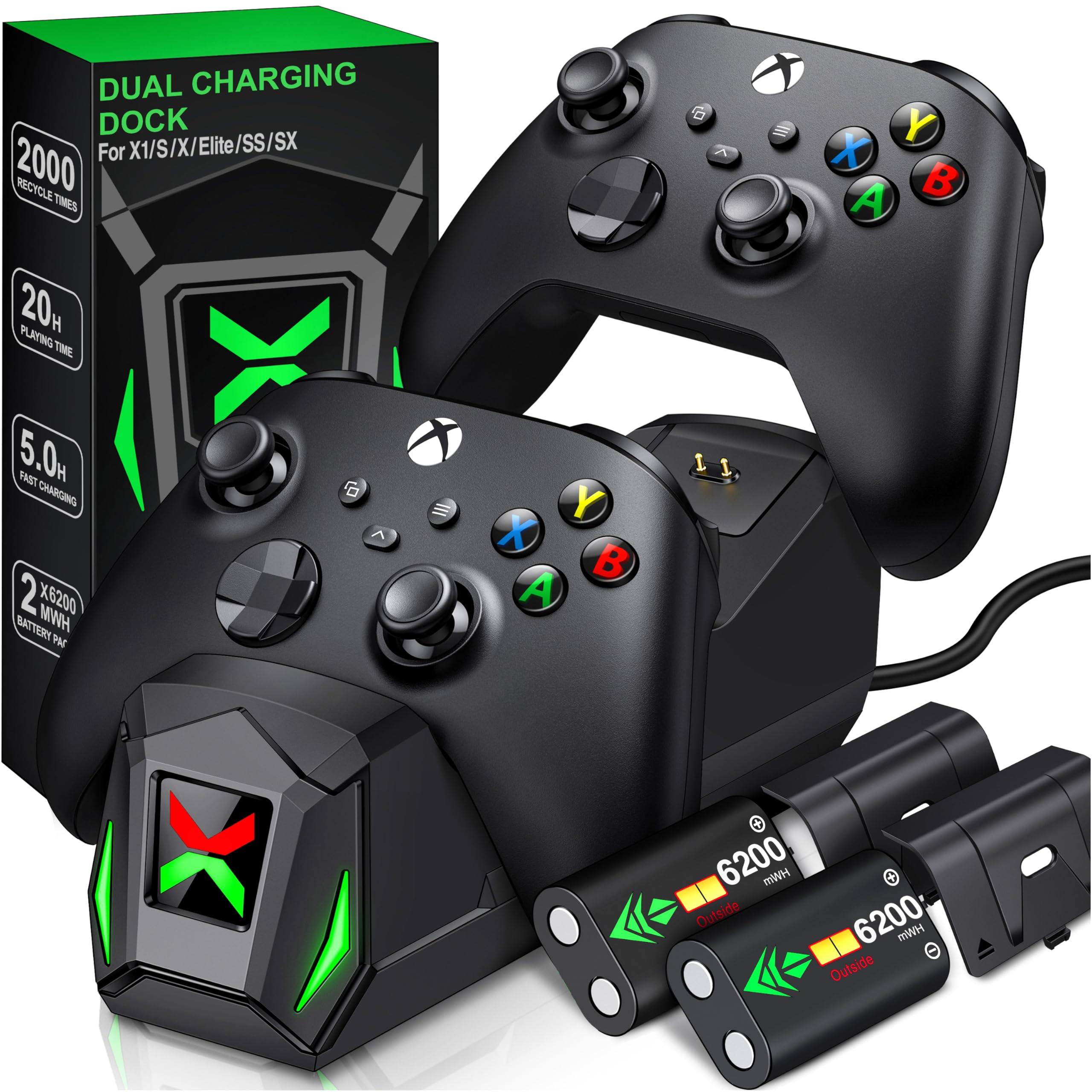
Xbox controllers do not ship with a rechargeable pack inside, which is why most Xbox charging stations are really battery purchases with a dock attached. This one is upfront about it: two 6200mWh packs in the box, and a stand where the controller lives between sessions.

We think that is the right way to solve Xbox charging. The packs drop into the controller in place of AA cells, the dock tops them up on contact, and the X-shaped light turns green when a pad is done — small theatre that turns out to be genuinely useful when two controllers look identical on the shelf. It covers the whole family of pads, from an old One S to a Series X.

Two exceptions matter. Elite Series 2 controllers will not charge on it, because the pack and battery door do not line up, so an Elite 2 household has to look elsewhere. And the packs are the weak link over time: they can stop taking a charge long before the dock does, which turns a one-time purchase into a repeat one. It is also the priciest pick in this group, and you are paying for the batteries as much as the stand. If you already own a play-and-charge kit, the stand alone would do; for everyone else this is the complete fix.

Pros

  • Two 6200mWh rechargeable packs included
  • Replaces disposable AA batteries
  • Fits Xbox One through Series X/S
  • Green and red status light per cradle

Cons

  • Elite Series 2 controllers will not charge
  • Battery packs can stop holding a charge
Our verdict

Xbox owners get the whole solution — two rechargeable packs and a dock that tops them up — provided nobody in the house uses an Elite Series 2.

Check Latest Price
4

Best for Joy-Con

HyperX ChargePlay Quad

95 /100
LBD Score Outstanding

Key details

Cable
2 meters
Power
USB
Warranty
Two years
Controllers Supported
Four Joy-Con
View on Amazon

Pick it up and the first thing you notice is the weight — 268 grams of base that does not skate across a TV stand when a Joy-Con is pulled out one-handed. We rate that higher than it sounds, because a dock that slides is a dock people stop using. Around the base, four Joy-Con slide onto rails and start charging, and that is the whole product.

The lights are the other thing HyperX got right. Each rail carries its own indicator, they sit low, and they do not turn the corner of the room green at night — a low bar that several Switch docks still manage to miss. Four rails means two full pairs plus the spares, which is the right number for a house that plays Mario Kart with four people.

The limits are about what it will not do. Joy-Con only: no Switch Pro, no PS5, no Xbox, so a mixed household needs a second dock. It draws power over a 2-meter USB-A cable with no brick in the box, so you will need a free port or a spare adapter. For the Joy-Con half of a Switch setup, though, nothing here is built this well for the money.

Pros

  • Charges four Joy-Con at once
  • Heavy 268-gram base stays put
  • Individual, low-key LED indicators
  • Two-year warranty

Cons

  • Joy-Con only, no Pro or PS5 pads
  • No power adapter included
Our verdict

With four Joy-Con on a base this planted, the ChargePlay Quad is the Switch dock we reach for; it just will not touch a Pro or a PS5 pad.

Check Latest Price
5

Best for Switch and PS5 Households

PURBHE Switch Charging Dock

93 /100
LBD Score Outstanding

Key details

Cable
80 cm USB-C
Power
Console, hub, or wall charger
Controllers Supported
Four Joy-Con plus two Pro or PS5
View on Amazon

Four Joy-Con and either two Switch Pro controllers or two PS5 DualSense pads, from one dock that stays small enough for a TV stand. That combination is unusual here — most multi-controller docks pick a console family and stay in it — and it is the reason this suits a room where a Switch and a PS5 share a screen.

The Joy-Con slide onto rails modeled on Nintendo's own, and the two outer cradles take the bigger pads. Status lights are per-slot and run red to green, so you can see which controller is still working through a charge. Power comes over USB-C, and it will take it from the console, a hub, or a wall charger, so no dedicated outlet is required.

The outer slots are the bonus rather than the reason to buy. This dock is built around the four Joy-Con rails; the Pro and DualSense positions exist to save you a second stand, not to be the permanent home for those pads. As a Switch-first dock that also keeps two PS5 controllers off the floor, that is a fair trade.

Pros

  • Four Joy-Con plus two Pro or PS5 pads
  • Small footprint for the capacity
  • Per-slot red-to-green indicators
  • Runs from console, hub, or wall charger

Cons

  • No power adapter in the box
Our verdict

For a living room shared by a Switch and a PS5, this is the one dock that covers both without asking for a second stand.

Check Latest Price
6

Budget PS5 Docks

OIVO PS5 Controller Charger

93 /100
LBD Score Outstanding

Key details

Cable
3 yards
Power
AC adapter included
Power Switch
On/off
Controllers Supported
Two DualSense or Edge
View on Amazon

Three yards of cable is the detail that decides where this dock can live. It reaches from a console on a low shelf to the top of a bookcase, so the charger does not have to sit where the console does. OIVO also includes the AC adapter, which keeps the PS5's rear ports free for everything else.

The cradles are the part to know about. Controllers sit in open slots rather than dropping into a shaped channel, so they lean, and setting one down can nudge the other out of contact. It is a two-hand job. If your pads mostly live on the dock between sessions, that is a minor annoyance; if they get grabbed and thrown back mid-match, it wears thin fast.

Charging is quick when the unit behaves, and it is UL listed. The on/off switch kills power when you are away for a few days, which is useful, because the indicator LEDs are otherwise lit constantly and a dark-room setup notices. The switch also means two controllers are not resting on live contacts for weeks at a time.

Where that leaves it: this is the value option in the group, with a cable long enough to reach an awkward shelf, its own adapter, and a long track record behind it. If your controllers sit still and you want to spend as little as possible, it does the job. If they are in and out all evening, pay a little more for a shaped cradle — the NEWDERY seats one-handed, and the extra outlay disappears the first time you stop fighting a slot.

Pros

  • AC adapter and 3-yard cable included
  • UL listed with an on/off power switch
  • Cheapest dual PS5 dock in this group

Cons

  • Charging can fail on an individual unit
Our verdict

The value pick for a PS5: a long cable, its own AC adapter, and two cradles, at the lowest price of any dual PS5 dock here.

Check Latest Price
7

Mixed-Console Shelves

HEATFUN Controller Charging Dock

79 /100
LBD Score Very Good

Key details

Power
5V/2A adapter, not included
Adapters
Two removable USB-C
Controllers Supported
Switch Pro and 2 Pro, PS5, Xbox Series X/S, Elite 2
View on Amazon

Two cradles, and between them they will take a Switch Pro, a Switch 2 Pro, a PS5 DualSense, an Xbox Series X/S pad, or an Elite 2 — any two at a time. No other dock here crosses console families, and for a household with a PlayStation and an Xbox under one TV, that solves a problem nothing else on this list touches.

The trick is a pair of removable USB-C adapters that plug into the controller's own port, so the dock meets a dongle rather than a fixed prong. It is easier to line up than a bare contact point, and it saves the dock from grinding against the controller's port every time you set it down.

The compatibility list has a hole in it: PowerA, Luna, and other third-party pro controllers do not work, so check the pad in your hand before ordering. Otherwise it behaves like any USB dock — red while charging, green when full, two controllers at a time.

The versatility is real; the certainty is not. Between dongles that can ride out with the controller and a power brick you supply yourself, this is a dock to buy for a specific mixed-console shelf rather than as a default. If your shelf really is mixed, the compromise earns its place. Buy it for the shelf you actually have.

Pros

  • Takes Switch Pro, PS5, and Xbox pads
  • Removable USB-C adapters ease alignment
  • Red and green status per cradle

Cons

  • No power adapter in the box
  • Adapters can pull out with the controller
Our verdict

It is the only dock here that will charge a Switch Pro, a DualSense, and an Xbox pad on the same base — worth the compromises for a genuinely mixed shelf.

Check Latest Price
8

PS4 Setups

Y Team PS4 Charging Dock

93 /100
LBD Score Outstanding

Key details

Power
USB from console
Warranty
12 months
Stated Charge Time
1.8 hours
Controllers Supported
PS4, PS4 Slim, PS4 Pro
View on Amazon

If you are still playing on a PS4, this little dock does the one thing that matters: two DualShock 4 pads, a stated 1.8 hours to full, and a red-to-green light over each slot. We think it is the right buy for a spare room or a second console, and we minded the light 160-gram build less than we expected to.

It pulls power from the console over USB, so there is no adapter and no extra outlet — good for a shelf behind a TV, less good if your PS4 lives in a closed cabinet. Controllers drop onto two fixed prongs rather than into shaped cradles, which takes a second look, especially in the dark.

The honest caveat is longevity. This is a dock that can stop charging after a few months, and the 12-month warranty is worth keeping where you can find it. Buy it for a second PS4 in a kid's room, or for a setup where the pads live on the stand and rarely move, and it earns its money. Treat it as a consumable rather than a fixture and you will not be disappointed.

Pros

  • Two PS4 pads in a stated 1.8 hours
  • Red and green status light per slot
  • Powered from the console, no outlet needed
  • 12-month warranty

Cons

  • Dock can stop charging after a few months
Our verdict

For a PS4 that is still in service, this is the least expensive way to keep two DualShock 4 pads charged — a light, simple dock at a light price.

Check Latest Price

How We Tested Controller Charging Stations

We started with a long list pulled from every dock we could find in stock for the consoles people actually own — PS5, Xbox Series X|S, Switch, and PS4 — then cut anything that didn't state its compatibility clearly, didn't include some way to plug it in, or drew repeated complaints about dead bays. That left 16 charging stations, which rotated through our homes for four months.

Each one lived where a dock actually lives: on a TV stand beside the console, on a nightstand, on a shelf within arm's reach of the couch. They went through two or three game nights a week plus a couple of long weekend sessions, and we set them up the way a buyer would — straight out of the box, timing how long it took to get a first controller charging.

Fit came first. We seated controllers one-handed and in the dark, then again with a chunky third-party pad and with a silicone cover left on, and noted which docks needed two hands or a wiggle. For charge speed, we ran a controller down to the low-battery warning, dropped it in, and checked every 15 minutes until the indicator read full, then played until the warning returned to see how long that charge really lasted. We also watched what the LEDs did — whether they switched off or changed color at full, and whether they lit up the whole room after dark.

Durability got the clumsy treatment: controllers pulled off at an angle, docks knocked off the shelf, cables yanked. On the models with swappable battery packs, we cycled the packs, left a charged one sitting for a week to see if it held, and checked how easy replacements were to find. Last, we counted what came in the box — cable, wall adapter, spare packs — because a dock that still needs a separate adapter isn't the bargain it looks like.

How to Choose a Controller Charging Station

Match the dock to the pad, not the console

Controller compatibility is where most returns start. A dock listed for PS5 may not take a DualSense Edge, an Xbox dock may not accept an Elite Series 2, and docks built around first-party pads often will not seat a PowerA or another third-party pro controller. Read the compatibility line as a list of the exact controllers in your house, not the console under your TV.

If one Edge or Elite pad lives in the house, that single controller should decide the purchase, even if it costs you a feature you wanted.

Decide between a wall adapter and a USB port

There are two power designs here, and the choice comes down to your console's ports. Docks with their own AC adapter, like the PowerA and the OIVO, leave every USB port free and do not care whether the console is on, resting, or unplugged.

USB docks are tidier but need a free port or a 5V/2A adapter you supply, and an underpowered port is exactly what makes a dock charge slowly or intermittently. If a headset dongle and an external drive already occupy your console, buy the adapter.

Weigh the cradle, not the spec sheet

Almost every dock here quotes somewhere around two to two and a half hours to full, so charge time rarely separates them. Seating does. A shaped channel takes a controller one-handed in the dark; fixed prongs and open slots need a second look and often a second hand, and a dock you fight is a dock that ends up in a drawer.

If kids or a second player use the setup, pay for the cradle that grips. And if you keep a silicone skin or grip case on your controller, expect to take it off before it will seat.

Count the controllers you actually charge

Two cradles handle a solo player and a spare. Four-to-six-controller docks earn their footprint where Joy-Con pairs multiply, or where a Switch and a PlayStation share a shelf.

Check the footprint against the surface you have, because the dock becomes storage as much as charging — the controllers live there. A dock that holds six in a small footprint is a different proposition from one that needs the width of the console's own stand.

Xbox is a battery purchase first

An Xbox controller has no rechargeable cell inside, so a dock without battery packs is only a holder — you would still be buying AAs. The sensible Xbox buy bundles two packs and the battery doors with the stand.

Check pack capacity in mWh and check the generation list: the NinABXY covers Xbox One through Series X/S but not the Elite Series 2, which runs its own internal battery. If you already own a play-and-charge kit, a plain holder may be all you need.

Frequently Asked Questions

Final Verdict

The NEWDERY is the dock we point most PS5 owners to. DualSense and Edge controllers drop in without a hunt for contact points, two charge at once in a stated 2.5 hours, and the light bar is readable across a room without being obnoxious. It is also the kind of dock you stop thinking about, which is the highest compliment this category offers.

Two requirements change the answer. If Xbox pads are in the house, the NinABXY is the only pick here that solves the battery problem. If it is a Switch shelf, the HyperX with four Joy-Con rails is the sturdiest thing in this group.