Best Electric Screwdrivers for PC Building of 2026

There's a particular panic in feeling a screw head start to round off inside a brand-new case. Motherboard standoffs, the single screw pinning down an M.2 drive, the four tiny screws on a fan hub — they take almost no torque, and a driver with one speed will chew them before your hand reacts. What you want is control: something light enough to hold over an open case, with torque settings you can click down and a bit that grips instead of skates.

I've rebuilt the same mid-tower enough times this year to know the driver matters as much as the parts list. My team and I spent five months with 14 electric screwdrivers, from pocket-size precision models to 1/4-inch hex drivers that also handle furniture, building PCs, upgrading laptops, and tearing down controllers. The winners were compact, clicked down to a genuinely gentle torque setting, held bits and screws magnetically, and had batteries that survived a whole build. The picks below are sorted by what you're assembling.

1

Best Overall

JOREST 155-in-1

91 /100
LBD Score Outstanding

Key details

Bits
140 precision bits
Battery
500mAh
Torque Range
0.15–0.75 N·m
Manual Torque
7 N·m
View on Amazon

The 155-piece JOREST set is built around a simple split: a pen-shaped electric handle for the easy turns and a separate manual handle for the ones that resist. Between them sit 140 precision bits and 13 repair tools, including an anti-static wrist strap, so a motherboard swap, an M.2 install, and a case teardown can all come out of the same case.

We recommend it because that split matches how PC work actually feels. The electric side offers five torque levels starting at 0.15 N·m, which is gentle enough for board screws and small enough to keep you from leaning on a fastener. When a case screw or an old prebuilt fights back, the manual handle gives you 7 N·m and a reason not to reach for a drill. The 200 RPM motor and 500mAh battery are modest, but this is a tool for control, not speed.

The bit selection is the real luxury. You get the usual Phillips, Torx, hex, and flat sizes, plus security and oddball heads that make laptop, console, and small-appliance work possible. The pen body is easy to choke up on for delicate work, and the kit includes a magnetic mat and tweezers, which we appreciate because tiny screws disappear fast on a dark desk. The anti-static strap and magnetic mat are the small additions that make it feel like a PC-building kit rather than a generic household driver.

Pros

  • 140 precision bits cover PC and electronics fasteners
  • Manual handle supplies 7 N·m for tight screws
  • Five torque levels start at 0.15 N·m
  • Anti-static wrist strap included

Cons

  • Electric torque tops out at 0.75 N·m
  • Bit labels can be hard to read
Our verdict

We recommend this kit for PC builders who want one case for tiny motherboard screws and stubborn case screws, thanks to its huge bit set and manual backup.

Check Latest Price
2

Best for Case Assembly

HOTO 12-in-1

94 /100
LBD Score Outstanding

Key details

Bits
12 S2 bits
Torque
4 N·m max
Weight
0.55 lb
Battery
1500mAh
View on Amazon

At 0.55 pound and about 7 inches long, the HOTO 12-in-1 is the one we reach for when the build is mostly case panels, fans, and furniture. The soft double-layer grip is comfortable for long assembly sessions, and the little aluminum box keeps the 12 bits and USB-C cable together. We like that it disappears into a build bag instead of demanding a shelf.

The three torque settings and 4 N·m electric ceiling are more than enough for case screws and flat-pack furniture; the 8 N·m manual mode is there if something is tight. The 1500mAh battery charges over USB-C, and the ring LED lights the work area without a separate lamp. Bits are 50mm S2 steel, with PH1 through PH3, hex H3 to H6, Torx T15 to T25, SL4, and PZ2.

The 12 bits cover standard case and furniture fasteners, and the simple three-setting collar is less intimidating than a display-driven driver. If your build includes a lot of M.2 and laptop work, the JOREST set is the safer single purchase; if you mostly assemble cases, this is the lighter tool. The ring light is the detail we notice most when working in a dark chassis.

Pros

  • Weighs only 0.55 lb
  • Three torque settings with 4 N·m max
  • 1500mAh battery charges over USB-C
  • Aluminum case keeps bits organized

Cons

  • No PH0 or smaller precision bits
Our verdict

We reach for this one when the build is mostly case panels and furniture-style assembly: it is light, comfortable, and simple to keep close.

Check Latest Price
3

Best Premium Adjustable

HOTO PixelDrive

90 /100
LBD Score Outstanding

Key details

Bits
30 bits
Weight
11.2 oz
Battery
2000mAh
Torque Range
0.5–6 N·m
View on Amazon

The PixelDrive puts a small screen on the back of the driver, and it shows the selected torque level and battery charge. That sounds like a gadget until you are upside down in a case: being able to see 0.5 N·m without counting clicks is genuinely useful. The half-press trigger starts at 80 RPM for delicate work, and a full press picks up speed for case screws.

The range runs from 0.5 to 6 N·m in six steps, and the 30-bit set includes 20 long bits, which is the part PC builders should notice. Long bits reach recessed fan and motherboard screws that a short 1/4-inch bit cannot. At 317 g, it is light enough to use one-handed, and the 2000mAh battery is the largest capacity in this group alongside the S2 Pro.

We think this is the premium pick for someone who wants one driver from M.2 to case panels. The cost is the real hurdle: it runs well above the simple HOTO 12-in-1 and several precision kits here. If you mostly turn case screws and do not need long bits or a display, the cheaper driver is the more sensible buy; if you want the widest range in a compact body, this is the one.

Pros

  • Six torque settings from 0.5 to 6 N·m
  • 30 bits include 20 long bits
  • 2000mAh battery with USB-C charging
  • Smart display shows torque and charge

Cons

  • Torque settings can feel inconsistent
  • Costs more than simpler 1/4-inch drivers
Our verdict

We think this is the upgrade choice for builders who want one driver to handle both delicate M.2 screws and case work, with a low 0.5 N·m setting and long bits.

Check Latest Price
4

Best for Tiny Fasteners

Fanttik E2 Ultra

90 /100
LBD Score Outstanding

Key details

Bits
50 precision bits
Speed
270 rpm
Battery
800mAh
Torque Range
0.05–0.6 N·m
View on Amazon

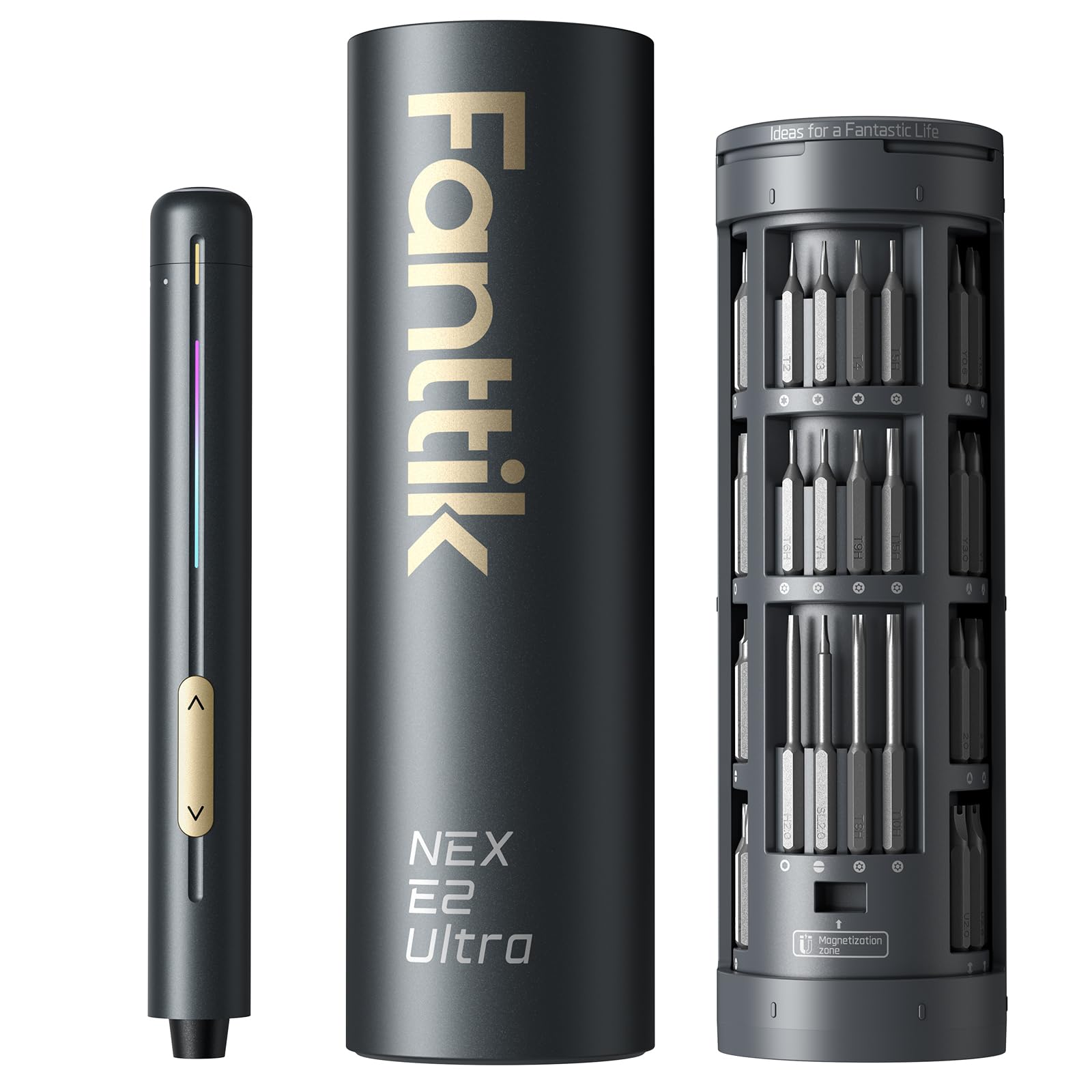
The E2 Ultra's party trick is the cylindrical case: twist the top and the bit holder rotates up, with 50 precision bits arranged around the center. It is compact enough to sit beside a motherboard, and the 5/32-inch hex bits are the right size for M.2, fan headers, and laptop screws. The 270 RPM motor and 800mAh battery give it more speed and runtime than the older E1 Max.

We like it for repeated internal work because the low 0.05 N·m setting is genuinely gentle. You can start a screw without feeling like you are about to strip the head, then step up through the five gears as the fastener takes hold. The 0.6 N·m ceiling is the boundary: this is a precision driver, not the tool for a stubborn case screw.

The rotary case is the reason it earns a spot in a small toolkit: it keeps 50 bits organized without a flat box, and the LED lights the immediate work area. The gradient indicator bar is more useful than it sounds because it shows the selected gear and whether the driver is tightening or loosening. For board-level work, it is the one we want in reach.

Pros

  • Fifty bits in a rotary storage case
  • Low 0.05 N·m setting for tiny screws
  • 800mAh battery lasts longer than E1 Max
  • 270 RPM motor for faster work

Cons

  • 0.6 N·m ceiling is low for case screws
  • Bit magnet can let small screws drift
Our verdict

This is the precision driver we want in reach for frequent internal upgrades, with a 50-bit rotary case and a 0.05 N·m low setting for tiny fasteners.

Check Latest Price
5

Best for Tight Corners

Fanttik S2 Pro

91 /100
LBD Score Outstanding

Key details

Bits
20 magnetic bits
Weight
2.3 lb
Battery
2000mAh
Torque Range
0.5–6 N·m
View on Amazon

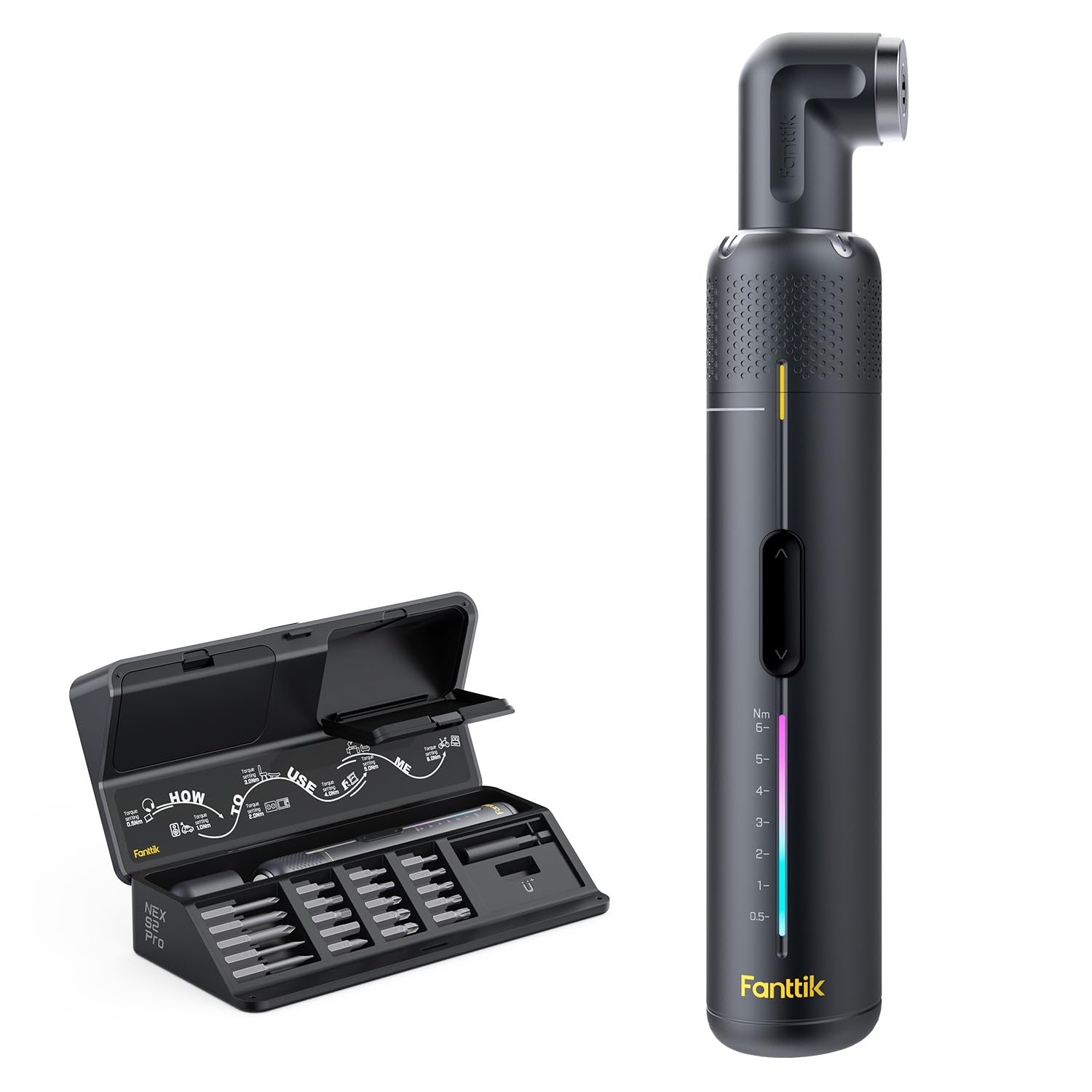
We like the S2 Pro for one reason above the rest: the 90-degree adapter. It lets you drive a screw from the side when a cooler or a fan shroud leaves no room for a straight shot. The driver itself has seven torque settings from 0.5 to 6 N·m, a 250 RPM motor, and a 2000mAh battery, plus 20 magnetic bits in a molded case.

The seven settings are the useful part: set it to 0.5 N·m for a delicate bracket, then step up for case screws. The trigger is easy to feather, and the LED ring helps in a dark chassis. The 90-degree adapter is not a gimmick; it is the reason to pick this over a plain 1/4-inch driver.

The cost is bulk. At 2.3 pounds, it is the heaviest driver here, and holding it overhead to reach a top fan is tiring. If you want a compact driver for a small case and do not mind the weight, this is the one; if you work inside a case for long stretches, the lighter HOTO PixelDrive is easier to live with.

Pros

  • 90-degree adapter reaches tight case corners
  • Seven torque settings from 0.5 to 6 N·m
  • 2000mAh battery with 5V/2A charging
  • 20 magnetic bits in a fitted case

Cons

  • Heavy at 2.3 lb
  • Torque control gets touchy at high settings
Our verdict

We like this for compact cases and tight corners, where its 90-degree adapter and 0.5 N·m low setting earn their keep.

Check Latest Price
6

Best Budget Precision

UnaMela 140-in-1

89 /100
LBD Score Excellent

Key details

Bits
120 precision bits
Speed
200 rpm
Torque
0.35 N·m
Battery
350mAh
View on Amazon

The UnaMela 140-in-1 is the budget kit that looks like it should cost more: 120 precision bits, 12 repair tools, a pen-shaped electric handle, and a separate manual screwdriver in one case. The bits cover Phillips, Torx, flat, tri-wing, hex, pentalobe, triangle, and more, which is why it shows up in PC, console, and RC toolkits.

The electric handle has five torque settings, a 200 RPM motor, and a 350mAh battery. That is enough for new case screws, fan mounts, and motherboard fasteners that are not already tight. The manual screwdriver is the backup for the ones that are, and the 12 tools include the picks and spudgers you need for plastic clips.

We see this as a starter kit rather than a lifetime tool. The low torque is the main limit. But if you are building one or two PCs and want every bit in one place without spending much, it covers the job; if you already know you will be opening tight machines, the JOREST kit's manual handle and higher bit count are the safer buy.

Pros

  • 120 precision bits plus 12 repair tools
  • Five torque settings for light work
  • 200 RPM motor turns screws quickly
  • Manual screwdriver included for stubborn screws

Cons

  • Low 0.35 N·m torque
  • Durability can be inconsistent
Our verdict

We see this as a budget starter kit for new builds and light electronics work, with enough bits to cover a first PC.

Check Latest Price
7

Pen-Style Repairs

STREBITO 70-in-1

89 /100
LBD Score Excellent

Key details

Bits
64 S2 bits
Battery
350mAh
Warranty
Lifetime
Torque Range
0.15–0.5 N·m
View on Amazon

The STREBITO 70-in-1 is a pen-style driver with a pop-up magnetic case, 64 S2 bits, and four LED lights around the tip. It is the shape many electronics techs prefer because you can hold it like a pen and choke up close to the screw.

The five torque settings run from 0.15 to 0.5 N·m, and the 350mAh battery is rated for more than 500 screws per charge. The bits cover Phillips, Torx, flat, tri-wing, hex, pentalobe, triangle, square, and more, so it can handle a laptop, a controller, or a motherboard outside the case.

The case is the best part: press the button and the lid pops up with the bits held in place, so you are not dumping a tray on the desk. The lifetime warranty is also unusual in this class, and it makes the kit easier to recommend for occasional use.

We recommend it for light electronics work and travel. The pen grip and lifetime warranty make it a sensible pick for a bag; if you need one tool for a full desktop build, the JOREST kit's manual handle is more useful.

Pros

  • 64 S2 bits cover small electronics
  • Five torque settings from 0.15 to 0.5 N·m
  • Four LED lights around the tip
  • Lifetime warranty adds long-term confidence

Cons

  • Low 0.5 N·m ceiling
  • Some units stop working early
Our verdict

We keep this pen-style kit in mind for light electronics work and travel, with a lifetime warranty and 64 bits for small repairs.

Check Latest Price

How We Tested 14 Electric Screwdrivers, From Bare Case to Closed Panel

We started with every electric screwdriver we could find that listed precision bits in the sizes computer hardware actually uses — Phillips 0 and 00, Torx T6 and T8, the small hex sizes that hold a bracket — then narrowed the field to models with adjustable torque and a rechargeable battery. That left 14 drivers in two families: pocket-size precision tools and 1/4-inch hex drivers that can also take on a flat-pack dresser. We ran them for five months.

Every driver went through the same build: a bare mid-tower case, motherboard standoffs, eight fan screws, an M.2 drive, and a GPU support bracket, timed from empty case to closed panel. We also used them for an SSD and RAM swap in a laptop, a controller teardown, and the assembly of two pieces of flat-pack furniture, since several of these claim to handle home repairs. No bench vise — the drivers lived in a desk drawer, got carried in a bag, and were asked to work at awkward angles behind a motherboard tray.

Battery life got counted in screws rather than hours: how many fasteners each driver set before it slowed, and whether it quit in the middle of a build or held enough for a second one. For magnetic hold, we stood each driver bit-down and shook it, then tried to pick a screw off the table and seat it on a standoff one-handed. Torque settings earned a note only when the lowest click would stop before a screw was fully snug — the settings that save a stripped thread. We dropped each driver onto a hardwood floor from desk height and checked afterward that the bit release still worked and the direction switch still fell under a thumb without looking. Finally, we opened the box and asked whether the included case, cable, and bit selection meant you could finish a build without a hardware-store run.

How to Choose an Electric Screwdriver for Pc Building

Start With the Bit Standard

PC building uses two families of fasteners: standard 1/4-inch case, fan, and power-supply screws, and much smaller precision screws on motherboards, M.2 drives, and laptops. A 1/4-inch driver handles the first group with authority; a 4 mm or 5/32-inch precision driver reaches the second. Some 1/4-inch kits include long PH0 bits that bridge the gap. Check the bit list for PH0, PH00, Torx, and hex before you buy, because a driver with 12 standard bits may not touch an M.2 screw. We prefer a kit that covers both rather than two separate tools.

Prioritize the Low End of the Torque Range

Maximum torque sells tools, but the low setting is what protects a motherboard. A precision driver that starts around 0.05 to 0.15 N·m lets you snug a small screw without stripping the head; a 1/4-inch driver with a 0.5 N·m setting can handle case screws and still be gentle. If the lowest setting is 1.5 N·m, you are relying on trigger control for delicate work. We look for at least three settings and a trigger that is easy to feather. Stop at first resistance and finish by hand.

Size, Weight, and Light Matter Inside a Case

A driver that feels fine on a workbench can be clumsy inside a mid-tower. Look for a body under about an inch and a half across, a weight that lets you use it one-handed, and a light that points at the bit rather than into your eyes. Long bits are more useful than a bulky right-angle adapter for most motherboard work, though a 90-degree adapter earns its place around a tightly packed cooler. If you build in small-form-factor cases, those clearances decide more than the motor.

Battery, Storage, and Manual Backup

Most of these drivers will finish a build on one charge, but capacity still matters if you repair machines regularly. USB-C charging is the feature to insist on; a proprietary charger is one more cable to lose. Storage is not cosmetic: a case that holds bits upright and labels them saves time when you are hunting for a PH0. We also value a manual handle or a high manual torque mode, because the electric motor should not be the only way to break loose a stubborn screw.

Frequently Asked Questions

Final Verdict

For most PC builders, the JOREST 155-in-1 is the one we recommend. Its 140 precision bits cover the small stuff, its five electric torque levels start low enough for board work, and the separate manual handle gives you a way to break loose a stubborn case screw without reaching for a drill. If your building is mostly case panels and you want a lighter, simpler 1/4-inch driver, the HOTO 12-in-1 is the better fit; if you want one premium driver with a 0.5 N·m low setting and long bits, the HOTO PixelDrive earns the upgrade.