Best GPU Thermal Pads of 2026

I've opened a graphics card for what should have been a simple repaste and ended up scraping oily, crumbling pad scraps off the memory chips with a plastic card. That's the moment thermal pads stop being an afterthought: paste gets all the attention, but the strips bridging your GPU's memory and power stages to the cooler decide whether those parts run cool or quietly cook. A pad that's the wrong thickness, too stiff to compress, or already dried out leaves a sliver of air where metal should meet — and suddenly the card is louder and hotter than it was before you touched it.

Over the past four months my team and I have installed 14 different pads into graphics cards, laptops, and a couple of consoles, and the pattern held: thickness and softness matter at least as much as the conductivity number printed on the label. A thin, stiff pad with an impressive figure loses to a softer one that actually squishes into the gap. What follows are the ones that earned a permanent spot on my bench.

1

Best Overall

OwlTree 4 Pack Thermal Pad

93 /100
LBD Score Outstanding

Key details

Pack Count
4 sheets
Sheet Size
100 x 100 mm
Thicknesses
0.5, 1, 1.5, 2 mm
Thermal Conductivity
6.0 W/mK
View on Amazon

Four thicknesses in one 100x100 pack is the reason this OwlTree set is our default for GPU repadding. Most repads live or die on matching the original gap: 0.5mm for tight memory contact, 1.0mm for common VRAM rows, 1.5mm and 2.0mm for deeper VRM and backplate areas. Having all four means you can measure, cut, and test-fit without ordering a second pack, and the 100x100 sheets are large enough to cut full rows rather than piecing strips. We think that matters more than chasing the highest W/mK number, especially on a card with uneven contact.

The 6.0 W/mK rating is not the highest in this group, and we do not pretend it is. What we like is the balance: the pads cut cleanly with scissors, the sheets are big enough for a full VRAM array, and the price is easy to justify for a first repad. The protective film can shift as you peel it, so work slowly and keep the pad flat. Once the cooler is seated, the material has enough give to compress into minor gaps.

For a straightforward GPU refresh, this is the kit we hand to someone who has not measured every gap yet. If you already know you need a single 1.5mm or 2mm sheet for a hot card, the specialist picks below are more targeted. As a first purchase, the OwlTree four-pack gives you the best chance of finishing the job with one order.

Pros

  • Four common thicknesses in one pack
  • Full 100x100 sheets cut to size
  • Cuts cleanly with ordinary scissors

Cons

  • Protective film can shift while peeling
Our verdict

We reach for this four-pack first for most GPU repads because it covers the common thicknesses in full sheets, and the 6.0 W/mK rating is enough for typical VRAM and VRM work.

Check Latest Price
2

Best for 0.5Mm Gaps

ARCTIC TP-3 Thermal Pad

94 /100
LBD Score Outstanding

Key details

Pad Size
120 x 20 mm
Thickness
0.5 mm
Electrical
Non-conductive
Pack Count
4 pads
View on Amazon

A 0.5mm pad has one job: fill a very tight gap without holding the cooler away from the die. The ARCTIC TP-3 is built for that job, and its very low hardness is the reason we reach for it on laptops, M.2 heatsinks, and GPU memory rows with minimal clearance. The 120x20 strips are narrow enough to sit on a row of VRM components without much trimming, though you will still need scissors for length. The four-pack gives you a few strips to work with or keep as spares.

What we appreciate is how much contact the pad makes at low pressure. A stiffer 0.5mm sheet can bridge a gap without really settling into the surface; this one conforms, which is exactly what you want when the cooler is already close to the board. The trade-off is that it is not a pad you can slide around after it touches down. Cut it to length, test-fit without the liner, and commit once you peel.

This is a specialist, not a full repad kit. If you need 1mm and 1.5mm pads too, the OwlTree four-pack is the easier single order. But for the thin gaps that cause the most trouble, the TP-3 is the one we trust to compress without lifting the cooler.

Pros

  • Very soft for tight 0.5mm gaps
  • Narrow 120x20 strips suit VRAM rows
  • Electrically insulating

Cons

  • Tears easily while peeling the liner
Our verdict

We keep this 0.5mm pad for tight clearances where a thicker sheet would hold the cooler off the die, and its softness is the reason to choose it.

Check Latest Price
3

Best Pre-Cut 1Mm Strips

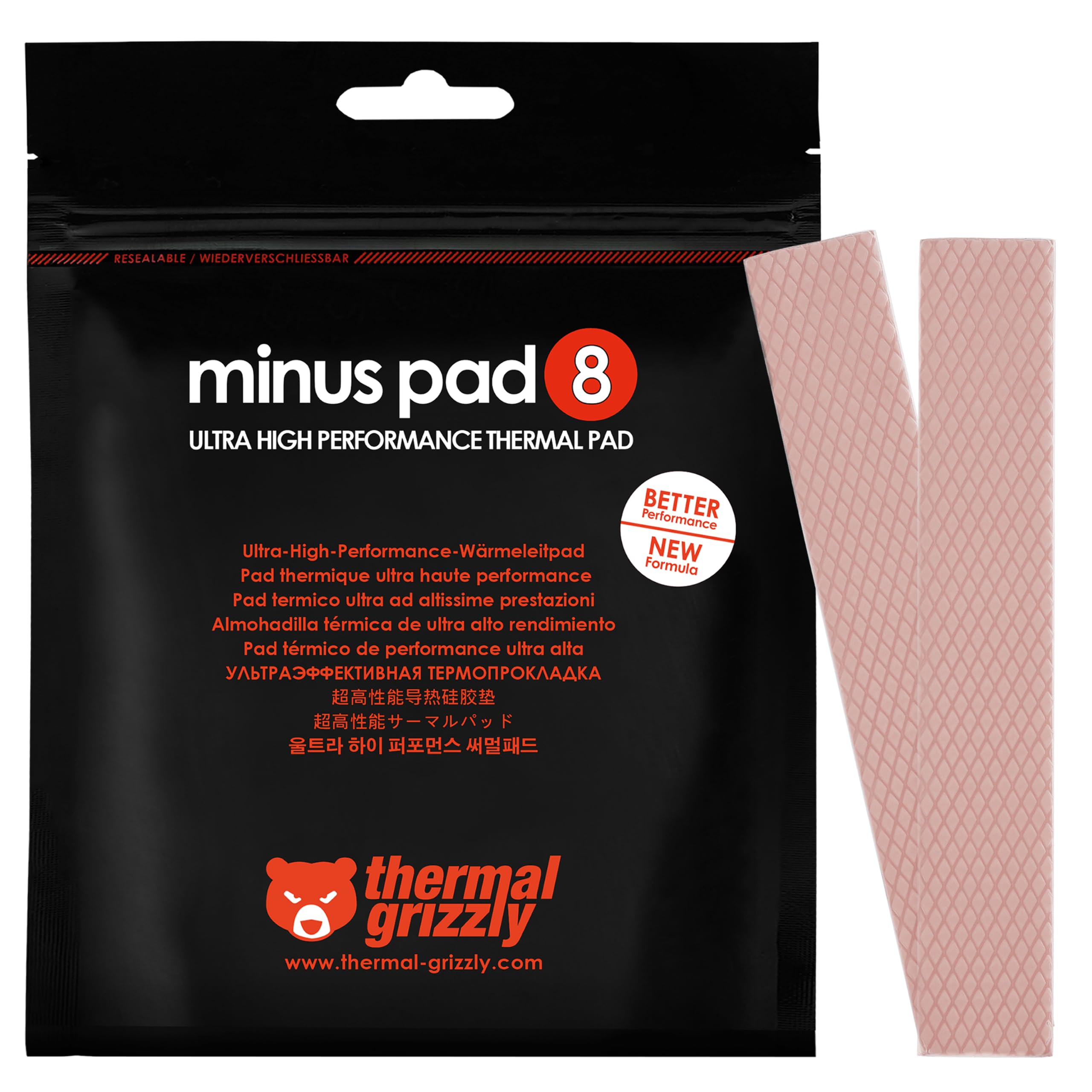
Thermal Grizzly Minus Pad 8

94 /100
LBD Score Outstanding

Key details

Pad Size
120 x 20 mm
Thickness
1.0 mm
Electrical
Non-conductive
Pack Count
2 pads
View on Amazon

The 120x20mm strips are the whole argument for this Minus Pad 8 pack. On a GPU, VRAM and VRM rows are often close to that width, so you can cut a length, lay it down, and move on without trimming a full sheet down to a skinny strip. The 1.0mm thickness is one of the most common for memory contact, and the two-pack gives you a spare strip for a mistake or a second small job.

Thermal Grizzly's pad is flexible and non-curing, and the material is easy to handle at room temperature. We found it cuts cleanly with scissors and sits flat without curling at the edges. It is not the highest-conductivity pad in this group, and it is the wrong format for a 1.5mm or 2mm gap. For a confirmed 1mm application, though, it is tidy and predictable. The pad is also electrically non-conductive, which is the property we want around exposed memory traces.

If you are repadding a card with long, narrow memory rows, this is the least fussy way to do it. If you need multiple thicknesses for one card, the OwlTree four-pack is the better first buy. The Minus Pad 8 earns its place as the clean, pre-cut 1mm option.

Pros

  • Pre-cut strips fit VRAM rows
  • Flexible, non-curing material
  • Electrically non-conductive

Cons

  • Two narrow strips may not cover a full card
Our verdict

The pre-cut 1mm strips save trimming on VRAM rows and M.2 heatsinks, which is why we treat this as the tidy 1mm option.

Check Latest Price
4

Best High-Conductivity Multi-Pack

OwlTree 3 Pack Thermal Pad

90 /100
LBD Score Outstanding

Key details

Pack Count
3 sheets
Sheet Size
100 x 100 mm
Thicknesses
0.5, 1, 1.5 mm
Thermal Conductivity
12.8 W/mK
View on Amazon

The 12.8 W/mK rating is the reason this OwlTree three-pack gets a second look. It covers 0.5mm, 1.0mm, and 1.5mm in 100x100 sheets, which are the thicknesses most likely to show up around GPU memory and VRM sections. If you want a multi-thickness kit with more thermal headroom than the 6.0 W/mK four-pack, this is the direct alternative.

The trade-off is handling. The pad is thinner and tackier than the four-pack, and the protective film can be stubborn to peel without stretching the pad. We found it easier to cut a piece slightly oversized, peel one corner of the liner, and press it down gradually. The material also tears more readily than the softer budget pads, so keep a spare piece and do not rush the install.

We recommend this one when you know your card needs 0.5mm to 1.5mm pads and you want higher conductivity in a multi-thickness kit. If you also need 2mm, the four-pack is the better single order. The three-pack earns its runner-up spot on conductivity and coverage, not on being the easiest pad to handle.

Pros

  • 12.8 W/mK in a multi-pack
  • Covers 0.5, 1, and 1.5 mm
  • 100x100 sheets cut to size

Cons

  • Film is hard to peel and pad can tear
Our verdict

We recommend this three-pack when you want higher conductivity across the common thin gaps, and you accept more careful liner handling in return.

Check Latest Price
5

Best High-Conductivity 1.5Mm

Thermalright Odyssey Thermal Pad

91 /100
LBD Score Outstanding

Key details

Thickness
1.5 mm
Electrical
Non-conductive
Sheet Size
85 x 45 mm
Thermal Conductivity
12.8 W/mK
View on Amazon

A 1.5mm gap is where a lot of GPU memory and VRM pads sit, and the Thermalright Odyssey is the most focused high-conductivity option here for that thickness. The 12.8 W/mK rating is near the top of this set, and the 85x45mm sheet is sized for a targeted repair rather than a whole-card repad.

We like the Odyssey when the original pad was 1.5mm and the card runs hot. The sheet cuts cleanly, and the material is soft enough to compress under the cooler without feeling crumbly. It is a targeted pad, not a full repad kit, so plan your cuts before you start. On a card with several 1.5mm contact points, one sheet may not be enough.

This is not the default kit for someone who has not measured the gap. It is the pick for a known 1.5mm application where you want more thermal headroom than the 6.0 W/mK packs offer. If you need 1mm and 2mm as well, buy a multi-thickness set and keep this for the hot spots.

Pros

  • 12.8 W/mK for hot 1.5mm gaps
  • Cuts cleanly and compresses
  • Non-conductive sheet

Cons

  • 85 x 45 mm sheet limits full-card coverage
Our verdict

For a confirmed 1.5mm gap on hot memory or VRM, this 12.8 W/mK sheet is the one we pick when thermal headroom matters more than coverage.

Check Latest Price
6

Best for 2Mm Gaps

Gelid GP-Extreme Thermal Pad

94 /100
LBD Score Outstanding

Key details

Pad Size
80 x 40 mm
Thickness
2.0 mm
Electrical
Non-conductive
Thermal Conductivity
12 W/mK
View on Amazon

The GP-Extreme is the 2mm specialist in this group, and that is a more useful thing to be than it sounds. Plenty of GPU backplate, VRM, and console heatsink gaps are deeper than the usual 1mm, and a thinner pad will not fill them properly.

The 12 W/mK rating gives you high conductivity without going to a stiff, hard-to-compress material. The 80x40mm sheet cuts easily and positions without curling, and the pad has enough give to settle under a cooler. We found it works best when the gap is measured first and the piece is cut slightly large, then trimmed to fit.

If your card needs 1mm or 1.5mm pads, the Minus Pad 8 or Thermalright Odyssey is the more direct choice. The Gelid is for the deeper gaps that those thinner pads cannot fill.

Once you know your card wants 2mm pads, this is the one we reach for on a hot VRAM or VRM area. The Gelid earns its place by doing one thickness with more thermal headroom than the budget kits, and that focus is the reason to keep it in the drawer.

Pros

  • 12 W/mK for 2mm gaps
  • Soft enough to compress
  • Electrically non-conductive

Cons

  • Compact 80 x 40 mm sheet limits coverage
Our verdict

This is our 2mm specialist: 12 W/mK performance in a compact sheet that suits deeper VRM and memory gaps on cards and consoles.

Check Latest Price
7

Best for Wide Thickness Range

Frienda 6 Pcs Thermal Pad

89 /100
LBD Score Excellent

Key details

Pack Count
6 sheets
Sheet Size
100 x 100 mm
Thicknesses
0.5, 1, 1.5, 2, 2.5, 3 mm
Thermal Conductivity
6.0 W/mK
View on Amazon

Most repad kits stop at 2mm; the Frienda set goes to 2.5mm and 3mm, which matters on cards and consoles with deeper gaps around the backplate or heatsink. The 100x100 sheets are large enough to cut full pieces, and the six-thickness range means you can test-fit a few options before committing.

The 6.0 W/mK rating is the same ballpark as the OwlTree four-pack, so this is not the high-conductivity pick. What we appreciate is the flexibility of the range. The pads need to sit close to the right thickness to make good contact; they are not a substitute for measuring the gap. The bright blue color is easy to see against a dark PCB, which sounds minor until you are placing small pieces.

The sheets cut cleanly, and the six-pack gives you enough material to make a mistake without running out. The 2.5mm and 3mm options are included rather than sold as a separate order. For a console or an older card with deep gaps, that alone can save a second purchase.

If your card or console needs a thickness above 2mm, this is the most straightforward way to get it without stacking pads. If you only need 0.5mm to 2mm, the OwlTree four-pack is the better-value default. The Frienda earns its place as the kit for the gaps the others skip.

Pros

  • Six thicknesses up to 3mm
  • Full 100x100 sheets
  • Covers gaps most kits skip

Cons

  • Stiffer pads need an accurate thickness match
Our verdict

We recommend this six-pack when your card needs 2.5mm or 3mm pads that most repad kits leave out, and the extra thicknesses make it a useful gap-filler.

Check Latest Price
8

Large 1Mm Areas

Aairhut 13W/m.K Thermal Pad

91 /100
LBD Score Outstanding

Key details

Thickness
1 mm
Electrical
Non-conductive
Sheet Size
120 x 120 mm
Thermal Conductivity
13 W/mK
View on Amazon

The 120x120mm sheet is what makes this Aairhut pad interesting. At 1mm, it covers a wide VRAM array or a full laptop heatsink contact area without joining smaller pieces, and the extra area gives you room to plan cuts around mounting holes. For a card with a long row of memory chips, that is a real convenience.

The 13 W/mK rating is the highest conductivity figure in this group, and the pad is soft enough to conform to slight height differences. The 120x120 size lets you cut one continuous piece across several components. The material is electrically non-conductive, which is the property we care about around exposed GPU circuitry. Cut with a sharp blade and support the sheet while peeling the liner.

When coverage and conductivity both matter, the large sheet earns its place. We recommend it for a known 1mm repad where one wide piece is simpler than several strips; pair it with a multi-thickness kit if you are doing a full unknown repad.

Pros

  • Large 120x120 sheet
  • 13 W/mK conductivity
  • Soft and conformable
  • Electrically non-conductive

Cons

  • Soft material can tear during liner removal
Our verdict

We like this when a 1mm repad needs to cover a wide area, since the 120x120 sheet gives you room to cut full arrays instead of joining strips.

Check Latest Price
9

Large 1.5Mm Sheets

Thermal Grizzly Minus Pad Advance

90 /100
LBD Score Outstanding

Key details

Thickness
1.5 mm
Electrical
Non-conductive
Pack Count
2 sheets
Sheet Size
100 x 100 mm
View on Amazon

Two 100x100 sheets in one pack is the practical appeal of the Minus Pad Advance. At 1.5mm, it is aimed at a full-size repad rather than a single small gap, and the flexible, non-curing material is designed to stay stable inside a hot card.

The two-sheet count gives you room to cut fresh pieces for a whole memory array without running out. The pad feels pliable and cuts cleanly, and the extra sheet is a useful margin for a mistake.

Thermal Grizzly backs this one with a 2-year warranty, which is unusually clear for a thermal pad and a small confidence boost on a premium purchase. The material is electrically non-conductive and non-curing, which is what we want inside a card that will heat-cycle for years.

The 1.5mm thickness is fixed, so this is a one-gap-size purchase rather than a kit. For a full repad where every contact point is 1.5mm, the two large sheets are easier to plan around than a stack of narrow strips.

We recommend it when you want a premium 1.5mm sheet for a full repad and you value the larger coverage. For most buyers, the Thermalright Odyssey or the OwlTree four-pack is the more focused buy. The Minus Pad Advance earns its also-consider spot on format and coverage.

Pros

  • Two full 100x100 sheets
  • Flexible, non-curing material
  • 2-year warranty
  • Electrically non-conductive

Cons

  • Premium price for one thickness
Our verdict

We see this as the premium 1.5mm choice for a full-size repad, with two 100x100 sheets and a flexible, non-curing feel that suits large-area coverage.

Check Latest Price

How We Tested Thermal Pads

We built the shortlist from the pads people actually buy when they open up a card, then filtered hard: multi-thickness packs, sheets large enough to cut a full set of memory strips, pre-cut sizes for cramped laptop heatsinks, and every listing claiming electrical non-conductivity. Anything without a stated thickness or with a sheet too small to cover a card's memory without seams got cut. Fourteen pads made it through, and they lived on my bench for four months.

Each one went into a real repair — a card opened for a paste and pad swap, a laptop heatsink, a console teardown, and an NVMe drive under a heatsink — with memory and hotspot temperatures logged from a looping benchmark before and after. We measured how much each pad compressed by clamping a trimmed offcut between two flat plates and calipering it, and we timed how long it took to peel the backing film without stretching or tearing the pad.

Adhesion got its own round: we noted which pads stayed exactly where they were placed on the chips, which slid or curled at the corners, and whether they lifted cleanly or tore and left residue when the cooler came back off. Pads that cracked when bent around a memory row lost ground to ones that stretched and recovered. Weeks later we reopened two builds to check for dried-out, oily, or crumbly material — the durability question no spec sheet answers. Finally, we priced each pad per square inch of usable surface after trimming, which is where value for money actually sorts itself out.

How to Choose Gpu Thermal Pads

Match the Thickness First

Thermal pads work by filling the space between a component and the cooler, so the thickness has to match the gap. Too thin and the pad does not touch both surfaces; too thick and it holds the cooler off the die or prevents other contacts from seating. Measure the old pad with calipers if it comes off in one piece, or use the card maker's service information for the memory and VRM locations. If you are unsure, buy a multi-thickness kit such as the OwlTree four-pack or the Frienda six-pack and test-fit before peeling the liner.

Conductivity Is a Trade-Off

A higher W/mK rating can help move heat, but it does not fix a gap that is the wrong size. High-conductivity pads are often stiffer, and a stiff pad may not conform to a slightly uneven surface at the low mounting pressure of a GPU cooler. For tight 0.5mm clearances, we prefer a very soft pad such as the ARCTIC TP-3. For a confirmed hot 1.5mm or 2mm gap, a higher-rated sheet such as the Thermalright Odyssey or Gelid GP-Extreme makes more sense. Match the material to the contact, not to the biggest number.

Think About Sheet Size and Format

A 100x100mm sheet gives you room to cut full VRAM rows, while a 120x20mm strip is already close to the width of many memory rows and saves trimming. Large 120x120mm sheets are useful when you want one continuous piece across a wide array. Before you buy, sketch the layout and add up the area you need; a single compact sheet may cover only one gap, while a two-sheet pack may handle a full card. We plan cuts around mounting holes first, then use the offcuts for the smaller components. The Thermal Grizzly Minus Pad 8 is the tidy pre-cut option; the Aairhut sheet is the large-coverage one.

Handle the Pad Like a Gap Filler

Thermal pads are not glue. The slight tack helps them stay in place during assembly, but the cooler's mounting pressure is what holds everything together. Peel the liner slowly, avoid stretching the pad, and test-fit without the liner before you commit. Work on a clean, static-safe surface with the card powered down, and use only electrically non-conductive pads around exposed circuitry. If a pad tears or picks up dust, cut a fresh piece; a damaged pad can leave an air gap that defeats the repair. We treat the tack as a helper, not a fastener.

Frequently Asked Questions

Final Verdict

For most GPU repads, the OwlTree 4 Pack is the one we recommend first. Four common thicknesses in full 100x100 sheets give you room to match the gap and cover the whole memory array, and the 6.0 W/mK material is a sensible balance for typical VRAM and VRM work. If you want higher conductivity across the same thin gaps, the OwlTree 3 Pack is the direct step up. If you already know your card needs a 1.5mm or 2mm sheet, the Thermalright Odyssey or Gelid GP-Extreme is the better fit.