Best GPUs for 1440P Gaming of 2026

The day the 1440p monitor landed on my desk, my old graphics card quietly resigned. Settings I'd run on high for years needed a downgrade, and the fans spun up like a hair dryer every time a game loaded a new area. A good 1440p card buys you high frame rates at the resolution you really play, enough video memory that you aren't dropping textures next year, and a cooler you rarely hear.

The surprise was how much capacity mattered. 16GB of video memory has quietly become the comfortable floor at this resolution, which is why every card in this lineup carries it, and why I stopped caring about a few dozen megahertz of boost clock. Cooling and noise are really one conversation, and power draw decides whether you're also shopping for a power supply.

I've spent eight months swapping seven cards through the same tower, and performance, value, and stability separated them far more than anything printed on the box. Looks broke a few ties too. The picks below are the ones that held up.

1

Best Overall

ASRock RX 9070 Challenger 16GB

91 /100
LBD Score Outstanding

Key details

Power
700W PSU, two 8-pin
Memory
16GB GDDR6, 256-bit
Card Size
290 x 123 x 51 mm
Boost Clock
2520 MHz
View on Amazon

Two cards can both say 16GB and behave nothing alike. The Challenger is a Radeon RX 9070 that feeds its memory across a 256-bit bus at 20 Gbps, and that pairing is what you notice at 1440p: maxed textures, high settings, and a frame rate that holds when a scene fills up with geometry instead of sagging. We think it is the right default for someone building around 1440p rather than squeezing 1440p out of the smallest budget.

It is also the easiest of the fast cards to live with. The body runs 290 mm long and 2.5 slots thick, so it clears the front-fan gap in a normal mid-tower and leaves the drive cage alone, and the triple-fan cooler keeps it composed enough to forget about while you play. At 1440p you are sitting close to a high-refresh panel for hours at a time, so a card you stop hearing is worth more than a handful of extra frames.

Power is the practical ceiling: two 8-pin connectors and a 700W recommendation. If your supply is a few years old, count the PCIe connectors before you order rather than after the box lands, because a card that needs a new PSU is a different purchase than the one you budgeted for.

Where it sits in this group is the real argument. The 16GB RX 9060 XT cards here come within a stone's throw of the price for less card, while the RX 9070 XT and the RTX 5070 Ti ask considerably more for frames you mostly see above 100 fps. The Challenger is the point where 1440p stops being a set of compromises, right before the price curve turns steep.

Pros

  • 256-bit bus gives 16GB real bandwidth
  • Runs cool and quiet through long sessions
  • 2.5-slot, 290 mm body fits most mid-towers
  • Costs less than the other 9070-class cards here

Cons

  • Two-year warranty where most here get three
Our verdict

The card we point most 1440p builders toward: a 256-bit 16GB RX 9070 that runs cool, stays quiet, and slots into a normal mid-tower.

Check Latest Price
2

Best Budget

XFX Swift RX 9060 XT 16GB

89 /100
LBD Score Excellent

Key details

Memory
16GB GDDR6
Cooling
Triple fan
Boost Clock
3320 MHz
Memory Speed
20 GHz
View on Amazon

Three fans on the lowest-priced card in this roundup is the detail worth noticing. Budget 9060 XT builds usually get a two-fan shroud and a cooler that has to work for its living; the Swift carries a triple-fan solution, a 3320 MHz boost clock that is the highest of the two 9060 XT cards here, and 16GB of GDDR6 running at 20 GHz.

That combination is what makes it a value pick rather than something you settle for. It holds high settings in the games we tried and leans on FSR 4 when a scene turns heavy, and the cooling is genuinely good — temperatures stay low and the fans stay out of the way. A quiet card at this price is the part we did not expect.

The honest limit is the entry-tier chip underneath. Heavy ray tracing is where the cheaper silicon shows first, and it is the setting where you will be glad the upscaler is as good as it is. For straight 1440p at high settings with ray tracing off or dialled back, this is a lot of card for the least money here.

Pros

  • Triple-fan cooler on the cheapest card here
  • Highest boost clock of the 9060 XT cards
  • Stays cool and quiet under load
  • 16GB of 20 GHz GDDR6

Cons

No notable drawbacks to flag.

Our verdict

The least expensive way into 16GB of 1440p-capable graphics here, and the triple-fan cooler means the savings do not show up as noise.

Check Latest Price
3

Best for Small Cases

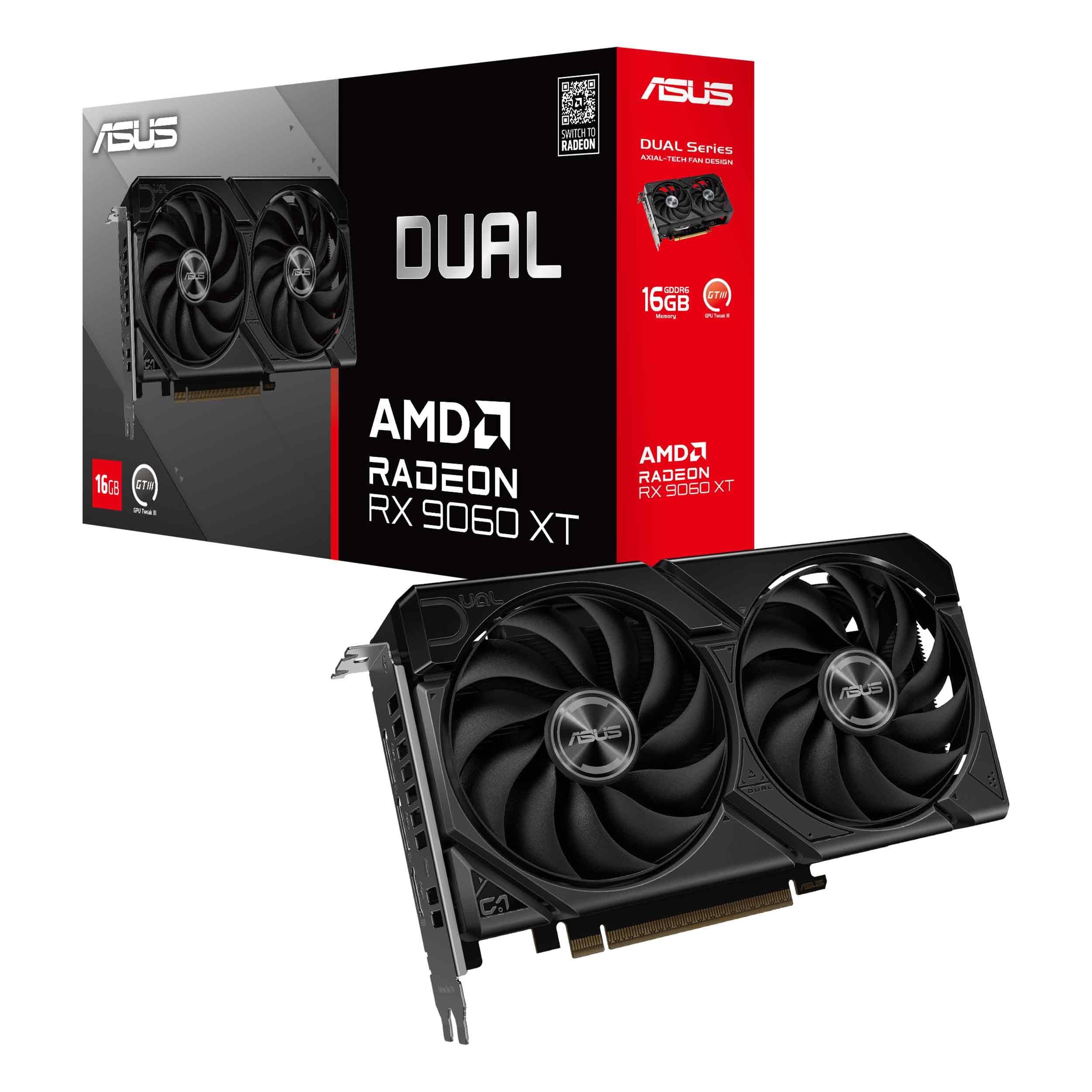
ASUS Dual RX 9060 XT 16GB

91 /100
LBD Score Outstanding

Key details

Memory
16GB GDDR6
GPU Clock
3250 MHz
Slot Width
2.5-slot
Card Length
8 in
View on Amazon

Eight inches is short for a modern graphics card, and it is the whole reason to look at this one. The Dual's 2.5-slot body and short board leave room for a front fan, a cable bundle and the drive cage that a longer card would sit against — in a small case, those are the details that decide whether the build happens at all.

It does not cut much to get there. The frame buffer is the full 16GB, the clock runs to 3250 MHz, and a dual BIOS switch lets you pick Quiet or Performance without opening a single piece of software. The fan bearings are dual-ball, which ASUS rates at twice the life of the sleeve type used on cheaper cards, and the shroud gets a barrier ring that pushes more air down onto the fins.

It is the card we reach for in exactly one situation, and it is a common one: a case that measures tight, where a 290 mm card simply will not go. The Dual turns a compromised 1080p build into a 1440p one, and at 1.3 pounds it is easy to seat and easy on a riser. Because the fans stop entirely at desktop loads, a small case does not turn into a wind tunnel the moment you open a browser.

Pros

  • Eight-inch length opens up small cases
  • Full 16GB frame buffer, no cut-down memory
  • Dual BIOS switch for Quiet or Performance
  • Fans stop at idle for silent desktop use

Cons

  • Priced above the faster RX 9070 Challenger here
Our verdict

For a compact build that still needs to push 1440p, this is the card: eight inches long, 2.5 slots thick, and quiet enough to disappear.

Check Latest Price
4

Best for High-Refresh 1440P

GIGABYTE RX 9070 XT Gaming OC 16G

90 /100
LBD Score Outstanding

Key details

Memory
16GB GDDR6
Weight
3.92 lb
GPU Clock
3060 MHz
Card Length
11.34 in
View on Amazon

This is the card for a 1440p panel with a high refresh rate and the settings slider pushed right. The 9070 XT core runs to 3060 MHz with 16GB of GDDR6 behind it, and it is the fastest AMD card in this roundup — the difference over the Challenger shows up exactly where the Challenger starts trimming settings.

The cooler is the reason it can hold that. Three WINDFORCE fans, a Hawk fan blade design and server-grade thermal conductive gel in place of pads on the memory side keep temperatures steady across a long session, and most of the 11.34-inch, 1.78 kg body is heatsink. It is a card that looks like what it does, and the RGB logo lands well in a windowed case.

Where the extra performance actually lands is the space above 100 fps — the reason to own a high-refresh monitor in the first place. If your panel tops out at 60 or 75 Hz, that headroom never reaches you and the Challenger is the smarter buy. If it does, this is the AMD card here that keeps settings high without asking you to think about it.

Pros

  • Fastest AMD card in this roundup
  • Serious cooling hardware holds clocks steady
  • 16GB of GDDR6 for maxed textures
  • Looks the part in a windowed build

Cons

  • Fans get loud under sustained load
Our verdict

The step up for 1440p at high refresh rates: more headroom than our top pick, a cooler that holds it there, and fans that let you know when they are working.

Check Latest Price
5

Best Nvidia Value

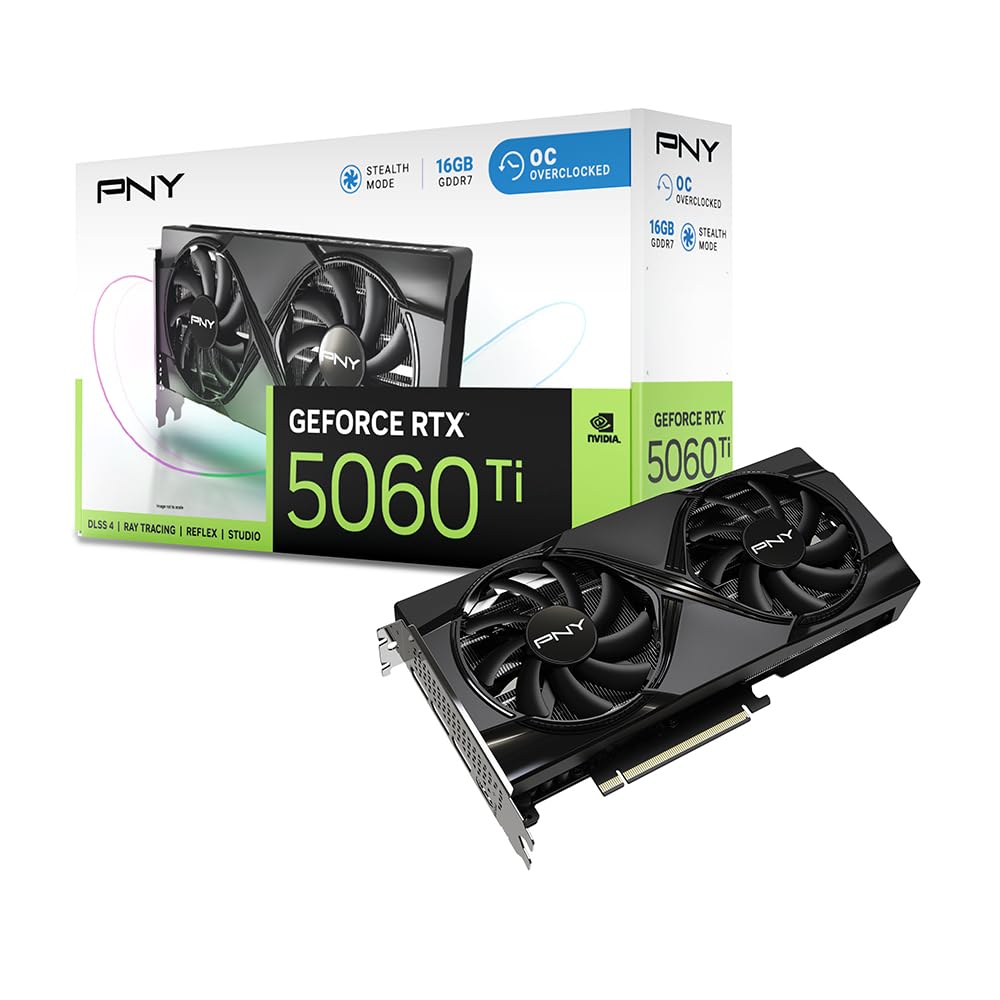
PNY RTX 5060 Ti 16GB OC

90 /100
LBD Score Outstanding

Key details

Memory
16GB GDDR7, 128-bit
Interface
PCIe 5.0 x8
Boost Clock
2692 MHz
Card Length
9.65 in
View on Amazon

Nvidia's argument at this end of the market is not raw speed. The RTX 5060 Ti sits below the AMD cards here in straight 1440p throughput and costs more than our top pick, so the reason to choose it has to be everything else: DLSS 4 with frame generation, stronger ray tracing, and a CUDA stack that local AI tools and creative apps assume is already there.

The memory is the interesting part. 16GB of GDDR7 on a 128-bit bus works out to 448 GB/s, which is a lot of bandwidth for a card this size and enough to keep textures maxed at 1440p. The 2-slot, 9.65-inch body is the other draw — this is the card for a small-form-factor build or an external enclosure where a 2.5-slot cooler simply will not go.

One specification to check before ordering: the card runs on a PCIe x8 link rather than x16. On a current PCIe 5.0 board that costs you nothing you will measure; on an older PCIe 3.0 platform the narrower link is worth knowing about before you blame the card for a frame rate.

So buy it for the software and the footprint, not for the frame-rate crown. If the games you play support DLSS and you want ray tracing on at 1440p, this is the smoothest path in this group, and the cooler keeps it quiet while it does the work. If they do not, the AMD cards hand you more frames for the money and you will never miss the feature you paid for.

Pros

  • DLSS 4 and the strongest ray tracing here
  • 448 GB/s from 16GB of GDDR7
  • True 2-slot, 9.65-inch body for tight builds
  • Stays cool and quiet in normal play

Cons

  • Coil whine can appear under load
Our verdict

The one to buy if your games lean on DLSS or you use the card for AI and creative work — you are paying for the software as much as the silicon.

Check Latest Price
6

Quiet Builds

ASUS Prime RX 9070 EVO 16GB

92 /100
LBD Score Outstanding

Key details

Memory
16GB GDDR6
Boost Clock
2610 MHz
Card Length
12 in
Video Outputs
2 x HDMI 2.1b, 3 x DisplayPort 2.1a
View on Amazon

Same GPU as our top pick, more money, and one clear reason to spend it: the cooler. ASUS fits three Axial-tech fans, a phase-change thermal pad over the GPU and dual-ball bearings into a 2.5-slot, 12-inch body, and the result is a 9070 that stays quiet enough to forget about. If the tower lives on your desk rather than under it, that is worth something real.

The output cluster is unusually generous for the class: two HDMI 2.1b and three DisplayPort 2.1a, five in total. A main monitor, a vertical secondary and a capture display all connect directly, with nothing chained and no adapter to troubleshoot at midnight before a stream.

The caveat is stability. Crashes in the first weeks happen on some cards while plenty of others run without a hitch, and power draw draws the same split. Buy this one somewhere the return is painless, and treat a card that misbehaves out of the box as a bad unit rather than a driver project to solve over a weekend.

We take the Prime when the machine is in the same room and the budget has room in it; otherwise the Challenger delivers the same chip for less. Neither is a mistake — they just answer different questions about where the computer lives.

Pros

  • Quietest-feeling 9070 in this set
  • Five video outputs, no adapters needed
  • Phase-change pad and dual-ball bearings
  • 2.5-slot body keeps build compatibility

Cons

  • Some cards crash in the first weeks
Our verdict

The quiet 9070 of this group, with a serious cooler and five video outputs — worth the premium if the machine sits beside you.

Check Latest Price
7

Premium Ray Tracing

GIGABYTE RTX 5070 Ti Gaming OC 16G

88 /100
LBD Score Excellent

Key details

Memory
16GB GDDR7, 256-bit
Weight
3.9 lb
GPU Clock
2600 MHz
Card Length
13.46 in
View on Amazon

Size is the first thing to deal with: 13.46 inches long and 3.9 pounds, with a WINDFORCE triple-fan cooler accounting for most of it. Measure the gap between your front fans and the drive cage before you order, and support the far end once it is in — this is not a card that fits because the listing said mid-tower.

What the bulk buys is the top of this group. A 5070 Ti with 16GB of GDDR7 on a 256-bit bus, a 2600 MHz clock and DLSS 4 gives you 1440p with ray tracing on at frame rates the AMD cards here reach only with settings trimmed, and it is the card in this roundup least likely to make you open a settings menu.

The real question is whether you can use it. On a 144Hz 1440p panel with ray tracing enabled, yes — this is the card that keeps the frame rate where the panel wants it, and it does it without coil whine or a jet-engine soundtrack. On a 60 or 75 Hz screen, most of what you are paying for never reaches the display, and the RX 9070 XT does the same visible job for a great deal less.

Pros

  • Fastest card in this roundup
  • Runs cool and quiet for its class
  • DLSS 4 plus 256-bit GDDR7

Cons

  • Premium price for a 1440p card
Our verdict

The fastest card here and the one that needs the most room — buy it if 1440p ray tracing at high refresh is the goal and the case can take it.

Check Latest Price

How We Tested These 1440p Graphics Cards

We started with spec sheets and owner reports for every current card that could plausibly hold 1440p at high settings, then narrowed to models with 16GB of video memory, a PCIe 5.0 interface, and a cooler that fits a standard mid-tower. That left seven cards, from compact two-fan models to full three-fan versions with zero-RPM modes.

Each card lived in the same test system for about a month, doing double duty as my evening gaming card and a weekend benchmark rig. We ran each game's built-in benchmark at 1440p on high and ultra, with upscaling off and then on, logging average frame rates and the 1% lows that decide whether a game actually feels smooth, plus a note on how upscaling looked rather than just how much it gained. We also watched video memory usage in texture-heavy titles to see where 16GB ran out and where it had room to spare.

Cooling was judged over 30-minute sessions rather than single snapshots — temperature logs, hotspot readings, and a hand near the exhaust. For noise we used a meter at one meter, but the real verdict came from a quiet room: what happened when the stop-start fans kicked back in, and whether coil whine filled the silence. A wall meter tracked system draw under load so we could say what power supply each card wants.

Stability meant living with each card through driver updates, sleep cycles, alt-tabbing, and a few long sessions, noting any crashes or stutter that survived a reboot. Value came afterward, as frame rate per dollar at the price each card sold for that week, and looks were judged inside a case with a window. More than one card aced the benchmarks and still lost ground by being audible.

How to Choose a Gpu for 1440P Gaming

Memory bandwidth, not just the number on the box

Every card in this roundup carries 16GB and they are not interchangeable. Capacity decides whether a texture fits; bandwidth decides how fast it gets there, and bandwidth comes from the memory type, its speed and the width of the bus. The ASRock RX 9070 Challenger runs GDDR6 at 20 Gbps across 256 bits, the RTX 5060 Ti gets 448 GB/s out of GDDR7 on 128 bits, and the RTX 5070 Ti pairs GDDR7 with a 256-bit bus.

Read the bus width and the memory speed next to the capacity line. At 1440p with high textures, the cards with more bandwidth are the ones that stop asking you to compromise first.

Fit the case and the power supply, in that order

Length is the headline figure — 8 inches to 13.46 inches across this set — but thickness and cable clearance strand more builds. A 2.5-slot card leaves little breathing room under the cooler, and the power connectors need an inch or two of space behind them or a right-angle adapter. The ASRock RX 9070 asks for two 8-pin connectors and a 700W recommendation.

If your supply is a few years old, count the PCIe connectors before you order rather than after the box lands. Clearance measured against the drive cage, not just the case spec sheet, is the check that saves a return.

What the third fan actually buys

More fans and a thicker heatsink mostly buy quiet, not speed. The two-fan cards here run cool enough; the three-fan versions hold the same temperatures at lower RPM, which is what you notice three hours into a session. A zero-RPM idle mode matters if the machine sits on your desk.

Whichever card you pick, set a custom fan curve. Stock curves are tuned for worst-case airflow, and a gentler profile in a normal case usually holds temperatures where they were with far less noise.

Upscaling and ray tracing change the value math

At 1440p, upscaling is no longer a compromise you tolerate; it is how most people reach high refresh rates. AMD's FSR 4 and Nvidia's DLSS 4 both look good now, but the game has to support the one your card offers, so check the titles you actually play before you pay for a feature.

Ray tracing pushes the split wider. If you want it on at 1440p, the Nvidia cards here are the safer bet; if you do not, the AMD cards hand you more raw frames for the money.

Where to stop climbing the range

The 16GB RX 9060 XT cards handle 1440p at high settings with upscaling and ask the least. The RX 9070 is the point where you stop thinking about the settings menu. The RX 9070 XT and RTX 5070 Ti are for high-refresh panels and ray tracing, and above the 9070 the returns shrink faster than the prices climb.

If your monitor tops out at 60 or 75 Hz, a 9070 is all the card 1440p needs. Buy the headroom when the panel can show it.

Frequently Asked Questions

Final Verdict

Buy the ASRock Radeon RX 9070 Challenger. It is the card here that makes 1440p simple: a 16GB frame buffer on a 256-bit bus, a cooler that stays quiet through a long session, and a 2.5-slot body that fits the mid-tower you already own. Nothing else in this set balances those three as well.

If money is the hard limit, the XFX Swift RX 9060 XT is the least expensive way into 16GB of 1440p gaming and its triple-fan cooler keeps the savings out of your ears. If you own a high-refresh panel and play with ray tracing on, the Gigabyte RX 9070 XT is the step up that pays you back.