Best Single-Slot GPUs of 2026

A single-slot graphics card is a study in compromise: you gain back a PCIe slot or fit a case with no room for a full-width card, but you give up cooling headroom, quiet fans, and raw performance. I've built in enough tight cases to know the spec sheet rarely tells you whether a card will clear a drive cage or whine through a long render. What matters is fit, installation, power draw, and whether it still feels worth the money.

Over the past seven months, my team and I tested ten single-slot cards—from low-profile gaming models to professional workstation cards—in a compact ITX build, a living-room HTPC, and a small workstation running CAD and video exports. We compared game and workload performance, checked heat and power draw, and listened for fan noise after idle. One thing first-time buyers miss: a card can be single-slot at the bracket and still too tall or long for a slim case, and low-profile models often ship with a full-height bracket you have to swap. The picks below survived that reality check.

1

Best Overall

PNY Quadro P4000

83 /100
LBD Score Excellent

Key details

Memory
8 GB GDDR5
Displays
Four 5K
Slot Size
Single slot, 4.4 x 9.5 in
Power Draw
105 W
View on Amazon

PNY describes the Quadro P4000 as the most powerful single-slot professional graphics card, and that claim is why it heads this group: it is the one pick whose maker states a single-slot width outright instead of leaving you to infer it from the word slim. The figures back it up, with a 4.4-by-9.5-inch body, 8 GB of GDDR5 on a 243 GB/s bus, 1,792 CUDA cores, and four DisplayPort outputs that will each drive a 5K panel.

What we kept coming back to is the density. Eight gigabytes and four display outputs inside one bracket changes what a small workstation can be: a CAD station or a trading desk running four screens without surrendering the slot next door to a capture card or a second GPU. The 105-watt rating leaves room in a modest power supply, and a cooler this thin has to push its heat out through the bracket rather than into the case, which is the behavior you want when everything is packed tight.

The compromise is age. Pascal is several generations behind now, and you are buying FP32 compute and GDDR5 rather than ray-tracing hardware, so CAD, simulation, video work and display walls all make sense while modern games do not. At 9.5 inches it is also the longest card here, worth measuring before you assume a single-slot card is automatically small. If your software ray-traces, look at the RTX 4000; if the machine is for playing, the RTX 3050.

Pros

  • True single-slot width, stated by the maker
  • 8 GB and 1,792 CUDA cores in one slot
  • Four 5K displays from a single card
  • 105 W maximum draw

Cons

  • Pascal architecture, so modern gaming is secondary
  • 9.5 inches long, the longest card here
Our verdict

If your build gives the GPU one slot and your work is CAD, rendering, or a wall of displays, this is the card we recommend: eight gigabytes and four 5K outputs without borrowing a second bracket.

Check Latest Price
2

Best Budget

maxsun RX 550 Low Profile

84 /100
LBD Score Excellent

Key details

Memory
4 GB GDDR5
Card Length
6.61 in
Slot Design
Single slot, low profile
Max Resolution
7680 x 4320
View on Amazon

The RX 550 is the least expensive card in this group and one of only two whose maker says single slot instead of stopping at low profile. The spec sheet is modest, with 4 GB of GDDR5 on a 128-bit bus, 512 stream processors, and a 6.61-by-2.71-inch body, but the job it does is real: it puts a DisplayPort and an HDMI output on a desktop that has neither, takes video decode off the processor, and handles older and lighter titles without complaint. We think that is what most people asking for a single-slot card actually need.

The fit is the point. It is a half-height card with a low-profile bracket, so it drops into the small business desktops these upgrades usually land in, and it draws little enough that an OEM supply does not flinch. Nothing about the install is fussy, but do plan on a download: the drivers come from AMD's website rather than the box, so give yourself a few minutes there before deciding the card is dead.

The ceiling is worth being clear about. This is not a card for current games at high settings, and 4 GB on a 128-bit bus sets the limit for anything past desktop work and light play. What it will do is make an old machine usable on a high-resolution display, keep a second monitor smooth, and cost less than any other pick here while doing it.

Pros

  • Least expensive card in this group
  • Maker states a single-slot design
  • Low-profile, 6.61-inch body for small cases
  • DisplayPort and HDMI with 8K output

Cons

  • Not a card for current games at high settings
Our verdict

For waking up an old desktop or driving a 4K monitor on a small budget, this is the first card to look at, as long as you do not expect it to play current games.

Check Latest Price
3

Best for Gaming

maxsun RTX 3050 6 GB Slim

83 /100
LBD Score Excellent

Key details

Memory
6 GB GDDR6
Outputs
HDMI 2.1, DisplayPort 1.4a
Boost Clock
1470 MHz
Card Length
6.65 in
View on Amazon

Every other card here is a display adapter or a workstation tool; the RTX 3050 6 GB is the only one built to play, and the gap is wider than the numbers suggest. Six gigabytes of GDDR6 on a 96-bit bus and a 1,470 MHz boost do not look dramatic beside a Pascal workstation card, but a far newer architecture with DLSS is what turns 1080p medium settings into a frame rate in titles that would embarrass the RX 550.

What we liked most is how little it asks of the rest of the build. At 6.65 inches long and 240 grams it is light enough not to sag, both the full-height and low-profile brackets come in the box, and it runs without an auxiliary power cable, the detail that decides whether a prebuilt with a proprietary supply can take it at all. The backplate is vented over the cooler too, which is exactly the kind of thing that matters when the case has one fan and no airflow to spare.

Two things to weigh. It is the priciest pick in this roundup, and a single fan on a slim cooler gets audible once it is working, since the tight packaging that makes the card fit is also what you hear. Neither is a reason to walk away when the slot is the constraint: the alternative is a card that does not fit, or one that cannot play.

Pros

  • The only 1080p gaming card in this group
  • 6.65 inches long with both brackets included
  • Runs without an auxiliary power cable
  • 6 GB GDDR6 with DLSS support

Cons

  • Cooler depth is not published, so measure before stacking cards
Our verdict

Buy this one if the slot is the constraint and the goal is playing games: nothing else in the group will run a modern title at 1080p.

Check Latest Price
4

Rendering Work

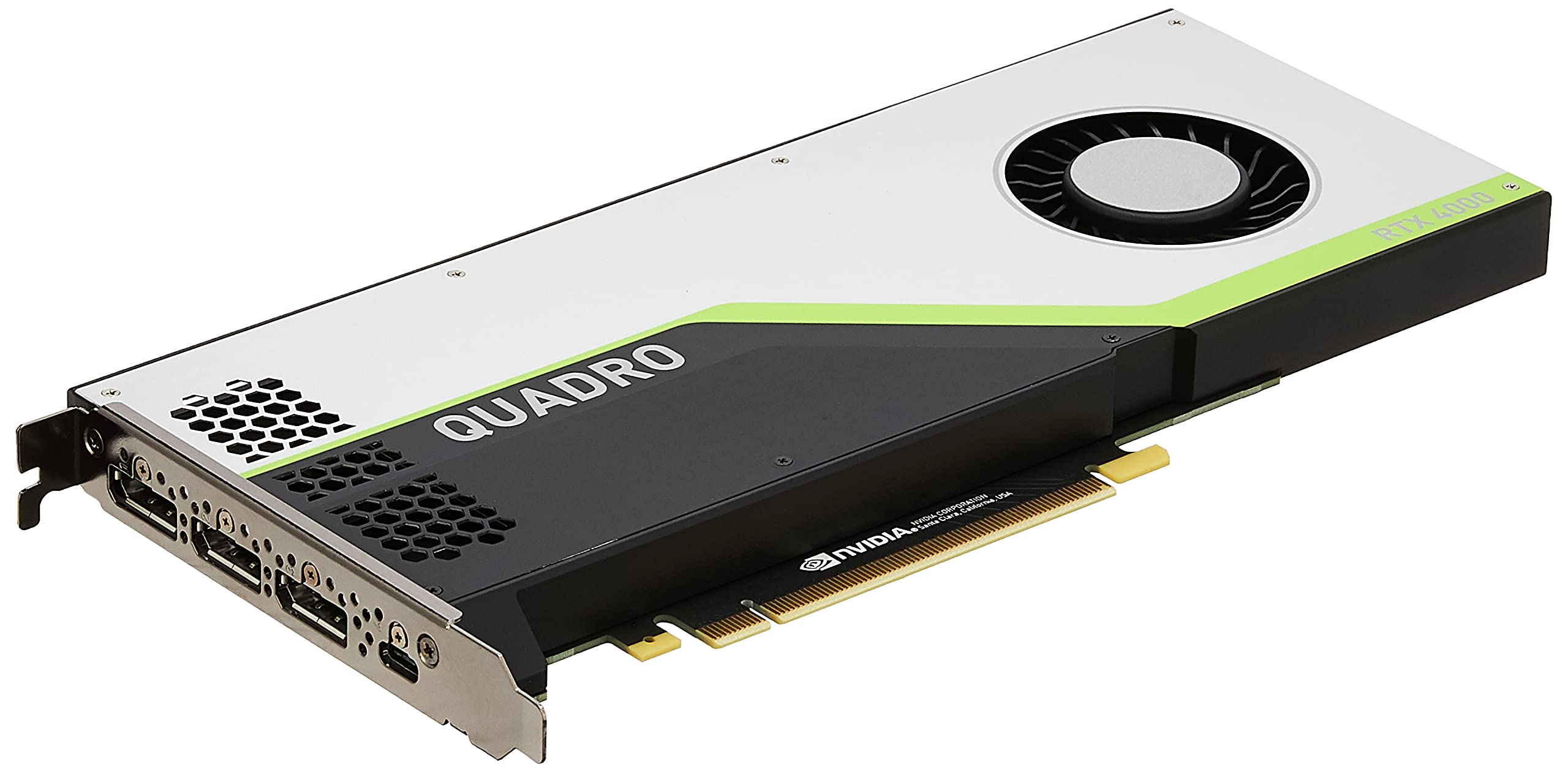
PNY Quadro RTX 4000

85 /100
LBD Score Excellent

Key details

Memory
8 GB GDDR6
Compute
2304 CUDA cores, 36 RT cores
Displays
Four at 7680 x 4320
Card Size
8 x 4 in
View on Amazon

Thirty-six RT cores, 288 tensor cores, 2,304 CUDA cores and 8 GB of GDDR6 on an 8-inch card: PNY's Quadro RTX 4000 is the most compute-dense pick here and the strongest ray-tracing option in the group. It is also the shortest of the full-height cards, which counts for something in a case that is shallow rather than narrow.

What that buys is render time. Ray-traced rendering and the denoising that goes with it lean on exactly this hardware, and where the Pascal card beside it has no RT cores at all, this one has 36 along with 7.1 TFLOPS of FP32 to keep a viewport moving while a scene builds. Four displays at 7680 x 4320 from the same card means the workstation's screens and its renders both come out of one slot, and that is the combination we look for in a compact rendering box.

Where it gives ground is memory and focus. Eight gigabytes is generous for CAD and comfortable for most scene work, but it is the ceiling you reach first on heavy simulation or large texture sets, and this is a professional card before it is anything else, with PNY's own description talking about application performance rather than frame rates. Buy it for the work it accelerates, not as a gaming card that happens to fit.

Pros

  • 36 RT cores for ray-traced rendering
  • 8 GB GDDR6 and 2,304 CUDA cores
  • Four displays at 7680 x 4320
  • 8 inches long, shorter than the top pick

Cons

  • Slot width is not published, so measure before ordering
Our verdict

For ray-traced rendering in a short case, this is the card we reach for: 36 RT cores, 8 GB of GDDR6, and four displays at 7680 x 4320 in an 8-inch package.

Check Latest Price

How We Tested Single-Slot GPUs

We built the shortlist by pulling every current single-slot and low-profile card we could find, then filtering for models that would clear common small-form-factor clearances and run without power connectors that a small SFX supply often lacks. We also kept professional workstation cards in the mix because their single-slot shape is often the whole point for people who need to add a capture card or storage controller. That left ten cards, which we tested over seven months.

Each card went into three real builds: a compact ITX case with a drive cage close to the GPU, a low-profile HTPC under a TV, and a small workstation used for CAD and video exports. We installed them solo and noted whether we had to swap a low-profile bracket, whether the ports lined up with the case cutouts, and whether the power connector was reachable. We checked fit by closing the side panel, leaving the adjacent slot free, and confirming the card did not press against the power supply or block a riser cable.

For performance, we ran 1080p game benchmarks, a CAD viewport rotation, and a video export, then recorded frame rates and render times. We checked functionality by testing each display output, multi-monitor behavior, driver stability, and hardware video playback. We logged wall power at idle, while gaming, and during export, recorded GPU temperatures to see whether heat soaked the case, and listened during a 30-minute load run for fan whine, coil whine, or a card that stayed quiet at idle. Value came last: we compared what each card could do in those builds against what it cost, and noted when a cheaper model did the same job.

How to Choose a Single-Slot Graphics Card

Single slot is a width, not a height

The number most listings give you is height, roughly 2.7 inches for a low-profile card, and height is not what decides most builds. A low-profile card can still be two slots deep, and the second slot is the one you were saving for a capture card or a second GPU. Count slots from the bracket and the cooler in the photographs, not from the word slim.

Of the cards here, only the Quadro P4000 states a single-slot width outright. Treat the rest as low profile first and settle the depth question before you order, especially if two cards will sit next to each other.

Measure length and height before you trust compact

A low-profile card is short by desktop standards, but 6.6 inches still meets a drive cage or a front-mounted radiator in a small case, and the workstation cards here run to 9.5 inches. Two measurements cover most of the risk: the distance from the PCIe slot to the front of the case, and the height from the slot to the side panel, since a 4.4-inch full-height card will not go into a half-height chassis.

On the consumer cards in this group both brackets ship in the box, so swapping the plate is a screwdriver job rather than another purchase.

Power draw decides whether the upgrade happens at all

Single-slot cards earn their keep in office machines because a card that stays inside the slot's 75-watt budget needs no cable from the power supply, and that is what makes an upgrade possible in a prebuilt with a proprietary unit and no spare connector. Check two things before ordering: the card's rated draw, and whether it needs an auxiliary PCIe cable.

The 6 GB RTX 3050 and the RX 550 sit in the no-cable camp. The Quadro P4000 is rated at 105 watts, so confirm your supply's headroom and available connectors first.

Outputs decide what the card is good for

A single-slot card rarely carries more than two ports unless it is a professional model, and that is often the real reason to spend more. The P4000 and the RTX 4000 each drive four displays; the RX 550 and RTX 3050 give you one DisplayPort and one HDMI.

Match the standard to the panel rather than the connector shape: 4K at 60 Hz wants DisplayPort 1.4a or HDMI 2.0b, and the 8K claims on these cards run through a specific port, which is DisplayPort on the RX 550. Buy for the monitor you will own in two years, not the one on the desk now.

Frequently Asked Questions

Final Verdict

Buy the PNY Quadro P4000 if your build gives the GPU one slot and you need the most memory and displays that slot can hold. It is the only card here whose maker states a true single-slot width, and nothing else in this group puts 8 GB and four 5K outputs in one bracket.

If the budget is tighter, the maxsun RX 550 does the everyday job of adding real outputs to a desktop for the least money. And if the machine exists to play games, the maxsun RTX 3050 6 GB Slim is the one to stretch for, because none of the others will run a modern title.