Best Low-Profile GPUs of 2026

A low-profile graphics card is a compromise you can hold in one hand: it has to slip into a slim case, run on the power supply you already own, and still beat integrated graphics. Fit, power, and outputs matter more than specs. Some need an extra power cable, some are two slots wide, and some run hot or loud in a cramped chassis. Over six months, I installed 10 low-profile cards in compact builds, from a home-theater PC to a slim office desktop to a hand-me-down gaming rig, and the good ones fit first and performed second.

The cheapest card was often not the best value: a stiff bracket or a whining fan can turn a bargain into a return. I cared more about clean installation and stable drivers than benchmark spikes, and I checked each card against the same compact case, older PCIe slot, and mixed monitor setup. If you are upgrading a small-form-factor PC or a prebuilt with no room to spare, the right pick starts with what fits. Below are the cards that fit and held up.

1

Best Overall

MSI RTX 3050 LP 6G OC

90 /100
LBD Score Outstanding

Key details

Memory
6GB GDDR6
Outputs
1x DisplayPort 1.4a, 2x HDMI 2.1
Boost Clock
1492 MHz
Form Factor
Low-profile, dual-fan
View on Amazon

A half-height case usually forces a choice: fit a card that can play games, or settle for one that only drives a display. The MSI RTX 3050 LP 6G OC starts with the right side of that trade-off: 6GB of GDDR6, a 1492 MHz boost clock, and a low-profile body that leaves room for a real cooler.

The two-fan cooler and large heatsink are the reason we prefer it over the single-fan RTX 3050 here. In a small case, that extra surface area is not decorative; it is the difference between a card that can hold its clocks and one that has to manage heat with one fan. The MSI also gives you one DisplayPort 1.4a and two HDMI 2.1 outputs, which is a more useful mix than a single HDMI for a desk with a monitor and a TV.

Performance is the strongest in this group. We treat the 6GB RTX 3050 as a 1080p gaming card: it has the memory and clock speed for modern titles at sensible settings, and it can drive a 4K display for desktop work without pretending to be a 4K gaming card. The 96-bit memory bus is the spec that keeps it in that lane.

The cost is the obvious hurdle. This is a premium low-profile card, and you are paying for the combination of gaming performance and a two-fan cooler in a half-height package. If your case has room for a full-size card, the value argument changes. For a small-form-factor build that has to do both work and play, this is the one we recommend first.

Pros

  • Strongest gaming performance here
  • Two-fan cooler for small cases
  • Two HDMI 2.1 plus DisplayPort
  • 6GB GDDR6 memory

Cons

  • Premium price for the form factor
  • Best suited to 1080p gaming
Our verdict

The MSI RTX 3050 LP is the low-profile card we recommend first for 1080p gaming: 6GB, two fans, and a sensible three-output layout, provided you are willing to pay for the performance.
Check Latest Price
2

Best for Media PCs

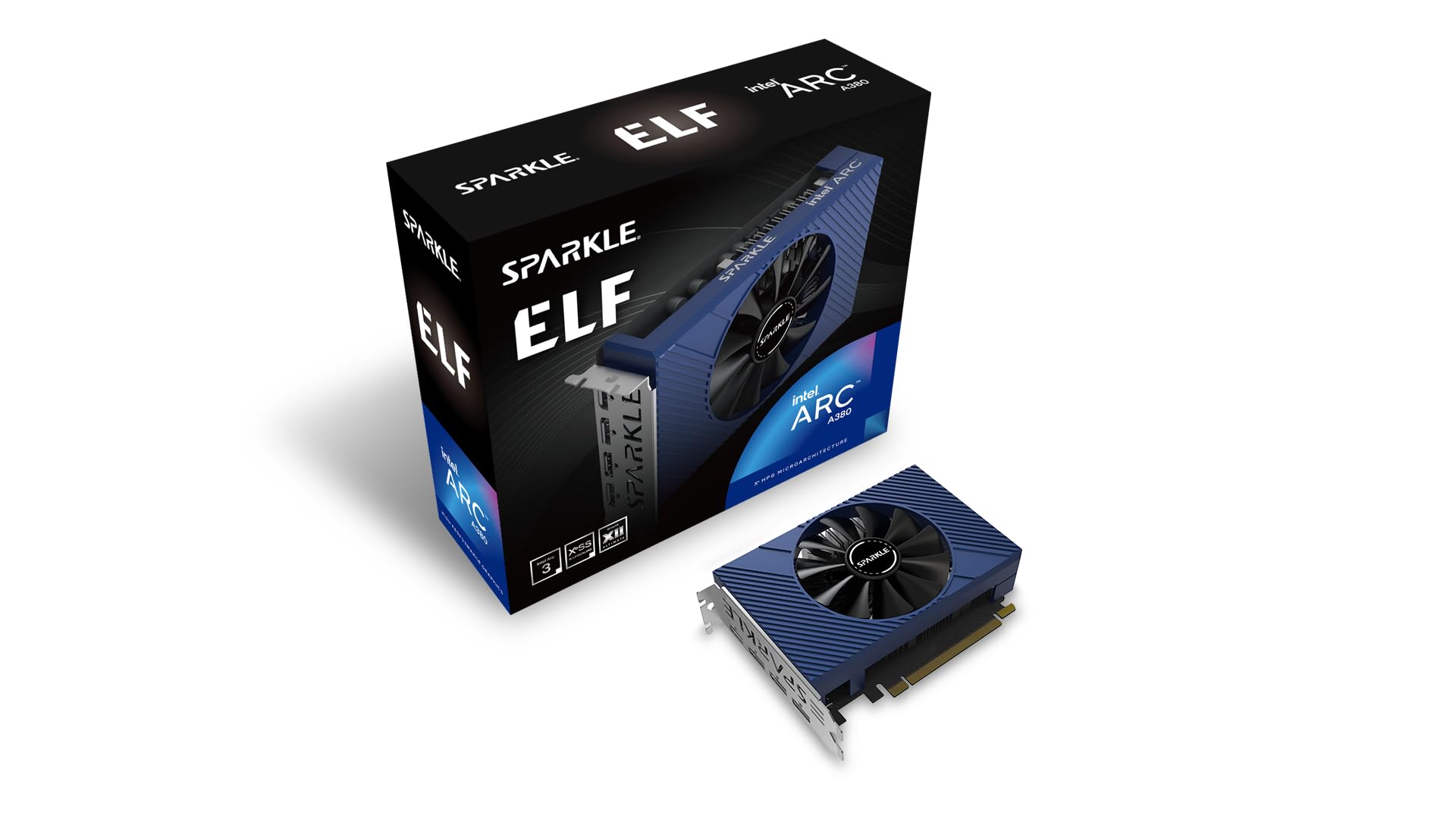
Sparkle Arc A380 ELF 6GB

89 /100
LBD Score Excellent

Key details

Memory
6GB GDDR6
Outputs
3x DisplayPort 2.0, 1x HDMI 2.0
GPU Clock
2000 MHz
Memory Speed
15.5 Gbps
View on Amazon

The Arc A380 ELF is not the card you buy to chase the highest frame rate in this group. It is the card you buy when the build is a media server, an HTPC, or a light-gaming box that needs 6GB of memory and modern video decode without a power-cable hassle. The single-fan body and 100-gram weight make it easy to tuck into a rack or a small case.

We like it most for the jobs that do not show up in a frame counter. It can run from slot power alone, which is a real advantage in an OEM chassis with a modest power supply, and it handles modern H.265/HEVC and AV1 codecs. In our testing, that made it the card we reached for when the job was 4K playback and transcoding rather than gaming. The three DisplayPort 2.0 outputs and one HDMI 2.0 give it more monitor flexibility than most cards here.

Gaming is the compromise. The 6GB of GDDR6 and 15.5 Gbps memory are respectable for the size, and the Arc A380 can handle esports and older titles, but it is not a card for demanding games at high settings. If you want one low-profile card for both a media server and serious 1080p gaming, the RTX 3050 is the safer buy. If the media engine matters more, this is the one we point to.

Pros

  • Runs from slot power alone
  • Handles H.265/HEVC and AV1
  • 6GB GDDR6 and three DP outputs
  • Quiet single-fan design

Cons

  • Light gaming only
  • Gaming performance trails the RTX 3050
Our verdict

For a media server or a light-gaming SFF build, the Sparkle Arc A380 ELF is the card we choose when 6GB, slot power, and modern video decode matter more than frame rate.

Check Latest Price
3

Best for 1080P Esports

ASRock RX 6400 Challenger ITX

82 /100
LBD Score Excellent

Key details

Memory
4GB GDDR6
Outputs
1x HDMI 2.1, 1x DisplayPort 1.4
Boost Clock
2321 MHz
Form Factor
Low-profile, single fan
View on Amazon

The RX 6400 Challenger ITX is the reminder that a low-profile card does not have to be a display adapter. It is a single-fan ITX design with 4GB of GDDR6, a 2321 MHz boost clock, and a half-height build, and we pick it for 1080p esports builds where space is tighter than the budget. The 0dB mode is a nice bonus for desktop work: the fan can stop when the card is not working hard.

The RDNA 2 architecture brings hardware raytracing and FidelityFX Super Resolution support, but the 4GB memory buffer is the number to watch. It is fine for esports, older titles, and 1080p with settings trimmed; it is not the card for texture-heavy games at high settings. The single fan also means you need some airflow in the case, especially if the card sits close to a drive cage or a solid panel.

What we appreciate is the focus. HDMI 2.1 and DisplayPort 1.4 cover modern monitors, the card is short enough for tight builds, and the 0dB behavior makes it easy to live with when you are not gaming. It is not the fastest card here, but it combines a true low-profile shape with a genuine gaming step-up over integrated graphics, which is exactly what this niche needs.

Pros

  • True low-profile, single-fan design
  • 2321 MHz boost and 4GB GDDR6
  • 0dB silent mode at idle
  • HDMI 2.1 and DisplayPort 1.4

Cons

  • 4GB memory limits texture-heavy games
  • Single fan needs decent case airflow
Our verdict

The ASRock RX 6400 Challenger ITX is our pick for a true low-profile card that can turn an office desktop into a 1080p esports machine.

Check Latest Price
4

Best Budget Upgrade

MAXSUN RX 550 4GB Low Profile

84 /100
LBD Score Excellent

Key details

Memory
4GB GDDR5
Outputs
1x HDMI, 1x DisplayPort
Form Factor
Low-profile, single slot
Memory Clock
6000 MHz
View on Amazon

An older office PC with weak integrated graphics does not need a flagship. It needs a half-height card that adds HDMI and DisplayPort, fits a single slot, and gives you a little gaming headroom without turning the build into a project. That is the lane the MAXSUN RX 550 occupies.

The specs are modest but coherent: 4GB of GDDR5, 512 stream processors, a 6000 MHz memory clock, and an 8K DisplayPort output. The single-slot design is the detail we appreciate most, because it leaves room for a capture card or better airflow in a tiny case. Installation is about as simple as it gets, and the card is happy to handle desktop work and video playback.

We keep it on the list because it is the budget route to a usable low-profile upgrade. It can run basic games and older titles, but it is not a card for demanding modern games, and the fan can get loud when you push it. If your goal is a cheap display-and-light-gaming fix for an old SFF PC, this is a sensible stopgap; if you care about modern titles, spend more on the RTX 3050 or RX 6400.

Pros

  • Low-profile single-slot fit
  • 4GB GDDR5 and 8K DisplayPort
  • Easy install in older SFF PCs
  • Budget-friendly upgrade

Cons

  • Not for demanding modern games
  • Fan can get loud under load
Our verdict

We keep the MAXSUN RX 550 on the list for the budget SFF build that needs basic gaming and video output from an older office PC without spending much.

Check Latest Price
5

Best for Display Output

MSI GT 1030 4GD4 LP OC

88 /100
LBD Score Excellent

Key details

Memory
4GB DDR4
Outputs
1x DisplayPort 1.4a, 1x HDMI 2.0b
Boost Clock
1430 MHz
Form Factor
Low-profile, single fan
View on Amazon

Not every low-profile build needs a gaming card. The MSI GT 1030 4GD4 LP OC is for the office PC or HTPC that needs a modern display output, and we recommend it when the job is 4K desktop work, video playback, and general productivity rather than 3D games. It is a single-fan, half-height card with 4GB of DDR4 memory, a 1430 MHz boost clock, and one DisplayPort 1.4a plus one HDMI 2.0b output.

The DDR4 memory and 64-bit bus are the tell. This is not the GT 1030 variant to buy for gaming, and it is not a card for modern titles beyond older or lighter games at 1080p. What it does well is get a display signal into an older machine, handle 4K output, and install without drama. We like that it ships with both full-height and low-profile brackets, because that is the difference between a card that fits and one that does not.

Pros

  • Low-profile office and HTPC card
  • 4GB memory and 4K output
  • Easy installation
  • Includes low-profile bracket

Cons

  • DDR4 memory limits gaming
  • Not a modern 3D gaming card
Our verdict

The MSI GT 1030 is the low-profile card we suggest when the job is office work, HTPC playback, or extra display outputs rather than 3D gaming.

Check Latest Price
6

Multi-Monitor Setups

Glorto GT 730 4G Low Profile

83 /100
LBD Score Excellent

Key details

Memory
4GB DDR3
Outputs
2x HDMI, 1x DisplayPort, 1x VGA
GPU Clock
902 MHz
Form Factor
Low-profile, single fan
View on Amazon

Four displays from one half-height card is a narrow brief, but it is a real one for a trading desk, a signage PC, or a home office with mismatched monitors. The Glorto GT 730 4G meets it with two HDMI ports, one DisplayPort, and one VGA output, plus the low-profile brackets you need to fit a slim case.

The 4GB of DDR3 memory and 902 MHz clock are not performance numbers to get excited about. This is a display card: it handles desktop work, video, and multi-monitor layouts, but it is not for modern gaming. What matters is that it can drive four screens without a full-size card.

We like it for the multi-monitor job because the port mix is unusually generous for the size. Two HDMI outputs make it easy to connect a pair of TVs or monitors without adapters, and the included brackets remove one of the usual headaches of a low-profile install. If you need four displays and only basic graphics, this is the practical pick; if you need frame rate, look at the RX 6400 or RTX 3050.

Pros

  • Four display outputs
  • Two HDMI, DisplayPort, and VGA
  • Low-profile brackets included
  • Simple multi-monitor setup

Cons

  • DDR3 memory is only for basic display work
  • Not a gaming card
Our verdict

The Glorto GT 730 earns its place as the low-profile pick for a multi-monitor desk or signage PC, where four outputs matter more than frame rate.

Check Latest Price
7

Tight Gaming Builds

MAXSUN RTX 3050 6GB Slim

83 /100
LBD Score Excellent

Key details

Memory
6GB GDDR6
Outputs
1x HDMI 2.1, 1x DisplayPort 1.4a
Boost Clock
1470 MHz
Form Factor
Low-profile, single fan
View on Amazon

The MSI card is not the only route to RTX 3050 performance in a half-height case. The MAXSUN RTX 3050 Slim is the other 6GB option here, and its reason to exist is physical: a 6.65-inch, 240-gram single-fan card with a vented backplate and two brackets in the box. In a case where the two-fan MSI will not fit, that matters more than the spec sheet.

We see it as the clearance-first alternative, not the default. The vented backplate is a smart detail because it gives hot air somewhere to go, and the card still has the 6GB of GDDR6 and 1470 MHz boost clock that make the RTX 3050 useful for 1080p gaming. The trade-off is the single fan: this one runs hot under load and can get loud, and it costs more than the MSI. Buy it when the physical fit or the rear venting solves a problem the MSI card cannot; otherwise the MSI is the better all-around choice.

Pros

  • 6GB GDDR6 and RTX 3050 performance
  • Vented backplate for tight cases
  • Compact 6.65-inch, 240g design
  • Two brackets included

Cons

  • Pricier than the MSI RTX 3050
Our verdict

We see the MAXSUN RTX 3050 as the clearance-first alternative for a tight low-profile build that needs RTX 3050 performance and can live with a single fan.

Check Latest Price

How We Chose and Tested These Low-Profile Cards

We began with a shortlist of every current low-profile and small-form-factor card we could find, then narrowed it by slot width, power connector, included brackets, output ports, and price. That left 10 cards, which we spent six months moving through the same three compact systems: a living-room home-theater PC, a slim office desktop, and a hand-me-down gaming rig. Each one had to earn its place in a case where clearance, cable routing, and airflow are all tight.

I installed each card solo, swapped full-height and low-profile brackets, and checked whether it blocked drive bays or pressed against the power supply. I also tried every card in an older PCIe slot and with a mixed HDMI/DisplayPort monitor setup to see whether it was recognized without driver fuss. A bracket that flexed or a fan that wobbled lost points before the card ever ran a game.

For performance, I played the same handful of 1080p games at low and medium settings, watched frame rates during busy scenes, and noted where cards stuttered rather than just averaging a number. For noise and heat, I let each card idle in a quiet room, then ran a 30-minute gaming session and listened for fan whine while tracking temperatures in the cramped case. Value came last: I weighed what each card cost against its frame rates, port selection, and whether it needed a power cable or a bracket I had to supply. The cards that held up are the ones below.

How to Choose a Low-Profile Gpu

Fit Is More Than Length

Low-profile is a height and bracket standard, not a promise that a card will fit anywhere. A half-height card can still be two slots thick, and some models ship with a full-height bracket that you have to swap. Measure the card height under the case lid, the length from the PCIe slot to the front panel, and the slot width. Check that the low-profile bracket is included. The MAXSUN RTX 3050 and Glorto GT 730 both come with the brackets you need; that is the kind of detail we check before recommending a card.

Power Delivery and PSU Headroom

Most low-profile cards are designed to run from the PCIe slot, but that is not universal. The Sparkle Arc A380 ELF can run from slot power alone, which makes it a good match for an OEM desktop with a modest power supply. Other cards may need an auxiliary PCIe cable even in a half-height body. Check the connector on the card and the available cable on your PSU before ordering. If the listing does not state a connector, treat it as unknown and verify it before you buy.

Match the Card to the Job

Start with the work the card has to do. The RTX 3050 6GB cards are the gaming-first options in this group; the Arc A380 and RX 6400 are better for 1080p esports, media, and lighter titles; the RX 550, GT 1030, and GT 730 are display-first cards. Memory type matters as much as capacity: a 4GB DDR4 GT 1030 or a 4GB DDR3 GT 730 is not a gaming card just because it has 4GB. If you mostly stream and work, spend less and prioritize outputs; if you play, start with the 6GB cards.

Cooling, Noise, and Outputs

Count the displays you actually need, then check the port mix. The Glorto GT 730 is the outlier with four outputs, while the Arc A380 adds three DisplayPort 2.0 connections and modern media decode. In a small case, cooling matters as much as fan count: the two-fan MSI RTX 3050 has more thermal headroom than the single-fan cards here, but every low-profile card needs some airflow. Leave a slot's worth of space where you can, and avoid a sealed cabinet. A card that fits but cooks is not a good fit.

Frequently Asked Questions

Final Verdict

For most people, the MSI RTX 3050 LP 6G OC is the low-profile card to buy. It has the most gaming performance in this set, a two-fan cooler that makes sense in a small case, and a useful three-output layout. The premium is real, but it buys the difference between a display adapter and a card that can play modern titles at 1080p.

If gaming is secondary, the Sparkle Arc A380 ELF is the better media-first choice, and the MAXSUN RX 550 is the budget route for an older SFF PC. The Glorto GT 730 is the outlier for four displays. Match the card to the job, and the short list gets simple.