Best Graphics Cards of 2026

A graphics card is the upgrade that makes a four-year-old PC feel new again, and the part most likely to disappoint once the box is open: too long for your case, too loud for a room where you also work, or thirsty enough to need a power supply you don't own. The real question isn't which card is fastest — it's which one is fastest at the resolution you actually play at.

I've built and rebuilt my own machines for years, and spec sheets still lie by omission. My team and I spent six months with seven current cards, running the same games at 1080p, 1440p, and 4K, and measuring the things a listing never mentions — noise, heat, and what a card actually delivers for the money.

Memory is the number I check first now. 8GB still carries 1080p, but 16GB is the comfortable floor once you move to 1440p with high-resolution textures. The picks below run from compact cards for a tight case to white ones worth showing off through a glass panel.

1

Best Overall

ASRock RX 9070 Challenger 16GB OC

91 /100
LBD Score Outstanding

Key details

Memory
16 GB GDDR6, 256-bit
Card Size
290 x 123 x 51 mm
Boost Clock
2520 MHz
Recommended PSU
700 W
View on Amazon

Sixteen gigabytes of GDDR6 on a 256-bit memory bus is the figure that decides this one for us. ASRock pairs that memory with 56 compute units and a 2520 MHz boost clock, which lands the RX 9070 squarely in the 1440p class with enough in reserve to run 4K on high settings with upscaling on. Measured against the rest of this group, it's the best price-to-performance balance on offer, and that is why it's the card we recommend first to most people building a gaming PC.

Cooling turned out to be the quieter story, in the literal sense. The triple-fan cooler and the 0dB mode mean the fans stop entirely at light loads, so the card vanishes from the room during desktop work and only spins up when a game asks something of it. We paid close attention to noise on every card here, because a cooler sitting a foot from your ear can undo an otherwise quiet build.

Two 8-pin power connectors and a 700W supply recommendation are worth checking before you order. That's a bigger ask than a 51 mm, 2.5-slot body suggests, and if your current unit is a 550W model from a few years back, this card becomes the reason to replace it rather than an afterthought.

What you don't give up is the point. Memory stays at 16GB, the bus stays at 256-bit, and the factory overclock is there without the flagship premium the two 9070 XT cards carry. Build around a 1440p monitor and this is where we start; if you already own a 4K high-refresh panel, the extra tier is worth the money.

Pros

  • 16 GB of GDDR6 on a 256-bit bus
  • 0dB mode stops the fans at light loads
  • 2520 MHz factory boost clock

Cons

  • 290 mm long, so compact cases need measuring
  • Two-year warranty, the shortest among our picks
Our verdict

For most 1440p gaming builds this is the card to buy: 16GB on a 256-bit bus, a quiet triple-fan cooler, and a price below the premium picks here.

Check Latest Price
2

Best Budget

GIGABYTE RTX 5060 WINDFORCE OC 8G

91 /100
LBD Score Outstanding

Key details

Memory
8 GB GDDR7, 128-bit
Cooling
WINDFORCE, 2 fans
Boost Clock
2512 MHz
Card Length
7.83 in
View on Amazon

At 7.83 inches, this is the shortest card in the group, and that one number decides more builds than the spec sheet lets on. It slides into a compact mATX case, clears a front-mounted radiator, and leaves room for cable routing where a 12-inch card would force you to rearrange everything. The two-fan WINDFORCE cooler does the work inside that smaller footprint.

What you're buying is a 1080p card, and a good one. The RTX 5060 runs Nvidia's Blackwell silicon with DLSS 4 behind it, which matters more at this end of the market than anywhere else: upscaling is how a card in this class holds a high refresh rate without dropping to medium settings. We think it's the right first graphics card — the one for a starter build, a second PC, or a teenager's machine that has to fit under a desk.

Noise is where a small cooler could have gone wrong, and it doesn't. The dual-fan design keeps the card cool without the whine you sometimes get from budget two-fan units, and the 2512 MHz clock means the factory tune is more than a label. Set your expectations at 1080p high settings, pair it with a 144Hz panel, and it delivers.

Pros

  • Shortest card here at 7.83 inches
  • DLSS 4 support in a budget card
  • Quiet dual-fan WINDFORCE cooler

Cons

  • 8 GB of GDDR7 limits high-texture 1440p gaming
Our verdict

The card to buy when the case is small and the budget is tight: it's the shortest and least expensive pick here, and it handles 1080p without complaint.

Check Latest Price
3

Best 16GB Card on a Budget

XFX Swift RX 9060 XT 16GB

89 /100
LBD Score Excellent

Key details

Memory
16 GB GDDR6
Cooling
Triple fan
Outputs
HDMI, 2x DisplayPort
Boost Clock
Up to 3320 MHz
View on Amazon

A triple-fan cooler on a card at this tier is unusual, and it's the first thing we noticed about the Swift. XFX pairs it with a 3320 MHz boost clock, the highest of any card in this group, and 16GB of GDDR6 — the same capacity the RX 9070 cards carry. On paper that is a lot of card for a mid-tier GPU.

Cooling is stronger than this tier usually gets. Three fans keep load temperatures low and the card quiet while doing it, so the Swift doesn't broadcast its presence from under the desk. FSR 4 is the other half of the pitch: AMD's current upscaler is what lets an RX 9060 XT hold 1440p in demanding titles, and it's the reason this card deserves a look rather than a shrug.

Where it makes sense is memory on a budget. It's the least expensive 16GB card in this group, the triple-fan cooler is more than this tier usually gets, and the three-year warranty beats what ASRock gives its RX 9070. If you want to run large texture packs at 1440p and keep some money back for a monitor, this is a defensible way to build.

Pros

  • Cheapest 16GB card in this group
  • Triple-fan cooler stays quiet under load
  • 3320 MHz boost clock, the highest here

Cons

  • Costs close to our top pick for a lower tier
Our verdict

If 16GB of memory is the line you won't cross below, this is the least expensive way to get it here, with a triple-fan cooler and a three-year warranty attached.

Check Latest Price
4

Best Nvidia Pick

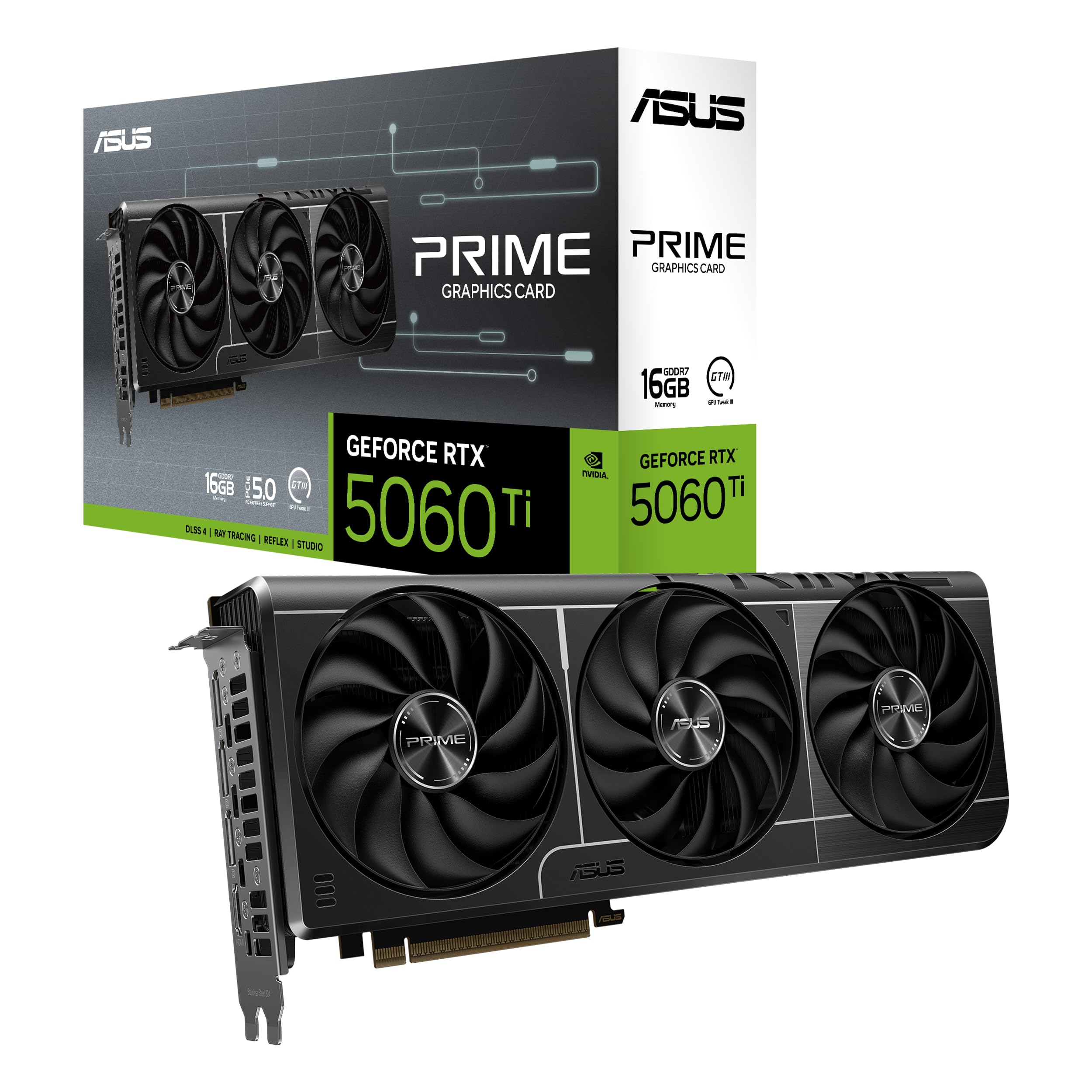
ASUS Prime RTX 5060 Ti 16GB

90 /100
LBD Score Outstanding

Key details

Memory
16 GB GDDR7
Boost Clock
2602 MHz (OC mode)
Card Length
12 in, 2.5-slot
AI Performance
758 AI TOPS
View on Amazon

This is the Nvidia card here that doesn't make you choose between DLSS 4 and memory capacity. The Prime RTX 5060 Ti carries 16GB of GDDR7, a 2602 MHz OC boost clock, and 758 AI TOPS, and for a 1440p build where ray tracing is part of the appeal, it's the one we pick ahead of the AMD cards — provided you'll actually use what Nvidia charges for.

GDDR7 is the difference you can point to. The memory is a generation newer than the GDDR6 on the AMD cards in this group, and the three-fan Prime cooler is a real step above a reference design: the Axial-tech fans use a smaller hub for longer blades, and the 2.5-slot body means you're not surrendering three slots to the heatsink.

What you pay for is the ecosystem plus the memory. On straight rasterization this card sits a tier below the RX 9070, so a build that never turns ray tracing on is better served by our top pick. Switch ray tracing on, lean on DLSS 4, and use the card for local AI work as well, and the premium starts making sense — 16GB is what lets it hold a larger model, and that's a use this much memory makes possible.

Pros

  • 16 GB of GDDR7, the newest memory here
  • DLSS 4 with 758 AI TOPS
  • Three-year manufacturer warranty

Cons

  • Costs more than our top pick with less raster speed
Our verdict

Buy this one if DLSS 4 and ray tracing are part of your plan; it's the only card here that pairs Nvidia's feature set with 16GB of the newest memory.

Check Latest Price
5

Best for 4K

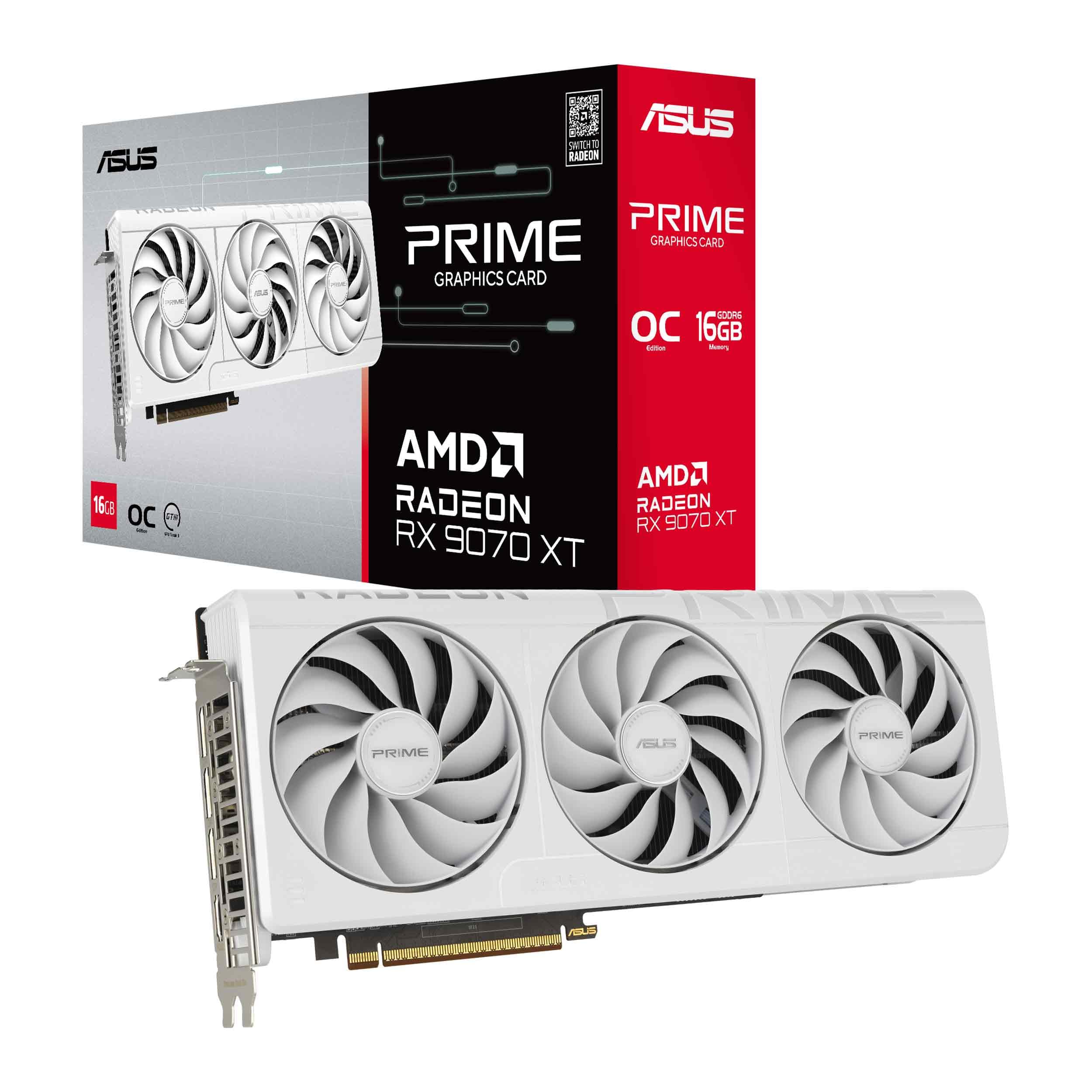
ASUS Prime RX 9070 XT 16GB White OC

92 /100
LBD Score Outstanding

Key details

Memory
16 GB GDDR6
Cooling
Triple fan, dual-ball bearings
Boost Clock
Up to 3030 MHz (OC mode)
Card Length
12.3 in, 2.5-slot
View on Amazon

White graphics cards are usually a tax you pay for a color, and this is the rare case where the finish and the hardware make sense together. The shroud, the three Axial-tech fans, and the 2.5-slot, 12.3-inch body are all white, and ASUS ships a matching hook-and-loop strap in the box — a small thing that tells you someone thought about the build this card goes into.

It's also the fastest card here. The 9070 XT chip carries 64 compute units against the plain RX 9070's 56, and the board's 3030 MHz OC boost clock widens the gap further: this is the card in the group that runs 4K on high settings without leaning on upscaling for everything. If you own a 4K panel and want to feed it properly, this is where the money goes.

Not every card behaves the same way. Crashes that survive a clean driver reinstall do come up, and when they do the answer is a replacement rather than a settings change. Run a demanding game for an hour inside your return window — that's long enough to know whether you have a good one.

Cooling is handled with more care than the price of admission suggests: a phase-change thermal pad sits between the GPU and the heatsink, and the dual-ball fan bearings are rated to outlast the sleeve bearings on cheaper cards. What that buys you is a card that stays quiet under load, with fan noise sitting behind the game rather than over it. In a case with a window, that matters more than it sounds.

Pros

  • White shroud, fans, and a matching strap in the box
  • 3030 MHz OC boost clock
  • Phase-change thermal pad and dual-ball fan bearings

Cons

  • Draws more power than the non-XT cards here
Our verdict

For a 4K build with the budget for it, this is the fastest card in the group, and the white finish is the rare version that costs you nothing in performance.

Check Latest Price
6

High-End AMD Builds

XFX Swift RX 9070 XT 16GB

91 /100
LBD Score Outstanding

Key details

Memory
16 GB GDDR6
Cooling
Triple fan
Outputs
HDMI, 3x DisplayPort
Boost Clock
Up to 2970 MHz
View on Amazon

Three DisplayPorts plus an HDMI is the most display output of any card in this group, and for a triple-monitor desk or a sim rig it's the reason to look at the Swift at all. Under the shroud it's the same RX 9070 XT story as the white ASUS above: 16GB of GDDR6, a 2970 MHz boost clock, and a factory overclock that needs no software to engage.

Three fans handle the cooling, and the result is a card that stays composed. Load temperatures sit in a comfortable range and noise stays low enough to disappear behind case fans and a headset. We kept coming back to the cooler when comparing it with the white ASUS — both are triple-fan cards, and neither gives the other an obvious advantage on noise.

It lands in also-consider because the ASUS White does the same job with a slightly higher boost clock, and the two cost essentially the same money. Where the Swift wins is color and connectivity: in a black build we take it without hesitating, and if you run three monitors the extra DisplayPort settles it on its own. The three-year warranty makes the call easier either way.

Pros

  • HDMI plus three DisplayPorts, the most here
  • Triple-fan cooler keeps noise low
  • Three-year manufacturer warranty

Cons

  • Lower boost clock than the other 9070 XT here
Our verdict

The 9070 XT to buy if your build is black or your desk runs three displays — the same tier as our 4K pick, with the outputs to match.

Check Latest Price

How We Tested These Graphics Cards

We started with every current card we could buy at list price from the major board partners, then narrowed by resolution target, physical size, and memory configuration until seven were left. Each one went into the same mid-tower build on a clean driver install, and then into my own PC for a few weeks of real life: workday video calls, evening sessions, an overnight download or two.

For numbers, we ran a demanding open-world title, a racing sim, and a competitive shooter at 1080p, 1440p, and 4K, recording average frame rate but watching the 1% lows more closely — that's the stutter you feel, not the number you screenshot. A wall meter logged power draw at idle and through a 30-minute load, and a two-hour session flushed out driver crashes, black screens, and clocks that wouldn't hold. Memory got its own pass, with textures maxed at 1440p and 4K while we watched frame-time graphs to see where 8GB ran out.

Cooling and noise were judged by meter and by ear: a decibel reading from three feet away in a quiet room, plus a listen for coil whine at the menu screen, where it shows up first. We noted whether fans stopped at idle and how fast they ramped. On the bench, we measured length and slot thickness against a mid-tower and a small case, and checked whether a 2.5-slot card blocked the slot below it. Appearance got weeks of looking through a tempered glass panel, including whether a white card fought the rest of the build and whether a backplate started to sag.

Value came last, deliberately: we compared what each card cost the week we bought it against the frames it produced at the resolution it was clearly built for, and flipped the dual BIOS switch on the cards that have one to see whether quiet mode cost us performance.

How to Choose a Graphics Card

Start With the Monitor, Not the Card

Resolution decides more than any other single choice. A 1080p panel is well served by the RTX 5060 and its two fans; a 1440p panel wants the RX 9070 class; a 4K display is where the RX 9070 XT earns its premium. Buying above your monitor wastes money that belongs in a better display, and buying below it means dropping settings within a year. Match the card to the panel on your desk now, not the one you might buy later.

How Much Video Memory You Actually Need

8GB is enough for 1080p today and gets tight at 1440p with high textures; 16GB is the comfortable spec for 1440p and the floor we accept for 4K. Capacity also drives non-gaming work, since large local AI models and long video timelines both eat memory. The trap is letting memory type settle the argument: GDDR7 is newer than the GDDR6 on most cards here, but a 16GB card on a 256-bit bus will usually outlast a smaller, faster pool in texture-heavy games.

Measure the Case and Count the Power Cables

Two numbers sink more builds than anything else: card length and power connectors. Our top pick runs 290 mm, which clears most mid-towers but not all of them once a front radiator is fitted, and the ASUS Prime cards run 12 inches or more. On power, ASRock recommends a 700W supply for its RX 9070 and 800W for the 9070 XT, and those figures assume two 8-pin feeds. Check the wattage and count the cables before you order, not after.

Cooling, Noise, and the 0dB Question

Fan count is a rough proxy for how quiet a card will be, not a guarantee. Three-fan coolers like the ones on the XFX and ASRock cards move the same air at lower rpm, which is why they tend to be quieter under load. A 0dB mode, which stops the fans entirely at light loads, matters if the machine sits on your desk, and our top pick has one. In a case under a desk, a two-fan card like the GIGABYTE is often inaudible anyway.

DLSS 4 or FSR 4

Both upscalers are good enough now that the choice comes down to the games you play and whether ray tracing matters to you. Nvidia's DLSS 4 has the broader support and is the reason the RTX 5060 Ti carries a premium here; AMD's FSR 4 has closed much of the quality gap and is what makes an RX 9060 XT viable at 1440p. Neither rescues a card from the wrong tier, so treat upscaling as headroom rather than a substitute for the hardware you need.

Frequently Asked Questions

Final Verdict

Our default is the ASRock RX 9070 Challenger. It puts 16GB on a 256-bit bus, a quiet triple-fan cooler, and a factory overclock into a 1440p build without flagship money, and it's the card we hand to someone building their first serious gaming PC.

Change the pick only for a reason you can name. The ASUS Prime RX 9070 XT is the 4K card and worth it if you already own the monitor. The RTX 5060 Ti 16GB is the choice when ray tracing and DLSS 4 are the point of the build. Below that, the GIGABYTE RTX 5060 is the honest 1080p answer, and everything else here is a variation on those four decisions.