Best ID Card Printers of 2026

Printing ID cards in-house sounds like a small convenience until a stack of new hires, members, or event badges is waiting on someone else's turnaround. The appeal is simple: you control the photo, the data, and the timeline. The catch is that a card printer is only as good as its weakest consumable — a cheap ribbon or card stock that feeds badly can turn a five-minute job into an afternoon of reprints. I've learned to care less about the printer's footprint and more about whether it feeds cleanly, prints color evenly, and tells me when the ribbon is running low.

Over the past eight months, we've put six ID card printers through regular office use, from single-sided desktop units to dual-sided models with bundled supplies and photo-capture software. We looked at print quality and color accuracy, speed under a realistic batch, the appearance of the finished card, and what the whole thing costs to keep running. The best ones made badging feel like a routine task rather than a project. The picks below reflect that — not the flashiest spec sheet, but the printers we'd trust with a Monday morning rush.

1

Best Overall

Bodno Seaory S25

92 /100
LBD Score Outstanding

Key details

Printing
Single-sided
Warranty
2 years
Print Resolution
300 x 300 dpi
Included Supplies
100 cards, 100-print ribbon
View on Amazon

The box is the argument for the Seaory S25. Bodno includes a 100-print YMCKO ribbon, 100 PVC cards, and a lifetime Bronze Edition software license, so a small office can print its first badge without placing a second order. We like that the kit covers Windows, Mac, and Linux drivers while the design software runs on Windows and Mac. That matters when the person making badges is not sitting at the same computer as the office manager.

The 300 x 300 dpi output is enough for the front of a standard photo ID: a portrait, a name, a logo, and a barcode all have room to read cleanly. We appreciated the hand-fed, one-card-at-a-time feed for replacement badges, because there is no stack to load for a single print. The 2-year hardware warranty and lifetime software support also make this an easier kit to live with than a bare printer with a one-year depot warranty.

The S25 is the one we recommend for a small office, school office, or event desk that needs a dependable single-sided badge maker. The output hopper holds a finished batch instead of spreading cards across the desk, and the controls stay simple enough for a receptionist to run without a manual.

Pros

  • Complete 100-card starter kit
  • Drivers for Windows, Mac, and Linux
  • 2-year hardware warranty
  • Simple hand-fed workflow

Cons

  • Ribbon replacements add ongoing cost
Our verdict

For small offices that want a complete single-sided kit, the Seaory S25 is our default pick.
Check Latest Price
2

Best Dual-Sided

Bodno Seaory S28

87 /100
LBD Score Excellent

Key details

Printing
Dual-sided, one pass
Warranty
2 years
Print Resolution
300 x 1200 dpi
Included Supplies
300 cards, 300-print ribbon, camera
View on Amazon

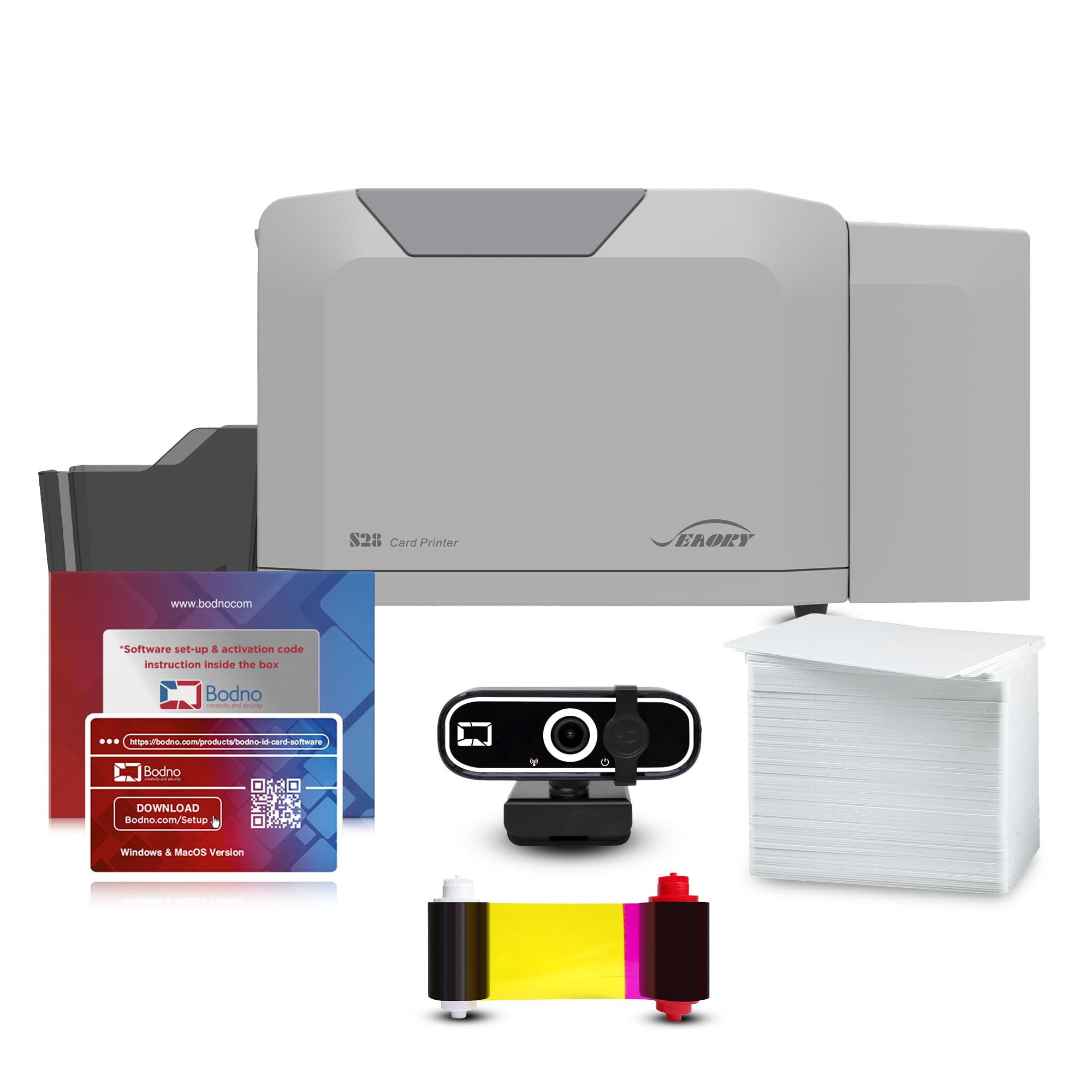
Both sides in one pass is the reason the Seaory S28 is here. A front photo and logo can share the card with a back-side barcode, emergency contact, or validity date without flipping and re-feeding. We like that the kit includes 300 cards, a 300-print ribbon, and a camera, so a school or mid-size office can run a badge rollout without sourcing extras. The 300 x 1200 dpi output is the sharpest in this group, and it gives small type and dense color art more room to stay clean.

The included camera is a practical extra: a new hire can be photographed at the printer instead of chased for a headshot. The S28 also keeps the same Bodno software workflow as the S25, so moving up to duplex does not mean learning a second design program. We appreciate the 2-year warranty and lifetime software support at this level.

The S28 earns its place when the back of the badge does real work, not just when you want a logo on both sides. The one-pass duplex saves a handling step on every card, and the larger starter kit makes more sense for recurring batches. For a front-only badge, the S25 is the simpler buy; for a two-sided card, this is the one we recommend.

Pros

  • Both sides in one pass
  • 300 x 1200 dpi color output
  • 300-card kit with camera and ribbon
  • 2-year warranty and lifetime software support

Cons

  • Setup can take some patience
Our verdict

We recommend the Seaory S28 when both sides of a badge carry information and you want the sharpest output here without a second pass.

Check Latest Price
3

Best Budget

Badgy100

78 /100
LBD Score Very Good

Key details

Card Time
45 seconds
Print Margin
0.05 in
Print Resolution
300 x 300 dpi
Included Supplies
100 cards, color ribbon
View on Amazon

At 3.7 pounds, the Badgy100 is light enough to move between a reception desk and an event table without a cart. The 100-card, 100-ribbon starter kit matches the low-volume work this printer is built for: a visitor badge, a new hire, a replacement. We like that the setup is aimed at a beginner, so the first card does not depend on learning every software feature. The manual feed also keeps the printer from feeling like a production machine you have to supervise.

The 0.05-inch print margin is the detail to plan around. The Badgy100 prints near-edge, not edge-to-edge, so a full-bleed design shows a thin white border. We do not mind that for a basic ID badge, and a border built into the artwork looks intentional. The 100-print ribbon also sets a natural first milestone: by the time it runs out, you know whether the printer belongs at the front desk or should stay in a drawer.

What we appreciate most is the lack of drama. There is no duplex path to clear, no second side to align, and no large footprint to negotiate. For a small office that prints a handful of badges a week, that simplicity is worth more than a faster spec sheet.

Pros

  • Light 3.7-pound body
  • 100-card starter kit
  • Beginner-friendly setup

Cons

  • 45-second card time is slow for batches
Our verdict

We like the Badgy100 for low-volume desks where light weight and a simple starter kit matter more than speed or duplexing.

Check Latest Price
4

Shallow PC Desks

IDP SMART-21S

76 /100
LBD Score Very Good

Key details

Printing
Single-sided
Software
Windows only
Footprint
6.6 x 10 x 12 in
Print Resolution
300 dpi color, 1200 dpi mono
View on Amazon

The SMART-21S has the shallowest desk depth here at 6.6 inches, which is the reason to consider it when the printer has to sit on a narrow reception counter or a shared worktable. The kit includes a 100-print YMCKO ribbon and 100 cards, so the first batch is covered. We also like the 1200 dpi monochrome mode for text-heavy access badges and barcodes; color is 300 dpi, but single-color output is the sharper option when you do not need a photo.

The single-card feed and one-button control panel keep operation simple, and the shallow body does not ask for much clearance. This is a specialist pick rather than the default: the Seaory S25 is the easier all-round kit for a mixed office, while the SMART-21S makes sense when desk depth is the hard constraint and the first batch is already covered.

Pros

  • Shallow 6.6-inch desk depth
  • 1200 dpi monochrome mode
  • Complete 100-print starter kit
  • Simple one-button control

Cons

  • Windows-only software
  • Reliability less settled than the Seaory picks
Our verdict

The SMART-21S is our compact pick for PC-based offices with very little desk space, provided you accept Windows-only software.

Check Latest Price

How We Tested These ID Card Printers

To build the shortlist, we started with printers sized for a front desk or small back office, then filtered by whether they supported single- or dual-sided printing, whether ribbons and card stock came in the box, whether the included software could import a photo without a separate subscription, and whether the printer plus a starter ribbon made sense for a small office. We cut anything that needed a dedicated IT install just to print a test card; we wanted models an office manager could set up with a laptop and a stack of blank cards.

We tested six units over eight months, running them through the same routine: a batch of new-hire badges on Monday, a set of replacement member cards midweek, and a last-minute event badge run on Friday afternoon. We loaded each printer's bundled ribbon and cards, imported portraits through the provided software or photo-capture tool, and timed the job from hitting print to stacking finished cards. We noted whether colors looked consistent across a batch, whether text stayed sharp at small point sizes, whether duplex models lined up the second side without reprints, and whether the finished card looked clean and professional enough to hand to someone.

We also paid attention to the boring parts: how often we had to clear a feed error, whether the ribbon warning came before we wasted a card, and how much a replacement ribbon and card stock added per card. Usability mattered too — did the software make sense without the manual, and could we hand the printer to a colleague without a training session? We kept using each printer for routine badging after the initial tests, and the ones that held up are the ones that made consumables and upkeep feel predictable rather than precious.

How to Choose an Id Card Printer

Start With the Bundle

A card printer is only half a purchase; the ribbon and cards decide what the first month actually costs. A 100-print kit is enough to prove a workflow and cover a small office's first batch, while a 300-print kit makes more sense for a school or a company issuing badges in waves. Check that the software license is included, not a trial, and that the ribbon matches the printer model. The cheapest box can become expensive if you are buying supplies again after a few dozen cards.

Single-Sided or Dual-Sided?

A single-sided printer puts the photo and name on the front and stops there. That is enough for many visitor and employee badges. A dual-sided model prints both sides in one pass, which is worth paying for when the back carries a barcode, emergency contact, validity date, or access instructions. Printing one side and manually flipping the card is not the same workflow: it adds handling and room for error. If the back of your badge is blank, put the money into a better ribbon kit instead.

Resolution and Card Edge

300 x 300 dpi is the working standard for ID cards: it handles a portrait, a logo, and readable text. Higher color resolution, such as the 300 x 1200 dpi on the Seaory S28, helps with small type and fine color detail. Edge coverage matters just as much. Some printers print near-edge and leave a small white margin, so a full-bleed design needs a built-in border rather than a last-minute crop. Ask for a sample print before you commit a whole badge design to a printer.

Software, Computers, and Setup

The printer is usually the easy part; the software and drivers are where a rollout slows down. Check the operating system of the computer that will actually run the printer, not the one in the catalog photo. A Windows-only kit is fine in a PC office and a dead end on a Mac. Cross-platform drivers help, but the design software must also run on the machine. If nobody on staff wants to build templates, prioritize a bundle with a lifetime license and a template library over a bare printer.

Where It Will Live

Measure the desk depth, not just the width. The Seaory S28 is nearly 19.3 inches deep, while the Seaory S25 is 9.6 inches and the SMART-21S is 6.6 inches. Leave clearance for the card slot and room to open the cover. A manual-feed printer is fine for one-off badges; a batch of new hires will be slower. If the printer moves between rooms, weight matters, and the Badgy100 is the lightest of these at 3.7 pounds.

Frequently Asked Questions

Final Verdict

Start with the Bodno Seaory S25 if you need a complete single-sided kit for a small office, school, or event desk. It includes the ribbon, cards, and software, and it is the most complete default here. Move to the Seaory S28 when the back of the badge carries real information and one-pass duplexing saves time. If volume is very low and the printer has to live on a crowded desk, the Badgy100 is the lighter, simpler choice.