Best M.2 SSD Heatsinks of 2026

An M.2 drive is the size of a stick of gum and it runs hot — a long write can push it past 70°C, at which point the controller slows itself to survive. A heatsink fixes that with metal on top, a thermal pad underneath, and clearance for case air to carry the heat off. That last part is where shopping gets hard: the cooler has to clear your graphics card, your side panel, or the tight bay inside a console.

I've mounted enough of these to know the biggest block isn't automatically the best one. My team spent three months with 16 heatsinks in real desktop builds and console expansions, and the standouts got the basics right: even contact with the controller, hardware that survived being removed and refitted, and a footprint that fit where it promised to.

Heatpipes and stacked double-sided plates look impressive in photos, but contact pressure beats surface area every time — a slim cooler clamped down properly will beat a chunky one held on by a hopeful rubber band. That's how these picks were judged; none of them earned a spot on looks alone.

1

Best Overall

MHQJRH M.2 2280 Heatsink

95 /100
LBD Score Outstanding

Key details

Mounting
Six adjustable-height screws
Drive Support
M.2 2280 NVMe/SATA
Cooling Design
Double-sided grooved aluminum
Installed Dimensions
3"L x 0.95"W x 0.4"H
View on Amazon

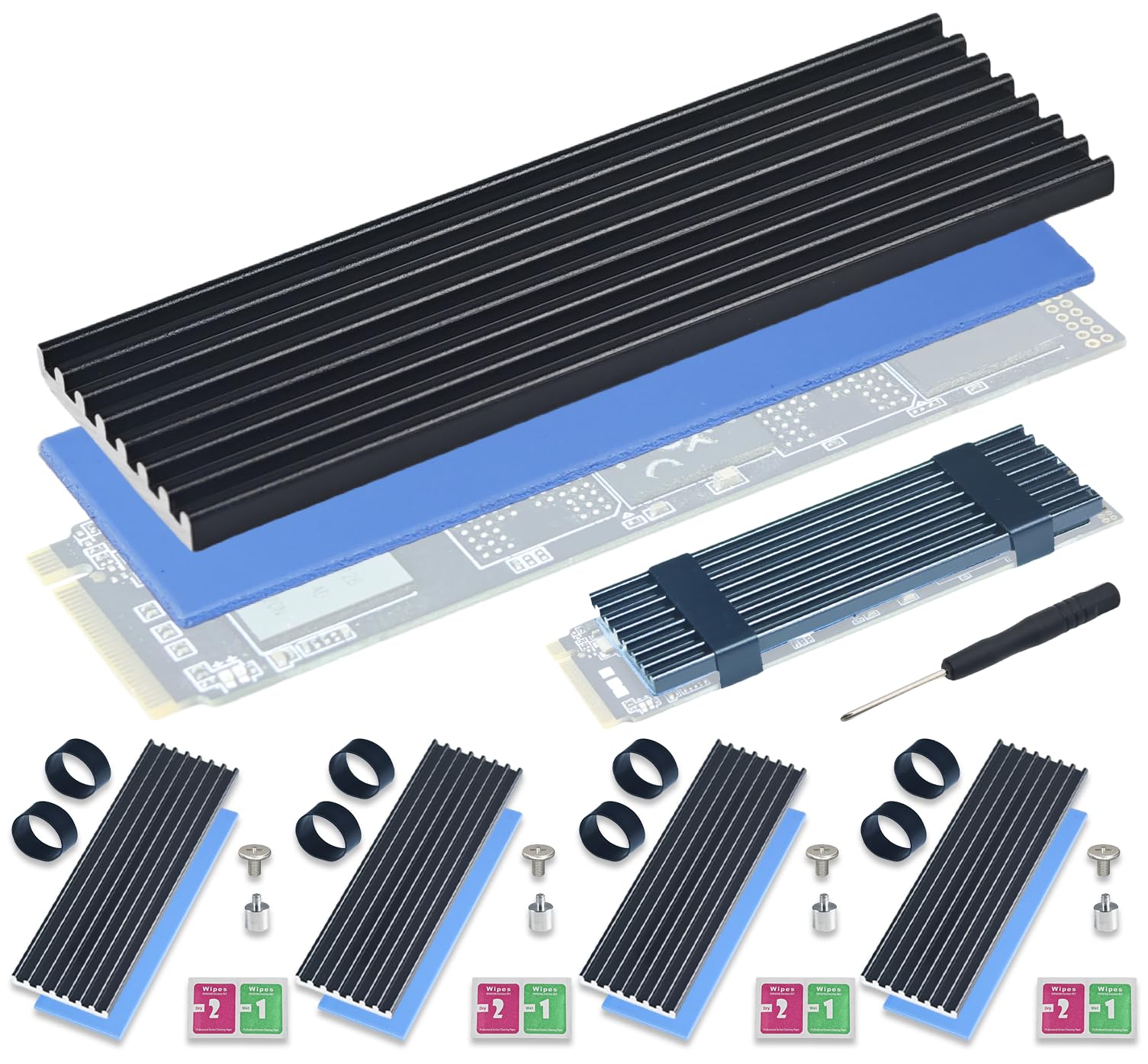
Six adjustable-height screws are the first thing we look at on the MHQJRH, because they solve the problem most 2280 coolers ignore: drives are not all the same height once you count the chips on one or both sides. The screw posts let the top plate sit level instead of cocked, and the grooved aluminum body spreads contact across the whole drive rather than pinching one end. At 3 by 0.95 by 0.4 inches, it is a standard-size block, not a tower. The black finish is plain enough to disappear under a motherboard cover, which we count as a feature.

We reach for this one first for mixed PC and PS5 builds. It is listed for both, and the double-sided clip design gives you a way to clamp a single- or double-sided drive without adhesive. The six screws take a little more patience than spring clips, but the even pressure is worth it on a drive you plan to leave alone. We also like that the kit includes the thermal pads and the hardware; there is no separate shopping trip for a screw or a pad. For a budget cooler, the contact arrangement feels more deliberate than the price suggests.

The caveat is height. At 0.4 inch, it is low enough for many PS5 and desktop installs, but it is not zero-clearance; check the gap under a graphics card and above the motherboard before you commit. We also keep the small screws in a tray during installation, because they are easy to lose and the mount is not something you want to rush.

If you want one heatsink that covers the widest range of ordinary builds, this is the one we hand to friends. It does not have the thermal mass of a heatpipe tower or the finished look of the be quiet! MC1, but it also does not ask you to solve a clearance puzzle before you can use it. The result is a cooler that is easy to recommend and easy to live with.

Pros

  • Six screws spread mounting pressure evenly
  • Fits desktop PC and PS5 builds
  • Double-sided grooved aluminum body
  • Budget-friendly for the hardware

Cons

No notable drawbacks to flag.

Our verdict

The MHQJRH is our default 2280 heatsink: it fits PC and PS5 builds, clamps evenly with six screws, and asks very little of your budget.
Check Latest Price
2

Best Premium Build

be quiet! MC1

94 /100
LBD Score Outstanding

Key details

Mounting
Screw-down
Warranty
3 years
Drive Support
Single- and double-sided M.2 2280
Installed Dimensions
2.91"L x 0.94"W x 0.39"H
View on Amazon

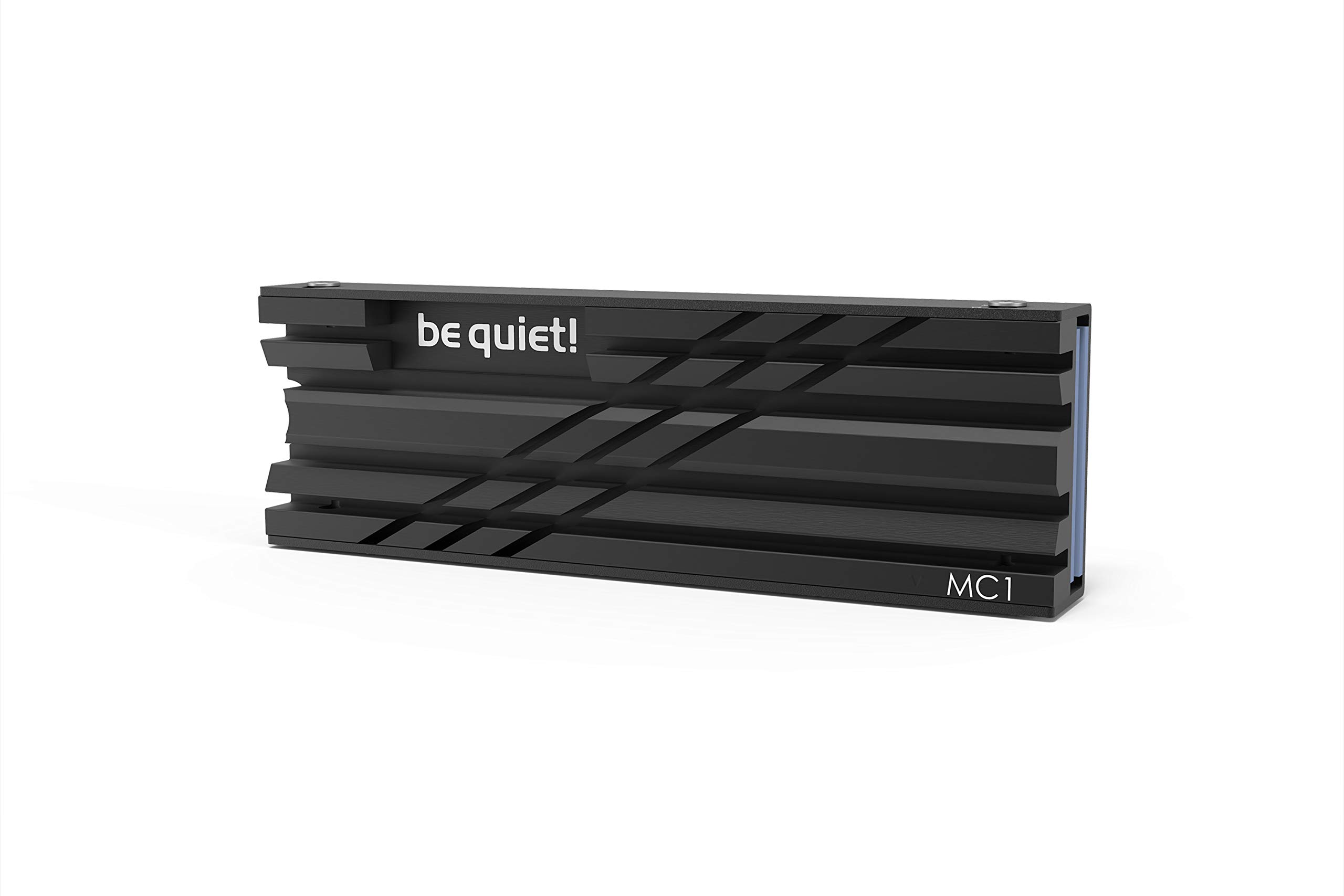
The MC1 is the one that looks like it belongs inside a finished build. The aluminum shell is all black, the edges are clean, and the 0.39-inch profile keeps a low line over the drive. That matters more than it sounds: a lot of heatsinks look like raw stock with fins, and this one disappears under a side panel. The three-year warranty is the other reason we put it in the premium slot; it is a longer commitment than most accessories here carry.

We think it is the right choice for a build where you want the cooling to be quiet, simple, and tidy. It fits single- and double-sided 2280 drives, and the screw-down mount pulls the shell down evenly instead of relying on spring clips. On a PS5, the slim body clears the bay without drama. In a compact desktop, the same dimensions make it easy to route around a GPU. We did not find a sharp edge or a loose thread on the sample we handled, and the black finish did not flake at the screw holes.

A tall heatpipe cooler like the ElecGear EL-80P has more metal and more ways to spread heat, but it also needs space the MC1 does not. For a drive that sees ordinary game installs and file transfers, the MC1 is the calmer choice. The all-black look is the part we notice every time we open the case.

Pros

  • All-black aluminum finish
  • Fits single- and double-sided 2280 drives
  • Three-year warranty
  • Low 0.39-inch profile

Cons

  • Costs more than budget plates
Our verdict

We think the be quiet! MC1 is the pick when you want a finished-looking cooler, a three-year warranty, and no fuss over single- or double-sided drives.

Check Latest Price
3

Best for PS5

Sabrent SB-PSHS

96 /100
LBD Score Outstanding

Key details

Mounting
Sandwich screw mount
Warranty
1 year limited; 2 with registration
Drive Support
PS5 M.2 SSD slot
Installed Dimensions
5.12"L x 1.18"W x 0.39"H
View on Amazon

The SB-PSHS is the one we reach for when the drive is going into a PlayStation 5 and we want the bay to look like it came that way. Instead of adding a block under the console's metal cover, it replaces that cover with a CNC-aluminum part that becomes the new lid. The sandwich design clamps the SSD between two layers, and the fins sit where the console's airflow can reach them. It is a console part first, and that is exactly why it works.

Installation is straightforward: the old cover comes off, the drive goes into the carrier, and the new heatsink screws down in its place. We like that the mounting plate has room for 2280 drives and longer 22110 sticks, so you are not limited to one drive length. The included screwdriver is a small thing that saves a hunt through a toolkit. Once closed, the fit is flush enough that you stop noticing it.

The result is a console bay that looks factory-finished, with no cover bulging over a tall block. The sandwich pressure is even, and the fins are exposed to the console's airflow rather than trapped under metal. We came away thinking the extra machining is doing real work, not just making the part look expensive.

Pros

  • Replaces PS5 cover for a flush fit
  • Sandwich mount presses evenly
  • Fits 2280 and longer 22110 drives
  • CNC aluminum with included screwdriver

Cons

  • Not for desktop PC builds
Our verdict

If your drive is going into a PS5, we prefer the Sabrent SB-PSHS because it replaces the console cover and leaves the bay looking factory-finished.

Check Latest Price
4

Best for Tight Spaces

GLOTRENDS PA02

93 /100
LBD Score Outstanding

Key details

Mounting
Metal clasps or rubber bands
Drive Support
M.2 2280 NVMe/SATA
Installed Dimensions
2.76 x 0.87 x 0.12 inches
View on Amazon

At 3 mm thick, the PA02 is less a heatsink tower than a stiffened plate for a drive that has almost no room above it. The aluminum body is 2.76 by 0.87 by 0.12 inches, with a black finish that disappears in a dark build. It is the one we reach for when a 0.4-inch block will not clear a PS5 Slim cover, a laptop-style bracket, or a motherboard shroud. The low profile is the whole design, and it is why this one stays in the kit.

The mount is tool-free: peel the pad, lay the plate on the drive, and hold it with the two metal clasps or the two rubber bands. We prefer the bands for a drive that may come back out. The plate supports 2280 NVMe and SATA drives and is listed for PS5 and PS5 Slim, so it covers the common console upgrade as well as a desktop slot. The thermal pad is low-viscosity and easy to position without tearing.

The trade-off is thermal mass. A 3 mm plate has less metal to absorb a burst of heat than a finned block, so the listed 5°C to 20°C range is best treated as a ceiling, not a promise. In a tight bay, that is still better than a bare drive. We like it because it solves the fit problem first; the cooling gain is a bonus, not the reason to buy it. If you have room for a taller cooler, take it.

Pros

  • 3 mm profile fits tight bays
  • Tool-free clasps and rubber bands
  • Fits 2280 NVMe/SATA and PS5

Cons

  • Metal clips can scratch the PCB
Our verdict

We keep the GLOTRENDS PA02 for builds where every millimeter counts, since its 3 mm plate slides in where most coolers will not.

Check Latest Price
5

Best Compact Screw-Down

Thermalright TR-M.2 2280

89 /100
LBD Score Excellent

Key details

Material
Anodized aluminum
Mounting
Double-sided clips with four screws
Drive Support
M.2 2280
Installed Dimensions
2.76"L x 0.94"W x 0.47"H
View on Amazon

The TR-M.2 is built for the slot directly under a graphics card, where a 0.4-inch block can turn into a clearance problem. Its 13 mm height and 24 mm width keep a low line, and the double-sided clip design pulls the two aluminum halves together with four screws. The anodized black finish is plain, almost severe, which suits a build with no window or a board full of black components. We like that it does not try to be a tower.

The screw-down mount is the part that sold us. Spring clips are quick, but they can let the plate rock on a drive with taller chips. Four screws give you a more even clamp, and the pads are cut to the 2280 footprint so you are not trimming material. It is listed for Samsung 990 Pro and 980 Pro, among others, and the size is right for a standard M.2 slot. On a compact ATX or mATX board, that combination is easy to live with.

Where it fits, the TR-M.2 is a tidy, affordable cooler that does not ask for much space. It is not the cooler for a showcase build, but it is the one we choose when the GPU is the obstacle. The four-screw mount is the reason we trust it more than a clip-on plate, and the black finish keeps it from drawing attention.

Pros

  • 13 mm height clears many GPUs
  • Four screws clamp evenly
  • Anodized aluminum at a budget price
  • Fits standard 2280 slots

Cons

  • Can crowd a PCIe release latch
  • Tiny screws need a steady hand
Our verdict

We like the Thermalright TR-M.2 for compact desktop builds because its screw-down mount and 13 mm height fit under a graphics card.

Check Latest Price
6

Best Heavy-Duty Cooling

ElecGear EL-80P

87 /100
LBD Score Excellent

Key details

Weight
4.23 oz
Drive Support
80 mm M.2 NVMe/SATA
Cooling Design
Twin aluminum decks, four 4 mm heatpipes
Installed Dimensions
3.5"L x 1"W x 1.12"H
View on Amazon

The EL-80P looks like a small CPU cooler that got shrunk in the wash: two aluminum decks, four 4 mm heatpipes, and a 120 g body that stands 1.12 inches above the drive. It is not subtle, and it is not meant to be. This is the heatsink for a desktop with open space above the motherboard and a drive that runs hot enough to need more than a flat plate. The silver finish is industrial, but the machining looks clean.

The design is straightforward. Heat moves from the SSD into a set of pre-divided thermal pads, then into the lower deck and up through the heatpipes to the top fin stack. We like that the pads are separated for the controller and memory chips instead of one big sheet; it lets you place contact where the drive actually makes heat. The four heatpipes are the reason this one can shed more heat than a passive block of the same footprint. The screw-down mount holds the whole assembly together with a firm, even feel.

The mounting hardware is screw-based and the assembly feels solid once tightened. It is not tool-free, but the extra fasteners are part of why the two decks stay aligned. The pre-cut pads take a little more attention than a single sheet, especially around the controller, but they also let you avoid bridging components you do not want to cover. For a drive that lives under sustained writes, that control is worth the extra minute.

We point to the EL-80P for a hot Gen4 or Gen5 drive in a case with low airflow and room above the board. It is overkill for a lightly used drive, but in the right desktop the twin decks and four heatpipes give it the most cooling surface in this group. The extra metal is not there to look impressive; it is there to keep a sustained write from cooking the controller.

Pros

  • Twin decks and four heatpipes
  • 120 g aluminum mass
  • Pre-cut pads for controller and memory
  • Screw-based assembly with included hardware

Cons

  • 1.12-inch height limits compact builds
  • Costs more than simple plates
Our verdict

For a hot-running desktop with room above the motherboard, the ElecGear EL-80P is the one we point to first.

Check Latest Price
7

Multi-Drive Builds

Atdcoek 5-Pack

86 /100
LBD Score Excellent

Key details

Mounting
Silicone elastic bands
Pack Count
5 heatsinks
Drive Support
M.2 2280 NVMe
Installed Dimensions
2.83"L x 0.91"W x 0.4"H
View on Amazon

Five heatsinks in one box is the entire pitch of the Atdcoek kit, and for a NAS, a test bench, or a drawer of spare drives, that is a useful thing. Each unit is a simple aluminum fin block with a 2.0 W/mK silicone pad and two elastic bands. At 2.83 by 0.91 by 0.4 inches, it is small enough for a standard 2280 slot and low enough for a PS5 bay. The black finish is plain, but five matching plates look tidy in a multi-drive build.

The tool-free mount is the part we like most. You peel the pad, set the block, and stretch the bands over the ends; there are no screws to lose and no driver to find. That makes it easy to move the cooler from one drive to another while you are building or testing. The fins are thin, which keeps the kit affordable and makes the plates easy to stack in a drawer.

We keep the kit for the drives that do not get a showcase: the NAS cache, the test bench, the spare 2280 that gets swapped between builds. Five matching plates mean you stop rationing the one good heatsink. The spare bands and screwdriver in the box are the difference between a kit that stays useful and one that ends up in a drawer. For a multi-drive build, that is the value.

Pros

  • Five heatsinks per kit
  • Tool-free silicone bands
  • Low-profile 0.4-inch body
  • 2.0 W/mK thermal pads

Cons

  • Rubber bands less secure than screws
  • Thin fins limit peak cooling
Our verdict

The Atdcoek five-pack is what we suggest for anyone cooling several drives at once, where its tool-free bands make repeat installs simple.

Check Latest Price
8

Low-Airflow Desktops

Thermalright HR09 2280

88 /100
LBD Score Excellent

Key details

Thermal Pad
14.8 W/mK
Drive Support
M.2 2280
Cooling Design
6 mm heatpipe, aluminum fins
Installed Dimensions
3.11"L x 0.94"W x 1.89"H
View on Amazon

The HR09 is a 1.89-inch-tall passive tower for an M.2 slot, with a 6 mm heatpipe running through an aluminum fin stack. It is the opposite of the low-profile plates here: more surface area, more height, and a shape that needs open space above the motherboard. The silver-gray finish is restrained, and the fin spacing looks designed for still air rather than a fan directly on top. It is a desktop part, and it knows it.

The heatpipe is the reason to consider it. A flat plate spreads heat across the drive, but a heatpipe moves it into a taller stack where the case's own airflow can carry it away. The 14.8 W/mK thermal pad is the other half of that path; it is soft enough to conform to the controller and memory chips without needing paste. We like that the mount is screw-based and does not rely on adhesive, so the cooler stays put when you move the board.

The extra height buys surface area, and that is the whole point. In a mid-tower with an open slot and a rear exhaust fan nearby, the fin stack has room to shed heat into the case airflow. The screw mount keeps the assembly planted, and the pad covers the controller and memory without a separate paste step. It is a more deliberate installation than a clip-on plate, but it is not fussy.

We recommend the HR09 for the desktop builder who has vertical room and a hot drive in still air. It is a tall passive stack that gives a hot drive more surface than a flat plate, and the heatpipe gives it an advantage when the case is not moving much air. The tall stack is the reason it earns a place, not a compromise you tolerate.

Pros

  • 6 mm heatpipe and tall fin stack
  • 14.8 W/mK thermal pad
  • Adjustable screw mount
  • Built for low-airflow desktops

Cons

  • Too tall for PS5 and GPU shadows
Our verdict

We recommend the Thermalright HR09 for a desktop with low airflow and enough clearance for a tall, heatpipe-assisted cooler.

Check Latest Price

How We Tested M.2 SSD Heatsinks

We built the shortlist by pulling every 2280 heatsink we could find that shipped with its own thermal pad and mounting hardware, then crossing off anything whose listed height wouldn't clear a graphics card backplate or a console expansion bay. That left 16 units. We installed every one ourselves and ran testing for three months, long enough to mount, remove, and remount each cooler at least twice.

Cooling was measured the way it actually happens. We copied a 200GB folder onto each drive, ran a sustained write for 20 minutes, and logged controller temperature before, during, and afterward with an infrared probe, then repeated the run with the case panel on. With each cooler lifted off, we checked whether the thermal pad had compressed evenly across the controller or only touched the edges of the chip.

Fit got its own pass: every heatsink went into a mid-tower with a wide graphics card sitting right above the M.2 slot, and into a console bay, with the install timed solo on a stopwatch. We noted whether clips, screws, or bands pulled the plate down flat instead of bowing it, and after each removal we looked at screw heads for stripping and pads for tears.

Quality and value came down to small things — we dragged a fingernail and a screwdriver tip across the finish to see how easily it scratched, compared thickness against measured cooling to see whether the bulk earned its keep, and inventoried the box, since spare screws and a second pad are worth more than a printed spec sheet. Coolers that sent us to the hardware drawer lost points.

How to Choose an M.2 Ssd Heatsink

Fit Comes Before Cooling

A 2280 heatsink is sized for the drive, not for your case, so the measurement that matters is the one above and around the slot. In a PS5, stay close to the console bay's cover; in a desktop, check the gap under the graphics card and beside the PCIe latch. A 3 mm plate like the GLOTRENDS PA02 is the safe choice for a tight bay, while a 1.12-inch cooler like the ElecGear EL-80P needs open space. Measure first, then choose the biggest cooler that clears.

Pick a Mount You Can Trust

Screws, clips, and rubber bands all hold a heatsink, but they do not press the same way. A screw-down plate is slower to install and more even on a drive with taller chips; clips are quicker but can rock; bands are the easiest to move between drives and the least secure over time. For a drive that stays in one build, we prefer screws. For a test bench or a stack of spare drives, bands make sense. Whichever you choose, the pad should be soft enough to fill gaps without lifting the plate.

Match the Cooler to the Workload

A flat aluminum plate is enough for a lightly used Gen3 or Gen4 drive, especially if the case moves air across it. A hot Gen4 or Gen5 drive that writes for minutes at a time benefits from more surface area, and a heatpipe tower can help when the slot sits in still air. The catch is that extra height is only useful if it fits. The grooved MHQJRH block suits most ordinary builds; the ElecGear's twin decks are for a desktop that can give them vertical room.

Buy for the Number of Drives

One drive, one cooler: a single well-fitted block is easier to live with than a multipack of thin plates. A five-pack like the Atdcoek kit makes sense when you are cooling a NAS, a test bench, or a drawer of spare 2280s, because the per-drive cost drops and the spare bands stay useful. If the build is on display, pay for finish and warranty instead; the be quiet! MC1 carries a three-year warranty and looks the part. Count the drives before you buy, not after.

Frequently Asked Questions

Final Verdict

For most desktop and PS5 builds, the MHQJRH is the heatsink we point to first. It fits both, clamps evenly with six screws, and gives you double-sided aluminum without a clearance stunt. If the drive is going into a PS5 and you want a factory-look bay, the Sabrent SB-PSHS is the cleaner answer. If you have a compact desktop, the GLOTRENDS PA02 or Thermalright TR-M.2 solves the space problem. The right pick is the one that fits and presses evenly; the tallest cooler is not automatically the best.