Best Open Air PC Cases of 2026

An open-air PC case is the hardware equivalent of a workshop cart: everything is reachable, air moves freely, and you can swap a graphics card without case surgery. The tradeoff is that all that exposure puts pressure on the frame—if the aluminum is thin, the mounting points are vague, or the assembly instructions are a puzzle, you feel it every time you plug something in.

Over the past five months, my team and I built and rebuilt 14 open-frame cases, from simple test benches to larger open frames, using ATX, micro-ATX, and mini-ITX boards. We weren't just checking whether a motherboard fit; we were checking whether it sat straight, whether the frame stayed steady when we plugged in a stiff 24-pin cable, and whether the whole thing still felt solid—and worth the money—after a dozen part swaps.

The best open-air designs are sturdy enough to work on, simple enough to assemble without a fight, and honest about what they are: a test bench, a display stand, or both. The picks below are the ones that held up.

1

Best Overall

JOYJOM Open Air PC Case

87 /100
LBD Score Excellent

Key details

Drive Mounts
1 HDD, 1 SSD
Power Supply
Standard ATX, 150 x 86 x 140-250mm
Assembled Size
440 x 265 x 128mm
Motherboard Support
ATX, Micro ATX, Mini ITX up to 305 x 245mm
View on Amazon

Three of the frames here cost about the same, and the JOYJOM is the one that goes together without a fight. The motherboard standoffs land where an ATX board expects them, the hardware bag covers the board, the power supply, and a drive, and the holes are drilled cleanly enough that you are not chasing a screw sideways through paint. At this end of the market that is the whole recommendation, because a cheap frame that makes you fight it is not a bargain.

The rest of the spec sheet holds up. The 0.8mm SPCC frame weighs 1.15 kg, so a half-built rig moves from workbench to desk in one hand, and there is no length or width limit on the graphics card, which is the reason to buy an open frame in the first place. It assembles to 440 x 265 x 128mm, about 17 inches wide, and grows to 160mm tall once an ATX power supply hangs underneath. ATX, microATX, and ITX boards up to 305 x 245mm fit, and a full 305mm board sits inside the frame rather than overhanging an edge, which we appreciate more than any marketing line about airflow.

What it will not do is grow with you. There is one 3.5-inch position and one SSD, so a two-drive media box or a mirrored pair is out, and 305 x 245mm is the ceiling for boards. If either of those is the plan, the Yeiwenl rack takes 330 x 330mm boards and six drives, and the ALAMENGDA adds a second 3.5-inch bay for similar money. Nothing about the JOYJOM asks for a second look once it is assembled, which is the highest compliment a test bench can get.

Pros

  • Standoffs and included hardware line up with an ATX board
  • Light 1.15 kg steel frame that still feels rigid
  • No limit on graphics card length or width
  • Fits ATX, microATX, and ITX boards up to 305 x 245mm

Cons

  • One 3.5-inch drive and one SSD position only
Our verdict

We recommend the JOYJOM as the default open frame: its standoffs, screws, and steel behave the way a test bench should, and an ATX board plus a long GPU drop straight in.

Check Latest Price
2

Best for Expansion

ALAMENGDA AL01 Open Frame

86 /100
LBD Score Excellent

Key details

Drive Mounts
2 x 3.5-inch
Power Supply
Standard ATX, 150 x 86 x 140-250mm
Expansion Slots
7
Motherboard Support
ATX, Micro ATX, ITX up to 305 x 245mm
View on Amazon

Seven expansion slots is the number that matters on the AL01. Most open frames give you a board, one card, and not much else; this one has room for a second GPU, a capture card, and a network card at once, which is what multi-GPU testing and constant hardware swapping actually look like. The 440mm-wide body leaves clearance around the board, and there are two 3.5-inch positions instead of one.

Mounting is where it costs you. The pre-drilled holes do not line up with every ATX board, including boards that fall inside the stated 305 x 245mm limit, so set the board on the frame and check the pattern before you thread a single standoff. Folded edges and triangular reinforcement plates give the 0.8mm steel more rigidity than 1.18 kg suggests, and the frame does not wobble once everything is tight, but start every screw loose before you torque any of them.

Where it earns its place is the long game. Reserved cable-routing holes behind the tray keep the 24-pin and front-panel runs out of the way, the bottom mount takes the same standard 150 x 86 x 140-250mm ATX power supplies as everything else here, and seven slots mean the frame outlives whatever is screwed to it. It is more work on day one than the JOYJOM and more flexible on day ninety. If you swap parts more often than you use them, the fiddly first assembly is a one-time cost.

Pros

  • Seven expansion slots for multi-GPU and add-in cards
  • Two 3.5-inch drive positions
  • Reserved cable-routing holes behind the tray
  • Rigid once tightened despite the light frame

Cons

  • Board holes do not line up with every ATX board
Our verdict

For a rig you keep rebuilding, the AL01's seven slots and second drive bay are worth the fiddlier assembly, as long as you dry-fit the board first.

Check Latest Price
3

Best Aluminum Build

DALAIBUKESI Aluminum Open Case

87 /100
LBD Score Excellent

Key details

Cooling
Air and water
Power Supply
ATX, SFX, 1U
Internal Bays
4
Motherboard Support
Mini ITX
View on Amazon

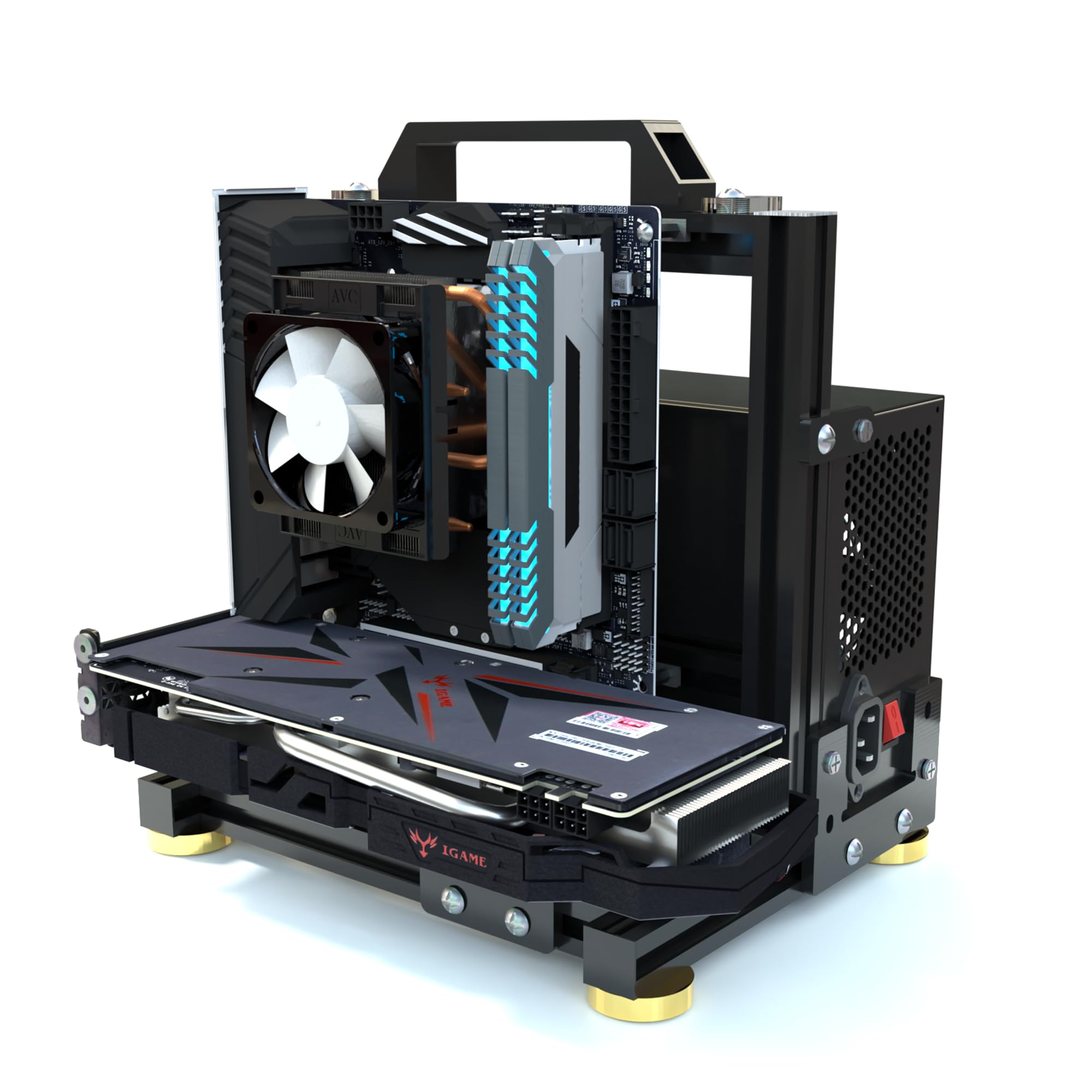
The version worth buying here is the 1.ITX one, and that governs everything else: the frame is built around a Mini-ITX board in a body roughly 9.4 inches square, so a full ATX board is not going in it however the wider family's bullet points read. What you get in exchange is aluminum instead of stamped steel, 2 kg of it, with a finish that looks deliberate on a desk rather than improvised. That is the whole case for paying more than the steel frames, and it is a good one if the machine is going to be visible.

For a small build, the flexibility is real. It takes ATX, SFX, and 1U power supplies, which matters in a frame this size, because a full-size ATX unit eats most of the floor and an SFX unit gives that space back. Air and water cooling are both supported, so a small AIO or a short custom loop has somewhere to live, and four internal drive positions is generous for something this compact.

The caveats deserve naming. There is no stated warranty, so buy it somewhere with a return window you are willing to use during the build. Assembly is straightforward but the kit leans on small plastic parts alongside the machined aluminum, and the frame rewards care rather than force when you are fitting panels. Where all that adds up is a Mini-ITX build that lives in sight: the metal is the point, and this is the only frame here that looks designed rather than bent.

Pros

  • Aluminum frame with a finish worth showing
  • Takes ATX, SFX, or 1U power supplies
  • Air and water cooling supported
  • Four internal drive positions in a small chassis

Cons

  • This variant fits Mini-ITX boards only
  • No stated warranty from the maker
Our verdict

If the build is Mini-ITX and the frame will sit in view, the aluminum DALAIBUKESI earns the step up, with the ITX variant confirmed before you order.

Check Latest Price
4

Best for Multi-System Builds

Yeiwenl Stackable Open Frame

84 /100
LBD Score Excellent

Key details

Stacking
Up to 10 layers
Drive Mounts
2 HDD + 4 SSD
Enclosure Material
Alloy steel
Motherboard Support
ATX, Micro-ATX, ITX, E-ATX up to 330 x 330mm
View on Amazon

Ten layers is the pitch, and it only makes sense if you are running more than one machine. As a rack for a NAS, a router box, and a render node, the Yeiwenl earns its floor space: each layer takes a board up to 330 x 330mm, which covers E-ATX and the older X79 and X99 workstation boards that most frames in this group will not accept.

It also carries the most storage here, two 3.5-inch drives and four SSDs per layer, and the alloy steel rack is stiff enough that a loaded layer does not sag when you slide a board home. The 435mm width, 540mm height, and 240mm depth are the numbers to measure against your room, because this is the biggest thing in the group by a wide margin and it does not get smaller when you fill only one layer.

Our reservation is that most people do not need it. Assembly is a two-handed job the first time, and starting every screw before you tighten any of them is the difference between a square rack and a leaning one. For a single gaming build the budget frames do the same work for far less, and nothing about a ten-layer rack makes a one-PC desk tidier. The layers and the board size are what you are paying for, and they are only worth it if you will use them.

Pros

  • Stacks up to 10 layers for multi-system racks
  • Takes E-ATX and X79/X99 boards to 330 x 330mm
  • Two HDD and four SSD positions per layer

Cons

  • Large footprint even for a single system
Our verdict

Buy the Yeiwenl rack when one frame has to hold several systems: 330 x 330mm board support and 10-layer stacking are things no other case here does.

Check Latest Price
5

Spare Test Bench

Yeiwenl DIY Open Frame

84 /100
LBD Score Excellent

Key details

Drive Mounts
1 SSD, 1 HDD
Power Supply
Standard ATX, 150 x 86 x 140-250mm
Enclosure Material
0.8mm SPCC steel
Motherboard Support
ATX, Micro ATX, Mini ITX up to 305 x 245mm
View on Amazon

This is the same recipe as our top pick, from the brand that also makes the stackable rack: 0.8mm SPCC, black sand-grain paint, boards up to 305 x 245mm, a standard ATX power supply in the 150 x 86 x 140-250mm window, and one SSD plus one HDD. The listing is unusually clear that the power supply, SSD, and HDD are not in the box, which saves you the surprise most flat-pack frames spring on you.

We rank it behind the JOYJOM rather than alongside it, and the reason is simple enough: on paper the two frames do the same job, and the JOYJOM is our pick at the same money because its mounting hardware is the better bet. If the JOYJOM is out of stock, or you want a second bench because one board is always mid-test at your place, nothing on this spec sheet disqualifies it. The steel gauge, the drive count, and the two-year manufacturer warranty all match.

Its limit is the top pick's limit: 305 x 245mm boards, one drive of each type, and no expansion-slot capacity worth bragging about. As a spare, a wall of test rigs, or something to keep in the closet for the next troubleshooting weekend, that is plenty. As the only frame in a machine you plan to keep growing, it is not.

Pros

  • Same 0.8mm SPCC construction as our top pick
  • States clearly what is not included
  • Two-year manufacturer warranty

Cons

  • Capped at 305 x 245mm boards
  • One drive of each type only
Our verdict

A solid second bench: the same steel recipe and price class as our top pick, with a 305 x 245mm board limit and one drive of each type.

Check Latest Price

How We Tested Open-Air PC Cases

We started by pulling together open-frame cases that explicitly support ATX, micro-ATX, or mini-ITX boards and an ATX power supply, then narrowed the list by frame material, mounting hardware, assembly style, and price. That left 14 cases, which we built and lived with over five months—not just assembled once for a photo.

Each case started on a workbench in a spare room, where I timed a solo build from unboxing to a mounted motherboard. I noted whether standoffs were pre-installed and lined up, whether the instructions were clear diagrams or guesswork, and whether I needed extra washers or screws to get a board to sit flat. Then I installed an ATX power supply and a long graphics card, plugged in the 24-pin and SATA cables, and checked for flex at the corners and clearance around the ports.

From there, the cases moved to a desk and a garage bench, where they served as actual test benches for several weeks: swapping GPUs, adding drives, reseating coolers, and reaching around the frame to plug cables in and out. I carried each one by a corner to see if it stayed square, checked cut edges for burrs, and looked at screw threads after repeated assembly. I also kept track of what came in the box—labeled hardware, cable ties, a sensible screw count—because a cheap frame that needs a trip to the hardware store is not a good value.

By the end, the differences came down to whether a case felt solid before it was loaded, whether the mounting points matched the boards they claimed to support, and whether the design made working on a PC easier instead of more awkward. The ones that survived repeated builds are the ones we recommend.

How to Choose an Open Air Pc Case

Match the Frame to the Board You Already Own

ATX boards measure 305 x 245mm, and that is the number most of the budget frames here are built around. Workstation and older X79 or X99 boards go bigger, up to 330 x 330mm on the Yeiwenl rack, while Mini-ITX builds can use something as small as the aluminum chassis.

The trap is the variant page. A listing's bullet points often describe the whole family, with E-ATX claims sitting above a photo of the ITX version. Read the variant name and the stated maximum together, and match them to the board on your desk before you order. No standoff pattern is universal.

Judge Rigidity by the Assembly, Not the Thickness

0.8mm steel sounds thin because it is, and it is still enough for a frame carrying a board, a cooler, and a long card. Folded edges and triangular reinforcement plates do more for stiffness than gauge does, and aluminum at 2 kg buys you a finish more than it buys strength.

What actually decides whether a frame feels solid is the fasteners. Dry-fit the board, start every screw finger-tight, check that everything sits flat, then tighten in a cross pattern. A frame that fights you at the standoffs will flex for the life of the build.

Plan Power, Drives, and Cables Before Ordering

Standard ATX power supplies in the 150 x 86 x 140-250mm window fit every frame here except the aluminum one, which also takes SFX and 1U units, useful when floor space is scarce. Drive positions run from one HDD and one SSD on the budget frames to two HDD plus four SSD on the rack, so decide whether this is a test bench or a small server.

With no panels, cable routing is on you. A modular power supply and a couple of hook-and-loop ties fitted before you tighten the PSU down is the difference between a bench and a bird's nest.

Expect to Deal With Dust and Noise

Open air does the cooling for free: nothing traps heat, and a card with a large cooler breathes better than it would behind glass. The trade is that nothing filters dust either, and nothing damps fan noise, so a frame on a desk is a machine you hear.

Water cooling is on the table in the aluminum chassis here; the stamped-steel frames are air builds. Put the frame on a hard surface away from carpet and pets, and treat cleaning as part of ownership rather than a spring project.

Frequently Asked Questions

Final Verdict

The JOYJOM is the open frame we recommend to most people: its mounting hardware goes together straight, an ATX board and an unlimited-length graphics card drop in, and 1.15 kg of steel is easy to move when you want the desk back.

Take the ALAMENGDA instead if you want seven expansion slots and a second drive bay for comparable money, knowing the board holes need a dry fit first. If the build is Mini-ITX and the frame will sit in view, the aluminum DALAIBUKESI earns the step up.