Best PC Fan Controllers of 2026

A fan hub and a fan controller look like the same small circuit board, and the listings rarely explain the difference. A hub splits one PWM signal across every fan on it, so they rise and fall together; a controller gives each channel its own instruction — from software, a dial, or a temperature probe. Either way you're buying your way out of a motherboard with too few headers.

I've run out of fan headers on nearly every build lately, and the failures repeat: a hub that can't carry six fans' worth of amperage, software that forgets your curve after a reboot, ARGB plugs at the wrong voltage. Four months with 14 hubs and controllers taught us the ones worth keeping are boring — settings hold, the board fits behind the tray, the price is fair.

Port count is the spec shoppers overrate. Add up the rated amps against the input power before counting fan plugs, confirm 3-pin fans won't be stuck at full tilt, and decide where control should live — a header you never touch, a dial, or an app you keep installed. The picks below start there.

1

Best Overall

ARCTIC 10-Port Fan Controller

87 /100
LBD Score Excellent

Key details

Ports
10 PWM
Control
Individual PWM via Windows/Linux
Mounting
Magnetic or adhesive
Max Current
2 A per port, 4.5 A total
View on Amazon

Ten PWM ports, each with its own control channel, are why the ARCTIC is our top pick. A hub can give every fan the same signal and call it a day; this one lets you set separate curves for front intakes, rear exhaust, and a top radiator. We also like that it does not lock you into a motherboard maker's software. For a first controller, or a rebuild where the headers have run out, it is the default we recommend.

The power numbers are modest but sensible: 2 A per port and 4.5 A total. That is enough for a typical ten-fan build with 120 mm or 140 mm case fans, but not for a stack of high-current industrial fans. We paid attention to the total rather than the per-port figure, because ten ports invite you to fill them. If your fans add up close to that total, choose a higher-wattage controller instead of pushing this one.

Mounting is refreshingly unfussy: magnets for a steel panel, adhesive for everything else, and no software license to manage. The Windows and Linux support is the detail we did not expect; Linux kernel 7.2+ is named, which matters if your build dual-boots. For a speed-first controller, that is a more useful feature than another lighting mode.

Pros

  • Ten independently controlled PWM ports
  • 2 A per port and 4.5 A total
  • Windows and Linux software support
  • Magnetic or adhesive mounting

Cons

  • No ARGB lighting control
  • 4.5 A total limits high-power fan arrays
Our verdict

For a build that needs real per-fan speed control without an ecosystem, this is the controller we recommend first.

Check Latest Price
2

Best for One Fan Header

Noctua NA-FH1 8-Port Hub

92 /100
LBD Score Outstanding

Key details

Ports
8, 12V and 5V fans
Mounting
Four magnets
Warranty
6 years
Total Output
54 W via SATA
View on Amazon

A powered hub is not the same thing as a controller. The Noctua NA-FH1 takes one PWM signal from your motherboard and sends it to eight fans, so every fan rises and falls together. What it adds is power and tidiness: a SATA feed for up to 54 W, support for 12 V and 5 V fans, and a board small enough to stick to a case panel.

That sounds limited, and it is, but we still reach for the NA-FH1 when a build has one fan header and a nest of splitters. The magnets are strong, the status LEDs are genuinely useful when a fan goes quiet, and the safety fuses plus six-year warranty make it the low-drama choice. We liked how firmly the connectors seat; nothing wobbled or needed a zip tie to stay put.

The catch is control: eight fans, one curve. If you want separate speeds for intake and exhaust, this is not the hub. For a straightforward case full of matching fans, though, that simplicity is the appeal. It is the one we choose when the goal is to stop thinking about fan wiring.

Pros

  • Eight fans from one motherboard header
  • 54 W through SATA power
  • Strong magnets and status LEDs
  • Safety fuses and six-year warranty

Cons

  • No ARGB lighting control
Our verdict

If one motherboard header is your bottleneck and you do not need per-fan curves, this is the hub we trust most.

Check Latest Price
3

Best for ARGB Builds

ASUS TUF ARGB PWM Hub

87 /100
LBD Score Excellent

Key details

Ports
6 PWM and ARGB
Power
Dual SATA, 108 W
Mounting
Magnetic
Warranty
2 years
View on Amazon

Two SATA power connectors are the first thing you notice about the ASUS TUF hub, and they explain what it is for: six fans and their ARGB lighting, powered from the power supply instead of borrowed from a motherboard header.

The unit pairs six PWM ports with six ARGB connections, mounts magnetically, and has visible power and operation indicators. Dual SATA feeds give it a 108 W ceiling, which is far more than a six-fan load needs, but the headroom is welcome if you run high-static-pressure fans or add lighting accessories. The connectors are labelled, and the board feels solid enough to stay put once mounted.

Where it earns its place is in a build that wants clean fan control and synchronized lighting without a separate RGB hub. We like that it keeps the wiring on one board and that the status lights tell you at a glance whether power is present. In an Aura Sync build, the tidiness is worth the higher price, and the dual SATA feeds mean the lighting is not stealing power from the fans. It is the neatest way here to handle a six-fan ARGB load.

Pros

  • Six PWM and ARGB ports
  • Dual SATA power with 108 W
  • Magnetic mount and status LEDs
  • Syncs lighting through the motherboard

Cons

  • All six fans share one PWM signal
  • Only six fan channels
Our verdict

For a six-fan Aura Sync build, this is the cleanest way to power and light the whole case from one board.

Check Latest Price
4

Best Budget ARGB Hub

Thermalright ARGB Fan Hub X12

87 /100
LBD Score Excellent

Key details

Ports
12 PWM and 5V ARGB
Power
SATA
Control
IR remote and motherboard sync
RGB Type
5V 3-pin ARGB only
View on Amazon

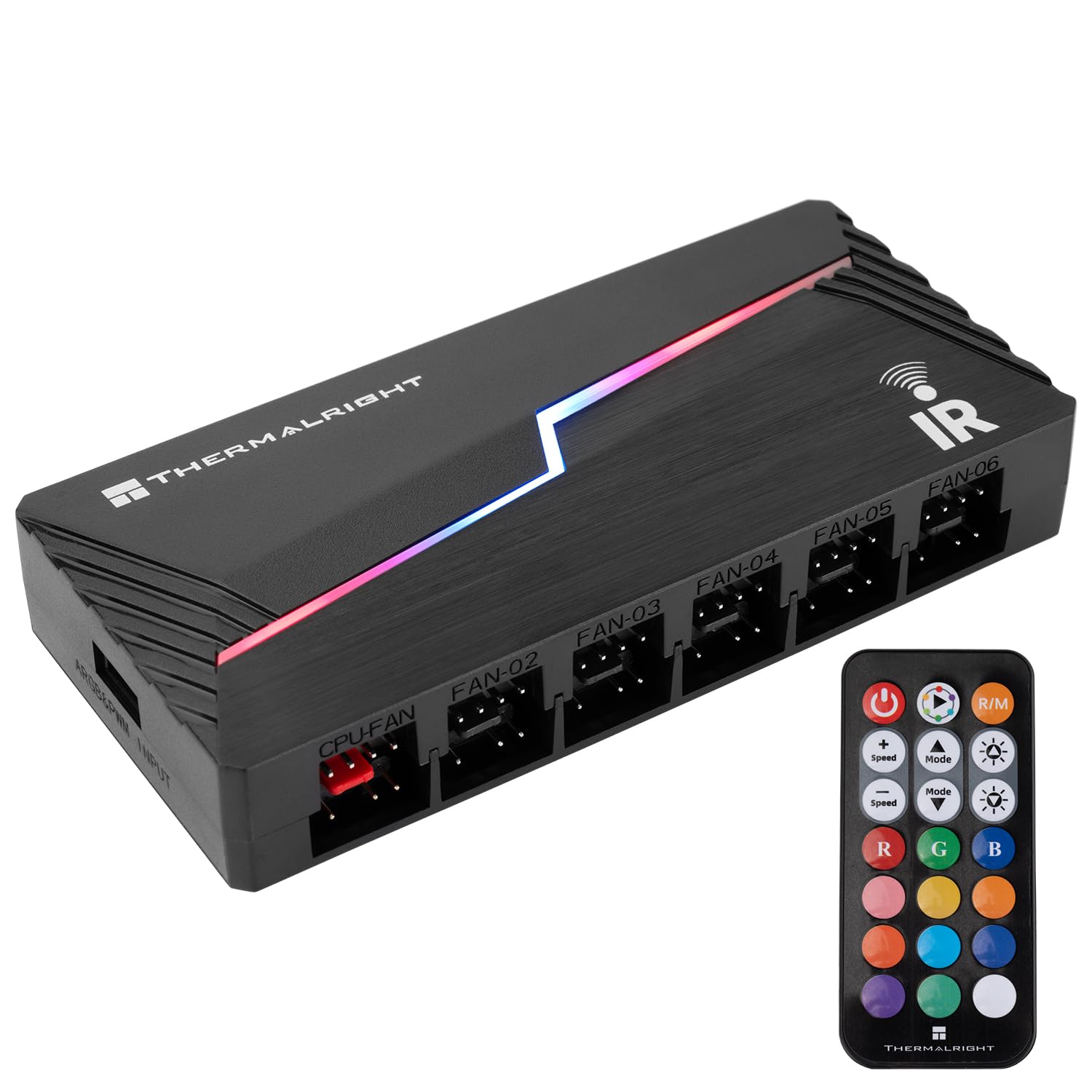
The Thermalright X12 arrives with a little IR remote, which is an odd accessory for a part that lives inside a case. The useful part is the specification behind it: twelve PWM fan groups and twelve 5V ARGB groups, fed by SATA, with motherboard sync when you want it.

We like it as the budget ARGB hub for a build with one 3-pin ARGB header and a pile of fans. Twelve groups is more than most cases need, and the SATA feed keeps the load off the motherboard. The catch is speed reporting: only the fan in the red port sends its RPM back, so the rest are invisible to monitoring software. That is a real limitation, but it is also easy to plan around.

Lighting runs on 5V 3-pin ARGB, with the remote for quick color changes or motherboard sync for proper control. The remote buttons are handy but not the reason to buy; set the lighting from the motherboard if you can. It is compact enough to tuck behind the motherboard tray, and the SATA cable is the only power run you need. Put the fan you care about most in the red port.

Pros

  • Twelve PWM and ARGB groups
  • SATA power with motherboard sync
  • IR remote for lighting changes
  • Compact body fits behind a tray

Cons

  • No 12V RGB support
Our verdict

If you need lots of ARGB ports for very little money and can live with one RPM readout, this is the budget hub to get.

Check Latest Price
5

Best for Corsair iCUE Builds

Corsair Commander Duo

86 /100
LBD Score Excellent

Key details

Sensors
2 temperature sensors
Channels
2 ARGB/PWM
Software
Corsair iCUE
Fan Support
Up to 12 daisy-chained fans
View on Amazon

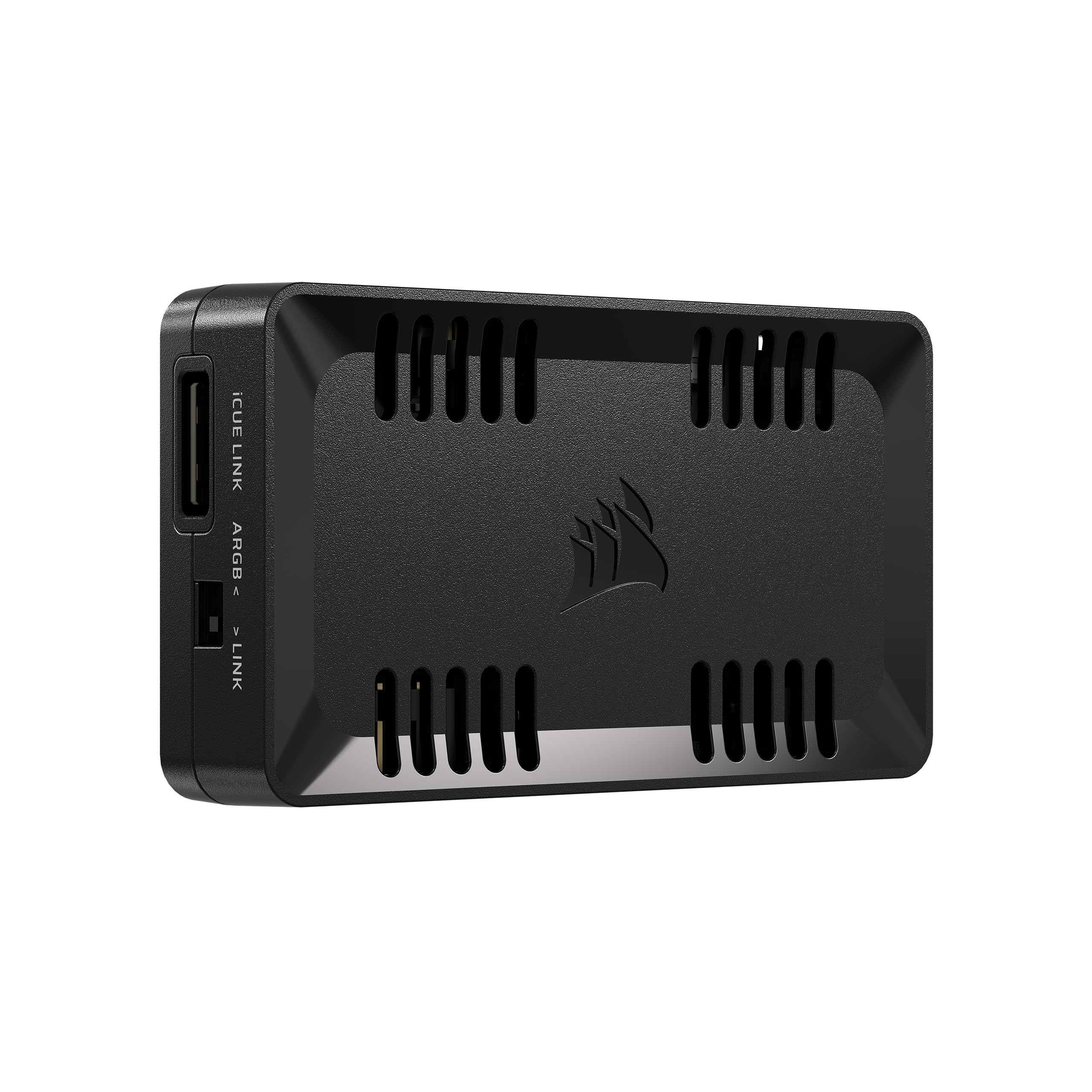
Two temperature sensors are the clue that the Commander Duo is aimed at iCUE builders rather than anyone with a random pile of fans. It bridges Corsair's iCUE Link ecosystem and ordinary 4-pin PWM/3-pin ARGB fans, with two channels that each take up to six daisy-chained fans.

The hardware is tidy: two ARGB/PWM channels, support for up to 50 LEDs per channel, and a single iCUE interface for fan curves and lighting. If you already run Corsair fans and an iCUE Link System Hub, it saves a second controller and a lot of cable spaghetti. The temperature sensors are a nice touch for setting curves against intake or exhaust air rather than just CPU temperature.

We recommend it to the Corsair loyalist, not to the shopper starting from scratch. The integration is the reason: one place to control both iCUE Link devices and older ARGB fans, with per-channel curves and synchronized lighting. In a Corsair-heavy build it replaces a pile of adapters and software windows, and the temperature sensors make the curves more useful than a CPU-only reading. That is the job it does best.

Pros

  • Two ARGB/PWM channels for 12 fans
  • Two temperature sensors
  • Single interface for mixed fan types
  • Compact enough to hide

Cons

  • Requires Corsair iCUE software
  • iCUE Link devices need a System Hub
Our verdict

For a Corsair-heavy build that mixes iCUE Link and ordinary ARGB fans, this is the controller that makes one software window work.

Check Latest Price
6

Best Manual Control

OwlTree 6-Fan PWM Controller

84 /100
LBD Score Excellent

Key details

Ports
6, 4-pin PWM only
Control
Manual knob, 1-99% duty
Max Output
60 W (5 A at 12 V)
Power Inputs
SATA or DC 5525
View on Amazon

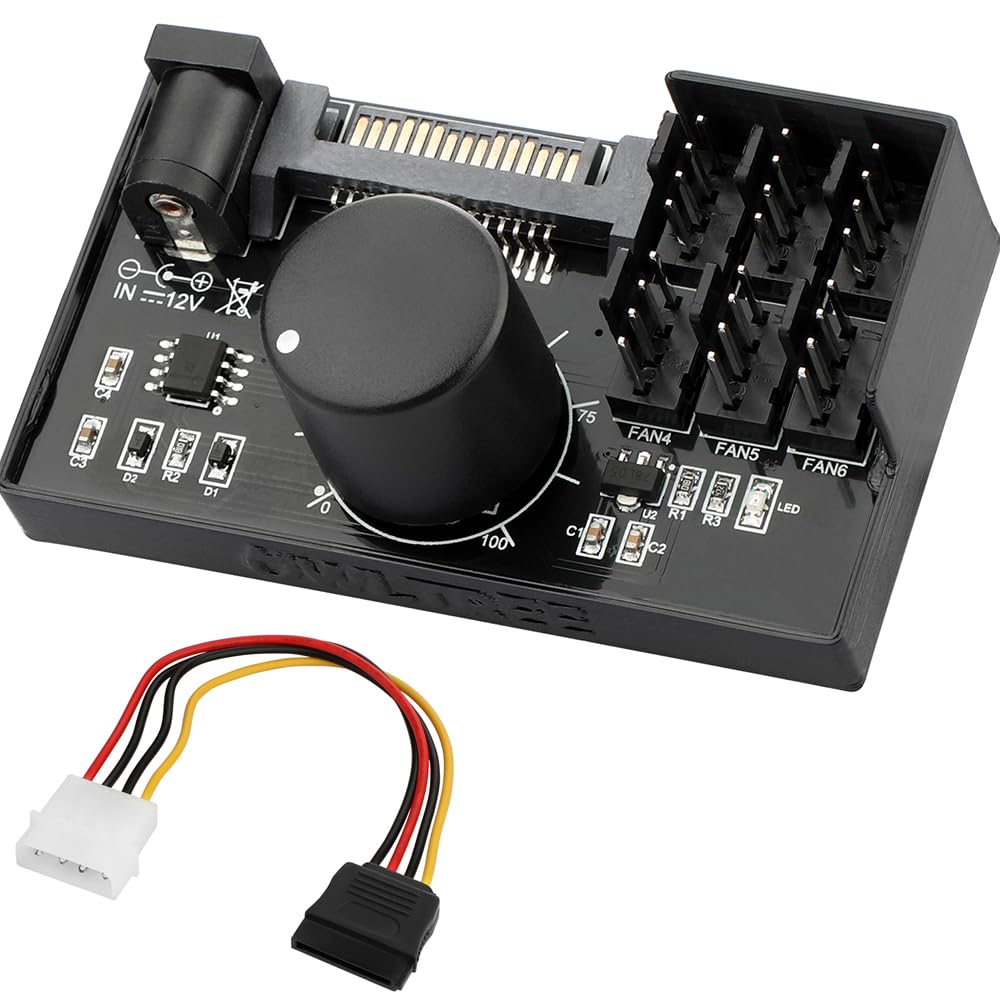
There is no software here: a single knob sets the PWM duty cycle for six fans, and that is exactly why the OwlTree earns a place. It is a manual controller for a test bench, an external radiator, a mining rig, or any build where you want to set fan speed once and leave the motherboard out of it. The 60 W, 5 A output is more than most six-fan setups need, and the SATA or DC 5525 power gives you options.

The knob is a set-and-forget tool rather than a responsive curve, and at the bottom of the dial some fans may keep turning rather than stop. For a bench or a secondary cooling loop, that is an easy trade-off. For a normal case where you want BIOS fan curves, it is the reason to look elsewhere.

Pros

  • Six 4-pin ports with 60 W
  • Manual 1-99% duty knob
  • SATA or DC power input
  • Compact and simple

Cons

  • 4-pin PWM fans only
  • No RPM reporting to the motherboard
Our verdict

For a bench, test rig, or external radiator where you want a knob and no software, this is the practical pick.

Check Latest Price
7

Synapse Fan Curves

Razer PWM Fan Controller

81 /100
LBD Score Excellent

Key details

Ports
8
Control
Razer Synapse fan curves
Profile
Low-profile adhesive mount
Dimensions
100 x 70 x 18.65 mm
View on Amazon

The Razer PWM Fan Controller is thin enough to stick to a case panel and light enough to forget, which is the main reason it stands out in a crowded field. It handles up to eight fans and uses Razer Synapse for curves and monitoring.

The software is the point: custom fan curves based on system temperature, with the ability to set profiles and monitor speeds from one screen. For a small case with limited board headers, the low-profile adhesive mount is a real problem-solver. The eight ports are easy to reach, and the thin body stays out of the way.

The adhesive backing is best on a clean, flat panel, and the unit is light enough to stay put once pressed down. The two-year warranty is welcome, and the thin body fits behind a motherboard tray where a boxy hub will not. It is a neat piece of hardware when it matches your fans.

We recommend it to a Synapse user who wants eight software-controlled channels in a tight case. The thin profile and temperature-based curves are the reason, and the eight ports give room to grow. It is a narrower pick than the ARCTIC or ASUS, which is why it sits in also-consider rather than the top tier.

Pros

  • Eight fan channels
  • Custom temperature-based curves
  • Thin adhesive-backed mount
  • Low-profile 100 x 70 mm body

Cons

  • Some fan models do not respond
  • No ARGB lighting control
Our verdict

This is for a Razer Synapse user who needs eight software-controlled channels in a tight case and knows the fan list matters.

Check Latest Price
8

Cabinets and Racks

Delinx 12V Fan Speed Controller

86 /100
LBD Score Excellent

Key details

Input
AC 100-240 V
Ports
2 via splitter
Output
3-12 V, 24 W max
Fan Support
2/3/4-pin and DC5521
View on Amazon

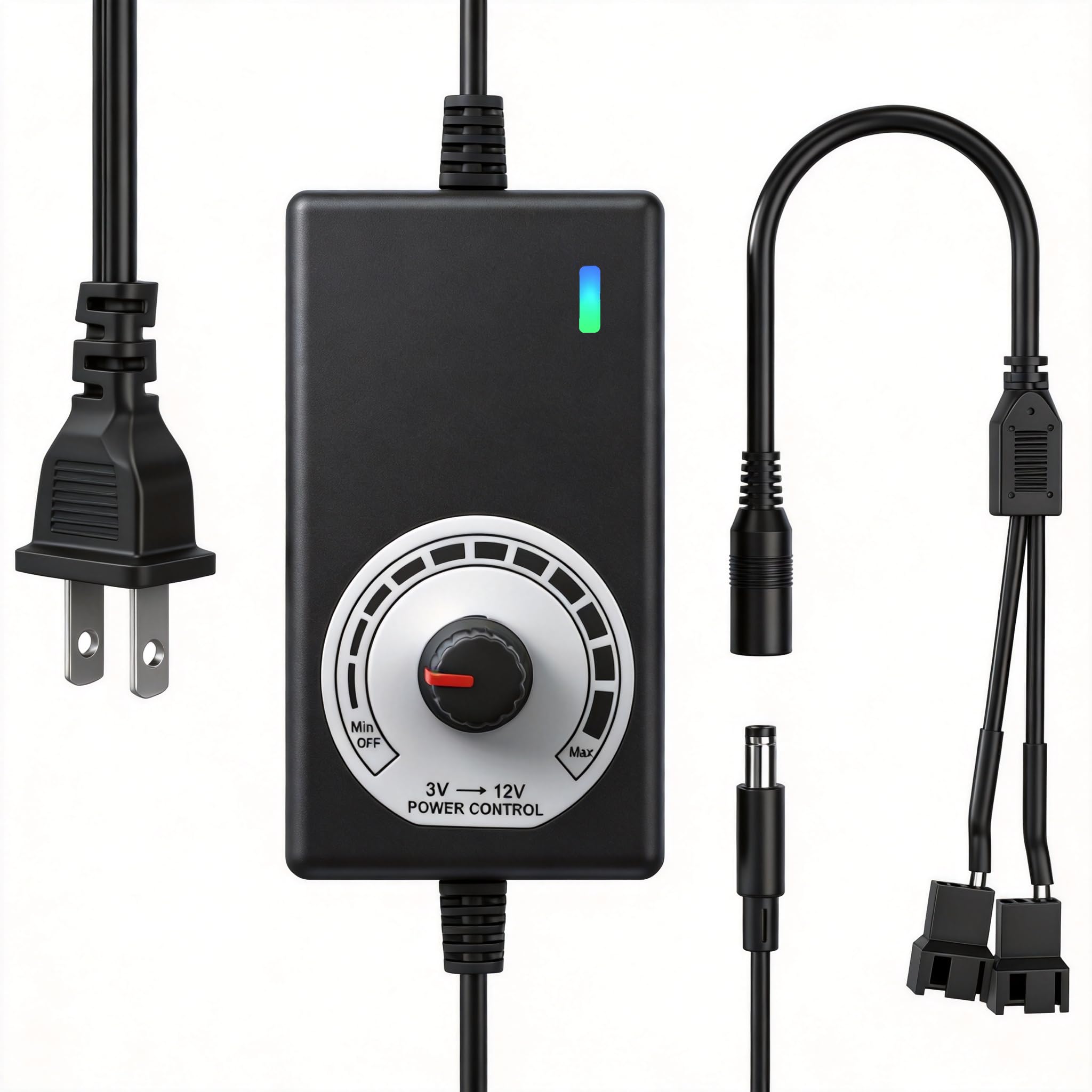
The AC plug is the giveaway: this is an external speed controller. The Delinx is a small 3-12 V power supply with a knob and a two-fan splitter, built for cabinets, racks, AV gear, and DIY cooling projects.

The splitter accepts 2-pin, 3-pin, 4-pin, and DC5521 fans, and the voltage range covers most 12 V models. You set speed with the voltage dial, which is simple and predictable for a fixed installation. The metal-and-plastic enclosure is utilitarian, and the included cable is short enough to keep a small install tidy.

Where it fits is a network rack, an AV cabinet, a server closet, or a project where two fans need to run at a fixed, adjustable speed. We like that there is no software, no motherboard header, and no dependency on the PC being awake. The dial is easy to set by feel, and the adapter includes overcharge, overcurrent, overvoltage, and short-circuit protection.

We recommend it for standalone cooling in a cabinet or rack. The wide voltage range and two-fan splitter make it a practical fix for a hot enclosure, and the inline dial is easier to live with than a software stack for a one-off install. It earns its place as a specialist tool rather than a general case controller.

Pros

  • Adjustable 3-12 V output
  • 24 W adapter with two-fan splitter
  • Works with 2/3/4-pin and DC fans
  • Simple inline control

Cons

  • 24 W total limits high-power fans
  • No RPM or temperature feedback
Our verdict

For a cabinet, rack, or DIY cooling project that needs two fans on a simple voltage dial, this is the specialist pick.

Check Latest Price

How We Tested PC Fan Controllers

We built the shortlist by reading listings and spec sheets for more than 40 hubs and controllers, then cutting anything that couldn't handle the basics: driving both 3-pin and 4-pin fans, taking power from SATA instead of leaning on a single motherboard header, and stating a total wattage that could actually cover the number of fans it advertised. That left 14, which we installed in working builds over four months — a six-fan mid-tower, a compact case where rear cable space is measured in millimeters, and an open bench for quick swaps.

Inside those builds we counted how many fans genuinely changed speed independently rather than sweeping in unison, and we timed how long a machine took to settle after a reboot to see whether saved curves survived. Controllers with a physical knob got adjusted mid-run, with the side panel on, to judge how fine the steps were and whether the dial was reachable. Every channel ran at full tilt for an hour, after which we felt the board and the SATA connector by hand. Each plug went in and out a dozen times, because a hub that grips poorly works loose the first time you reroute a cable, and we checked that 5V ARGB wasn't being fed 12V.

Mounting got tested honestly: magnetic feet on a steel panel, then on an aluminum panel where magnets have nothing to hold, which is where adhesive backing and thin, flexy PCBs showed up. Software was installed, uninstalled, and reinstalled after an update to see if fan curves stuck or reset to default. Throughout, we weighed build quality and price against a plain passive splitter — a controller only earns its cost if the extra control is something you'll actually use.

How to Choose a Pc Fan Controller

Individual Control or a Powered Hub?

A true controller gives each fan its own speed channel; a powered hub sends one PWM signal to every fan. That distinction matters more than the number of ports. If your goal is to set intake, exhaust, and radiator fans at different speeds, choose a controller like the ARCTIC. If you simply need to run eight matching fans from one motherboard header, a hub like the Noctua is easier to wire and live with. Do not pay for individual control you will not use.

Power Headroom Comes Before Port Count

Add up the current or wattage of the fans you plan to connect, then compare it with the controller's total rating, not just its per-port limit. A ten-port controller with a 4.5 A total is not a license to fill all ten ports with high-current fans. SATA-powered hubs generally have more headroom than a motherboard header, and dual SATA feeds are there for a reason. Leave margin for startup surge and for the fans you might add later.

Match the Lighting Standard

ARGB is not a generic label. Most current fans use 5V 3-pin ARGB, while older 12V 4-pin RGB systems use a different voltage and connector. A 5V hub will not control a 12V strip, and forcing the wrong plug can damage the lighting. Decide whether you want motherboard sync, a remote, or a closed ecosystem such as Corsair iCUE, then buy a controller that speaks that language. If you do not need lighting, spend the money on fan control instead.

Plan the Mount and Cable Route

Most of these controllers rely on magnets or adhesive, so check that the mounting surface is steel and flat. A magnetic hub is only as good as the panel it grabs; a case with an aluminum or plastic back panel needs the adhesive route. Cable length and port layout matter too, especially in a small case or behind a motherboard tray. Measure the space before you buy, and leave room to reach the ports once the side panel is on.

Decide How Much Monitoring You Need

Some hubs report one fan's RPM, some report none, and true controllers can report each channel. If you rely on BIOS warnings or want to spot a failed fan, that difference matters. Software support is the other half: Windows-only utilities are common, Linux support is not, and a proprietary ecosystem can be excellent inside its own family and frustrating outside it. Pick the control method you will actually open, not the one with the longest feature list.

Frequently Asked Questions

Final Verdict

For most builds, the ARCTIC 10-Port Fan Controller is the one we recommend: ten independently controlled PWM channels, 2 A per port, and Windows and Linux support. It does not do ARGB, but that keeps it focused and affordable, and it is the easiest way here to give every fan its own curve.

If your board has one fan header and you just need to consolidate, the Noctua NA-FH1 is the more sensible buy: fewer features, a simpler installation, and a six-year warranty. For ARGB, start with the ASUS TUF or Thermalright X12; for Corsair iCUE, the Commander Duo is the integrated route.