Best Silent PC Cases of 2026

A silent PC case is a bit of a contradiction. You want the thing quiet, but every panel you add to block noise also traps the heat that makes fans spin harder. I learned that the expensive way when a solid-front case turned my old gaming build into a muffled space heater. What you're really shopping for is a case that quiets the parts you can hear without choking the parts you can't.

Over the past six months, I've built and rebuilt 12 systems in cases ranging from compact mini-towers to full E-ATX boxes, with my team tracking noise, temperatures, and build hassle side by side. The good ones share a few traits: sound-dampening panels that don't rattle, enough mesh or venting to let slow-spinning fans do their job, and front-panel USB-C and fan controls you can reach without tearing the build apart. A quiet case won't fix a noisy graphics card, but it can stop a reasonable build from sounding like a leaf blower. Below are the cases that earned a spot under my desk and stayed there.

1

Best Overall

be quiet! Silent Base 802

90 /100
LBD Score Outstanding

Key details

Front I/O
Fan controller and USB 3.2 Gen 2 Type C
Noise Design
Extra-thick insulation mats
Radiator Support
Up to 420mm
Motherboard Support
ATX
View on Amazon

The Silent Base 802 can be two cases at once. Its top and front panels swap between solid covers and vented ones, so you can lean on the extra-thick insulation mats for a quieter build or open it up when a hot graphics card needs more air. That flexibility is the reason it earns our top spot: most silent cases ask you to pick a side, and this one lets you change your mind as your parts do.

We kept coming back to the solid panel set for a desk build. With the closed top and front in place, the case feels deliberately overbuilt in the ways that matter for noise—dense panels, a decoupled motherboard tray, and enough internal space that cables and drives are not crammed against the sides. The front I/O is genuinely useful, too, with a fan controller and USB 3.2 Gen 2 Type C within reach. Support for up to 420mm radiators means you can use a large, slow-spinning AIO rather than a small cooler working hard.

The case's volume is part of why it stays calm: there is room for a high-end GPU, a big radiator, and the cable slack that keeps airflow clean. For a quiet ATX build that still has room for a high-end GPU and a big radiator, we think the trade is worth it. It is the safest recommendation here for someone who wants one case to handle both a silent daily setup and occasional airflow-heavy work.

Pros

  • Swappable solid and vented panels
  • Extra-thick insulation mats
  • Fan controller and USB-C front I/O
  • Supports up to 420mm radiators

Cons

  • Large, heavy chassis takes up space
Our verdict

Buy the Silent Base 802 if you want one quiet ATX case that can switch to airflow mode when your parts run hot.

Check Latest Price
2

Best for Maximum Quiet

Fractal Design Define 7

90 /100
LBD Score Outstanding

Key details

Fan Capacity
Up to nine fans
Noise Design
High-density sound damping
Drive Support
Up to 14 HDDs
Included Fans
Three Dynamic X2 GP-14
View on Amazon

The Define 7 is the one case here that treats hard drives as a first-class citizen. Behind the brushed aluminum door are mounts for up to 14 HDDs, alongside four SSD mounts, and the case can be converted to a storage layout without turning the interior into a rat's nest. That makes it the obvious pick for a quiet NAS or a workstation with a lot of local media.

Quiet is the other half. The solid panels are lined with industrial high-density sound damping, and the front door closes with a magnetic latch instead of a cheap-feeling clip. Three Dynamic X2 GP-14 fans come preinstalled, with room for up to nine fans total. The whole top panel comes off, which makes a big cooler or radiator install less fiddly. We appreciated that serviceability: a storage case you cannot work in easily is a storage case you stop upgrading.

This is more case than most people need. If you are building a single-GPU gaming PC, the Silent Base 802 or Pure Base 501 will be easier to live with. But for a quiet storage machine, the Define 7's combination of damping, drive capacity, and modularity is hard to argue with. We reach for it when the PC doubles as a media library or a small server, not when it just needs to sit under a desk and play games.

Pros

  • High-density sound damping
  • Up to 14 HDDs plus four SSD mounts
  • Three 140mm Dynamic X2 fans included
  • Modular interior with removable top

Cons

  • Premium price for the storage capacity
  • Heavy at 13.49 kg
Our verdict

Choose the Define 7 for a quiet workstation or NAS where drive capacity and heavy damping matter more than a compact footprint.

Check Latest Price
3

Best Compact

be quiet! Pure Base 501

87 /100
LBD Score Excellent

Key details

Form Factor
Compact mid tower
Included Fans
Two 140mm PWM
Radiator Support
Up to 360mm
Motherboard Support
ATX
View on Amazon

The Pure Base 501 is the quiet case we recommend when you want a grown-up-looking PC that does not announce itself. The clean, light-free exterior is the first clue: this is a case for someone who wants the PC to disappear under a desk. Two 140mm PWM fans move air at low RPM, and the case supports a 360mm radiator if you need more cooling. For a midrange ATX build, it is the quiet case we point to first.

The compact dimensions do not make it feel like a puzzle box. be quiet! leaves enough room for high-end graphics cards and large coolers, and the vertical GPU mount is a neat option if you want to show off a card without a window. Cable routing is straightforward, with tie points on the backside and a clean path to the motherboard. We also like that the front intake is not a solid wall; the airflow-optimized fan blades and vented path keep a modern GPU from choking.

What you give up is some of the absolute silence of the bigger, heavier cases here. The 501 is quiet for its size, but it cannot match the sheer interior volume of the Silent Base 802 or Define 7. If your idea of quiet is a high-end GPU at full load, spend more on one of those. If you want a compact ATX case that stays calm during everyday work, this is the one we reach for.

Pros

  • Two 140mm PWM fans included
  • Compact ATX mid-tower
  • Clean, light-free design

Cons

  • Top vent cannot be closed
Our verdict

The Pure Base 501 is our pick for a compact, quiet ATX build that needs to look plain and stay cool without a big case.

Check Latest Price
4

Best Budget

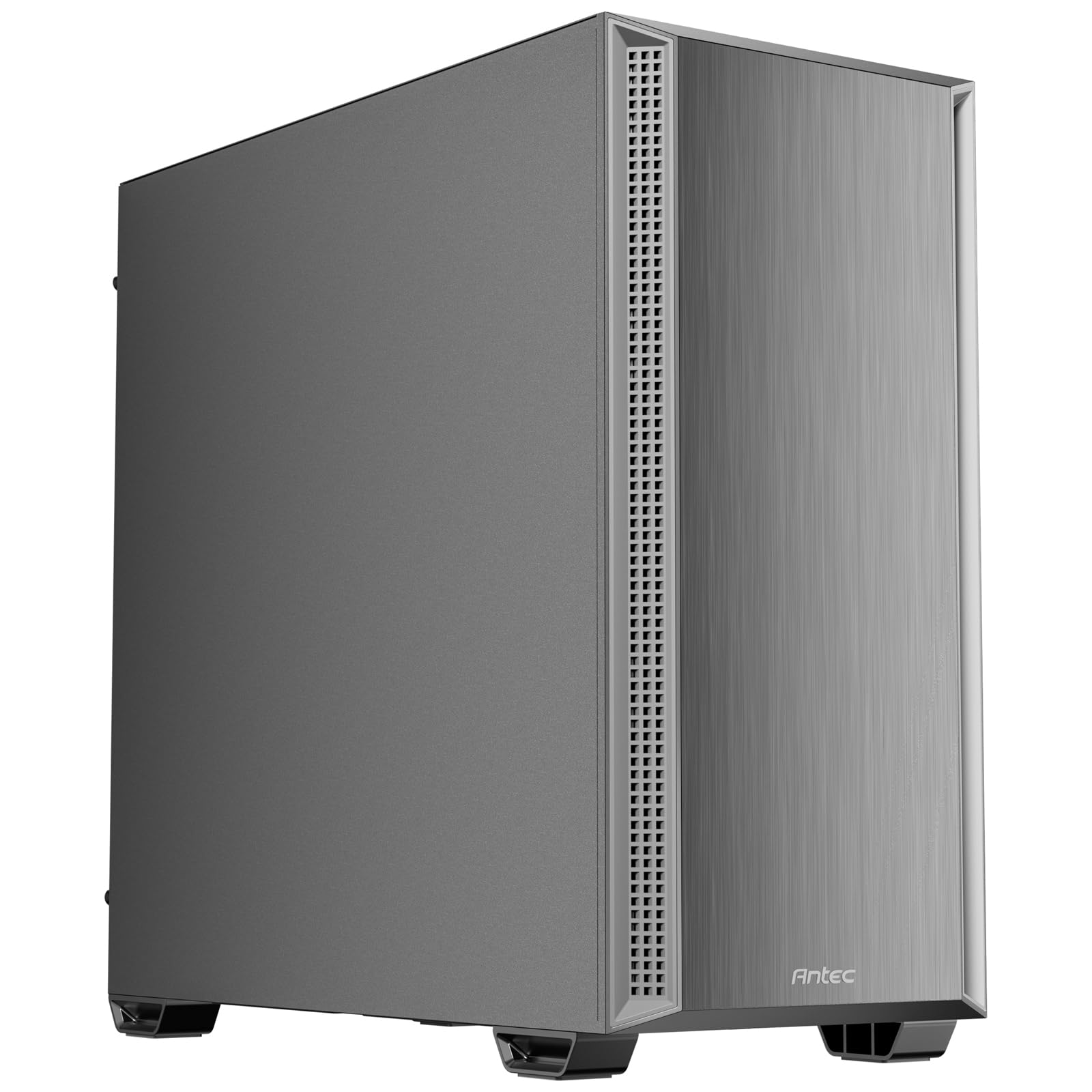
Antec P7 S

89 /100
LBD Score Excellent

Key details

Noise Design
Sound-dampening side panels
Included Fans
Four 120mm PWM
Radiator Support
Up to 360mm top
Motherboard Support
ATX
View on Amazon

Four PWM fans in a quiet case is the kind of spec that makes you check the specs twice. The Antec P7 S backs it up with sound-dampening side panels, a dual side mesh front intake, and a 360mm top radiator mount. It is the budget pick that does not feel like a penalty box: the brushed front panel looks tidy, the interior has room for a high-end graphics card, and the front panel includes USB Type-C.

We were impressed by how complete the package feels. The four preinstalled 120mm PWM fans give you more control than the usual pair of fixed-speed fans, and the side mesh design lets air in around the front panel instead of through a solid door. That keeps a midrange system cool without making the fans work harder than they need to. The sound-dampening panels take the edge off fan noise, and the case is easy to work in, with straightforward cable management and a roomy interior.

For an office PC, a first build, or a secondary gaming rig, the P7 S gets the quiet basics right without asking you to sacrifice airflow. It is the one we recommend when the budget is tight and you still want PWM control. It will not match the Define 7 for sealing in noise, but it also will not leave you hunting for extra fans on day one.

Pros

  • Four PWM fans included
  • Sound-dampening side panels
  • Dual side mesh intake feeds airflow

Cons

  • Mesh front lets more noise through than a solid door
Our verdict

The P7 S is the quiet case to buy on a tight budget, with four PWM fans and sound-dampening panels doing the basics well.

Check Latest Price
5

Small Quiet Builds

Fractal Design Pop Mini Silent

83 /100
LBD Score Excellent

Key details

Noise Design
Closed front/top, bitumen panels, foam
Drive Support
Up to two HDDs and six SSDs
Included Fans
Three 120mm Aspect
Motherboard Support
Micro ATX / Mini ITX
View on Amazon

The Pop Mini Silent is the small-form option: mATX and Mini ITX boards, a closed front and top, bitumen side panels, and sound-dampening foam. It is the case you choose when the PC has to fit on a shelf or in a tight desk nook. The solid black finish and compact shape make it look like a piece of office equipment, which is exactly the point.

Three 120mm Aspect fans come included, and the case can hold up to two HDDs and six SSDs. The interior is compact but not cramped; the shroud hides wiring and makes the build look tidy. We were struck by how much drive support Fractal fits into a small box, and the side panels come off easily when you need to work inside. The closed panels are meant to mute low-level hum, and the bitumen side panels add mass where fan vibration can travel.

That is the boundary worth knowing before you buy. The Pop Mini Silent suits a modest gaming PC, a home-office build, or a living-room media machine, where the components are efficient enough to run cool at low fan speeds. If you are packing in a hot, high-power graphics card, the closed front and top work against you; choose the Silent Base 802 or Define 7 instead. For a small build with sensible parts, it is a tidy, quiet-minded case with a footprint that is easy to live with.

Pros

  • Compact mATX/Mini ITX footprint
  • Closed front/top with bitumen damping
  • Three 120mm Aspect fans included

Cons

  • No USB-C front-panel port
Our verdict

The Pop Mini Silent is a good fit for a small, modestly powered build where the case has to stay out of the way.

Check Latest Price

How We Tested Silent PC Cases

We started by gathering cases sold as quiet or silence-focused, then filtered out anything that couldn't fit a modern graphics card, a 240mm radiator, or a standard ATX power supply. That left 12 cases across compact mini-tower, mid-tower, and E-ATX sizes. We bought them at retail and used the same core components in each build wherever clearance allowed.

Testing ran for six months. The cases lived under my home-office desk, in a living room corner where I could hear them during quiet work, and on a test bench for back-to-back thermal runs. I built each one by hand, timed the assembly, and noted whether the side panels, drive cages, and cable routing made the process easier or turned it into a wrestling match.

For noise, I set each case's fans to the same gentle curve, then measured idle and load levels from one meter away. I also listened for the annoying stuff a decibel reading misses: panel hum, hard-drive vibration, fan tick, and any rattle when I pressed a side panel. To check airflow, I ran the same CPU and GPU stress test in each case and compared temperatures after 30 minutes, then repeated the run with the front panel removed to see whether a solid door was smothering the intake.

Durability and everyday use got the same hands-on treatment. I carried each case up and down stairs, flexed the panels, checked hinges and feet, and wiped fingerprints off the finish under normal room light. I measured footprint and height against a standard desk, checked radiator and GPU clearance with a tape measure, and noted how easy it was to reach front-panel USB-C ports, fan headers, and dust filters after the build was closed up.

How to Choose a Silent Pc Case

Balance Silence Against Heat

Every silent case makes a trade: closed panels and damping material block noise, but they also restrict airflow. If your graphics card or CPU is already working hard, the fans speed up, and the case gets louder no matter how much foam is inside. We look for a design that can move enough air at low RPM, whether through a vented front, a mesh side intake, or swappable panels. A modest office build can lean on closed panels; a high-end gaming PC needs more breathing room.

Check the Size and Clearances

Silent cases tend to be bigger than they look in photos, because damping adds thickness and drive cages take space. Before you choose, check the maximum GPU length, CPU cooler height, and radiator support against your parts, not just the motherboard form factor. A compact mATX case can be quiet, but only if the components inside are efficient enough to run cool. Measure the spot where the case will sit, too; a deep mid-tower can crowd a desk. If the case has a removable top or front, that helps during the build.

Choose Fans You Can Slow Down

Quiet comes from moving air gently, not from moving less air. Two or three large PWM fans running at low RPM usually make less noise than a single small fan working hard, and a fan controller or motherboard header lets you tune the curve. We prefer cases that include PWM fans rather than fixed-speed ones, because the difference is audible at idle. If the case ships with only two fans, budget for one more intake fan; if it already includes four, you have more headroom.

Look for Damping Where It Counts

Sound-dampening foam absorbs higher-frequency noise, while bitumen or other mass-loaded panels reduce the low-frequency resonance that makes a case hum. Look for damping on the side panels and front, not just a token sheet on one panel. A solid door or closed top will block more noise than a glass window, but it also traps heat. If you want a case that looks good with the panels off, you are shopping for a different priority. We treat damping as one part of the quiet recipe, not a substitute for slow fans.

Decide How Much Storage and Access You Need

Drive capacity is where silent cases diverge most. A simple gaming build needs one or two drives, while a media server or workstation may need a stack of HDDs and room to work. More drive cages mean more weight and more places for vibration to travel, so choose only the storage you expect to use. A removable top panel, easy side access, and sensible cable routing matter if you plan to upgrade. We prefer a case that is easy to open to one that squeezes in an extra cage we never fill.

Frequently Asked Questions

Final Verdict

For most people building a quiet ATX PC, the be quiet! Silent Base 802 is the one we recommend. Its swappable panels let you seal in sound for daily work and open up for airflow when a hot GPU needs it, so you are not locked into one trade-off. If you are building a quiet storage machine or want maximum damping, the Fractal Define 7 is the better fit. If space is tight, start with the compact Pure Base 501.