The Best SSDs for Steam Deck

If your handheld gaming PC has started issuing storage warnings like a metronome, you're not alone. The internal M.2 2230 slot is small, and games are not. A larger, faster drive solves the delete-something-now problem and can smooth out the stutter that creeps in when a drive is nearly full.

Over the past six months, my team and I installed and lived with 12 M.2 2230 drives, from 1TB value picks to 2TB upgrades, and the differences went beyond the read-speed number on the box. We tracked game load times, long downloads, shader compiles, and whether each drive stayed cool in a cramped handheld chassis. Installation ranged from painless to fiddly, compatibility was never a given, and heat was the quiet decider—a fast drive can still throttle when the case has no room to breathe. The spec sheet also won't tell you that sustained write speed matters more than peak read once you're copying a big library.

1

Best Overall

Crucial P310 2TB

95 /100
LBD Score Outstanding

Key details

Capacity
2 TB
Warranty
5 years
Form Factor
M.2 2230
Rated Read/write
7,100 / 6,000 MB/s
View on Amazon

Two terabytes is more room than most of us will ever fill on a handheld, and that is the argument for this drive. On a 64 GB or 256 GB Steam Deck you spend half your time deciding what to delete; with the P310 in place, that conversation ends and the library lives in one place. Crucial lists the Steam Deck by name, and the 1.18 by 0.87 inch footprint is the M.2 2230 size the Deck's slot is built around.

The rated figures are up to 7,100 MB/s read and 6,000 MB/s write, which is more than the console can use: the Deck's M.2 slot runs PCIe Gen 3 x4, so a Gen4 drive is capped before it stretches. What matters more in a battery-powered handheld is how the controller behaves at low power, and Crucial designs this one for low draw. In our time with it, installs moved quickly, the Deck came back up into SteamOS without drama, and the drive never became the thing we were waiting on.

Five years of limited warranty sits behind it, on the best-established record in this group. That counts for more than it sounds. The SSD is the one component in a Deck you are trusting with everything, and a drive with a long history behind it is a different proposition from a newcomer quoting the same speed rating.

Where the P310 gives ground is price: it is the most expensive route to 2 TB here. We still make it the default, because capacity, warranty, and a proven record buy you more on a handheld than a benchmark the slot cannot reach. If the budget is firm, the Addlink S91 gets to the same capacity for less.

Pros

  • 2 TB ends the uninstall cycle
  • Five-year limited warranty and a long track record
  • Low-power design aimed at handheld battery life

Cons

  • Premium price for the capacity
  • No screwdriver or install kit in the box
Our verdict

Our default recommendation: 2 TB, a five-year warranty, and the longest record here make it the drive we tell most Deck owners to buy.

Check Latest Price
2

Best Value 2TB

Addlink S91 2TB

91 /100
LBD Score Outstanding

Key details

Caching
SLC cache + HMB
Capacity
2 TB
Warranty
5 years
Rated Read/write
5,000 / 3,200 MB/s
View on Amazon

Set the S91 beside our top pick and the decision sharpens: the same 2 TB, the same 2230 footprint, the same five-year warranty, a lower price, and a lower speed rating. Addlink quotes 5,000 MB/s read and 3,200 MB/s write, both comfortably beyond what the Deck's Gen 3 slot can pull.

Our read is that this is the better buy for most people. A Steam Deck will never show you the gap between 5,000 and 7,100 MB/s, so the money goes toward capacity you will actually use. SLC caching with host memory buffer support keeps writes from sagging once the cache fills, and the listing names both the Steam Deck and the ROG Ally, which matters if the drive might migrate between handhelds.

The honest caveat is that 3,200 MB/s write rating, the lowest among the 2 TB drives here. Inside a Deck that number is theoretical; move the same drive into a laptop or a desktop and it becomes visible. Think of the S91 as the capacity without the headline — that is the trade, and for a handheld it is the right one.

Pros

  • Same 2 TB and five-year term as the top pick for less
  • SLC cache plus HMB keep writes steady
  • Listed for both Steam Deck and ROG Ally

Cons

  • Lowest rated write speed of the 2 TB picks
Our verdict

We recommend the S91 to anyone who wants 2 TB without paying top-of-group money, and the five-year warranty makes it an easy call.

Check Latest Price
3

Best Endurance Coverage

fanxiang S630 1TB

91 /100
LBD Score Outstanding

Key details

Capacity
1 TB
Warranty
5 years
Endurance
320 TBW
Rated Read/write
5,000 / 3,600 MB/s
View on Amazon

320 TBW is the figure to notice on the S630, and it is the one most listings bury. Terabytes written is the amount of data the drive is rated to absorb over its life, and paired with a five-year term it is the most specific endurance promise in this group — which is why this is the 1 TB drive we recommend to anyone planning to keep a Deck for years.

A Deck writes more than a laptop doing office work: libraries get reinstalled, shader caches rebuild, games shuttle between internal storage and a microSD card. Endurance is the spec that quietly covers all of it, and 5,000/3,600 MB/s is quick enough that you will never point at this drive as the slow part of the system. The graphene sticker on the face is a thin film rather than a slab, so the Deck's shield seats again without a fight.

The ceiling is 1 TB, and it is real. If your library already runs past a terabyte, no endurance rating makes this the right pick and the 2 TB drives above are the ones to consider. For everyone else this is the low-anxiety choice: coverage you can still claim years from now, and a drive that behaves the way a boring piece of hardware should.

Pros

  • 320 TBW endurance rating, the most specific here
  • Quick enough to disappear inside a Deck
  • Thin graphene sticker fits under the shield

Cons

  • Costs more than the budget 1 TB drives
Our verdict

Buy the S630 if you plan to keep your Deck for years: 320 TBW and five years of coverage are the most specific endurance promise in this group.

Check Latest Price
4

Best Budget Pick

Patriot Viper VP4000 Mini 1TB

89 /100
LBD Score Excellent

Key details

Capacity
1 TB
Interface
PCIe Gen4 x4
NVMe Version
1.4
Rated Read/write
5,000 / 3,500 MB/s
View on Amazon

Some people come to this decision with one fixed constraint: more room, as little money as possible. The Viper VP4000 Mini is the drive we point those readers to, and it has done nothing in our testing to suggest the saving costs you reliability.

You get 1 TB in the 2230 size, PCIe Gen4 x4, NVMe 1.4 compliant, rated at 5,000 MB/s read and 3,500 MB/s write. None of that is exotic, and that is the point: it is the specification a Steam Deck can actually use, from a company that has been building memory for a long time. At 10 grams it is also light enough that the only thing you notice after the swap is the free space.

The ceiling is 1 TB, and it is worth being honest about that. If your library has already spilled across two microSD cards, a terabyte only postpones the problem and the 2 TB drives here solve it once. If you are upgrading a 64 GB or 256 GB Deck and rotate a handful of games, 1 TB is comfortably enough.

That is the verdict: at the budget end of this group, with Gen4 speed, a familiar badge, and no install drama, the VP4000 Mini does the job most people actually need — and leaves room in the budget for a large microSD card alongside it.

Pros

  • Gen4 x4 speed at the budget end of the group
  • Long track record among the 1 TB options
  • Light and small enough to be forgotten

Cons

  • No warranty term stated on the listing
Our verdict

For a tight budget, the Viper VP4000 Mini is the 1 TB drive we point to: proven, quick enough, and sized for the games most people keep installed.

Check Latest Price
5

Best Mid-Price 1TB

Acer MA200 1TB

88 /100
LBD Score Excellent

Key details

Caching
HMB + SLC cache
Capacity
1 TB
Warranty
5 years
Rated Read/write
5,200 / 4,700 MB/s
View on Amazon

A graphene heat spreader and a low-power controller are the two design choices that explain the MA200's place here, and both answer the same problem: a 2230 drive inside a handheld has almost no room to shed heat and a battery budget to respect.

We rate it the best-balanced 1 TB drive in this group. At 5,200 MB/s read and 4,700 MB/s write it is the quickest 1 TB option on paper, HMB and SLC caching keep launch and load times brisk once the cache is warm, and the five-year warranty matches the longest term here. For a buyer who wants a recognized brand and does not want to think hard about the purchase, that combination is the whole argument.

The heat spreader deserves more attention than a spec-sheet bullet usually gets. Throttling is what turns a fast drive into a slow one in a cramped shell, and a controller that draws less is one that is not competing with the APU for battery. Inside a Deck you will not see the speed advantage over cheaper 1 TB drives; the thermal design is the part that could actually show up.

Pros

  • Quickest rated 1 TB drive in the group
  • Five-year warranty at a mid-range price
  • Graphene spreader with a low-power controller

Cons

  • Priced above the budget 1 TB drives
Our verdict

We rate the MA200 the best-balanced 1 TB pick here: fast on paper, backed by a five-year warranty, and built to shed heat in a small chassis.

Check Latest Price
6

Budget 2 TB

TEAMGROUP MP44S 2TB

87 /100
LBD Score Excellent

Key details

Capacity
2 TB
Warranty
5 years
Heat Spreader
Graphene label
Rated Read/write
5,000 / 3,500 MB/s
View on Amazon

The MP44S is the 2 TB drive here whose measured speed we trust least. Rated at 5,000 MB/s read and 3,500 MB/s write it looks like the rest of the mid-pack, but its low queue-depth results — the ones that govern how quickly a game actually loads — come in weaker and less consistent than the other 2 TB picks. In a Deck, where the slot caps everything at Gen 3, that gap shrinks to something you will not feel in play.

The rest of the package is competitive. It is one of the cheaper routes to 2 TB, it carries a five-year warranty, and the graphene label is the thin-film type that goes back under the shield. The drive we handled went in without fuss, held a large library, and never asked to be thought about again.

Our view is that the trade is usually worth taking on a handheld, where capacity is what you feel and benchmark spreadsheets are not. If the drive will also live in a laptop, or you move very large files regularly, the Addlink S91 and the Crucial are the steadier choices. Buy this one for the room, not for the numbers.

Pros

  • 2 TB without the top-tier price
  • Five-year warranty on a 2 TB drive
  • Thin graphene label clears the shield

Cons

  • Speed varies more between drives than the other 2 TB picks
Our verdict

We suggest the MP44S when 2 TB matters more than benchmark consistency, and inside a Steam Deck that trade usually makes sense.

Check Latest Price
7

First Upgrade

OSCOO ON1000T 1TB

85 /100
LBD Score Excellent

Key details

Capacity
1 TB
Warranty
3 years
Heat Spreader
Graphene heatsink
Rated Read/write
5,200 / 4,800 MB/s
View on Amazon

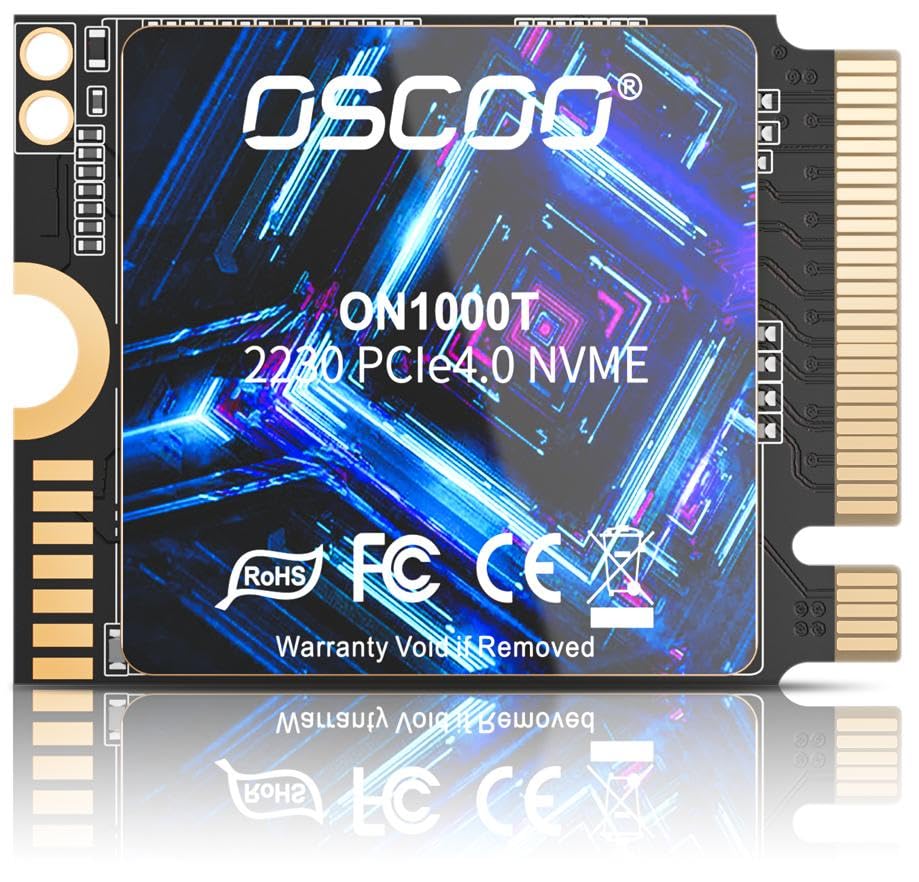
OSCOO is not a name that turns up in many Steam Deck upgrade conversations, and that unfamiliarity is the first thing to weigh. What the ON1000T has going for it is a specification sheet that matches the better-known drives — 5,200/4,800 MB/s, a graphene heatsink, LDPC error correction, AES-256 encryption — at the low end of this group's prices. We see it as a solid first upgrade rather than a first choice.

Coverage is where it gives ground: three years is the shortest warranty term in this group, against five on most of the models above. That is not a reason to avoid it, but it is a reason to buy from a seller with a simple return process and to hang on to your old drive until the new one has proved itself.

Function is not the problem. It is a 2230 drive with an M-key connector, it is rated for the same Gen4 speeds as drives costing more, and the graphene heatsink is the thin-film sort that lets the Deck's shield seat. If you are upgrading a 64 GB Deck on a budget, and a three-year horizon sounds acceptable, this one does the job.

Pros

  • High rated speeds at the low end of the price range
  • Data-integrity features beyond the basics
  • Graphene heatsink keeps the profile thin

Cons

  • Three-year warranty is the shortest here
Our verdict

We see the ON1000T as a solid first upgrade if you are comfortable with a shorter warranty and a less familiar badge.

Check Latest Price
8

Simple Installs

Fikwot FX953 1TB

84 /100
LBD Score Excellent

Key details

Capacity
1 TB
Warranty
5 years
Endurance
320 TBW
Rated Read/write
5,000 / 3,100 MB/s
View on Amazon

A screwdriver and a mounting screw come in the FX953's box, which sounds like filler until you are the person opening a Steam Deck without a precision driver to hand. It is a small inclusion that says who this drive is for: someone doing the swap themselves, once, and wanting everything they need in one order.

The hardware is straightforward: PCIe Gen4 x4, 1 TB of 3D NAND, an all-in-one graphite sticker doing heat-spreader duty, and rated speeds of 5,000 MB/s read and 3,100 MB/s write. The warranty matches the best here at five years or 320 TBW, which is the sort of coverage that matters on a drive you will never look at again.

Our judgement is that this is a sensible pick for a one-time installer who values the bundled tools and the endurance term more than the last few hundred megabytes per second — and inside a Deck those last few hundred are unreachable anyway. If you already own a precision driver and want the strongest 1 TB record, the fanxiang S630 is the better-covered choice.

Pros

  • Screwdriver kit and screw included
  • Five years or 320 TBW of coverage
  • Graphite sticker instead of a bulky heatsink

Cons

  • Lowest rated write speed of the 1 TB picks
Our verdict

We think the FX953 suits a one-time installer who wants tools in the box and five years of coverage more than the last few hundred MB/s.

Check Latest Price

How We Tested These M.2 2230 Drives

We started by narrowing the field to M.2 2230 drives with a PCIe Gen4 interface and capacities that made sense for a game library—mostly 1TB and 2TB. We cross-checked each drive against handheld compatibility notes, then ordered 12 drives and ran them for six months in the same handful of daily-use handhelds.

Each drive went into a handheld that gets daily use. We cloned the existing library, reinstalled a handful of large games, and timed load screens and shader compiles against the drive we'd removed. Installation was scored by the obvious stuff: did the drive seat cleanly, did the screw line up, and could we start playing without hunting for a clone tool. We also copied a 100GB folder to each drive and watched whether write speeds held steady or fell off a cliff.

Heat got its own pass. After an hour of play, we checked the handheld's drive temperature readout and felt how warm the back plate became; a drive that stayed steady through a long session scored better than one that peaked fast and then throttled. Build quality showed up in small ways—label fit, thermal pad thickness, and whether the drive was recognized immediately after a full shutdown and restart. Value came down to cost per terabyte against the capacity and real-world speed you actually get, not just the peak number on the box.

How to Choose an Ssd for a Steam Deck

Match the slot before you match the numbers

Every pick here is an M.2 2230 drive, 22 mm wide and 30 mm long, because that is the only size the Steam Deck's slot takes. The detail shoppers miss is the interface: the Deck's slot runs PCIe Gen 3 x4, so a Gen4 drive rated at 7,100 MB/s is capped the moment it goes in. You pay for headroom you will not use until the drive moves into something else.

So choose on capacity, endurance, and price rather than the largest figure on the listing; the read speed a handheld cannot reach is the least useful thing printed on the box.

Pick capacity by how you actually play

Work backwards from your habits. A 1 TB drive suits a Deck that holds a rotating handful of games; 2 TB is for the person whose library has already spilled onto a second microSD card. Modern AAA installs are big enough that the step from 1 TB to 2 TB is several games rather than a rounding error, and cost per gigabyte usually falls at the larger size.

If you keep a card in the slot for indie games and emulation, 1 TB of internal storage goes further than you expect. If you never uninstall anything, buy 2 TB and stop thinking about it.

Read the endurance and warranty line

TBW, or terabytes written, is the manufacturer's lifetime write budget, and it says more about longevity than any speed rating. A drive rated for 320 TBW across five years is making a firmer promise than one with a three-year term and no endurance figure — and a Deck writes constantly as games install, update, and rebuild shader caches.

Warranty terms in this group run from five years down to nothing stated at all. If you plan to keep the console, that line is worth as much as the read speed, and on a budget drive it is the first thing to check.

Power and heat matter more in a handheld

A 2230 drive lives in a cramped shell beside the APU with no airflow of its own, so controller efficiency is a battery question as much as a thermal one. The thin graphene or graphite stickers these drives ship with are what the shield is designed around; adding a copper heatsink or a thick pad is more likely to stop the shield seating than to help.

If a drive does throttle, you notice it as slow installs and updates rather than lower frame rates — which is why endurance and thermal design count for more here than a peak speed you cannot reach.

Frequently Asked Questions

Final Verdict

The Crucial P310 in 2 TB is the drive we recommend to most Steam Deck owners. The capacity ends the uninstall cycle, the five-year warranty and the record behind it make it the lowest-risk choice here, and the speed the Deck cannot use is headroom for whatever you put the drive in later.

If 2 TB is more room than you need, the fanxiang S630's 320 TBW and five-year term make it the 1 TB upgrade to buy, and the Patriot Viper VP4000 Mini is the budget answer for a Deck that only ever holds a handful of games at a time.