Best USB Microphones of 2026

The first time you hear yourself played back through a laptop's built-in mic, something dies a little. It's thin, it catches every keystroke, and it makes a good story sound like a hostage tape. A USB microphone is the shortest fix I know: one cable, no interface, no mixer, no driver ritual — just a more convincing version of you.

I've recorded on everything from a mic the size of a golf ball to a studio condenser, and my team and I have spent six months with 12 USB models — morning calls, evening podcast sessions, a few ill-advised late-night streams. What separated the good ones was boring: how fast you can get a usable level, how much of the room the mic hears, and whether it survives being replugged a hundred times.

One thing worth knowing: pickup pattern and mic type shape your recording more than any number on the box. A dynamic mic forgives a noisy room; a condenser hands you fine detail along with the neighbor's dog. Neither is better — they're better at different jobs. Here's what we'd buy again.

1

Best Overall

Blue Yeti

93 /100
LBD Score Outstanding

Key details

Weight
3.2 lb
Connection
USB Type-A
Pickup Patterns
Cardioid, omnidirectional, bidirectional, stereo
Onboard Controls
Gain, mute, headphone volume, pattern
View on Amazon

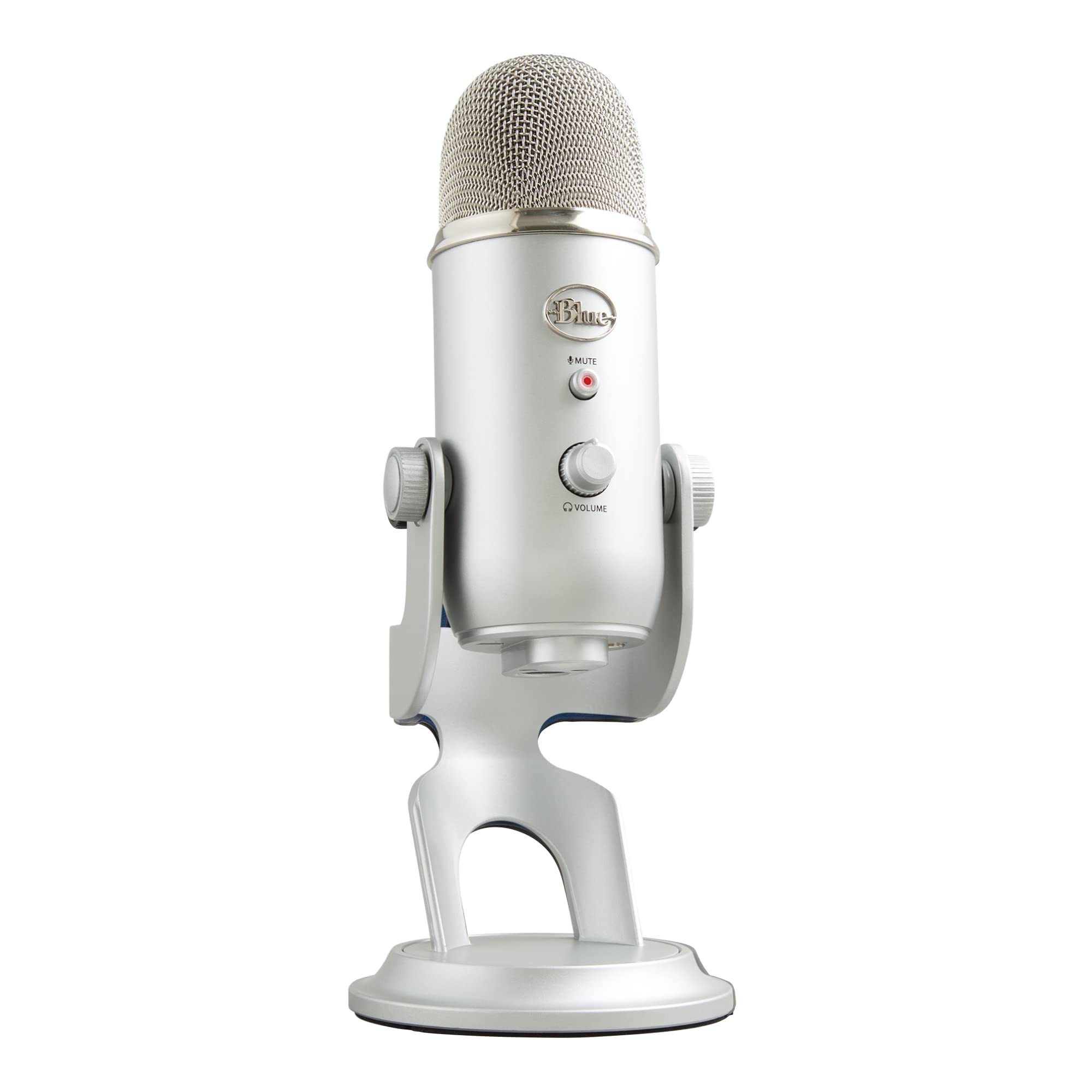
A four-pattern microphone is really four microphones, and that is why the Yeti sits at the top of this list. Cardioid for you alone at the desk, bidirectional for two people facing each other across it, omnidirectional for a group around a table, stereo for an instrument. The pattern dial gets more use than any other control on the thing, and it means one purchase covers a solo stream and a co-host without a second mic. The stereo setting is the one people get wrong: it is for instruments and room ambience, not for making a single voice sound wider.

Everything else you reach for is on the body too, including gain, mute, and headphone volume. A hardware mute is worth more than it sounds, since a cough or a delivery arriving never reaches the recording. The headphone jack gives you zero-latency monitoring, so you hear yourself as you actually sound rather than half a second late. Blue VO!CE, the companion software, layers on compression and EQ presets if you want a broadcast tone without learning a DAW.

Size is the first thing to plan around: 3.2 pounds and a foot tall, it takes a real bite out of a small desk and is not a mic you throw in a bag. The second is placement, and it rewards a bit of care. Cardioid selected, gain trimmed until your loudest sentence just clears the meter, the capsule a hand's width off to the side of your mouth. Set up that way, the detail that makes the Yeti worth owning lands on the recording instead of the room.

On longevity, the two-year warranty is the thing to lean on, and registering it takes a minute. This is a desktop fixture rather than a travel mic, and that is the honest boundary of what it does: buy it to stay in one place and cover every job at that desk.

Pros

  • Four pickup patterns cover solo, duo, and room work
  • Gain, mute, and headphone volume on the body
  • Zero-latency monitoring through the headphone jack
  • Blue VO!CE effects without extra hardware

Cons

  • Large, heavy body eats desk space
  • Room noise reaches the take if you sit back
Our verdict

Four patterns and physical controls make this the mic we hand to anyone who wants one purchase to cover solo streams, interviews, and music.

Check Latest Price
2

Best for Noisy Rooms

FIFINE AmpliTank K688

93 /100
LBD Score Outstanding

Key details

Capsule
Dynamic
Connection
USB-C and XLR
Onboard Controls
Tap mute, gain, headphone volume
Frequency Response
50Hz-16kHz
View on Amazon

The K688 is a dynamic microphone, and that single word changes where you can use it. Dynamic capsules are less sensitive by design, so a fan, a humming PC, and a keyboard two feet away land much further back in the mix. In a small room with hard walls, which is the usual spare-bedroom setup, that difference matters more than any figure on the box.

Its 50Hz-16kHz range says the same thing in numbers: the top octave is trimmed, so voices arrive full and forward rather than airy. Speech, streaming, and deeper voices all benefit. Record an acoustic guitar or a soprano and you will want the sparkle a condenser brings. The metal body and the included shock mount feel like parts that will outlast the desk they sit on.

USB-C gets you recording in a minute, and the XLR output is there for the day you add an interface or a mixer, so the mic comes with you instead of being replaced. The front-panel tap mute is quiet enough not to thump the recording, and the headphone jack has its own volume knob for monitoring. What is missing is a stand and an XLR cable: the box holds the mic, a shock mount, a 5/8-inch to 3/8-inch adapter, and a USB-C cable.

Budget for an arm and you have a microphone that behaves in a bad room and grows into an interface later. Where the Yeti gives you patterns and software, this gives you isolation, and for a bedroom with a fan and a mechanical keyboard that is the more useful half of the bargain.

Pros

  • Dynamic capsule keeps room noise out of the take
  • USB now, XLR when you add an interface
  • Quiet tap mute and headphone monitoring
  • Metal body with shock mount included

Cons

  • No stand or XLR cable in the box
Our verdict

A dynamic capsule and a real XLR path make this our pick for a desk in a noisy room, as long as you budget for an arm.

Check Latest Price
3

Best Handheld Dynamic

Samson Q2U

91 /100
LBD Score Outstanding

Key details

Capsule
Dynamic
Connection
USB-C and XLR
In The Box
Tripod stand, clip, windscreen, USB-C and XLR cables
Frequency Response
50Hz-15kHz
View on Amazon

Almost everything on this list is designed to stay on a desk. The Q2U is the exception, a handheld dynamic that works in your fist for an interview, sits in the included tripod for recording, and clips into a standard mic clip when you want it on an arm. At 11.2 ounces it is light enough to hold through a long conversation and heavy enough not to feel like a toy.

The pack is unusually complete: tripod stand, tripod extension, mic clip, windscreen, and both a USB-C cable and an XLR cable. Plug USB-C into a laptop and it is a plug-and-play USB mic; run XLR to a mixer and it is a stage mic. That dual life is the argument for it, and the dynamic capsule means you do not need a treated booth for a usable take, with a 50Hz-15kHz range voiced for speech.

We keep it on the list for two buyers: the podcaster who records guests in the same room, where you can simply hand it over, and the person who wants one microphone that survives a move to an interface. The catch is the connector, because the listing specifies USB-C, so a laptop with only USB-A ports needs an adapter or a different cable. And because this is a mic that travels, look after the monitoring jack and the cable joint; those are the parts that age first.

Pros

  • Handheld or on its stand, unlike most USB mics
  • USB-C and XLR cables both included
  • Dynamic capsule delivers clean speech untreated
  • Tripod, extension, clip, and windscreen included

Cons

  • USB-C connection may need an adapter on older laptops
Our verdict

The one mic here you can hold in your hand: a dynamic with both cables in the box, made for interviews and desks that move.

Check Latest Price
4

Best All-In-One Kit

MAONO A04

91 /100
LBD Score Outstanding

Key details

Capsule
16mm condenser
Connection
USB-B to USB-A/C
In The Box
Boom arm, C-clamp, shock mount, pop filter, windscreen
Sampling Rate
192kHz/24-bit
View on Amazon

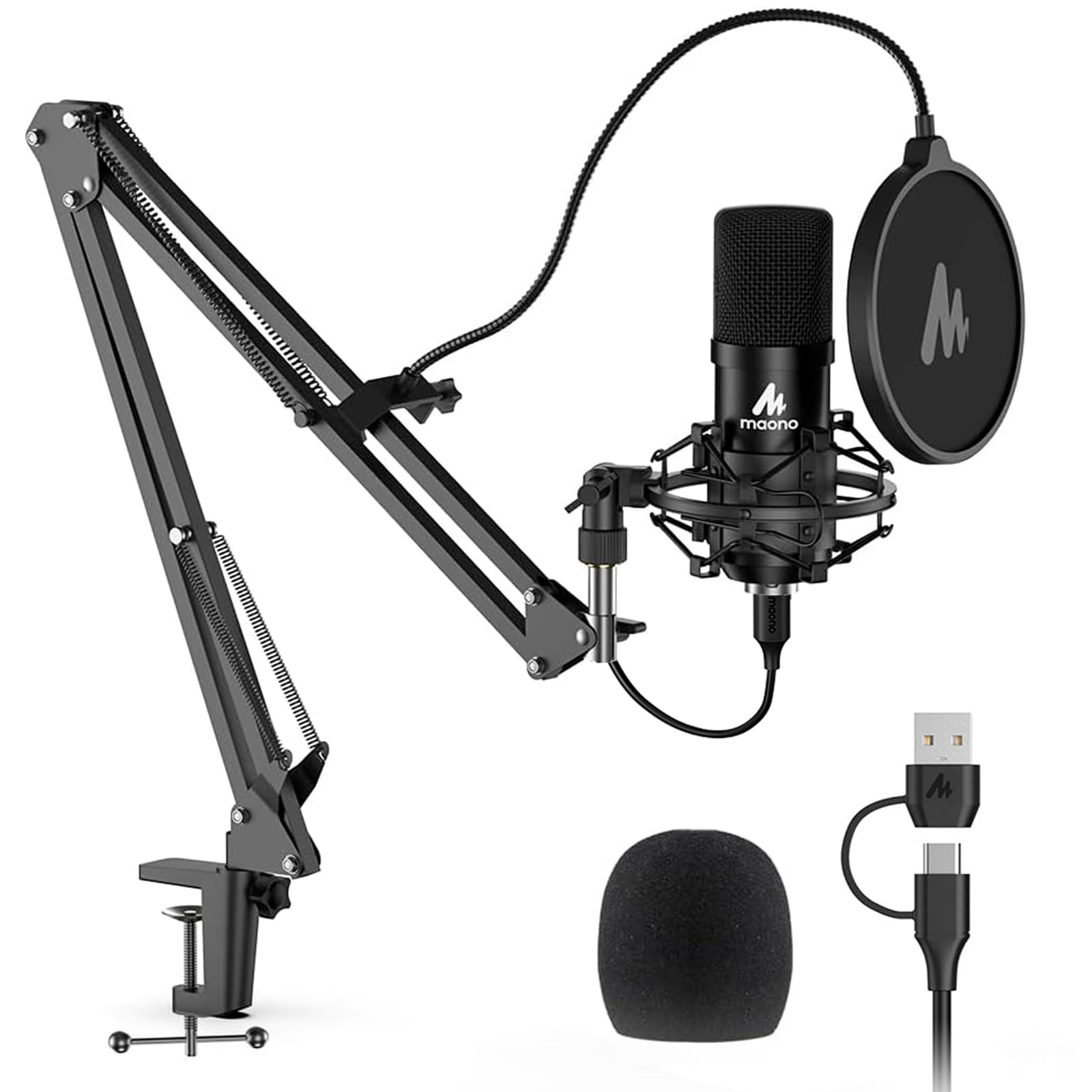
Open the box and the pitch is obvious: a boom arm, a C-clamp, a shock mount, a pop filter, a foam windscreen, and the cable, all in one purchase. The microphone itself is a 16mm cardioid condenser running a 192kHz/24-bit chipset, a number that matters less than where you point it, but a sign the electronics were not where costs were cut.

Our view is that the mount decides whether a kit like this is worth it. The clamp needs a free lip under the desk edge to grip, so check for a drawer stack or a thick apron before you commit, and the shock mount does real work in suspending the capsule away from knocks and keystrokes. Set up properly, an arm gets the microphone in front of your face rather than under your chin, which is the biggest upgrade over a desktop tripod.

Sonically it is a condenser with a full low end across a 30Hz-16kHz range, which flatters speech and gives singing some body. It wants a reasonably quiet room and a gain setting that leaves headroom, and the pop filter earns its place the first time you land on a plosive. For a first streaming or podcast desk with nothing assembled yet, this is the least fiddly way to get there.

Pros

  • Arm, clamp, shock mount, and pop filter included
  • 192kHz/24-bit chipset and 16mm capsule
  • Pop filter and shock mount tame plosives and knocks

Cons

  • Clamp and arm joints are the light parts
Our verdict

The shortest path from box to broadcast: a complete arm, mount, and filter kit around a capable condenser, provided your desk can take a clamp.

Check Latest Price
5

Best Budget Desktop Mic

FIFINE K669B

91 /100
LBD Score Outstanding

Key details

Weight
5.6 oz
Capsule
Condenser, cardioid
Connection
USB-B to USB-A/C cable
In The Box
Tripod stand, USB cable
View on Amazon

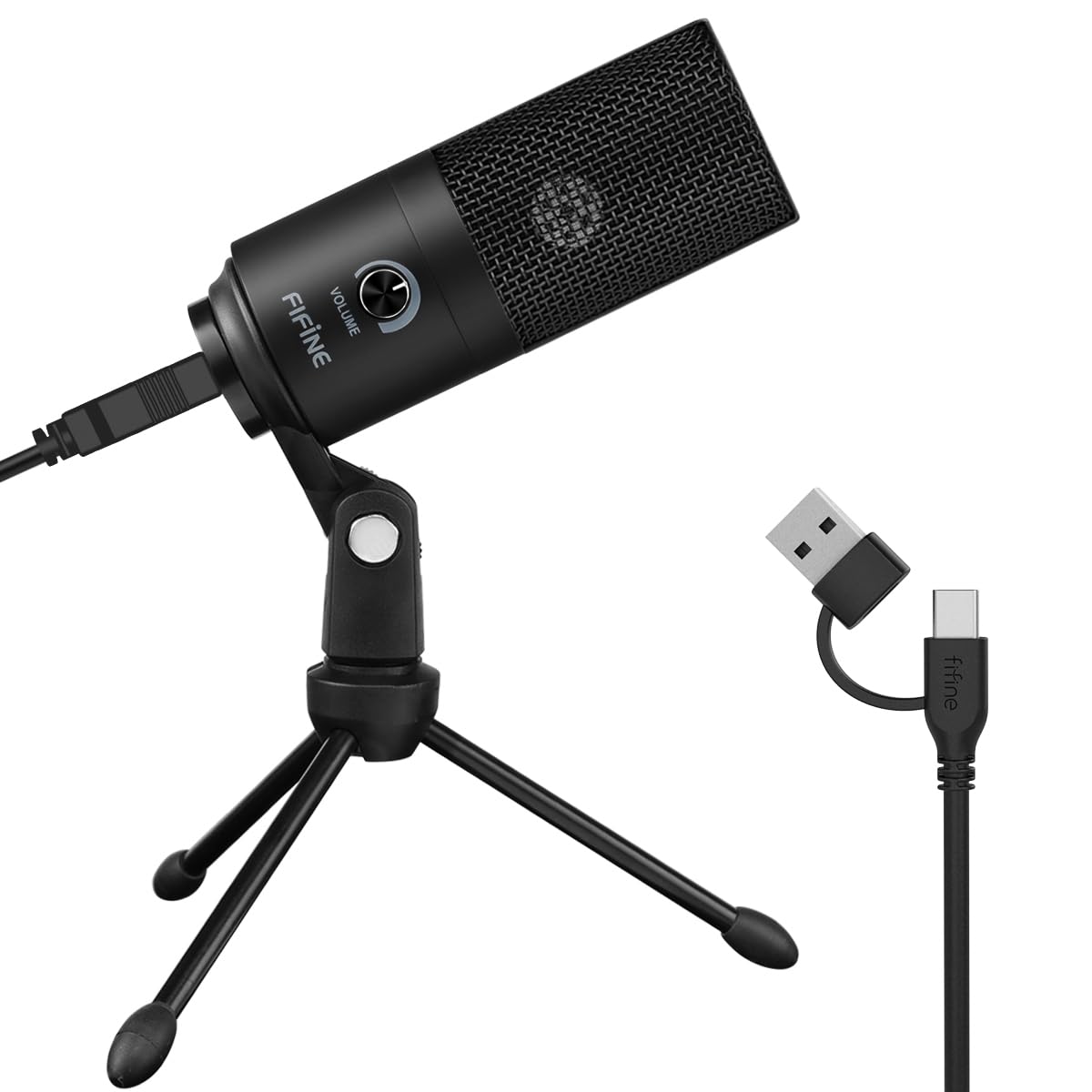
Metal-bodied, weighted, and simple: the K669B is the budget mic we point beginners at, and the reason is how little it asks of you. Plug the cable in, pick it in your operating system, and talk. The volume knob on the front handles level without a menu, and the tripod keeps the capsule off the desk rather than lying flat on it.

The cardioid pattern does the work of ignoring the back of the room, and the 20Hz-20kHz response is wider than the money suggests. For voice-over, Discord, meetings, and a first podcast it is clean enough that nobody on the other end asks what you are using. It also moves to a boom arm if you outgrow the tripod, so the mic does not become obsolete the moment your desk does.

What it will not do is fix a live room. It is a condenser, so it picks up the fan, the keyboard, and the reflection off a bare wall, and a blanket behind you plus the capsule a hand's width from your mouth does more than any setting. Over time, the knob and the cable joint are the parts that take the wear, so coil the cable rather than wrapping it around the body.

Pros

  • Metal body and weighted tripod for the money
  • Plug and play with a physical volume knob
  • Cardioid capsule with 20Hz-20kHz response

Cons

  • Short tripod keeps the capsule low on the desk
Our verdict

The budget microphone we point beginners at: metal body, one knob, no setup, and a sound that clears the bar for meetings and first recordings.

Check Latest Price
6

Phone Recording

ZealSound K66

89 /100
LBD Score Excellent

Key details

Capsule
Condenser, cardioid
Connection
USB with USB-C and Lightning adapters
Cable Length
70.9 inches
Onboard Controls
Gain, headphone volume, mute, echo, noise reduction
View on Amazon

The K66 is the only microphone here with a dedicated echo control, and that tells you most of what you need to know about who it is for. Gain, headphone volume, echo, noise reduction, and mute all sit on the body, and the 3.5mm jack gives you zero-latency monitoring so you hear the effect before you commit it to a recording. For quick, casual, slightly theatrical recordings, that is a toy box worth having.

The box holds a 70.9-inch USB cable plus USB-C and Lightning adapters, which is why it turns up in phone and tablet setups: TikTok clips, voice memos, a kid recording songs in the back seat. Treat the phone side as the part to test on day one. An adapter in the box does not guarantee every handset recognizes the mic, and finding that out an hour before you need it is miserable.

At a desk it is competent rather than remarkable, a cardioid condenser with a 40Hz-18kHz range that is honest on speech. Use the noise-reduction button sparingly, since it quiets the room by thinning the voice along with it. Where this earns its place in the drawer of recommendations is as a second microphone: inexpensive enough to keep for phone recording and casual streaming, not the one to build a channel around.

Pros

  • Echo, noise reduction, gain, and mute on the body
  • USB-C and Lightning adapters in the box
  • Zero-latency monitoring via headphone jack

Cons

  • Noise reduction thins the voice it cleans
  • Phone recognition varies by handset
Our verdict

A knob-heavy condenser for quick phone and tablet recording, where the echo and noise-reduction buttons earn their keep more than studio fidelity does.

Check Latest Price
7

Calls and Meetings

JOUNIVO JV-601

89 /100
LBD Score Excellent

Key details

Design
Adjustable gooseneck
Controls
Mute button with LED indicator
Cable Length
6 feet
Polar Pattern
Omnidirectional
View on Amazon

No stand, no clamp, no arm: the JV-601 is a gooseneck that sits on the desk and bends to your mouth, which makes it the only mic here that slips under a monitor or beside a keyboard without rearranging anything. The base has enough weight to stay put, the stem holds its position, and the mute button lights red so you can see at a glance whether you are live.

We rate it for the job it was built for: Zoom calls, Discord, a lecture, a desk mic for someone who talks to their computer for a living. It is an omnidirectional capsule, so it listens to the desk around it rather than to a tight cone in front of your face. In a quiet office that is forgiving and convenient; in a shared room it is the wrong tool. This is a communications mic, not a recording mic.

Setup is a USB port and nothing else. No drivers, and both Windows and macOS pick it up, with a 6-foot cable that reaches a tower on the floor. The gooseneck folds down small enough to travel, and the trick to keeping it tight is to bend it at the joint rather than from the middle of the stem.

Pros

  • Gooseneck aims at your mouth without a stand
  • Mute button with a visible LED indicator
  • Plug and play on Windows and macOS

Cons

  • Omnidirectional capsule hears the whole room
Our verdict

A gooseneck for people who talk to their computer all day: no stand, a visible mute, and a clear voice on calls without recording-studio ambitions.

Check Latest Price

How We Tested 12 USB Microphones in Real Rooms

We started with a list of about 60 USB microphones drawn from manufacturer specs, retailer bestseller pages, and the models readers ask about most, then narrowed it by connection type, price, and whether the extras — mute buttons, headphone jacks, dual USB and XLR outputs — actually justified the jump in cost. Twelve made the cut, and over six months each one became somebody's daily mic rather than a single unboxing and a pat on the head.

Every mic recorded the same two-minute scripted passage and the same unscripted five-minute ramble in three settings: a carpeted bedroom, a kitchen with the refrigerator running, and a shared office of mechanical keyboards. We also ran each through Zoom, Discord, and a plain audio recorder, since a mic that sounds clean in one app can misbehave in another.

Setup was timed from box to first usable recording, and we noted anything that had to be installed or configured first. Playback happened on headphones and studio monitors, listening for room hum, keyboard clatter, and the plastic hollowness a nearby laptop fan adds. Gain knobs got pushed to both ends to find where each mic clipped or hissed, and mute buttons were pressed mid-sentence to check that the indicator light told the truth.

To judge background noise, we compared raw recordings against each mic's cardioid or noise-cancellation setting to hear what got removed and what got damaged. Each one was plugged and unplugged fifty times, its cable rewound, and a few were knocked off the desk onto carpet to see what rattled. We checked compatibility on Windows, macOS, an iPad, and an Android phone with adapters, then ran two-hour sessions to catch dropouts, heat, or a mic that quietly disconnected halfway through.

How to Choose a Usb Microphone

Capsule type comes before everything else

Condenser capsules are sensitive and detailed, which is why most USB mics use one, and also why they capture the fridge, the fan, and the reflection off a bare wall. Dynamic capsules give up some top-end air in exchange for rejecting what is behind you, which is the reason the FIFINE K688 and the Samson Q2U are our picks for a bedroom with a PC humming in it. A quiet, soft-furnished room rewards the condenser's detail. A live one rewards the dynamic, as long as you sit close.

Match the pickup pattern to the job

Cardioid is the default: one person, one cone of sensitivity in front of the capsule. Omnidirectional listens in a circle, which suits a meeting table or a gooseneck reaching across a keyboard. Bidirectional covers two people facing each other over the mic, and stereo is for instruments rather than for widening a voice. The common mistake is paying for four patterns and leaving the mic in omni, where it hears the room as loudly as it hears you. Aim the capsule at your mouth, slightly off-axis, about a hand's width away.

Controls you will actually touch

Mute and headphone volume earn their place every session. A hardware mute keeps a cough or a delivery out of the recording, and a headphone jack with zero-latency monitoring lets you hear your own level while you talk instead of discovering it in the edit. A gain knob helps you match the mic to the room without menu diving. If you stream, look for a mute that lights up when it is engaged, because a mute you cannot see is how hot-mic clips happen.

Mounting, clamps, and what ships in the box

Check three things before ordering: whether a stand or arm is included, whether the clamp suits your desk, and whether the mic takes a standard thread so you can change mounts later. A clamp needs a free lip under the desk edge, so a thick apron or a drawer directly below it can leave you improvising. Kits such as the MAONO A04 are the value play because the arm, shock mount, and pop filter arrive together, but the arm is usually the part where money was saved.

USB today, XLR tomorrow

Every microphone here records over USB with no interface or mixer in the chain. A hybrid like the FIFINE K688 or the Samson Q2U adds an XLR output, so the day you buy an interface the mic comes with you rather than being replaced. That flexibility is worth a little extra if you expect to end up there; if you are certain you will not, spend it on the capsule and controls instead. Check the cable in the box too, since USB-A-only laptops need the right cable or an adapter.

Frequently Asked Questions

Final Verdict

The Blue Yeti is the microphone we point most people toward, because four pickup patterns and physical controls cover solo streaming, a two-person podcast, and a room recording without a second purchase.

If your desk sits in a noisy room, or you expect to move to an interface later, the FIFINE K688 answers with a dynamic capsule and an XLR output the Yeti cannot match. And when the budget is the deciding factor, the FIFINE K669B is the simplest way to get a clean voice into a computer for very little.