Best USB Microphones for Podcasting of 2026

A microphone is the one piece of podcast gear you can't fix later. You can edit around a cough, cut a rambling answer, and sweeten a thin voice, but you cannot subtract the room — the fridge hum, the keyboard clatter, the neighbor's leaf blower. That's why I spend more time auditioning mics than anything else in my setup, and why our team has spent the past six months recording with 12 of them.

What separates these mics isn't price. It's how much of the room they let in. A dynamic mic forgives an untreated bedroom in a way a sensitive condenser often doesn't, and a switchable pickup pattern lets you narrow the field when the dog is in the next room. The other thing I'd tell a first-time buyer: a headphone jack for live monitoring saves you more retakes than any spec printed on the box.

Setup and compatibility matter more than people expect, too. The best ones go from box to recordable in under five minutes on a Mac or a PC, no driver hunt, no audio interface, no software tier you have to pay for. Below, the picks that survived months of real recording — not just a five-minute sound check.

1

Best Overall

Blue Yeti

93 /100
LBD Score Outstanding

Key details

Weight
3.5 lb
Connection
USB
Pickup Patterns
Cardioid, omni, bidirectional, stereo
Onboard Controls
Gain, mute, pattern, headphone volume
View on Amazon

Four pickup patterns is the whole argument for the Yeti, and it is worth knowing what each one does before you pay for them. Cardioid is what a solo show uses: it listens in front of the capsule and pushes down the wall behind you. Turn the dial to bidirectional and the mic hears two people facing each other across a table, which is a co-host episode without buying a second microphone. Omni takes in the room for a group recording, and stereo spreads the image for music or atmosphere. Three capsules under the grille do that work, which is why the body is as large as it is.

The controls sit on the front where you can reach them mid-sentence: gain, mute, headphone volume and the pattern dial, with a headphone jack for zero-latency monitoring. We plugged it into a Mac and a Windows laptop and it appeared as an input on both without a driver; Blue VO!CE adds EQ and compression if you want them, but nothing about the mic depends on installing it. That set of controls is the most complete on any mic in this group.

What makes it our default is range. A solo show that adds a guest, a voice track that later needs a jingle, an interview recorded across a table: all of it works without another purchase. The bill for that sensitivity is the room. This is a condenser that will happily record your keyboard, the fridge and the reflection off a bare wall, so sit close, keep the gain low and put something soft behind you. If your space is genuinely loud, the FIFINE K688 is the better tool.

Pros

  • Four pickup patterns cover solo, co-host and group recording
  • Gain, mute and headphone monitoring on the body
  • Plug-and-play on Mac and PC, no driver needed
  • Blue VO!CE adds EQ and effects if you want them

Cons

  • Sensitive capsule captures keyboard, fan and room reflections
  • Tall, heavy body takes desk space
Our verdict

We recommend the Yeti as the default podcasting mic: one purchase covers a solo show, a two-person interview and a music bed, with the controls to run all three from the desk.

Check Latest Price
2

Best for Untreated Rooms

Samson Q2U

91 /100
LBD Score Outstanding

Key details

Weight
11.2 oz
Connection
USB-C and XLR
In The Box
Tripod stand, mic clip, windscreen, USB-C and XLR cables
Polar Pattern
Unidirectional
View on Amazon

A dynamic capsule is the reason to look at the Q2U. It is deliberately less sensitive than the condensers here, so room echo and the hum from the next room sit further back under your voice, which is often the difference between a usable take at a kitchen table and an hour of editing. The body is shaped to be held, too, so it is the one mic here that works for a doorstep interview or a second person leaning in.

What earns it a runner-up spot is completeness. The box holds a tripod stand, an extension rod, a mic clip, a windscreen and both a USB-C cable and an XLR cable, so you can be recording over USB in the time it takes to screw the clip on and move to an interface later without replacing the mic. A dynamic capsule, both connections and a stand in one box is the most useful package here for anyone recording in a room they cannot treat.

The trade is proximity. Speak a couple of inches from the grille and it sounds full and solid; lean back in your chair and it thins out fast. A dynamic is not a mute button for the room either, so a live kitchen still shows up in the track, just further back. Sit close, aim the capsule at your mouth rather than your nose, and it behaves the way a broadcast handheld should.

Pros

  • Dynamic capsule puts room echo further back
  • Stand, clip, windscreen and both cables included
  • USB-C now, XLR later when you add an interface
  • Handheld body suits interviews away from the desk

Cons

  • Failures inside the first year, including the monitoring jack
Our verdict

For a loud or echoey room, this is our pick: a dynamic capsule, both cables and a stand in one box, for less than the flagship condenser here.

Check Latest Price
3

Best for Live Monitoring

FIFINE K688

93 /100
LBD Score Outstanding

Key details

Connection
USB and XLR
In The Box
Shock mount, USB-C cable, thread adapter
Polar Pattern
Unidirectional
Frequency Response
50Hz-16KHz
View on Amazon

No stand comes in the box. What you get is the dynamic mic, a shock mount, a USB-C cable and a thread adapter, with the clear expectation that you will bring a boom arm or a desk stand. That is a fork in the road rather than a fault: if you already own an arm, this is the least expensive route into a metal-bodied dynamic with monitoring; if you do not, price a stand in before you compare it with a kit.

The capsule is built for voice, with a 50Hz-16KHz range and a unidirectional pattern, and the metal body has taken the desk knocks we have given it without complaint. Three controls on the front do the work: tap-to-mute, a gain knob and a headphone jack with its own volume wheel. Those are the three things we reach for during a recording, and having them on the mic instead of buried in software is why this one stays plugged in.

Both connections are live. USB goes straight into a laptop; XLR goes into an interface when you add one, and the XLR path keeps the noise floor down as you push gain. It is not immune to the room, and static on the USB side is the thing to watch: try another cable and another port before you decide the mic is faulty.

For a desk show where you listen to yourself in headphones and might add an interface later, this is the one we keep recommending to people who already own an arm. The RGB ring is controllable across three modes and a spread of colors, which is either the point of the mic or an annoyance, depending on how your desk looks on camera.

Pros

  • Dynamic capsule with USB and XLR in one mic
  • Tap-to-mute, gain and headphone monitoring on the body
  • Metal body with shock mount included
  • XLR path keeps the noise floor down at high gain

Cons

  • Static can develop on the USB connection
Our verdict

Buy the K688 if you already own an arm or stand and want a dynamic that can move to XLR, with monitoring, mute and gain on the mic itself.

Check Latest Price
4

Best Starter Kit

FIFINE T669

93 /100
LBD Score Outstanding

Key details

Connection
USB
In The Box
Boom arm, C-clamp, shock mount, pop filter, windscreen, USB cable
Polar Pattern
Unidirectional
Frequency Response
20Hz-20KHz
View on Amazon

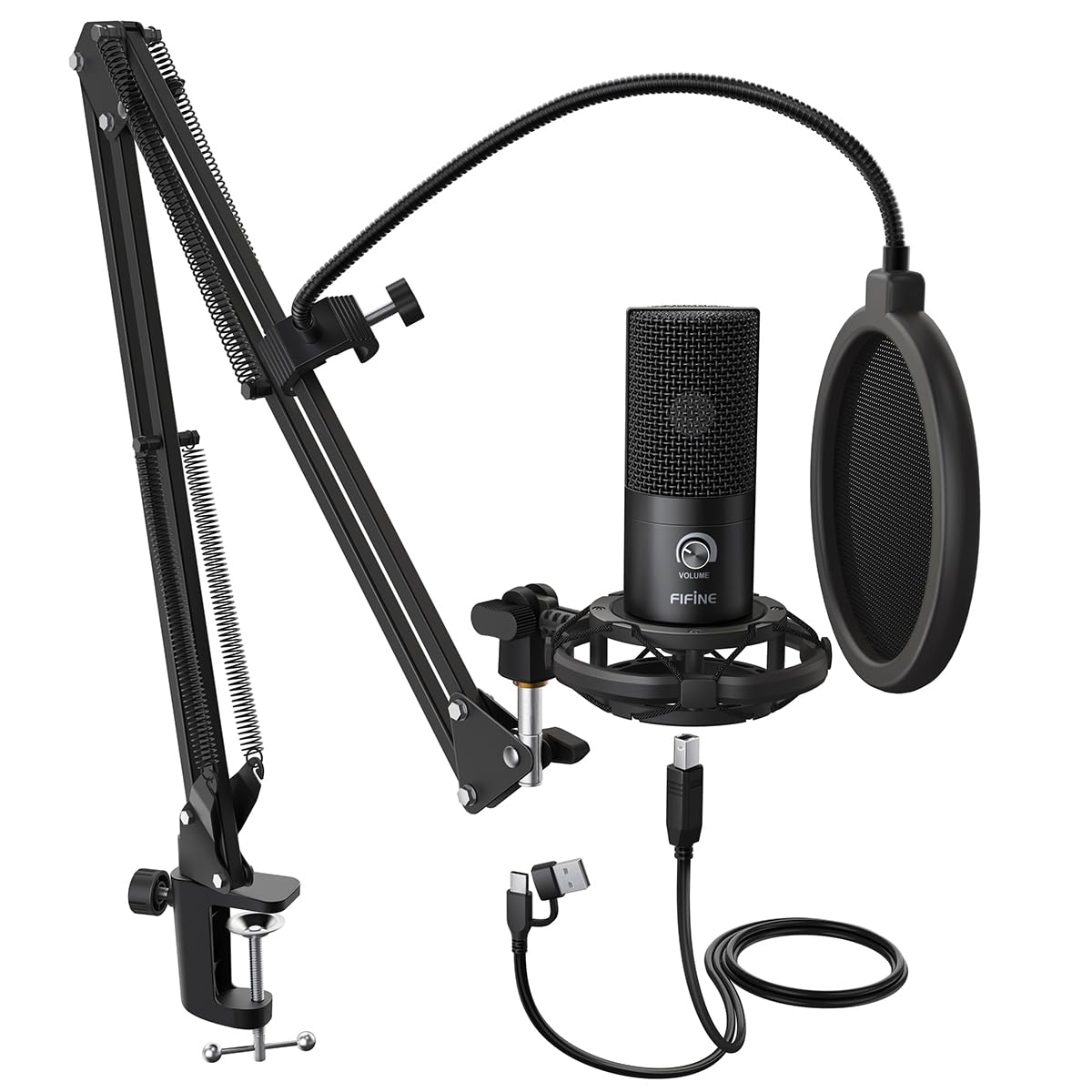
The whole desk setup arrives in one box: condenser mic, scissor boom arm with a C-clamp, shock mount, pop filter, windscreen and USB cable. It is the least expensive complete boom-arm kit in this group, and that is the reason it is here. You can be recording at mouth height the day it lands, without a second order.

The sound is the pleasant part. Voice comes through clear and forward, the cardioid pattern keeps the worst of the room off-axis, and the shock mount takes the edge off desk taps. For a first show, or a second mic for a co-host, it is more than enough to sound deliberate rather than improvised.

Setup is genuinely plug-and-play on Windows and Mac, with no driver and no software, and the arm swings out of the way between recordings. One check before you buy: the C-clamp needs a desk edge it can close around, so a glass top or a desk with a full modesty panel is a fight you do not want. Everything else about the kit is ready to go.

Pros

  • Arm, shock mount, pop filter and cable in one box
  • Clear, forward voice from a cardioid condenser
  • Plug-and-play on Windows and Mac

Cons

  • Boom arm and C-clamp are light-duty
Our verdict

Starting from nothing, the T669 puts a clear-sounding condenser at mouth height with the arm, mount and filter already in the box.

Check Latest Price
5

Best Budget

TONOR TC30

91 /100
LBD Score Outstanding

Key details

Weight
14.1 oz
Connection
USB Type-C
In The Box
Shock mount, tripod, pop filter, USB-C cable
Polar Pattern
Cardioid
View on Amazon

Cheap does not have to mean bare: the TC30 includes a foldable tripod, a concealed shock mount, a pop filter and a USB-C cable, so there is nothing else to order before your first recording. The mic itself is a small cardioid condenser that sits low and close to the desk rather than looming over it.

We rate it the cheapest complete desk setup here, and the voice quality holds up. The cardioid pattern pushes down off-axis sound, the shock mount deals with the keyboard, and there is no software between you and a recording: plug it in and the computer sees it.

The tripod is short, so you will be leaning toward it, and the room comes along for the ride, with a fan or a busy street landing in the track. One more check: some units do not play nicely with Macs, so if you record on a Mac, run a test take while you can still return it. On Windows it is about as frictionless as this list gets.

Pros

  • Complete desk setup for the lowest outlay here
  • Clear cardioid voice pickup
  • Folding tripod, shock mount and pop filter included

Cons

  • Levels and muting happen in your recording app
Our verdict

For a first podcast on a tight budget, the TC30 gets you a clear cardioid mic, tripod and pop filter without a second order.

Check Latest Price
6

Voiceover and Music

MAONO A04

91 /100
LBD Score Outstanding

Key details

Capsule
16mm condenser
Connection
USB
In The Box
Boom arm, shock mount, pop filter, windscreen, clamp, USB cable
Sampling Rate
192kHz/24Bit
View on Amazon

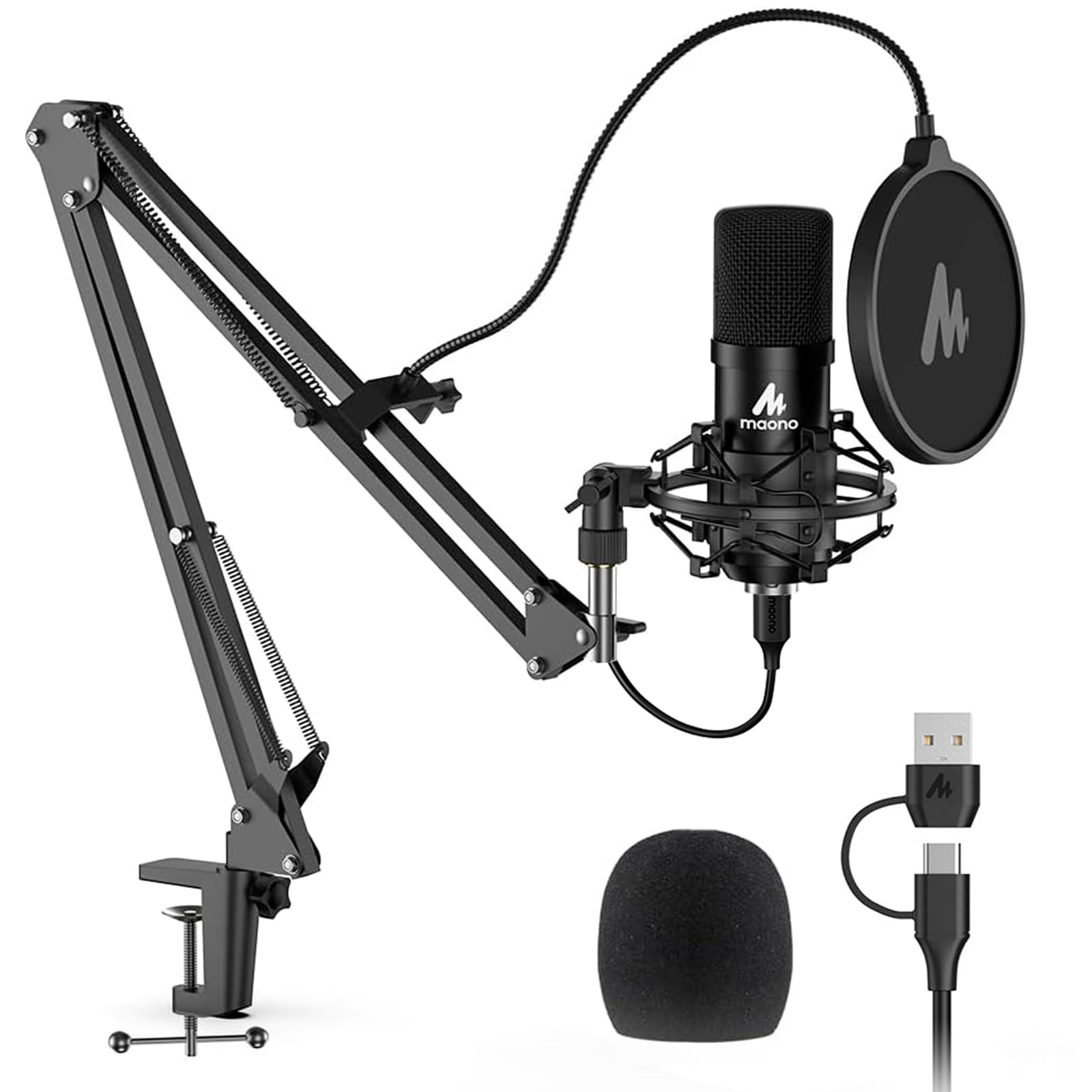
192kHz/24-bit is printed on the box, and it is not the reason to buy this mic. A podcast delivered as an MP3 does not need that sampling rate. What does matter is the 16mm capsule, which the design aims at a fuller low end, and the kit around it, which gets that capsule to mouth height: boom arm, shock mount, pop filter, windscreen and clamp.

Of the kits here, this is the one aimed at recording rather than streaming. The pop filter and windscreen together handle plosives, the arm keeps the desk clear, and it takes voice and an acoustic guitar in the same session without sounding stretched. It is the alternative to the FIFINE T669 when the job is capturing takes rather than getting a live desk set up.

Assembly takes a few minutes: clamp the arm, hang the shock mount, clip on the filter. The mic body is metal and solid in the hand. Test it the day it arrives, because a few units turn up dead, and keep the packaging until you have recorded a full take.

Pros

  • Boom arm, shock mount and pop filter included
  • 16mm capsule aimed at a fuller low end
  • Metal mic body feels solid in the hand

Cons

  • Arm and clamp are the weakest parts of the kit
Our verdict

If you want a boom-arm kit for recording voice and instruments rather than live streaming, the A04 gives you a warm, full sound for modest money.

Check Latest Price

How We Tested 12 USB Podcast Mics in Real Rooms

We started with spec sheets, then filtered hard. I gathered the USB mics that kept surfacing in podcast forums and review sections, then cut anything that needed an audio interface, a driver download, or a paid software tier to sound decent, since plug-and-play is the entire appeal of USB. That left 12 mics, which we used for six months.

Every mic recorded the same paragraph at a fixed hand-span from my mouth in three settings: an untreated spare bedroom with bare floors, a shared apartment with a fridge humming through the wall, and a quiet house at night with two people asleep down the hall. I switched pickup patterns mid-session to hear how much room each one let in, then listened back on headphones and again on a laptop speaker — the way most listeners actually hear a podcast.

Background noise got its own pass. I typed through a full take, ran a space heater a couple of feet away, and clicked a pen, noting whether those sounds landed in the recording or stayed out of it. I fumbled for the mute button mid-sentence and set each mic down on the desk to hear the thump come through. Three of them went into a backpack with a laptop for two weeks of travel to see how the stands, grilles, and cables held up.

Setup was timed rather than assumed: unboxing to first usable recording, then the same mic into a Windows PC, a Mac, and a browser call with nothing installed. Reliability surfaced later — gain knobs that went scratchy, mute buttons that stopped clicking. For value, the least and most expensive mics read identical copy, and more than once the cheaper one held its own.

How to Choose a Usb Microphone for Podcasting

Start With Your Room, Not the Spec Sheet

Condenser capsules (the Blue Yeti, FIFINE T669, TONOR TC30 and MAONO A04 here) are sensitive by design: they capture detail, and they capture the fridge, the keyboard and the reflection off a bare wall along with it. Dynamic capsules (the Samson Q2U and FIFINE K688) trade a little of that detail for distance from the room.

A carpeted spare room with the door shut rewards a condenser. A desk in a kitchen or a shared apartment is where a dynamic earns its keep. Buying a sensitive mic and fixing it afterwards with software noise reduction thins your voice; accounting for the room up front costs nothing.

Pickup Patterns: Pay Only for the Ones You Will Use

Cardioid is the pattern a solo show lives on: it listens in a wedge in front of the capsule and pushes down what is behind it. The Yeti adds omni, bidirectional and stereo. Bidirectional is the one that matters for podcasters, because it hears two people seated on opposite sides of the mic.

Extra patterns are not free. Move away from cardioid and the mic takes in more of the room, so a group or two-person recording is also a room-treatment decision. One voice, one pattern, is enough; a permanent co-host is an argument for a second mic before it is an argument for four patterns.

The Controls That Save a Take

Three controls earn their place on the mic body: gain, mute and a headphone jack. Gain on the mic lets you rescue a quiet take without diving into software. A mute within half a second saves you from coughing into a recording, which is why the tap-to-mute on the K688 and the front button on the Yeti are worth having.

The headphone jack matters most, because it lets you hear yourself with no delay and catch a plosive or a fading voice before the take ends. If you monitor while recording, buy the jack. If you record first and listen back afterwards, you can spend that money elsewhere.

Mounting and What Is Actually in the Box

The mic is rarely the whole purchase. The K688 arrives without a stand, the TC30 with a short tripod, the T669 and A04 with a clamp-on boom arm, and the Yeti with a weighted desk base. A boom arm lifts the mic out of keyboard range, but the clamp needs a desk edge it can close around, so glass tops and desks with a full modesty panel fight back.

A tripod is simpler and puts the capsule low, which means leaning in for the whole episode. Before you compare prices, add whatever gets the capsule to mouth height. A kit is often the cheaper route to a finished setup than a bare mic plus the hardware you still need.

USB or USB/XLR, and How Much Future to Buy

USB is the reason this category exists: one cable to the laptop, power and audio together, no interface. XLR is the path to a mixer, an interface and a mic that outlives the computer. The Q2U and K688 do both, and moving to XLR keeps the noise floor down as you push gain.

What XLR does not do is work on its own, so the second connection is only worth paying for if you expect to add an interface. If you record straight into a laptop and plan to keep doing that, a USB-only mic is not a compromise; it is the simpler correct answer.

Frequently Asked Questions

Final Verdict

Our default pick is the Blue Yeti. Four patterns, gain, mute and headphone monitoring in one plug-and-play box mean a solo show this month can become a two-person interview next month without a second purchase, and nothing else here covers that many situations.

The exception is the room. If yours is loud, echoey or shared, buy a dynamic instead: the Samson Q2U if you want a stand and both cables in the box, the FIFINE K688 if you already own an arm and want monitoring on the body. Neither gives you the Yeti's patterns, and both put the room further behind your voice.