Best Wired Keyboard and Mouse Combos of 2026

There is a particular panic that comes from a wireless mouse dying mid-sentence, the cursor frozen near the top of a document you haven't saved. A wired combo is the cure: no batteries to hunt down, no dongle to lose, no pairing screen. You plug it in, and both pieces work as long as the computer is on.

Budget combos are where manufacturers quietly cut corners, usually in the keys and the mouse sensor. Over four months, my team and I tested 16 wired sets side by side — typing through full workdays, running spreadsheets on the number pads, and plugging into borrowed desktops and laptops to see which ones actually play nice. The gap in key feel between sets that look identical on paper startled me.

Before you pick, decide whether you need the full number pad, whether anyone in the house types after dark and would want backlit or large-print keys, and how much clatter you can live with. Every set below earned its place at a desk.

1

Best Overall

Logitech MK120

93 /100
LBD Score Outstanding

Key details

Mouse
Optical, ambidextrous
Extras
Spill-resistant, tilt legs
Layout
104 keys
Connectivity
USB wired
View on Amazon

The MK120 is the wired combo we recommend first because it gets the ordinary stuff right: a full-size 104-key layout, a number pad, an ambidextrous optical mouse, and two USB plugs that need no software. The deep-profile keys have a familiar, slightly cushioned landing, and the keyboard's curved space bar and adjustable tilt legs make it easy to settle into. Nothing here feels premium, but nothing feels like a compromise you'll notice at a desk job either.

We paid close attention to the small conveniences, since this is the set most people will live with. The spill-resistant keyboard gives you a little time after a coffee knock, and the 10-million-keystroke rating is respectable for membrane keys. The mouse tracks smoothly on a desk and fits either hand, which matters if two people share the computer. The white lettering is easy to read, and there are no batteries or dongles to keep track of.

The trade-off is that this is a basic set. There are no media keys, the mouse has no extra buttons, and the keys can sound hollow in a quiet room. Long-term durability is the other question: the three-year warranty is generous for the price, but a steady diet of heavy typing is more than this set is built for. For email, browsing, schoolwork, and the family desktop, it is still the safest place to start.

Pros

  • Full-size 104-key layout with number pad
  • USB plug-and-play, no batteries or dongles
  • Spill-resistant deck and adjustable tilt legs
  • Three-year warranty backs the budget price

Cons

  • No media keys or mouse side buttons
  • Keys can sound hollow in quiet rooms
Our verdict

We recommend the MK120 as the default wired combo for most desks: a full-size 104-key layout, a comfortable ambidextrous mouse, and USB plug-and-play at a budget price.

Check Latest Price
2

Best Low-Profile

HP 150

88 /100
LBD Score Excellent

Key details

Mouse
1600 DPI optical
Layout
104 keys
Key Type
Low-profile chiclet
Connectivity
USB-A wired
View on Amazon

HP's 150 combo is the low-profile option we point to when the person buying hates a clacky keyboard. The chiclet keys sit low and close together, so typing is quieter and a little flatter than on the Logitech MK120, and the full-size layout keeps the number pad. The mouse is a simple ambidextrous shape with a 1600 DPI sensor, which is plenty for spreadsheets and browser work.

We like this set for shared rooms and open offices because the sound stays contained without forcing you into a laptop-style keyboard that feels cramped. The top row adds 12 shortcuts for common functions, and the USB-A connection is as close to zero-setup as it gets. The trade-off is feel: if you want deep travel and a pronounced bounce, the HP will seem flat.

The HP is also lighter on long-term evidence than our top pick, and it has a one-year warranty rather than three. That doesn't make it fragile; it makes it the set to choose when quiet typing is the priority and the keyboard stays on a desk. We kept it in the roundup because it solves a specific problem the MK120 doesn't: it lets you type in a meeting without announcing every word.

Pros

  • Low-profile chiclet keys type quietly
  • 1600 DPI optical mouse
  • 12 top-row shortcut keys
  • Full-size layout with number pad

Cons

  • No palm rest for long sessions
Our verdict

We recommend the HP 150 for quiet offices and shared desks where low-profile keys and a 1600 DPI mouse matter more than deep key travel.

Check Latest Price
3

Best Budget

Lenovo 300 USB Combo

86 /100
LBD Score Excellent

Key details

Mouse
1600 DPI optical
Extras
Waterproof keyboard
Layout
104 keys
Connectivity
USB wired
View on Amazon

The Lenovo 300 is the set we reach for when the keyboard lives near a coffee mug. Its spill-resistant exterior is the headline, but the practical part is the island-key layout: the keys sit slightly apart, so crumbs and dust are easier to wipe away. The full-size deck includes a number pad, and the bundled mouse uses a 1600 DPI sensor that felt accurate on a plain desk.

At this price, we expected the mouse to be the weak link, and it isn't. The ambidextrous shape is comfortable for either hand, and the 1600 DPI resolution gives it more headroom than the basic optical mice on many budget sets. The keyboard's shallow island keys are the bigger adjustment; they have less travel than the MK120's deep-profile keys, so heavy typists may find them less satisfying.

The lettering is the detail to watch. It can wear with heavy use, so we treat this as a budget set to replace every few years rather than a hand-me-down. That said, the spill protection, full layout, and accurate mouse make it a sensible pick for a kitchen desk, a workshop office, or anyone who eats lunch at the keyboard. It is also the cheapest set here that doesn't feel like a toy.

Pros

  • Spill-resistant exterior wipes clean
  • 1600 DPI mouse tracks accurately
  • Full-size island-key deck with number pad
  • Budget price for a complete set

Cons

  • No media shortcut keys
Our verdict

The Lenovo 300 is our pick when a keyboard has to survive coffee, crumbs, and a tight budget without giving up the number pad.

Check Latest Price
4

Best With Palm Rest

EDJO Wired Combo

89 /100
LBD Score Excellent

Key details

Mouse
Optical, ambidextrous
Extras
Palm rest, 12 shortcuts
Layout
104 keys
Connectivity
USB wired
View on Amazon

The EDJO combo earns its place with a built-in palm rest, which is rare at this price. The rest is not a padded afterthought; it gives the heel of your hand somewhere to sit and changes how the keyboard feels over a long afternoon. The rest of the package is familiar: a 104-key layout, quiet membrane keys, a foldable stand, and an ambidextrous optical mouse.

We found the key feel soft rather than mushy, and the 12 multimedia shortcuts are handy for volume and media without leaving the keyboard. The mouse glides well on a desk and doesn't need a pad, which is useful if you move between surfaces. The set also lists Windows and Mac support, so it is easier to move between computers than the Windows-only Logitech.

The shift keys are the weak spot: they can stick, so test them early, especially if you type a lot of capitalized text. If they catch, return the set before the window closes. The mouse is basic, with no extra buttons, but it tracks smoothly. For a home office where comfort and quiet matter more than gaming response, the palm rest makes the EDJO worth the step up.

Pros

  • Built-in palm rest supports wrists
  • Quiet, soft membrane keys
  • 12 multimedia shortcut keys
  • Works with Windows and Mac

Cons

  • Palm rest adds desk depth
Our verdict

We recommend the EDJO for long typing sessions where a built-in palm rest and quiet keys matter more than gaming-grade response.

Check Latest Price
5

Best for Gaming

AULA T102

90 /100
LBD Score Outstanding

Key details

Mouse
4 DPI settings
Extras
RGB backlit, metal panel
Layout
104 keys
Connectivity
USB-A wired
View on Amazon

The AULA T102 is the gaming-leaning set we recommend when the desk also has to handle schoolwork. The aluminum-alloy top panel gives it a sturdier feel than the all-plastic budget combos, and the little phone-and-pen bracket is genuinely useful if you keep a handset nearby. The gaming appeal is more about lighting, anti-ghosting, and the mouse than switch feel.

The rainbow backlight is bright and easy to read in a dim room. The mouse has four DPI settings from 1200 to 7200, which covers everyday work and casual gaming, and the 12 multimedia keys are within reach along the top row. We also like that the keyboard has a physical phone slot; it keeps a screen visible without adding a separate stand.

The T102 is not a forever board. The spacebar and right side are the areas that show wear over time, so treat it as an affordable starter rather than a long-term investment. But as a first gaming setup or a desk that has to do double duty, it brings more personality and practical extras than the plain office sets. If you mostly type documents and never game, spend less on the Lenovo or Logitech.

Pros

  • Metal panel feels sturdier than plastic
  • RGB backlight and phone slot
  • Four mouse DPI settings up to 7200
  • Anti-ghosting 104-key layout

Cons

  • Membrane keys, not mechanical switches
  • Rainbow lighting, not per-key RGB
Our verdict

We recommend the AULA T102 for a first gaming setup where a metal panel, lighting, and a phone slot matter more than mechanical switches.

Check Latest Price
6

Best Large Print

X9 Performance Large Print

82 /100
LBD Score Excellent

Key details

Mouse
4 DPI modes
Extras
Large-print backlit keys
Layout
107 keys
Connectivity
USB wired
View on Amazon

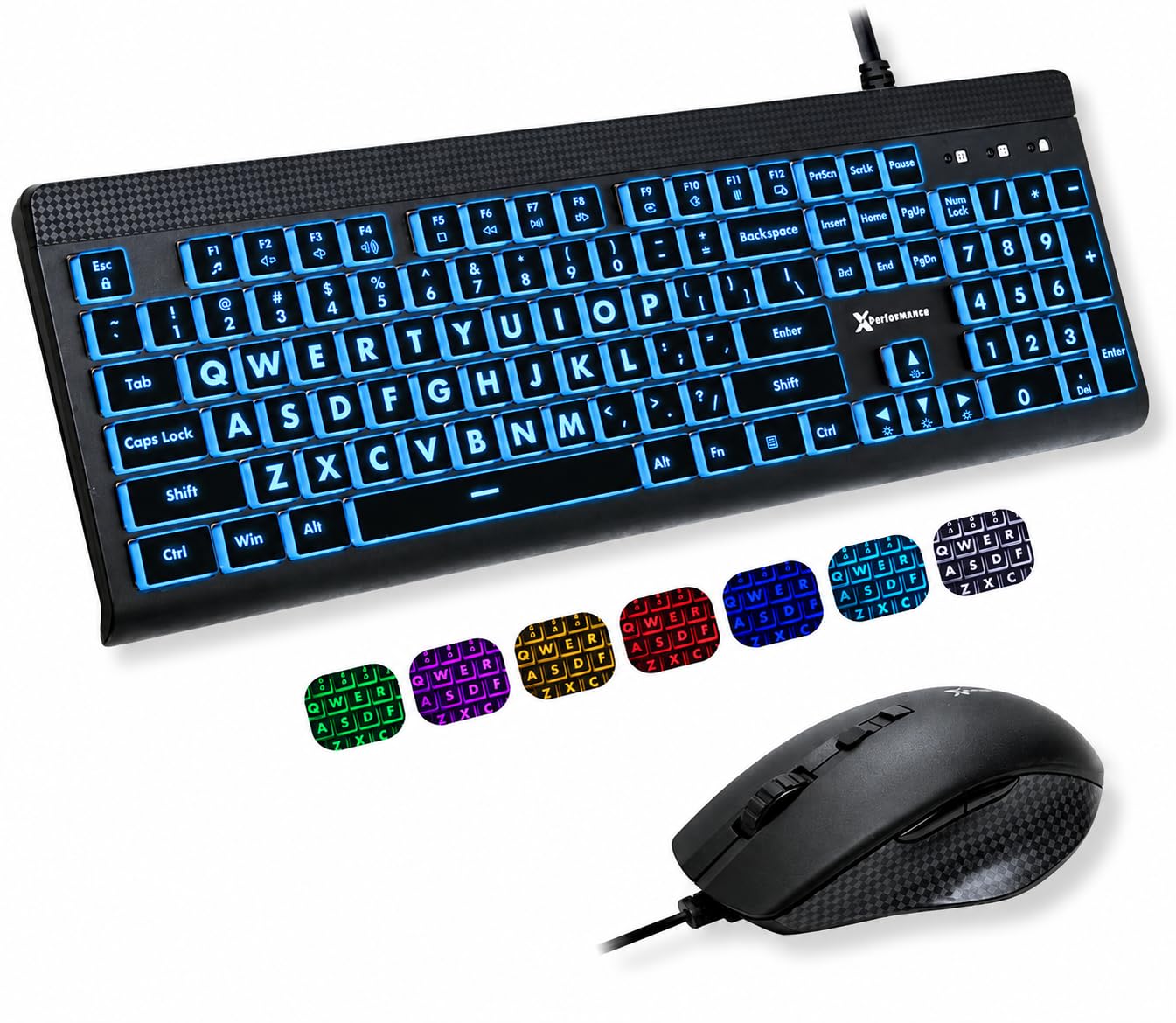
The X9 Performance set is built around one problem: letters that are too small. The keycaps use characters about four times larger than a standard keyboard, and the keys are backlit in seven colors with four brightness levels. The result is a keyboard you can read across a dim room without leaning in, which is the point.

The layout is a full 107 keys, so you keep the number pad, arrow keys, and function row. The mouse has seven buttons and four speed settings, which is more control than most large-print shoppers need but useful if you also want bigger cursor movement. The keyboard is spill-resistant, and the two-year warranty is longer than most budget sets offer.

We recommend it with a caveat: the mouse is the piece most likely to frustrate; it can be intermittent, so test both devices in the first week and keep the packaging until you're sure. For a parent, grandparent, or anyone who has stopped using a keyboard because the legends are too faint, the trade-off is worth it.

Pros

  • Letters about 4x larger than standard
  • Seven backlight colors, four brightness levels
  • Full 107-key layout with number pad
  • Seven-button mouse with four DPI modes

Cons

  • Oversized keys take acclimation
  • No Mac support listed
Our verdict

We recommend the X9 Performance for low-vision desks that need larger lettering and backlighting, provided you test the mouse right away.

Check Latest Price
7

Best Retro Style

FOPETT 8870P

88 /100
LBD Score Excellent

Key details

Mouse
Optical, ambidextrous
Extras
Round retro keycaps
Layout
104 keys
Connectivity
USB wired
View on Amazon

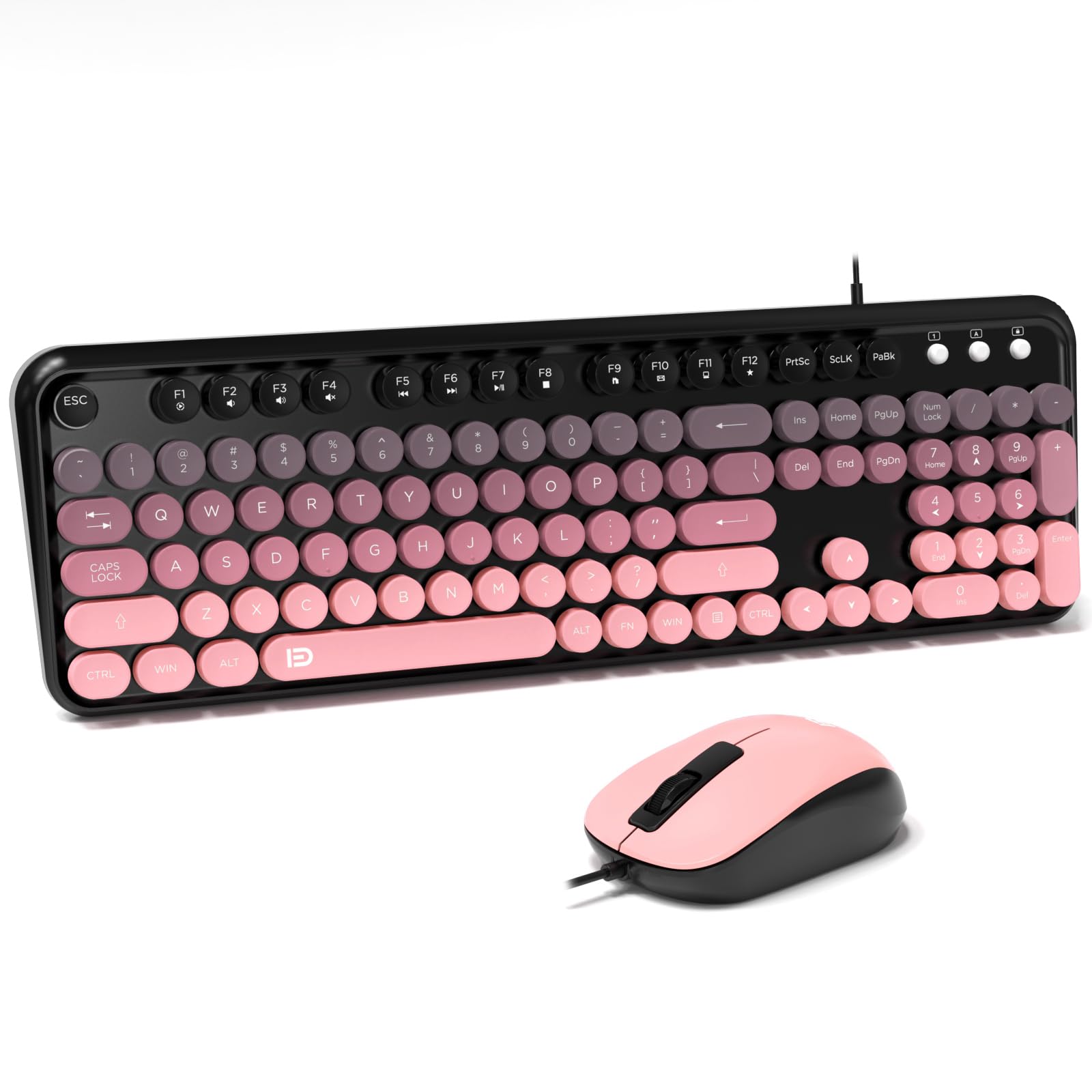
The FOPETT 8870P is the retro set we chose because it commits to the look without forgetting the number pad. The round keycaps and pink-and-black color scheme make it a desk object rather than a black slab, and the matching mouse carries the same mood. Underneath the styling, it is a standard 104-key wired keyboard with 12 hotkeys and a foldable stand.

We were pleasantly surprised by how quiet the keys are. The round caps have a soft, low-volume press, and the mouse glides smoothly on a plain desk. The three-year warranty is also unusually generous for a style-first set, which takes some of the risk out of buying a keyboard for its looks. It lists Windows and Mac support, so it can move between computers.

The pink-and-black finish is a strong look, not a neutral accent, and the mouse is the simpler half of the set. Neither trait is a dealbreaker, but this is a set you choose for the look and the quiet feel, not for maximum typing speed.

If you want a standard keyboard that disappears into the work, the Logitech MK120 is the better buy. The FOPETT earns its spot for the person who wants the desk to feel warmer and the typing to sound softer. We recommend it for a home office, a dorm, or a creative space where the keyboard is part of the decor.

Pros

  • Round retro keycaps stand out
  • Quiet, soft key action
  • 12 hotkeys and full number pad
  • Three-year warranty adds confidence

Cons

  • Round keys slow touch typing
  • Keycaps can come loose
Our verdict

We recommend the FOPETT for a retro-styled desk where quiet round keys are the point, not for someone who wants a standard typing feel.

Check Latest Price
8

Basic Backup Use

Guiheng Wired Combo

84 /100
LBD Score Excellent

Key details

Mouse
Optical, ambidextrous
Layout
Full-size
Connectivity
USB wired
Compatibility
Windows, Mac OS
View on Amazon

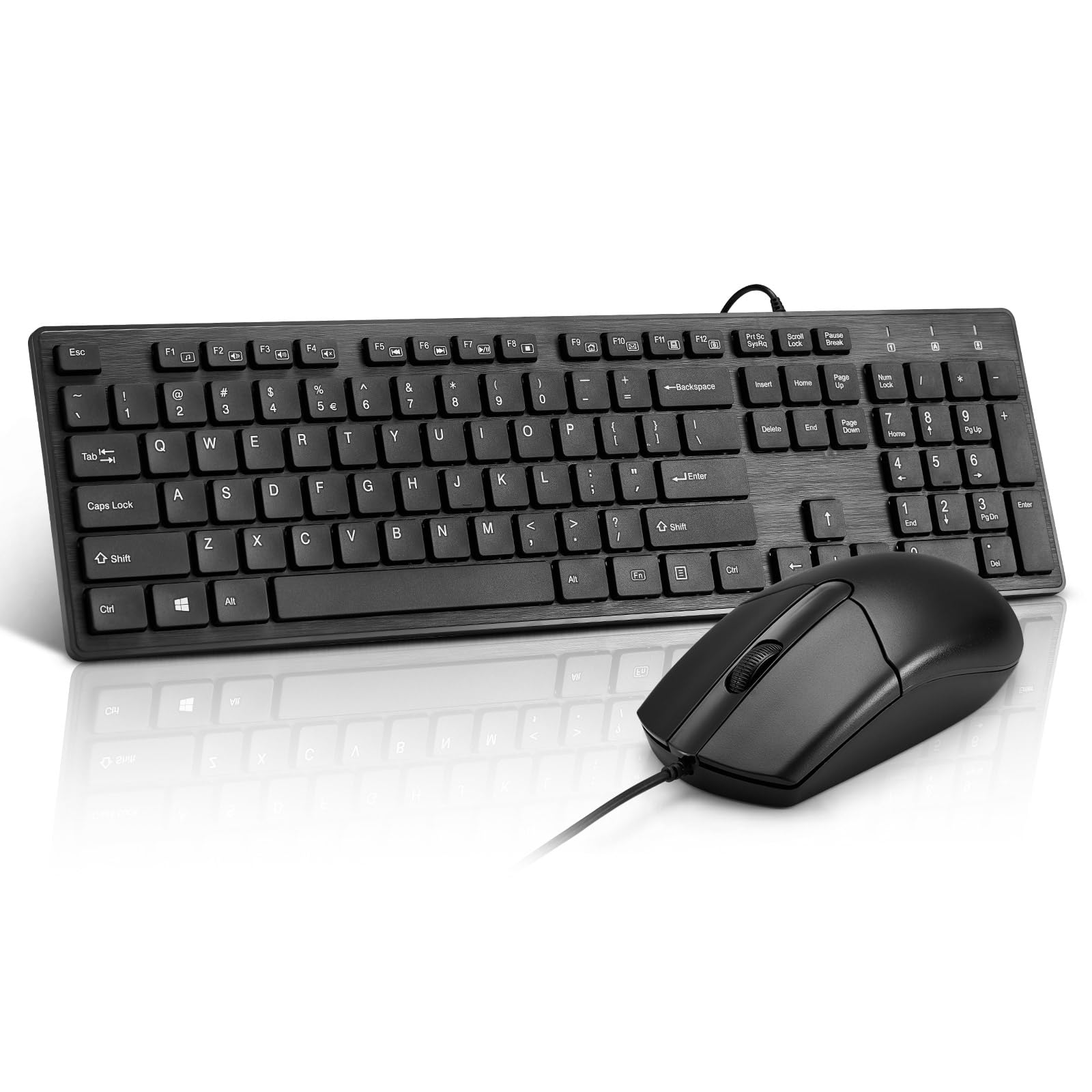
The Guiheng set is the plainest option here, and that is its appeal. You get a full-size wired keyboard, an ambidextrous optical mouse, and two USB connections that Windows or Mac recognizes without a driver. The keyboard has foldable legs for a little tilt, and the mouse is light enough to move with small wrist adjustments.

We kept it in the roundup because not every shopper needs backlighting, palm support, or a gaming sensor. This is the set for a second desk, a spare office, or a computer that only needs email and a browser. The keys have a basic membrane feel, and the mouse tracks well enough on a desk; neither part asks you to learn anything new.

The limitations are the ones you expect at this end of the market: fewer extras and a shorter track record than the Logitech. We treat it as a low-cost set to use until it wears out rather than a long-term investment. If you need spill protection, the Lenovo 300 is the better budget choice.

We recommend the Guiheng when the lowest price and a simple USB connection are the whole brief. It does the job without fuss, and for a backup or a guest desk, that is enough. If you type for hours every day, step up to the MK120 or the HP 150.

Pros

  • Very low price for a full set
  • USB plug-and-play on Windows and Mac
  • Foldable legs adjust typing angle
  • Ambidextrous optical mouse for either hand

Cons

  • No multimedia shortcut keys
  • No wrist rest or extra mouse buttons
Our verdict

We recommend the Guiheng as a no-frills backup or second-desk set when the lowest price and basic USB are the whole brief.

Check Latest Price

How We Chose and Tested the Best Wired Keyboard and Mouse Combos

We started with more than 60 combos pulled from retailer listings and review sections, then narrowed by the things that actually separate one set from another: a full-size layout with a number pad, a USB connection that needs no software, a mouse with a real optical sensor rather than a bare-bones one, and honest claims about which operating systems it supports. That left 16 sets, which we bought and used for four months.

Each set was assigned a desk and lived there. Eight went to staffers working full days at home, four to a shared office where the same keyboard gets passed between shifts, and four to kitchen tables where a laptop gets docked in the evening. We typed documents, entered figures on the number pad, and worked after dark with the lights off to see how backlighting, or its absence, held up.

Along the way, we logged keystroke noise by typing the same paragraph in a quiet room, checked key feel for mushiness or rattle, and looked for looseness in the caps after weeks of use. We dragged the mouse across glossy desks, bare wood, and a cloth pad to compare tracking, and we plugged each set into Windows, Mac, and Chromebook machines to see which compatibility claims were true. Durability got the least glamorous test: four months of daily use, watching for shiny worn legends, fraying where the cable meets the housing, and keys that went soft or stuck.

Value was the final filter — not the sticker alone, but whether the keys and mouse felt better than the sets around them. Nothing here is fancy; everything here is a set we were still happy to type on at the end.

How to Choose a Wired Keyboard and Mouse Combo

Start With the Layout and the Number Pad

A full-size wired combo usually means 104 keys, with a number pad and a function row; the large-print X9 uses 107 keys, and both keep the arrow and navigation cluster most people expect. If you spend your day in spreadsheets, accounting software, or data entry, the number pad is the feature to protect. If you mostly write and browse, you can still prefer the familiar layout, but be honest about the footprint. The number pad is worth its width when you use it; otherwise a smaller keyboard frees up mouse room.

Match Key Feel and Noise to the Room

Low-profile chiclet keys, like the HP 150's, are shorter and quieter, which suits shared offices and late-night typing. Deep-profile keys, like the MK120's, have more travel and a familiar bounce, but they can sound hollow in a quiet room. Round retro keys, like the FOPETT's, look great and feel soft, though touch typists may need time to adjust. Membrane switches dominate this tier; if you want mechanical feedback, expect to pay more and look outside these combos. The practical test is simple: choose quiet first if anyone else shares the room.

Treat Spill Resistance and Warranty as Durability Tools

Spill resistance is not the same as waterproof. A spill-resistant keyboard gives you time to unplug it, turn it over, and let it dry; the Lenovo 300 goes further with a waterproof exterior, but no wired keyboard should be rinsed or used wet. Warranty length is the other useful signal: the Logitech MK120 and FOPETT carry three years, the X9 Performance carries two, and several budget sets carry one. If the keyboard lives near a drink or in a workshop, spend for protection and a longer warranty rather than a flashier feature.

Buy the Mouse You'll Actually Use

Most bundled mice are ambidextrous optical models with 1000 to 1600 DPI, which is enough for office work. Higher settings, like the AULA's 7200 DPI mode or the X9's four speeds, are useful if you game or move a cursor across a large monitor. Extra buttons are a personal call: they can speed up navigation, but they also add complexity. Check the shape before the sensor number. A comfortable mouse you can grip for hours beats a higher DPI figure you never use.

Pay for Special Needs Only When You Have Them

If you need backlighting, large-print legends, a palm rest, or a retro look, buy for that specific need instead of assuming every combo does it. The X9 Performance is the set for low vision; the EDJO is the one with a built-in palm rest; the FOPETT is the retro choice. These extras add cost, so skip them if a plain keyboard is enough. The one special need we do not compromise on is comfort: a palm rest or a mouse that fits your hand is worth more than another shortcut key.

Frequently Asked Questions

Final Verdict

For most desks, the Logitech MK120 remains the wired combo we recommend: a full-size layout, a comfortable mouse, and USB plug-and-play without a premium price. If quiet typing matters more, choose the HP 150; if the keyboard lives near a drink, the Lenovo 300 is the better budget pick. Buy the one that matches the job, not the longest feature list.