Best Gaming Keyboard and Mouse Combos of 2026

A keyboard-and-mouse combo usually means one box, one price, one trip to checkout — and, more often than not, one or two corners quietly cut. The savings have to come from somewhere: a deck that bottoms out like wet cardboard, a mouse sensor that skips the moment you flick, or software you'll never install. Working out which corners a set cut, and where the money went instead, is most of the decision.

I've owned combos where the keyboard lasted years and the mouse died in a season, and I've had the reverse. Over the past four months my team and I have kept 16 sets plugged in at our desks — full-size boards with number pads, compact ones that leave room for a low-sensitivity flick — and price told us surprisingly little.

One thing I'd tell a first-time buyer: the DPI number on the box matters less than anti-ghosting, which is the difference between a board that registers the keys you're holding and one that quietly drops them. Everything below got typed on, played on, and occasionally shoved into a backpack.

1

Best Overall

Redragon S107 RGB Combo

91 /100
LBD Score Outstanding

Key details

Lighting
RGB, 6 keyboard modes
Warranty
2 years
Mouse Sensor
10,000 DPI via software
Anti-ghosting
25 keys
View on Amazon

The 10,000 DPI mouse and 25-key anti-ghosting are the two specifications that make this Redragon set the default for most PC gamers. The mouse reaches its top sensitivity through Redragon's software but keeps a 5,000 DPI button for quick changes, and the mouse polls at 1,000 Hz, so fast movement and overlapping inputs have room to register. We also like the 12 multimedia keys and the foldable stand, which make it feel more like a complete desktop set than a bare-bones bundle.

This is the combo we recommend first because it covers the practical middle ground: a high-resolution sensor, programmable controls, six keyboard lighting modes, and a two-year warranty. We spent time with the software remapping buttons and setting lighting, and it is the feature that separates this set from cheaper combos that only cycle through preset colors. The key feel is smooth and quiet rather than sharply clicky, which suits long sessions and shared rooms. The 104-key layout keeps the number pad, and the mouse is light enough for fast flick shots.

The caveat is that this is a membrane keyboard with a mechanical feel, not a true mechanical board, so shoppers chasing switch-level feedback should keep looking. For everyone else, the S107 is the safest balance of features, software, and warranty in this group.

Pros

  • 10,000 DPI mouse with software control
  • 25-key anti-ghosting and 1,000 Hz mouse polling
  • Two-year warranty and programmable software
  • Quiet, comfortable key feel for long sessions

Cons

  • Uneven brightness across some lighting colors
Our verdict

We recommend the Redragon S107 to most PC gamers because it pairs a 10,000 DPI mouse and 25-key anti-ghosting with useful software and a two-year warranty.
Check Latest Price
2

Best Quiet

MSI Forge GK110 Combo

82 /100
LBD Score Excellent

Key details

Lighting
Predefined RGB effects
Mouse Sensor
12,800 DPI optical
Anti-ghosting
26 keys
Mouse Switches
20 million clicks
View on Amazon

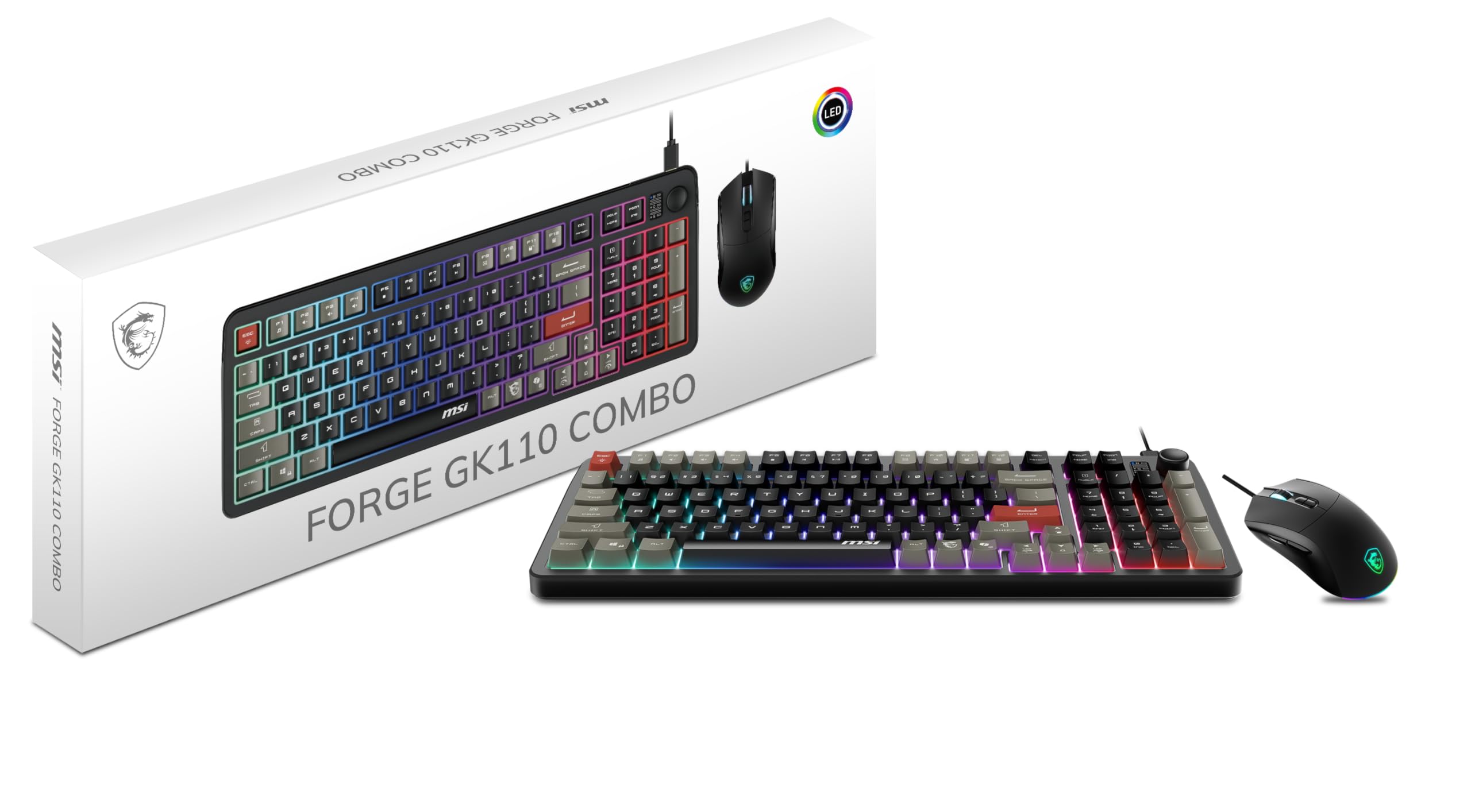
The first thing we noticed about the MSI Forge GK110 is how little noise it makes. The keys have a soft, quiet travel, and the mouse clicks are muted, which makes this the set we point to for a shared room, a dorm, or late-night sessions when someone else is sleeping. The frame feels solid enough for a desk that gets daily use.

It is our quiet pick because it does not ask you to give up gaming basics. The mouse uses a 12,800 DPI optical sensor, the highest here, and its switches are rated for more than 20 million clicks. The keyboard covers 26-key anti-ghosting, and the dedicated volume scroll wheel is a small convenience we appreciated more than expected. The 26-key anti-ghosting also covers the WASD cluster and the modifiers most games use, while the wired connection keeps latency predictable.

The trade-off is customization: the RGB is a set of predefined effects rather than per-key programming, and the keyboard is membrane. If you want deep macro and lighting control, the Redragon S107 is the better fit; if you want a quiet, responsive set for everyday play, this is the one.

Pros

  • Very quiet keys and mouse clicks
  • 12,800 DPI optical sensor
  • 26-key anti-ghosting and volume wheel
  • 20 million-click mouse switches

Cons

  • Predefined RGB effects only
Our verdict

For a shared room or late-night sessions, the MSI Forge GK110 earns its place with muted keys and a 12,800 DPI sensor that still covers fast play.

Check Latest Price
3

Best Metal Build

AULA T102 Combo

90 /100
LBD Score Outstanding

Key details

Warranty
1 year
Mouse Sensor
7,200 DPI, four steps
Anti-ghosting
Yes
Keyboard Panel
Aluminum alloy
View on Amazon

A metal top plate and a phone slot are unusual at this price, and they are the reason the AULA T102 earns a place on a desk that has to do more than game. The 104-key layout keeps the number pad, the mouse steps through 1,200, 2,400, 4,800, and 7,200 DPI, and the keyboard adds 12 multimedia keys.

The metal panel gives the keyboard a sturdier feel than the plastic-heavy budget sets here, and the phone holder is genuinely useful if you keep a phone on the desk for chat or guides. The key feel is smooth and the mouse is comfortable for a claw or relaxed grip. We also appreciated the anti-ghosting, which keeps overlapping inputs from dropping during fast play. The phone slot also keeps a guide or chat window within sight without a separate stand.

We recommend the T102 for a tidy desk setup because it combines the full-size layout, anti-ghosting, and a useful phone slot without the gamer-only look. The rainbow lighting is more preset than programmable, so if you want per-key color control, the Redragon S107 is the better choice. The one-year warranty is shorter than the Redragon's, but the metal build is the reason to pick this one.

Pros

  • Metal top plate feels sturdier
  • Phone and pen holder keep desk organized
  • 7,200 DPI mouse with four steps
  • Full 104-key layout with multimedia keys

Cons

  • Membrane keys, not true mechanical
Our verdict

The AULA T102 is the desk-first set we like: a metal panel, phone slot, and 7,200 DPI mouse make a full-size combo feel tidier.

Check Latest Price
4

Best Compact

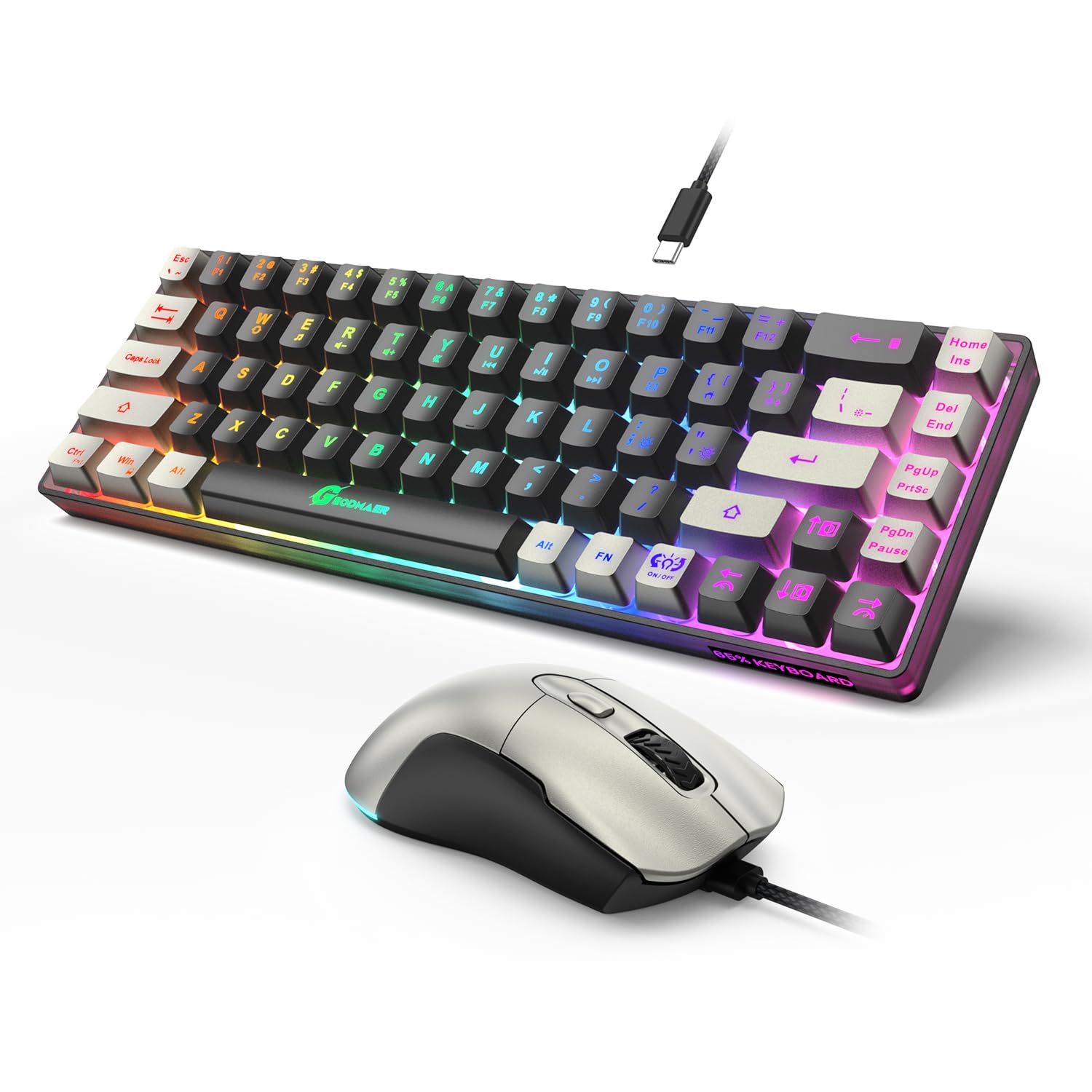
GEODMAER 65% Combo

87 /100
LBD Score Excellent

Key details

Layout
65%, 68 keys
Warranty
3 years
Mouse Sensor
7,200 DPI via software
Anti-ghosting
Yes
View on Amazon

If your mouse hand is already crowding a laptop stand or a second monitor, the GEODMAER 65% is the combo that gives space back. The 68-key layout drops the number pad and squeezes the main block into a much smaller footprint, while the mouse still offers up to 7,200 DPI and the keyboard keeps anti-ghosting. We think that trade is the right one for a compact gaming desk. The keyboard also has a function layer for the missing keys, so you can still reach media and navigation controls.

The compact size is the point, but it is also the adjustment: there is no number pad, and the function layer takes a little learning. The mouse is a natural fit for a compact setup, and the three-year warranty is the longest in this group. We also like that the keycaps use two-tone injection so the letters stay legible when the RGB is off.

For a small desk or a dorm room, this is the set we recommend over a full-size board. The catch is that the 65% layout is not for spreadsheet work or anyone who lives on the number pad; if you need those keys, choose a full-size set like the AULA T102.

Pros

  • 65% layout saves desk space
  • 7,200 DPI mouse with six preset steps
  • Anti-ghosting and 3-year warranty
  • Two-tone keycaps stay legible

Cons

  • No number pad in the 65% layout
Our verdict

Buy the GEODMAER 65% if desk space is tight; it keeps anti-ghosting and a 7,200 DPI mouse in a footprint that leaves room to swing.

Check Latest Price
5

Best Budget

BlueFinger RGB Combo

89 /100
LBD Score Excellent

Key details

Backlighting
Rainbow RGB
Connectivity
Wired USB
Keyboard Keys
104
Mouse Pad Size
11.8 x 9.8 in
View on Amazon

The BlueFinger RGB combo is the least expensive set here, and it still includes a 104-key keyboard, a backlit mouse, and a mouse pad. The keyboard's rainbow backlight toggles off with the Scroll Lock key, and both devices use braided USB cables. The mouse has adjustable DPI, and the set is plug-and-play with no driver needed. The 104-key layout keeps the number pad and the familiar function row.

We recommend it for a first setup or a spare desk because it covers the basics without asking for much. The keys have a soft, quiet action, and the mouse is light enough for quick movement. It is not the set for someone chasing crisp mechanical feedback or deep software control. If you mainly play casual games and want a full-size board, this is the least painful way to get there. The keyboard has a natural angle, and the keycaps are contoured to reduce hand fatigue.

The mouse pad is a useful inclusion, though at 11.8 by 9.8 inches it is closer to a standard pad than a full desk mat. The lighting is preset rainbow rather than customizable, so it is best for a buyer who wants a little color without fiddling.

Pros

  • Full 104-key layout with rainbow backlight
  • Includes a mouse pad
  • Adjustable DPI mouse with braided cable
  • Plug-and-play USB setup

Cons

  • Preset rainbow lighting only
Our verdict

When the budget is fixed, this BlueFinger set covers the essentials with a full-size keyboard, backlit mouse, and mouse pad at the lowest cost here.

Check Latest Price
6

Starter Bundles

BlueFinger 3-in-1 Combo

87 /100
LBD Score Excellent

Key details

Keyboard Keys
104
Mouse Buttons
6
Included Items
Keyboard, mouse, headset, mouse pad
Mouse Pad Size
12.5 x 9.4 in
View on Amazon

The reason to look at this BlueFinger set is the headset. It is the only combo here that adds a microphone headset and a mouse pad to the keyboard and mouse, which makes it a complete starter kit rather than another two-piece bundle.

The keyboard is a 104-key RGB board with a rainbow backlight, and the mouse has six buttons and a comfortable shape. The mouse pad measures 12.5 by 9.4 inches, enough for a low-sensitivity player to move without lifting. The headset has a red LED finish and an adjustable microphone, which makes it a natural fit for voice chat.

The keyboard uses the same rainbow backlight and full-size layout as the budget BlueFinger set, while the mouse adds forward and back buttons. The set is wired and plug-and-play, so there is no pairing or charging to manage. The headset is the part to check first if you plan to use voice chat; its microphone and comfort will matter more than the keyboard's lighting.

We recommend this bundle for a first gaming setup or a gift because it removes the need to buy a headset separately. If you already own a headset, the two-piece Redragon S107 is the better value; if you need everything at once, this is the set that covers it.

Pros

  • Includes headset and mouse pad
  • Full 104-key RGB keyboard
  • Six-button mouse with forward/back
  • Large 12.5 x 9.4 inch mouse pad

Cons

  • Rainbow lighting is preset
Our verdict

This BlueFinger bundle is the one to choose for a first setup because it adds a headset and mouse pad without leaving you to buy them separately.

Check Latest Price

How We Tested the Best Gaming Keyboard and Mouse Combos

We started by pulling every set sold as a keyboard-and-mouse pair, then narrowed by what changes daily use: full-size with a number pad or compact, whether the mouse could switch DPI without digging into software, and whether anti-ghosting was actually built in rather than just mentioned in the listing. Sixteen sets made the cut, and we lived with them for four months.

Testing happened where these things actually live. Each set sat on someone's desk through full workdays of spreadsheets and email, then got played at night — fast shooters where one missed keypress ends the round, and slower strategy games where the keyboard does most of the work. One compact set rode in a backpack to a friend's apartment every Friday.

We typed the same 400-word passage on all 16 decks and noted which keys felt flat, which wobbled at the corner, and which bottomed out with a rattle. For anti-ghosting we held crouch, sprint, both strafes, and a weapon swap at once and watched for dropped inputs; for responsiveness, we flicked each mouse across a wide pad to see if the cursor landed where we aimed. Ergonomics meant noting where our wrists sat after two hours and whether the mouse shape suited a palm or claw grip. Brightness we checked twice — lights off, then a lamp on — looking at whether legends stayed readable and whether light bled through the seams.

Durability was the slow part: four months of daily pounding, watching for legends worn shiny, mouse feet losing their glide, and keycaps working loose, plus unplug-and-reboot checks to see whether saved settings held. Appearance we judged on a real desk, not a product shot — fingerprints, dust in the seams, whether the finish scuffed. Value, in the end, came down to what was still pleasant to use in month four.

How to Choose a Gaming Keyboard and Mouse Combo

Start With the Mouse Sensor, Not the DPI Number

DPI is a sensitivity ceiling, not a quality score. A 3,200 DPI optical mouse is enough for most 1080p and 1440p play; 7,200 DPI gives more headroom, and 10,000 or 12,800 DPI matters mainly if you like very high sensitivity or a large, high-resolution monitor. What we look for first is a stable optical sensor and a 1,000 Hz polling rate, because those affect tracking and input lag more than the top DPI setting.

Check how the DPI changes, too. A dedicated button is handy mid-game, while software control lets you fine-tune steps. The Redragon S107 and MSI Forge GK110 both offer software adjustment, while the GEODMAER 65% relies on preset steps and a driver.

Match the Keyboard Layout to Your Desk

Full-size boards give you a number pad, function row, and media keys, which suit work as well as play. A 65% layout like the GEODMAER 65% drops the number pad and compresses the main block, freeing room for a larger mouse swing. That is a real advantage on a small desk, but it is a poor fit if you use spreadsheets or enter numbers all day.

Look at the extras that affect footprint, too. The AULA T102 adds a phone slot and a metal panel, while the BlueFinger 3-in-1 brings a mouse pad and headset into the same purchase. None of those extras matter if the keyboard does not fit your desk, so measure the width before you buy.

Prioritize Anti-Ghosting and Key Feel Over RGB

Anti-ghosting is the feature that keeps simultaneous key presses from cancelling each other. A 25- or 26-key rollover covers the keys most games use; full N-key rollover is better only if you routinely press half the board at once. We prefer solid anti-ghosting and a comfortable key action to a more elaborate light show.

Mechanical feel is not the same as mechanical switches. Many combos in this group use membrane keys with a mechanical-style cap, which can be quiet and comfortable but lacks the sharp actuation of a true mechanical board. If noise matters, the MSI Forge GK110 is the quietest set here; if you want a more tactile budget board, the AULA T102 is a better middle ground.

Decide on Wired or Wireless, Then Check the Warranty

Wired combos avoid charging and pairing, and every set here is wired, so you need two free USB-A ports. Wireless models can share one adapter and cut cable clutter, but they add battery management and usually cost more. For a permanent desk, wired is the simpler choice.

Warranty is the quiet differentiator. The GEODMAER 65% carries a three-year manufacturer warranty, the Redragon S107 gives you two years, and the AULA T102 and MSI Forge GK110 list one year. A longer warranty does not guarantee a longer life, but it gives you a cheaper path if a key or mouse button fails.

Frequently Asked Questions

Final Verdict

The Redragon S107 is the combo we recommend first because it gives you a 10,000 DPI mouse, 25-key anti-ghosting, software, and a two-year warranty without the premium price. If quiet operation matters more, the MSI Forge GK110 is the better fit; its 12,800 DPI sensor and muted keys suit shared rooms and late sessions. For a small desk, choose the GEODMAER 65%.