Best Wireless Keyboard and Mouse Combos of 2026

Going wireless is supposed to simplify your desk, yet the failure modes are oddly specific: a keystroke that never lands, a cursor that stutters across the screen, a mouse that dies in the middle of a sentence you were already regretting. A good combo makes all of that stop, and then you stop thinking about your desk at all.

I put up with a cheap set for two years that ate a battery every six weeks, which is what finally made me picky. So my team and I spent four months with 12 combos, ranging from slim low-profile boards to sculpted wave-shaped ones with built-in wrist rests, using them for real work instead of a five-minute demo. The differences showed up fast, mostly in the places reviews mention: comfort, wireless reliability, and whether the thing feels worth what you paid.

Two things I'd pass along before you scroll. A full-size layout is only worth the desk space if you genuinely use the number pad; otherwise a compact board buys you room for the mouse. And quiet is not one quality — some keyboards thud, some click, and a loud mouse click can undo a silent keyboard at 11 p.m. What follows is grouped by who each set suits, from the ergonomic-leaning to the near-silent.

1

Best Overall

ULSOU EK30

85 /100
LBD Score Excellent

Key details

Mouse
Contoured right-handed, 3 DPI levels
Power
2 AA batteries
Keyboard
Full-size wave with wrist rest
Connection
2.4 GHz USB receiver
View on Amazon

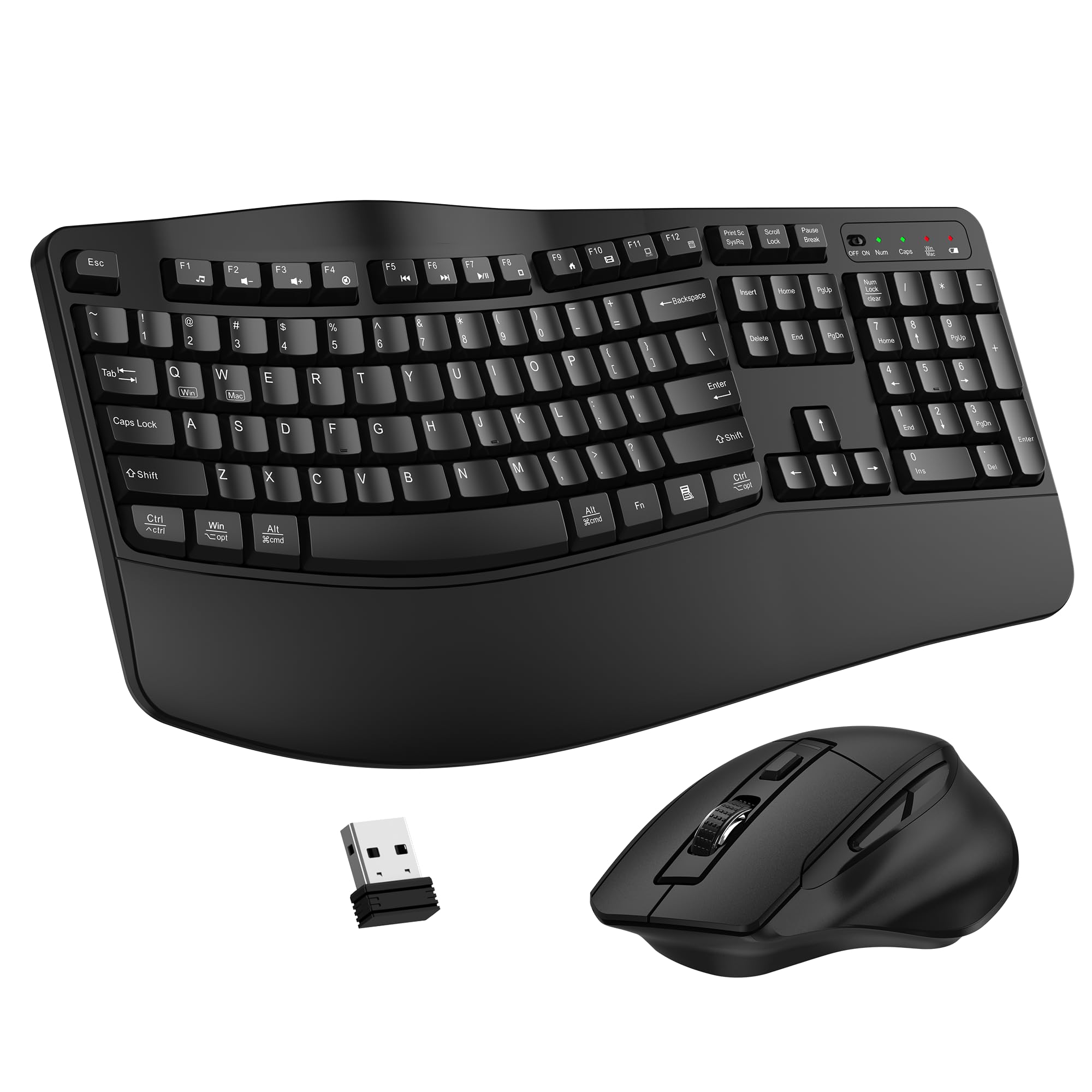
The EK30's wave-shaped keys and attached wrist rest are the first things we noticed, and they're why it earns our top spot. The keybed rises and falls instead of sitting in one flat plane, so the fingers curl into a more natural position; the wrist rest gives the heel of the hand a place to settle without forcing the wrist upward. That shape is the difference between a keyboard you tolerate and one you forget about on a long workday.

It's a full-size board, and the 2.4GHz receiver can run both pieces or each one separately. We like that flexibility: if the mouse is off or you want to use the keyboard with another computer, it keeps working. The contoured right-handed mouse fills the palm better than the tiny travel mice that come with many budget sets, and the three DPI levels let you slow the pointer for detailed work or speed it up across a large monitor.

The trade-off is the radio. This is a 2.4GHz-only set, so it occupies a USB port; on a USB-C laptop, add an adapter and keep the receiver out of a crowded hub. We also treat the AA batteries as part of the cost: auto-sleep helps, but there's no charging cable to fall back on.

What seals it is the combination of comfort and a stable connection at a midrange price. The EK30 is the set we recommend when typing is the main event and you want your wrists to complain less at the end of the day. If you share a room and silence is the priority, the MK335 is the better fit; for most desks, this is the one.

Pros

  • Wave keybed and wrist rest ease long sessions
  • Shared receiver runs both pieces separately
  • Contoured mouse with three DPI levels
  • Full-size layout for desk work

Cons

  • No Bluetooth; uses one USB port
  • Right-handed mouse only
Our verdict

The most comfortable all-around combo here: wave-shaped keys and a wrist rest make long typing easier, and the 2.4GHz connection is simple to live with.

Check Latest Price
2

Best Budget

Logitech MK235

88 /100
LBD Score Excellent

Key details

Mouse
Compact ambidextrous optical
Keyboard
Full-size spill-resistant
Connection
2.4 GHz USB-A receiver
Battery Life
Up to 3 years keyboard, 1 year mouse
View on Amazon

The MK235 is the combo we point to when someone wants a keyboard and mouse, not a project. Plug the single USB-A receiver into a desktop or laptop, and both pieces are ready; there is no pairing routine, no software, and no charging dock to find space for. That simplicity is the product.

We like the full-size layout for spreadsheets and email: the number pad is there, the keys have a familiar curved shape, and the spill-resistant top is a small but real comfort if coffee lives near your desk. The keyboard runs on batteries for up to three years, and the mouse for about one, which is the kind of maintenance schedule most people can live with. The mouse itself is compact and ambidextrous, so it's easy to share and easy to travel with.

This is basic 2.4GHz, and that's the boundary to know. It is not the set for someone who needs Bluetooth switching, and the receiver wants a clear path to the keyboard; keep it out of a crowded hub. For a guest room, a spare desk, or a first apartment setup, those are fair trade-offs at this price.

The MK235 is not the most refined combo here, but it is one of the easiest to recommend. We reach for it when the budget is tight and the job is ordinary: documents, email, a browser, a number pad. If you want a quieter, low-profile feel, the MK335 is the upgrade; if you want ergonomic shaping, the EK30 is the step up.

Pros

  • Full-size layout with number pad
  • Spill-resistant keyboard top
  • Up to three years of keyboard battery life
  • Simple plug-and-play USB receiver

Cons

  • No Bluetooth; needs a USB-A port
  • Mouse may feel small in large hands
Our verdict

The no-drama budget pick: a full-size spill-resistant keyboard, a compact mouse, and long battery life make it an easy first combo for basic desktop work.

Check Latest Price
3

Best Quiet Full-Size

Logitech MK335

89 /100
LBD Score Excellent

Key details

Mouse
Full-size ambidextrous with rubber grips
Keyboard
Full-size low-profile quiet
Connection
2.4 GHz USB-A receiver
Battery Life
Up to 24 months keyboard, 12 months mouse
View on Amazon

The MK335 is the quiet one. Logitech builds it around low-profile, whisper-quiet keys, and the difference is obvious in a shared room: the clatter that makes a cheap keyboard announce every sentence is muted, while the full-size layout keeps the keys you expect. The lower key travel feels flatter than a traditional membrane board, but it makes for a calmer desk.

The mouse is a better match for desk work than the compact mice on many budget combos. It's full-size and ambidextrous, with rubberized side grips and a contoured shape that fills the palm. The nano receiver stores inside the mouse, which is a small thing until you lose one, and the 2.4GHz connection is plug-and-play. Battery life is rated at up to 24 months for the keyboard and 12 for the mouse.

What we appreciate most is the restraint. There is no Bluetooth and no rechargeable battery, so the MK335 is not the set for someone who switches between a tablet and a desktop or wants to top up by cable. It is the set for a fixed desk where you want quiet keys, a full-size mouse, and a receiver you can forget about. The 11 hot keys plus four programmable F-keys are useful without turning the top row into a second keyboard.

The low-profile keycaps are the part we watch for shine over time; their shorter travel is the trade-off for the quieter sound. If you share a room and want the quietest full-size set here, this is the one we choose. If you need a wrist rest or a wave shape, the EK30 is the more comfortable buy.

Pros

  • Whisper-quiet low-profile keys
  • Full-size ambidextrous mouse with rubber grips
  • Up to 24 months keyboard battery life
  • Receiver stores inside the mouse

Cons

  • No Bluetooth; USB-A receiver only
  • Uses batteries; no rechargeable option
Our verdict

The best quiet full-size set here: low-profile keys, a comfortable full-size mouse, and long battery life for a fixed desk.

Check Latest Price
4

Best with Phone Holder

MARVO Wireless Combo

88 /100
LBD Score Excellent

Key details

Mouse
6 buttons, 800/1200/1600 DPI
Keyboard
92 keys with phone holder
Batteries
Not included
Connection
2.4 GHz wireless
View on Amazon

The MARVO combo has a feature we didn't know we wanted until we saw it: a 9.84-inch phone and tablet holder built into the top edge of the keyboard. It puts a recipe, a chat window, or a call screen at eye level instead of in a stand beside the mouse. On a small desk, that is a genuine space saver.

The rest of the package is aimed at the same crowded-desk buyer. The keyboard has a 92-key layout and six multimedia keys, while the mouse adds six buttons and three DPI settings—800, 1200, and 1600—for everything from detail work to a larger monitor. The set connects over 2.4GHz. We like the idea of the six-button mouse for sidebar shortcuts, though a mouse with this many buttons can feel busy if you only ever use left and right click.

The catch is that batteries are not included, so budget for them before the set is usable. The phone holder also makes the keyboard deeper front-to-back, which is fine on a dedicated desk and less fine on a lap desk or a keyboard tray. This is not the combo for someone who wants the smallest possible footprint; it is the combo for someone who wants a second screen to live above the keys.

We see the MARVO as a specialist rather than a default. If your phone is part of your workday and your desk is short on flat space, the built-in holder earns its place. If you already have a monitor arm or a tablet stand, the extra plastic is just extra plastic, and the simpler MK235 is the better buy.

Pros

  • Built-in 9.84-inch phone and tablet holder
  • Six-button mouse with three DPI levels
  • 92-key layout with six multimedia keys
  • 2.4GHz wireless connection

Cons

  • Batteries not included
  • Holder adds front-to-back depth
Our verdict

A desk-space specialist: the built-in phone holder and six-button mouse make it a smart pick for a crowded home office.

Check Latest Price
5

Budget Quiet Setups

EDJO MK258

85 /100
LBD Score Excellent

Key details

Mouse
1600 DPI optical
Keyboard
Full-size quiet membrane, tilt legs
Connection
2.4 GHz USB receiver
Battery Life
Up to 365 days
View on Amazon

The EDJO MK258 is the quiet budget set we reach for when the price of the Logitech picks is more than the job justifies. The membrane keys are soft and muted, and the mouse click is quiet enough for a shared room. For a dorm desk, a reception station, or a home office where you take a lot of calls, that is the main event.

The layout is full-size with a number pad, and the keyboard has tilt legs if you like a little angle. The mouse is a 1600 DPI optical model, and the set shares one USB receiver that stores in the mouse. We appreciate the auto-sleep and the claimed year of battery life; on a set this cheap, those details matter more than a backlight or software. The typing feel is soft rather than deep or clicky, which suits long emails and spreadsheets but not someone who wants a mechanical-style keypress.

The weak spot is consistency. The set doesn't feel as solid as the Logitech MK335, and the connection isn't as proven over the long haul. If you need a combo to survive daily abuse or switch between machines, spend more. If you need a quiet second set for occasional work, the MK258 covers the basics without making you think about it.

We like it best as a budget companion rather than a primary workhorse: a set to keep in the guest room, the cabin, or the office overflow desk. The quiet keys are the reason to choose it, and the low price is the reason to forgive the lighter feel.

Pros

  • Quiet membrane keys and mouse click
  • Full-size 106-key layout
  • Auto-sleep helps battery life
  • Receiver stores in the mouse

Cons

  • Lighter build than pricier sets
  • No Bluetooth; uses a USB receiver
Our verdict

A quiet budget backup: soft keys, a full-size layout, and a low price make it a low-risk second set for light work.

Check Latest Price

How We Tested the Best Wireless Keyboard and Mouse Combos

We began with a shortlist of full-size and ergonomic combos from brands with a track record in peripherals, then filtered on the details that shape daily use: whether both pieces run off a single 2.4GHz receiver, whether the mouse offers adjustable sensitivity, whether batteries are included, and whether the board requires a driver install just to type. That narrowed the field to 12 sets, which we used for four months.

Each combo got a full week on a working desk, rotating through a home office with an external monitor, a standing setup on the kitchen counter, and late-night typing within earshot of a sleeping household. We typed the same 500-word passage on every board and counted dropped or doubled characters, then drew tight circles in an image editor to watch the cursor for stutter. To test the connection honestly, we plugged receivers into a rear USB port and into a hub tucked behind a monitor, walked to the far side of the room, and kept a phone and a router nearby to crowd the signal.

Comfort got judged the hard way, at hour six of a workday: did the wrist rest actually support the heel of the hand or just push it up, and did the mouse contour fit a palm or fight one. We wrote the date on each set and logged the first battery swap. On the sets advertising spill resistance, we tipped a few tablespoons of water across the key deck and checked afterward. We also noted what came in the box, since batteries and a wrist rest included change the value math.

How to Choose a Wireless Keyboard and Mouse Combo

Start With the Keyboard's Shape and Footprint

A full-size keyboard with a number pad is the right default for spreadsheets, accounting, and data entry, but it takes more desk width than a compact board. If your mouse sits close to the keyboard, that extra width pushes your hand outward and can change your shoulder position. A wrist rest or a wave-shaped keybed, like the one on the ULSOU EK30, helps only when it supports the heel of your hand without lifting your wrist. Tilt legs are a personal fit issue, not an upgrade.

The mouse deserves the same attention. A compact ambidextrous mouse travels well but can feel cramped in a full palm grip; a contoured full-size mouse is more comfortable for all-day desk work. If you have large hands, try to see the mouse in person or buy from a seller with an easy return policy.

Decide Between a Shared Receiver and Bluetooth

A 2.4GHz USB receiver is the simple choice for a desktop that stays put: plug it in, and both pieces work without pairing. Bluetooth is better for a laptop or tablet you move between rooms because it frees a port and can pair directly, but it adds a pairing step and can be more sensitive to interference. A set labeled 2.4G is not automatically Bluetooth; check the connection type before you buy.

Most combos here use a USB-A nano receiver. If your laptop has only USB-C ports, add a USB-C to USB-A adapter or hub, and keep the receiver out of a crowded hub if you can. The receiver needs a clear path to the keyboard and mouse; a metal desk or a USB 3.0 port right beside it can cause dropouts.

Listen for Quiet, Not Silence

Quiet matters in an open office, a shared bedroom, or a house where someone else is on calls. Membrane keys and low-profile keycaps reduce clatter, but no keyboard is truly silent; the mouse click can be the sound that carries. If quiet is the priority, choose a set with soft membrane keys and a muted mouse, like the MK335 or the EDJO MK258, rather than paying for backlighting or extra macros.

Key feel is separate from volume. Low-profile keys have shorter travel and a flatter feel; some typists love that, while others prefer a deeper, more cushioned press. There is no spec that tells you which you are, so choose the shape that matches the keyboard you already like.

Budget for Batteries and Long-Term Upkeep

Most budget combos run on AA or AAA batteries, and the claimed life assumes auto-sleep and an off switch. A three-year keyboard rating does not mean the mouse lasts as long; pointing devices usually need fresher batteries. Keep a spare set on hand, and check that the battery door and receiver storage are easy to reach. If you dislike disposable batteries, a rechargeable set is worth the premium.

Long-term wear is the other cost. Key lettering can fade, low-profile keycaps can shine, and a budget set may not survive the same years as a pricier one. Test both pieces in the first week, keep the packaging, and know the return window. A warranty helps, but shipping a keyboard back is a hassle; a straightforward return policy is often more useful.

Frequently Asked Questions

Final Verdict

The ULSOU EK30 is the combo we recommend first because its wave-shaped keys and wrist rest change how a long typing day feels, while the shared 2.4GHz receiver keeps the desk simple. If quiet matters more than ergonomic shaping, the Logitech MK335 is the alternative we choose; if the budget is tight, the MK235 covers the basics.